battery VAUXHALL CASCADA 2015.5 Owner's Manual
[x] Cancel search | Manufacturer: VAUXHALL, Model Year: 2015.5, Model line: CASCADA, Model: VAUXHALL CASCADA 2015.5Pages: 255, PDF Size: 7.56 MB
Page 23 of 255
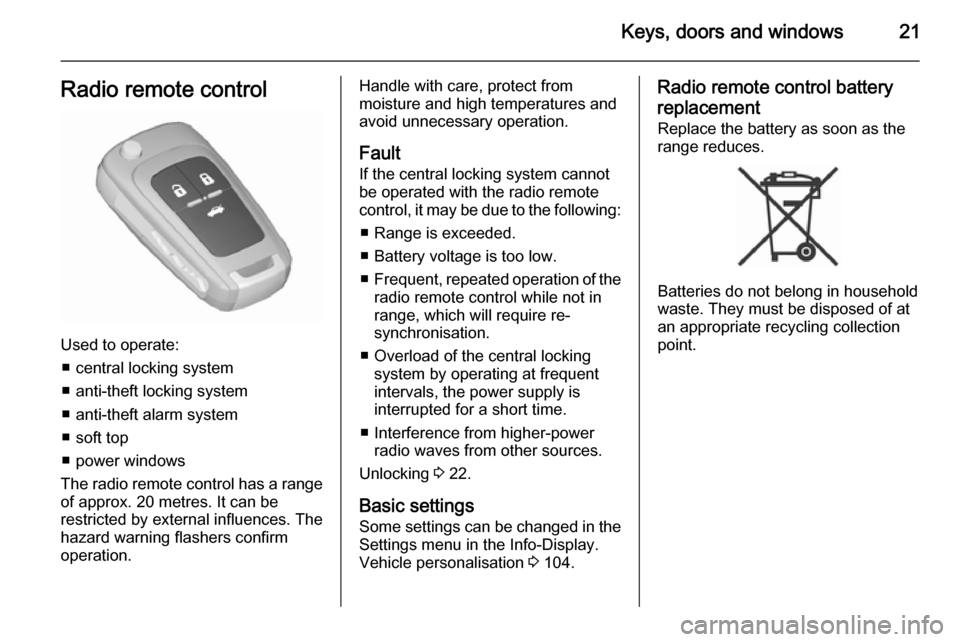
Keys, doors and windows21Radio remote control
Used to operate:■ central locking system
■ anti-theft locking system
■ anti-theft alarm system
■ soft top
■ power windows
The radio remote control has a range of approx. 20 metres. It can be
restricted by external influences. The
hazard warning flashers confirm
operation.
Handle with care, protect from
moisture and high temperatures and
avoid unnecessary operation.
Fault
If the central locking system cannot
be operated with the radio remote
control, it may be due to the following:
■ Range is exceeded.
■ Battery voltage is too low.
■ Frequent, repeated operation of the
radio remote control while not in
range, which will require re-
synchronisation.
■ Overload of the central locking system by operating at frequent
intervals, the power supply is
interrupted for a short time.
■ Interference from higher-power radio waves from other sources.
Unlocking 3 22.
Basic settings
Some settings can be changed in the Settings menu in the Info-Display.
Vehicle personalisation 3 104.Radio remote control battery
replacement
Replace the battery as soon as the
range reduces.
Batteries do not belong in household
waste. They must be disposed of at
an appropriate recycling collection
point.
Page 24 of 255
22Keys, doors and windows
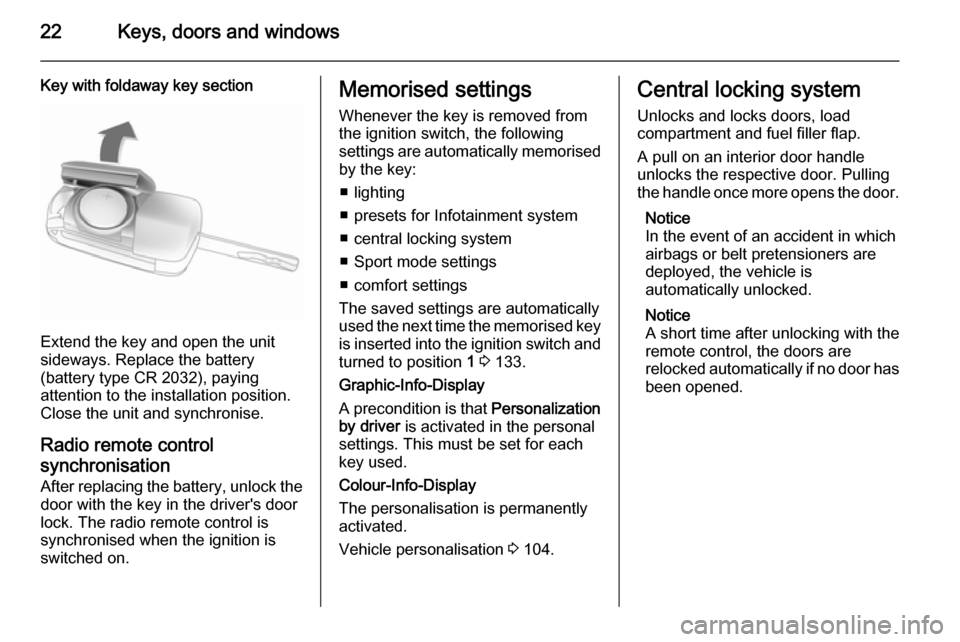
Key with foldaway key section
Extend the key and open the unit
sideways. Replace the battery
(battery type CR 2032), paying
attention to the installation position.
Close the unit and synchronise.
Radio remote control
synchronisation
After replacing the battery, unlock the
door with the key in the driver's door
lock. The radio remote control is
synchronised when the ignition is
switched on.
Memorised settings
Whenever the key is removed from
the ignition switch, the following
settings are automatically memorised by the key:
■ lighting
■ presets for Infotainment system
■ central locking system
■ Sport mode settings
■ comfort settings
The saved settings are automatically
used the next time the memorised key
is inserted into the ignition switch and
turned to position 1 3 133.
Graphic-Info-Display
A precondition is that Personalization
by driver is activated in the personal
settings. This must be set for each
key used.
Colour-Info-Display
The personalisation is permanently
activated.
Vehicle personalisation 3 104.Central locking system
Unlocks and locks doors, load
compartment and fuel filler flap.
A pull on an interior door handle
unlocks the respective door. Pulling the handle once more opens the door.
Notice
In the event of an accident in which
airbags or belt pretensioners are
deployed, the vehicle is
automatically unlocked.
Notice
A short time after unlocking with the
remote control, the doors are
relocked automatically if no door has been opened.
Page 31 of 255
Keys, doors and windows29
A triggered alarm, which has not beeninterrupted by the driver, will be
indicated by the hazard warning
lights. They will flash quickly three
times the next time the vehicle is
unlocked with the radio remote
control. Additionally a warning
message is displayed in the DIC after
switching on the ignition.
Vehicle messages 3 102.
If the vehicle's battery is to be
disconnected (e.g. for maintenance
work), the alarm siren must be
deactivated as follows: switch the
ignition on then off, then disconnect
the vehicle's battery within
15 seconds.
Immobiliser The system is part of the ignition
switch and checks whether the
vehicle is allowed to be started with the key being used.
The immobiliser is activated
automatically after the key has been removed from the ignition switch.If the control indicator d flashes when
the ignition is on, there is a fault in the
system; the engine cannot be started. Switch off the ignition and repeat the
start attempt.
If the control indicator continues
flashing, attempt to start the engine
using the spare key and seek the
assistance of a workshop.
Notice
The immobiliser does not lock the
doors. You should always lock the
vehicle after leaving it.
Switch on the anti-theft alarm
system 3 22, 3 27.
Control indicator d 3 94.Exterior mirrors
Convex shape
The convex exterior mirror contains
an aspherical area and reduces blind spots. The shape of the mirror makes
objects appear smaller, which will
affect the ability to estimate
distances.
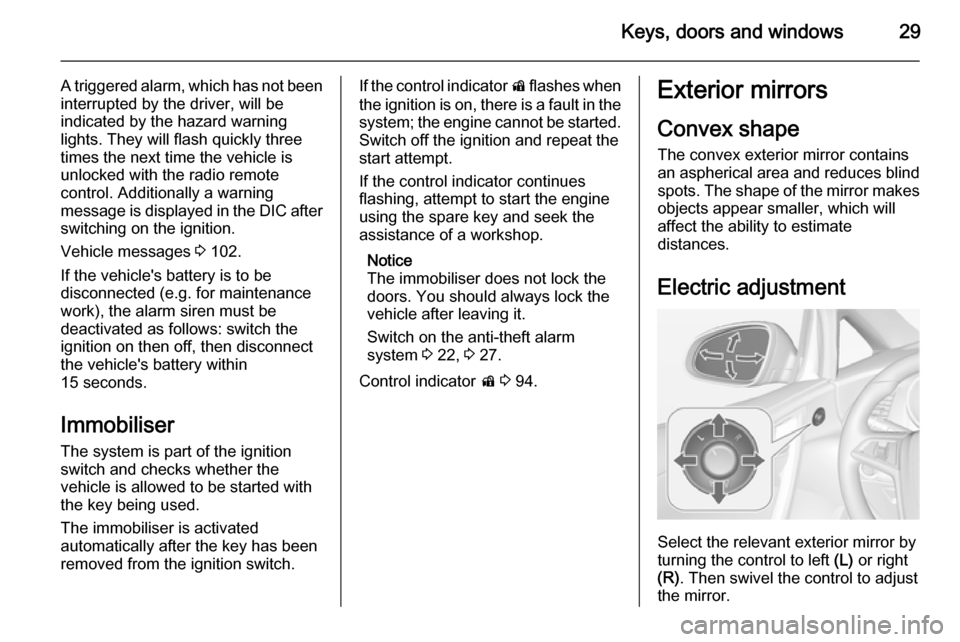
Electric adjustment
Select the relevant exterior mirror by
turning the control to left (L) or right
(R) . Then swivel the control to adjust
the mirror.
Page 35 of 255
Keys, doors and windows33
Override safety function
In the event of closing difficulties due
to frost or the like, switch on the
ignition, then pull the switch to the first
detent and hold. The window moves
up with safety function disabled. To
stop movement, release the switch.
Comfort operating with the
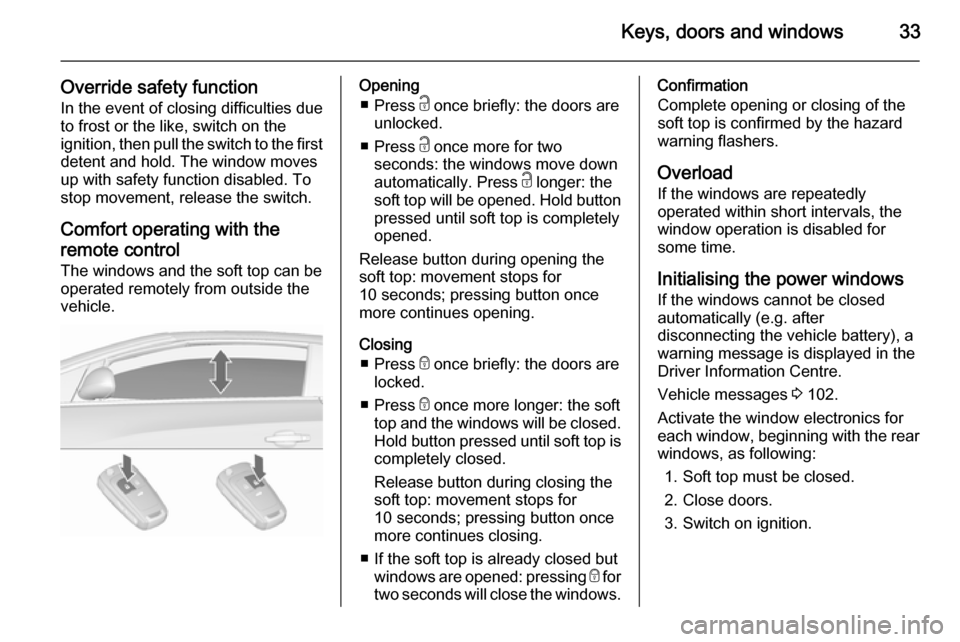
remote control The windows and the soft top can be
operated remotely from outside the
vehicle.Opening
■ Press c once briefly: the doors are
unlocked.
■ Press c once more for two
seconds: the windows move down
automatically. Press c longer: the
soft top will be opened. Hold button
pressed until soft top is completely
opened.
Release button during opening the
soft top: movement stops for
10 seconds; pressing button once
more continues opening.
Closing ■ Press e once briefly: the doors are
locked.
■ Press e once more longer: the soft
top and the windows will be closed.
Hold button pressed until soft top is completely closed.
Release button during closing the
soft top: movement stops for
10 seconds; pressing button once
more continues closing.
■ If the soft top is already closed but windows are opened: pressing e for
two seconds will close the windows.Confirmation
Complete opening or closing of the
soft top is confirmed by the hazard
warning flashers.
Overload If the windows are repeatedly
operated within short intervals, the
window operation is disabled for
some time.
Initialising the power windowsIf the windows cannot be closed
automatically (e.g. after
disconnecting the vehicle battery), a
warning message is displayed in the
Driver Information Centre.
Vehicle messages 3 102.
Activate the window electronics for
each window, beginning with the rear
windows, as following:
1. Soft top must be closed.
2. Close doors.
3. Switch on ignition.
Page 38 of 255

36Keys, doors and windows
Close soft top
Hold e pressed until the soft top, the
soft top lid and the windows are
completely closed. All windows will be opened at first during this operation.
Confirmation of operation
Complete opening or closing of the
soft top with the remote control is
confirmed by the hazard warning
flashers.
Safety stop
The button on the remote control or
the switch in the centre console must
be actuated until the soft top is in its
respective end position. Releasing
the button or the switch during
operation stops soft top movement
immediately. The soft top remains in
intermediate position only for a
certain time. After this time a warning chime sounds, the hydraulic pressure
in the system decreases and the soft
top can start to move by itself.
Actuating button or switch once more
continues operation.
Requirements for operation ■ Vehicle is stationary or driving with a speed up to 31 mph.
■ Load compartment partition isfolded out, pass-through flap isclosed 3 72.
■ Soft top lid is engaged in closed position.
■ Boot lid is completely closed.
■ Outside temperature is not lower than -7 °C for opening and -10 °C
for closing.
■ Vehicle battery voltage is sufficient.
■ The system is not overloaded by repeated operation (max. 5
complete cycles in succession).
Page 85 of 255

Instruments and controls83
Adjust all settings.
Set date
To adjust the time settings, select the
Set Date menu item. Turn the
multifunction knob to adjust the first
setting.
Press the multifunction knob to
confirm the input. The coloured
background moves to the next
setting.
Adjust all settings.
Time format
To choose the desired time format,
select 12 hr / 24 hr Format . Activate
12 Hour or 24 Hour .
Vehicle personalisation 3 104.Power outlets
A 12 Volt power outlet is located in the
front console.
A further 12 Volt power outlet is
located in the rear console. Fold the
cover downwards.
Do not exceed the maximum power
consumption of 120 watts.
With ignition off, the power outlets are
deactivated. Additionally the power
outlets are deactivated in the event of
low vehicle battery voltage.
Electrical accessories that are
connected must comply with the
electromagnetic compatibility
requirements laid down in
DIN VDE 40 839.
Do not connect any current-delivering
accessories, e.g. electrical charging
devices or batteries.
Do not damage the outlet by using
unsuitable plugs.
Stop-start system 3 135.
Page 92 of 255

90Instruments and controls
Illuminates for approx. 60 seconds
after the ignition is switched on. The
front passenger airbag is activated.
* illuminates yellow.
The front passenger airbag is
deactivated 3 62.9 Danger
Risk of fatal injury for a child using
a child restraint system together
with activated front passenger
airbag.
Risk of fatal injury for an adult
person with deactivated front
passenger airbag.
Charging system
p illuminates red.
Illuminates when the ignition is
switched on and extinguishes shortly
after the engine starts.
Illuminates when the engine is
running
Stop, switch off engine. Vehicle
battery is not charging. Engine
cooling may be interrupted. The
brake servo unit may cease to be
effective. Seek the assistance of a
workshop.
Malfunction indicator light
Z illuminates or flashes yellow.
Illuminates when the ignition is
switched on and extinguishes shortly
after the engine starts.
Illuminates when the engine isrunning
Fault in the emission control system. The permitted emission limits may be
exceeded. Seek the assistance of a
workshop immediately.Flashes when the engine is
running
Fault that could lead to catalytic
converter damage. Ease up on the
accelerator until the flashing stops.
Seek the assistance of a workshop
immediately.
Brake and clutch system R illuminates red.
The brake and clutch fluid level is too low 3 189.9 Warning
Stop. Do not continue your
journey. Consult a workshop.
Illuminates after the ignition is
switched on if the manual parking
brake is applied 3 147.
Operate pedal - illuminates or flashes yellow.
Page 104 of 255

102Instruments and controlsVehicle messagesMessages are indicated in the Driver
Information Centre (DIC), in some
cases together with a warning and
signal sound.
Press the SET/CLR button, the
MENU button or turn the adjuster
wheel to confirm a message.
Messages in the Driver
Information Centre (DIC)
The vehicle messages are displayed
as text. Follow the instructions given
in the messages.
The system displays messages
regarding the following topics:
■ service messages
■ fluid levels
■ anti-theft alarm system
■ brakes
■ ride control systems
■ driver assistance systems
■ cruise control
■ speed limiter
■ forward collision alert
■ parking assist systems
■ lighting, bulb replacement
■ wiper/washer system
■ doors, windows
■ soft top
■ load compartment, boot lid
■ side blind spot alert
■ traffic sign assistant
■ lane departure warning
■ radio remote control
■ seat belts
■ airbag systems
■ engine and transmission
■ tyre pressure
■ diesel particle filter
■ vehicle battery status
■ selective catalytic reduction, diesel exhaust fluid (DEF), AdBlue
3 140
Page 105 of 255

Instruments and controls103
Messages in the
Colour-Info-Display Some important messages may
appear additionally in the
Colour-Info-Display. Press the
multifunction knob to confirm a
message. Some messages only pop
up for a few seconds.
Warning chimes
When starting the engine or
whilst driving
Only one warning chime will sound at a time.
The warning chime regarding
unfastened seat belts has priority
over any other warning chime.
■ If seat belt is not fastened.
■ If a door or the boot lid is not fully closed when starting off.
■ If the soft top is not completely opened or closed.
■ If the soft top lid is not completely closed.■ If the load compartment partition isfolded in when operating the soft
top.
■ If a certain speed is exceeded with parking brake applied.
■ If a certain speed is exceeded when
operating the soft top.
■ If a programmed speed or speed limit is exceeded.
■ If a warning message appears in the Driver Information Centre
(DIC).
■ If the parking assist detects an object.
■ If unintended lane change occurs.
■ If the diesel particle filter has reached the maximum filling level.
■ If AdBlue needs to be refilled.
When the vehicle is parked and/ or the driver's door is opened ■ When the key is in the ignition switch.
■ With exterior lights on.During an Autostop ■ If the driver's door is opened.
Battery voltage
When the vehicle battery voltage is
running low, a warning message will
appear in the Driver Information
Centre (DIC).
1. Switch off immediately any electrical consumers which are
not required for a safe ride, e.g.
seat heating, heated rear window
or other main consumers.
2. Charge the vehicle battery by driving continuously for a while or
by using a charging device.
The warning message will disappear after the engine has been started
twice consecutively without a voltage
drop.
If the vehicle battery cannot be
recharged, have the cause of the fault remedied by a workshop.
Page 122 of 255

120Lighting
■ door pocket lights
■ console lights
Activation, deactivation and duration
of this function can be changed in the
Info-Display. Vehicle personalisation
3 104.
The settings can be saved for the key being used 3 22.
Exit lighting The following lights switch on if the
key is removed from the ignition
switch:
■ interior lights
■ instrument panel light (only when it is dark)
■ door and console lights
■ puddle lights
They will switch off automatically after
a delay and will be activated again if
the driver's door is opened.
Headlights, tail lights and number
plate lights illuminate the surrounding area for an adjustable time after
leaving the vehicle.Path lighting
Headlights, tail lights and number
plate lights illuminate the surrounding
area for an adjustable time after
leaving the vehicle.
Activating
1. Switch off ignition
2. Remove ignition key
3. Open driver's door
4. Pull turn signal lever
5. Close driver's door
If the driver's door is not closed, the
lights switch off after two minutes.
Exit lighting is switched off
immediately if the turn signal lever is pulled while the driver's door is open.
Activation, deactivation and duration
of this function can be changed in the Info-Display. Vehicle personalisation
3 104.
The settings can be saved for the key being used 3 22.
Battery discharge
protection
Vehicle battery state of charge
function
The function guarantees longest
vehicle battery life via a generator
with controllable power output and
optimised power distribution.
To prevent discharge of the vehicle
battery when driving, the following
systems are reduced automatically in two stages and finally switched off:
■ auxiliary heater
■ heated rear window and mirrors