infotainment VAUXHALL CASCADA 2015 Infotainment system
[x] Cancel search | Manufacturer: VAUXHALL, Model Year: 2015, Model line: CASCADA, Model: VAUXHALL CASCADA 2015Pages: 133, PDF Size: 2.29 MB
Page 101 of 133
Radio101
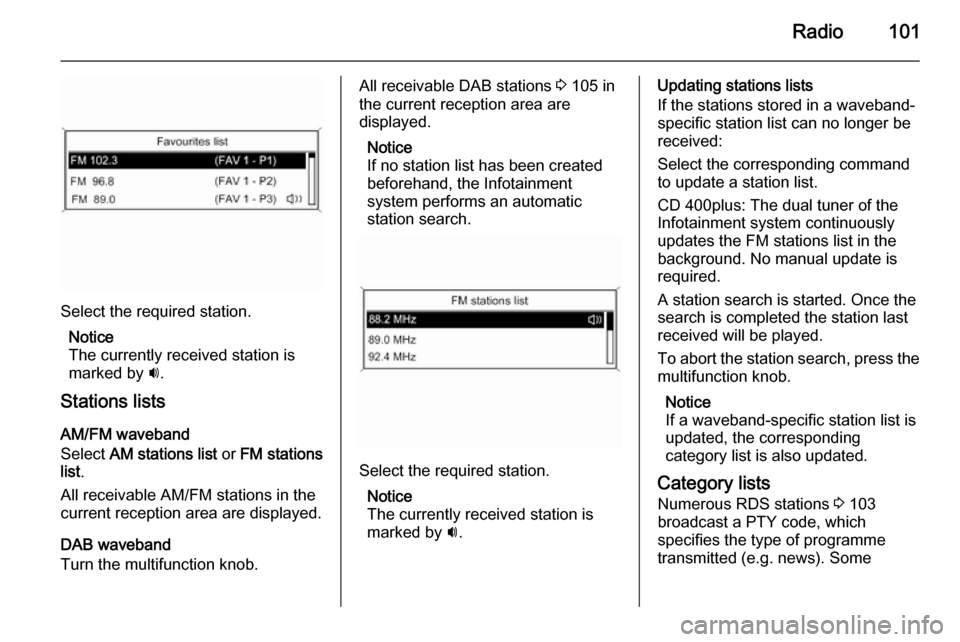
Select the required station.Notice
The currently received station is
marked by i.
Stations lists
AM/FM waveband
Select AM stations list or FM stations
list .
All receivable AM/FM stations in the current reception area are displayed.
DAB waveband
Turn the multifunction knob.
All receivable DAB stations 3 105 in
the current reception area are
displayed.
Notice
If no station list has been created
beforehand, the Infotainment
system performs an automatic
station search.
Select the required station.
Notice
The currently received station is
marked by i.
Updating stations lists
If the stations stored in a waveband- specific station list can no longer be
received:
Select the corresponding command
to update a station list.
CD 400plus: The dual tuner of the
Infotainment system continuously
updates the FM stations list in the
background. No manual update is
required.
A station search is started. Once the
search is completed the station last
received will be played.
To abort the station search, press the multifunction knob.
Notice
If a waveband-specific station list is
updated, the corresponding
category list is also updated.
Category lists Numerous RDS stations 3 103
broadcast a PTY code, which
specifies the type of programme
transmitted (e.g. news). Some
Page 102 of 133
102Radio
stations also change the PTY code
depending on the content currently
being transmitted.
The Infotainment system stores these
stations, sorted by programme type,
in the corresponding category list.
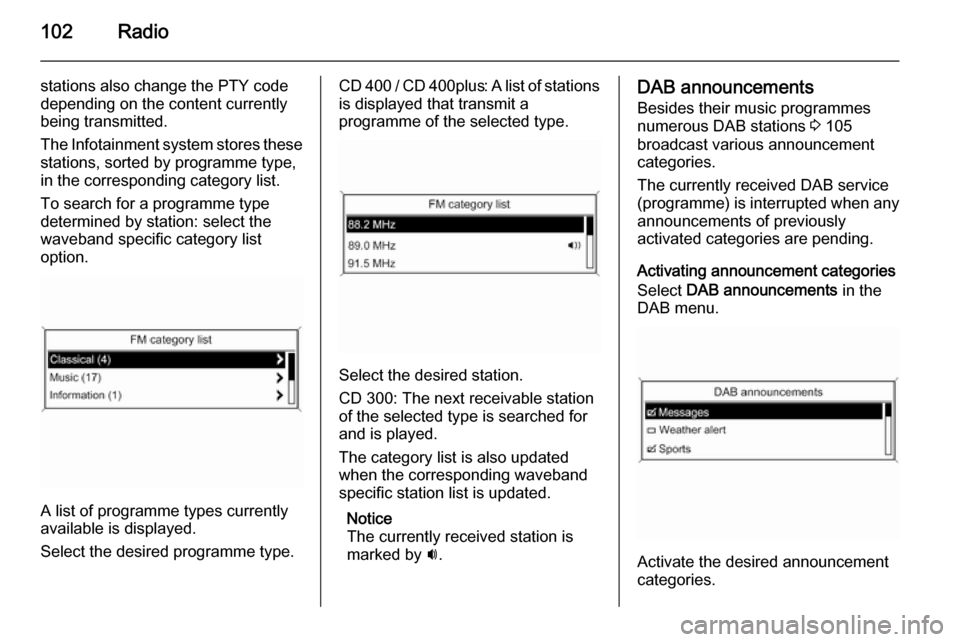
To search for a programme type
determined by station: select the
waveband specific category list
option.
A list of programme types currently
available is displayed.
Select the desired programme type.
CD 400 / CD 400plus: A list of stations is displayed that transmit a
programme of the selected type.
Select the desired station.
CD 300: The next receivable station
of the selected type is searched for
and is played.
The category list is also updated
when the corresponding waveband
specific station list is updated.
Notice
The currently received station is marked by i.
DAB announcements
Besides their music programmes
numerous DAB stations 3 105
broadcast various announcement categories.
The currently received DAB service
(programme) is interrupted when any
announcements of previously
activated categories are pending.
Activating announcement categories
Select DAB announcements in the
DAB menu.
Activate the desired announcement
categories.
Page 103 of 133
Radio103
Several announcement categories
can be selected at the same time.
Notice
DAB announcements can only be
received if the DAB waveband is
activated.
Radio data system (RDS) RDS is a service of FM stations that
considerably facilitates the finding of
the desired station and its fault-free
reception.Advantages of RDS
■ On the display the programme name of the set station appears
instead of its frequency.
■ During a station search the Infotainment system tunes in to
RDS stations only.
■ The Infotainment system always tunes into the best receivable
broadcasting frequency of the set
station by means of AF (Alternative Frequency).
■ Depending on the station that is received, the Infotainment systemdisplays radio text that can contain,
e.g., information about the current
programme.
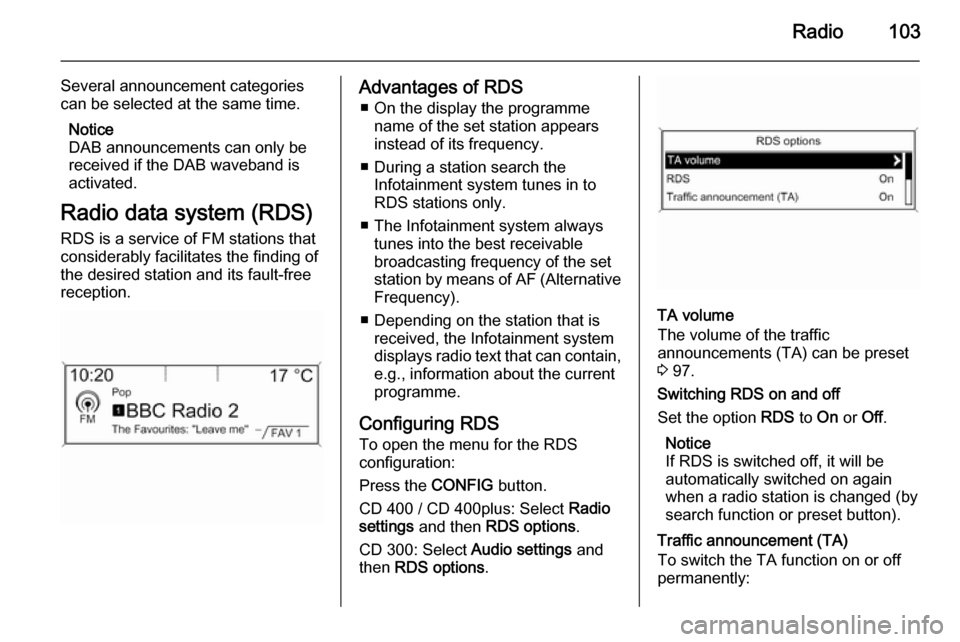
Configuring RDS To open the menu for the RDS
configuration:
Press the CONFIG button.
CD 400 / CD 400plus: Select Radio
settings and then RDS options .
CD 300: Select Audio settings and
then RDS options .
TA volume
The volume of the traffic
announcements (TA) can be preset
3 97.
Switching RDS on and off
Set the option RDS to On or Off.
Notice
If RDS is switched off, it will be
automatically switched on again when a radio station is changed (by
search function or preset button).
Traffic announcement (TA)
To switch the TA function on or off
permanently:
Page 104 of 133

104Radio
Set the option Traffic announcement
(TA) to On or Off.
Switching regionalization on and off
(RDS must be activated for
regionalization)
At certain times some RDS stations
broadcast regionally different
programmes on different frequencies.
Set the option Regional (REG) to On
or Off .
If regionalization is switched on, only
alternative frequencies (AF) with the
same regional programmes are
selected.
If regionalization is switched off,
alternative frequencies of the stations are selected without regard to
regional programmes.
RDS-scrolling text
Some RDS stations hide the programme name in the display line
in order to display additional
information.
To prevent additional information
being displayed:
Set RDS- Text scroll freeze to On.Radio text:
If RDS and reception of an RDS
station are activated, information
about the programme that is currently
receivable and about the music track
currently playing are displayed below
the programme name.
To show or hide the information:
Set the option Radio text: to On or Off .
Radio traffic service
(TP = Traffic Programme)
Radio traffic service stations are RDS stations that broadcast traffic news.
Switching the radio traffic service on
and off
To switch the traffic announcement
standby facility of the Infotainment
system on and off:
Press the TP button.
■ If the radio traffic service is switched on, [ ] is displayed in the
radio main menu.
■ Only radio traffic service stations are received.■ If the current station is not a radiotraffic service station, a search is
started automatically for the next
radio traffic service station.
■ If a radio traffic service station has been found, [TP] is displayed in the
radio main menu.
■ Traffic announcements are played at the preset TA volume 3 97.
■ If the radio traffic service is switched on, CD/MP3 playback is
interrupted for the duration of the
traffic announcement.
Listening to traffic announcements only
Switch on the radio traffic service and
completely turn down the volume of
the Infotainment system.
Blocking out traffic announcements
To block out a traffic announcement,
e.g. during CD/MP3 playback:
Press TP button or the multifunction
knob to confirm the cancel message
on the display.
Page 105 of 133
Radio105
The traffic announcement is aborted,
but the radio traffic service remains
switched on.
EON (Enhanced Other Networks)
With EON you can listen to radio
traffic announcements even if the
station you have set does not
broadcast its own radio traffic service.
If such a station is set, it is displayed
in black as for radio traffic service stations TP.
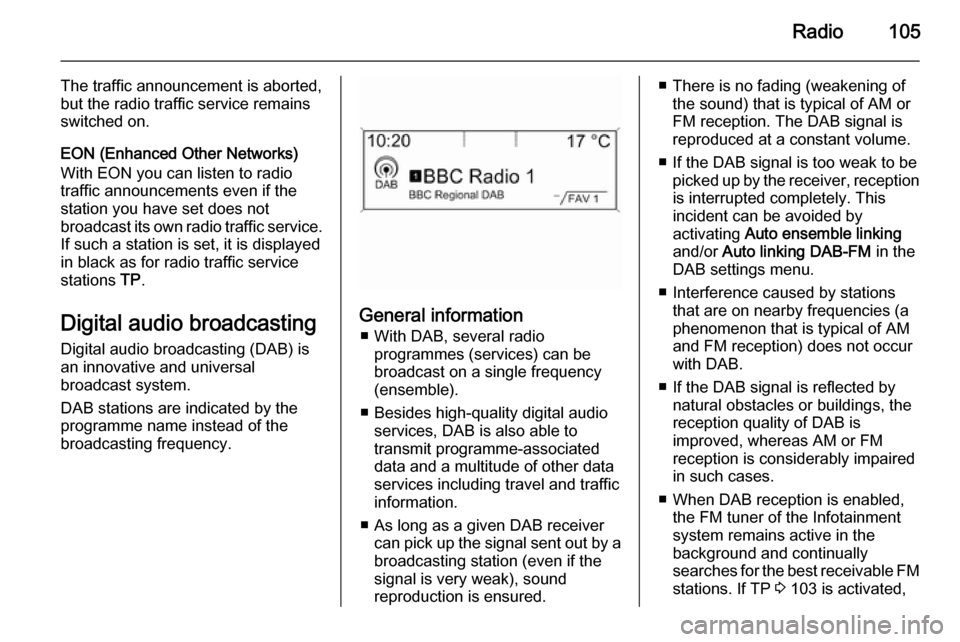
Digital audio broadcasting Digital audio broadcasting (DAB) is
an innovative and universal
broadcast system.
DAB stations are indicated by the
programme name instead of the
broadcasting frequency.
General information
■ With DAB, several radio programmes (services) can be
broadcast on a single frequency
(ensemble).
■ Besides high-quality digital audio services, DAB is also able to
transmit programme-associated
data and a multitude of other data
services including travel and traffic
information.
■ As long as a given DAB receiver can pick up the signal sent out by a
broadcasting station (even if the signal is very weak), sound
reproduction is ensured.
■ There is no fading (weakening of the sound) that is typical of AM or
FM reception. The DAB signal is
reproduced at a constant volume.
■ If the DAB signal is too weak to be picked up by the receiver, receptionis interrupted completely. This
incident can be avoided by
activating Auto ensemble linking
and/or Auto linking DAB-FM in the
DAB settings menu.
■ Interference caused by stations that are on nearby frequencies (a
phenomenon that is typical of AM
and FM reception) does not occur
with DAB.
■ If the DAB signal is reflected by natural obstacles or buildings, the
reception quality of DAB is
improved, whereas AM or FM
reception is considerably impaired
in such cases.
■ When DAB reception is enabled, the FM tuner of the Infotainmentsystem remains active in the
background and continually
searches for the best receivable FM stations. If TP 3 103 is activated,
Page 106 of 133

106Radio
traffic announcements of the FM
station which is currently best
receivable are issued. Deactivate TP, if you do not wish DAB
reception to be interrupted by FM traffic announcements.
Configuring DAB
Press the CONFIG button.
Select Radio settings and then DAB
settings .
The following options are available in
the configuration menu:
■ Auto ensemble linking : with this
function activated, the device switches over to the same service
(programme) on another DAB
ensemble (frequency, if available)
when the DAB signal is too weak to
be picked up by the receiver.
■ Auto linking DAB-FM : with this
function activated, the device
switches over to a corresponding
FM station of the active DAB
service (if available) when the DAB signal is too weak to be picked up
by the receiver.
■ Dynamic audio adaption : with this
function activated, the dynamic
range of the DAB signal is reduced.
That means the level of the loud
sounds is reduced, but not the level of the quiet sounds. Therefore the
volume of the Infotainment systemcan be raised to a point where the
quiet sounds are audible, without
the loud sounds being too loud.
■ Frequency band : after selection of
this option it can be defined which
DAB wavebands are to be received
by the Infotainment system.
Page 107 of 133
CD Player107CD PlayerGeneral information...................107
Usage ........................................ 108General information
The Infotainment system's CD player
can play audio CDs and MP3/WMA
CDs.
Important information about
audio CDs and MP3/WMA CDsCaution
Under no circumstances place
DVDs, single-CDs with a diameter
of 8 cm or shaped CDs in the audio
player.
You must not put any stickers on
CDs. These discs can get jammed in the CD drive and ruin the player. Replacement of the device will
then be necessary.
■ The following CD formats can be used:
CD-ROM Mode 1 and Mode 2.
CD-ROM XA Mode 2, Form 1 and
Form 2.
■ The following file formats can be used:
ISO9660 Level 1, Level 2, (Romeo,Joliet).
MP3 and WMA files written in any
format other than listed above may
not play correctly, and their file names and folder names may not
be displayed correctly.
Notice
ISO 13346 is not supported. It may
be required to manually select
ISO 9660 when burning an audio
CD, e.g. with Windows 7.
■ Audio CDs with copy protection, which are not in compliance with
the audio CD standard, may not
play correctly or not at all.
■ Self-recorded CD-Rs and CD-RWs
are more vulnerable to mishandling than prerecorded CDs. Correct
handling, especially in the case of
self-recorded CD-Rs and CD-RWs,
must be ensured. See below.
■ Self-recorded CD-Rs and CD-RWs
may not play correctly or not at all.
In such cases it is not the
equipment that is at fault.
Page 112 of 133

112USB portUSB portGeneral information...................112
Playing saved audio files ...........112General information
In the centre console there is a USB
socket for the connection of external audio data sources.
Devices connected to the USB port
are operated via the controls and
menus of the Infotainment system.
Notice
The socket must always be kept
clean and dry.
Important information
The following devices can be
connected to the USB port:
■ iPod
■ Zune
■ PlaysForSure device (PFD)
■ USB drive
Notice
Not all iPod, Zune, PFD or USB drive models are supported by the
Infotainment system.
Playing saved audio files
Page 114 of 133

114Speech recognitionSpeech recognitionGeneral information...................114
Phone control ............................ 115General information
The speech recognition of the
Infotainment system enables you to
operate the phone portal via voice input. It recognises commands and
numeric sequences independently of
the current speaker. The commands
and numeric sequences can be
spoken without a voice pause
between the individual words.
You can save telephone numbers
assigning a name of your choice
(voice tag). Using these names, you
can later set up a telephone
connection.
In the event of incorrect operation or commands, the speech recognition
gives you visual and/or acoustic
feedback and requests you to re-
enter the desired command. Apart
from this, the speech recognition
acknowledges important commands and will enquire if necessary.
To ensure that conversations inside
the vehicle do not lead to
unintentional triggering of systemfunctions, the speech recognition
does not start until it has been
activated.
Important notes on language
support ■ Not all languages available for the display of the Infotainment system
are also available for the speech
recognition.
■ If the currently selected language for the display is not supported by
the speech recognition, you must
enter the voice commands in
English.
To be able to enter voice
commands in English, you must
first activate the phone main menu
by pressing the PHONE button on
the Infotainment system, and then activate the speech recognition of
the phone portal by pressing button
w on the steering wheel.
Page 115 of 133

Speech recognition115Phone controlActivating speech recognition
To activate the speech recognition of
the Phone portal, press button w on
the steering wheel. For the duration of
the dialogue any active audio source
is muted and any traffic news fade-in
is cancelled.
Adjusting the volume for voice
output Turn the volume knob on the
Infotainment system, or press the + or
― button on the steering wheel.
Cancelling a dialogueThere are various ways of
deactivating the speech recognition
and cancelling the dialogue:
■ Press button x on the steering
wheel.
■ Say " Cancel".
■ Do not enter (say) any commands for some time.
■ After the third unrecognised command.Operation
With the aid of the speech recognition
the mobile phone can be operated
very conveniently via voice input. It is
sufficient to activate the speech
recognition and to enter (say) the
desired command. After input of the
command the Infotainment system
guides you through the dialogue with
appropriate questions and feedback
to achieve the desired action.
Main commands After activation of the speech
recognition a short tone signals that
the speech recognition is expecting
input.
Main commands available: ■ " Dial "
■ " Call "
■ " Redialing "
■ " Save "
■ " Delete "
■ " Directory "
■ " Pair "■ "Select device "
■ " Voice feedback "
Commands that are frequently
available
■ " Help ": the dialogue is terminated
and all commands available within
the actual function are enumerated.
■ " Cancel ": the speech recognition is
deactivated.
■ " Yes ": a suitable action is triggered
depending on the context.
■ " No ": a suitable action is triggered
depending on the context.
Entering a telephone number
After the command " Dial" the speech
recognition requests input of a
number.
The telephone number must be
spoken in your normal voice without
any artificial pauses between the individual numbers.
Recognition works best if a pause of
at least half a second is made after
every three to five digits. The
Infotainment system then repeats the
numbers recognised.