AUX VAUXHALL CASCADA 2015 Owner's Manual
[x] Cancel search | Manufacturer: VAUXHALL, Model Year: 2015, Model line: CASCADA, Model: VAUXHALL CASCADA 2015Pages: 251, PDF Size: 7.47 MB
Page 1 of 251
Vauxhall CascadaOwner's Manual
Page 5 of 251

Introduction3Vehicle specific data
Please enter your vehicle's data on
the previous page to keep it easily
accessible. This information is
available in the sections "Service and maintenance" and "Technical data"
as well as on the identification plate.
Introduction
Your vehicle is a designed
combination of advanced technology, safety, environmental friendliness
and economy.
This Owner's Manual provides you
with all the necessary information to
enable you to drive your vehicle
safely and efficiently.
Make sure your passengers are
aware of the possible risk of accident
and injury which may result from
improper use of the vehicle.
You must always comply with the
specific laws and regulations of the
country that you are in. These laws
may differ from the information in this Owner's Manual.When this Owner's Manual refers to aworkshop visit, we recommend your
Vauxhall Authorised Repairer.
All Vauxhall Authorised Repairers
provide first-class service at
reasonable prices. Experienced
mechanics trained by Vauxhall work
according to specific Vauxhall
instructions.
The customer literature pack should
always be kept ready to hand in the
vehicle.
Using this manual ■ This manual describes all options and features available for this
model. Certain descriptions,
including those for display and
menu functions, may not apply to
your vehicle due to model variant,
country specifications, special
equipment or accessories.
■ The "In brief" section will give you an initial overview.
■ The table of contents at the beginning of this manual and withineach section shows where the
information is located.■ The index will enable you to search
for specific information.
■ This Owner's Manual depicts left- hand drive vehicles. Operation is
similar for right-hand drive vehicles.
■ The Owner's Manual uses the factory engine designations. The
corresponding sales designations
can be found in the section
"Technical data".
■ Directional data, e.g. left or right, or
front or back, always relate to the
direction of travel.
■ The vehicle display screens may not support your specific language.
■ Display messages and interior labelling are written in bold letters.
Danger, Warnings and
Cautions9 Danger
Text marked 9 Danger provides
information on risk of fatal injury.
Disregarding this information may
endanger life.
Page 6 of 251

4Introduction9Warning
Text marked 9 Warning provides
information on risk of accident or
injury. Disregarding this
information may lead to injury.
Caution
Text marked Caution provides
information on possible damage to
the vehicle. Disregarding this
information may lead to vehicle
damage.
Symbols
Page references are indicated with 3.
3 means "see page".
Thank you for choosing a Vauxhall.
We wish you many hours of
pleasurable driving.
Your Vauxhall Team
Page 13 of 251

In brief11
1Power windows .....................31
2 Exterior mirrors .....................29
3 Cruise control .....................150
Speed limiter ....................... 152
Forward collision alert .........153
4 Side air vents ...................... 130
5 Turn and lane-change
signals, headlight flash,
low beam and high beam,
high beam assist .................116
Exit lighting ......................... 120
Parking lights ...................... 117
Buttons for Driver
Information Centre ................95
6 Instruments .......................... 84
7 Steering wheel controls .......77
8 Driver Information Centre ...... 95
9 Windscreen wiper,
windscreen washer
system, headlight washer
system ................................... 79
10 Sport mode ........................ 148
Central locking system ..........21Hazard warning flashers ....116
Control indicator for airbag
deactivation .......................... 89
Control indicator for front
passenger seat belt .............89
Tour mode .......................... 148
11 Info-Display .......................... 99
12 Anti-theft alarm system
status LED ........................... 26
13 Centre air vents .................. 130
14 Glovebox, lockable ...............69
Fuse box ............................. 199
15 Traction Control system .....146
Electronic Stability Control . 147
Parking assist systems .......156
Lane departure warning .....170
Eco button for stop-start
system ................................. 135
16 Climate control system ........ 122
17 AUX input, USB input ..........10
18 Power outlet .......................... 8319Soft top operation switch .....34
Central window switch .........31
20 Selector lever, manual
transmission ....................... 143
Automatic transmission ......140
21 Parking brake, manual or
electric operation ................144
22 Ignition switch with
steering wheel lock ............133
23 Horn ..................................... 78
Driver airbag ........................ 60
24 Bonnet release lever ..........182
25 Storage compartment ..........70
Fuse box ............................ 199
26 Steering wheel adjustment ..77
27 Light switch ........................ 109
Headlight range
adjustment ......................... 112
Front fog lights ...................117
Rear fog light ...................... 117
Instrument illumination .......118
Page 65 of 251

Seats, restraints63
Change status only when the vehicle
is stopped with the ignition off.
Status remains until the next change.
Control indicator for airbag
deactivation 3 89.Child restraints
Child restraint systems
We recommend the following child
restraint systems which are tailored
specifically to the vehicle:
■ Group 0, Group 0+
Vauxhall Baby Safe, with or without
ISOFIX base, for children up to
13 kg
■ Group I
Vauxhall Duo ISOFIX, for children
from 9 kg to 18 kg
■ Group II, Group III
Vauxhall Kid, for children from
15 kg up to 36 kg
When a child restraint system is being used, pay attention to the following
usage and installation instructions
and also those supplied with the child
restraint system.
Always comply with local or national
regulations. In some countries, the
use of child restraint systems is
forbidden on certain seats.9 Warning
When using a child restraint
system on the front passenger
seat, the airbag systems for the
front passenger seat must be
deactivated; if not, the triggering of the airbags poses a risk of fatal
injury to the child.
This is especially the case if rear-
facing child restraint systems are
used on the front passenger seat.
Airbag deactivation 3 62.
Airbag label 3 57.
9 Warning
When using child restraint
systems on the rear seats, ensure that the backrests are engaged
securely in upright position.
Selecting the right system
The rear seats are the most
convenient location to fasten a child restraint system.
Page 122 of 251

120Lighting
■ door pocket lights,
■ console lights.
Activation, deactivation and duration of this function can be changed in the
Info-Display. Vehicle personalisation
3 103.
The settings can be saved for the key being used 3 21.
Exit lighting The following lights switch on if the
key is removed from the ignition
switch:
■ Interior lights
■ Instrument panel light (only when it
is dark)
■ Door and console lights
■ Puddle lights
They will switch off automatically after a delay and will be activated again ifthe driver's door is opened.
Headlights, tail lights and number
plate lights illuminate the surrounding
area for an adjustable time after
leaving the vehicle.Path lighting
Headlights, tail lights and number
plate lights illuminate the surrounding area for an adjustable time after
leaving the vehicle.
Activating
1. Switch off ignition
2. Remove ignition key
3. Open driver's door
4. Pull turn signal lever
5. Close driver's door
If the driver's door is not closed, the
lights switch off after two minutes.
Exit lighting is switched off
immediately if the turn signal lever is pulled while the driver's door is open.
Activation, deactivation and duration
of this function can be changed in the Info-Display. Vehicle personalisation
3 103.
The settings can be saved for the key being used 3 21.
Battery discharge
protection
Vehicle battery state of charge
function
The function guarantees longest
vehicle battery life via a generator
with controllable power output and
optimised power distribution.
To prevent discharge of the vehicle
battery when driving, the following
systems are reduced automatically in two stages and finally switched off:
■ Auxiliary heater
■ Heated rear window and mirrors
Page 132 of 251

130Climate controlAuxiliary heaterAir heater
Quickheat is an electric auxiliary air
heater which automatically warms up
the passenger compartment more
quickly.Air vents
Adjustable air vents At least one air vent must be open
while the cooling is on.
To open the vent, turn the adjuster
wheel towards the bigger W symbol.
Adjust the air amount at the vent
outlet by turning the adjuster wheel.
Direct the flow of air by tilting and
swivelling the slats.
To close the vent, turn the adjuster
wheel towards the smaller W symbol.
9 Warning
Do not attach any objects to the
slats of the air vents. Risk of
damage and injury in case of an
accident.
Fixed air vents
Additional air vents are located
beneath the windscreen and door windows and in the foot wells.
Page 138 of 251

136Driving and operating
An Autostop is indicated by the
needle at the AUTOSTOP position in
the tachometer.
During an Autostop, the heating and
brake performance will be
maintained.
Caution
The steering assist can be
reduced during an Autostop.
Conditions for an Autostop
The stop-start system checks if each
of the following conditions is fulfilled:
■ The stop-start system is not manually deactivated
■ the bonnet is fully closed
■ the driver's door is closed or the driver's seat belt is fastened
■ the vehicle battery is sufficiently charged and in good condition
■ the engine is warmed up
■ the engine coolant temperature is not too high
■ the engine exhaust temperature is not too high, e.g. after driving with
high engine load
■ the ambient temperature is above -5° C
■ the climate control system allows an Autostop
■ the brake vacuum is sufficient
■ the self-cleaning function of the diesel particle filter is not active
■ the vehicle was driven at least at walking speed since the last
AutostopOtherwise an Autostop will be
inhibited.
Certain settings of the climate control
system may inhibit an Autostop. See
Climate control chapter for more
details 3 125.
Immediately after motorway driving
an Autostop may be inhibited.
New vehicle running-in 3 133.
Battery discharge protection
To ensure reliable engine restarts,
several battery discharge protection
features are implemented as part of
the stop-start system.
Power saving measures
During an Autostop, several electrical
features, e.g. auxiliary electric heater
or rear window heating are disabled
or switched into a power saving
mode. The fan speed of the climate
control system is reduced to save
power.
Page 188 of 251
186Vehicle care
The vehicle battery is maintenance-
free provided that the driving profile
allows sufficient charging of the
battery. Short-distance-driving and
frequent engine starts can discharge
the battery. Avoid the use of
unnecessary electrical consumers.
Batteries do not belong in household
waste. They must be disposed of at
an appropriate recycling collection
point.
Laying up the vehicle for more than
4 weeks can lead to battery
discharge. Disconnect the clamp from the negative terminal of the vehicle
battery.
Ensure the ignition is switched off
before connecting or disconnecting
the vehicle battery.
The anti-theft alarm siren must be
deactivated as follows: Switch the ignition on then off, disconnect the
vehicle's battery within 15 seconds.
Vehicle battery discharge protection
3 120.
Replacing the vehicle battery Notice
Any deviation from the instructions
given in this section may lead to
temporary deactivation of the stop-
start system.
When the vehicle battery is being
replaced, please ensure that there
are no open ventilation holes in the
vicinity of the positive terminal. If a
ventilation hole is open in this area, it
must be closed off with a dummy cap, and the ventilation in the vicinity of the
negative terminal must be opened.
Only use vehicle batteries that allow
the fuse box to be mounted above the
vehicle battery.
In vehicles with stop-start system, be
sure to have the AGM (Absorptive
Glass Mat) battery replaced with
another AGM battery.
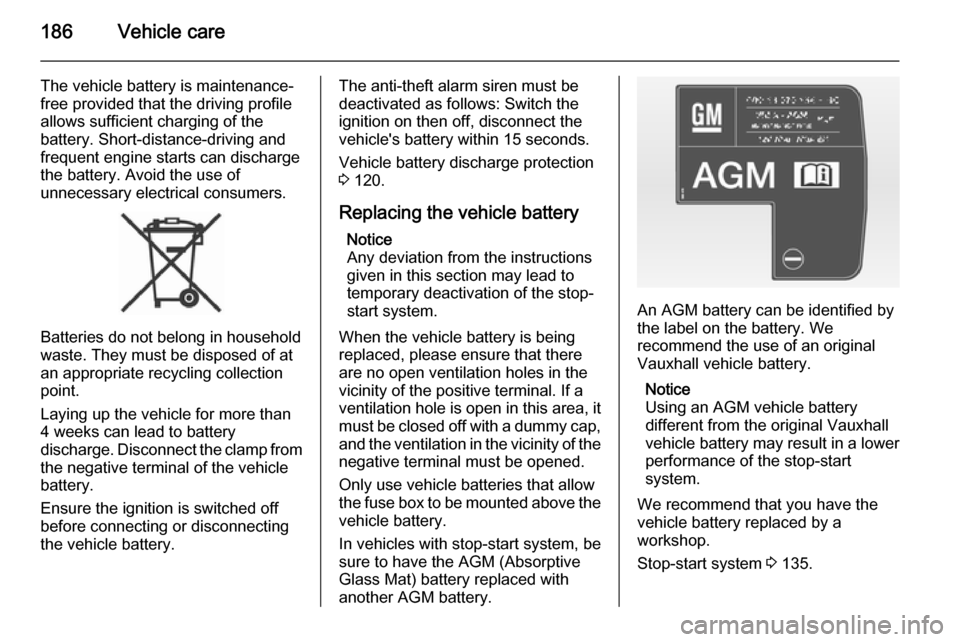
An AGM battery can be identified by
the label on the battery. We
recommend the use of an original
Vauxhall vehicle battery.
Notice
Using an AGM vehicle battery
different from the original Vauxhall
vehicle battery may result in a lower performance of the stop-start
system.
We recommend that you have the
vehicle battery replaced by a
workshop.
Stop-start system 3 135.
Page 201 of 251
Vehicle care199
No.Circuit48Radiator fan49Fuel pump50Headlamp levelling, adaptive
forward lighting51–52Auxiliary heater, diesel engine53Transmission control module,
Engine control module54Vacuum pump, instrument
panel cluster, heating ventila‐
tion, air conditioning system
After having changed defective fuses,
close the fuse box cover and press
until it engages.
If the fuse box cover is not closed
correctly, malfunctions may occur.
Instrument panel fuse box
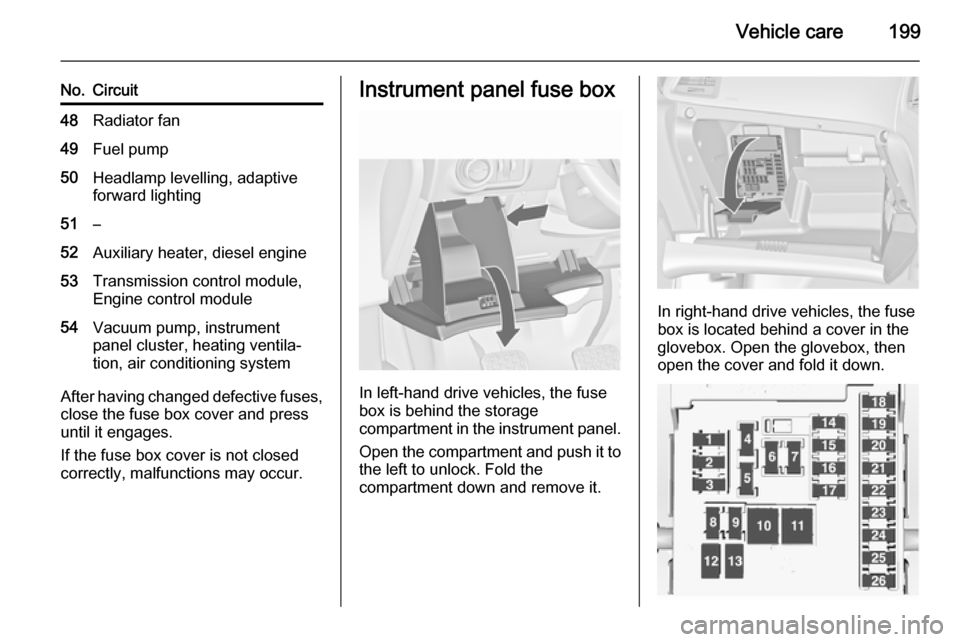
In left-hand drive vehicles, the fuse
box is behind the storage
compartment in the instrument panel.
Open the compartment and push it to the left to unlock. Fold the
compartment down and remove it.
In right-hand drive vehicles, the fuse
box is located behind a cover in the
glovebox. Open the glovebox, then
open the cover and fold it down.