audio VAUXHALL CASCADA 2016.5 Infotainment system
[x] Cancel search | Manufacturer: VAUXHALL, Model Year: 2016.5, Model line: CASCADA, Model: VAUXHALL CASCADA 2016.5Pages: 119, PDF Size: 1.93 MB
Page 49 of 119

Navigation49When all GPS coordinates are
entered, select Search at the bottom
of the screen.
A confirmation menu is displayed.
To start route guidance, select Start
Guidance .
Deleting saved destinations To delete destinations stored in the
system, press CONFIG, select
Navigation Settings and then Delete
Saved Destinations . A submenu is
displayed.
Activate the menu items of the
storage location you wish to be
cleared.
Select Delete. The selected storage
locations are cleared.
Guidance
Starting and cancelling route
guidance
Starting route guidance
Enter or select the desired address.A confirmation menu is displayed.
Select Start Guidance to start route
guidance.
Cancelling route guidance
When route guidance is active, press DEST to display the Route Menu.
Select Cancel Route to cancel the
current navigation session.
Guidance instructions Route guidance is provided by voice
prompts and visual instructions on the
map (if activated).
Voice prompts
Navigation voice prompts announce
which direction to follow, when
approaching an intersection at which
you need to turn.
Press CONFIG and then select
Navigation Settings .
Select Voice Prompt to display the
respective submenu.
If you wish the system to audibly
indicate the next turning manoeuvre,
activate Navigation Voice Prompts .
If you wish traffic alerts to be read out,
activate Traffic Alert Prompts .
To adjust the volume during voice prompts, select Navigation Volume .
The respective submenu is displayed.
To adjust the volume of voice
prompts, select Announcement and
then adjust the setting as desired.
To adjust the volume of the audio
source possibly playing in the
background, select Background and
then adjust the setting as desired.
Select Volume Test to get an audio
example of the settings.
Page 54 of 119

54Speech recognitionIn such a case you must selectanother language for the display
if you want to control the
Infotainment system via voice
input. Changing the display
language, see "Language" in
chapter "System settings" 3 20.
Address input for destinations in
foreign countries
In case you want to enter the address of a destination located in a foreign
country via voice input, you must
change the language of the
Infotainment display to the language
of the foreign country.
E.g. if the display is currently set to English and you want to enter the
name of a city located in France, you
must change the display language to
French.
Exceptions: If you want to enter
addresses in Belgium, you may
optionally change the display
language to French or Dutch. For
addresses in Switzerland you may
optionally change the display
language to French, German, or
Italian.To change the display language, see
"Language" in chapter "System
settings" 3 20.
Input order for destination addresses The order in which the parts of an
address must be entered using the
speech recognition system is
dependent on the country where the
destination is located.
An example for the respective input
order is given out by the system.
Voice pass-thru application
The voice pass-thru application of the Infotainment system allows access tothe speech recognition commands on
your smartphone. See operating
instructions for your smartphone to
find out whether your smartphone
supports this feature.Usage
Embedded speech recognition Activating speech recognition Notice
Speech recognition is not available
during an active phone call.
Press w on the right side of the
steering wheel.
The audio system mutes, w on the
display is highlighted, and a voice
output message prompts you to say a command.
As soon as the speech recognition is
ready for voice input, a beep is heard.
You can now say a voice command to
directly initiate a system function (e.g. playing a radio station), or to start a
dialogue sequence with several
dialogue steps (e.g. entering a
destination address), see "Operation
via speech commands" further below.
After a dialogue sequence is finished,
the speech recognition is deactivated
automatically. To initiate another
dialogue sequence, you must activate the speech recognition again.
Page 55 of 119

Speech recognition55Adjusting the volume of voice
prompts
Press w or ─ on the right side of the
steering wheel.
Interrupting a voice prompt
As an experienced user, you can
interrupt a voice prompt by briefly
pressing w on the steering wheel.
A beep is heard immediately, and a
command can be stated without
having to wait.
Cancelling a dialogue sequence
There are several possibilities to
cancel a dialogue sequence and to
deactivate the speech recognition:
● Say " Cancel" or "Exit".
● Press n on the right side of the
steering wheel.In the following situations a dialogue
sequence is automatically cancelled:
● If you do not say any commands for some time (by default you areprompted three times to say a
command).
● If you say commands that are not
recognised by the system (by
default you are prompted three
times to say a correct command).
Operation via speech commands
The speech recognition can
understand commands that are either naturally stated in sentence form, or
direct commands stating the
application and the task.
For best results: ● Listen for the voice prompt and wait for the beep before saying a
command or replying.
● Say " Help" if you want to listen
again to the help prompt for the
current dialogue step.● The voice prompt can be interrupted by pressing w again.
If you wish to directly speak your
command, press w twice.
● Wait for the beep and then speak
the command naturally. In most
cases, recognition rates will be
higher if pauses are kept to a
minimum. Use short and direct
commands.
Usually phone and audio commands
can be spoken in a single command. For example, "Call David Smith at
work", "Play" followed by the artist or
song name, or "Tune to" followed by
the radio frequency and the
waveband.
Navigation destinations, however, are too complex for a single
command. First, state "Navigation" and then, e.g. "Address" or "Point of
Interest". The system responds with
requesting more details.
After saying "Point of Interest", only
major chains may be selected by
name. Chains are businesses with at
least 20 locations. For other POIs,
Page 58 of 119
![VAUXHALL CASCADA 2016.5 Infotainment system 58Speech recognitionMenuActionSpeech commandsRadio menuSelecting a
waveband" [Tune [to] | Select] F M [Radio] "
" [Tune [to] | Select] A M [Radio] "
" [Tune [to] | Select] D A B [Radio] "Selecting a
s](/img/38/19380/w960_19380-57.png "VAUXHALL CASCADA 2016.5 Infotainment system 58Speech recognitionMenuActionSpeech commandsRadio menuSelecting a
waveband\" [Tune [to] | Select] F M [Radio] \"
\" [Tune [to] | Select] A M [Radio] \"
\" [Tune [to] | Select] D A B [Radio] \"Selecting a
s")
58Speech recognitionMenuActionSpeech commandsRadio menuSelecting a
waveband" [Tune [to] | Select] F M [Radio] "
" [Tune [to] | Select] A M [Radio] "
" [Tune [to] | Select] D A B [Radio] "Selecting a
station" Tune F M … "
" Tune A M … "
" Tune D A B … "Media menuSelecting a
media source" [Play | Select] C D "
" [Play | Select] U S B "
" [Play | Select] [Front] AUX "
" [Play | Select] Bluetooth Audio "Selecting a
search category" Play Artist ... "
" Play Album … "
" Play Genre … "
" Play Folder … "
" Play Playlist … "
" Play Composer … "
" Play Audiobook … "Selecting a song"Play Song … "
Page 72 of 119

72Frequently asked questionsPhone?How can I pair my phone with the
Infotainment system?
! In order to pair a phone, press
O , select Phone Settings and
then Bluetooth . Select Pair device
and follow the instruction on the
Infotainment system and your
mobile phone. Make sure
Bluetooth is enabled.
Detailed description 3 63.? How can I access my phone book
or recent calls list via the
Infotainment system?
! Depending on the phone, you must
allow access to the respective data
in the settings of your mobile
phone. In general, the download of the phone book and recent calls list is not supported by all mobile
phones.
Detailed description 3 63.? Although access to my phone book
has been granted, not all contacts
are available in the Infotainment
system. Why is that?
! Depending on the phone, contacts
stored on the SIM card cannot be read by the Infotainment system.
Detailed description 3 63.
Navigation? How can I toggle between total
driving time or remaining driving
time and total distance or partial
distance?
! When the navigation application is
active, press the multifunction
knob to display the Navigation
Menu . Select Switch Route Time/
Destination and adjust the settings
as desired.
Detailed description 3 37.? When pressing DEST/NAV,
different menus are displayed
sometimes. Why is that?
! If route guidance is active, the
destination application is
displayed for you to select a
destination.Detailed description 3 41.
If route guidance is not active, the
Route Menu is displayed.
Detailed description 3 49.
Audio? When playing media files from a
device connected via Bluetooth,
the track title and artist are not
displayed in the Infotainment
system and the media browse
function is not available. Why is
that?
! When connecting a device via
Bluetooth, due to the Bluetooth
protocol supported only restricted
functions are available.
Detailed description 3 33.? The Infotainment system does not
have a tone button on the
faceplate. How can I change the tone settings?
! The tone settings menu is
accessible via the Home Page.
Press ; and then select More to
display the second Home Page. To
access the tone settings menu,
select Tone.
Page 74 of 119

74IndexAActivating AUX.............................. 33
Activating Bluetooth music ...........33
Activating CD player .....................30
Activating radio ............................. 23
Activating the Infotainment system 14
Activating the navigation system ..37
Activating the phone portal ...........65
Activating USB audio ....................33
Activating USB picture ..................34
Address book................................ 41
Apps ............................................. 35
Audio CUE volume .......................19
Audio files ..................................... 31
Autostore lists ............................... 24
Retrieving stations..................... 24
Storing stations ......................... 24
Auto volume.................................. 19
AUX .............................................. 31
B
BACK button ................................. 16
Balance......................................... 18
Basic operation ............................. 16
Bass.............................................. 18
Bluetooth connection ....................63
Bluetooth music ............................ 31
Bread crumbs ............................... 49C
Category list.................................. 23
CD player...................................... 29
Chime volume............................... 19
Control elements Infotainment system ....................8
Steering wheel ............................ 8
Control elements overview .............8
D DAB .............................................. 27
Date .............................................. 20
Destination input ..........................41
Digital audio broadcasting ............27
Display .......................................... 20
Displaying pictures .......................34
E Emergency call ............................. 64
EQ ................................................ 18
Equaliser....................................... 18
F
Factory defaults ............................ 20
Fader ............................................ 18
Favourite lists ............................... 25
Retrieving stations..................... 25
Storing stations ......................... 25
File formats ................................... 29
Page 75 of 119

75Audio files.................................. 31
Picture files................................ 31
Frequently asked questions .........71
G
General information 29, 31 , 36 , 53 , 62
AUX ........................................... 31
Bluetooth music......................... 31
CD ............................................. 29
Infotainment system ....................6
Navigation ................................. 36
Phone portal .............................. 62
Radio ......................................... 23
USB ........................................... 31
Gracenote ..................................... 31
Guidance ..................................... 49
H
Home address .............................. 41
Home Page............................. 16, 20
I
Infotainment control panel ..............8
K Keyboard ...................................... 41
L
Language ..................................... 20M
Maps ............................................. 37
Maximum startup volume .............19
Menu operation............................. 16
Messages ..................................... 16
Midrange....................................... 18 Mobile phones and CB radio equipment ................................ 69
Multifunction knob......................... 16
Mute.............................................. 14
N
Navigation Address book ............................ 41
Bread crumbs ............................ 49
Coordinates ............................... 41
Current location ......................... 37
Destination input .......................41
Favourite routes ........................41
General settings ........................37
Guidance alerts ......................... 49
Home address ........................... 41
Keyboard ................................... 41
Map display ............................... 37
Map manipulation ......................37
POIs .......................................... 41
Recent destinations ..................41
Route guidance ......................... 49
Route options ............................ 49
Route simulation .......................37Route tracking........................... 49
TMC stations ............................. 49
Traffic incidents ......................... 49
Turn list ..................................... 49
Voice prompts ........................... 49
Waypoint trip ............................. 41
Navigation system ........................36
Navigation volume ........................19
O Operation ...................................... 65
AUX ........................................... 33
Bluetooth music......................... 33
CD ............................................. 30
Infotainment system ..................14
Menu ......................................... 16
Navigation system .....................37
Phone ........................................ 65
Radio ......................................... 23
USB ..................................... 33, 34
P Pairing .......................................... 63
Phone Bluetooth ................................... 62
Bluetooth connection ................63
Conference call ......................... 65
Emergency calls ........................64
Functions during a call ..............65
Phone book ............................... 65
Page 76 of 119

76Recent calls............................... 65
Text messages .......................... 68
Phone book ............................ 41, 65
Phone call Initiating ..................................... 65
Taking ....................................... 65
Picture files ................................... 31
Pictures......................................... 34
Playing audio ................................ 33
POIs.............................................. 41
R Radio Autostore lists............................ 24
Category list .............................. 23
DAB ........................................... 27
DAB announcements ................27
Digital Audio Broadcasting ........27
Favourite lists ............................ 25
Radio Data System ...................26
RDS........................................... 26
RDS Options menu ...................26
Regional .................................... 26
Retrieving stations ..............24, 25
Station list.................................. 23
Station search ........................... 23
Storing stations ...................24, 25
TP.............................................. 26 Traffic Programme ....................26
Waveband selection ..................23Radio data system (RDS) ............26
Regionalisation ............................. 26
Route guidance ............................ 49
Route simulation ........................... 37
S Smartphone .................................. 35
Software update ........................... 20
Speech commands overview........ 57
Speech recognition .......................53
Station list ..................................... 23
Station search............................... 23
Switching the Infotainment system on .................................. 14
System settings ............................ 20
Display ...................................... 20
Home Page ............................... 20
Language .................................. 20
Software .................................... 20
Time and Date........................... 20
T
TA ................................................. 26
TA volume .................................... 19
Text messages ............................. 68
Theft-deterrent feature ................... 7
Time.............................................. 20
Time format .................................. 20
TMC .............................................. 49
Tone settings ................................ 18
TP ................................................. 26Traffic incidents............................ 49
Traffic programme ........................26
Treble ........................................... 18
Turn list ......................................... 49
U Usage ................... 14, 23, 30, 37, 54
AUX ........................................... 33
Bluetooth music......................... 33
CD ............................................. 30
Infotainment system ..................14
Navigation system .....................37
Phone ........................................ 65
USB ..................................... 33, 34
USB .............................................. 31
Using apps.................................... 35
V
Voice recognition ..........................53
Volume Audio Cue volume .....................19
Auto volume .............................. 19
Chime volume ........................... 19
Maximum startup volume ..........19
Mute function............................. 14
Navigation volume..................... 19
Volume of traffic
announcements ........................ 19
Volume settings ............................ 19
Page 80 of 119

80IntroductionIntroductionGeneral information.....................80
Theft-deterrent feature .................81
Control elements overview ..........82
Usage .......................................... 85
Basic operation ............................ 86
Tone settings ............................... 88
Volume settings ........................... 89General information
The Infotainment system provides
you with state-of-the-art in-car
infotainment.
For the AM, FM and DAB wavebands the radio is equipped with twelve
automatically assignable channel presets. Furthermore, various
channels can be allocated manually
(waveband-independent).
The integrated audio player will
entertain you with audio CDs and MP3/WMA CDs.
Furthermore, you can connect
external data storage devices, e.g.
iPod, MP3 player or USB stick, or a
portable CD player to the
Infotainment system as further audio
sources.
The digital sound processor provides
you with several preset equalizer
modes for sound optimisation.
Optionally, the Infotainment system
can be operated using controls on the steering wheel or via the speech
recognition system.In addition the Infotainment system
can be equipped with a mobile phone
portal.
The well-thought-out design of the
control elements, the clear displays
and a large multifunction knob enable you to control the system easily and
intuitively.
Notice
This manual describes all options
and features available for the
various Infotainment systems.
Certain descriptions, including those for display and menu functions, may
not apply to your vehicle due to
model variant, country
specifications, special equipment or
accessories.
Important information on
operation and traffic safety9 Warning
The Infotainment system must be
used so that the vehicle can be
driven safely at all times. If in
Page 84 of 119
84Introduction20 AUX..................................... 100
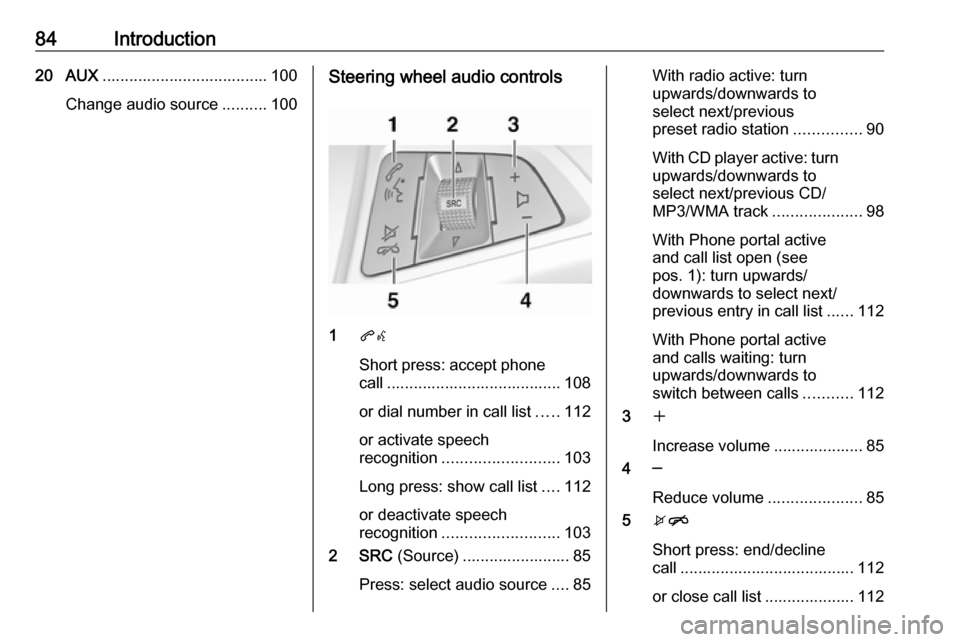
Change audio source ..........100Steering wheel audio controls
1qw
Short press: accept phone
call ....................................... 108
or dial number in call list .....112
or activate speech
recognition .......................... 103
Long press: show call list ....112
or deactivate speech
recognition .......................... 103
2 SRC (Source) ........................ 85
Press: select audio source ....85
With radio active: turn
upwards/downwards to
select next/previous
preset radio station ...............90
With CD player active: turn
upwards/downwards to
select next/previous CD/
MP3/WMA track ....................98
With Phone portal active
and call list open (see
pos. 1): turn upwards/
downwards to select next/
previous entry in call list ......112
With Phone portal active
and calls waiting: turn
upwards/downwards to
switch between calls ...........112
3 w
Increase volume .................... 85
4 ─
Reduce volume .....................85
5 xn
Short press: end/decline
call ....................................... 112
or close call list .................... 112