fuel VAUXHALL CASCADA 2016.5 User Guide
[x] Cancel search | Manufacturer: VAUXHALL, Model Year: 2016.5, Model line: CASCADA, Model: VAUXHALL CASCADA 2016.5Pages: 263, PDF Size: 7.72 MB
Page 100 of 263
98Instruments and controlsTo reset, press SET/CLR for a few
seconds separately for selected
page 1 or 2.
Average speed 1 or 2
Display of average speed. The
measurement can be reset at any
time.
To reset, press SET/CLR for a few
seconds separately for selected
page 1 or 2.
Digital speedDigital display of the instantaneous
speed.
Range Range is calculated from current fuel
tank content and current
consumption. The display shows
average values.
After refuelling, the range is updated
automatically after a brief delay.
When the fuel level in the tank is low,
a message appears in the display.
When the tank must be refuelled
immediately, a warning message is
displayed.Additionally, the control indicator i
in the fuel gauge illuminates or flashes 3 93.
Instantaneous consumption
Displays the instantaneous
consumption.
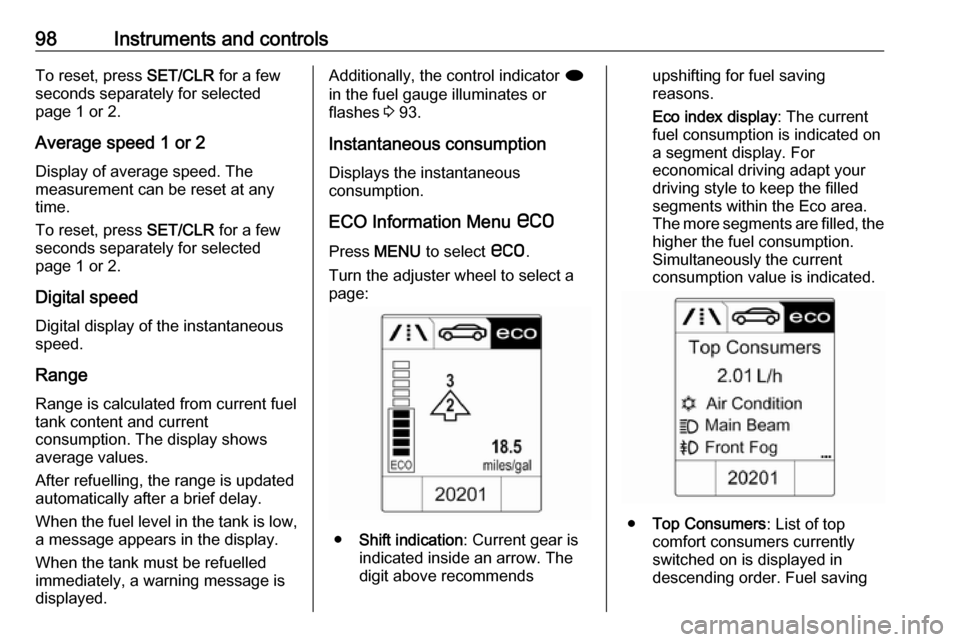
ECO Information Menu s
Press MENU to select s.
Turn the adjuster wheel to select a
page:
● Shift indication : Current gear is
indicated inside an arrow. The
digit above recommends
upshifting for fuel saving
reasons.
Eco index display : The current
fuel consumption is indicated on a segment display. For
economical driving adapt your
driving style to keep the filled
segments within the Eco area.
The more segments are filled, the higher the fuel consumption.
Simultaneously the current
consumption value is indicated.
● Top Consumers : List of top
comfort consumers currently
switched on is displayed in
descending order. Fuel saving
Page 101 of 263
Instruments and controls99potential is indicated. A switched-off consumer disappears from
the list and the consumption
value will be updated.
During sporadic driving
conditions, the heated rear
window is activated automatically to increase engine load. In this
event, the heated rear window is
indicated as one of the top
consumers, without activation by
the driver.
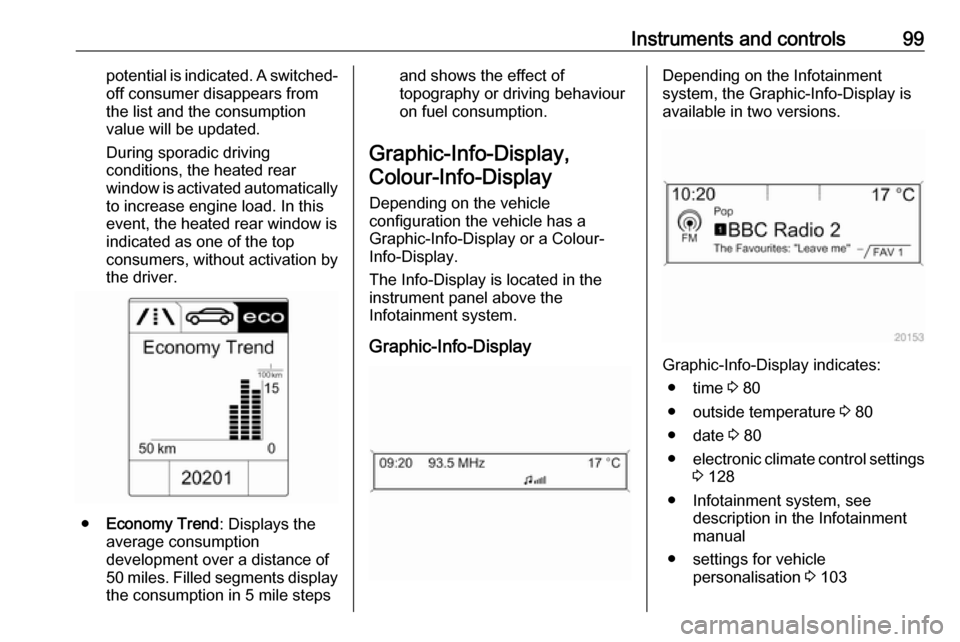
● Economy Trend : Displays the
average consumption
development over a distance of
50 miles. Filled segments display
the consumption in 5 mile steps
and shows the effect of
topography or driving behaviour
on fuel consumption.
Graphic-Info-Display, Colour-Info-Display
Depending on the vehicle
configuration the vehicle has a
Graphic-Info-Display or a Colour-
Info-Display.
The Info-Display is located in the
instrument panel above the
Infotainment system.
Graphic-Info-DisplayDepending on the Infotainment
system, the Graphic-Info-Display is
available in two versions.
Graphic-Info-Display indicates:
● time 3 80
● outside temperature 3 80
● date 3 80
● electronic climate control settings
3 128
● Infotainment system, see description in the Infotainment
manual
● settings for vehicle personalisation 3 103
Page 110 of 263

108Instruments and controls● Smartphone application
● Remote control, e.g. location of the vehicle, activation of horn and
lights, control of central locking
system
● Stolen vehicle assistance
● Vehicle diagnostics
● Destination download
Notice
The OnStar module of the vehicle is
deactivated after ten days without an
ignition cycle. Functions requiring a
data connection will be available
again after switching on the ignition.
OnStar buttonsPrivacy button
Press and hold j until a message is
heard to activate or deactivate the
transmission of the vehicle location.
Press j to answer a call or to end a
call to an advisor.
Press j to access the Wi-Fi settings.
Service button
Press Z to establish a connection to
an advisor.
SOS button
Press [ to establish a priority
emergency connection to a specially
trained emergency advisor.
Status LED
Green: The system is ready.
Green flashing: The system is on a
call.
Red: A problem arose.
Off: System is in standby mode.
Red / green flashing for a short period of time: Transmission of the vehicle
location has been deactivated.OnStar services
General services
If you need any information
concerning e.g. opening hours, points of interest and destinations or if youneed any support e.g. in the case of a
vehicle breakdown, a flat tyre and
empty fuel tank, press Z to establish
a connection to an advisor.
Emergency services
In the case of an emergency situation,
press [ and talk to an advisor. The
advisor then contacts emergency or
assistance service providers and
directs them to your vehicle.
In the case of an accident with
activation of airbags or belt
tensioners, an automatic emergency
call is established. The advisor is
immediately connected to your
vehicle to see whether help is
needed.
Wi-Fi hotspot
The Wi-Fi hotspot of the vehicle
provides internet connectivity with a
maximum speed of 4G/LTE.
Page 111 of 263

Instruments and controls109Notice
The Wi-Fi hotspot functionality is not
available for all markets.
Up to seven devices may be
connected.
To connect a mobile device with the
Wi-Fi hotspot:
1. Press j and then select Wi-Fi
settings on the Info-Display. The
settings displayed include the Wi- Fi hotspot name (SSID),
password and connection type.
2. Start a Wi-Fi network search on your mobile device.
3. Select your vehicle hotspot (SSID) when listed.
4. When prompted, enter the password on your mobile device.
Notice
To change the SSID or password, press Z and talk to an advisor or log
in to your account.
To switch off the Wi-Fi hotspot
functionality, press Z to call an
advisor.Smartphone app
With the My Vauxhall smartphone
app, some vehicle functions can be
operated remotely.
The following functions are available: ● Lock or unlock vehicle.
● Honk horn or flash lights.
● Check fuel level, engine oil life and tyre pressure (only with tyre
pressure monitoring system).
● Send navigation destination to the vehicle, if equipped with a
built-in navigation system.
● Locate vehicle on a map.
● Manage Wi-Fi settings.
To operate these functions, download
the app from Apple's App Store or
Google Play Store.
Remote control
If desired, use any phone to call an
advisor, who can remotely operate
specific vehicle functions. Find the
respective OnStar phone number on
our country-specific website.The following functions are available:
● Lock or unlock vehicle.
● Provide information on the vehicle location.
● Honk horn or flash lights.
Stolen vehicle assistance
If the vehicle is stolen, report the theft
to the authorities and request OnStar
stolen vehicle assistance. Use any
phone to call an advisor. Find the
respective OnStar phone number on
our country-specific website.
OnStar can provide support in
locating and recovering the vehicle.Theft alert
When the anti-theft alarm system is
triggered, a notification is sent to
OnStar. You are then informed about
this event by text message or email.Restart prevention
By sending remote signals, OnStar can prevent the vehicle from
restarting once it has been turned off.
Page 129 of 263

Climate control127If no cooling or drying is required,
switch off the cooling system for fuel
saving reasons. Activated cooling
may inhibit Autostops.
Stop-start system 3 138.
Air recirculation system 4
Press 4 to activate air recirculation
mode. The LED in the button
illuminates to indicate activation.
Press 4 again to deactivate air
recirculation mode.
9 Warning
The exchange of fresh air is
reduced in air recirculation mode.
In operation without cooling the air humidity increases, so the
windows may mist up from inside.
The quality of the passenger
compartment air deteriorates,
which may cause the vehicle
occupants to feel drowsy.
In warm and very humid ambient air conditions, the windscreen may mist
up from outside, when cold air is
directed towoards it. If windscreen
mists up from outside, activate
windscreen wiper and deactivate s.
Maximum cooling
Briefly open the windows so that hot
air can disperse quickly.
● Switch on cooling n.
● Air recirculation system 4 on.
● Press air distribution switch M.
● Set temperature control to coldest level.
● Set fan speed to highest level.
● Open all vents.
Page 133 of 263

Climate control131Fan speed Z
Press lower button to decrease or
upper button to increase fan speed as shown in the illustration. The fan
speed is indicated by the number of
segments in the display.
Pressing the lower button for longer:
fan and cooling are switched off.
Pressing the upper button for longer:
the fan runs at maximum speed.
To return to automatic mode: Press
AUTO .
Air distribution s, M , K
Press appropriate button for desired
adjustment. Activation is indicated by
illumination of the LED in the button.
s:to windscreen and front door
windows (air conditioning is
activated in the background to
help preventing windows from
fogging)M:to head area via adjustable air ventsK:to foot well and windscreen
All combinations are possible.
Return to Automatic air distribution:
press AUTO .
Cooling n
Press n to switch on cooling. The
LED in the button illuminates to
indicate activation. Cooling is only
functional when the engine is running and climate control fan is switched on.
Press n again to switch off cooling.
The air conditioning system cools and
dehumidifies (dries) when outside
temperature is above a specific level. Therefore condensation may form
and drip from under the vehicle.
If no cooling or drying is required,
switch off the cooling system for fuel
saving reasons. When the cooling
system is switched off, no engine
Page 137 of 263

Driving and operating135Driving and
operatingDriving hints ............................... 136
Control of the vehicle ...............136
Steering ................................... 136
Ground clearance ....................136
Starting and operating ...............137
New vehicle running-in ............137
Ignition switch positions ...........137
Retained power off ..................137
Starting the engine ..................137
Overrun cut-off ........................ 138
Stop-start system ....................138
Parking .................................... 140
Engine exhaust .......................... 142
Diesel particle filter ..................142
Catalytic converter ...................143
AdBlue ..................................... 143
Automatic transmission ..............146
Transmission display ...............146
Selector lever .......................... 147
Manual mode ........................... 148
Electronic driving programmes 148
Fault ........................................ 148
Interruption of power supply ....149Manual transmission ..................149
Brakes ........................................ 150
Antilock brake system .............150
Parking brake .......................... 151
Brake assist ............................. 152
Hill start assist ......................... 153
Ride control systems .................153
Traction Control system ..........153
Electronic Stability Control ......154
Interactive driving system ........155
Driver assistance systems .........157
Cruise control .......................... 157
Speed limiter ........................... 158
Forward collision alert .............160
Following distance indication ...162
Parking assist .......................... 163
Side blind spot alert .................170
Rear view camera ...................171
Traffic sign assistant ................173
Lane departure warning ..........177
Fuel ............................................ 178
Fuel for petrol engines .............178
Fuel for diesel engines ............178
Refuelling ................................ 179
Fuel consumption - CO 2-
Emissions .............................. 181
Trailer hitch ................................ 181
General information .................181Driving characteristics and
towing tips .............................. 182
Trailer towing ........................... 182
Towing equipment ...................183
Page 139 of 263

Driving and operating137Starting and operating
New vehicle running-in
Do not brake unnecessarily hard for
the first few journeys.
During the first drive, smoke may
occur because of wax and oil
evaporating off the exhaust system.
Park the vehicle in the open for a
while after the first drive and avoid
inhaling the fumes.
During the running-in period fuel and
engine oil consumption may be
higher and the cleaning process of
the diesel particle filter may take
place more often. Autostop may be
inhibited to allow for charging the
vehicle battery.
Diesel particle filter 3 142.Ignition switch positions0:ignition off1:steering wheel lock released,
ignition off2:ignition on, for diesel engine:
preheating3:starting
Retained power off
The following electronic systems can
work until the driver's door is opened
or at the latest for 10 minutes after the
ignition is switched off:
● power windows
● power outlets
Power to the Infotainment system will continue to operate for 30 minutes or
until the key is removed from the ignition switch, regardless of whether
any door will be opened.
Starting the engine
Manual transmission: operate clutch.
Automatic transmission: operate
brake and move the selector lever to
P or N.
Do not operate the accelerator pedal. Diesel engine: turn the key to position2 for preheating until control
indicator ! extinguishes.
Page 140 of 263

138Driving and operatingTurn the key briefly to position 3 and
release: an automatic procedure
operates the starter with a short delay
as long as the engine is running, see
'Automatic Starter Control'.
Before restarting or to switch off the engine, turn the key back to position
0 .
During an Autostop, the engine can
be started by depressing the clutch
pedal.
Starting the vehicle at low
temperatures
Starting the engine without additional
heaters is possible down to -25 °С for diesel engines and -30 °C for petrol
engines. Required is an engine oil
with the correct viscosity, the correct fuel, performed services and a
sufficiently charged vehicle battery.
With temperatures below -30 °C the
automatic transmission needs a
warming phase of approx. 5 minutes.
The selector lever must be in position P .Automatic Starter Control
This function controls the engine
starting procedure. The driver does
not have to hold the key in position 3.
Once applied, the system will go on starting automatically until the engine
is running. Because of the checking
procedure, the engine starts running
after a short delay.
Possible reasons for a non-starting
engine:
● Clutch pedal not operated (manual transmission).
● Brake pedal not operated or selector lever not in P or N
(automatic transmission).
● Timeout occurred.
Turbo engine warm-up
Upon start-up, engine available
torque may be limited for a short time, especially when the engine
temperature is cold. The limitation is
to allow the lubrication system to fully protect the engine.Overrun cut-off
The fuel supply is automatically cut off
during overrun, i.e. when the vehicle
is driven with a gear engaged but accelerator is released.
Stop-start system The stop-start system helps to save
fuel and to reduce the exhaust
emissions. When conditions allow, it
switches off the engine as soon as the
vehicle is at a low speed or at a
standstill, e.g. at a traffic light or in a
traffic jam. It starts the engine
automatically as soon as the clutch is
depressed. A vehicle battery sensor
ensures that an Autostop is only performed if the vehicle battery is
sufficiently charged for a restart.
Activation
The stop-start system is available as soon as the engine is started, the
vehicle starts-off and the conditions
as stated below in this section are
fulfilled.
Page 144 of 263

142Driving and operatingEngine exhaust9Danger
Engine exhaust gases contain
poisonous carbon monoxide,
which is colourless and odourless and could be fatal if inhaled.
If exhaust gases enter the interior
of the vehicle, open the windows.
Have the cause of the fault
rectified by a workshop.
Avoid driving with an open load
compartment, otherwise exhaust
gases could enter the vehicle.
Diesel particle filter
The diesel particle filter system filters
harmful soot particles out of the
exhaust gases. The system includes
a self-cleaning function that runs
automatically during driving without
any notification. The filter is cleaned
by periodically burning off the soot
particles at high temperature. This
process takes place automatically
under set driving conditions and may
take up to 25 minutes. Typically it
needs between 7 and 12 minutes.
Autostop is not available and fuel
consumption may be higher during
this period. The emission of smells
and smoke during this process is
normal.
Under certain driving conditions, e.g.
short distances, the system cannot
clean itself automatically.
If the cleaning of the filter is required
and if previous driving conditions did
not enable automatic cleaning, it will
be indicated by control indicator %.
Simultaneously Diesel partic. filter is
full continue driving appears in the
Driver Information Centre.
% illuminates when diesel particle
filter is full. Start cleaning process as
soon as possible.
% flashes when diesel particle filter
has reached the maximum filling
level. Start cleaning process
immediately to avoid damage to the
engine.
Cleaning process To activate cleaning process,
continue driving, keep engine speed
above 2000 revolutions per minute.
Shift down if necessary. Diesel
particle filter cleaning is then started.
If additionally a message appears in
the Driver Information Centre that
cleaning is not possible, seek the
assistance of a workshop.Caution
If the cleaning process is
interrupted, there is a risk of
provoking severe engine damage.
Cleaning takes place quickest at high
engine speeds and loads.