headlights VAUXHALL CASCADA 2016.5 User Guide
[x] Cancel search | Manufacturer: VAUXHALL, Model Year: 2016.5, Model line: CASCADA, Model: VAUXHALL CASCADA 2016.5Pages: 263, PDF Size: 7.72 MB
Page 123 of 263
Lighting121Parking lights
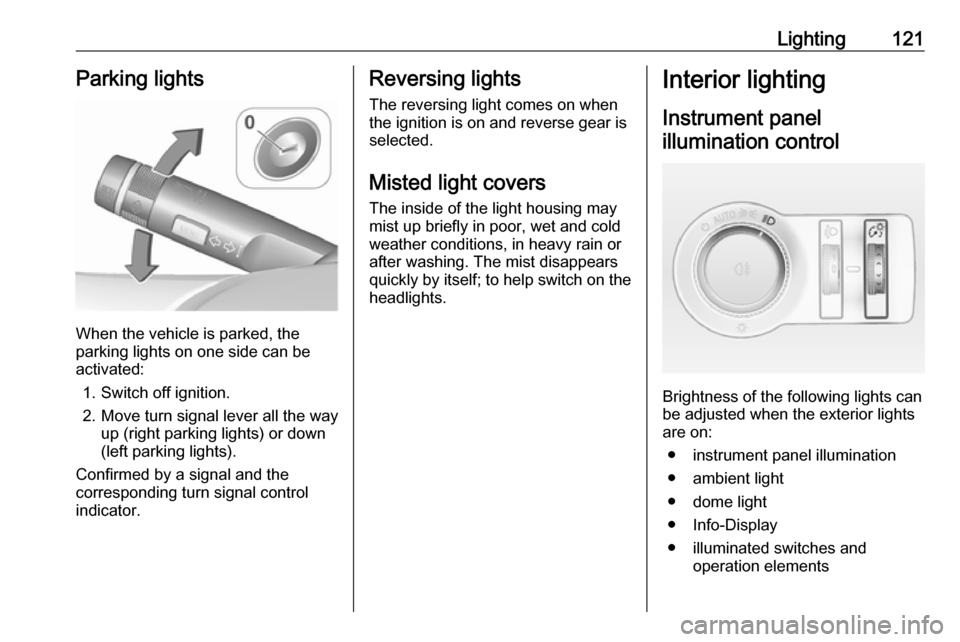
When the vehicle is parked, the
parking lights on one side can be
activated:
1. Switch off ignition.
2. Move turn signal lever all the way up (right parking lights) or down
(left parking lights).
Confirmed by a signal and the
corresponding turn signal control
indicator.
Reversing lights
The reversing light comes on when
the ignition is on and reverse gear is
selected.
Misted light covers
The inside of the light housing may
mist up briefly in poor, wet and cold weather conditions, in heavy rain or
after washing. The mist disappears
quickly by itself; to help switch on the
headlights.Interior lighting
Instrument panel illumination control
Brightness of the following lights can
be adjusted when the exterior lights
are on:
● instrument panel illumination
● ambient light
● dome light
● Info-Display
● illuminated switches and operation elements
Page 124 of 263
122LightingTurn thumb wheel A and hold until
the desired brightness is obtained.
On vehicles with light sensor, the
brightness can only be adjusted when
the exterior lights are on and the light sensor detects night conditions.
Interior lights
During entry and exit of the vehicle,
the front and rear courtesy lights
automatically switch on and then off
after a delay.
Notice
In the event of an accident with
airbag deployment the courtesy
lights are turned on automatically.Front courtesy light
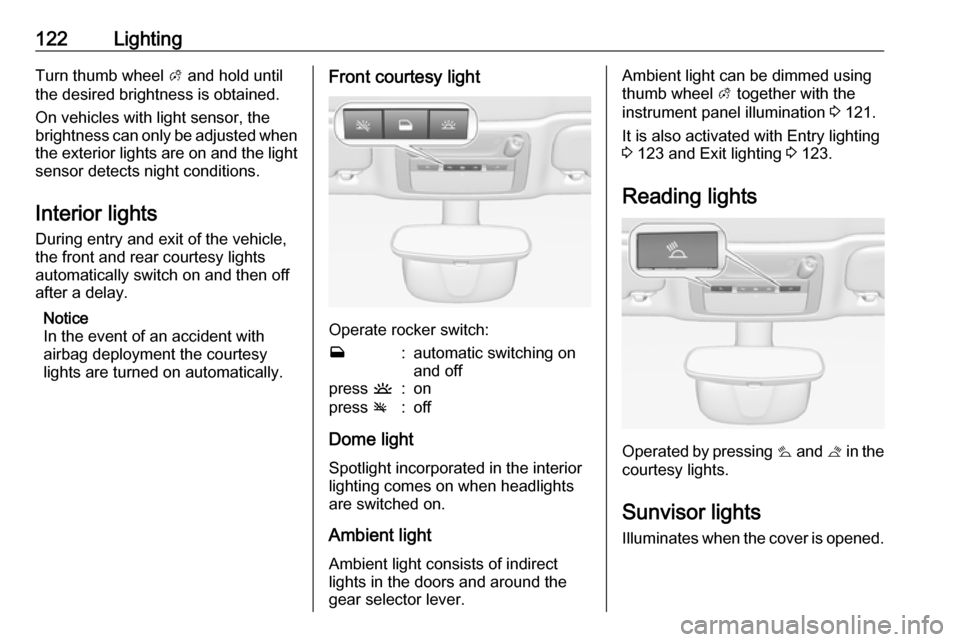
Operate rocker switch:
w:automatic switching on
and offpress u:onpress v:off
Dome light
Spotlight incorporated in the interior
lighting comes on when headlights
are switched on.
Ambient light Ambient light consists of indirect
lights in the doors and around the
gear selector lever.
Ambient light can be dimmed using
thumb wheel A together with the
instrument panel illumination 3 121.
It is also activated with Entry lighting
3 123 and Exit lighting 3 123.
Reading lights
Operated by pressing s and t in the
courtesy lights.
Sunvisor lights
Illuminates when the cover is opened.
Page 125 of 263

Lighting123Lighting features
Entry lighting Welcome lighting
The following lights are switched on
for a short time by unlocking the
vehicle with the radio remote control:
● headlights
● tail lights
● number plate lights
● instrument panel light
● interior lights
● puddle lights
Some functions work only in the dark and facilitates locating the vehicle.
The lighting switches off immediately
when the ignition key is turned to
position 1 3 137.
The following lights will additionally
switch on when the driver's door is
opened:
● illumination of all switches
● Driver Information Centre● door pocket lights
● console lights
Activation, deactivation and duration of this function can be changed in the
Info-Display. Vehicle personalisation
3 103.
The settings can be saved for the key being used 3 21.
Exit lighting
The following lights switch on if the
key is removed from the ignition
switch:
● interior lights
● instrument panel light (only when
it is dark)
● door and console lights
● puddle lights
They will switch off automatically after
a delay and will be activated again if
the driver's door is opened.
Headlights, tail lights and number
plate lights illuminate the surrounding
area for an adjustable time after
leaving the vehicle.Path lighting
Headlights, tail lights and number
plate lights illuminate the surrounding area for an adjustable time after
leaving the vehicle.
Activating
1. Switch off ignition
2. Remove ignition key
3. Open driver's door
4. Pull turn signal lever
5. Close driver's door
If the driver's door is not closed, the
lights switch off after two minutes.
Page 175 of 263
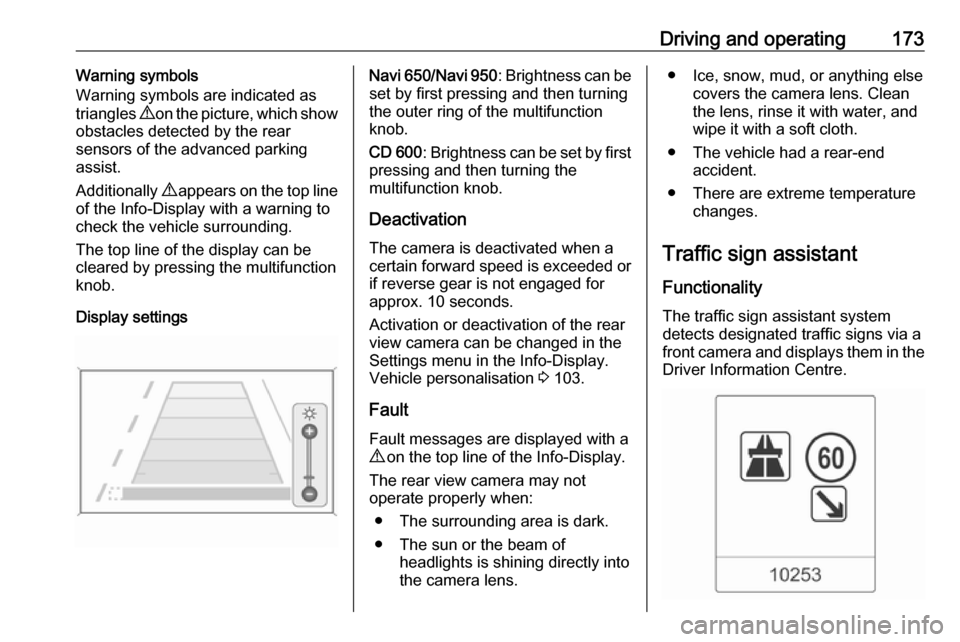
Driving and operating173Warning symbols
Warning symbols are indicated as
triangles 9 on the picture, which show
obstacles detected by the rear
sensors of the advanced parking
assist.
Additionally 9 appears on the top line
of the Info-Display with a warning to
check the vehicle surrounding.
The top line of the display can be
cleared by pressing the multifunction
knob.
Display settingsNavi 650 /Navi 950 : Brightness can be
set by first pressing and then turning
the outer ring of the multifunction
knob.
CD 600 : Brightness can be set by first
pressing and then turning the
multifunction knob.
Deactivation The camera is deactivated when acertain forward speed is exceeded or
if reverse gear is not engaged for
approx. 10 seconds.
Activation or deactivation of the rear
view camera can be changed in the Settings menu in the Info-Display.
Vehicle personalisation 3 103.
Fault
Fault messages are displayed with a 9 on the top line of the Info-Display.
The rear view camera may not
operate properly when:
● The surrounding area is dark.● The sun or the beam of headlights is shining directly into
the camera lens.● Ice, snow, mud, or anything else covers the camera lens. Clean
the lens, rinse it with water, and
wipe it with a soft cloth.
● The vehicle had a rear-end accident.
● There are extreme temperature changes.
Traffic sign assistant
Functionality
The traffic sign assistant system detects designated traffic signs via a
front camera and displays them in the Driver Information Centre.
Page 189 of 263

Vehicle care187Vehicle careGeneral Information...................188
Accessories and vehicle modifications .......................... 188
Vehicle storage ........................188
End-of-life vehicle recovery .....189
Vehicle checks ........................... 189
Performing work ......................189
Bonnet ..................................... 189
Engine oil ................................. 190
Engine coolant ......................... 191
Washer fluid ............................ 192
Brakes ..................................... 193
Brake fluid ............................... 193
Vehicle battery ......................... 193
Diesel fuel system bleeding .....195
Wiper blade replacement ........195
Bulb replacement .......................195
Halogen headlights ..................196
Adaptive forward lighting .........197
Fog lights ................................. 198
Front turn signal lights .............199
Tail lights ................................. 200
Side turn signal lights ..............202
Number plate light ...................202Interior lights ............................ 203
Instrument panel illumination ...203
Electrical system ........................203
Fuses ....................................... 203
Engine compartment fuse box . 204
Instrument panel fuse box .......206
Load compartment fuse box ....207
Vehicle tools .............................. 209
Tools ........................................ 209
Wheels and tyres .......................210
Winter tyres ............................. 210
Tyre designations ....................210
Tyre pressure monitoring
system .................................... 211
Tyre pressure .......................... 214
Tread depth ............................. 215
Changing tyre and wheel size . 216
Wheel covers ........................... 216
Tyre chains .............................. 216
Tyre repair kit .......................... 217
Wheel changing .......................220
Spare wheel ............................ 222
Jump starting ............................. 226
Towing ....................................... 227
Towing the vehicle ...................227
Towing another vehicle ...........228Appearance care .......................229
Exterior care ............................ 229
Interior care ............................. 231
Page 191 of 263

Vehicle care189End-of-life vehicle recovery
Information on end-of-life vehicle
recovery centres and the recycling of
end-of-life vehicles is available on our website, where legally required. Only
entrust this work to an authorised
recycling centre.Vehicle checks
Performing work9 Warning
Only perform engine compartment
checks when the ignition is off.
The cooling fan may start
operating even if the ignition is off.
9 Danger
The ignition system and Xenon
headlights use extremely high
voltage. Do not touch.
Bonnet
Opening
Pull the release lever and return it to
its original position.
Page 198 of 263
196Vehicle careHalogen headlights
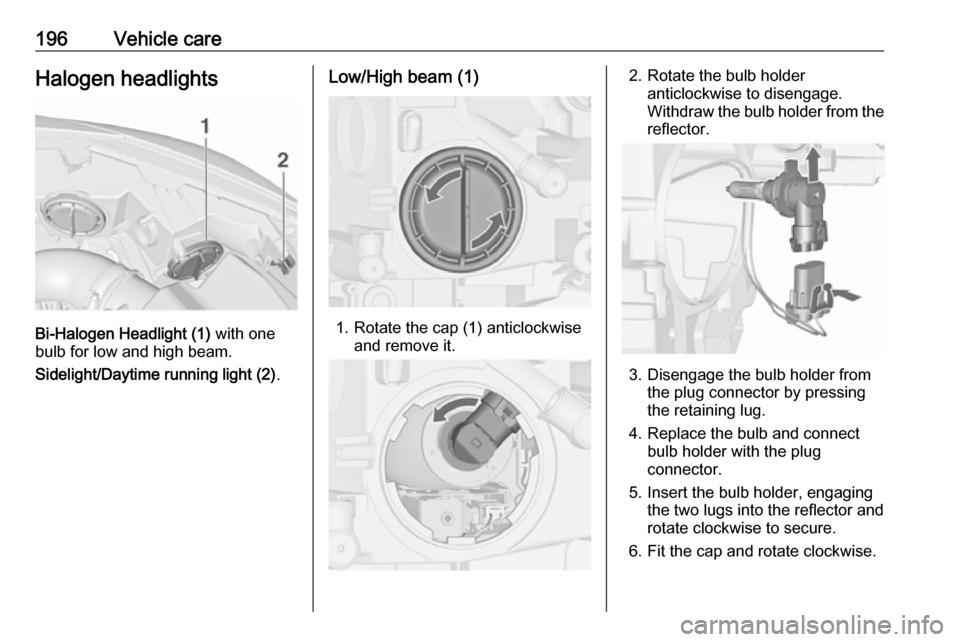
Bi-Halogen Headlight (1) with one
bulb for low and high beam.
Sidelight/Daytime running light (2) .
Low/High beam (1)
1. Rotate the cap (1) anticlockwise
and remove it.
2. Rotate the bulb holderanticlockwise to disengage.
Withdraw the bulb holder from the
reflector.
3. Disengage the bulb holder from the plug connector by pressing
the retaining lug.
4. Replace the bulb and connect bulb holder with the plug
connector.
5. Insert the bulb holder, engaging the two lugs into the reflector and
rotate clockwise to secure.
6. Fit the cap and rotate clockwise.
Page 199 of 263
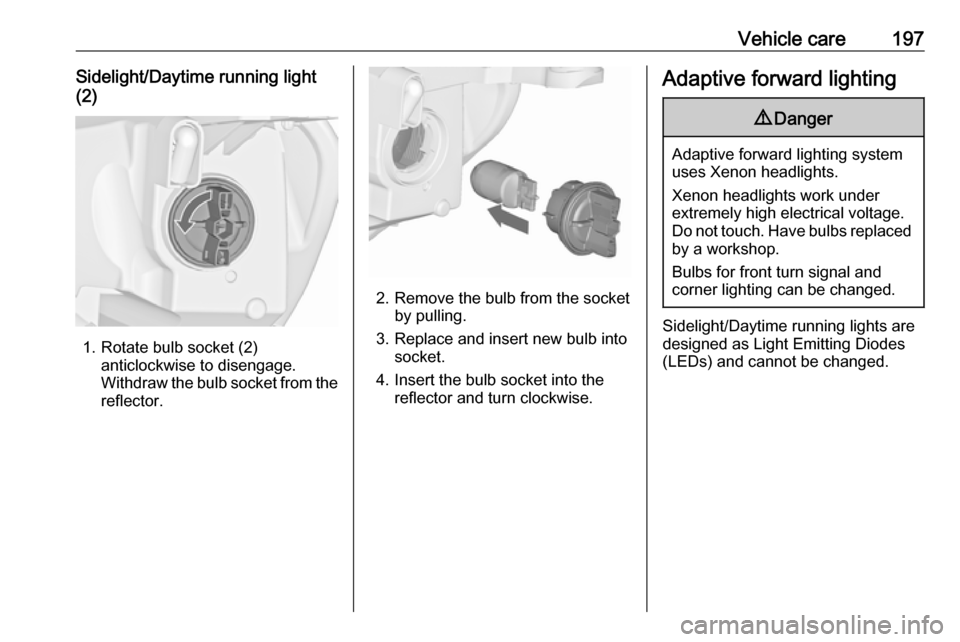
Vehicle care197Sidelight/Daytime running light
(2)
1. Rotate bulb socket (2) anticlockwise to disengage.
Withdraw the bulb socket from the
reflector.
2. Remove the bulb from the socket by pulling.
3. Replace and insert new bulb into socket.
4. Insert the bulb socket into the reflector and turn clockwise.
Adaptive forward lighting9 Danger
Adaptive forward lighting system
uses Xenon headlights.
Xenon headlights work under
extremely high electrical voltage.
Do not touch. Have bulbs replaced by a workshop.
Bulbs for front turn signal and
corner lighting can be changed.
Sidelight/Daytime running lights are
designed as Light Emitting Diodes
(LEDs) and cannot be changed.
Page 201 of 263
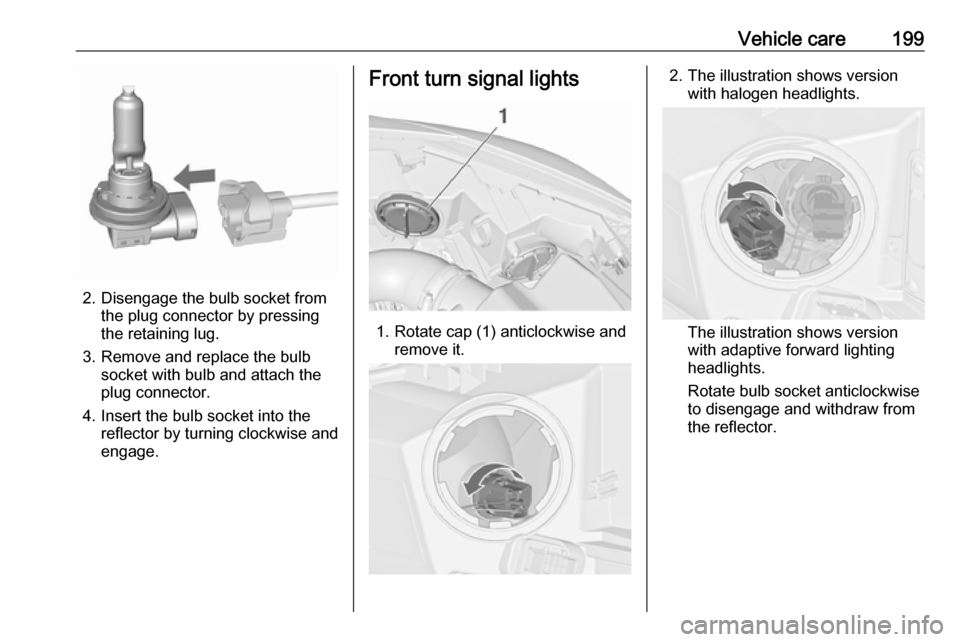
Vehicle care199
2. Disengage the bulb socket fromthe plug connector by pressing
the retaining lug.
3. Remove and replace the bulb socket with bulb and attach the
plug connector.
4. Insert the bulb socket into the reflector by turning clockwise and
engage.
Front turn signal lights
1. Rotate cap (1) anticlockwise and remove it.
2. The illustration shows versionwith halogen headlights.
The illustration shows version
with adaptive forward lighting
headlights.
Rotate bulb socket anticlockwise
to disengage and withdraw from
the reflector.
Page 229 of 263

Vehicle care2273. Connect the black lead to thenegative terminal of the booster
battery.
4. Connect the other end of the black
lead to a vehicle grounding point,
such as the engine block or an
engine mounting bolt. Connect as far away from the discharged
battery as possible, however at
least 60 cm.
Route the leads so that they cannot
catch on rotating parts in the engine
compartment.
To start the engine: 1. Start the engine of the vehicle providing the jump.
2. After 5 minutes, start the other engine. Start attempts should be
made for no longer than
15 seconds at an interval of
1 minute.
3. Allow both engines to idle for approx. 3 minutes with the leads
connected.4. Switch on electrical consumers (e.g. headlights, heated rear
window) of the vehicle receiving
the jump start.
5. Reverse above sequence exactly when removing leads.Towing
Towing the vehicle
Insert a screwdriver in the slot at the
lower part of the cap. Release the cap
by carefully moving the screwdriver
downwards.
The towing eye is stowed with the
vehicle tools 3 209.