wheel VAUXHALL CASCADA 2016.5 Owner's Guide
[x] Cancel search | Manufacturer: VAUXHALL, Model Year: 2016.5, Model line: CASCADA, Model: VAUXHALL CASCADA 2016.5Pages: 263, PDF Size: 7.72 MB
Page 97 of 263

Instruments and controls95Information displays
Driver Information Centre
The Driver Information Centre is
located in the instrument cluster
between speedometer and
tachometer.
The following main menus can be
indicated in the display and selected by pushing MENU on the turn signal
lever. Menu symbols are indicated in
the top line of the display:
● Vehicle Information Menu X
● Trip/Fuel Information Menu W
● ECO Information Menu s
Some of the displayed functions differ
when the vehicle is being driven or at a standstill. Some functions are only
available when the vehicle is being
driven.
Vehicle personalisation 3 103.
Memorised settings 3 21.
Selecting menus and functions The menus and functions can be
selected via the buttons on the turn
signal lever.
Press MENU to switch between the
menus or to return from a submenu to the next higher menu level.
Turn the adjuster wheel to highlight a
menu option or set a numeric value.
Press SET/CLR to select a function or
confirm a message.
Page 98 of 263
96Instruments and controlsVehicle Information Menu X
Press MENU to select X.
Turn the adjuster wheel to select a
submenu. Press SET/CLR to confirm.
Follow the instructions given in the
submenus.
Depending on the version, the
possible submenus may include:
● Unit : displayed units can be
changed
● Tyre Pressure : checks tyre
pressure of all wheels during
driving 3 211
● Tyre Load : select tyre pressure
category according to the actually inflated tyre pressure
3 211
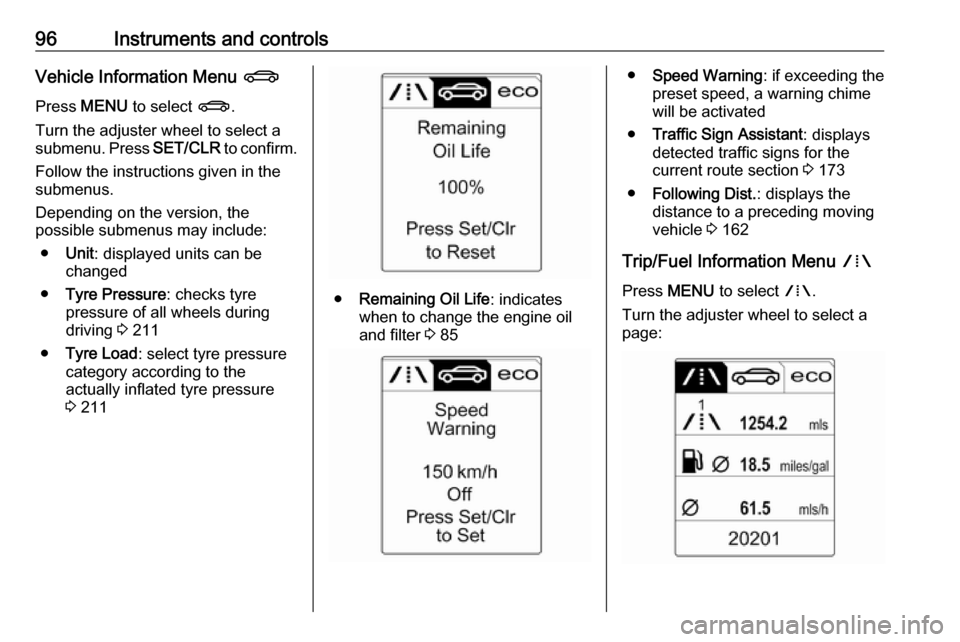
● Remaining Oil Life : indicates
when to change the engine oil and filter 3 85
● Speed Warning : if exceeding the
preset speed, a warning chime will be activated
● Traffic Sign Assistant : displays
detected traffic signs for the
current route section 3 173
● Following Dist. : displays the
distance to a preceding moving
vehicle 3 162
Trip/Fuel Information Menu W
Press MENU to select W.
Turn the adjuster wheel to select a
page:
Page 99 of 263
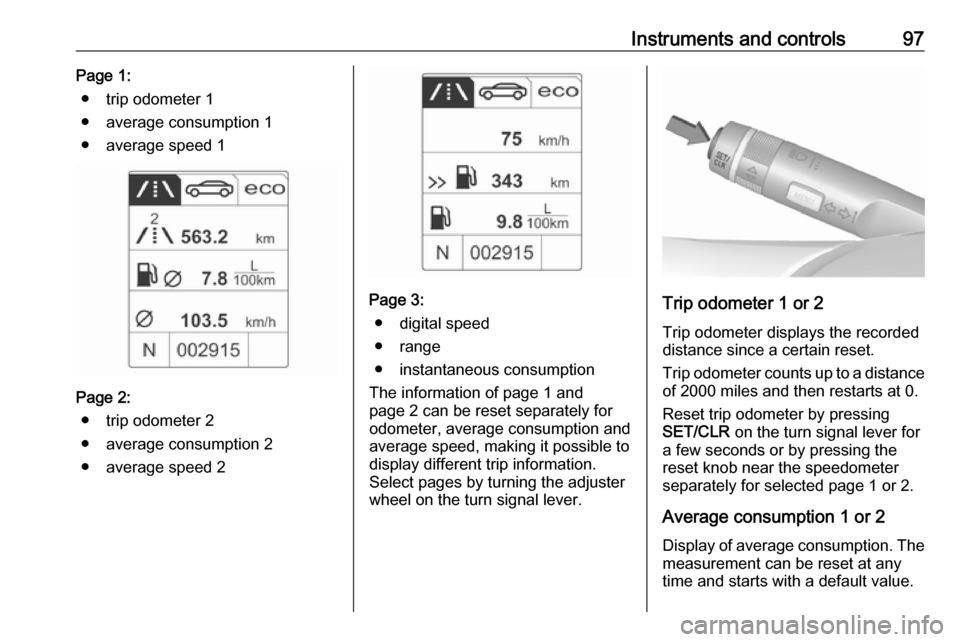
Instruments and controls97Page 1:● trip odometer 1
● average consumption 1
● average speed 1
Page 2: ● trip odometer 2
● average consumption 2
● average speed 2
Page 3: ● digital speed
● range
● instantaneous consumption
The information of page 1 and
page 2 can be reset separately for
odometer, average consumption and
average speed, making it possible to display different trip information.
Select pages by turning the adjuster
wheel on the turn signal lever.Trip odometer 1 or 2
Trip odometer displays the recorded
distance since a certain reset.
Trip odometer counts up to a distance
of 2000 miles and then restarts at 0.
Reset trip odometer by pressing
SET/CLR on the turn signal lever for
a few seconds or by pressing the
reset knob near the speedometer
separately for selected page 1 or 2.
Average consumption 1 or 2
Display of average consumption. The measurement can be reset at any
time and starts with a default value.
Page 100 of 263
98Instruments and controlsTo reset, press SET/CLR for a few
seconds separately for selected
page 1 or 2.
Average speed 1 or 2
Display of average speed. The
measurement can be reset at any
time.
To reset, press SET/CLR for a few
seconds separately for selected
page 1 or 2.
Digital speedDigital display of the instantaneous
speed.
Range Range is calculated from current fuel
tank content and current
consumption. The display shows
average values.
After refuelling, the range is updated
automatically after a brief delay.
When the fuel level in the tank is low,
a message appears in the display.
When the tank must be refuelled
immediately, a warning message is
displayed.Additionally, the control indicator i
in the fuel gauge illuminates or flashes 3 93.
Instantaneous consumption
Displays the instantaneous
consumption.
ECO Information Menu s
Press MENU to select s.
Turn the adjuster wheel to select a
page:
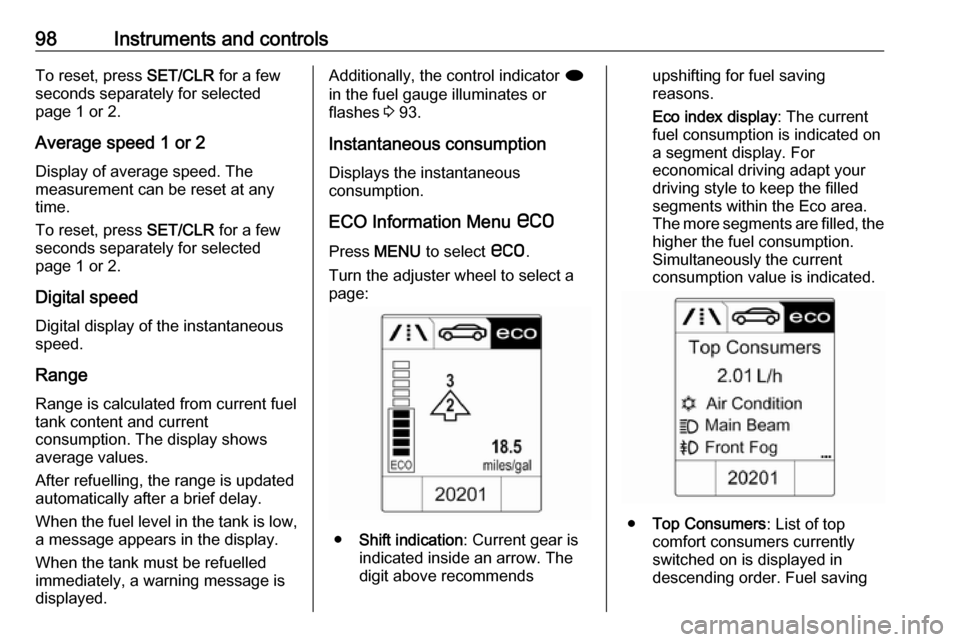
● Shift indication : Current gear is
indicated inside an arrow. The
digit above recommends
upshifting for fuel saving
reasons.
Eco index display : The current
fuel consumption is indicated on a segment display. For
economical driving adapt your
driving style to keep the filled
segments within the Eco area.
The more segments are filled, the higher the fuel consumption.
Simultaneously the current
consumption value is indicated.
● Top Consumers : List of top
comfort consumers currently
switched on is displayed in
descending order. Fuel saving
Page 103 of 263

Instruments and controls101
To exit the Settings menu, press
BACK repeatedly or press CONFIG
after confirming the changes.
Vehicle personalisation 3 103.
Memorised settings 3 21.
Vehicle messages
Messages are indicated in the Driver
Information Centre, in some cases
together with a warning and signal
sound.
Press SET/CLR , MENU or turn the
adjuster wheel to confirm a message.
Messages in the Driver
Information Centre
The vehicle messages are displayed
as text. Follow the instructions given
in the messages.
The system displays messages
regarding the following topics:
● service messages
● fluid levels
● anti-theft alarm system
● brakes
● ride control systems
● driver assistance systems
● cruise control
Page 117 of 263

Lighting115If a headlight flash is activated when
the high beam is on, the high beam assist will be deactivated.
If a headlight flash is activated when the high beam is off, the high beam
assist will remain activated.
The latest setting of the high beam
assist will remain after the ignition is
switched on again.
Headlight flash To activate the headlight flash, pull
lever.Headlight range adjustment
Manual headlight range
adjustment
To adapt headlight range to the
vehicle load to prevent dazzling: turn
thumb wheel ? to required position.
0:front seats occupied1:all seats occupied2:all seats occupied and load
compartment laden3:driver's seat occupied and load
compartment laden.
Dynamic automatic headlight
levelling 3 116.
Headlights when driving
abroad
The asymmetrical headlight beam
extends visibility at the edge of the
road at the passenger side.
However, when driving in countries
where traffic drives on the opposite
side of the road, adjust the headlights to prevent dazzling of oncoming
traffic.
Vehicles with halogen headlight
system
The headlights do not have to be adjusted.
Page 119 of 263

Lighting117Country lighting
Activated automatically at a speed
range between approx. 34 and
70 mph. The beam of light and the
brightness is different between the
left and the right side.
Motorway lighting Activated automatically at a speed
above approx. 70 mph and minimal
steering movements. It switches on
after a delay or directly when the
vehicle is powerfully accelerated. The
light beam is longer and brighter.
Adverse weather lighting
Activated automatically up to a speed
of approx. 43 mph, when the rain sensor recognises condensation or
the wiper operates continuously. The
range, distribution and light intensity
is regulated variably depending on visibility.Dynamic curve lighting
The light beam pivots based on
steering wheel angle and speed,
improving lighting in curves.
Control indicator f 3 94.
Corner lighting
On tight bends or when turning off,
depending on the steering angle or
the turn signal light, an additional left
or right reflector is switched on which illuminates the road at a right angle to
the direction of travel. It is activated
up to a speed of 25 mph.
Control indicator f 3 94.
Reversing function
If the headlights are on and reverse
gear is engaged, both corner lights
are switched on. They remain
illuminated for 20 seconds after
disengaging reverse gear or until
driving faster than 10 mph in a
forward gear.
High beam assist This feature allows high beam as
main driving light by night and when
vehicle speed is faster than 25 mph.
It switches to low beam when: ● The camera in the windscreen detects the lights of oncoming or
preceding vehicles.
● The vehicle speed is slower than
12 mph.
● It is foggy or snowy.
● Driving in urban areas.
If there are no restrictions detected,
the system switches back to high
beam.
Page 122 of 263

120LightingIn the event of an accident with airbag
deployment the hazard warning
flashers are activated automatically.
Turn and lane-changesignalslever up:right turn signallever down:left turn signal
If the lever is moved past the
resistance point, the turn signal is
switched on constantly. When the
steering wheel moves back, the turn
signal is automatically deactivated.
For three flashes, e.g. when changing lanes, press the lever until resistance
is felt then release.
When a trailer is connected, pressing the lever until resistance is felt then
releasing activates six turn signal
flashes.
Move the lever to the resistance point
and hold for longer indication.
Switch the turn signal off manually by moving the lever to its original
position.
Front fog lights
Operated by pressing >.
Light switch in position AUTO:
switching on front fog lights will switch headlights on automatically.
Rear fog lights
Operated by pressing r
.
Light switch in position AUTO:
switching on rear fog light will switch
headlights on automatically.
Light switch in position 8: rear fog
light can only be switched on with
front fog lights.
The vehicle rear fog light is
deactivated when towing.
Page 124 of 263
122LightingTurn thumb wheel A and hold until
the desired brightness is obtained.
On vehicles with light sensor, the
brightness can only be adjusted when
the exterior lights are on and the light sensor detects night conditions.
Interior lights
During entry and exit of the vehicle,
the front and rear courtesy lights
automatically switch on and then off
after a delay.
Notice
In the event of an accident with
airbag deployment the courtesy
lights are turned on automatically.Front courtesy light
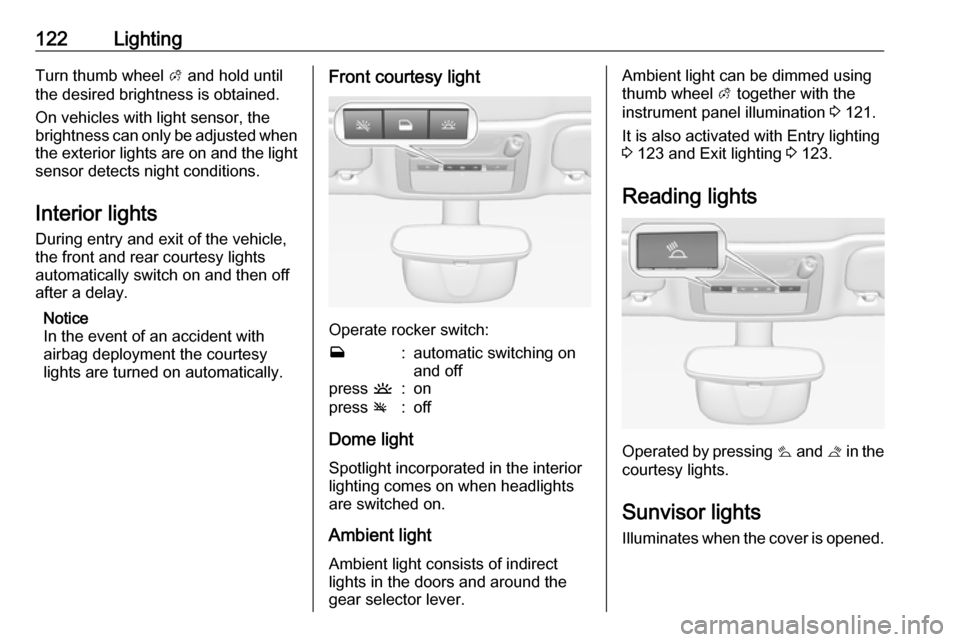
Operate rocker switch:
w:automatic switching on
and offpress u:onpress v:off
Dome light
Spotlight incorporated in the interior
lighting comes on when headlights
are switched on.
Ambient light Ambient light consists of indirect
lights in the doors and around the
gear selector lever.
Ambient light can be dimmed using
thumb wheel A together with the
instrument panel illumination 3 121.
It is also activated with Entry lighting
3 123 and Exit lighting 3 123.
Reading lights
Operated by pressing s and t in the
courtesy lights.
Sunvisor lights
Illuminates when the cover is opened.
Page 128 of 263

126Climate controlDemisting and defrosting
●Press V: fan automatically
switches to higher speed, the air
distribution is directed towards
the windscreen.
● Set temperature control to warmest level.
● Switch on heated rear window Ü.
● Open side air vents as required and direct them towards the doorwindows.
Air conditioning system
In addition to the heating and
ventilation system, the air
conditioning system has controls for:
n:cooling4:air recirculation
Heated seats ß 3 53, Heated
steering wheel * 3 77.
Cooling n
Press n to switch on cooling. The
LED in the button illuminates to
indicate activation. Cooling is only
functional when the engine is running and climate control fan is switched on.
Press n again to switch off cooling.
The air conditioning system cools and
dehumidifies (dries) as soon as the
outside temperature is slightly above
the freezing point. Therefore
condensation may form and drip from under the vehicle.