change wheel VAUXHALL CASCADA 2016.5 Owner's Manual
[x] Cancel search | Manufacturer: VAUXHALL, Model Year: 2016.5, Model line: CASCADA, Model: VAUXHALL CASCADA 2016.5Pages: 263, PDF Size: 7.72 MB
Page 13 of 263

In brief111Power windows .....................31
2 Exterior mirrors .....................29
3 Cruise control .....................157
Speed limiter ....................... 158
Forward collision alert .........160
4 Side air vents ...................... 133
5 Turn and lane-change
signals, headlight flash,
low beam and high beam,
high beam assist .................120
Exit lighting ......................... 123
Parking lights ...................... 121
Buttons for Driver
Information Centre ................95
6 Instruments .......................... 83
7 Steering wheel controls .......77
8 Driver Information Centre ...... 95
9 Windscreen wiper,
windscreen washer
system, headlight washer
system ................................... 78
10 Sport mode ........................ 155
Central locking system ..........22Hazard warning flashers ....119
Control indicator for airbag deactivation .......................... 89
Control indicator for front
passenger seat belt .............89
Tour mode .......................... 155
11 Info-Display .......................... 99
12 Anti-theft alarm system
status LED ........................... 26
13 Centre air vents .................. 133
14 Glovebox, lockable ...............68
Fuse box ............................. 206
15 Traction Control system
(TC) ..................................... 153
Electronic Stability Control (ESC) .................................. 154
Parking assist systems .......163
Lane departure warning .....177
Eco button for stop-start
system ................................. 138
16 Climate control system ........ 125
17 AUX input, USB input ..........10
18 Power outlet .......................... 8219Soft top operation switch .....34
Central window switch .........31
20 Selector lever, transmission
21 Parking brake, manual or
electric operation ................151
22 Ignition switch with
steering wheel lock ............137
23 Horn ..................................... 78
Driver airbag ........................ 60
24 Bonnet release lever ..........189
25 Storage compartment ..........69
Fuse box ............................ 206
26 Steering wheel adjustment ..77
27 Light switch ........................ 112
Rear fog light ...................... 120
Instrument illumination .......121
Headlight range
adjustment ......................... 115
Front fog lights ...................120
Page 70 of 263

68StorageStorageStorage compartments................68
Glovebox ................................... 68
Cupholders ................................ 69
Front storage ............................. 69
Armrest storage .........................70
Centre console storage .............70
Load compartment .......................71
Rear storage .............................. 73
Rear floor storage cover ............73
Lashing eyes ............................. 74
Warning triangle ........................74
First aid kit ................................. 74
Loading information .....................75Storage compartments9Warning
Do not store heavy or sharp
objects in the storage
compartments. Otherwise, the
storage compartment lid could
open and vehicle occupants could be injured by objects being thrown
around in the event of hard
braking, a sudden change in
direction or an accident.
Glovebox
The glovebox features a pen holder,
a credit card holder, a coin holder and
an adapter for the locking wheel nuts.
Close glovebox whilst driving. It can
be locked with the vehicle key.
Page 87 of 263
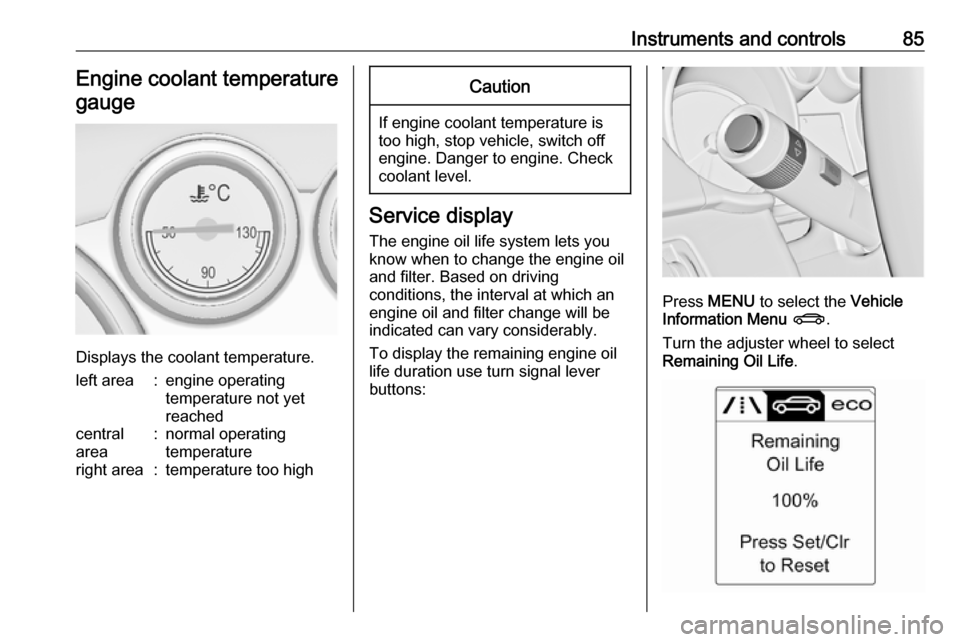
Instruments and controls85Engine coolant temperaturegauge
Displays the coolant temperature.
left area:engine operating
temperature not yet
reachedcentral
area:normal operating
temperatureright area:temperature too highCaution
If engine coolant temperature is
too high, stop vehicle, switch off
engine. Danger to engine. Check
coolant level.
Service display
The engine oil life system lets you
know when to change the engine oil
and filter. Based on driving
conditions, the interval at which an
engine oil and filter change will be
indicated can vary considerably.
To display the remaining engine oil
life duration use turn signal lever
buttons:
Press MENU to select the Vehicle
Information Menu X .
Turn the adjuster wheel to select
Remaining Oil Life .
Page 98 of 263
96Instruments and controlsVehicle Information Menu X
Press MENU to select X.
Turn the adjuster wheel to select a
submenu. Press SET/CLR to confirm.
Follow the instructions given in the
submenus.
Depending on the version, the
possible submenus may include:
● Unit : displayed units can be
changed
● Tyre Pressure : checks tyre
pressure of all wheels during
driving 3 211
● Tyre Load : select tyre pressure
category according to the actually inflated tyre pressure
3 211
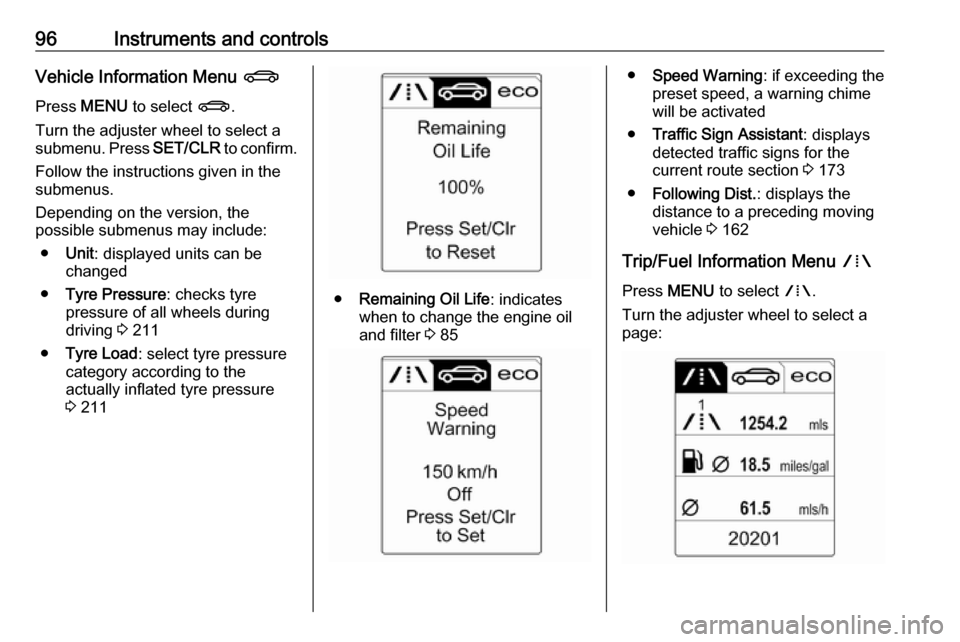
● Remaining Oil Life : indicates
when to change the engine oil and filter 3 85
● Speed Warning : if exceeding the
preset speed, a warning chime will be activated
● Traffic Sign Assistant : displays
detected traffic signs for the
current route section 3 173
● Following Dist. : displays the
distance to a preceding moving
vehicle 3 162
Trip/Fuel Information Menu W
Press MENU to select W.
Turn the adjuster wheel to select a
page:
Page 103 of 263

Instruments and controls101
To exit the Settings menu, press
BACK repeatedly or press CONFIG
after confirming the changes.
Vehicle personalisation 3 103.
Memorised settings 3 21.
Vehicle messages
Messages are indicated in the Driver
Information Centre, in some cases
together with a warning and signal
sound.
Press SET/CLR , MENU or turn the
adjuster wheel to confirm a message.
Messages in the Driver
Information Centre
The vehicle messages are displayed
as text. Follow the instructions given
in the messages.
The system displays messages
regarding the following topics:
● service messages
● fluid levels
● anti-theft alarm system
● brakes
● ride control systems
● driver assistance systems
● cruise control
Page 122 of 263

120LightingIn the event of an accident with airbag
deployment the hazard warning
flashers are activated automatically.
Turn and lane-changesignalslever up:right turn signallever down:left turn signal
If the lever is moved past the
resistance point, the turn signal is
switched on constantly. When the
steering wheel moves back, the turn
signal is automatically deactivated.
For three flashes, e.g. when changing lanes, press the lever until resistance
is felt then release.
When a trailer is connected, pressing the lever until resistance is felt then
releasing activates six turn signal
flashes.
Move the lever to the resistance point
and hold for longer indication.
Switch the turn signal off manually by moving the lever to its original
position.
Front fog lights
Operated by pressing >.
Light switch in position AUTO:
switching on front fog lights will switch headlights on automatically.
Rear fog lights
Operated by pressing r
.
Light switch in position AUTO:
switching on rear fog light will switch
headlights on automatically.
Light switch in position 8: rear fog
light can only be switched on with
front fog lights.
The vehicle rear fog light is
deactivated when towing.
Page 161 of 263
Driving and operating159Activation
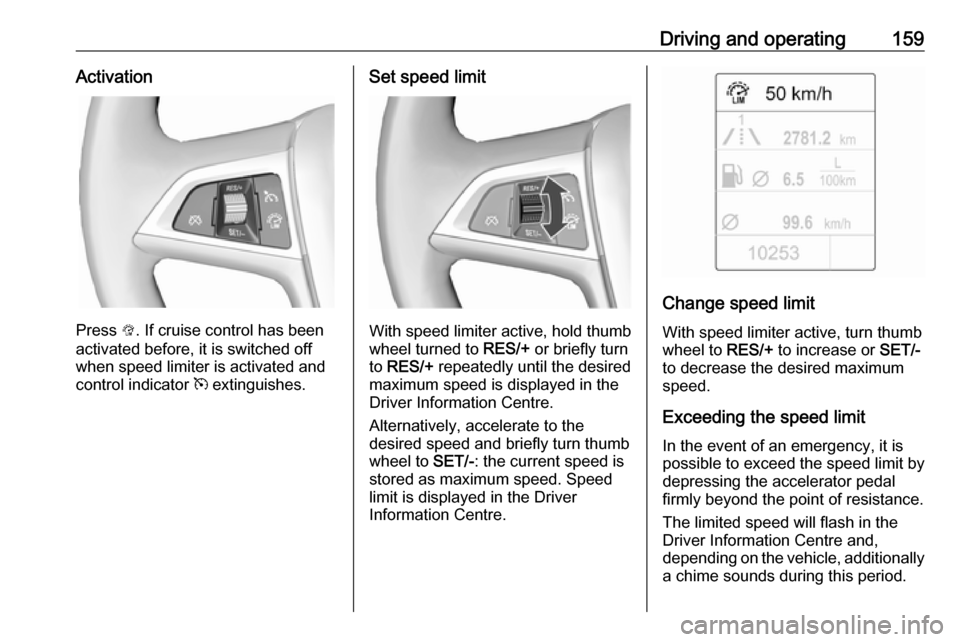
Press L. If cruise control has been
activated before, it is switched off when speed limiter is activated and
control indicator m extinguishes.
Set speed limit
With speed limiter active, hold thumb
wheel turned to RES/+ or briefly turn
to RES/+ repeatedly until the desired
maximum speed is displayed in the
Driver Information Centre.
Alternatively, accelerate to the
desired speed and briefly turn thumb
wheel to SET/-: the current speed is
stored as maximum speed. Speed
limit is displayed in the Driver
Information Centre.
Change speed limit
With speed limiter active, turn thumb
wheel to RES/+ to increase or SET/-
to decrease the desired maximum
speed.
Exceeding the speed limit In the event of an emergency, it is possible to exceed the speed limit by
depressing the accelerator pedal
firmly beyond the point of resistance.
The limited speed will flash in the
Driver Information Centre and,
depending on the vehicle, additionally
a chime sounds during this period.
Page 222 of 263

220Vehicle careNotice
The driving characteristics of the repaired tyre are severely affected,therefore have this tyre replaced.
If unusual noise is heard or the
compressor becomes hot, turn
compressor off for at least
30 minutes.
The built-in safety valve opens at a
pressure of 102 psi.
Note the expiry date of the kit. After
this date its sealing capability is no
longer guaranteed. Pay attention to
storage information on sealant
bottle.
Replace the used sealant bottle. Dispose of the bottle as prescribed
by applicable laws.
The compressor and sealant can be used from approx. -30 °C.
The adapters supplied can be used
to pump up other items e.g.
footballs, air mattresses, inflatable
dinghies etc. They are located on the underside of the compressor. To
remove, screw on compressor air hose and withdraw adapter.Wheel changing
Some vehicles are equipped with a
tyre repair kit instead of a spare wheel
3 217.
Make the following preparations and
observe the following information:
● Park the vehicle on a level, firm and non-slippery surface. The
front wheels must be in the
straight-ahead position.
● Apply the parking brake and engage first gear, reverse gear or
P .
● Remove the spare wheel 3 222.
● Never change more than one wheel at once.
● Use the jack only to change wheels in case of puncture, not
for seasonal winter or summer
tyre change.
● The jack is maintenance-free.
● If the ground on which the vehicle
is standing is soft, a solid board
(max. 1 cm thick) should be
placed under the jack.
● Take heavy objects out of the vehicle before jacking up.● No people or animals may be in the vehicle when it is jacked-up.
● Never crawl under a jacked-up vehicle.
● Do not start the vehicle when it is
raised on the jack.
● Clean wheel nuts and thread with
a clean cloth before mounting the
wheel.9 Warning
Do not grease wheel bolt, wheel
nut and wheel nut cone.
1. Disengage wheel nut caps with a screwdriver and remove. Pull off
the wheel cover. Vehicle tools
3 209.
Alloy wheels: Disengage wheel
nut caps with a screwdriver and
remove. To protect the wheel,
place a soft cloth between the
screwdriver and the alloy wheel.
Page 224 of 263

222Vehicle careAttach wheel wrench and with the
jack correctly aligned rotate
wrench until wheel is clear of the
ground.
5. Unscrew the wheel nuts. 6. Change the wheel. Spare wheel 3 222.
7. Screw on the wheel nuts.
8. Lower vehicle.
9. Install the wheel wrench ensuring that it locates securely and tighten
each nut in a crosswise
sequence. Tightening torque is
140 Nm.
10. Align the valve hole in the wheel cover with the tyre valve before
installing.
Install wheel nut caps.
Install centre cap on alloy wheels.
11. Stow the replaced wheel 3 222,
the vehicle tools 3 209 and the
adapter for the locking wheel nuts 3 68.
12. Check the tyre pressure of the installed tyre and the wheel nut
torque as soon as possible.Have the defective tyre renewed or
repaired as soon as possible.
Jacking position for lifting platform
Rear arm position of the lifting
platform centrically under the recess
of the sill.
Front arm position of the lifting
platform at the underbody.
Spare wheel Some vehicles are equipped with a
tyre repair kit instead of a spare
wheel.
If mounting a spare wheel, which is
different from the other wheels, this
wheel might be classified as a
temporary spare wheel and the
corresponding speed limits apply,
even though no label indicates this.
Seek the assistance of a workshop to
check the applicable speed limit.
The spare wheel has a steel rim.
Page 225 of 263

Vehicle care223Caution
The use of a spare wheel that issmaller than the other wheels or in combination with winter tyres
could affect driveability. Have the defective tyre replaced as soon as
possible.
Removing the spare wheel and
stowing a damaged wheel in the
load compartment
The spare wheel is located in the
spare wheel well beneath the floor
cover.
The spare wheel well is not designed
for other tyre sizes than spare wheel.
To remove: 1. Close the soft top and fold in the load compartment partition by
pushing at the loop area upwards to the inside 3 71.
2. Remove the floor cover.
3. The spare wheel is secured with a
wing nut in the well. Untwist nut,
remove conus and take out the
spare wheel.
Under the spare wheel there is a
box and a bag with vehicle tools.
The tool bag is fixated with a
tether to the stow rod. Remove
tool box and tool bag tether from
the stow rod to access the tools in the bag. Vehicle tools 3 209.
4. Change the damaged wheel 3 220 and stow the tools back in
the tool box and the bag. Remove
the strap from the box and put
aside.
5. Attach the tool bag tether to the stow rod and put the bag in the
well. Secure the tool box by
turning right back the wing nut
with the conus.