steering VAUXHALL CASCADA 2018.5 User Guide
[x] Cancel search | Manufacturer: VAUXHALL, Model Year: 2018.5, Model line: CASCADA, Model: VAUXHALL CASCADA 2018.5Pages: 265, PDF Size: 7.82 MB
Page 79 of 265

Instruments and controls77Controls
Steering wheel adjustment
Unlock lever, adjust steering wheel,
then engage lever and ensure it is
fully locked.
Do not adjust steering wheel unless
vehicle is stationary and steering
wheel lock has been released.
Steering wheel controls
The Infotainment system, some driver assistance systems and a connected
mobile phone can be operated via the
controls on the steering wheel.
Further information is available in the
Infotainment manual.
Driver assistance systems 3 157.
Heated steering wheel
Activate heating by pressing *.
Activation is indicated by the LED in
the button.
Page 80 of 265

78Instruments and controlsThe highlighted grip areas of the
steering wheel are heated quicker
and to a higher temperature than the
other areas.
Heating is operational when the
engine is running and during an
Autostop.
Stop-start system 3 138.
Horn
Press j.
Windscreen wiper and
washer
Windscreen wiperHI:fastLO:slowINT:interval wiping
or
automatic wiping with rain
sensorOFF:off
For a single wipe when the
windscreen wiper is off, press the
lever down to position 1x.
Do not use if the windscreen is frozen.
Switch off in car washes.
Adjustable wiper interval
Wiper lever in position INT.
Turn the adjuster wheel to adjust the
wiping frequency.
Page 90 of 265

88Instruments and controlsControl indicators in the centre
console
Overview
OTurn signal 3 88XSeat belt reminder 3 89vAirbag and belt tensioners and
roll bars 3 89VAirbag deactivation 3 89pCharging system 3 89ZMalfunction indicator light
3 90RBrake and clutch system 3 90-Operate pedal 3 90mElectric parking brake 3 90jElectric parking brake fault
3 91uAntilock brake system (ABS)
3 91RUpshift 3 91cPower steering 3 91)Lane departure warning 3 91aElectronic Stability Control off
3 92bElectronic Stability Control and
Traction Control system 3 92kTraction Control system off
3 92!Preheating 3 92%Exhaust filter 3 92YAdBlue 3 92wTyre pressure monitoring
system 3 92IEngine oil pressure 3 93iLow fuel 3 93dImmobiliser 3 938Exterior light 3 93CHigh beam 3 93lHigh beam assist 3 94fAdaptive forward lighting 3 94>Fog light 3 94rRear fog light 3 94mCruise control 3 94AVehicle detected ahead 3 94hDoor open 3 94
Turn lights
O illuminates or flashes green.
Illuminates briefly The parking lights are switched on.
Flashes
A turn signal or the hazard warning
flashers are activated.
Page 93 of 265
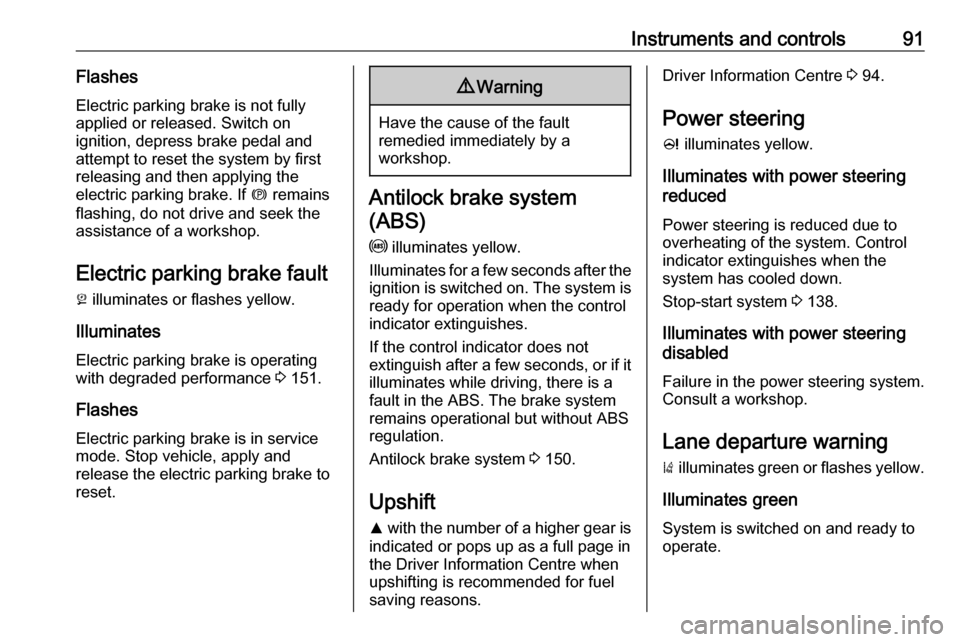
Instruments and controls91Flashes
Electric parking brake is not fully applied or released. Switch on
ignition, depress brake pedal and
attempt to reset the system by first
releasing and then applying the
electric parking brake. If m remains
flashing, do not drive and seek the
assistance of a workshop.
Electric parking brake fault j illuminates or flashes yellow.
Illuminates
Electric parking brake is operating
with degraded performance 3 151.
Flashes
Electric parking brake is in service mode. Stop vehicle, apply and
release the electric parking brake to
reset.9 Warning
Have the cause of the fault
remedied immediately by a
workshop.
Antilock brake system
(ABS)
u illuminates yellow.
Illuminates for a few seconds after the ignition is switched on. The system is
ready for operation when the control
indicator extinguishes.
If the control indicator does not
extinguish after a few seconds, or if it illuminates while driving, there is a
fault in the ABS. The brake system
remains operational but without ABS
regulation.
Antilock brake system 3 150.
Upshift R with the number of a higher gear is
indicated or pops up as a full page in
the Driver Information Centre when
upshifting is recommended for fuel
saving reasons.
Driver Information Centre 3 94.
Power steering
c illuminates yellow.
Illuminates with power steering
reduced
Power steering is reduced due to
overheating of the system. Control
indicator extinguishes when the
system has cooled down.
Stop-start system 3 138.
Illuminates with power steering
disabled
Failure in the power steering system.
Consult a workshop.
Lane departure warning
) illuminates green or flashes yellow.
Illuminates green
System is switched on and ready to
operate.
Page 95 of 265

Instruments and controls93Flashes
Fault in system or tyre without
pressure sensor mounted (e.g. spare wheel). After 60-90 seconds the
control indicator illuminates
continuously. Consult a workshop.
Tyre pressure monitoring system
3 211.
Engine oil pressure
I illuminates red.
Illuminates when the ignition is
switched on and extinguishes shortly
after the engine starts.
Illuminates when the engine is
runningCaution
Engine lubrication may be
interrupted. This may result in
damage to the engine and/or
locking of the drive wheels.
1. Depress clutch.
2. Select neutral gear, set selector lever to N.
3. Move out of the flow of traffic as
quickly as possible without
impeding other vehicles.
4. Switch off ignition.9 Warning
When the engine is off,
considerably more force is needed
to brake and steer. During an
Autostop the brake servo unit will still be operational.
Do not remove key until vehicle is stationary, otherwise the steeringwheel lock could engage
unexpectedly.
Check oil level before seeking the
assistance of a workshop 3 191.
Low fuel
i illuminates or flashes yellow.
Illuminates
Level in fuel tank is too low.
Flashes
Fuel used up. Refuel immediately.
Never run the tank dry.
Catalytic converter 3 143.
Bleeding the diesel fuel system
3 195.
Immobiliser d flashes yellow.
Fault in the immobiliser system. The
engine cannot be started.
Exterior light 8 illuminates green.
The exterior lights are on 3 112.
High beam
C illuminates blue.
Illuminates when high beam is on or
during headlight flash 3 114 , or when
high beam is on with high beam assist
or intelligent light range 3 116.
Page 105 of 265

Instruments and controls103
Press CONFIG . The menu Settings is
displayed.
The following settings can be
selected by turning and pressing the
multifunction knob:
● Sport mode settings
● Languages
● Time Date
● Radio settings
● Phone settings
● Vehicle settings
In the corresponding submenus the
following settings can be changed:
Sport mode settings
The driver can select the functions
which will be activated in Sport mode
3 155.
● Sport suspension : Damping
becomes harder.
● Sport powertrain performance :
Accelerator pedal and gear
change characteristics become
more responsive.
● Sport steering : Steering support
is reduced.
● Swap backlight colour main
instr. : Changes the instrument
illumination colour.Languages
Selection of the desired language.
Time Date
See 'Clock' 3 80.
Radio settings
See Infotainment manual for further
information.
Phone settings
See Infotainment manual for further information.
Page 107 of 265

Instruments and controls105Remote door unlock: Changes
the configuration to unlock only
the driver's door or the whole
vehicle whilst unlocking.
Auto relock doors : Activates or
deactivates the automatic relock
function after unlocking without
opening the vehicle.
● Restore factory settings
Restore factory settings : Resets
all settings to the default settings.
Settings in the Colour-Info-
Display
Navi 950/Navi 650/CD 600
Press CONFIG on the Infotainment
system faceplate to enter the
Configuration menu.
Turn the multifunction knob to scroll
upwards or downwards in the list.
Press the multifunction knob
(Navi 950 / Navi 650: press the outer
ring) to select a menu item.
● Sport Mode Profile
● Languages
● Time and Date
● Radio Settings
● Phone Settings
● Navigation Settings
● Display Settings
● Vehicle Settings
In the corresponding submenus the
following settings can be changed:
Sport Mode Profile
● Engine Sport Performance :
Accelerator pedal and gear
change characteristics become
more responsive.
● Sport Mode Back Lighting :
Changes the instrument
illumination colour.
● Sport Suspension : Damping
becomes harder.
● Sport Steering : Steering support
is reduced.
Languages
Selection of the desired language.
Time and Date
See Infotainment manual for further
information.
Radio Settings
See Infotainment manual for further information.
Phone Settings
See Infotainment manual for further information.
Page 119 of 265

Lighting117Country lighting
Activated automatically at a speed
range between approx. 34 and
70 mph. The beam of light and the
brightness is different between the
left and the right side.
Motorway lighting Activated automatically at a speed
above approx. 70 mph and minimal
steering movements. It switches on
after a delay or directly when the
vehicle is powerfully accelerated. The
light beam is longer and brighter.
Adverse weather lighting
Activated automatically up to a speed
of approx. 43 mph, when the rain sensor recognises condensation or
the wiper operates continuously. The
range, distribution and light intensity
is regulated variably depending on visibility.Dynamic curve lighting
The light beam pivots based on
steering wheel angle and speed,
improving lighting in curves.
Control indicator f 3 94.
Corner lighting
On tight bends or when turning off,
depending on the steering angle or
the turn signal light, an additional left
or right reflector is switched on which illuminates the road at a right angle to
the direction of travel. It is activated
up to a speed of 25 mph.
Control indicator f 3 94.
Reversing function
If the headlights are on and reverse
gear is engaged, both corner lights
are switched on. They remain
illuminated for 20 seconds after
disengaging reverse gear or until
driving faster than 10 mph in a
forward gear.
High beam assist This feature allows high beam as
main driving light by night and when
vehicle speed is faster than 25 mph.
It switches to low beam when: ● The camera in the windscreen detects the lights of oncoming or
preceding vehicles.
● The vehicle speed is slower than
12 mph.
● It is foggy or snowy.
● Driving in urban areas.
If there are no restrictions detected,
the system switches back to high
beam.
Page 122 of 265

120LightingIn the event of an accident with airbag
deployment the hazard warning
flashers are activated automatically.
Turn lightslever up:right turn signallever down:left turn signal
A resistance point can be felt when
moving the lever.
Constant flashing is activated when
the lever is being moved beyond the
resistance point. It is deactivated
when the steering wheel is moved in
the opposite direction or lever is
manually moved back to its neutral
position.
Activate temporary flashing by
holding the lever just before the
resistance point. Turning lights will
flash until lever is being released.
To activate three flashes, tap the
lever briefly without passing the
resistance point.
When a trailer is connected, turn
signal flashes six times when
pressing the lever until resistance is
felt and then releasing.
Front fog lightsOperated by pressing >.
Light switch in position AUTO:
switching on front fog lights will switch headlights on automatically.
Rear fog lights
Operated by pressing r.
Light switch in position AUTO:
switching on rear fog light will switch
headlights on automatically.
Light switch in position 8: rear fog
light can only be switched on with
front fog lights.
The vehicle rear fog light is
deactivated when towing.
Page 128 of 265

126Climate controlDemisting and defrosting
●Press V: fan automatically
switches to higher speed, the air
distribution is directed towards
the windscreen.
● Set temperature control to warmest level.
● Switch on heated rear window Ü.
● Open side air vents as required and direct them towards the doorwindows.
Air conditioning system
In addition to the heating and
ventilation system, the air
conditioning system has controls for:
n:cooling4:air recirculation
Heated seats ß 3 53, Heated
steering wheel * 3 77.
Cooling n
Press n to switch on cooling. The
LED in the button illuminates to
indicate activation. Cooling is only
functional when the engine is running and climate control fan is switched on.
Press n again to switch off cooling.
The air conditioning system cools and
dehumidifies (dries) as soon as the
outside temperature is slightly above
the freezing point. Therefore
condensation may form and drip from under the vehicle.