change time VAUXHALL CASCADA 2018.5 Owner's Manual
[x] Cancel search | Manufacturer: VAUXHALL, Model Year: 2018.5, Model line: CASCADA, Model: VAUXHALL CASCADA 2018.5Pages: 265, PDF Size: 7.82 MB
Page 23 of 265
Keys, doors and windows21Unlocking 3 21.
Basic settings Some settings can be changed in the
Settings menu in the Info-Display.
Vehicle personalisation 3 102.
Radio remote control battery
replacement
Replace the battery as soon as the
range reduces.
Batteries do not belong in household
waste. They must be disposed of at
an appropriate recycling collection
point.
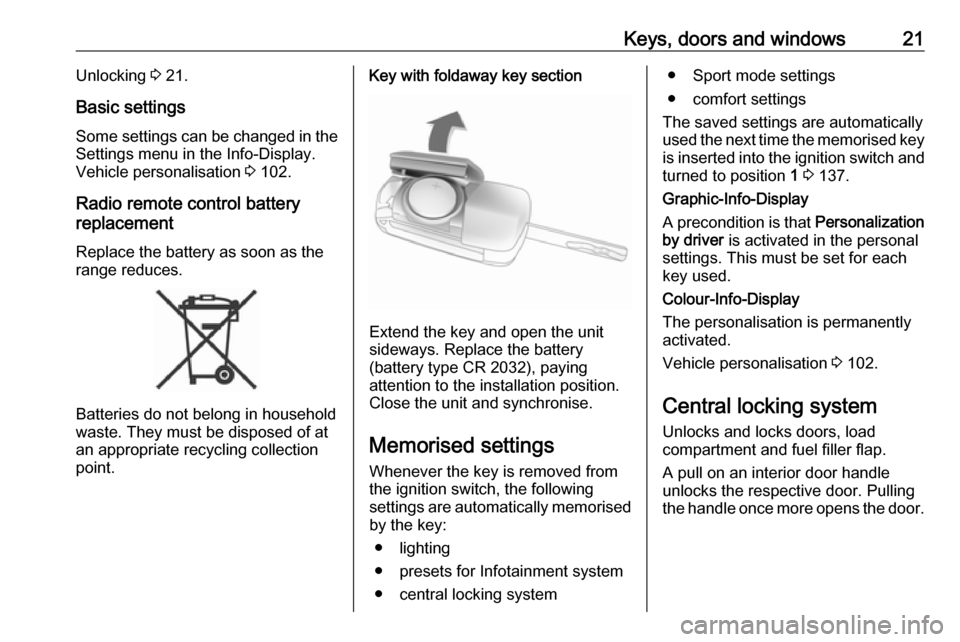
Key with foldaway key section
Extend the key and open the unit
sideways. Replace the battery
(battery type CR 2032), paying
attention to the installation position.
Close the unit and synchronise.
Memorised settings
Whenever the key is removed from
the ignition switch, the following
settings are automatically memorised
by the key:
● lighting
● presets for Infotainment system
● central locking system
● Sport mode settings
● comfort settings
The saved settings are automatically
used the next time the memorised key
is inserted into the ignition switch and
turned to position 1 3 137.
Graphic-Info-Display
A precondition is that Personalization
by driver is activated in the personal
settings. This must be set for each
key used.
Colour-Info-Display
The personalisation is permanently
activated.
Vehicle personalisation 3 102.
Central locking system
Unlocks and locks doors, load
compartment and fuel filler flap.
A pull on an interior door handle
unlocks the respective door. Pulling the handle once more opens the door.
Page 24 of 265

22Keys, doors and windowsNotice
In the event of an accident in which airbags or belt pretensioners are
deployed, the vehicle is
automatically unlocked.
Notice
A short time after unlocking with the
remote control, the doors are
relocked automatically if no door has
been opened.
Unlocking
Press c.
Two settings are selectable: ● To unlock only the driver's door and fuel filler flap, press c once.
To unlock all doors, press c
twice.
Press c again and hold to open
the windows and the soft top 3 31.
● Press c once to unlock all doors,
load compartment and fuel filler
flap.
The setting can be changed in the Settings menu in the Info-Display.
Vehicle personalisation 3 102.
The setting can be saved for the key
being used.
Memorised settings 3 21.
Unlocking and opening the boot lid 3 24.
Locking
Close doors, load compartment and
fuel filler flap.
Press e briefly.
If the driver's door is not closed properly, the central locking system
will not work.
Press and hold e again to close the
soft top and the windows 3 31.
Central locking buttons Locks or unlocks both doors, the load
compartment and fuel filler flap from
the passenger compartment.
Page 64 of 265

62Seats, restraintsThe front passenger airbag system
can be deactivated via a key-
operated switch on the right side of
the instrument panel.
Use the ignition key to choose the
position:* OFF:front passenger airbag is
deactivated and will not
inflate in the event of a
collision. Control indicator
* OFF illuminates
continuously in the centre
console. A child restraint
system can be installed in
accordance with the chart
Child restraint installation
locations 3 65. No adult
person is allowed to occupy the front passenger seat.V ON:front passenger airbag is
active. A child restraint
system must not be
installed.9 Danger
Risk of fatal injury for a child using
a child restraint system on a seat
with activated front passenger
airbag.
Risk of fatal injury for an adult
person on a seat with deactivated
front passenger airbag.
If the control indicator V
illuminates,
the front passenger airbag system will inflate in the event of a collision.
If both control indicators are
illuminated at the same time, there is
a system failure. The status of the
system is not discernible, therefore
no person is allowed to occupy the
front passenger seat. Contact a
workshop immediately.
Change status only when the vehicle
is stopped with the ignition off.
Status remains until the next change.
Control indicator for airbag
deactivation 3 89.
Page 82 of 265

80Instruments and controlsThe illustration shows Graphic-Info-
Display
The illustration shows Colour-Info-
Display
If outside temperature drops to 3 °C,
a warning message is displayed in the Driver Information Centre.9 Warning
The road surface may already be
icy even though the display
indicates a few degrees above 0
°C.
Clock
Date and time are shown in the
Info-Display.
Time and date settings
CD 400plus/CD 400/CD 300
Press CONFIG . The menu Settings is
displayed.
Select Time Date .
Selectable setting options:
● Set time: Changes the time
shown on the display.
● Set date: Changes the date
shown on the display.
● Set time format : Changes
indication of hours between 12 h
and 24 h.
● Set date format : Changes
indication of date between MM/
DD/YYYY and DD.MM.YYYY .
● Display clock : Switches on/off
indication of time on the display.
● RDS clock synchronization : The
RDS signal of most VHF
transmitters automatically sets
Page 87 of 265

Instruments and controls85Caution
If engine coolant temperature is
too high, stop vehicle, switch off
engine. Danger to engine. Check
coolant level.
Service display
The engine oil life system lets you
know when to change the engine oil
and filter. Based on driving
conditions, the interval at which an
engine oil and filter change will be
indicated can vary considerably.
To display the remaining engine oil
life duration use turn signal lever
buttons:
Press MENU to select the Vehicle
Information Menu X .
Turn the adjuster wheel to select
Remaining Oil Life .
The remaining engine oil life duration
is displayed in percent in the Driver
Information Centre.
Reset Press SET/CLR on turn signal lever
for several seconds to reset. The
remaining engine oil life duration
page must be active. Switch on
ignition, but not the engine.
The system must be reset every time
the engine oil is changed, to ensure
proper functionality. Seek the
assistance of a workshop.
Next service When the system has calculated that
engine oil life has diminished, a
warning message appears in the
Driver Information Centre. Have
engine oil and filter changed by a
workshop within one week or
300 miles (whichever occurs first).
Driver Information Centre 3 94.
Service information 3 233.
Page 105 of 265

Instruments and controls103
Press CONFIG . The menu Settings is
displayed.
The following settings can be
selected by turning and pressing the
multifunction knob:
● Sport mode settings
● Languages
● Time Date
● Radio settings
● Phone settings
● Vehicle settings
In the corresponding submenus the
following settings can be changed:
Sport mode settings
The driver can select the functions
which will be activated in Sport mode
3 155.
● Sport suspension : Damping
becomes harder.
● Sport powertrain performance :
Accelerator pedal and gear
change characteristics become
more responsive.
● Sport steering : Steering support
is reduced.
● Swap backlight colour main
instr. : Changes the instrument
illumination colour.Languages
Selection of the desired language.
Time Date
See 'Clock' 3 80.
Radio settings
See Infotainment manual for further
information.
Phone settings
See Infotainment manual for further information.
Page 107 of 265

Instruments and controls105Remote door unlock: Changes
the configuration to unlock only
the driver's door or the whole
vehicle whilst unlocking.
Auto relock doors : Activates or
deactivates the automatic relock
function after unlocking without
opening the vehicle.
● Restore factory settings
Restore factory settings : Resets
all settings to the default settings.
Settings in the Colour-Info-
Display
Navi 950/Navi 650/CD 600
Press CONFIG on the Infotainment
system faceplate to enter the
Configuration menu.
Turn the multifunction knob to scroll
upwards or downwards in the list.
Press the multifunction knob
(Navi 950 / Navi 650: press the outer
ring) to select a menu item.
● Sport Mode Profile
● Languages
● Time and Date
● Radio Settings
● Phone Settings
● Navigation Settings
● Display Settings
● Vehicle Settings
In the corresponding submenus the
following settings can be changed:
Sport Mode Profile
● Engine Sport Performance :
Accelerator pedal and gear
change characteristics become
more responsive.
● Sport Mode Back Lighting :
Changes the instrument
illumination colour.
● Sport Suspension : Damping
becomes harder.
● Sport Steering : Steering support
is reduced.
Languages
Selection of the desired language.
Time and Date
See Infotainment manual for further
information.
Radio Settings
See Infotainment manual for further information.
Phone Settings
See Infotainment manual for further information.
Page 111 of 265

Instruments and controls109To connect a mobile device with the
Wi-Fi hotspot:
1. Press j and then select Wi-Fi
settings on the Info-Display. The
settings displayed include the Wi- Fi hotspot name (SSID),
password and connection type.
2. Start a Wi-Fi network search on your mobile device.
3. Select your vehicle hotspot (SSID) when listed.
4. When prompted, enter the password on your mobile device.
Notice
To change the SSID or password, press Z and talk to an advisor or log
in to your account.
To switch off the Wi-Fi hotspot
functionality, press Z to call an
advisor.
Smartphone app
With the My Vauxhall smartphone
app, some vehicle functions can be
operated remotely.The following functions are available:
● Lock or unlock vehicle.
● Honk horn or flash lights.
● Check fuel level, engine oil life and tyre pressure (only with tyre
pressure monitoring system).
● Send navigation destination to the vehicle, if equipped with a
built-in navigation system.
● Locate vehicle on a map.
● Manage Wi-Fi settings.
To operate these functions, download the app from App Store ®
or
Google Play™ Store.
Remote control
If desired, use any phone to call an
advisor, who can remotely operate
specific vehicle functions. Find the respective OnStar phone number on
our country-specific website.
The following functions are available: ● Lock or unlock vehicle.
● Provide information on the vehicle location.
● Honk horn or flash lights.Stolen vehicle assistance
If the vehicle is stolen, report the theft to the authorities and request OnStar
stolen vehicle assistance. Use any
phone to call an advisor. Find the
respective OnStar phone number on
our country-specific website.
OnStar can provide support in
locating and recovering the vehicle.Theft alert
When the anti-theft alarm system is
triggered, a notification is sent to
OnStar. You are then informed about
this event by text message or email.Restart prevention
By sending remote signals, OnStar
can prevent the vehicle from
restarting once it has been turned off.
On-demand diagnostics
At any time e.g. if the vehicle displays a vehicle message, press Z to
contact an advisor and ask to
complete a real-time diagnostic check
to directly determine the issue.
Depending on the results, the advisor
will provide further support.
Page 112 of 265

110Instruments and controlsDiagnostic report
The vehicle automatically transmits
diagnostic data to OnStar which
sends a monthly email report to you
and your preferred workshop.
Notice
The workshop notification function
can be disabled in your account.
The report contains the status of key
operating systems of the vehicle like
engine, transmission, airbags, ABS,
and other major systems. It also
provides information on possible
maintenance items and tyre pressure (only with tyre pressure monitoring
system).
To look at the information in greater
detail, select the link within the email and log in to your account.
Destination download
A desired destination can be directly
downloaded to the navigation system.
Press Z to call an advisor and
describe the destination or point of
interest.The advisor can look up any address
or point of interest and directly send
the destination to the built-in
navigation system.
OnStar settings
OnStar PIN
To have full access to all OnStar
services, a four-digit PIN is required. The PIN has to be personalised when first talking to an advisor.
To change the PIN, press Z to call an
advisor.
Account data
An OnStar subscriber has an account
where all the data is stored. To
request a change of the account
information, press Z and talk to an
advisor or log in to your account.
If the OnStar service is used on
another vehicle, press Z and request
that the account be transferred to the
new vehicle.Notice
In any case, if the vehicle is disposed of, sold or otherwise transferred,
immediately inform OnStar about
the changes and terminate the
OnStar service on this vehicle.
Vehicle location
The vehicle location is transmitted to OnStar when service is requested ortriggered. A message on the Info-
Display informs about this
transmission.
To activate or deactivate the
transmission of the vehicle location,
press and hold j until an audio
message is heard.
The deactivation is indicated by the
status light flashing red and green for a short period of time and each time
the vehicle is started.
Notice
If the transmission of the vehicle
location is deactivated, some
services are no longer available.
Page 125 of 265

Lighting123Lighting features
Entry lighting Welcome lighting
The following lights are switched on
for a short time by unlocking the
vehicle with the radio remote control:
● headlights
● tail lights
● number plate lights
● instrument panel light
● interior lights
● puddle lights
Some functions work only in the dark and facilitates locating the vehicle.
The lighting switches off immediately
when the ignition key is turned to
position 1 3 137.
The following lights will additionally
switch on when the driver's door is
opened:
● illumination of some switches
● Driver Information Centre● door pocket lights
● console lights
Activation, deactivation and duration of this function can be changed in the
Info-Display. Vehicle personalisation
3 102.
The settings can be saved for the key being used 3 21.
Exit lighting
The following lights switch on if the
key is removed from the ignition
switch:
● interior lights
● instrument panel light (only when
it is dark)
● door and console lights
● puddle lights
They will switch off automatically after
a delay and will be activated again if
the driver's door is opened.
Headlights, tail lights and number
plate lights illuminate the surrounding
area for an adjustable time after
leaving the vehicle.Path lighting
Headlights, tail lights and number
plate lights illuminate the surrounding area for an adjustable time after
leaving the vehicle.
Activating
1. Switch off ignition
2. Remove ignition key
3. Open driver's door
4. Pull turn signal lever
5. Close driver's door
If the driver's door is not closed, the
lights switch off after two minutes.