transmission VAUXHALL CASCADA 2018 Owner's Manual
[x] Cancel search | Manufacturer: VAUXHALL, Model Year: 2018, Model line: CASCADA, Model: VAUXHALL CASCADA 2018Pages: 265, PDF Size: 7.81 MB
Page 13 of 265

In brief111Power windows .....................31
2 Exterior mirrors .....................29
3 Cruise control .....................155
Speed limiter ....................... 157
Forward collision alert .........158
4 Side air vents ...................... 131
5 Turn and lane-change
signals, headlight flash,
low beam and high beam,
high beam assist .................118
Exit lighting ......................... 121
Parking lights ...................... 119
Buttons for Driver
Information Centre ................93
6 Instruments .......................... 83
7 Steering wheel controls .......77
8 Driver Information Centre ...... 93
9 Windscreen wiper,
windscreen washer
system, headlight washer
system ................................... 78
10 Sport mode ........................ 153
Central locking system ..........21Hazard warning flashers ....117
Control indicator for airbag deactivation .......................... 88
Control indicator for front
passenger seat belt .............87
Tour mode .......................... 153
11 Info-Display .......................... 97
12 Anti-theft alarm system
status LED ........................... 26
13 Centre air vents .................. 131
14 Glovebox, lockable ...............68
Fuse box ............................. 205
15 Traction Control system
(TC) ..................................... 151
Electronic Stability Control (ESC) .................................. 152
Parking assist systems .......161
Lane departure warning .....175
Eco button for stop-start
system ................................. 136
16 Climate control system ........ 123
17 AUX input, USB input ..........10
18 Power outlet .......................... 8119Soft top operation switch .....34
Central window switch .........31
20 Selector lever, transmission
21 Parking brake, manual or
electric operation ................149
22 Ignition switch with
steering wheel lock ............135
23 Horn ..................................... 78
Driver airbag ........................ 60
24 Bonnet release lever ..........188
25 Storage compartment ..........69
Fuse box ............................ 205
26 Steering wheel adjustment ..77
27 Light switch ........................ 110
Rear fog light ...................... 118
Instrument illumination .......119
Headlight range
adjustment ......................... 113
Front fog lights ...................118
Page 17 of 265
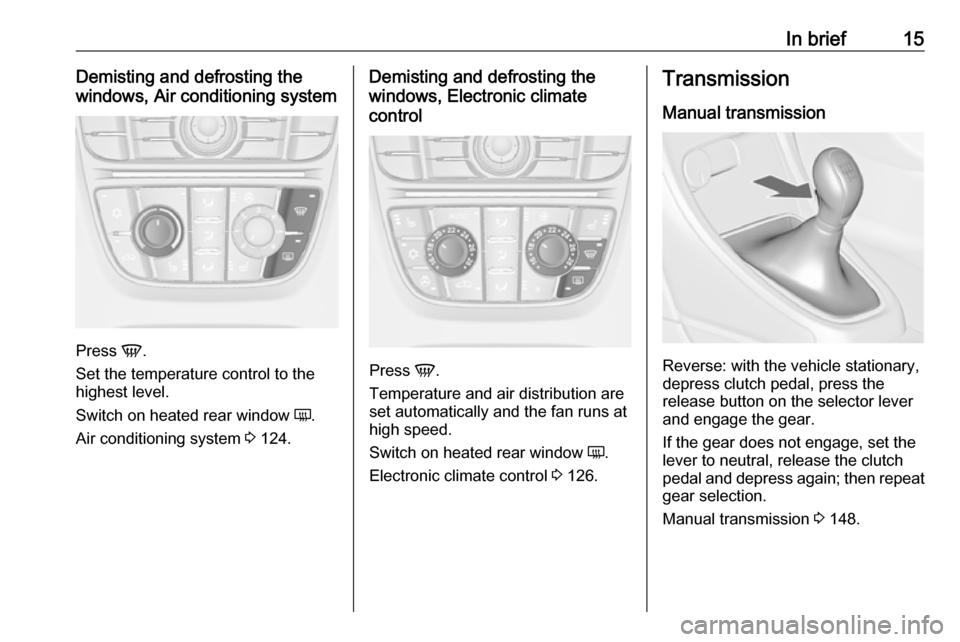
In brief15Demisting and defrosting the
windows, Air conditioning system
Press V.
Set the temperature control to the
highest level.
Switch on heated rear window Ü.
Air conditioning system 3 124.
Demisting and defrosting the
windows, Electronic climate
control
Press V.
Temperature and air distribution are
set automatically and the fan runs at
high speed.
Switch on heated rear window Ü.
Electronic climate control 3 126.
Transmission
Manual transmission
Reverse: with the vehicle stationary,
depress clutch pedal, press the
release button on the selector lever
and engage the gear.
If the gear does not engage, set the
lever to neutral, release the clutch
pedal and depress again; then repeat
gear selection.
Manual transmission 3 148.
Page 18 of 265
![VAUXHALL CASCADA 2018 Owners Manual 16In briefAutomatic transmissionP:parkR:reverseN:neutralD:automatic modeM:manual mode: move selector
lever from D to the left.<:manual mode upshifting]:manual mode downshifting
The selector lever can](/img/38/19387/w960_19387-17.png "VAUXHALL CASCADA 2018 Owners Manual 16In briefAutomatic transmissionP:parkR:reverseN:neutralD:automatic modeM:manual mode: move selector
lever from D to the left.<:manual mode upshifting]:manual mode downshifting
The selector lever can")
16In briefAutomatic transmissionP:parkR:reverseN:neutralD:automatic modeM:manual mode: move selector
lever from D to the left.<:manual mode upshifting]:manual mode downshifting
The selector lever can only be moved
out of P when the ignition is on and
the brake pedal is applied. To engage
P or R, press the release button.
Automatic transmission 3 144.
Starting off
Check before starting off ● Tyre pressure and condition 3 213, 3 246.
● Engine oil level and fluid levels 3 189.
● All windows, mirrors, exterior lighting and number plates are
free from dirt, snow and ice and
are operational.
● Proper position of mirrors, seats and seat belts 3 29, 3 47,
3 55.
● Soft top must be completely opened or closed 3 34.
● Brake function at low speed, particularly if the brakes are wet.Starting the engine
● Turn key to position 1.
● Move the steering wheel slightly to release the steering wheel
lock.
● Manual transmission: operate clutch and brake pedal.
Automatic transmission: operate
brake pedal and move selector to
P or N.
● Do not operate accelerator pedal.
Page 20 of 265
18In brieflever to position P before
removing the ignition key. On
an uphill slope, turn the front
wheels away from the kerb.
If the vehicle is on a downhill
slope, engage reverse gear or
set the selector lever to position P before removing the ignition
key. Turn the front wheels
towards the kerb.
● Close the windows and the soft
top.
● Remove the ignition key from the ignition switch. Turn the
steering wheel until the
steering wheel lock is felt to
engage.
For vehicles with automatic
transmission, the key can only
be removed when the selector
lever is in position P.
●
Lock the vehicle with e on the
radio remote control.
Activate the anti-theft alarm
system 3 26.
● The engine cooling fans may run
after the engine has been
switched off 3 188.Caution
After running at high engine
speeds or with high engine loads,
operate the engine briefly at a low load or run in neutral for
approx. 30 seconds before
switching off, in order to protect
the turbocharger.
Keys, locks 3 19, Laying the vehicle
up for a long period of time 3 187.
Page 26 of 265
24Keys, doors and windowsAdditionally, it is configurable to
unlock the driver's door or both doors after the ignition is switched off and
the ignition key is removed (manual
transmission) or the selector lever is
moved to position P (automatic
transmission).
Settings can be changed in the
Settings menu in the Info-Display.
Vehicle personalisation 3 101.
The settings can be saved for the key being used 3 21.Doors
Load compartment
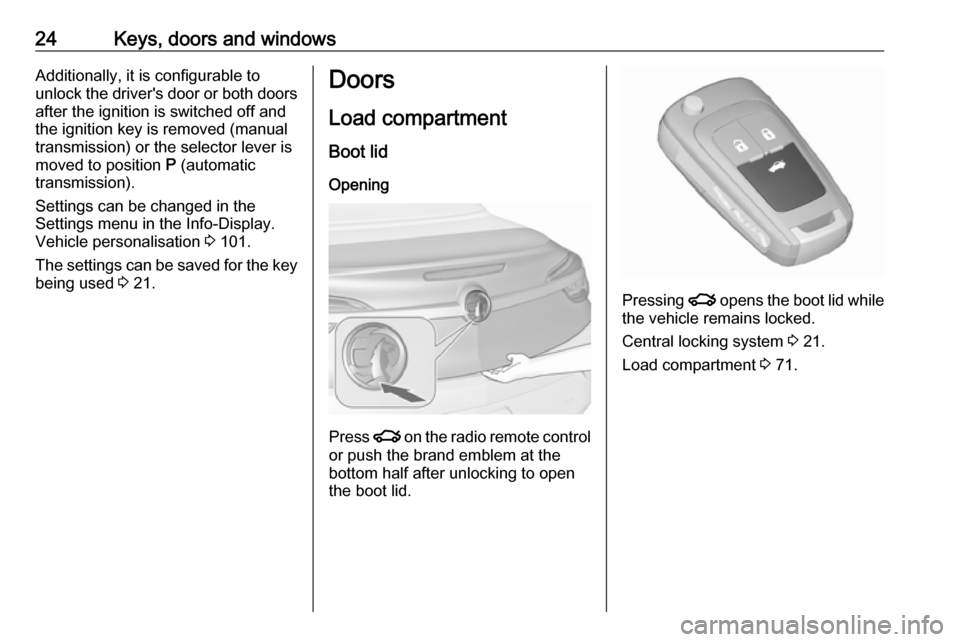
Boot lid Opening
Press x on the radio remote control
or push the brand emblem at the
bottom half after unlocking to open the boot lid.
Pressing x opens the boot lid while
the vehicle remains locked.
Central locking system 3 21.
Load compartment 3 71.
Page 108 of 265
106Instruments and controlsDepending on the equipment of the
vehicle, the following services are
available:
● Emergency services and support
in the case of a vehicle
breakdown
● Wi-Fi hotspot
● Smartphone application
● Remote control, e.g. location of the vehicle, activation of horn and
lights, control of central locking
system
● Stolen vehicle assistance
● Vehicle diagnostics
● Destination download
Notice
The OnStar module of the vehicle is
deactivated after ten days without an
ignition cycle. Functions requiring a
data connection will be available
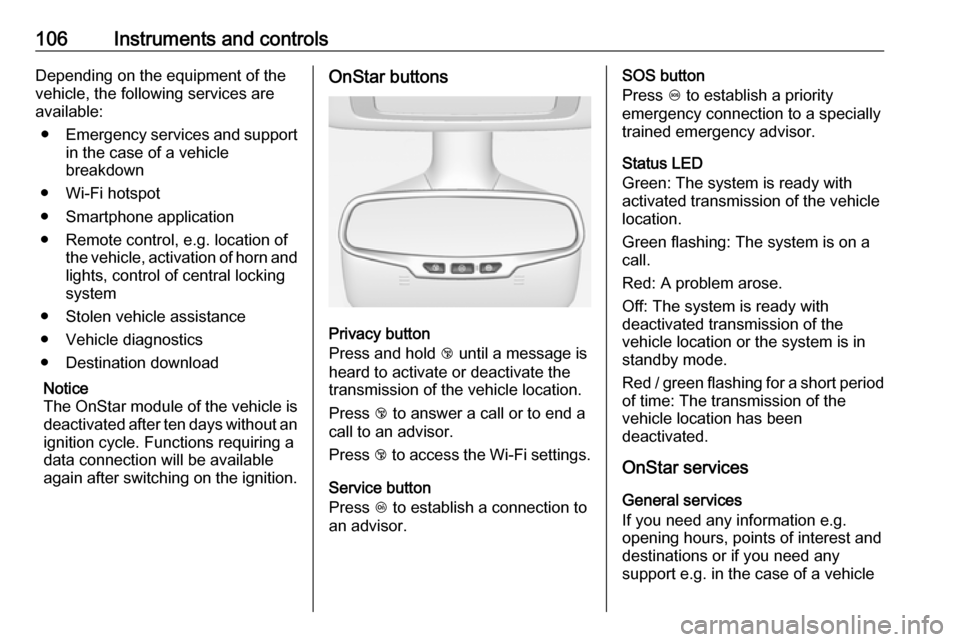
again after switching on the ignition.OnStar buttons
Privacy button
Press and hold j until a message is
heard to activate or deactivate the
transmission of the vehicle location.
Press j to answer a call or to end a
call to an advisor.
Press j to access the Wi-Fi settings.
Service button
Press Z to establish a connection to
an advisor.
SOS button
Press [ to establish a priority
emergency connection to a specially
trained emergency advisor.
Status LED
Green: The system is ready with
activated transmission of the vehicle
location.
Green flashing: The system is on a
call.
Red: A problem arose.
Off: The system is ready with
deactivated transmission of the
vehicle location or the system is in
standby mode.
Red / green flashing for a short period of time: The transmission of the
vehicle location has been
deactivated.
OnStar services
General services
If you need any information e.g.
opening hours, points of interest and
destinations or if you need any
support e.g. in the case of a vehicle
Page 110 of 265

108Instruments and controlsStolen vehicle assistance
If the vehicle is stolen, report the theft
to the authorities and request OnStar
stolen vehicle assistance. Use any
phone to call an advisor. Find the
respective OnStar phone number on
our country-specific website.
OnStar can provide support in
locating and recovering the vehicle.Theft alert
When the anti-theft alarm system is
triggered, a notification is sent to
OnStar. You are then informed about
this event by text message or email.Restart prevention
By sending remote signals, OnStar can prevent the vehicle from
restarting once it has been turned off.
On-demand diagnostics
At any time e.g. if the vehicle displays a vehicle message, press Z to
contact an advisor and ask to
complete a real-time diagnostic check
to directly determine the issue.
Depending on the results, the advisor
will provide further support.
Diagnostic report
The vehicle automatically transmits
diagnostic data to OnStar which
sends a monthly email report to you
and your preferred workshop.
Notice
The workshop notification function
can be disabled in your account.
The report contains the status of key
operating systems of the vehicle like
engine, transmission, airbags, ABS,
and other major systems. It also
provides information on possible
maintenance items and tyre pressure (only with tyre pressure monitoring
system).
To look at the information in greater detail, select the link within the email and log in to your account.
Destination download
A desired destination can be directly
downloaded to the navigation system.
Press Z to call an advisor and
describe the destination or point of
interest.The advisor can look up any address
or point of interest and directly send
the destination to the built-in
navigation system.
OnStar settings
OnStar PIN
To have full access to all OnStar
services, a four-digit PIN is required. The PIN has to be personalised when first talking to an advisor.
To change the PIN, press Z to call an
advisor.
Account data
An OnStar subscriber has an account where all the data is stored. To
request a change of the account
information, press Z and talk to an
advisor or log in to your account.
If the OnStar service is used on
another vehicle, press Z and request
that the account be transferred to the new vehicle.
Page 111 of 265

Instruments and controls109Notice
In any case, if the vehicle is disposed
of, sold or otherwise transferred,
immediately inform OnStar about
the changes and terminate the
OnStar service on this vehicle.
Vehicle location
The vehicle location is transmitted to OnStar when service is requested ortriggered. A message on the Info-
Display informs about this
transmission.
To activate or deactivate the
transmission of the vehicle location,
press and hold j until an audio
message is heard.
The deactivation is indicated by the
status light flashing red and green for a short period of time and each time
the vehicle is started.
Notice
If the transmission of the vehicle
location is deactivated, some
services are no longer available.
Notice
The vehicle location always remains
accessible to OnStar in the case of
an emergency.Find the privacy policy in your
account.
Software updates
OnStar may remotely carry out software updates without further
notice or consent. These updates are
to enhance or maintain safety and
security or the operation of the
vehicle.
These updates may concern privacy
issues. Find the privacy policy in your account.
Page 135 of 265

Driving and operating133Driving and
operatingDriving hints ............................... 134
Control of the vehicle ...............134
Steering ................................... 134
Ground clearance ....................134
Starting and operating ...............135
New vehicle running-in ............135
Ignition switch positions ...........135
Retained power off ..................135
Starting the engine ..................135
Overrun cut-off ........................ 136
Stop-start system ....................136
Parking .................................... 138
Engine exhaust .......................... 140
Diesel particle filter ..................140
Catalytic converter ...................141
AdBlue ..................................... 141
Automatic transmission ..............144
Transmission display ...............144
Selector lever .......................... 145
Manual mode ........................... 146
Electronic driving programmes 146
Fault ........................................ 147
Interruption of power supply ....147Manual transmission ..................148
Brakes ........................................ 148
Antilock brake system .............148
Parking brake .......................... 149
Brake assist ............................. 151
Hill start assist ......................... 151
Ride control systems .................151
Traction Control system ..........151
Electronic Stability Control ......152
Interactive driving system ........153
Driver assistance systems .........155
Cruise control .......................... 155
Speed limiter ........................... 157
Forward collision alert .............158
Following distance indication ...160
Parking assist .......................... 161
Side blind spot alert .................168
Rear view camera ...................170
Traffic sign assistant ................172
Lane departure warning ..........175
Fuel ............................................ 176
Fuel for petrol engines .............176
Fuel for diesel engines ............177
Refuelling ................................ 178
Fuel consumption - CO 2-
Emissions .............................. 180
Trailer hitch ................................ 181
General information .................181Driving characteristics and
towing tips .............................. 181
Trailer towing ........................... 181
Towing equipment ...................182
Page 137 of 265
Driving and operating135Starting and operating
New vehicle running-in
Do not brake unnecessarily hard for
the first few journeys.
During the first drive, smoke may
occur because of wax and oil
evaporating off the exhaust system.
Park the vehicle in the open for a
while after the first drive and avoid
inhaling the fumes.
During the running-in period fuel and
engine oil consumption may be
higher and the cleaning process of
the diesel particle filter may take
place more often. Autostop may be
inhibited to allow for charging the
vehicle battery.
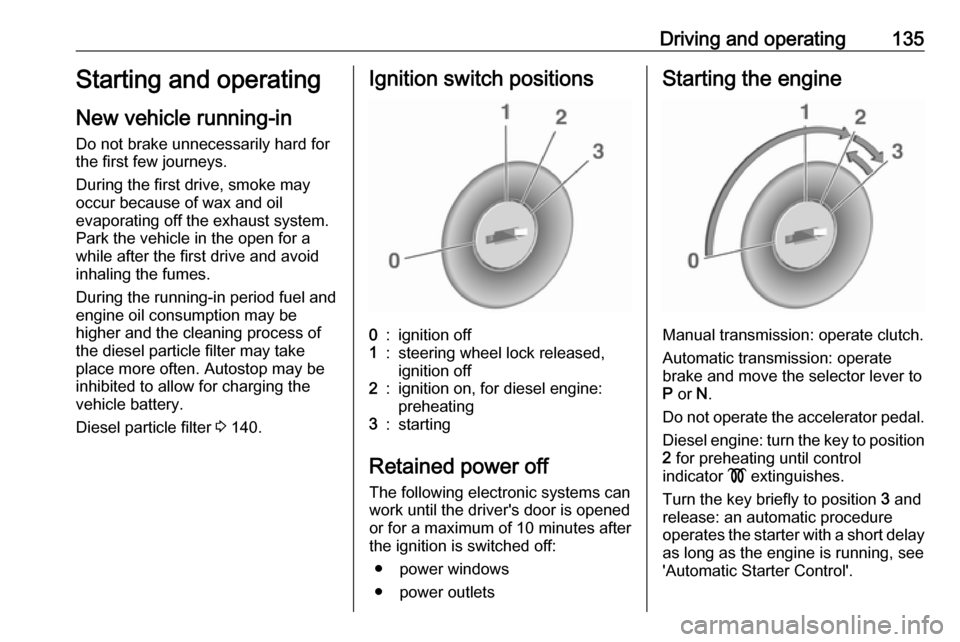
Diesel particle filter 3 140.Ignition switch positions0:ignition off1:steering wheel lock released,
ignition off2:ignition on, for diesel engine:
preheating3:starting
Retained power off
The following electronic systems can
work until the driver's door is opened
or for a maximum of 10 minutes after
the ignition is switched off:
● power windows
● power outlets
Starting the engine
Manual transmission: operate clutch.
Automatic transmission: operate
brake and move the selector lever to
P or N.
Do not operate the accelerator pedal. Diesel engine: turn the key to position2 for preheating until control
indicator ! extinguishes.
Turn the key briefly to position 3 and
release: an automatic procedure
operates the starter with a short delay
as long as the engine is running, see
'Automatic Starter Control'.