door lock VAUXHALL COMBO 2016 User Guide
[x] Cancel search | Manufacturer: VAUXHALL, Model Year: 2016, Model line: COMBO, Model: VAUXHALL COMBO 2016Pages: 189, PDF Size: 4.47 MB
Page 63 of 189

Storage61To remove, lift the front part of the
parcel shelf by releasing it from the
front retainers ( 1) on both sides.
Lift the rear part of the parcel shelf by
releasing it from the rear retainers ( 2
and 3) on both sides.
Installing
Refit the parcel shelf by engaging in
front and rear retainers on both sides.
Lashing eyes VanThe lashing eyes are designed to
secure items against slippage, e.g.
using lashing straps or a luggage net.
Combo Tour
Load compartment grille Depending on version, the load
compartment area can be increased
by opening the load compartment
partition on the front passenger side
(where fitted).
● Fold down the front passenger seat. Refer to "Seat folding"
3 35.
● From inside the load
compartment, release the pin (1)
on the rear of the partition to
unlock, then swing open the
partition door over the folded
front passenger seat.
● Insert the pin in the slot (2) on the
backrest of the folded front
passenger seat to lock in
position.
9 Warning
The load compartment partition
must always be locked in either
position during driving. Otherwise
Page 66 of 189

64Instruments and controlsInstruments and
controlsControls ....................................... 65
Steering wheel adjustment ........65
Steering wheel controls .............65
Horn ........................................... 65
Windscreen wiper/washer .........66
Rear window wiper/washer .......66
Headlamp washer .....................67
Outside temperature ..................67
Clock ......................................... 67
Power outlets ............................. 68
Cigarette lighter ......................... 69
Ashtrays .................................... 70
Warning lights, gauges and indi‐ cators ........................................... 70
Instrument cluster ......................70
Speedometer ............................. 70
Odometer .................................. 70
Trip odometer ............................ 70
Tachometer ............................... 71
Fuel gauge ................................ 71
Fuel selector .............................. 72
Engine coolant temperature gauge ....................................... 72
Service display .......................... 73Transmission display .................73
Control indicators ......................73
Generic warning ........................76
Turn signal ................................. 77
Seat belt reminder .....................77
Airbag and belt tensioners .........77
Airbag deactivation ....................78
Charging system .......................78
Malfunction indicator light ..........78
Brake system ............................. 79
Brake pad wear ......................... 79
Antilock brake system (ABS) .....79
Transmission ............................. 79
Upshift ....................................... 80
Hill start assist ........................... 80
Ultrasonic parking assist ...........80
Electronic Stability Control ........80
Engine coolant temperature ......81
Preheating ................................. 81
Diesel particle filter ....................81
Tyre pressure monitoring system ...................................... 82
Engine oil pressure ....................82
Change engine oil .....................82
Low engine oil level ...................83
Low fuel ..................................... 83
Drain fuel filter ........................... 83
Immobiliser ................................ 83
Stop-start system ......................84
Exterior light .............................. 84High beam................................. 84
Fog light ..................................... 84
Rear fog light ............................. 84
Cruise control ............................ 84
Door open .................................. 84
Information displays .....................85
Driver Information Centre ..........85
Vehicle messages ........................90
Warning chimes .........................90
Fuel system messages ..............91
Trip computer ............................... 91
Page 78 of 189

76Instruments and controlsControl indicator in the roof
console
Airbag deactivation 3 49, 3 78.
Overview
9Generic warning 3 76OTurn signal 3 77XSeat belt reminder 3 77vAirbag and belt tensioners
3 77*Airbag deactivation 3 78pCharging system 3 78ZMalfunction indicator light
3 78RBrake system 3 79FBrake pad wear 3 79uAntilock brake system (ABS)
3 79sTransmission 3 79[ ÒUpshift 3 80ZHill start assist 3 80rUltrasonic parking assist
3 80RElectronic Stability Control
3 80$Engine coolant temperature
3 81!Preheating 3 81%Diesel particle filter 3 81wTyre pressure monitoring
system 3 82IEngine oil pressure 3 82,
Change engine oil 3 82SLow engine oil level 3 83$Low fuel 3 83UDrain fuel filter 3 83dImmobiliser 3 83ÆStop-start system 3 848Exterior light 3 84µExterior light failure 3 84CHigh beam 3 84>Fog light 3 84rRear fog light 3 84mCruise control 3 84(Door open 3 84
Generic warning
9 illuminates yellow.
Depending on model variant, control
indicator 9 may illuminate
independently or in conjunction with
Æ 3 84, t 3 84, Z 3 80 or r
3 80.
Page 90 of 189

88Instruments and controls●Daytime running lights
● Exit menu
LIGHTING (Brightness of interior
lighting)
When driving at night with the low
beam on, adjust the brightness of the
vehicle's interior lighting (e.g.
instrument panel, climate control
display).
It is also possible to adjust the
brightness by pressing R or S
without accessing the settings menu.
SPEED BEEP (Speed limit warning
chime)
Activate or deactivate the speed limit
warning chime or change the speed
limit. Speeds between 20 and
125 mph can be stored.
When activated, the driver is alerted
with a warning chime when the set
speed limit is exceeded.
After accessing this menu option,
activate or deactivate the function
(set to On or Off) and confirm.
Press SETq when activated ( On) to
access the current set speed. Adjust
as required and confirm.Warning chimes 3 90.
TRIP B DATA
Activate or deactivate the second trip
computer (set to On or Off).
Trip B records average consumption, distance travelled, average speed
and travel time (driving time). The
measurement can be restarted at any
time. Trip computer 3 91.
SET TIME (Setting the clock and clock mode)
After accessing this menu option, it is possible to either set the time or
change the clock mode between 12
hour and 24 hour clock.
Select Time and confirm. Adjust the
hours setting (flashing value) and
confirm. Adjust minutes setting
(flashing value) and confirm.
Select Mode and confirm. Select
12h or 24h and confirm.
Clock 3 67.SET DATE
Adjust the year setting (flashing
value) and confirm. Adjust month
setting (flashing value) and confirm.
Adjust the day setting (flashing value)
and confirm.
RADIO INFO (Display audio and
radio information)
Activate radio info (set to On) to
display audio and radio information (e.g. station frequency, RDS
messages, track number). Deactivate
when not required (set to Off).
AUTOCLOSE (Automatic central
locking when driving)
Activate the autoclose feature (set to
On ) to automatically lock the doors
when vehicle speed exceeds
12 mph. Deactivate when not
required (set to Off).
UNIT OF MEASUREMENT (for
Distance, Fuel consumption and
Temperature)
After accessing this menu option, it is
possible to set the unit of
measurement for distance, fuel
consumption and temperature.
Page 114 of 189
112Driving and operatingRestarting the engine
Manual transmission
The selector lever must be in neutral
to enable an automatic restart.
Depress the clutch pedal to restart the
engine.
Manual transmission automated
If the lever is in position N, select
another gear, otherwise release the
brake pedal or move the lever to +, –
or R to enable an automatic restart.
If an electrical accessory, e.g. a
portable CD player, is connected to
the power outlet, a brief power drop
during the restart may be noticeable.
Restarting the engine with the key When one of the following conditions
occurs during an Autostop, the
engine will need to be restarted
manually using the key.
● the driver's seat belt is unfastened and the driver's door
is opened
● three minutes have elapsed since the engine was switched offIn this event, control indicator ^
flashes in the DIC in conjunction with
a warning chime. Depending on
version, a corresponding message
may also appear in the DIC 3 85.
Fault
If control indicator Æ illuminates in the
instrument cluster, there is a fault in
the stop-start system 3 84.
Depending on version, 9 will
illuminate as an alternative if control
indicator Æ is not present. A warning
message may also be displayed in
the DIC 3 85.
Generic warning 9 3 76.
Seek the assistance of a workshop.
Parking9 Warning
● Do not park the vehicle on an
easily ignitable surface. The
high temperature of the
exhaust system could ignite the
surface.
● Always apply parking brake without pressing release
button. Apply as firmly as
possible on a downhill slope or
uphill slope. Depress brake
pedal at the same time to
reduce operating force.
● Switch off the engine. Turn the ignition key to position 0 and
remove it. Turn the steering
wheel until the steering wheel
lock is felt to engage.
● If the vehicle is on a level surface or uphill slope, engage
first gear before switching off
the ignition. On an uphill slope,
turn the front wheels away from
the kerb.
If the vehicle is on a downhill
slope, engage reverse gear
before switching off the ignition. Turn the front wheels towardsthe kerb.
Lock the vehicle 3 21 and activate the
anti-theft locking system 3 26 .
Page 129 of 189

Driving and operating127A slight loss of power and torque can
be expected in petrol operation. You
must therefore adapt your driving
style (e.g. during overtaking
manoeuvres) and vehicle loads (e.g.
towing loads) accordingly.
Every six months run the petrol tank
down until control indicator §
illuminates and then refuel. This is
necessary to maintain fuel quality as
well as system function necessary for
petrol operation.
Fill the tank completely at regular
intervals to prevent corrosion in the
tank.
Refuelling
Fuel filler flap is located at left rear side of vehicle.9 Danger
Before refuelling, switch off engine
and any external heaters with
combustion chambers. Switch off
any mobile phones.
Follow the operating and safety
instructions of the filling station
when refuelling.9 Danger
Fuel is flammable and explosive.
No smoking. No naked flames or
sparks.
If you can smell fuel in your
vehicle, have the cause of this
remedied immediately by a
workshop.
Caution
In case of misfuelling, do not
switch on ignition.
Release the fuel filler flap by pulling
the flap by hand.
Insert key into fuel filler cap and turn
anticlockwise to unlock.
To remove fuel filler cap, rotate
anticlockwise.
Caution
To avoid damage, do not attempt
to operate the sliding side door
when the fuel filler flap is open.
Notice
Depending on model, the sliding
side door may be fitted with a safety system that prevents the door from
being opened fully when the fuel
filler flap is open.
Sliding side door 3 23.
The fuel filler cap can be retained in
the bracket on the fuel filler flap.
Page 135 of 189

Vehicle care133Vehicle storageStorage for a long period of time
If the vehicle is to be stored for several months:
● Wash and wax the vehicle.
● Have the wax in the engine compartment and underbody
checked.
● Clean and preserve the rubber seals.
● Fill up fuel tank completely.
● Change the engine oil.
● Drain the washer fluid reservoir.
● Check the coolant antifreeze and
corrosion protection.
● Adjust tyre pressure to the value specified for full load.
● Park the vehicle in a dry, well ventilated place. Engage first or
reverse gear to prevent the
vehicle from rolling.
● Do not apply the parking brake.● Open the bonnet, close all doors and lock the vehicle.
● Disconnect the clamp from the negative terminal of the vehicle
battery. Beware that all systems
are not functional, e.g. anti-theft
locking system.
Putting back into operation
When the vehicle is to be put back into
operation:
● Connect the clamp to the negative terminal of the vehicle
battery. Activate the electronics
of the power windows.
● Check tyre pressure.
● Fill up the washer fluid reservoir.
● Check the engine oil level.
● Check the coolant level.
● Fit the number plates if necessary.End-of-life vehicle recovery
Information on end-of-life vehicle
recovery centres and the recycling of
end-of-life vehicles is available on our website. Only entrust this work to an
authorised recycling centre.
Natural gas vehicles must be recycled by a service centre authorised for
natural gas vehicles.
Page 146 of 189
144Vehicle care
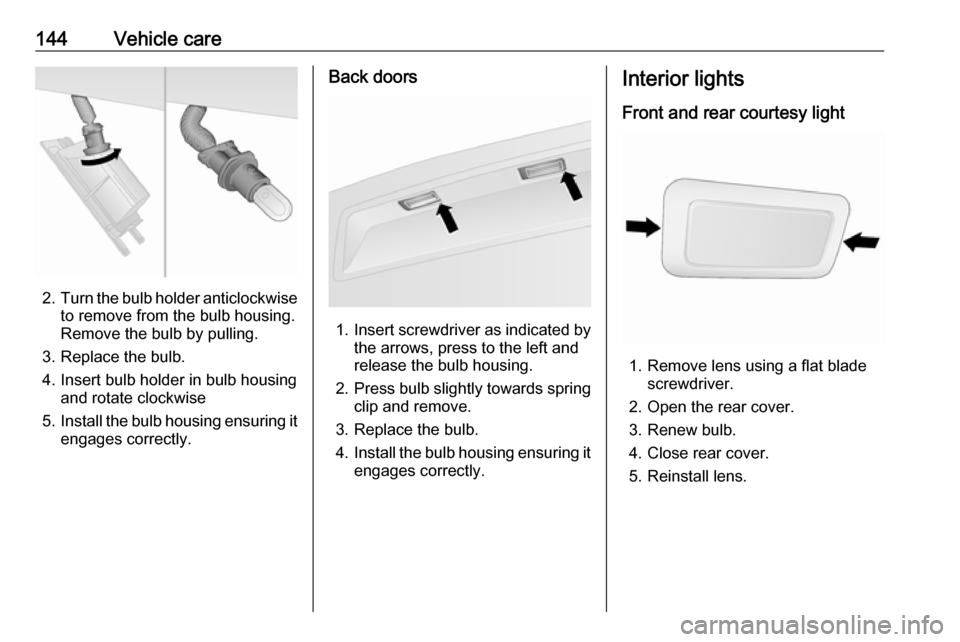
2.Turn the bulb holder anticlockwise
to remove from the bulb housing.
Remove the bulb by pulling.
3. Replace the bulb.
4. Insert bulb holder in bulb housing and rotate clockwise
5. Install the bulb housing ensuring it
engages correctly.
Back doors
1. Insert screwdriver as indicated by
the arrows, press to the left and
release the bulb housing.
2. Press bulb slightly towards spring
clip and remove.
3. Replace the bulb.
4. Install the bulb housing ensuring it
engages correctly.
Interior lights
Front and rear courtesy light
1. Remove lens using a flat blade screwdriver.
2. Open the rear cover. 3. Renew bulb.
4. Close rear cover.
5. Reinstall lens.
Page 166 of 189

164Vehicle careAppearance careExterior care
Locks The locks are lubricated at the factoryusing a high quality lock cylinder
grease. Use de-icing agent only when
absolutely necessary, as this has a
degreasing effect and impairs lock function. After using a de-icing agent, have the locks regreased by a
workshop.
Washing The paintwork of your vehicle is
exposed to environmental influences. Wash and wax your vehicle regularly.
When using automatic vehicle
washes, select a programme that
includes waxing.
Bird droppings, dead insects, resin,
pollen and the like should be cleaned
off immediately, as they contain
aggressive constituents which can
cause paint damage.If using a vehicle wash, comply with
the vehicle wash manufacturer's
instructions. The windscreen wiper and rear window wiper must be
switched off. Remove antenna and
external accessories such as roof
racks etc.
If you wash your vehicle by hand,
make sure that the insides of the
wheel housings are also thoroughly
rinsed out.
Clean edges and folds on opened
doors and the bonnet as well as the
areas they cover.Caution
Always use a cleaning agent with
a pH value of 4 to 9.
Do not use cleaning agents on hot surfaces.
Have the door hinges of all doors
greased by a workshop.
Do not clean the engine compartment with a steam-jet or high-pressure jet
cleaner.
Thoroughly rinse and leather-off the vehicle. Rinse leather frequently. Use
separate leathers for painted and
glass surfaces: remnants of wax on
the windows will impair vision.
Exterior lights
Headlight and other light covers are
made of plastic. Do not use any
abrasive or caustic agents, do not use
an ice scraper, and do not clean them
dry.
Polishing and waxing
Wax the vehicle regularly (at the
latest when water no longer beads).
Otherwise, the paintwork will dry out.
Polishing is necessary only if the paint
has become dull or if solid deposits
have become attached to it.
Paintwork polish with silicone forms a protective film, making waxing
unnecessary.
Plastic body parts must not be treated
with wax or polishing agents.
Page 183 of 189

Customer information181● vehicle reactions in particulardriving situations (e.g. inflation ofan airbag, activation of the
stability regulation system)
● environmental conditions (e.g. temperature)
This data is exclusively technical and
helps identifying and correcting errors
as well as optimizing vehicle
functions.
Motion profiles indicating travelled
routes cannot be created with this
data.
If services are used (e.g. repair
works, service processes, warranty cases, quality assurance),
employees of the service network
(manufacturer included) are able to
read out this technical information
from the event and error data storage
modules applying special diagnostic
devices. If required, you will receive
further information at these
workshops. After an error has been
corrected, the data is deleted from the error storage module or it is
constantly overwritten.When using the vehicle, situations
may occur in which technical data
related to other information (accident
report, damages on the vehicle,
witness statements etc.) may be
associated with a specific person -
possibly, with the assistance of an
expert.
Additional functions contractually
agreed upon with the client (e.g.
vehicle location in emergency cases)
allow the transmission of particular vehicle data from the vehicle.
Radio Frequency
Identification (RFID)
RFID technology is used in some
vehicles for functions such as tyre
pressure monitoring and ignition
system security. It is also used in
connection with conveniences such
as radio remote controls for door
locking/unlocking and starting, and in-
vehicle transmitters for garage door
openers. RFID technology in
Vauxhall vehicles does not use or
record personal information or link
with any other Vauxhall system
containing personal information.