instrument panel VAUXHALL COMBO D 2018 User Guide
[x] Cancel search | Manufacturer: VAUXHALL, Model Year: 2018, Model line: COMBO D, Model: VAUXHALL COMBO D 2018Pages: 203, PDF Size: 4.76 MB
Page 101 of 203

Lighting99LightingExterior lighting............................ 99
Light switch ................................ 99
High beam ................................. 99
Headlight flash ........................... 99
Headlight range adjustment ....100
Headlights when driving abroad .................................... 100
Daytime running lights .............100
Hazard warning flashers ..........100
Turn and lane-change signals . 101
Front fog lights ......................... 101
Rear fog lights ......................... 101
Reversing lights .......................102
Misted light covers ...................102
Interior lighting ........................... 102
Instrument panel illumination control ..................................... 102
Interior lights ............................ 103
Load compartment lighting ......104
Lighting features ........................105
Exit lighting .............................. 105
Battery discharge protection ....105Exterior lighting
Light switch
Turn light switch:
§:off / daytime running lights9:sidelights / headlights
Control indicator 8 3 89.
Tail lights Tail lights are illuminated together
with low/high beam and sidelights.
High beam
To switch from low to high beam,
push lever. To switch to low beam,
pull lever.
Depending on version, pull lever
towards steering wheel to switch
between high and low beam.
Headlight flash To activate the headlight flash, pull
lever.
Page 104 of 203
102LightingReversing lights
The reversing lights come on when
the ignition is on and reverse gear is
selected.
Misted light covers
The inside of the light housing may
mist up briefly in poor, wet and cold weather conditions, in heavy rain or
after washing. The mist disappears
quickly by itself; to help, switch on the headlights.Interior lighting
Instrument panel
illumination control
When driving at night with the
headlights on, adjust the brightness
of the vehicle's interior lighting
(including instrument panel, climate
control display etc.) via the settings
menu of the Driver Information Centre
3 90.
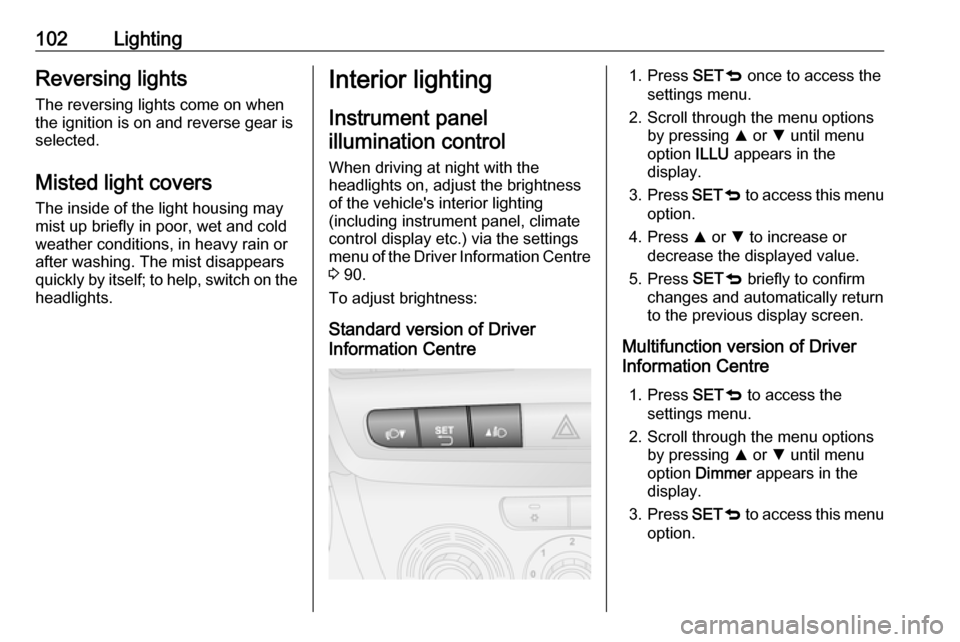
To adjust brightness:
Standard version of Driver
Information Centre1. Press SETq once to access the
settings menu.
2. Scroll through the menu options by pressing R or S until menu
option ILLU appears in the
display.
3. Press SETq to access this menu
option.
4. Press R or S to increase or
decrease the displayed value.
5. Press SETq briefly to confirm
changes and automatically return
to the previous display screen.
Multifunction version of Driver
Information Centre
1. Press SETq to access the
settings menu.
2. Scroll through the menu options by pressing R or S until menu
option Dimmer appears in the
display.
3. Press SETq to access this menu
option.
Page 111 of 203

Climate control109The preselected temperature is
automatically regulated. In the
automatic mode the fan speed and air
distribution automatically regulate the air flow.
The system can be manually adapted
by use of air distribution and air flow
controls.
The electronic climate control system is only fully operational when the
engine is running.
For correct operation do not cover the
sensor on the instrument panel.
Automatic mode Basic setting for maximum comfort: ● Press AUTO.
● Open all air vents.
● Cooling n on.
● Set desired temperature.
Temperature preselection
Temperatures can be set to the
desired value.
For reasons of comfort, change
temperature only in small increments. Turn AUTO knob to adjust.clockwise:warmanticlockwise:cold
Heating will not be fully effective until
the engine has reached normal
operating temperature.
When the minimum temperature is
set below 16 ℃, the electronic climate
control system runs at maximum
cooling. LO appears in the display.
If the maximum temperature is set above 32 ℃, the electronic climate
control system runs at maximum
heating. HI appears in the display.
Notice
If A/C is switched on, reducing the
set cabin temperature can cause the engine to restart from an Autostop or
inhibit an Autostop.
Stop-start system 3 116.
Fan speed
The selected fan speed is indicated
with bars in the display.
Press ] or < to increase or decrease
the fan speed.
maximum fan
speed:all bars displayedminimum fan
speed:one bar displayed
Cooling n must be switched off
before fan can be deactivated.
To return to automatic fan speed:
Press AUTO.
Demisting and defrosting the
windows
Press Ê.
Temperature and air distribution are
set automatically and the fan runs at
a high speed.
When the vehicle reaches normal
operating temperature the function
remains active for approx.
three minutes.
To return to automatic mode: press
n or AUTO .
Air distribution
Press R, S or 6.
LED in buttons illuminate.
Arrows shown in the display indicate
the distribution settings.
Page 142 of 203

140Vehicle careVehicle careGeneral Information...................140
Accessories and vehicle modifications .......................... 140
Vehicle storage ........................141
End-of-life vehicle recovery .....141
Vehicle checks ........................... 142
Performing work ......................142
Bonnet ..................................... 142
Engine oil ................................. 143
Engine coolant ......................... 144
Power steering fluid .................145
Washer fluid ............................ 145
Brakes ..................................... 145
Brake fluid ............................... 146
Vehicle battery ......................... 146
Wiper blade replacement ........148
Bulb replacement .......................149
Halogen headlights ..................149
Fog lights ................................. 151
Tail lights ................................. 151
Side turn signal lights ..............152
Centre high-mounted brake light ......................................... 152
Number plate light ...................152Interior lights ............................ 153
Instrument panel illumination ...154
Electrical system ........................155
Fuses ....................................... 155
Engine compartment fuse box . 156
Instrument panel fuse box .......157
Vehicle tools .............................. 159
Tools ........................................ 159
Wheels and tyres .......................159
Winter tyres ............................. 159
Tyre designations ....................160
Tyre pressure .......................... 160
Tyre pressure monitoring
system .................................... 161
Tread depth ............................. 162
Changing tyre and wheel size . 163 Wheel covers ........................... 163
Tyre chains .............................. 163
Tyre repair kit .......................... 164
Wheel changing .......................166
Spare wheel ............................ 168
Jump starting ............................. 170
Towing ....................................... 172
Towing the vehicle ...................172
Towing another vehicle ...........172
Appearance care .......................173
Exterior care ............................ 173
Interior care ............................. 175General Information
Accessories and vehiclemodifications
We recommend the use of genuine
parts and accessories and factory
approved parts specific for your
vehicle type. We cannot assess or guarantee reliability of other products
- even if they have a regulatory or
otherwise granted approval.
Any modification, conversion or other
changes made to standard vehicle
specifications (including, without
limitation, software modifications,
modifications of the electronic control units) may invalidate the warrantyoffered by Vauxhall. Furthermore,
such changes may affect driver
assistance systems, may impact fuel
consumption, CO 2 emissions and
other emissions of the vehicle and
cause the vehicle to no longer
conform to the operating permit,
impacting the validity of your vehicle
registration.
Page 144 of 203

142Vehicle careVehicle checks
Performing work9 Warning
Only perform engine compartment
checks when the ignition is off.
The cooling fan may start
operating even if the ignition is off.
9 Danger
The ignition system use extremely
high voltage. Do not touch.
Bonnet
Opening
Pull the release lever (located on the
lower left side of the instrument panel) and return it to its original position.
Move the safety catch sideways and
open the bonnet.
Secure the bonnet support.
Page 156 of 203

154Vehicle careFront courtesy light, reading lights
1. Remove lens using a flat bladescrewdriver.
2. Open the rear cover. 3. Renew bulbs.
4. Close rear cover.
5. Reinstall lens.
Removable rear courtesy light
1. Press the button at the top of the lamp assembly to release it.
2.Prise the lamp assembly out at the
points illustrated.
3. Renew bulb, ensuring it engages correctly.
4. Reinstall lamp assembly.
Instrument panel illumination
Have bulbs replaced by a workshop.
Page 157 of 203
Vehicle care155Electrical system
Fuses Data on the replacement fuse must
match the data on the defective fuse.
There are two fuse boxes in the
vehicle:
● on the right of the engine compartment, next to the vehicle
battery
● in left-hand drive vehicles; on the
left-hand side of the instrument
panel or, in right-hand drive
vehicles; on the right-hand side
of the instrument panel, behind a
cover
Before replacing a fuse, turn off the
respective switch and the ignition.
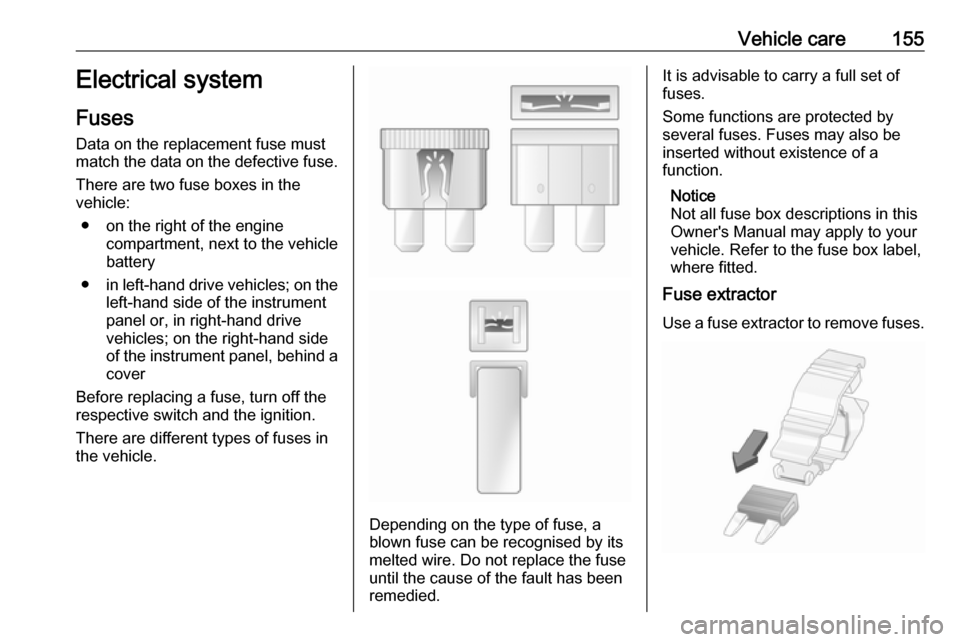
There are different types of fuses inthe vehicle.
Depending on the type of fuse, a
blown fuse can be recognised by its
melted wire. Do not replace the fuse until the cause of the fault has been
remedied.
It is advisable to carry a full set of
fuses.
Some functions are protected by
several fuses. Fuses may also be
inserted without existence of a
function.
Notice
Not all fuse box descriptions in this
Owner's Manual may apply to your
vehicle. Refer to the fuse box label,
where fitted.
Fuse extractor
Use a fuse extractor to remove fuses.
Page 159 of 203
Vehicle care157No.CircuitF09Rear door switchF10HornF14High beamF15PTCI additional heaterF19Air conditioning systemF20Heated rear windowF21Fuel pumpF30Fog lightsF84CNG systemF85Power outletsF86Cigarette lighter/Heated seatsF87Stop-start systemF88Mirror heating
After having changed defective fuses
refit the fuse box cover.
If the fuse box cover is not closed
correctly, malfunction may occur.
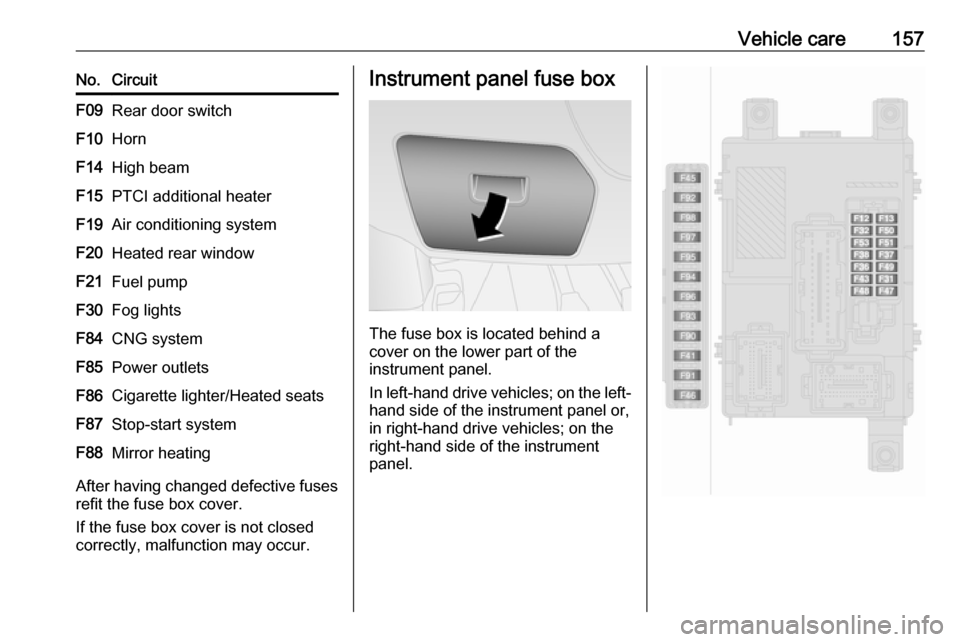
Instrument panel fuse box
The fuse box is located behind a
cover on the lower part of the
instrument panel.
In left-hand drive vehicles; on the left-
hand side of the instrument panel or,
in right-hand drive vehicles; on the
right-hand side of the instrument
panel.
Page 160 of 203

158Vehicle careNo.CircuitF12Right low beamF13Left low beam/Headlight range
adjustmentF31Fusebox relays/Body control
unit relaysF32Courtesy lightsF36Diagnostic connector/Climate
control system/Infotainment
system/Tyre pressure moni‐
toring system/Alarm sirenF37Instrument panel/Braking
systemF38Central locking systemF41-F43Windscreen washer systemF45-F46-F47Power windowsF48Power windowsNo.CircuitF49Exterior mirrors/Infotainment
system/Parking assist/Tyre
pressure monitoring system/
Instrument illumination/Rain
sensorF50-F51Infotainment system/Braking
system/Clutch/Interior heaterF53Instrument panelF90-F91-F92-F93-F94Power outlet load compartmentF95Cigarette lighter/Power outletF96Cigarette lighter/Power outletF97Heated front seatF98Heated front seatThe single panel of fuses may be
located on the right-hand side of the
fuse compartment in right-hand drive
vehicles.
After having changed defective fuses,
refit the cover.
If the fuse box cover is not closed
correctly, malfunction may occur.
Page 177 of 203

Vehicle care175Paintwork damageRectify minor paintwork damage witha touch-up pen before rust forms.
Have more extensive damage or rust areas repaired by a workshop.
Underbody
Some areas of the vehicle underbody
have a PVC undercoating while other critical areas have a durable
protective wax coating.
After the underbody is washed, check
the underbody and have it waxed if
necessary.
Bitumen/rubber materials could
damage the PVC coating. Have
underbody work carried out by a
workshop.
Before and after winter, wash the
underbody and have the protective
wax coating checked.
Natural gas system
Do not direct the steam jet or high-
pressure jet towards natural gas
system components. It is particularly
important to protect the natural gastank and the pressure valves on the
vehicle underbody and the bulkhead in the engine compartment.
These components must not be
treated using chemical cleaners or
preservatives.
Have components of the natural gas
system cleaned by a workshop
authorised to carry out maintenance
of natural gas vehicles.
Towing equipment
Do not clean the coupling ball bar with a steam-jet or high-pressure jet
cleaner.
Interior care
Interior and upholstery
Only clean the vehicle interior,
including the instrument panel fascia
and panelling, with a dry cloth or
interior cleaner.
Clean the leather upholstery with
clear water and a soft cloth. In case of heavy soiling, use leather care.The instrument cluster and the
displays should only be cleaned using
a soft damp cloth. If necessary, use a
weak soap solution.
Clean fabric upholstery with a
vacuum cleaner and brush. Remove
stains with an upholstery cleaner.
Clothing fabrics may not be
colourfast. This could cause visible
discolourations, especially on light-
coloured upholstery. Removable
stains and discolourations should be
cleaned as soon as possible.
Clean seat belts with lukewarm water or interior cleaner.Caution
Close Velcro fasteners as open
Velcro fasteners on clothing could damage seat upholstery.
The same applies to clothing with
sharp-edged objects, like zips or
belts or studded jeans.