instrument panel VAUXHALL COMBO E 2019.75 User Guide
[x] Cancel search | Manufacturer: VAUXHALL, Model Year: 2019.75, Model line: COMBO E, Model: VAUXHALL COMBO E 2019.75Pages: 281, PDF Size: 10.44 MB
Page 114 of 281

112Instruments and controlsTouch required menu display icon or
a function with the finger.
Confirm a required function or
selection by touching.
Touch r on the display to exit a
menu without changing a setting.
For further information, see
Infotainment manual.Speech recognition
Description see Infotainment manual.
Vehicle personalisation 3 115.
Head-up display
The head-up display displays driver
information concerning the
instrument cluster onto a foldable
projection plane on the driver's side.
The information appears as an image
projected from a lense in the
instrument panel onto the projection
plane directly ahead in driver's view.
The image appears focused out
toward the front of the vehicle.Head-up display shows:
● vehicle speed
● speed limits detected by the speed sign recognition
● set speed of speed limiter
● set speed of cruise control
● forward collision alert
● navigation information.Switching on
Press e to switch on the head-up
display.
Adjust position of head-up display
image
Press ä or å to centre the image. It
can only be adjusted up and down,
not side to side.
9 Warning
If the head-up display image is too
bright or too high in your field of
view, it may obstruct your view
Page 115 of 281

Instruments and controls113when it is dark outside. Be sure tokeep the head-up display imagedim and placed low in your field of view.
Adjust brightness
The head-up display image will
automatically dim and brighten to
compensate for outside lighting.
Brightness can also be adjusted
manually as needed:
Press e to brighten the display. Press
æ to dim the display.
The image can temporarily light up
depending on angel and position of
sunlight.
Switching off Press æ and hold to turn the head-up
display off.
Language Preferred language can be set invehicle personalisation menu 3 115.
Units
Units can be changed in vehicle
personalisation menu 3 115.
Care of head-up display Clean the screen of the head-updisplay with a soft cloth sprayed withglass cleaner. Wipe the lens gently,
then dry it.
System limitations Head-up display may not operate
properly when:
● The lens in the instrument panel is covered by objects or not
clean.
● Display brightness is too dim or bright.
● Image is not adjusted to the proper height.
● The driver wears polarized sunglasses.
If the head-up image is not correct for
other reasons, contact a workshop.Rear view display
The rear view display is located at the position of the interior mirror.
It provides the following views: ● standard rear view 3 39
● close rear view 3 196
● passenger side view 3 193
Switching on
Press m and confirm the message
with p.
Page 123 of 281
Lighting121LightingExterior lighting.......................... 121
Light switch .............................. 121
Automatic light control .............122
High beam ............................... 122
High beam assist .....................122
Headlight flash ......................... 123
Headlight range adjustment ....124
Headlights when driving abroad .................................... 124
Daytime running lights .............124
Cornering lights .......................124
Hazard warning flashers ..........124
Turn lights ................................ 125
Front fog lights ......................... 125
Rear fog light ........................... 126
Parking lights ........................... 126
Reversing lights .......................126
Misted light covers ...................126
Interior lighting ........................... 127
Instrument panel illumination control ..................................... 127
Interior lights ............................ 127
Reading lights .......................... 127
Sunvisor lights ......................... 128Lighting features ........................128
Centre console lighting ............128
Entry lighting ............................ 128
Exit lighting .............................. 128
Vehicle locator lighting ............129
Peripheral lighting ....................129
Battery discharge protection ....129Exterior lighting
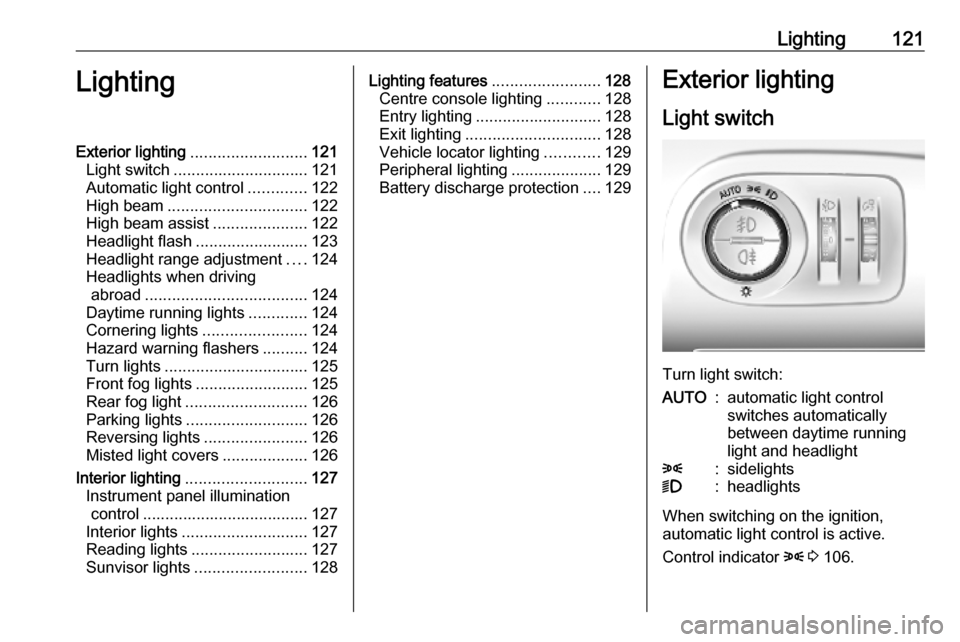
Light switch
Turn light switch:
AUTO:automatic light control
switches automatically
between daytime running
light and headlight8:sidelights9:headlights
When switching on the ignition,
automatic light control is active.
Control indicator 8 3 106.
Page 129 of 281

Lighting127Interior lighting
Instrument panel
illumination control
Brightness of the following lights can
be adjusted when the exterior lights
are on:
● instrument panel illumination
● Info Display
● illuminated switches and operation elements
Turn thumb wheel A and hold until
the desired brightness is obtained.
Interior lights
During entry and exit of the vehicle,
the front and rear courtesy lights
automatically switch on and then off
after a delay.
Notice
In the event of an accident with
airbag deployment the courtesy
lights are turned on automatically.
Front and rear courtesy light
Operate rocker switch:
;:automatic switching on
and offpress e:onpress $:offReading lights
Operated by pressing z and B in the
courtesy lights.
Page 130 of 281

128LightingIllustration shows rear courtesy lights.
Sunvisor lights Illuminates when the cover is opened.Lighting features
Centre console lighting A spotlight integrated in the overheadconsole illuminates the centre
console when headlights are
switched off.
The intensity can be adjusted in the
vehicle personalisation 3 115.
Entry lighting
Welcome lighting
Some or all of the following lights are
switched on for a short time by
unlocking the vehicle with the radio remote control:
● headlights
● tail lights
● interior lights
The number of activated lights
depends on the surrounding light
conditions.
The lighting switches off immediately
when the ignition is switched on.
Starting off 3 17.This function can be activated or
deactivated in the vehicle
personalisation 3 115.
The following lights will additionally
switch on when the driver's door is
opened:
● illumination of some switches
● Driver Information Centre
Exit lighting
The following lights are switched on if
the key is removed from the ignition
switch:
● interior lights
● instrument panel light
They will switch off automatically after
a delay. This function works only in
the dark.
Path lighting Headlights, tail lights and number
plate lights illuminate the surrounding
area for an adjustable time after
leaving the vehicle.
Page 142 of 281

140Climate controlAir vents
Adjustable air vents Air vents in the instrument panel
Direct the flow of air by tilting and
swivelling the slats.
To close the vent, swivel the slats
inwards.
Outer air vents in the instrument
panel
Direct the flow of air by tilting and
swivelling the slats.
To close the vent, swivel the slats
outwards.
At least two air vents must be open
while cooling is on.
9 Warning
Do not attach any objects to the
slats of the air vents. Risk of
damage and injury in case of an
accident.
Rear air vents in the centre
console
To activate the distribution of
climatised / heated air via the rear air
vents, press E.
Direct the flow of air by tilting and
swivelling the slats.
Adjust the air flow to select the
desired speed.
x:increase air flowx:decrease air flow
Page 180 of 281

178Driving and operatingHill considerations9Warning
Do not use the adaptive cruise
control on steep hill roads.
System performance on hills depends
on vehicle speed, vehicle load, traffic
conditions and the road gradient. It
may not detect a vehicle in your path
while driving on hills. On steep hills,
you may have to use the accelerator
pedal to maintain your vehicle speed.
When going downhill you may have to brake to maintain or reduce your
speed.
Note that applying the brake
deactivates the system.
Fault
In the event of a fault with the adaptive
cruise control, you are alerted by the
illumination of a warning light and the display of a message in the
instrument panel, accompanied by an
audible signal.
The adaptive cruise control may not
operate correctly if traffic signs do not comply with the Vienna Convention
on Road Signs and Signals.
Have the system checked by a dealer
or a qualified workshop.
As a safety measure, do not use the
system if the brake lights are faulty.
Forward collision alert The forward collision alert may help toavoid or reduce the harm caused by
front-end crashes.
The forward collision alert uses the
front camera in the windscreen to
detect a preceding vehicle directly
ahead, in your path.If a vehicle directly ahead is
approached too quickly, a warning
chime and alert in the Driver
Information Centre is provided.9 Warning
Forward collision alert is just a
warning system and does not
apply the brakes. When
approaching a vehicle ahead too
rapidly, it may not provide you
enough time to avoid a collision.
The driver accepts full
responsibility for the appropriate
following distance based on traffic, weather and visibility conditions.
The complete attention of the
driver is always required while
driving. The driver must always be
ready to take action and apply the
brakes.
Page 195 of 281
Driving and operating193The state of the system is stored
when switching off the ignition.
The system is automatically
deactivated when towing an
electrically connected trailer.
Due to adverse weather conditions
such as heavy rain, false detections
may occur.
Fault
In the event of a fault, B flashes for a
few moments in the instrument panel,
accompanied by C and a display
message. Have the cause of the fault remedied by a workshop.
Passenger side cameraThe passenger side camera monitorsthe side of the vehicle.
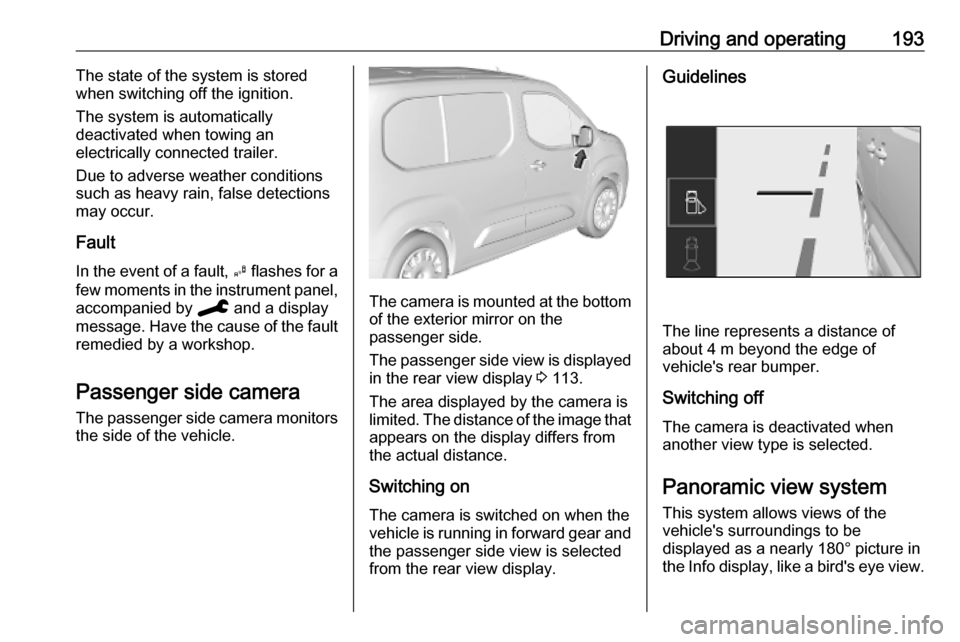
The camera is mounted at the bottom
of the exterior mirror on the
passenger side.
The passenger side view is displayed in the rear view display 3 113.
The area displayed by the camera is
limited. The distance of the image that
appears on the display differs from
the actual distance.
Switching on The camera is switched on when the
vehicle is running in forward gear and
the passenger side view is selected from the rear view display.
Guidelines
The line represents a distance of
about 4 m beyond the edge of
vehicle's rear bumper.
Switching off The camera is deactivated when
another view type is selected.
Panoramic view system
This system allows views of the
vehicle's surroundings to be
displayed as a nearly 180° picture in
the Info display, like a bird's eye view.
Page 202 of 281

200Driving and operatingIf the driver wishes to maintain the
trajectory of the vehicle, he can
prevent the correction by keeping a
firm grip on the steering wheel, e.g.
during an avoiding manoeuvre. The
correction is interrupted if the turn
lights are operated.
There is no correction triggered when
the turn lights are operated and
during a few seconds after turn lights
have been switched off.
If the system detects that the driver is not holding the steering wheel firmly
enough during an automatic
correction of trajectory, it interrupts
the correction. A warning message in
the Driver Information Centre
accompanied by a warning chime
alerts the driver when immediate
driver´s action is required.
If the side blind spot alert is activated
and the driver is about to change the
lane, the system corrects the
trajectory of the vehicle despite the
activation of the turn lights if another vehicle is detected in the side blind
spot zone.Deactivation
To deactivate the system, press and
hold Ó. Deactivation of the system is
confirmed by the illuminated LED in
the button. In the Driver Information
Centre solid grey lines are displayed.
Recommended deactivationIt is recommended to deactivate the
system in the following situations:
● Road surface in poor condition
● Unfavourable climatic conditions
● Slippery surfaces, e.g., ice
The system is not designed for driving
in the following situations:
● Driving on a speed circuit
● Driving with a trailer
● Driving on a rolling stand
● Driving on unstable surfacesFault
In the event of a fault, a and C
appear in the instrument panel,
accompanied by a display message
and a warning chime. Contact a
dealer or a qualified workshop to have
the system checked.
System limitations
The system performance may be
affected by:
● windscreen not clean or affected by foreign objects, e.g. stickers
● close vehicles ahead
● banked roads
● narrow, winding or hilly roads
● road edges
● sudden lighting changes
● adverse environmental conditions, e.g. heavy rain or
snow
● vehicle modifications, e.g. tyres
Page 212 of 281

210Vehicle careVehicle careGeneral Information...................210
Accessories and vehicle modifications .......................... 210
Vehicle storage ........................211
End-of-life vehicle recovery .....212
Vehicle checks ........................... 212
Performing work ......................212
Bonnet ..................................... 212
Engine oil ................................. 213
Engine coolant ......................... 214
Washer fluid ............................ 215
Brakes ..................................... 215
Brake fluid ............................... 215
Vehicle battery ......................... 216
Diesel fuel system bleeding .....218
Wiper blade replacement ........218
Bulb replacement .......................219
Halogen headlights ..................219
LED headlights ........................ 221
Front fog lights ......................... 221
Front turn lights .......................222
Tail lights ................................. 223
Side turn lights ......................... 225
Number plate light ...................226
Interior lights ............................ 226Electrical system........................226
Fuses ....................................... 226
Engine compartment fuse box . 227
Instrument panel fuse box .......228
Vehicle tools .............................. 229
Tools ........................................ 229
Wheels and tyres .......................230
Winter tyres ............................. 230
Tyre designations ....................230
Tyre pressure .......................... 231
Tyre deflation detection system .................................... 232
Tread depth ............................. 233
Changing tyre and wheel size . 233
Wheel covers ........................... 234
Tyre chains .............................. 234
Tyre repair kit .......................... 234
Wheel changing .......................237
Spare wheel ............................ 239
Jump starting ............................. 242
Towing ....................................... 244
Towing the vehicle ...................244
Towing another vehicle ...........245
Appearance care .......................246
Exterior care ............................ 246
Interior care ............................. 248
Floor mats ............................... 249General Information
Accessories and vehicle modifications
We recommend the use of genuine parts and accessories and factory
approved parts specific for your
vehicle type. We cannot assess or
guarantee reliability of other products - even if they have a regulatory or
otherwise granted approval.
Any modification, conversion or other
changes made to standard vehicle
specifications (including, without
limitation, software modifications,
modifications of the electronic control units) may invalidate the warranty
offered by Vauxhall. Furthermore,
such changes may affect driver
assistance systems, may impact fuel
consumption, CO 2 emissions and
other emissions of the vehicle and
cause the vehicle to no longer
conform to the operating permit,
impacting the validity of your vehicle
registration.