Automatic light control VAUXHALL COMBO E 2020 Owner's Manual
[x] Cancel search | Manufacturer: VAUXHALL, Model Year: 2020, Model line: COMBO E, Model: VAUXHALL COMBO E 2020Pages: 279, PDF Size: 28.6 MB
Page 13 of 279

In brief111Electric child locks ................. 27
Unlocking tailgate .................31
Child safety system for
rear windows ......................... 40
2 Power windows .....................40
3 Exterior mirrors .....................37
4 Side air vents ...................... 140
5 Cruise control .....................167
Speed limiter ....................... 169
Adaptive cruise control .......167
6 Turn lights ........................... 125
Headlight flash ....................123
High beam ........................... 122
High beam assist ...............122
Exit lighting ......................... 128
Parking lights ...................... 126
Buttons for Driver
Information Centre ..............108
7 Instruments .......................... 97
Driver Information Centre .... 108
8 Infotainment controls9Head-up display ..................112
10 Windscreen wiper and
washer, rear wiper and
washer ................................. 90
11 Air vents ............................. 140
12 Info Display ........................ 110
13 Hazard warning flashers ....124
Central locking system ..........24
14 Anti-theft alarm system
status LED ........................... 34
15 USB charging port ................ 93
16 Storage ................................. 69
18 Climate control system ........ 131
19 Electronic Stability Control
and Traction Control ...........163
Eco mode ............................ 157
Descent control system ....... 164
20 Selective ride control ..........165
21 Inductive charging .................94
22 Manual transmission ..........158
Automatic transmission ......155
23 Power outlet .......................... 93
24 Electric parking brake .........16025Power button ....................... 144
26 Ignition switch .....................143
27 Steering wheel adjustment ..89
28 Horn ..................................... 90
29 Parking assist / Advanced
parking assist .....................183
Electric child locks ................. 27
Eco button for stop-start
system ................................. 147
Lane keep assist .................198
Tyre deflation detection
system ................................. 233
Parking heater ....................138
30 Fuse box ............................ 229
31 Bonnet release lever ..........213
32 Head-up display ..................112
33 Light switch ........................ 121
Front / rear fog lights ..........125
Instrument illumination .......126
Page 14 of 279
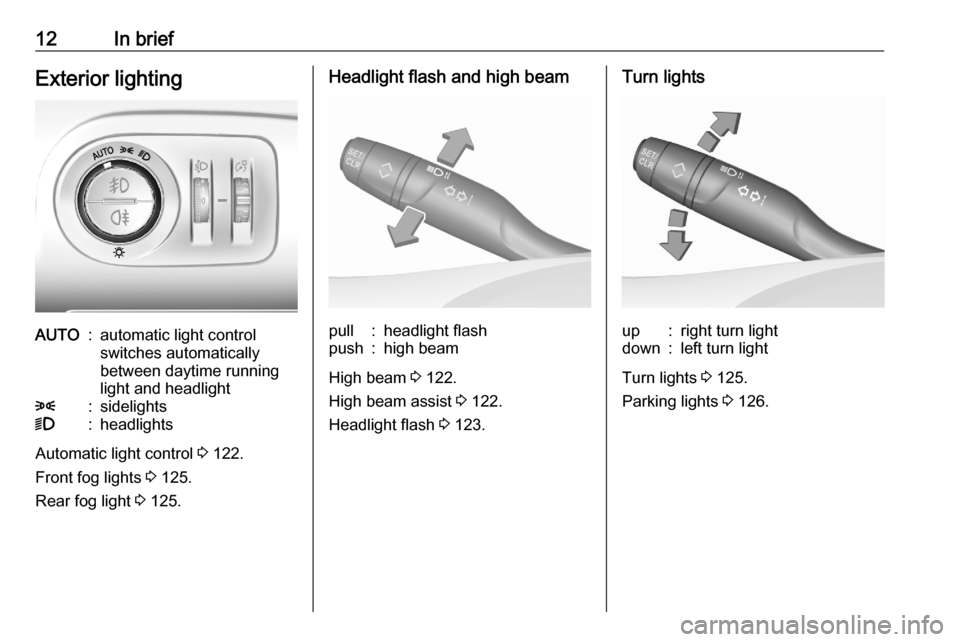
12In briefExterior lightingAUTO:automatic light control
switches automatically
between daytime running
light and headlight8:sidelights9:headlights
Automatic light control 3 122.
Front fog lights 3 125.
Rear fog light 3 125.
Headlight flash and high beampull:headlight flashpush:high beam
High beam 3 122.
High beam assist 3 122.
Headlight flash 3 123.
Turn lightsup:right turn lightdown:left turn light
Turn lights 3 125.
Parking lights 3 126.
Page 20 of 279
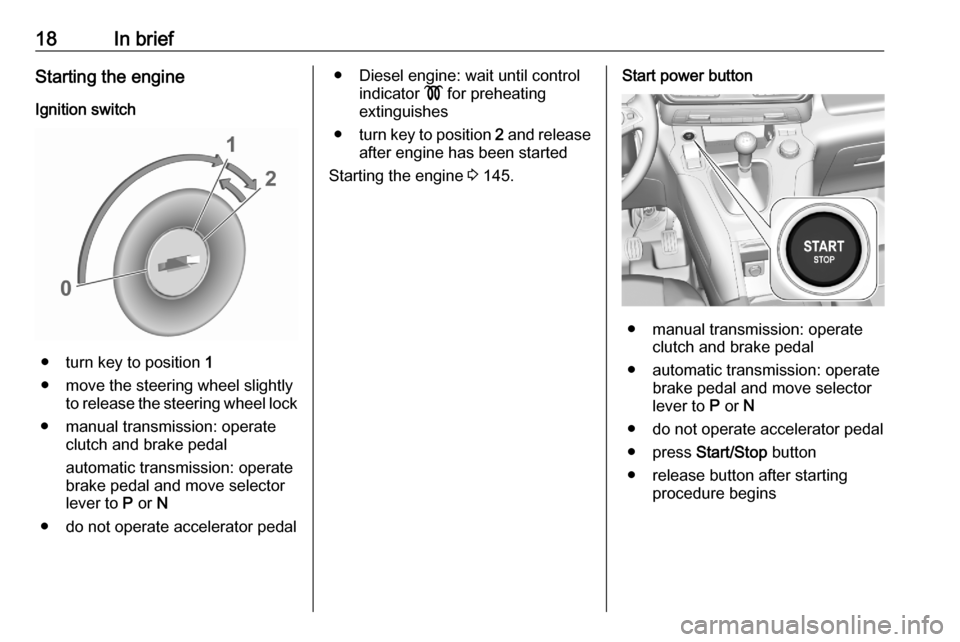
18In briefStarting the engineIgnition switch
● turn key to position 1
● move the steering wheel slightly to release the steering wheel lock
● manual transmission: operate clutch and brake pedal
automatic transmission: operate
brake pedal and move selector lever to P or N
● do not operate accelerator pedal
● Diesel engine: wait until control indicator ! for preheating
extinguishes
● turn key to position 2 and release
after engine has been started
Starting the engine 3 145.Start power button
● manual transmission: operate
clutch and brake pedal
● automatic transmission: operate brake pedal and move selectorlever to P or N
● do not operate accelerator pedal
● press Start/Stop button
● release button after starting procedure begins
Page 38 of 279

36Keys, doors and windowsNotice
If the vehicle is unlocked and no door is opened, the vehicle is
automatically relocked after 30
seconds. In this case, the anti-theft
alarm will be reactivated, too.
Alarm
When triggered, the alarm horn
sounds and the hazard warning lights flash simultaneously. The number
and duration of alarm signals are
stipulated by legislation.
The anti-theft alarm system can be
deactivated by pressing c, by
pressing on one of the front door
handles at the markings with
electronic key system. The LED of the
U button will extinguish and the turn
lights flash for a short time.
A triggered alarm, which has not been interrupted by the driver, will be
indicated by the rapid flashing of the
LED of the U button. If the ignition is
switched on, the flashing stops
immediately
If the vehicle's battery is to be
disconnected (e.g. for maintenance
work), the alarm siren must bedeactivated as follows: switch the
ignition on then off, then disconnect
the vehicle's battery within 15 s
If the battery has been reconnected
(e.g. after maintenance work), wait for 10 minutes to restart the engine.
Locking the vehicle without
activation of the anti-theft alarm
Lock the vehicle by inserting and
turning the integrated key of the
remote control or the electronic key
system in the lock cylinder of the
driver's door.
Malfunction of the remote control Unlock the vehicle by inserting and
turning the integrated key of the
remote control or the electronic key
system in the lock cylinder of the
driver's door.
Open the driver's door.
The horn of the anti-theft alarm will
sound.
Switch on ignition.
The horn will stop sounding and the
status LED extinguishes.Immobiliser
The system is part of the ignition
switch and checks whether the
vehicle is allowed to be started with
the key being used.
The immobiliser is activated
automatically after the key has been
removed from the ignition switch.
Notice
Radio Frequency Identification
(RFID) tags may cause interference
with the key. Do not have it placed
near the key when starting the
vehicle.
Notice
The immobiliser does not lock the
doors. Always lock the vehicle after
leaving it 3 24.
Switch on the anti-theft alarm
system 3 34.
Emergency operation of electronic
key 3 144.
Page 97 of 279
Instruments and controls959Warning
Remove any metal objects from
the charging device before
charging a mobile device, as these objects could become very hot.
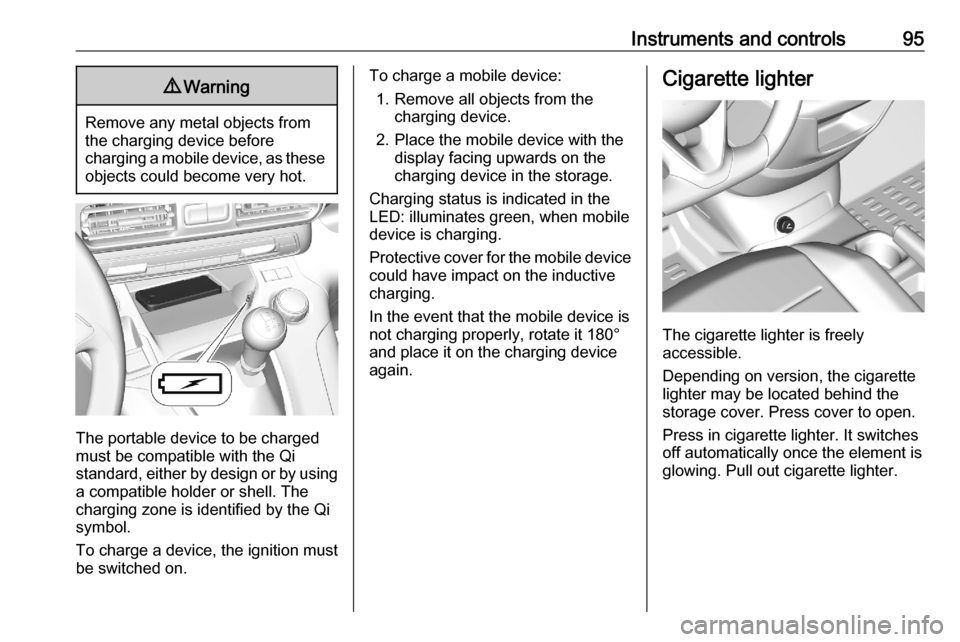
The portable device to be charged
must be compatible with the Qi
standard, either by design or by using a compatible holder or shell. The
charging zone is identified by the Qi
symbol.
To charge a device, the ignition must
be switched on.
To charge a mobile device:
1. Remove all objects from the charging device.
2. Place the mobile device with the display facing upwards on the
charging device in the storage.
Charging status is indicated in the
LED: illuminates green, when mobile
device is charging.
Protective cover for the mobile device
could have impact on the inductive
charging.
In the event that the mobile device is
not charging properly, rotate it 180°
and place it on the charging device
again.Cigarette lighter
The cigarette lighter is freely
accessible.
Depending on version, the cigarette
lighter may be located behind the storage cover. Press cover to open.
Press in cigarette lighter. It switches
off automatically once the element is
glowing. Pull out cigarette lighter.
Page 106 of 279

104Instruments and controlsAntilock brake system(ABS)
u illuminates yellow.
Illuminates for a few seconds after the
ignition is switched on. The system is ready for operation when the control
indicator extinguishes.
If the control indicator does not
extinguish after a few seconds, or if it
illuminates while driving, there is a
fault in the ABS. The brake system
remains operational but without ABS
regulation.
Antilock brake system 3 159.
Gear shifting
R with the number of a higher gear is
indicated, when upshifting is
recommended for fuel saving
reasons.
Overload indicator
& illuminates.
Illuminates when the overload
indicator detects an exceeding of the
maximum authorised weight 3 86.Descent control system
ò illuminates or flashes green.
Iluminates green The system is switched on and ready
to operate.
Flashes green
The system is in operation.
Lane keep assist
a illuminates green or yellow, or
flashes yellow.
Illuminates green
The system is switched on and ready to operate.
Illuminates yellow
The system approaches a detected
lane marking without using the turn
light in that direction.
Flashes yellow The system recognizes that the lane
is departed significantly.Lane keep assist 3 198.
Electronic Stability Control
and Traction Control system
b illuminates or flashes yellow.
Illuminates
A fault in the system is present.
Continued driving is possible. Driving stability, however, may deteriorate
depending on road surface
conditions.
Have the cause of the fault remedied
by a workshop.
Flashes
The system is actively engaged.
Engine output may be reduced and
the vehicle may be braked
automatically to a small degree.
Electronic Stability Control and
Traction Control system 3 163.
Selective ride control 3 165.
Engine coolant temperature o illuminates red.
Page 108 of 279

106Instruments and controlsIlluminates when the engine is
runningCaution
Engine lubrication may be
interrupted. This may result in
damage to the engine and / or
locking of the drive wheels.
1. Select neutral gear.
2. Move out of the flow of traffic as quickly as possible without
impeding other vehicles.
3. Switch off ignition.
9 Warning
When the engine is off,
considerably more force is needed
to brake and steer. During an
Autostop the brake servo unit will still be operational.
Do not remove key until vehicle is stationary, otherwise the steering
wheel lock could engage
unexpectedly.
Keep engine turned off and let the
vehicle be towed to a workshop.
Low fuel o illuminates yellow.
Level in fuel tank is too low.
Refuelling 3 204.
Bleeding the diesel fuel system
3 219.
Autostop D illuminates or flashes green.
Illuminates green
Engine is in an Autostop.
Flashes green
Autostop is temporarily unavailable,
or Autostop mode is invoked
automatically.
Stop-start system 3 147.
Exterior light 8 illuminates green.
The exterior lights are on 3 121.High beam
C illuminates blue.
Illuminates when high beam is on,
during headlight flash 3 122.
Low beam
9 illuminates green.
Illuminated when low beam is on.
High beam assist
f illuminates green.
The high beam assist is activated
3 122.
LED headlights
C illuminates and a warning
message is displayed in the Driver
Information Centre.
Seek the assistance of a workshop.
Front fog lights
> illuminates green.
The front fog lights are on 3 125.
Page 109 of 279

Instruments and controls107Rear fog lightr illuminates yellow.
The rear fog light is on 3 125.
Rain sensor
< illuminates green.
Illuminated when rain sensor position on wiper lever is selected.
Cruise control
m illuminates white or green.
Illuminates white
The system is on.
Illuminates green
Cruise control is active. Set speed is
indicated in the Driver Information
Centre.
Cruise control 3 167.
Adaptive cruise control
m illuminates white or green.
C illuminates in the Driver
Information Centre.m illuminates white
The system is on.
m illuminates green
Adaptive cruise control is active.
When Adaptive cruise control is on or active, C with the set speed is
indicated in the Driver Information
Centre.
Adaptive cruise control 3 171.
Side blind spot alert
B illuminates continously green in the
instrument cluster.
The system is active 3 191.
Active emergency braking
m illuminates or flashes yellow.
Illuminates
The system has been deactivated or
a fault has been detected.
Additionally, a warning message is
displayed in the Driver Information
Centre.Check the reason of the deactivation
3 179 and in case of a system fault,
seek the assistance of a workshop.
Flashes
The system is actively engaged. Depending on the situation, the
vehicle may automatically brake
moderately or hard.
Forward collision alert 3 178.
Front pedestrian protection 3 182.
Active emergency braking 3 179.
Speed limiter
ß illuminates in the Driver
Information Centre when speed
limiter is active. Set speed is indicated alongside ß symbol.
Speed limiter 3 169.
Door open
h illuminates red.
A door or the tailgate is open.
Page 115 of 279
Instruments and controls113when it is dark outside. Be sure tokeep the head-up display imagedim and placed low in your field of view.
Adjust brightness
The head-up display image will
automatically dim and brighten to
compensate for outside lighting.
Brightness can also be adjusted
manually as needed:
Press e to brighten the display. Press
æ to dim the display.
The image can temporarily illuminate
depending on angel and position of
sunlight.
Switching off Press æ and hold to turn the head-up
display off.
Language Preferred language can be set invehicle personalisation menu 3 115.
Units
Units can be changed in vehicle
personalisation menu 3 115.
Care of head-up display Clean the screen of the head-updisplay with a soft cloth sprayed withglass cleaner. Wipe the lens gently,
then dry it.
System limitations Head-up display may not operate
properly when:
● The lens in the instrument panel is covered by objects or not
clean.
● Display brightness is too dim or bright.
● Image is not adjusted to the proper height.
● The driver wears polarized sunglasses.
If the head-up image is not correct for
other reasons, contact a workshop.Rear view display
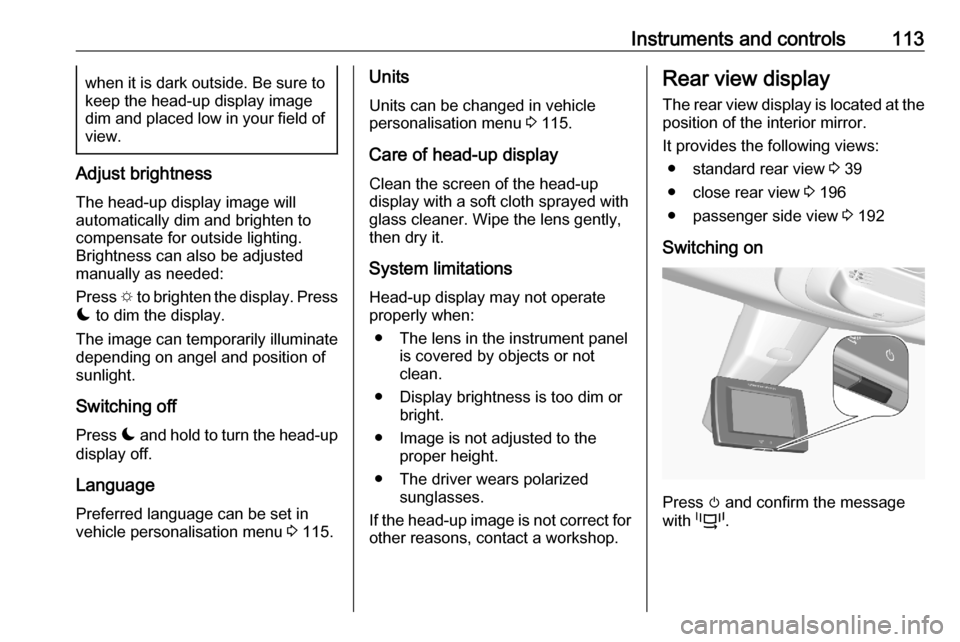
The rear view display is located at the position of the interior mirror.
It provides the following views: ● standard rear view 3 39
● close rear view 3 196
● passenger side view 3 192
Switching on
Press m and confirm the message
with p.
Page 118 of 279
116Instruments and controls●Comfort
Ambient lighting : Adjusts the
brightness of the ambient
lighting.
Rear wiper in reverse gear :
Activates or deactivates
automatic switching on of the
rear window wiper when reverse
gear is engaged.
● Vehicle
Unlocking boot only : Activation /
deactivation.
Plip action : Driver / all doors.
● Security
Fatigue Detection system :
Activates or deactivates the
driver drowsiness system.
● Driving assistance
Speed recommendation :
Activates or deactivates the
function.Colour Info Display Multimedia
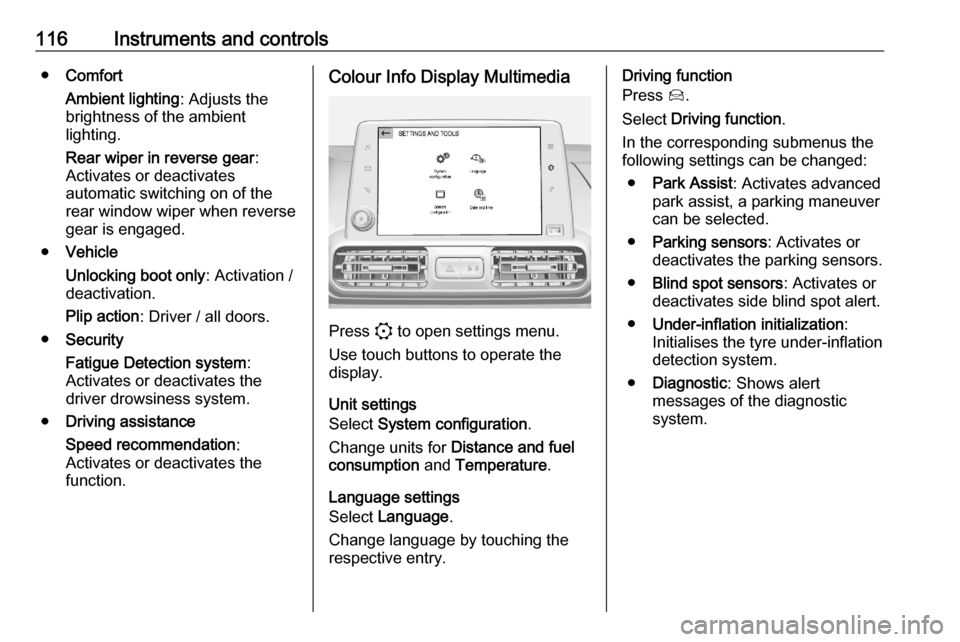
Press : to open settings menu.
Use touch buttons to operate the
display.
Unit settings
Select System configuration .
Change units for Distance and fuel
consumption and Temperature .
Language settings
Select Language .
Change language by touching the
respective entry.
Driving function
Press Í.
Select Driving function .
In the corresponding submenus the
following settings can be changed:
● Park Assist : Activates advanced
park assist, a parking maneuver
can be selected.
● Parking sensors : Activates or
deactivates the parking sensors.
● Blind spot sensors : Activates or
deactivates side blind spot alert.
● Under-inflation initialization :
Initialises the tyre under-inflation
detection system.
● Diagnostic : Shows alert
messages of the diagnostic
system.