park assist VAUXHALL COMBO E 2020 User Guide
[x] Cancel search | Manufacturer: VAUXHALL, Model Year: 2020, Model line: COMBO E, Model: VAUXHALL COMBO E 2020Pages: 279, PDF Size: 28.6 MB
Page 123 of 279

Lighting121LightingExterior lighting.......................... 121
Light switch .............................. 121
Automatic light control .............122
High beam ............................... 122
High beam assist .....................122
Headlight flash ......................... 123
Headlight range adjustment ....124
Headlights when driving abroad .................................... 124
Daytime running lights .............124
Hazard warning flashers ..........124
Turn lights ................................ 125
Front fog lights ......................... 125
Rear fog light ........................... 125
Parking lights ........................... 126
Reversing lights .......................126
Misted light covers ...................126
Interior lighting ........................... 126
Instrument panel illumination control ..................................... 126
Interior lights ............................ 127
Reading lights .......................... 127
Sunvisor lights ......................... 127
Lighting features ........................128
Centre console lighting ............128Entry lighting ............................ 128
Exit lighting .............................. 128
Vehicle locator lighting ............129
Peripheral lighting ....................129
Battery discharge protection ....129Exterior lighting
Light switch
Turn light switch:
AUTO:automatic light control
switches automatically
between daytime running
light and headlight8:sidelights9:headlights
When switching on the ignition,
automatic light control is active.
Control indicator 8 3 106.
Page 144 of 279

142Driving and operatingDriving and
operatingDriving hints ............................... 143
Control of the vehicle ...............143
Steering ................................... 143
Starting and operating ...............143
New vehicle running-in ............143
Ignition switch positions ...........143
Power button ........................... 144
Starting the engine ..................145
Overrun cut-off ........................ 147
Stop-start system ....................147
Parking .................................... 150
Engine exhaust .......................... 151
Exhaust filter ............................ 151
Catalytic converter ...................151
AdBlue ..................................... 152
Automatic transmission ..............155
Transmission display ...............155
Gear selection ......................... 155
Manual mode ........................... 156
Electronic driving programmes 157
Fault ........................................ 157
Eco mode ................................ 157
Manual transmission ..................158Brakes........................................ 159
Antilock brake system .............159
Parking brake .......................... 160
Brake assist ............................. 162
Hill start assist ......................... 162
Ride control systems .................163
Electronic Stability Control and Traction Control system .........163
Descent control system ...........164
Selective ride control ...............165
Driver assistance systems .........167
Cruise control .......................... 167
Speed limiter ........................... 169
Adaptive cruise control ............171
Forward collision alert .............178
Active emergency braking .......179
Front pedestrian protection .....182
Parking assist .......................... 183
Advanced parking assist .........187
Side blind spot alert .................191
Passenger side camera ...........192
Panoramic view system ...........193
Rear view camera ...................196
Lane keep assist .....................198
Driver alert ............................... 201
Fuel ............................................ 202
Fuel for petrol engines .............202
Fuel for diesel engines ............203
Refuelling ................................ 204Trailer hitch................................ 206
General information .................206
Driving characteristics and towing tips .............................. 206
Trailer towing ........................... 206
Towing equipment ...................207
Trailer stability assist ...............210
Page 145 of 279

Driving and operating143Driving hints
Control of the vehicle
Never coast with engine not
running
Many systems will not function in this
situation ( e.g. brake servo unit, power
steering). Driving in this manner is a danger to yourself and others.
All systems function during an
Autostop.
Stop-start system 3 147.
Pedals
To ensure the pedal travel is uninhibited, there must be no mats in the area of the pedals.
Use only floor mats, which fit properly
and are fixed by the retainers on the
driver side.Steering
If power steering assist is lost
because the engine stops or due to a system malfunction, the vehicle can
be steered but may require increased
effort.Starting and operating
New vehicle running-in Do not brake unnecessarily hard for
the first few journeys.
During the first drive, smoke may
occur because of wax and engine oil
evaporating off the exhaust system.
Park the vehicle in the open for a
while after the first drive and avoid
inhaling the fumes.
During the running-in period, fuel and engine oil consumption may be
higher.
Additionally, the cleaning process of
the exhaust filter may take place more
often.
Exhaust filter 3 151.
Ignition switch positions
Turn key:
Page 156 of 279

154Driving and operatingNotice
Whenever a filling pump with a
nozzle for passenger cars is not
available at a filling station, use only
AdBlue bottles or canisters with a
sealed refill adapter for refilling, to
prevent splashback and overspill,
and in order to ensure that the fumes
from the tank are captured and do
not emerge. AdBlue in bottles or
canisters is available in many filling
stations and can be purchased e.g. at Vauxhall dealers and other retail
outlets.
Since AdBlue has a limited
durability, check the date of expiry
before refilling.
Notice
Refill the tank to a level of at least
5 l to ensure that the new AdBlue
level is being detected.
In case AdBlue refill is not
successfully detected:1. Continuously drive the vehicle for 10 min making sure that
vehicle speed is always higher
than 12 mph.
2. If AdBlue refill is detected successfully, AdBlue supply-
driven warnings or limitations will
disappear.
If AdBlue refill is still not detected, seek the assistance of a workshop.
If AdBlue must be refilled at
temperatures below -11 °C, the
refilling of AdBlue may not be
detected by the system. In this
event, park the vehicle in a space
with a higher ambient temperature
until AdBlue is liquified.
Notice
When unscrewing the protective cap
from the filler neck, ammonia fumes
may emerge. Do not inhale as the
fumes have a pungent smell. The
fumes are not harmful by inhalation.
The AdBlue tank should be filled
completely. This must be done if the
warning message regarding
prevention of an engine restart is
already displayed.The vehicle must be parked on a level surface.
The filler neck for AdBlue is located
behind the fuel filler flap, which is located at left rear side of the vehicle.
If the vehicle is equipped with an
electronic key system, the fuel filler
flap can only be opened if the vehicle
is unlocked.
1. Remove key from ignition switch.
2. Close all doors to avoid ammonia fumes entering the interior of the
vehicle.
3. Release the fuel filler flap by pushing the flap 3 204.
Page 164 of 279

162Driving and operatingAutomatic release:● Parking brake releases automatically after moving off.
● j extinguishes in the
instrument cluster and a display
message pops up to confirm the
release.
If the vehicle is equipped with an
automatic transmission and the brake is not released automatically, make
sure the front doors are correctly
closed.Deactivation of automatic operation 1. Start the engine.
2. If the parking brake is released, apply the parking brake pulling the
switch j.
3. Take your foot off the brake pedal.
4. Press the switch j for at least
10 s and maximum 15 s.
5. Release the switch j.
6. Press and hold the brake pedal. 7. Pull the switch j for 2 s.
The deactivation of the automatic operation of the electric parking brake
is confirmed by o illuminating in theinstrument cluster 3 103 . The electric
parking brake can only be applied and released manually.
To reactivate the automatic
operation, repeat the steps described above.
Functionality check
When the vehicle is not moving, the
electric parking brake might be
applied automatically. This is done to
check the system.
Fault
Failure mode of electric parking brake
is indicated by a control indicator j
and by a vehicle message which is
displayed in the Driver Information Centre.
Vehicle messages 3 114.
Control indicator j flashes: electric
parking brake is not fully applied or
released. When continuously
flashing, release electric parking
brake and retry applying.Brake assist
If brake pedal is depressed quickly
and forcefully, maximum brake force
is automatically applied.
Operation of brake assist might
become apparent by a pulse in the
brake pedal and a greater resistance when depressing the brake pedal.
Maintain steady pressure on the
brake pedal as long as full braking is
required. Maximum brake force is
automatically reduced when brake
pedal is released.
Hill start assist The system helps prevent unintendedmovement when driving away on
inclines.
When releasing the brake pedal after
stopping on an incline, brakes remain
on for further 2s. The brakes release
automatically as soon as the vehicle
begins to accelerate.
Page 176 of 279

174Driving and operatingResuming stored speed
Move the thumb wheel to RES/+ at a
speed above 19 mph. The adaptive cruise control is activated with the
stored set speed.
Taking over the speed limit from
the traffic sign assistant
The intelligent speed adaptation
informs the driver when a speed limit
is detected by the traffic sign
assistant. The detected speed limit
can be taken over as new set speed
for the adaptive cruise control.
With the camera at the top of the
windscreen, this system detects and
reads speed limit and end of speed
limit signs. The system also takes
account of information on speed limits from the navigation map data.
The function can be activated or
deactivated in the personalisation
menu 3 115.
If the adaptive cruise control is active, the recognised speed limit will be
displayed in the Driver Information
Centre and MEM illuminates.In the Driver Information Centre,
speed limit sign is shown in the
display and MEM illuminates for a few
seconds.
Press MEM on the steering wheel to
request saving of the suggested
speed.
Press MEM on the steering wheel
once more to confirm and save the
new speed setting.
This speed limit is now the new set
speed of the adaptive cruise control.
Adaptive cruise control on
vehicles with automatic
transmission
For vehicles with automatic
transmission, adaptive cruise control
allows to maintain the selected
distance behind a stopping vehicle until a complete stop is reached.
If the system has stopped your
vehicle behind another vehicle, then
the set speed is replaced by a green
control indicator .. This symbol
notifies, that the vehicle is hold
automatically in stop position.If the stopped vehicle ahead was stopped for a longer time and then
begins to move forward, the green
illuminated vehicle ahead control
indicator . will flash and a warning
chime will sound as a reminder to check traffic before resuming.
When the vehicle ahead drives away,
press the accelerator pedal until
19 mph and then move the thumb
wheel to SET- or RES+ to resume
adaptive cruise control. If the vehicle
stays stopped for more than five
minutes or if the driver's door is
opened and the driver's seat belt is
unfastened, then the electric parking
brake is applied automatically to hold
the vehicle. Control indicator m will
illuminate. To release electric parking
brake, press the accelerator pedal.
Electric parking brake 3 160.9 Warning
When the system is deactivated or
cancelled, the vehicle will no
longer be held at a stop and can
Page 185 of 279
Driving and operating183● the sensor in the windscreen isblocked by snow, ice, slush, mud,dirt etc.
● the windscreen is damaged or affected by foreign objects, e.g.
stickers
Parking assist
General information When attaching a trailer or bicycle
carrier to the trailer hitch, the parking
assist is deactivated.9 Warning
The driver bears full responsibility
for the parking manoeuvre.
Always check the surrounding
area when driving backwards or
forwards while using parking
assist system.
Rear parking assist
The system warns the driver with
acoustic signals against potentially
hazardous obstacles behind the
vehicle in a distance range up to
50 cm while reverse gear is engaged.
The system operates with ultrasonic
parking sensors in the rear bumper.
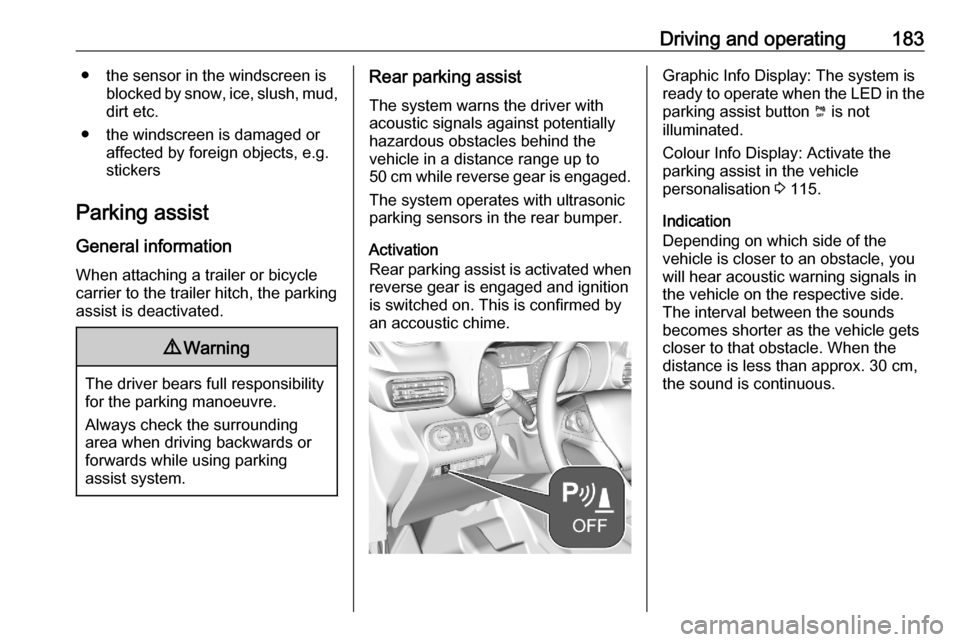
Activation
Rear parking assist is activated when
reverse gear is engaged and ignition
is switched on. This is confirmed by
an accoustic chime.Graphic Info Display: The system is
ready to operate when the LED in the
parking assist button ¼ is not
illuminated.
Colour Info Display: Activate the
parking assist in the vehicle
personalisation 3 115.
Indication
Depending on which side of the
vehicle is closer to an obstacle, you
will hear acoustic warning signals in
the vehicle on the respective side.
The interval between the sounds
becomes shorter as the vehicle gets
closer to that obstacle. When the
distance is less than approx. 30 cm, the sound is continuous.
Page 186 of 279

184Driving and operating
Additionally, the distance to rear
obstacles is displayed by changing
distance lines in the Info Display
3 110. When the obstacle is very
close, 9 for danger is displayed.
Deactivation
The system is switched off when
reverse gear is disengaged. Press ¼
to deactivate the system manually.
The LED in the button illuminates
when the system is deactivated. If the
system has been deactivated
manually, it is not reactivated
automatically the next time the
ignition is switched on.
Graphic Info Display: The system is
switched off when the LED in the
parking assist button ¼ is illuminated.
Colour Info Display: Deactivate the
parking assist in the vehicle
personalisation 3 115. The state of
the system
Front-rear parking assist
The front-rear parking assist
measures the distance between the
vehicle and obstacles in front and
behind the vehicle. It informs and
warns the driver by giving acoustic
signals and display indication.
It uses two different acoustic warning signals for the front and rear
monitoring areas, each with a
different tone frequency.
The system operates with ultrasonic
parking sensors in the rear and front
bumper.
Activation
In addition to the rear parking assist,
the front parking assist is triggered
when an obstacle is detected in front
and the speed of the vehicle is below 6 mph.Graphic Info Display: The system is
ready to operate when the LED in the
parking assist button ¼ is not
illuminated.
Colour Info Display: Activate the
parking assist is in the vehicle
personalisation 3 115.
Indication
Depending on which side of the
vehicle is closer to an obstacle, you
will hear acoustic warning signals in the vehicle on the respective side.
The interval between the sounds
becomes shorter as the vehicle gets
closer to that obstacle. When the
distance is less than approx. 30 cm,
the sound is continuous.
Page 187 of 279
Driving and operating185
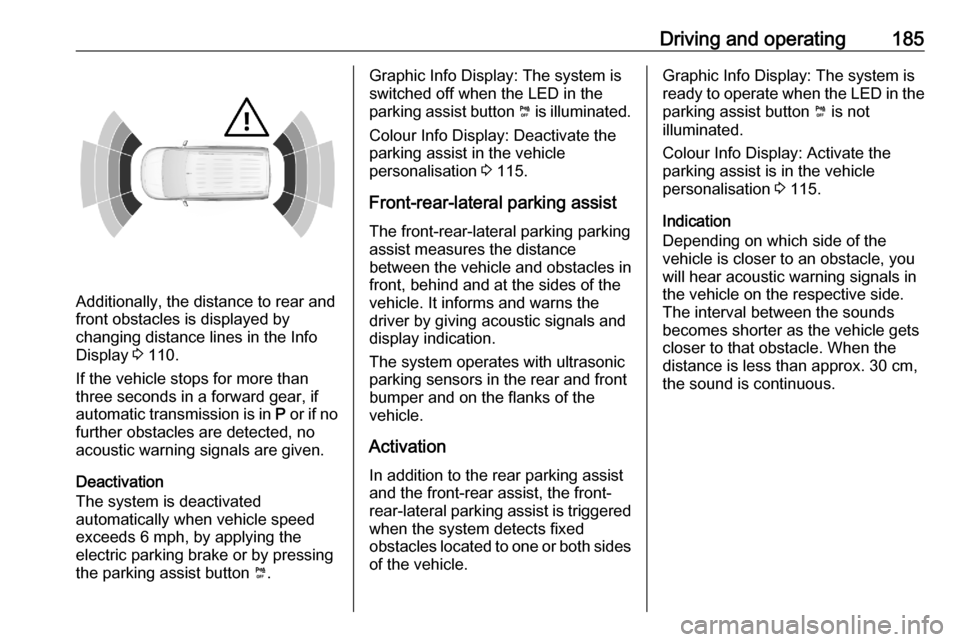
Additionally, the distance to rear and
front obstacles is displayed by
changing distance lines in the Info Display 3 110.
If the vehicle stops for more than
three seconds in a forward gear, if
automatic transmission is in P or if no
further obstacles are detected, no
acoustic warning signals are given.
Deactivation
The system is deactivated
automatically when vehicle speed
exceeds 6 mph, by applying the
electric parking brake or by pressing
the parking assist button ¼.
Graphic Info Display: The system is
switched off when the LED in the
parking assist button ¼ is illuminated.
Colour Info Display: Deactivate the
parking assist in the vehicle
personalisation 3 115.
Front-rear-lateral parking assist The front-rear-lateral parking parking
assist measures the distance
between the vehicle and obstacles in
front, behind and at the sides of the
vehicle. It informs and warns the
driver by giving acoustic signals and
display indication.
The system operates with ultrasonic parking sensors in the rear and front
bumper and on the flanks of the
vehicle.
Activation
In addition to the rear parking assist
and the front-rear assist, the front-
rear-lateral parking assist is triggered
when the system detects fixed
obstacles located to one or both sides
of the vehicle.Graphic Info Display: The system is
ready to operate when the LED in the parking assist button ¼ is not
illuminated.
Colour Info Display: Activate the
parking assist is in the vehicle
personalisation 3 115.
Indication
Depending on which side of the
vehicle is closer to an obstacle, you
will hear acoustic warning signals in
the vehicle on the respective side.
The interval between the sounds
becomes shorter as the vehicle gets closer to that obstacle. When the
distance is less than approx. 30 cm,
the sound is continuous.
Page 188 of 279
186Driving and operating
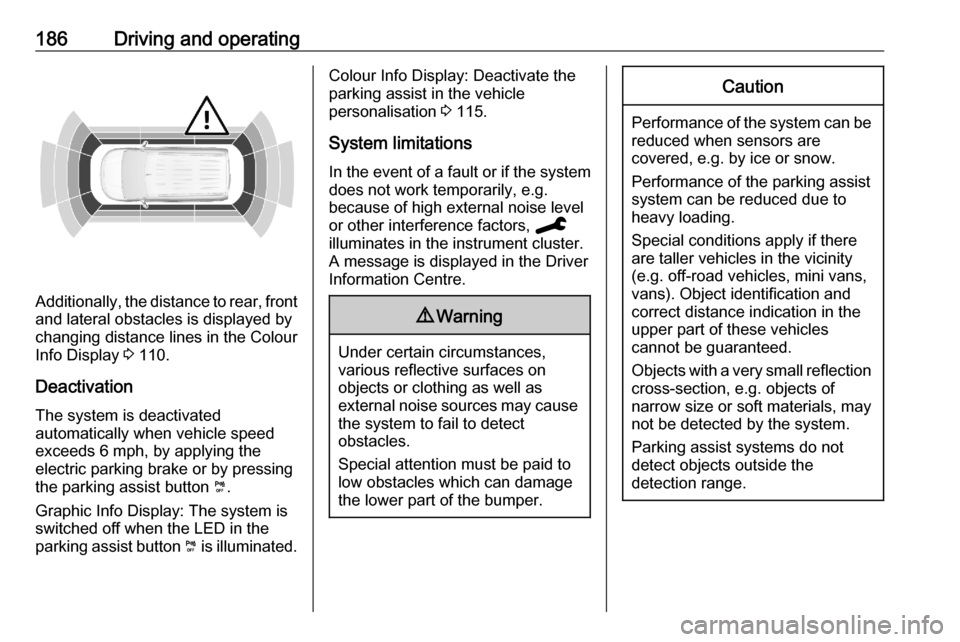
Additionally, the distance to rear, front
and lateral obstacles is displayed by
changing distance lines in the Colour
Info Display 3 110.
Deactivation
The system is deactivated
automatically when vehicle speed
exceeds 6 mph, by applying the
electric parking brake or by pressing
the parking assist button ¼.
Graphic Info Display: The system is
switched off when the LED in the
parking assist button ¼ is illuminated.
Colour Info Display: Deactivate the
parking assist in the vehicle
personalisation 3 115.
System limitations In the event of a fault or if the system
does not work temporarily, e.g. because of high external noise level
or other interference factors, C
illuminates in the instrument cluster.
A message is displayed in the Driver Information Centre.9 Warning
Under certain circumstances,
various reflective surfaces on
objects or clothing as well as
external noise sources may cause the system to fail to detect
obstacles.
Special attention must be paid to
low obstacles which can damage
the lower part of the bumper.
Caution
Performance of the system can be reduced when sensors are
covered, e.g. by ice or snow.
Performance of the parking assist
system can be reduced due to
heavy loading.
Special conditions apply if there
are taller vehicles in the vicinity
(e.g. off-road vehicles, mini vans,
vans). Object identification and correct distance indication in the
upper part of these vehicles
cannot be guaranteed.
Objects with a very small reflection
cross-section, e.g. objects of
narrow size or soft materials, may
not be detected by the system.
Parking assist systems do not
detect objects outside the
detection range.