eco VAUXHALL COMBO E 2020 Repair Manual
[x] Cancel search | Manufacturer: VAUXHALL, Model Year: 2020, Model line: COMBO E, Model: VAUXHALL COMBO E 2020Pages: 279, PDF Size: 28.6 MB
Page 166 of 279

164Driving and operatingESC and TC are also reactivated the
next time the ignition is switched on.
Fault
If there is a fault in the system, the control indicator b illuminates
continuously and a message appears
in the Driver Information Centre. The
system is not operational.
Have the cause of the fault remedied
by a workshop.
Descent control system
The descent control system allows
the vehicle to travel at a low speed
without depressing the brake pedal.
The vehicle will automatically
decelerate to a low speed and remain at that speed when the system is
activated. Some noise or vibration
from the brake system may be
apparent when the system is active.Caution
Use only when descending steep
grades while driving off-road. Do
not use when driving on normal
road surfaces. Unnecessary
usage of the DCS function, such
as while driving on normal roads,
may damage the brake system
and the ESC function.
Activation
Notice
If hill descent control is active, active emergency braking is automatically
deactivated.
The systems is only available for
slopes greater than 5%.
At speeds below approx. 30 mph,
press ò. The system can also be
activated when the vehicle is
stationary with the engine running. The control indicator ò in the
instrument cluster is illuminated in
green to show the system is
activated.
When the vehicles starts its descent, the system controls the speed of the
vehicle; accelerator and brake pedals can be released.
● If the gearbox is in first or second
gear, the speed decreases andthe control indicator in the
instrument cluster flashes
rapidly.
● If the gearbox is in neutral or the clutch pedal is released, the
speed decreases and the control
indicator in the instrument cluster
flashes slowly.
If the system is operating, the brake
lights automatically come on.
If the speed exceeds 18 mph,
regulation is paused. The ò
indicator light in the instrument cluster
Page 168 of 279

166Driving and operatingA LED illuminates and a status
message appears in the Driver
Information Centre to confirm the
chosen mode.
ESC off mode 9
The ESC and Traction Control are
deactivated in this mode.
An LED in the button a illuminates.
ESC and Traction Control are
reactivated automatically from
30 mph or everytime the ignition is
switched on.
Standard mode 2
This mode is calibrated for a low level of wheel spin, based on the different
types of grip generally encountered in
normal day to day driving.
Everytime the ignition is switched off,
the system is automatically reset to
this mode.
Snow mode 3
This mode adapts to the grip
conditions encountered by each
wheel when starting.When advancing, the system
optimises wheel spin to guarantee the
best acceleration based on the
available traction. Recommended in
cases of deep snow and steep
inclines.
This mode is active up to a speed of
30 mph.
Mud mode 4
This mode allows considerable wheel spin at start-up for the wheel with the
least grip, this removes mud and re-
establishes traction.
Simultaneously, the wheel with the
most grip is provided with the most
torque possible.
This mode is active up to a speed of 50 mph.
Sand mode 1
This mode allows a small amount of
simultaneous wheel spin on the two
drive wheels, enabling the vehicle to
advance and reduce the risk of
sinking.
This mode is active up to a speed of
75 mph.Caution
Do not use the other modes on
sand as the vehicle may become
stuck.
Page 169 of 279

Driving and operating167Driver assistance
systems9 Warning
Driver assistance systems are
developed to support the driver
and not to replace the driver's
attention.
The driver accepts full
responsibility when driving the
vehicle.
When using driver assistance
systems, always take care
regarding the current traffic
situation.
Cruise control
The cruise control can store and
maintain speeds above 25 mph.
Additionally at least the third gear
must be engaged on manual
transmission, on automatic
transmission position D or the second
or a higher gear in position M must be
selected.
Deviations from the stored speeds may occur when driving uphill or
downhill.
The system maintains the vehicle
speed at the preset speed by the
driver, without any action on the
accelerator pedal.
The preset speed can be exceeded
temporarily by pressing the
accelerator pedal firmly.
The status and preset speed is
displayed in the Driver Information Centre.
Do not use the cruise control if it is not advisable to maintain a constant
speed.
Control indicator m 3 107.Switching on the system
Press m, symbol m and a message
are displayed in the Driver
Information Centre. The system is still not active.
Page 170 of 279
168Driving and operating
Activation of the functionalitySetting speed by the driver
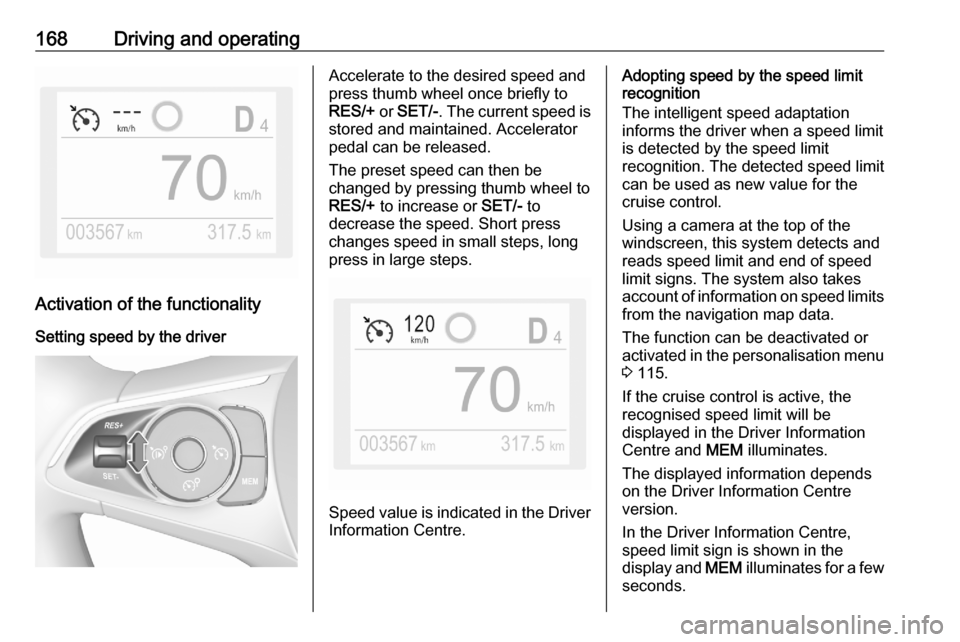
Accelerate to the desired speed and
press thumb wheel once briefly to
RES/+ or SET/- . The current speed is
stored and maintained. Accelerator
pedal can be released.
The preset speed can then be
changed by pressing thumb wheel to
RES/+ to increase or SET/- to
decrease the speed. Short press
changes speed in small steps, long
press in large steps.
Speed value is indicated in the Driver
Information Centre.
Adopting speed by the speed limit
recognition
The intelligent speed adaptation
informs the driver when a speed limit
is detected by the speed limit
recognition. The detected speed limit
can be used as new value for the
cruise control.
Using a camera at the top of the
windscreen, this system detects and
reads speed limit and end of speed
limit signs. The system also takes
account of information on speed limits from the navigation map data.
The function can be deactivated or
activated in the personalisation menu
3 115.
If the cruise control is active, the
recognised speed limit will be
displayed in the Driver Information
Centre and MEM illuminates.
The displayed information depends
on the Driver Information Centre
version.
In the Driver Information Centre,
speed limit sign is shown in the
display and MEM illuminates for a few
seconds.
Page 171 of 279

Driving and operating169Press MEM on the steering wheel to
request saving of the suggested
speed.
Press MEM on the steering wheel
once more to confirm and save the
new speed setting.
This speed is the new value for the
cruise control.
Exceeding the set speed
Vehicle speed can be increased by
depressing the accelerator pedal.
When the accelerator pedal is
released, the previously stored speed
is resumed.
Deactivation of the functionality
Press Ñ, cruise control is in pause
mode and a message is displayed.
The vehicle is driven without cruise
control.
Cruise control is deactivated, but not
switched off. Last stored speed
remains in memory for later speed
resume.Cruise control is deactivated
automatically:
● The brake pedal is depressed.
● Vehicle speed is below 25 mph.
● The Traction Control system or Electronic Stability Control is
operating.
● The selector lever is in N
(automatic transmission) / the first or second gear (manual
transmission).
Resume stored speed
Press thumb wheel to RES/+ at a
speed above 25 mph. The stored
speed will be obtained.
Switching off the system
Press m, the cruise control mode is
deselected and the cruise control
indication extinguishes in the Driver
Information Centre.
Pressing ß to activate the speed
limiter deactivates cruise control.
Switching off the ignition cancels any
programmed speed value.Fault
In the event of a cruise control fault, the speed is cleared resulting in
flashing of the dashes.
The cruise control may not operate
correctly if traffic signs do not comply with the Vienna Convention on Road
Signs and Signals.
Speed limiter
The speed limiter prevents the
vehicle exceeding a preset maximum speed.
The maximum speed can be set at
speeds above 18 mph.
The driver can accelerate the vehicle
up to the preset speed. Deviations
from the limited speed may occur
when driving downhill.
The preset speed can be exceeded
temporarily by pressing the
accelerator pedal firmly.
The status and preset speed limit are
displayed in the Driver Information
Centre.
Page 173 of 279

Driving and operating171assistant. The detected speed limit
can be used as new value for the
speed limiter.
Using a camera at the top of the windscreen, this system detects and
reads speed limit and end of speed
limit signs. The system also takes account of information on speed limits
from the navigation map data.
The function can be activated or
deactivated in the personalisation
menu 3 115.
If the speed limiter is active, the
recognised speed limit will be
displayed in the Driver Information
Centre and MEM illuminates.
The displayed information depends
on the Driver Information Centre
version.
In the Driver Information Centre,
speed limit sign is shown and MEM
illuminates for a few seconds.
Press MEM on the steering wheel to
request saving of the suggested
speed.
Press MEM on the steering wheel
once more to confirm and save the
new speed setting.This speed is the new value for the
speed limiter.
Exceeding the speed limitIn the event of an emergency, it is possible to exceed the speed limit by
depressing the accelerator pedal
firmly nearly to the final point.
Release the accelerator pedal and
the speed limiter function is
reactivated once a speed lower than
the limit speed is obtained.
Deactivation of the functionality
Press Ñ, speed limiter is in pause
mode and a message is displayed.
The vehicle is driven without speed
limit.
Speed limiter is deactivated, but not
switched off. Last stored speed
remains in memory for later speed
resume.
Resume limit speed Press Ñ, the stored speed limit will be
obtained.Switching off the system
Press ß, the speed limiter mode is
deselected and the speed limit indication extinguishes in the Driver
Information Centre.
Pressing m to activate cruise control
deactivates speed limiter.
The preset speed remains in the
memory when the ignition is switched
off.
Fault
In the event of a speed limiter fault,
the speed is cleared resulting in
flashing of the dashes.
The speed limiter may not operate correctly if traffic signs do not comply
with the Vienna Convention on Road
Signs and Signals.
Adaptive cruise control
The adaptive cruise control is an
enhancement to the conventional
cruise control with the additional
feature of maintaining a certain
following distance to the vehicle
ahead. It uses a camera at the top of
Page 176 of 279

174Driving and operatingResuming stored speed
Move the thumb wheel to RES/+ at a
speed above 19 mph. The adaptive cruise control is activated with the
stored set speed.
Taking over the speed limit from
the traffic sign assistant
The intelligent speed adaptation
informs the driver when a speed limit
is detected by the traffic sign
assistant. The detected speed limit
can be taken over as new set speed
for the adaptive cruise control.
With the camera at the top of the
windscreen, this system detects and
reads speed limit and end of speed
limit signs. The system also takes
account of information on speed limits from the navigation map data.
The function can be activated or
deactivated in the personalisation
menu 3 115.
If the adaptive cruise control is active, the recognised speed limit will be
displayed in the Driver Information
Centre and MEM illuminates.In the Driver Information Centre,
speed limit sign is shown in the
display and MEM illuminates for a few
seconds.
Press MEM on the steering wheel to
request saving of the suggested
speed.
Press MEM on the steering wheel
once more to confirm and save the
new speed setting.
This speed limit is now the new set
speed of the adaptive cruise control.
Adaptive cruise control on
vehicles with automatic
transmission
For vehicles with automatic
transmission, adaptive cruise control
allows to maintain the selected
distance behind a stopping vehicle until a complete stop is reached.
If the system has stopped your
vehicle behind another vehicle, then
the set speed is replaced by a green
control indicator .. This symbol
notifies, that the vehicle is hold
automatically in stop position.If the stopped vehicle ahead was stopped for a longer time and then
begins to move forward, the green
illuminated vehicle ahead control
indicator . will flash and a warning
chime will sound as a reminder to check traffic before resuming.
When the vehicle ahead drives away,
press the accelerator pedal until
19 mph and then move the thumb
wheel to SET- or RES+ to resume
adaptive cruise control. If the vehicle
stays stopped for more than five
minutes or if the driver's door is
opened and the driver's seat belt is
unfastened, then the electric parking
brake is applied automatically to hold
the vehicle. Control indicator m will
illuminate. To release electric parking
brake, press the accelerator pedal.
Electric parking brake 3 160.9 Warning
When the system is deactivated or
cancelled, the vehicle will no
longer be held at a stop and can
Page 182 of 279

180Driving and operatingForward collision alert 3 178
Front pedestrian protection 3 182
The feature uses various inputs (e.g.
camera sensor, brake pressure,
vehicle speed) to calculate the
probability of a frontal collision.9 Warning
This system is not intended to
replace the driver responsibility for driving the vehicle and looking
ahead. Its function is limited to
supplemental use only to reduce
the vehicle speed before a
collision.
The system may not react to
animals. After a sudden lane
change, the system needs a
certain time to detect the next
preceding vehicle.
The driver must always be ready
to take action and apply the brakes and steer to avoid collisions.
Functionality
Active emergency braking is
equipped with a front camera and
operates in forward gear in the range
between walking speed and 53 mph.
The system detects stationary
vehicles only if the speed does not
exceed 50 mph.
A precondition is that active
emergency braking is not deactivated
in the vehicle personalisation menu
3 115.
If deactivated, m illuminates in the
instrument cluster and a warning message is displayed in the Driver
Information Centre
If the system has been deactivated
manually, it is reactivated
automatically the next time the
ignition is switched on.
The system includes: ● emergency automatic braking● forward collision alert
● front pedestrian protectionEmergency automatic braking
After activation of brake preparation
system and just before the imminent
collision, this function automatically
applies limited braking to reduce the
impact speed of the collision or
prohibit a crash.
If active emergency braking is
applied, m flashes in the instrument
cluster.
Depending on the situation, the
vehicle may automatically brake
moderately or hard.
Front automatic braking can only
occur if a vehicle or a pedestrian
ahead is detected.
Forward collision alert 3 178
Front pedestrian protection 3 182
Below a speed of 19 mph, emergency automatic braking may slow down thevehicle to a complete stop. If the
speed exceeds 19 mph, emergency
automatic braking reduces the speed.
However, the driver must apply the
brake.
Page 183 of 279

Driving and operating181Emergency automatic braking may
slow the vehicle to a complete stop to
try to avoid a potential crash.
● Automatic transmission: If the vehicle comes to a complete
stop, automatic braking is
maintained for up to two
seconds. Keep the brake pedal
depressed to prevent the vehicle
from starting off again.
● Manual transmission: If the vehicle comes to a complete
stop, the engine may stall.
Operation of the function may be felt
by a slight vibration in the brake
pedal.9 Warning
Emergency automatic braking is
an emergency crash preparation
feature and is not designed to
avoid crashes. Do not rely on the
system to brake the vehicle.
Emergency automatic braking will
not brake outside of its operating speed range and only responds to
detected vehicles and
pedestrians.
System limitations
In some cases, the active emergencybraking system may provide an
automatic braking in situations that
seem to be unnecessary, for instance
in parking garages, due to traffic signs
in a curve or due to vehicles in
another lane. This is normal
operation, the vehicle does not need
service. Firmly apply the accelerator
pedal to override the automatic
braking if the situation and the
surroundings permit.
In the following cases, active
emergency braking performance is
limited:
● driving on winding or hilly roads
● detecting all vehicles, especially vehicles with a trailer, tractors,
muddy vehicles, etc.
● detecting a vehicle when weather
limits visibility, such as in fog,
rain, or snow
● driving during nighttime
● windscreen damaged or stickeredComplete attention is always requiredwhile driving, and you should be
ready to take action and apply the
brakes and / or steer the vehicle to
avoid crashes.
We recommend to deactivate the
system in the vehicle personalisation
in the following cases:
● when towing a trailer or caravan
● when carrying long objects on roof bars or a roof rack
● when the vehicle is being towed with the engine running
● when a spare wheel is fitted that is smaller than the other wheels
● before using an automatic car wash with the engine running
● before placing the vehicle on a rolling road in a workshop
● if the windscreen has been damaged close to the camera
● if the front bumper has been damaged
● if the brake lights are not working
Page 185 of 279
Driving and operating183● the sensor in the windscreen isblocked by snow, ice, slush, mud,dirt etc.
● the windscreen is damaged or affected by foreign objects, e.g.
stickers
Parking assist
General information When attaching a trailer or bicycle
carrier to the trailer hitch, the parking
assist is deactivated.9 Warning
The driver bears full responsibility
for the parking manoeuvre.
Always check the surrounding
area when driving backwards or
forwards while using parking
assist system.
Rear parking assist
The system warns the driver with
acoustic signals against potentially
hazardous obstacles behind the
vehicle in a distance range up to
50 cm while reverse gear is engaged.
The system operates with ultrasonic
parking sensors in the rear bumper.
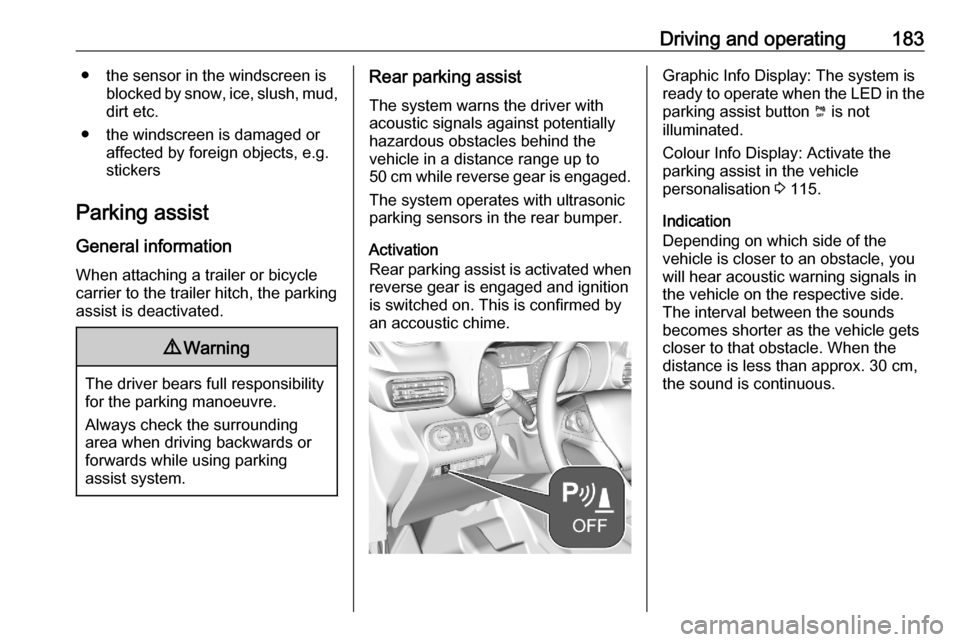
Activation
Rear parking assist is activated when
reverse gear is engaged and ignition
is switched on. This is confirmed by
an accoustic chime.Graphic Info Display: The system is
ready to operate when the LED in the
parking assist button ¼ is not
illuminated.
Colour Info Display: Activate the
parking assist in the vehicle
personalisation 3 115.
Indication
Depending on which side of the
vehicle is closer to an obstacle, you
will hear acoustic warning signals in
the vehicle on the respective side.
The interval between the sounds
becomes shorter as the vehicle gets
closer to that obstacle. When the
distance is less than approx. 30 cm, the sound is continuous.