manual radio set VAUXHALL CORSA 2014.5 Infotainment system
[x] Cancel search | Manufacturer: VAUXHALL, Model Year: 2014.5, Model line: CORSA, Model: VAUXHALL CORSA 2014.5Pages: 177, PDF Size: 2.97 MB
Page 142 of 177

142Radio
still cannot find a station, the last
active frequency (FM) or ensemble
(DAB) will be set.
Manual station search The manual station search is used to
tune in to stations of known
frequencies (AM, FM) or ensembles
(DAB).
Keep m or n pressed until MAN is
displayed.
■ Coarse tuning:
Hold m or n down until the
desired frequency (AM, FM) or ensemble (DAB) is almost reached.
■ Fine tuning: Tap m or n until the exact
frequency/ensemble is reached.
If RDS 3 143 is deactivated in the FM
waveband or the AM waveband is active, tapping m or n moves the
frequency by on increment.
Station memory
Separate memory slots are available
for each wavelength (FM, AM):
9 memory slots are available for each of the following wavelength:
FM, FM-AS (automatically stored FM
stations), AM, AM-AS (automatically
stored AM stations), DAB, DAB-AS
(automatically stored DAB stations).
The memory slots can be selected
directly in the respective wavelength
via the station buttons.
Manual storing
Tune in to the desired station.
Keep the station button pressed on
which the tuned-in station is to be
stored.
The radio is muted for a short while
and displays the station previously
stored in the memory slot.
The station tuned-in is audible again and is displayed.The station is stored in the desired
memory slot.
RDS on or RDS off 3 143 are stored
together with the station.
FM station list
The Infotainment system stores all
receivable FM stations in the
background.
The list of receivable stations is
updated automatically if the radio
searches for a TP station 3 143 or an
automatic storage run is performed
using the Autostore (AS) function
3 142.
RDS stations 3 143 are sorted by
radio company in the station list (HR1, HR2...)
Autostore listsActivate/deactivate AS level
Tap the AS button.
When the AS level is active, the
display shows AS.
Page 167 of 177
Introduction167
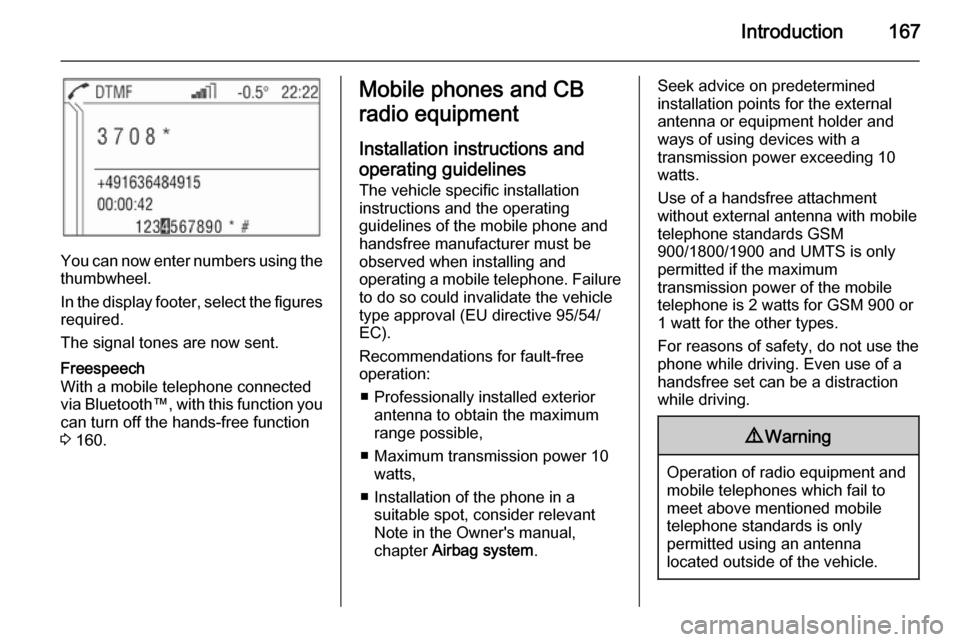
You can now enter numbers using thethumbwheel.
In the display footer, select the figures required.
The signal tones are now sent.
Freespeech
With a mobile telephone connected
via Bluetooth™, with this function you
can turn off the hands-free function
3 160.Mobile phones and CB
radio equipment
Installation instructions and operating guidelines The vehicle specific installation
instructions and the operating
guidelines of the mobile phone and
handsfree manufacturer must be observed when installing and
operating a mobile telephone. Failure to do so could invalidate the vehicle
type approval (EU directive 95/54/
EC).
Recommendations for fault-free
operation:
■ Professionally installed exterior antenna to obtain the maximum
range possible,
■ Maximum transmission power 10 watts,
■ Installation of the phone in a suitable spot, consider relevant
Note in the Owner's manual,
chapter Airbag system .Seek advice on predetermined
installation points for the external
antenna or equipment holder and
ways of using devices with a
transmission power exceeding 10
watts.
Use of a handsfree attachment
without external antenna with mobile
telephone standards GSM
900/1800/1900 and UMTS is only
permitted if the maximum
transmission power of the mobile
telephone is 2 watts for GSM 900 or
1 watt for the other types.
For reasons of safety, do not use the
phone while driving. Even use of a handsfree set can be a distraction
while driving.9 Warning
Operation of radio equipment and
mobile telephones which fail to
meet above mentioned mobile
telephone standards is only
permitted using an antenna
located outside of the vehicle.