lock VAUXHALL CORSA 2014.5 Owner's Guide
[x] Cancel search | Manufacturer: VAUXHALL, Model Year: 2014.5, Model line: CORSA, Model: VAUXHALL CORSA 2014.5Pages: 231, PDF Size: 6.8 MB
Page 66 of 231

64Storage
Move rear seat backrests upright and
allow locking mechanisms to engage
audibly at both sides. Once the
backrests are locked the red mark
must no longer protrude.
The rear seat backrests can be
locked in two positions.
Do not trap the seat belt when moving the backrest to the upright position.
Install the load compartment cover.
9 Warning
Only drive the vehicle when the
backrests are securely locked into position. Otherwise there is a risk
of personal injury or damage to the
load or vehicle in the event of hard braking or a collision.
The seat belt of the centre seat could
be blocked when the backrest is
folded up too quickly. To unlock the
retractor, push in the seat belt or pull
it out by approx. 20 mm and then let
go.
Load compartment cover
Do not place any objects on the cover.
5-door passenger vehicle
Lift the cover backwards, until it
unlatches, then remove.
Fit in reverse order.
Page 72 of 231

70Instruments and controlsInstruments and
controlsControls ....................................... 70
Warning lights, gauges and indi‐
cators ........................................... 76
Information displays .....................86
Vehicle messages ........................ 90
Trip computer ............................... 91
Vehicle personalisation ................95Controls
Steering wheel adjustment
Unlock lever, adjust steering wheel,
then engage lever and ensure it is fully locked.
Do not adjust steering wheel unless
vehicle is stationary and steering
wheel lock has been released.
Steering wheel controls
The Infotainment system and the
Info-Display can be operated via the
controls on the steering wheel.
Further information is available in the
Infotainment system manual.
Page 76 of 231
74Instruments and controls
icy road conditions. : remains
illuminated until the temperature
reaches at least 5 °C.
In vehicles with Graphic-Info-Display
or Colour-Info-Display, a warning
message appears in the display as a warning for icy road conditions. There is no message below -5 °C.
9 Warning
The road surface may already be
icy even though the display
indicates a few degrees above 0
°C.
Clock
Date and time are shown in the
Info-Display.
Graphic-Info-Display,
Colour-Info-Display 3 86.
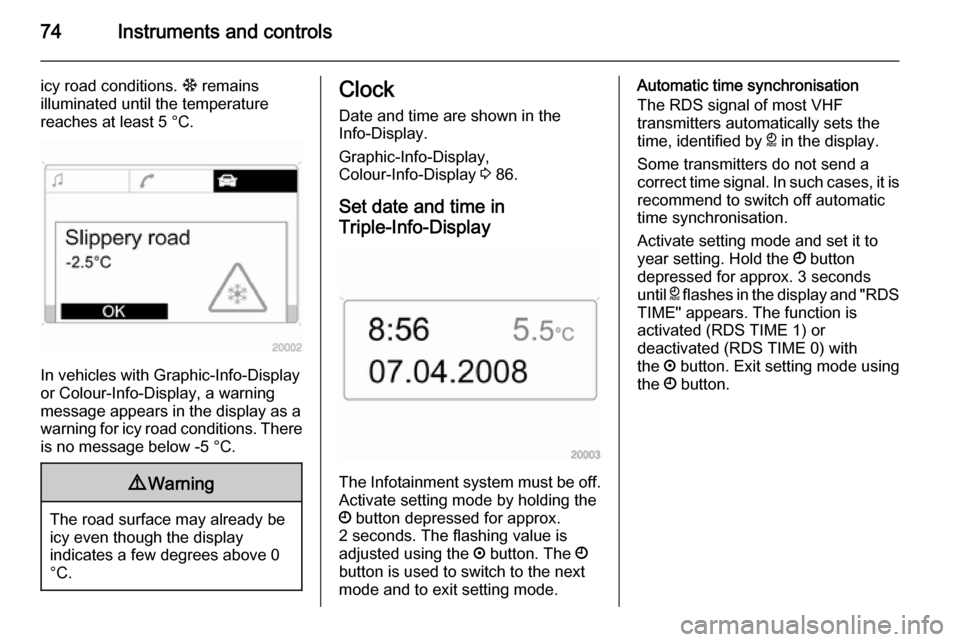
Set date and time in
Triple-Info-Display
The Infotainment system must be off. Activate setting mode by holding the
Ö button depressed for approx.
2 seconds. The flashing value is
adjusted using the ; button. The Ö
button is used to switch to the next
mode and to exit setting mode.
Automatic time synchronisation
The RDS signal of most VHF
transmitters automatically sets the
time, identified by } in the display.
Some transmitters do not send a
correct time signal. In such cases, it is
recommend to switch off automatic
time synchronisation.
Activate setting mode and set it to year setting. Hold the Ö button
depressed for approx. 3 seconds
until } flashes in the display and "RDS
TIME" appears. The function is
activated (RDS TIME 1) or
deactivated (RDS TIME 0) with
the ; button. Exit setting mode using
the Ö button.
Page 84 of 231

82Instruments and controls
On vehicles with manual transmission
automated, R flashes when the
driver's door is opened if no gear is engaged and the parking brake is not
applied.
Apply clutch pedal
- illuminates yellow.
Clutch pedal needs to be operated to start the engine.
Stop-start system 3 116.
Antilock brake system
(ABS) u illuminates red.
Illuminates for a few seconds after the ignition is turned on. The system is
ready for operation when the control indicator extinguishes.
If the control indicator does not go out after a few seconds, or if it illuminates while driving, there is a fault in the
ABS. The brake system remains
operational but without ABS
regulation.
Antilock brake system 3 128.Upshift
[ illuminates green when upshifting
is recommended for fuel saving
reasons.
Sport mode
1 illuminates yellow.
The symbol is illuminated when Sport mode is on 3 126.
Winter mode T illuminates yellow.
The symbol is illuminated when
Winter mode is on 3 121, 3 126.
Power steering
p illuminates yellow.
Fault in power steering system. The
power steering may have failed. The
vehicle can be steered but
considerably more force is required.
Contact a workshop.Ultrasonic parking assist
r illuminates or flashes yellow.
Illuminates
Fault in system. Have the cause of the fault remedied by a workshop.
Flashes Fault due to sensors that are dirty orcovered by ice or snow.
or
Interference due to external sources
of ultrasound. Once the source of interference is removed, the system
will operate normally.
Parking assist 3 132.
Electronic Stability
Program
v flashes or illuminates yellow.
Illuminates for a few seconds when
the ignition is switched on.
Page 86 of 231
84Instruments and controls
Illuminates yellow
Deflation detected. Stop as soon as
possible and check tyre pressure.
Flashes yellow for 1 minute then
illuminates continuously
Fault in system. Consult a workshop.
Tyre pressure monitoring system
3 174.
Engine oil pressure
I illuminates red.
Illuminates for a few seconds after the ignition is switched on.
Illuminates when the engine is runningCaution
Engine lubrication may be
interrupted. This may result in
damage to the engine and/or
locking of the drive wheels.
1. Depress clutch.
2. Select neutral gear, set selector lever to N.
3. Move out of the flow of traffic as quickly as possible without
impeding other vehicles.
4. Switch off ignition.9 Warning
When the engine is off (except
during an Autostop), considerably
more force is needed to brake and steer.
Do not remove key until vehicle is stationary, otherwise the steeringwheel lock could engage
unexpectedly.
Check oil level before seeking the
assistance of a workshop 3 148.
Low engine oil level S illuminates yellow.
Engine oil level is checked
automatically.
Illuminates when the engine is
running
Low engine oil level. Check engine oil level and top up as necessary
3 148.
Low fuel Y illuminates or flashes yellow.
Illuminates Level in fuel tank too low.
Flashes
Fuel used up. Refuel immediately.
Never run the tank dry.
Erratic fuel supply can cause catalytic converter to overheat 3 120.
Bleeding the diesel fuel system
3 152.
Apply footbrake
j illuminates yellow.
Page 90 of 231

88Instruments and controls
Setting date and time
Select menu item Time, Date from the
Settings menu.
Select the required menu items and
make settings.
Changing the time setting will also
change the time setting of the
navigation system.
Automatic time synchronisation
The RDS signal of most VHF
transmitters automatically sets the time.
Some transmitters do not send a
correct time signal. In such cases, we recommend to switch off automatic
time synchronisation.
The function is activated by
highlighting the field in front of
Synchron. clock automatical. in the
Time, Date menu.
Language selection
The display language for some
functions can be selected.
Select menu item Language from the
Settings menu.
Select the desired language.
Selection is indicated by a 6 in front
of the menu item.
When the language setting of the
display is changed, the system will
ask whether the announcement
language of the Mobile Phone Portal
should also be changed - see
Infotainment system manual.
Page 99 of 231

Instruments and controls97
P4: Automatic locking 3 24.
P5 : Selective unlocking 3 21.
P6 : Speed warning 3 76.
P7 : Volume of the acoustic turn signal
3 101.
Page 107 of 231

Lighting105Lighting featuresCentre console lighting
Spotlight in interior mirror housing.
Daylight-dependent, automatically
regulated centre console lighting.
Entry lighting
After unlocking the vehicle, the
instrument panel lighting, the front
and rear foot well lighting and the
information display come on for a few
seconds.
Starting off 3 16.
Peripheral lighting
The exterior lights come on for
approx. 30 seconds.
To activate, press button q on the
radio remote control twice when the
vehicle is locked.
Country-specific application: To
switch on the function, press button
q on the radio remote control once
when the vehicle is locked.Switching on the ignition or pressing button p on the radio remote control
will deactivate the function.
This function can be activated and
deactivated depending on the key
being used. Vehicle personalisation
3 95.
Exit lighting The exterior lights illuminate for
approx. 30 seconds after the system
is activated and the driver's door is
closed.
Activating1. Switch off ignition.
2. Remove ignition key.
3. Open driver's door.
4. Pull turn signal lever.
5. Close driver's door.
If the driver's door is not closed the
lights switch off after two minutes.
The lighting is switched off
immediately if inserting the key into
the ignition switch or pulling the turn
signal lever while the driver's door is
open.
Battery discharge
protection
To prevent the battery from becoming discharged, all the interior lighting is
switched off automatically after
5 minutes, when the ignition is
switched off.
Page 117 of 231
Driving and operating115Starting and operating
New vehicle running-in Do not brake unnecessarily hard for
the first few journeys.
During the first drive, smoke may
occur because of wax and oil
evaporating off the exhaust system.
Park the vehicle in the open for a
while after the first drive and avoid
inhaling the fumes.
During the running-in period fuel and
engine oil consumption may be
higher and the cleaning process of the diesel particle filter may take
place more often. Autostop may be inhibited to allow for charging the
battery.
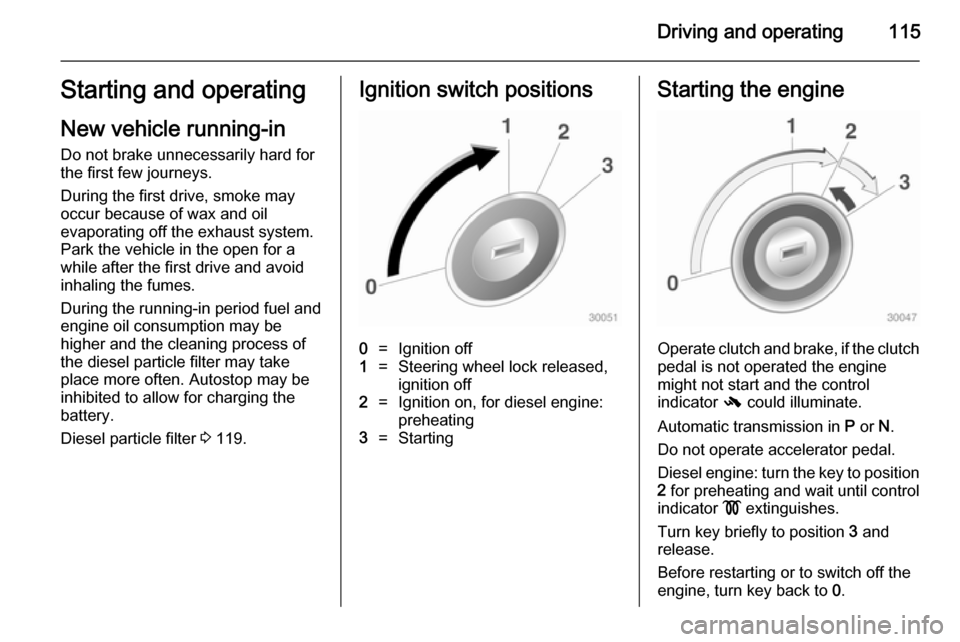
Diesel particle filter 3 119.Ignition switch positions0=Ignition off1=Steering wheel lock released,
ignition off2=Ignition on, for diesel engine:
preheating3=StartingStarting the engine
Operate clutch and brake, if the clutch pedal is not operated the engine
might not start and the control
indicator - could illuminate.
Automatic transmission in P or N.
Do not operate accelerator pedal.
Diesel engine: turn the key to position 2 for preheating and wait until control
indicator ! extinguishes.
Turn key briefly to position 3 and
release.
Before restarting or to switch off the engine, turn key back to 0.
Page 120 of 231

118Driving and operating
The engine start is indicated by the
needle at the idle speed position in
the tachometer.
If the selector lever is shifted out of
neutral before depressing the clutch
first, control indicator - illuminates.
Control indicator - 3 81.
Restart of the engine by the
stop-start system
The selector lever has to be in N to
enable an automatic restart.
If one of the following conditions occurs during an Autostop, the
engine will be restarted automatically
by the stop-start system.
■ The stop-start system is manually deactivated
■ the bonnet is opened
■ the driver's seat belt is unfastened and the driver's door is opened
■ the engine temperature is too low
■ the battery is discharged
■ the brake vacuum is not sufficient
■ the vehicle starts to move
■ the defrosting function is activated■ the climate control system requests
an engine start
■ the air conditioning is manually switched on
If the bonnet is not fully closed, a
warning message is displayed in the
Driver Information Centre.
If an electrical accessory, e.g. a
portable CD player, is connected to
the power outlet, a brief power drop
during restart might be noticeable.
Parking ■ Do not park the vehicle on an easily
ignitable surface. The high
temperature of the exhaust system
could ignite the surface.
■ Always apply parking brake without
pressing release button. Apply as firmly as possible on downhill or
uphill slopes. Depress the foot
brake at the same time to reduce
operating force.
■ Switch off the engine and ignition. Turn the steering wheel until the
steering wheel lock engages.■ If the vehicle is on a level surface or
uphill slope, engage first gear or set the selector lever to P before
switching off the ignition. On an
uphill slope, turn the front wheels
away from the kerb.
If the vehicle is on a downhill slope, engage reverse gear or set theselector lever to P before switching
off the ignition. Turn the front
wheels towards the kerb.
■ Lock the vehicle and activate the anti-theft locking system and the
anti-theft alarm system.