lock VAUXHALL CORSA 2015.5 Owner's Guide
[x] Cancel search | Manufacturer: VAUXHALL, Model Year: 2015.5, Model line: CORSA, Model: VAUXHALL CORSA 2015.5Pages: 249, PDF Size: 7.3 MB
Page 81 of 249
Instruments and controls79
If outside temperature drops to 3 °C,
a warning message is displayed in the Driver Information Centre.9 Warning
The road surface may already be
icy even though the display
indicates a few degrees above 0
°C.
Clock
Graphic-Info Display
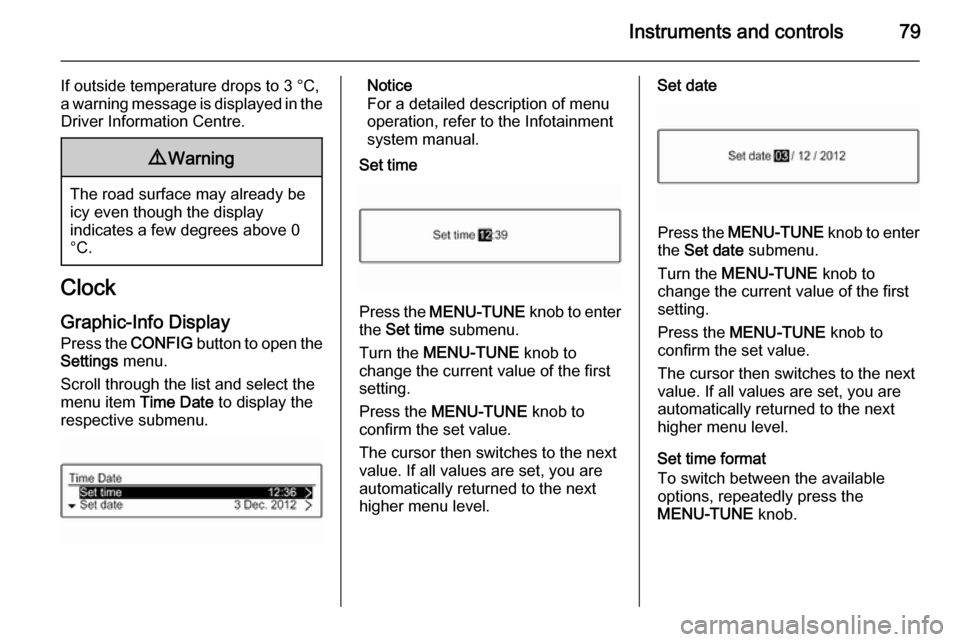
Press the CONFIG button to open the
Settings menu.
Scroll through the list and select the
menu item Time Date to display the
respective submenu.
Notice
For a detailed description of menu
operation, refer to the Infotainment
system manual.
Set time
Press the MENU-TUNE knob to enter
the Set time submenu.
Turn the MENU-TUNE knob to
change the current value of the first setting.
Press the MENU-TUNE knob to
confirm the set value.
The cursor then switches to the next
value. If all values are set, you are
automatically returned to the next
higher menu level.
Set date
Press the MENU-TUNE knob to enter
the Set date submenu.
Turn the MENU-TUNE knob to
change the current value of the first setting.
Press the MENU-TUNE knob to
confirm the set value.
The cursor then switches to the next
value. If all values are set, you are
automatically returned to the next
higher menu level.
Set time format
To switch between the available
options, repeatedly press the
MENU-TUNE knob.
Page 82 of 249

80Instruments and controls
Set date format
To switch between the available
options, repeatedly press the
MENU-TUNE knob.
RDS clock synchronization
The RDS signal of most VHF
transmitters automatically sets the
time. RDS time synchronisation can
take a few minutes. Some
transmitters do not send a correct
time signal. In such cases, it is
recommended to switch off the
automatic time synchronisation.
To switch between the options On
and Off, repeatedly press the
MENU-TUNE knob.
Colour-Info Display
Press the ; button and then select
the Settings screen button.
Select Time & date settings to display
the respective submenu.
Notice
For a detailed description of menu
operation, refer to the Infotainment
system manual.
Set time format
To select the desired time format, tap
on the screen buttons 12 h or 24 h .
Set date format
To select the desired date format, tap on the < and > screen buttons and
choose between the available
options.
Set time and date
To adjust the time and date settings,
tap on the H and I screen buttons.
RDS clock synchronization
The RDS signal of most VHF
transmitters automatically sets the
time. RDS time synchronisation can take a few minutes. Some
transmitters do not send a correct
time signal. In such cases, it is
recommended to switch off the
automatic time synchronisation.
To activate or deactivate RDS clock
synchronization , tap on the screen
buttons On or Off.
Page 91 of 249

Instruments and controls89
Illuminates when the engine is
running Fault in the emission control system.
The permitted emission limits may be
exceeded. Seek the assistance of a
workshop immediately.
Flashes when the engine is
running
Fault that could lead to catalytic converter damage. Ease up on the accelerator until the flashing stops.
Seek the assistance of a workshop
immediately.
Service vehicle soon g illuminates yellow.
Additionally, a warning message is
displayed in the Driver Information
Centre.
The vehicle requires a service.
Seek the assistance of a workshop.
Vehicle messages 3 100.
Brake and clutch system R illuminates red.The brake and clutch fluid level is too
low 3 181.9 Warning
Stop. Do not continue your
journey. Consult a workshop.
Illuminates after the ignition is
switched on if the manual parking
brake is applied 3 144.
Operate pedal - illuminates or flashes yellow.
Illuminates
Clutch pedal needs to be depressed
to start the engine in Autostop mode.
Stop-start system 3 131.
Flashes
Clutch pedal needs to be depressed
for a main start of the engine 3 17,
3 130.
On some versions, the operate pedal message is indicated in the Driver
Information Display 3 100.
Antilock brake system
(ABS) u illuminates yellow.
Illuminates for a few seconds after the ignition is switched on. The system is
ready for operation when the control
indicator extinguishes.
If the control indicator does not go out after a few seconds, or if it illuminates while driving, there is a fault in the
ABS. The brake system remains
operational but without ABS
regulation.
Antilock brake system 3 143.
Gear shifting R with the number of the next higher
gear is indicated, when upshifting is
recommended for fuel saving
reasons.
Power steering
c illuminates yellow.
Page 93 of 249

Instruments and controls91Diesel particle filter% illuminates or flashes yellow.
The diesel particle filter requires
cleaning.
Continue driving until %
extinguishes. If possible, do not allow
engine speed to drop below
2000 rpm.
Illuminates
The diesel particle filter is full. Start
cleaning process as soon as
possible.
Flashes
The maximum filling level of the filter
is reached. Start cleaning process
immediately to avoid damage to the
engine.
Diesel particle filter 3 134, Stop-start
system 3 131.
Tyre pressure monitoring
system
w illuminates or flashes yellow.Illuminates
Tyre pressure loss. Stop immediately and check tyre pressure.
Flashes
Fault in system or tyre without
pressure sensor mounted ( e.g. spare
wheel). After 60-90 seconds the control indicator illuminates
continuously. Consult a workshop.
Tyre pressure monitoring system
3 200.
Engine oil pressure
I illuminates red.
Illuminates when the ignition is
switched on and extinguishes shortly
after the engine starts.Illuminates when the engine is
runningCaution
Engine lubrication may be
interrupted. This may result in
damage to the engine and/or
locking of the drive wheels.
1. Depress the clutch.
2. Set selector lever to neutral.
3. Move out of the flow of traffic as quickly as possible without
impeding other vehicles.
4. Switch off the ignition.
9 Warning
When the engine is off,
considerably more force is needed
to brake and steer.
During an Autostop the brake
servo unit will still be operational.
Page 94 of 249

92Instruments and controlsDo not remove key until vehicle is
stationary, otherwise the steering wheel lock could engage
unexpectedly.
Check oil level before seeking the
assistance of a workshop 3 178.
Low fuel
Y illuminates or flashes yellow.
Illuminates
Level in fuel tank is too low.
Flashes Fuel used up. Refuel immediately.
Never run the tank dry.
Catalytic converter 3 135.
Bleeding the diesel fuel system
3 184.
Immobiliser
d flashes yellow.
Fault in the immobiliser system. The
engine cannot be started.
Reduced engine power
# illuminates yellow.
The engine power is limited. Consult
a workshop.
Autostop Autostop active
D illuminates red or white.
Engine is in an Autostop.
Stop-start system 3 131.
Exterior light 8 illuminates green.
The exterior lights are on 3 108.
High beam
C illuminates blue.
Illuminated when high beam is on or
during headlight flash 3 109.
High beam assist
l illuminates green.The high beam assist is activated
3 111.
Fog light
> illuminates green.
The front fog lights are on 3 113.
Rear fog light
r illuminates yellow.
The rear fog light is on 3 113.
Cruise control
m illuminates white or green.
Illuminates white
The system is on.
Illuminates green Cruise control is active.
Cruise control 3 147.
Vehicle detected ahead A illuminates green.
Page 96 of 249

94Instruments and controls
■language setting, if no Infotainment
system is available
■ clock, if no Infotainment system is available
■ outside temperature, if no Infotainment system is available
Some of the displayed functions differ when the vehicle is being driven or at
a standstill.
Midlevel display
The menu pages of the Midlevel
display are selected by pressing the
MENU button on the turn signal lever.
Selectable menu pages of Midlevel
display are:
■ Trip menu, see below
■ Vehicle menu, see below
Some of the displayed functions differ when the vehicle is being driven or at
a standstill. Some functions are only
available when the vehicle is being
driven.
Uplevel-DisplayThe menu pages of the Uplevel
display are selected by pressing the
MENU button on the turn signal lever.
Main menu symbols are indicated in
the top line of the display:
■ Trip menu, see below
■ Vehicle menu, see below
■ Eco menu, see below
Some of the displayed functions differ when the vehicle is being driven or at
a standstill. Some functions are only
available when the vehicle is being
driven.
Selecting menus and functions
The menus and functions can be
selected via the buttons on the turn
signal lever.
Page 97 of 249

Instruments and controls95
Press the MENU button to switch
between the main menus or to return
from a submenu to the next higher
menu level.
Turn the adjuster wheel to select a
subpage of the main menu or to set a
numeric value.
Press the SET/CLR button to select
and confirm a function.
Vehicle and service messages are
popped-up in the DIC if required.
Confirm messages by pressing
SET/CLR button. Vehicle messages
3 100.
Trip Menu
Press the MENU button to select the
Trip information page.
Turn the adjuster wheel to select a subpage.
The following list contains all possible Trip Menu pages. Some may not be
available for your particular vehicle.
Follow the instructions given in the
submenus.
■ trip odometer 1
■ trip odometer 2
■ average fuel economy 1
■ average fuel economy 2
■ digital speed
■ fuel range
■ instantaneous fuel economy
■ average vehicle speed
■ clock
■ temperature
■ blank page
Selection and indication is different
between Midlevel- and Uplevel-
Display.Trip odometer 1 and 2
Trip odometer displays the current
distance since a certain reset.
Trip odometer counts up to a distance
of 2,000 miles then restarts at 0.
Turn the adjuster wheel to selectbetween trip odometer 1 and 2.
To reset, press SET/CLR button for a
few seconds while viewing this page.
Simultaneously average fuel
economy 1 and 2 is indicated together with trip odometer 1 and 2.
The information of trip page 1 and 2
can be reset separately while the
respective display is active.
Average fuel economy 1 and 2
Display of average consumption. The measurement can be reset at any
time and starts with a default value.
To reset, press SET/CLR button for a
few seconds while viewing this page.
Simultaneously trip odometer 1 and 2
is indicated together with average fuel
economy 1 and 2.
Page 98 of 249

96Instruments and controls
The information of trip page 1 and 2
can be reset separately while the
respective display is active.
Digital speed
Digital display of the instantaneous
speed.
Fuel range
Range is calculated from current fuel
tank content and current
consumption. The display shows
average values.
After refuelling, the range is updated
automatically after a brief delay.
When the fuel level in the tank is low,
a message appears on the display
and the control indicator Y in the fuel
gauge illuminates.
When the tank must be refuelled
immediately, a warning message
appears and remains on the display.
Additionally, the control indicator Y in
the fuel gauge flashes 3 92.
Instantaneous fuel economy Display of the instantaneous
consumption.Average vehicle speed
Display of average speed. The
measurement can be reset at any
time.
To reset, press SET/CLR button for a
few seconds while viewing this page.
Clock
Display of actual time.
Only indicated if no Infotainment
system is available.
Temperature
Display of actual outside
temperature.
Only indicated if no Infotainment
system is available.
Blank page
Shows a blank page without any
information.
Vehicle Menu Press the MENU button to select the
Vehicle Information Menu .
Turn the adjuster wheel to select a subpage.The following list contains all possible
Vehicle Menu pages. Some may not
be available for your particular
vehicle.
Follow the instructions given in the
submenus.
■ unit
■ speed warning
■ remaining oil life
■ tyre pressure
■ tyre loading
■ following distance
■ traffic sign assistant
■ language
Selection and indication is different
between Midlevel- and Uplevel-
Display.
Unit
Press SET/CLR while page is
displayed. Select imperial (unit 1) or metric (unit 3) by turning the adjuster
wheel. Press SET/CLR to set the unit.
Page 102 of 249

100Instruments and controls
To exit the Settings menu, press
button BACK in steps or press button
CONFIG after confirming the
changes.
Vehicle personalisation 3 103.
Memorised settings 3 22.Vehicle messages
Messages are indicated mainly in the
Driver Information Centre (DIC), in
some cases together with a warning
and signal buzzer.
Press the SET/CLR button, the
MENU button or turn the adjuster
wheel to confirm a message.
Vehicle messages on Base- and
Midlevel-Display
The vehicle messages are displayed
as code numbers.
No.Vehicle message1Change engine oil3Engine coolant level low4Air conditioning off5Steering wheel is locked7Turn steering wheel, switch
ignition off and then on
Page 103 of 249

Instruments and controls101
No.Vehicle message9Turn steering wheel, start
engine again12Vehicle overloaded13Compressor overheated15Centre high-mounted brake
light failure16Brake light failure17Headlight levelling malfunction18Left low beam failure19Rear fog light failure20Right low beam failure21Left sidelight failure22Right sidelight failure23Reversing light failure24Number plate light failure25Left front turn signal failure26Left rear turn signal failureNo.Vehicle message27Right front turn signal failure28Right rear turn signal failure29Check trailer brake light30Check trailer reversing light31Check left trailer turn signal32Check right trailer turn signal33Check trailer rear fog light34Check trailer rear light35Replace battery in radio remote
control48Clean side blind spot alert
system49Lane departure warning
unavailable53Tighten gas cap54Water in diesel fuel filter55Diesel particle filter is full
3 134No.Vehicle message56Tyre pressure imbalance on
front axle57Tyre pressure imbalance on
rear axle58Tyres without TPMS sensors
detected59Open and then close driver
window60Open and then close front
passenger window65Theft attempted66Service theft alarm system67Service steering wheel lock68Service power steering75Service air conditioning76Service side blind spot alert
system79Top up engine oil81Service transmission