change wheel VAUXHALL CORSA 2015.5 Owner's Manual
[x] Cancel search | Manufacturer: VAUXHALL, Model Year: 2015.5, Model line: CORSA, Model: VAUXHALL CORSA 2015.5Pages: 249, PDF Size: 7.3 MB
Page 13 of 249

In brief11
1Power windows .....................30
2 Exterior mirrors .....................28
3 Cruise control .....................147
Speed limiter ...................... 149
Forward collision alert ........150
4 Turn and lane-change
signals, headlight flash,
low beam and high beam ....112
Exit lighting ......................... 116
Parking lights ...................... 113
Buttons for Driver
Information Centre ................93
5 Instruments .......................... 82
6 Forward collision alert
indicator ............................. 150
7 Driver Information Centre ...... 93
8 Infotainment controls ...........74
9 Windscreen wiper,
windscreen washer
system, rear window
wiper, rear window washer
system ................................... 7610 Central locking system ..........22
City mode ............................ 146
Eco button for stop-start
system ................................. 131
Parking assist ..................... 153
Seat heating .......................... 38
Heated steering wheel ..........75
11 Anti-theft alarm system
status LED ........................... 26
12 Hazard warning flashers ....112
Control indicator for airbag
deactivation .......................... 88
Control indicator for front
passenger seat belt .............87
13 Colour-Info-Display ..............98
Graphic-Info-Display .............99
14 Centre air vents .................. 126
15 Side air vents, passenger
side ..................................... 126
16 Airbag deactivation switch
(behind glovebox cover) ......46
17 Glovebox .............................. 56
Fuse box ............................ 19618Climate control system ........ 118
19 Power outlet .......................... 81
20 AUX input, USB input ...........10
21 Selector lever,
transmission ....................... 139
22 Parking brake ......................144
23 Ignition switch with
steering wheel lock ............129
24 Horn ..................................... 75
Driver airbag ........................ 44
25 Bonnet release lever ..........178
26 Steering wheel adjustment ..74
27 Light switch ........................ 108
Headlight range
adjustment ......................... 110
Rear fog light ...................... 113
Fuse box ............................ 196
Brightness of instrument
panel illumination ................114
Page 58 of 249

56StorageStorageStorage compartments................56
Load compartment .......................67
Roof rack system .........................71
Loading information .....................72Storage compartments9Warning
Do not store heavy or sharp
objects in the storage
compartments. Otherwise, the
storage compartment lid could
open and vehicle occupants could be injured by objects being thrown
around in the event of hard
braking, a sudden change in
direction or an accident.
Glovebox
Pull lever to open the glovebox cover.
The glovebox features a coin holder
and an adapter for the locking wheel
bolts.
The glovebox should be closed whilst
driving.
Cupholders
Cupholders are located in the centre
console.
Page 72 of 249

70Storage
To remove, lift the load-bay floor
using the recess and pull backwards.
To insert, push the load-bay floor
forwards in the corresponding guide,
then lower.
If mounted in the upper position, the
space between the load-bay floor and
the spare wheel well cover can be
used as a stowage compartment.
In this position, if the rear seat
backrests are folded forwards, an
almost completely flat load bay is
created.
The double load-bay floor is able to
withstand a load of no more than
100 kg. In the lower position, the
double load-bay floor is able to
withstand the maximum permissible
load.
General hint9 Warning
For safety reasons, stow all parts
in the load compartment in its
position, always drive with a
closed rear floor cover and, if
possible, with folded up rear
backrests.
Otherwise, vehicle occupants
could be injured by objects being
thrown around in the event of hard braking, a sudden change in
direction or an accident.
Lashing eyes
The lashing eyes are designed to
secure items against slippage, e.g.
using lashing straps or luggage net.
Warning triangle
The warning triangle is stowed in the
load compartment below the tailgate.
Page 86 of 249

84Instruments and controlsEngine coolant
temperature gauge
Number of LEDs displays the coolant temperature.
up to 3 LEDs=engine operating
temperature not
yet reached4 to 6 LEDs=normal operating
temperaturemore than 6
LEDs=temperature too
highCaution
If engine coolant temperature is
too high, stop vehicle, switch off
engine. Danger to engine. Check
coolant level.
Service display
The engine oil life system lets you
know when to change the engine oil
and filter. Based on driving
conditions, the interval at which an
engine oil and filter change will be
indicated can vary considerably.
To display the remaining engine oil
life duration use turn signal lever
buttons:
Press the MENU button to select the
Vehicle Information Menu .
Turn the adjuster wheel to select Remaining Oil Life .
Page 99 of 249
Instruments and controls97
Speed warning
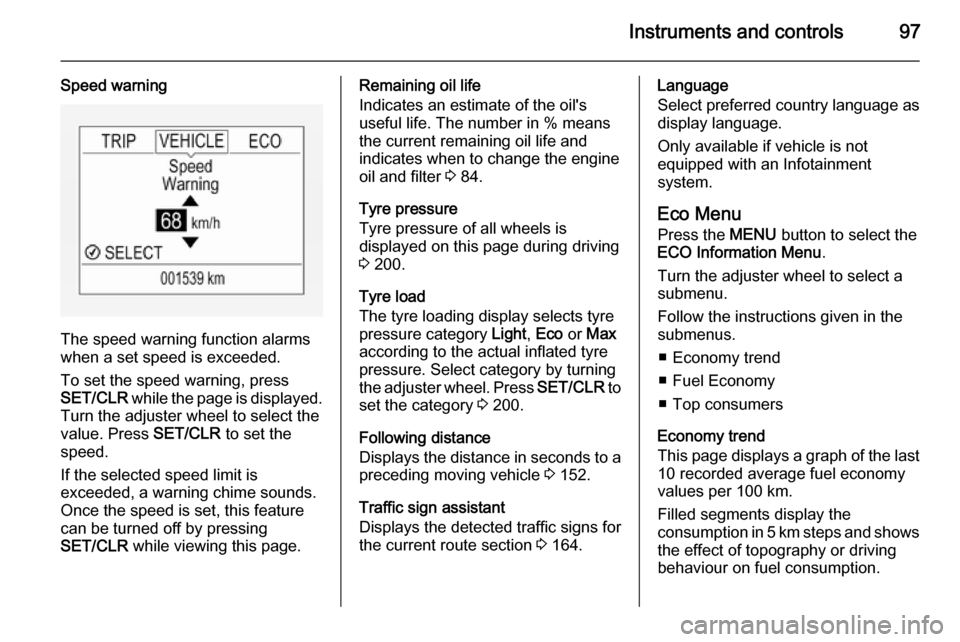
The speed warning function alarms
when a set speed is exceeded.
To set the speed warning, press
SET/CLR while the page is displayed.
Turn the adjuster wheel to select the
value. Press SET/CLR to set the
speed.
If the selected speed limit is
exceeded, a warning chime sounds.
Once the speed is set, this feature
can be turned off by pressing
SET/CLR while viewing this page.
Remaining oil life
Indicates an estimate of the oil's
useful life. The number in % means the current remaining oil life and
indicates when to change the engine
oil and filter 3 84.
Tyre pressure
Tyre pressure of all wheels is
displayed on this page during driving 3 200.
Tyre load
The tyre loading display selects tyre
pressure category Light, Eco or Max
according to the actual inflated tyre pressure. Select category by turning
the adjuster wheel. Press SET/CLR to
set the category 3 200.
Following distance
Displays the distance in seconds to a preceding moving vehicle 3 152.
Traffic sign assistant
Displays the detected traffic signs for
the current route section 3 164.Language
Select preferred country language as
display language.
Only available if vehicle is not
equipped with an Infotainment
system.
Eco Menu
Press the MENU button to select the
ECO Information Menu .
Turn the adjuster wheel to select a
submenu.
Follow the instructions given in the
submenus.
■ Economy trend
■ Fuel Economy
■ Top consumers
Economy trend
This page displays a graph of the last 10 recorded average fuel economy
values per 100 km.
Filled segments display the
consumption in 5 km steps and shows the effect of topography or driving
behaviour on fuel consumption.
Page 102 of 249

100Instruments and controls
To exit the Settings menu, press
button BACK in steps or press button
CONFIG after confirming the
changes.
Vehicle personalisation 3 103.
Memorised settings 3 22.Vehicle messages
Messages are indicated mainly in the
Driver Information Centre (DIC), in
some cases together with a warning
and signal buzzer.
Press the SET/CLR button, the
MENU button or turn the adjuster
wheel to confirm a message.
Vehicle messages on Base- and
Midlevel-Display
The vehicle messages are displayed
as code numbers.
No.Vehicle message1Change engine oil3Engine coolant level low4Air conditioning off5Steering wheel is locked7Turn steering wheel, switch
ignition off and then on
Page 114 of 249

112Lighting
Corner lighting
On tight bends or when turning off,
depending on the steering angle or
the indicator light signal, an additional left or right reflector is switched on
which illuminates the road in the
direction of travel. It is activated up to
a speed of 25 mph.
Reversing function If the low beam is on and reverse gear is engaged, both corner lights are
switched on. They remain illuminated
for 20 seconds after disengaging
reverse gear.
Hazard warning flashers
Operated by pushing the ¨ button.
In the event of an accident with airbag
deployment the hazard warning
flashers are activated automatically.
Turn and lane-change
signalslever up=right turn signallever down=left turn signal
If the lever is moved past the
resistance point, the turn signal is
switched on constantly. When the
steering wheel moves back, the turn
signal is automatically deactivated.
For three flashes, e.g. when changing
lanes, press the lever until resistance
is felt and then release.
Page 128 of 249

126Climate controlThe quality of the passenger
compartment air deteriorates,
which may cause the vehicle
occupants to feel drowsy.
In warm and very humid ambient air
conditions, the windscreen may mist
up from outside, when cold air is
directed towards it. If windscreen
mists up from outside, activate
windscreen wiper and deactivate s.
Basic settings Some settings can be changed in the
Info-Display. Vehicle personalisation
3 103.
Air vents
Adjustable air vents
At least one air vent must be open
while the cooling is on.
Adjust the air amount at the vent
outlet by turning the adjuster wheel.
The vent is closed when the adjuster wheel is turned close to the left or
right.
Direct the flow of air by tilting and
swivelling the slats.
9 Warning
Do not attach any objects to the
slats of the air vents. Risk of
damage and injury in case of an
accident.
Fixed air vents
Additional air vents are located
beneath the windscreen and door windows and in the foot wells.
Page 148 of 249

146Driving and operating
spinning. ESC operates in
combination with the Traction Control system (TC).
As soon as the vehicle starts to
swerve (understeer/oversteer),
engine output is reduced and the
wheels are braked individually. This
considerably improves the driving
stability of the vehicle on slippery road
surfaces.
ESC is operational after each engine
start as soon as the control indicator
b extinguishes.
When ESC operates b flashes.
9 Warning
Do not let this special safety
feature tempt you into taking risks
when driving.
Adapt speed to the road
conditions.
Fault
If there is a fault in the system the
control indicator b illuminates
continuously and a message or a
warning code appears in the Driver
Information Centre. The system is not
operational.
Have the cause of the fault remedied by a workshop.
City mode City mode is a feature which enables
increased steering assistance during
lower speed conditions, e.g. city
traffic or parking. Steering assistance
is increased for greater convenience.
Activation
Press button B when engine is
running. The system works from
standstill up to 22 mph, and in reverse gear. Above this speed, the system
changes to normal mode. When
activated, City mode engages
automatically below 22 mph.
An illuminated LED in the City mode
button indicates that the system is
active and a message pops-up in the
Driver Information Centre.
City mode remains active during an
Autostop, but is only operational
when the engine is running.
Page 152 of 249
150Driving and operating
Alternatively, accelerate to the
desired speed and briefly turn thumb
wheel to SET/-: the current speed is
stored as maximum speed. Speed
limit is displayed in the DIC.
Change speed limit
With speed limiter active, turn thumb
wheel to RES/+ to increase or SET/-
to decrease the desired maximum
speed.
Exceeding the speed limit
In the event of an emergency, it is possible to exceed the speed limit by
depressing the accelerator pedal
firmly beyond the point of resistance.
The limited speed will flash in the DIC and a chime sounds during this
period.
Release the accelerator pedal and the speed limiter function is
reactivated once a speed lower than
the limit speed is obtained.
Deactivation Press button y: speed limiter is
deactivated and the vehicle can be
driven without speed limit.
The limited speed will be stored and
is indicated in brackets in the DIC.
Additionally, a corresponding
message appears.
Resume limit speed
Turn thumb wheel to RES/+. The
stored speed limit will be obtained.
Switching off
Press button L, the speed limit
indication extinguishes in the DIC.
The stored speed is deleted.
By pressing button m to activate
cruise control, speed limiter is also
deactivated and the stored speed is
deleted.By switching off the ignition, speed
limiter is also deactivated, but the
speed limit will be stored for next
speed limiter activation.
Forward collision alert The forward collision alert can help to
avoid or reduce the harm caused by
front-end crashes.
Forward collision alert uses the front
camera system in the windscreen to
detect a vehicle directly ahead, in
your path, within a distance of approx.
60 metres.
A vehicle ahead is indicated by
control indicator A.
If a vehicle directly ahead is
approached too quickly, a warning
chime and an optical alert in the
windscreen is provided.