oil pressure VAUXHALL CORSA 2015.5 Owner's Manual
[x] Cancel search | Manufacturer: VAUXHALL, Model Year: 2015.5, Model line: CORSA, Model: VAUXHALL CORSA 2015.5Pages: 249, PDF Size: 7.3 MB
Page 19 of 249

In brief17Starting offCheck before starting off ■ Tyre pressure and condition 3 199,
3 237.
■ Engine oil level and fluid levels 3 178.
■ All windows, mirrors, exterior lighting and number plates are free
from dirt, snow and ice and are
operational.
■ Proper position of mirrors, seats, and seat belts 3 28, 3 35,
3 39.
■ Brake function at low speed, particularly if the brakes are wet.Starting the engine
■ Turn key to position 1.
■ Move the steering wheel slightly to release the steering wheel lock.
■ Manual transmission: operate clutch and brake pedal.
Manual transmission automated:
operate brake pedal.
Automatic transmission: operate
brake pedal and move selector
lever to P or N.
■ Do not operate accelerator pedal.
■ Diesel engines: turn the key to position 2 for preheating and wait
until control indicator !
extinguishes.
■ Turn the key to position 2 for
preheating and wait until control
indicator ! extinguishes.
■ Turn key to position 3 and release.
Starting the engine 3 130.
Page 93 of 249

Instruments and controls91Diesel particle filter% illuminates or flashes yellow.
The diesel particle filter requires
cleaning.
Continue driving until %
extinguishes. If possible, do not allow
engine speed to drop below
2000 rpm.
Illuminates
The diesel particle filter is full. Start
cleaning process as soon as
possible.
Flashes
The maximum filling level of the filter
is reached. Start cleaning process
immediately to avoid damage to the
engine.
Diesel particle filter 3 134, Stop-start
system 3 131.
Tyre pressure monitoring
system
w illuminates or flashes yellow.Illuminates
Tyre pressure loss. Stop immediately and check tyre pressure.
Flashes
Fault in system or tyre without
pressure sensor mounted ( e.g. spare
wheel). After 60-90 seconds the control indicator illuminates
continuously. Consult a workshop.
Tyre pressure monitoring system
3 200.
Engine oil pressure
I illuminates red.
Illuminates when the ignition is
switched on and extinguishes shortly
after the engine starts.Illuminates when the engine is
runningCaution
Engine lubrication may be
interrupted. This may result in
damage to the engine and/or
locking of the drive wheels.
1. Depress the clutch.
2. Set selector lever to neutral.
3. Move out of the flow of traffic as quickly as possible without
impeding other vehicles.
4. Switch off the ignition.
9 Warning
When the engine is off,
considerably more force is needed
to brake and steer.
During an Autostop the brake
servo unit will still be operational.
Page 95 of 249

Instruments and controls93
A vehicle ahead is detected in the
same lane.
Forward collision alert 3 150.
Speed limiter L illuminates in the Driver
Information Centre when Speed
limiter is active. Set speed is indicated near L symbol.
Speed limiter 3 149.
Traffic sign assistant
L displays detected traffic signs as
control indicator.
Traffic sign assistant 3 164.
Door open h illuminates.
A door or the tailgate is open.Information displays
Driver Information Centre The Driver Information Centre (DIC)
is located in the instrument cluster.
Depending on the version and
equipment, the Driver Information
Centre (DIC) is available as Baselevel
display, Midlevel display or Uplevel
display.
Following pages are selectable in the DIC using the buttons on the turn
signal lever:
■ trip odometer 3 82
■ vehicle information and settings, see below
■ trip/fuel information, see below ■ economic information, see below
■ navigation information
Following indication appears if
required:
■ warning messages 3 100
■ gear shift indication 3 89
■ drive mode indication 3 136,
3 140■ tyre pressure warning 3 200
■ seat belt reminder indication 3 87
■ autostop indication 3 131
■ service information 3 89
Baselevel-Display
Select subpages by turning the
adjuster wheel on turn signal lever.
Selectable subpages are:
■ engine oil life indication
■ tyre pressure indication
■ tyre loading
■ unit setting
Page 98 of 249

96Instruments and controls
The information of trip page 1 and 2
can be reset separately while the
respective display is active.
Digital speed
Digital display of the instantaneous
speed.
Fuel range
Range is calculated from current fuel
tank content and current
consumption. The display shows
average values.
After refuelling, the range is updated
automatically after a brief delay.
When the fuel level in the tank is low,
a message appears on the display
and the control indicator Y in the fuel
gauge illuminates.
When the tank must be refuelled
immediately, a warning message
appears and remains on the display.
Additionally, the control indicator Y in
the fuel gauge flashes 3 92.
Instantaneous fuel economy Display of the instantaneous
consumption.Average vehicle speed
Display of average speed. The
measurement can be reset at any
time.
To reset, press SET/CLR button for a
few seconds while viewing this page.
Clock
Display of actual time.
Only indicated if no Infotainment
system is available.
Temperature
Display of actual outside
temperature.
Only indicated if no Infotainment
system is available.
Blank page
Shows a blank page without any
information.
Vehicle Menu Press the MENU button to select the
Vehicle Information Menu .
Turn the adjuster wheel to select a subpage.The following list contains all possible
Vehicle Menu pages. Some may not
be available for your particular
vehicle.
Follow the instructions given in the
submenus.
■ unit
■ speed warning
■ remaining oil life
■ tyre pressure
■ tyre loading
■ following distance
■ traffic sign assistant
■ language
Selection and indication is different
between Midlevel- and Uplevel-
Display.
Unit
Press SET/CLR while page is
displayed. Select imperial (unit 1) or metric (unit 3) by turning the adjuster
wheel. Press SET/CLR to set the unit.
Page 99 of 249
Instruments and controls97
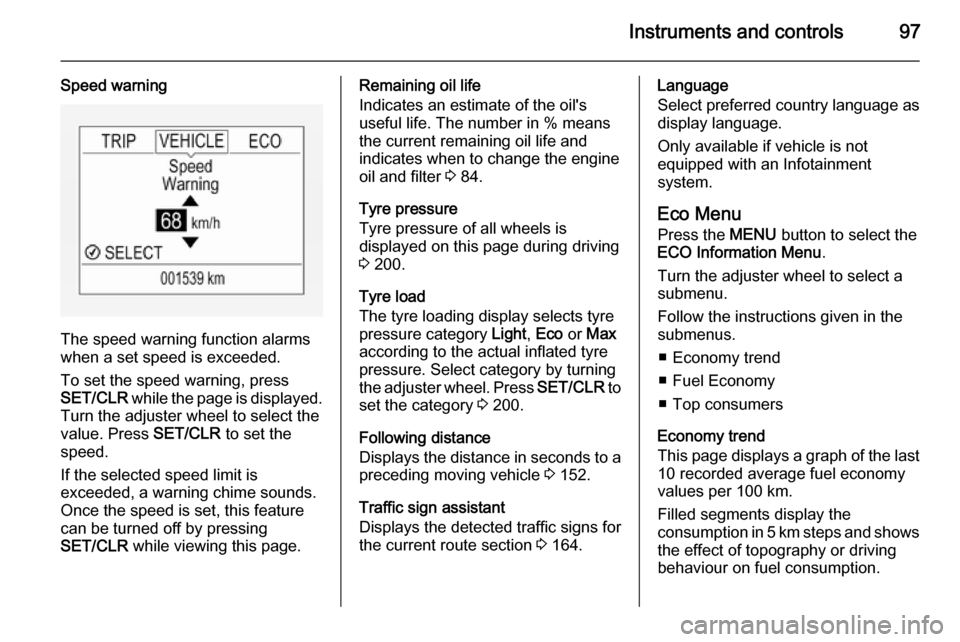
Speed warning
The speed warning function alarms
when a set speed is exceeded.
To set the speed warning, press
SET/CLR while the page is displayed.
Turn the adjuster wheel to select the
value. Press SET/CLR to set the
speed.
If the selected speed limit is
exceeded, a warning chime sounds.
Once the speed is set, this feature
can be turned off by pressing
SET/CLR while viewing this page.
Remaining oil life
Indicates an estimate of the oil's
useful life. The number in % means the current remaining oil life and
indicates when to change the engine
oil and filter 3 84.
Tyre pressure
Tyre pressure of all wheels is
displayed on this page during driving 3 200.
Tyre load
The tyre loading display selects tyre
pressure category Light, Eco or Max
according to the actual inflated tyre pressure. Select category by turning
the adjuster wheel. Press SET/CLR to
set the category 3 200.
Following distance
Displays the distance in seconds to a preceding moving vehicle 3 152.
Traffic sign assistant
Displays the detected traffic signs for
the current route section 3 164.Language
Select preferred country language as
display language.
Only available if vehicle is not
equipped with an Infotainment
system.
Eco Menu
Press the MENU button to select the
ECO Information Menu .
Turn the adjuster wheel to select a
submenu.
Follow the instructions given in the
submenus.
■ Economy trend
■ Fuel Economy
■ Top consumers
Economy trend
This page displays a graph of the last 10 recorded average fuel economy
values per 100 km.
Filled segments display the
consumption in 5 km steps and shows the effect of topography or driving
behaviour on fuel consumption.
Page 103 of 249

Instruments and controls101
No.Vehicle message9Turn steering wheel, start
engine again12Vehicle overloaded13Compressor overheated15Centre high-mounted brake
light failure16Brake light failure17Headlight levelling malfunction18Left low beam failure19Rear fog light failure20Right low beam failure21Left sidelight failure22Right sidelight failure23Reversing light failure24Number plate light failure25Left front turn signal failure26Left rear turn signal failureNo.Vehicle message27Right front turn signal failure28Right rear turn signal failure29Check trailer brake light30Check trailer reversing light31Check left trailer turn signal32Check right trailer turn signal33Check trailer rear fog light34Check trailer rear light35Replace battery in radio remote
control48Clean side blind spot alert
system49Lane departure warning
unavailable53Tighten gas cap54Water in diesel fuel filter55Diesel particle filter is full
3 134No.Vehicle message56Tyre pressure imbalance on
front axle57Tyre pressure imbalance on
rear axle58Tyres without TPMS sensors
detected59Open and then close driver
window60Open and then close front
passenger window65Theft attempted66Service theft alarm system67Service steering wheel lock68Service power steering75Service air conditioning76Service side blind spot alert
system79Top up engine oil81Service transmission
Page 104 of 249

102Instruments and controls
No.Vehicle message82Change engine oil soon84Engine power reduced89Service vehicle soon94Shift to park before exiting95Service airbag128Bonnet open134Park assist fault, clean bumper136Service parking assist145Check washer fluid level174Low vehicle battery258Park assist off
Vehicle messages on Uplevel-
Display The vehicle messages are displayedas text. Follow the instructions given
in the messages.
The system displays messages
regarding the following topics:
■ service messages
■ fluid levels
■ anti-theft alarm system
■ brakes
■ ride control systems
■ cruise control, speed limiter
■ forward collision alert
■ parking assist systems
■ lighting, bulb replacement
■ wiper/washer system
■ doors, windows
■ side blind spot alert
■ traffic sign assistant
■ lane departure warning
■ radio remote control
■ seat belts
■ airbag systems
■ engine and transmission
■ tyre pressure
■ diesel particle filter
■ vehicle battery statusVehicle messages on
Colour-Info-Display
Some important messages appear
additionally in the
Colour-Info-Display. Some
messages only pop-up for a few
seconds.
Warning chimes
When starting the engine or
whilst driving Only one warning chime will sound at
a time.
The warning chime regarding
unfastened seat belts has priority
over any other warning chime.
■ If seat belt is not fastened.
■ If a door or the tailgate is not fully closed when starting off.
■ If a certain speed is exceeded with parking brake applied.
■ If a programmed speed is exceeded.
Page 178 of 249

176Vehicle careVehicle careGeneral Information...................176
Vehicle checks ........................... 177
Bulb replacement .......................184
Electrical system ........................193
Vehicle tools .............................. 198
Wheels and tyres .......................199
Jump starting ............................. 215
Towing ....................................... 217
Appearance care .......................219General Information
Accessories and vehicle
modifications
We recommend the use of genuine parts and accessories and factory
approved parts specific for your
vehicle type. We cannot assess or
guarantee reliability of other products
- even if they have a regulatory or
otherwise granted approval.
Do not make any modifications to the electrical system, e.g. changes of
electronic control units (chip tuning).Caution
When transporting the vehicle on
a train or on a recovery vehicle, the
mud flaps may be damaged.
Vehicle storage
Storage for a long period of time If the vehicle is to be stored for severalmonths:
■ Wash and wax the vehicle.
■ Have the wax in the engine compartment and underbody
checked.
■ Clean and preserve the rubber seals.
■ Fill up fuel tank completely.
■ Change the engine oil.
■ Drain the washer fluid reservoir. ■ Check the coolant antifreeze and corrosion protection.
■ Adjust tyre pressure to the value specified for full load.
■ Park the vehicle in a dry, well ventilated place. Engage first orreverse gear or set selector lever to P . Prevent the vehicle from rolling.
■ Do not apply the parking brake.
Page 179 of 249
Vehicle care177
■ Open the bonnet, close all doorsand lock the vehicle.
■ Disconnect the clamp from the negative terminal of the vehicle
battery. Beware that all systems are
not functional, e.g. anti-theft alarm
system.
Putting back into operation
When the vehicle is to be put back into
operation:
■ Connect the clamp to the negative terminal of the vehicle battery.
Activate the electronics of the
power windows.
■ Check tyre pressure.
■ Fill up the washer fluid reservoir.
■ Check the engine oil level.
■ Check the coolant level.
■ Fit the number plate if necessary.End-of-life vehicle
recovery
Information on end-of-life vehicle
recovery centres and the recycling of
end-of-life vehicles is available on our website. Only entrust this work to an
authorised recycling centre.
Gas vehicles must be recycled by a
service centre authorised for gas
vehicles.Vehicle checks
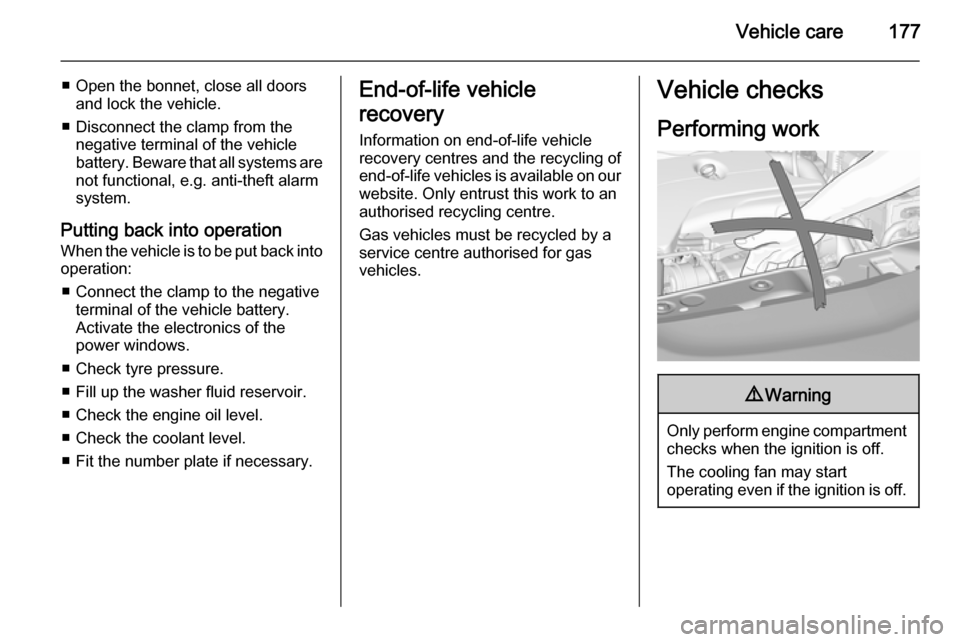
Performing work9 Warning
Only perform engine compartment
checks when the ignition is off.
The cooling fan may start
operating even if the ignition is off.
Page 223 of 249

Vehicle care221
Paintwork damageRectify minor paintwork damage witha touch-up pen before rust forms.
Have more extensive damage or rust areas repaired by a workshop.
Underbody Some areas of the vehicle underbody
have a PVC undercoating while other
critical areas have a durable
protective wax coating.
After the underbody is washed, check the underbody and have it waxed if
necessary.
Bitumen/rubber materials could
damage the PVC coating. Have
underbody work carried out by a
workshop.
Before and after winter, wash the
underbody and have the protective
wax coating checked.
Towing equipment
Do not clean the coupling ball bar with
a steam-jet or high-pressure jet
cleaner.Rear carrier system
Clean the rear carrier system with a
steam-jet or high-pressure jet cleaner
at least once a year.
Operate the rear carrier system
periodically if not in regular use, in
particular during winter.
Interior care
Interior and upholstery Only clean the vehicle interior,
including the instrument panel fascia
and panelling, with a dry cloth or
interior cleaner.
Clean the leather upholstery with
clear water and a soft cloth. In case of
heavy soiling, use leather care.
The instrument cluster and the
displays should only be cleaned using a soft damp cloth. If necessary use a
weak soap solution.
Clean fabric upholstery with a
vacuum cleaner and brush. Remove
stains with an upholstery cleaner.Clothing fabrics may not be
colourfast. This could cause visible
discolourations, especially on light- coloured upholstery. Removable
stains and discolourations should be
cleaned as soon as possible.
Clean seat belts with lukewarm water or interior cleaner.Caution
Close Velcro fasteners as open
Velcro fasteners on clothing could damage seat upholstery.
The same applies to clothing with
sharp-edged objects, like zips or
belts or studded jeans.
Plastic and rubber parts
Plastic and rubber parts can be
cleaned with the same cleaner as
used to clean the body. Use interior cleaner if necessary. Do not use any
other agent. Avoid solvents and petrol in particular. Do not use high-
pressure jet cleaners.