radio VAUXHALL CORSA 2015.75 User Guide
[x] Cancel search | Manufacturer: VAUXHALL, Model Year: 2015.75, Model line: CORSA, Model: VAUXHALL CORSA 2015.75Pages: 261, PDF Size: 7.61 MB
Page 109 of 261

Instruments and controls107
In the corresponding submenus, the
following settings can be changed:
Languages
Selection of the desired language.
Time Date
See 'Clock' 3 80.
Radio settings
See Infotainment system manual for
further information.
Phone settings
See Infotainment system manual for
further information.
Vehicle settings ■ Climate and air quality
Auto fan speed : Modifies the level
of the cabin airflow of the climate
control in Automatic mode.
Air conditioning mode : Controls the
state of the cooling compressor
when the vehicle is started. Last
setting (recommended) or at
vehicle start is either always ON or
always OFF.Auto rear demist : Activates
automatically rear heated window.
■ Comfort settings
Chime volume : Changes the
volume of warning chimes.
Personalization by driver : Activates
or deactivates the personalisation
function.
Rear auto wipe in reverse :
Activates or deactivates automatic
switching on of the rear window
wiper when reverse gear is
engaged.
■ Park assist / Collision detection
Park assist : Activates or
deactivates the ultrasonic parking
assist. Activation is selectable with
or without attached trailer coupling.
Side blind zone alert : Changes the
settings for the side blind spot alert
system.
■ Exterior ambient lighting
Exterior lighting by unlocking :
Activates or deactivates the entry lighting.
Duration upon exit of vehicle :Activates or deactivates and
changes the duration of exit
lighting.
■ Power door locks
Auto door lock : Activates or
deactivates the automatic door locking function after switching on
ignition.
Stop door lock if door open :
Activates or deactivates the door
locking function while a door is
open.
Delayed door lock : Activates or
deactivates the delayed door
locking function. This menu option
is displayed with Stop door lock if
door open deactivated. Central
locking system 3 22.
■ Remote locking, unlocking, starting
Remote unlock feedback :
Activates or deactivates the hazard warning flasher feedback whilst
unlocking.
Passive door unlock : Changes the
configuration to unlock only the
driver's door or the whole vehicle
whilst unlocking.
Page 110 of 261
108Instruments and controls
Auto relock doors: Activates or
deactivates the automatic relock
function after unlocking without opening the vehicle.
■ Restore factory settings :
Resets all settings to the default settings.
Personal settings Colour-Info-Display
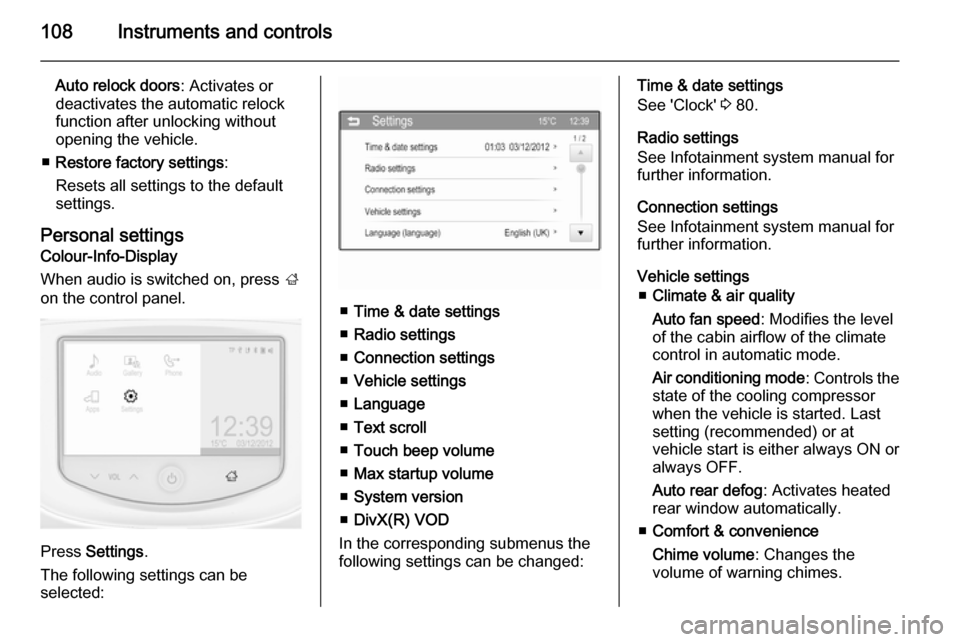
When audio is switched on, press ;
on the control panel.
Press Settings .
The following settings can be
selected:
■ Time & date settings
■ Radio settings
■ Connection settings
■ Vehicle settings
■ Language
■ Text scroll
■ Touch beep volume
■ Max startup volume
■ System version
■ DivX(R) VOD
In the corresponding submenus the
following settings can be changed:
Time & date settings
See 'Clock' 3 80.
Radio settings
See Infotainment system manual for
further information.
Connection settings
See Infotainment system manual for further information.
Vehicle settings ■ Climate & air quality
Auto fan speed : Modifies the level
of the cabin airflow of the climate
control in automatic mode.
Air conditioning mode : Controls the
state of the cooling compressor
when the vehicle is started. Last
setting (recommended) or at
vehicle start is either always ON or always OFF.
Auto rear defog : Activates heated
rear window automatically.
■ Comfort & convenience
Chime volume : Changes the
volume of warning chimes.
Page 120 of 261

118LightingReading lights
Operated by pressing 2 for the left
and right side.
Lighting features
Entry lighting
Welcome lighting
The following lights are switched on
for a short time by unlocking the
vehicle with the radio remote control:
■ headlights
■ tail lights
■ number plate lights
■ instrument panel light
■ interior lights
Some functions are only operable
when it is dark outside to facilitate locating the vehicle.
The lighting switches off immediately
when the ignition key is turned to
position 1 3 131.
Activation or deactivation of this
function can be changed in the
Info-Display.
Vehicle personalisation 3 106.
The settings can be saved for the key being used 3 22.The following lights will additionally
switch on when the driver's door is
opened:
■ all switches
■ Driver Information Centre
Exit lighting
The following lights switch on if the
key is removed from the ignition
switch:
■ interior lights
■ instrument panel light (only when it is dark)
They will switch off automatically after
a delay and will be activated again if
the driver's door is opened.
Path lightingHeadlights, tail lights and number
plate lights illuminate the surrounding
area for an adjustable time after
leaving the vehicle.
Page 211 of 261

Vehicle care209
After inflating, some driving may be
required to update the tyre pressure
values in the DIC. During this time w
may illuminate.
If w illuminates at lower temperatures
and extinguishes after driving, this
could be an indicator for approaching a low tyre pressure condition. Check
tyre pressure.
Vehicle messages 3 103.
If the tyre pressure must be reduced
or increased, switch off ignition.
Only mount wheels with pressure
sensors, otherwise the tyre pressure
will not be displayed and w
illuminates continuously.
A spare wheel or temporary spare
wheel is not equipped with pressure
sensors. The tyre pressure
monitoring system is not operational
for these tyres. Control indicator w
illuminates. For the further three
tyres, the system remains
operational.The use of commercially-available
liquid tyre repair kits can impair the
function of the system. Factory-
approved repair kits can be used.
External high-power radio equipment
could disrupt the tyre pressure
monitoring system.
Each time the tyres are replaced, tyre pressure monitoring system sensors
must be dismounted and serviced.
For the screwed sensor; replace
valve core and sealing ring. For the
clipped sensor; replace complete
valve stem.
Vehicle loading status Adjust tyre pressure to load condition according to the tyre information labelor tyre pressure chart 3 249, and
select the appropriate setting in the
menu Tyre Load in the Driver
Information Centre (DIC), Vehicle
Information Menu ? 3 95. This
setting is the reference for the tyre
pressure warnings.The menu Tyre Load only appears if
the vehicle is in a standstill and the
parking brake is applied. On vehicles
with automatic transmission the
selector lever has to be in P.
Baselevel display and Midlevel
display:
Select
■ LO for comfort pressure up to
three people.
■ ECO for Eco pressure up to
three people.
■ Hi for full loading.
Uplevel display:
Page 253 of 261

Customer information251Customer informationCustomer information................251
Vehicle data recording and pri‐
vacy ........................................... 252Customer information
Declaration of conformity Transmission systems
This vehicle has systems that
transmit and/or receive radio waves
subject to Directive 1999/5/EC.
These systems are in compliance with the essential requirements and
other relevant provisions of Directive
1999/5/EC. Copies of the original
Declarations of Conformity can be
obtained on our website.
Jack
Translation of the original declaration
of conformity
Declaration of conformity according
to EC Directive 2006/42/EC
We declare that the product:
Product designation: Jack
Type/GM part number: 13331922 is in compliance with the provisions of
Directive 2006/42/EC.Applied technical standards:GMN9737=jackingGM 14337=standard equipment jack – hardware
testsGMN5127=vehicle integrity –
hoisting and service
station jackingGMW15005=standard equipment
jack and spare tyre,
vehicle testISO TS 16949=quality
management
systems
The signatory is authorised to
compile the technical documentation.
Rüsselsheim, 31st January 2014
signed by
Hans-Peter Metzger
Engineering Group Manager Chassis & Structure
Adam Opel AG
D-65423 Rüsselsheim
Page 255 of 261

Customer information253Radio Frequency
Identification (RFID)
RFID technology is used in some vehicles for functions such as tyre
pressure monitoring and ignition
system security. It is also used in
connection with conveniences such
as radio remote controls for door
locking/unlocking and starting, and in- vehicle transmitters for garage dooropeners. RFID technology in
Vauxhall vehicles does not use or
record personal information or link with any other Vauxhall system
containing personal information.
Page 259 of 261

257
Preheating ................................... 93
Puncture ..................................... 219
R Radio Frequency Identification (RFID) ..................................... 253
Radio remote control ...................21
Reading lights ............................ 118
Rear carrier system ......................58
Rear floor storage cover ..............70
Rear fog light ............................... 94
Rear fog lights ........................... 115
Rear view camera ...................... 165
Rear window wiper/washer .......... 78
Recommended fluids and lubricants ........................ 232, 236
Reduced engine power ................94
Refuelling ................................... 173
Retained power off .....................131
Reversing lights .........................116
Ride control systems ..................147
Roof .............................................. 32
Roof load ...................................... 73
Roof rack ..................................... 72
S Safety belts ................................... 39
Seat adjustment ....................... 7, 36 Seat belt ........................................ 8
Seat belt reminder .......................89Seat belts ..................................... 39
Seat folding .................................. 37
Seat heating ................................. 39
Seat position ................................ 35
Selector lever ..................... 138, 143
Service ....................................... 129
Service display ............................ 86
Service information ....................231
Service vehicle soon .................... 91
Side airbag system ......................46
Side blind spot alert ....................164
Sidelights .................................... 110
Side turn signal lights ................198
Spare wheel ............................... 222
Speed limiter......................... 95, 152
Speedometer ............................... 83
Starting and operating ................131
Starting off ................................... 17
Starting the engine ............132, 142
Steering wheel adjustment ......9, 75
Steering wheel controls ...............75
Stop-start system........................ 133
Storage ......................................... 56
Storage compartments .................56
Sunroof ........................................ 32
Sun visors .................................... 31
Symbols ......................................... 4T
Tachometer ................................. 84
Tail lights ................................... 196
Three-point seat belt .................... 40
Tools .......................................... 205
Top-tether fastening eyes ............54
Tow bar....................................... 177
Towing ................................ 177, 225
Towing another vehicle .............226
Towing equipment .....................179
Towing the vehicle .....................225
Traction Control system ............. 147
Traction Control system off........... 93
Traffic sign assistant .............95, 167
Trailer coupling ........................... 177
Trailer stability assist .................182
Trailer towing ............................. 178
Transmission ............................... 16
Transmission display .........138, 142
Tread depth ............................... 212
Trip odometer .............................. 83
Turn and lane-change signals ...114
Turn signal ................................... 89
Tyre chains ................................ 213
Tyre designations ......................206
Tyre pressure ............................ 206
Tyre pressure monitoring system ............................... 93, 207