page 92 VAUXHALL CORSA 2015 User Guide
[x] Cancel search | Manufacturer: VAUXHALL, Model Year: 2015, Model line: CORSA, Model: VAUXHALL CORSA 2015Pages: 249, PDF Size: 7.32 MB
Page 99 of 249
Instruments and controls97
Unit
Press SET/CLR while page is
displayed. Select imperial (unit 1) or
metric (unit 3) by turning the adjuster
wheel. Press SET/CLR to set the unit.
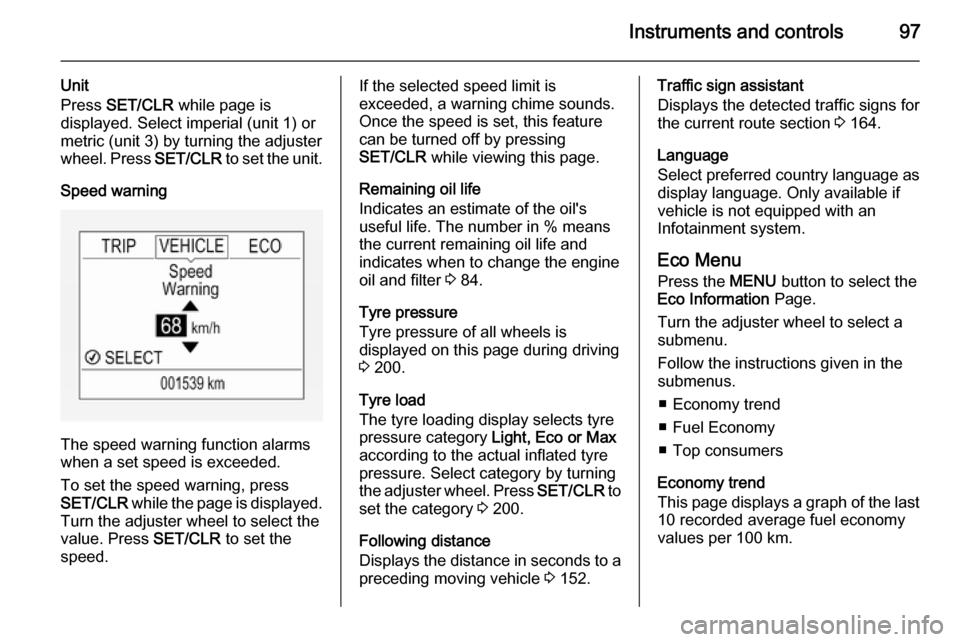
Speed warning
The speed warning function alarms
when a set speed is exceeded.
To set the speed warning, press
SET/CLR while the page is displayed.
Turn the adjuster wheel to select the
value. Press SET/CLR to set the
speed.
If the selected speed limit is
exceeded, a warning chime sounds.
Once the speed is set, this feature
can be turned off by pressing
SET/CLR while viewing this page.
Remaining oil life
Indicates an estimate of the oil's
useful life. The number in % means the current remaining oil life and
indicates when to change the engine
oil and filter 3 84.
Tyre pressure
Tyre pressure of all wheels is
displayed on this page during driving 3 200.
Tyre load
The tyre loading display selects tyre
pressure category Light, Eco or Max
according to the actual inflated tyre
pressure. Select category by turning
the adjuster wheel. Press SET/CLR to
set the category 3 200.
Following distance
Displays the distance in seconds to a preceding moving vehicle 3 152.Traffic sign assistant
Displays the detected traffic signs for
the current route section 3 164.
Language
Select preferred country language as
display language. Only available if
vehicle is not equipped with an
Infotainment system.
Eco Menu
Press the MENU button to select the
Eco Information Page.
Turn the adjuster wheel to select a
submenu.
Follow the instructions given in the
submenus.
■ Economy trend
■ Fuel Economy
■ Top consumers
Economy trend
This page displays a graph of the last 10 recorded average fuel economy
values per 100 km.
Page 100 of 249

98Instruments and controls
Filled segments display the
consumption in 5 km steps and shows
the effect of topography or driving
behaviour on fuel consumption.
Graph can be reset by pressing
SET/CLR button.
Fuel Economy
Indicates the average fuel
consumption since the last driver
reset compared to a best average fuel consumption value. To reset average
fuel consumption, press and hold
SET/CLR button while viewing this
page.
A short press on SET/CLR button
changes the distance over 10, 25 or
50 km.
Additionally the instantaneous
consumption value is displayed.
Top consumers
List of top comfort consumers
currently switched on is displayed in
descending order. Fuel saving
potential is indicated. A switched-off
consumer disappears from the list
and the consumption value will be
updated.During sporadic driving conditions,
the engine will activate the heated
rear window automatically to increase the engine load. In this event, the
heated rear window is indicated as
one of the top consumers, without
activation by the driver.
Colour-Info-Display
Depending on the vehicle
configuration, the vehicle has a
Colour-Info-Display with Touch-
Screen functionality.The Colour-Info-Display with Touch- Screen functionality indicates in
colour:
■ time 3 79
■ outside temperature 3 78
■ date 3 79
■ rear view camera indication 3 163
■ parking assist and advanced parking assist instructions 3 153
■ electronic climate control settings 3 121
■ Infotainment system, see description in the Infotainment
system manual
■ navigation, see description in the Infotainment system manual
■ system messages
■ vehicle messages 3 100
■ settings for vehicle personalisation 3 103
The type of information and how it is
displayed depends on the settings
made.
Page 101 of 249

Instruments and controls99
Selecting menus and settings
Menus and settings are selected via
the touch screen display.
Press button ;: Home page is
displayed.
Tap display icon Settings: Menu page
Settings is displayed. Select a setting
by tapping.
Tap selection once more to confirm a
setting or value.
Press display button q to exit a menu
or setting without changing or delete
the last character in a character
sequence.
To exit the Settings menu, press
display button q in steps or press
button ; after confirming the
changes.
Vehicle personalisation 3 103.
Memorised settings 3 22.
Graphic-Info-Display
Depending on the vehicle
configuration, the vehicle has a
Graphic-Info-Display.
The Graphic-Info-Display indicates:
■ time 3 79
■ outside temperature 3 78
■ date 3 79
■ electronic climate control settings 3 121
■ Infotainment system, see description in the Infotainment
system manual
■ settings for vehicle personalisation 3 103
Selecting menus and settings
Menus and settings are accessed via the display.
Press button CONFIG: Menu page
Settings is displayed.
Turn knob MENU-TUNE to select a
setting or value.
Press knob MENU-TUNE to confirm
a setting or value.
Page 137 of 249

Driving and operating135
take up to 25 minutes. Typically it
needs between seven and
12 minutes. Autostop is not available
and fuel consumption may be higher
during this period. The emission of
smells and smoke during this process is normal.
Under certain driving conditions, e.g.
short distances, the system cannot
clean itself automatically.
If cleaning of the filter is required and if previous driving conditions did not
enable automatic cleaning, it will be
indicated by control indicator %.
Simultaneously a warning message or warning code appears in the Driver
Information Centre.
% illuminates when diesel particle
filter is full. Start cleaning process as
soon as possible.
% flashes when diesel particle filter
has reached the maximum filling
level. Start cleaning process
immediately to avoid damage to the
engine.
Cleaning process To activate cleaning process,
continue driving, keep engine speed
above 2000 revolutions per minute.
Shift down if necessary. Diesel
particle filter cleaning is then started.
If g illuminates additionally,
cleaning is not possible, seek the
assistance of a workshop.Caution
If the cleaning process is
interrupted, there is a risk of
provoking severe engine damage.
Cleaning takes place quickest at high engine speeds and loads.
The control indicator % extinguishes
as soon as the self-cleaning
operation is complete.
Catalytic converter
The catalytic converter reduces the
amount of harmful substances in the
exhaust gases.Caution
Fuel grades other than those listed on pages 3 168, 3 230 could
damage the catalytic converter or
electronic components.
Unburnt petrol will overheat and
damage the catalytic converter.
Therefore avoid excessive use of the starter, running the fuel tank
dry and starting the engine by
pushing or towing.
In the event of misfiring, uneven
engine running, a reduction in engine performance or other unusual
problems, have the cause of the fault
rectified by a workshop as soon as
possible. In an emergency, driving
can be continued for a short period,
keeping vehicle speed and engine
speed low.
Page 154 of 249

152Driving and operating
General information
9Warning
Forward collision alert is just a
warning system and does not
apply the brakes. When
approaching a vehicle ahead too
rapidly, it may not provide you
enough time to avoid a collision.
The driver accepts full
responsibility for the valid
following distance based on traffic, weather and visibility conditions.
The complete attention of the
driver is always required while
driving. He shall always be ready to take action and apply the
brakes.
System limitations
The system is designed to warn only for vehicles, but may react also on
other objects.
In the following cases, forward
collision alert may not detect a vehicle
ahead or sensor performance is
limited:
■ on winding roads
■ when weather limits visibility, such as fog, rain, or snow
■ when the sensor is blocked by snow, ice, slush, mud, dirt, or
windscreen damage
Following distance
indication The following distance indication
displays the distance to a preceding
moving vehicle. The front camera in
the windscreen is used to detect the
distance of a vehicle directly ahead in
the vehicle's path. It is active at
speeds above 25 mph.
When a preceding vehicle is detected
ahead, the distance is indicated in
seconds, displayed on a page in the
Driver Information Centre 3 93 . Press
the MENU button on the turn signal
lever to select Vehicle Information
Menu X and turn the adjuster
wheel to choose following distance
indication page.
The minimum indicated distance is
0.5 seconds.
Page 167 of 249

Driving and operating165
Combinations of multiple signs in the
display are possible.
An exclamation mark in a frame
indicates that there is an additional
sign detected which cannot be
recognised by the system.
The system is active up to a speed of
124 mph depending on the lighting
conditions.
As soon as the speed becomes
slower than 34 mph the display will be reset and the content of the traffic sign
page will be cleared, e.g.. when
entering a city zone. The next
recognized speed indication will be
displayed.
Display indication
Traffic signs are displayed on the
page Traffic sign detection on the
Driver Information Centre. Choose
Vehicle by the Menu button and
select Traffic sign detection entry via
the adjuster wheel on the turn signal lever 3 93.
When another page on the Driver
Information Centre menu was
selected and then Traffic sign
detection page is chosen again, the
last recognised traffic sign will be
displayed.
Alert function
Once activated, speed limit and no
passing signs are displayed as pop-
up alerts in the Driver Information
Centre.
Page 168 of 249

166Driving and operating
The alert function can be activated or
deactivated in the setting menu of the
traffic sign assistant page by pressing the SET/CLR button on the turn signal
lever.Once setting page is displayed, select
Alert ON to activate pop-up alert.
Deactivate by selecting Alert OFF.
When switching on the ignition, alert function is deactivated.
Pop-up alert is displayed for approx.
eight seconds in the Driver
Information Centre.
System reset The content of the traffic sign memory
can be cleared in the setting menu of
the traffic sign assistant page by
pressing the SET/CLR button on the
turn signal lever. Select and confirm
Reset to clear traffic sign assistant
system. Upon successful reset a
chime will sound and the following
symbol is indicated until the next
traffic sign is detected.
In some cases traffic sign assistant
clears up automatically by the
system.
Fault The traffic sign assistant system may
not operate correctly when:
■ The area of the windscreen, where the front camera is located, is not
clean.
■ Traffic signs are completely or partially covered or difficult to
discern.
■ There are adverse environmental conditions, e.g. heavy rain, snow,
direct sunlight or shadows. In this
Page 202 of 249

200Vehicle care
Tyre pressure 3 237.
The tyre pressure information label on the right door frame indicates theoriginal equipment tyres and the
correspondent tyre pressures.
The tyre pressure data refers to cold
tyres. It applies to summer and winter tyres.
The ECO tyre pressure serves to
achieve the smallest amount of fuel
consumption possible.
Incorrect tyre pressures will impair
safety, vehicle handling, comfort and fuel economy and will increase tyre
wear.
Tyre pressures differ depending on
various options. For the correct tyre
pressure value, follow the procedure
below:
■ Identify the engine identifier code. Engine data 3 230.
■ Identify the respective tyre.
The tyre pressure tables show all
possible tyre combinations 3 237.For the tyres approved for your
vehicle, refer to the EEC Certificate of Conformity provided with your vehicle
or other national registration
documents.
The driver is responsible for correct
adjustment of tyre pressure.9 Warning
If the pressure is too low, this can
result in considerable tyre warm-
up and internal damage, leading to tread separation and even to tyre
blow-out at high speeds.
If the tyre pressure must be reduced
or increased, switch off ignition. After
adjusting tyre pressure switch on
ignition and select the relevant setting on the page Tyre load in the Driver
Information Centre 3 93.
Tyre pressure monitoring
system The tyre pressure monitoring system
(TPMS) checks the pressure of all
four tyres once a minute when vehicle speed exceeds a certain limit.Caution
Tyre pressure monitoring system
warns only about low tyre pressure
condition and does not replace
regular tyre maintenance by the
driver.
All wheels must be equipped with pressure sensors and the tyres must
have the prescribed pressure.
Notice
In countries where the tyre pressure
monitoring system is legally
required, the use of wheels without
pressure sensors will invalidate the
vehicle type approval.
The current tyre pressures can be
shown in the Vehicle Menu in the
Driver Information Centre (DIC).
Page 203 of 249

Vehicle care201
The menu can be selected by the
buttons on the turn signal lever.
Press the MENU button to select the
Vehicle Menu .
Turn the adjuster wheel to select the
tyre pressure monitoring system.
Baselevel display and Midlevel
display:
The tyre pressure for each tyre is
displayed on its own page.
Uplevel display:
The tyre pressures for all tyres are
displayed on one page.
System status and pressure warnings
are displayed by a message
indicating the corresponding tyre in the DIC.
A detected low tyre pressure
condition is indicated by the control
indicator w 3 91.
If w illuminates, stop as soon as
possible and inflate the tyres as
recommended 3 237.
If w flashes for 60-90 seconds and
then illuminates continuously, there is
a fault in the system. Consult a
workshop.
After inflating, driving may be
required to update the tyre pressure
values in the DIC. During this time w
may illuminate.