trailer VAUXHALL CORSA 2016.5 Owner's Manual
[x] Cancel search | Manufacturer: VAUXHALL, Model Year: 2016.5, Model line: CORSA, Model: VAUXHALL CORSA 2016.5Pages: 265, PDF Size: 7.81 MB
Page 105 of 265

Instruments and controls103No.Vehicle message28Right rear turn signal failure29Check trailer brake light30Check trailer reversing light31Check left trailer turn signal32Check right trailer turn signal33Check trailer rear fog light34Check trailer rear light35Replace battery in radio remote
control48Clean side blind spot alert
system49Lane departure warning
unavailable53Tighten fuel filler cap54Water in diesel fuel filter55Diesel particle filter is full
3 13956Tyre pressure imbalance on
front axleNo.Vehicle message57Tyre pressure imbalance on rear axle58Tyres without TPMS sensors
detected59Open then close driver window60Open then close front
passenger window65Theft attempted66Service anti-theft alarm system67Service steering wheel lock68Service power steering75Service air conditioning76Service side blind spot alert
system79Top up engine oil81Service transmission82Change engine oil soon84Engine power reduced89Service vehicle soonNo.Vehicle message94Shift to park before exiting95Service airbag128Bonnet open134Parking assist fault, clean
bumper136Service parking assist145Check washer fluid level174Low vehicle battery151Press clutch to start258Parking assist off
Vehicle messages on Uplevel-
Display
The vehicle messages are displayedas text. Follow the instructions given
in the messages.
The system displays messages
regarding the following topics:
● service messages
● fluid levels
● anti-theft alarm system
Page 108 of 265

106Instruments and controlsAuto rear demist: Activates
automatically the heated rear
window.
● Comfort settings
Chime volume : Changes the
volume of warning chimes.
Personalization by driver :
Activates or deactivates the
personalisation function.
Rear auto wipe in reverse :
Activates or deactivates
automatic switching on of the
rear window wiper when reverse
gear is engaged.
● Park assist / Collision detection
Park assist : Activates or
deactivates the ultrasonic
parking assist. Activation is
selectable with or without
attached trailer coupling.
Side blind zone alert : Changes
the settings for the side blind spot
alert system.
● Exterior ambient lighting
Exterior lighting by unlocking :
Activates or deactivates the entry lighting.Duration upon exit of vehicle :
Activates or deactivates and
changes the duration of exit
lighting.
● Power door locks
Auto door lock : Activates or
deactivates the automatic door
locking function after switching
on ignition.
Stop door lock if door open :
Activates or deactivates the door
locking function while a door is open.
Delayed door lock : Activates or
deactivates the delayed door
locking function. This menu
option is displayed with Stop door
lock if door open deactivated.
Central locking system 3 22.
● Remote locking, unlocking,
starting
Remote unlock feedback :
Activates or deactivates the
hazard warning flasher feedback
whilst unlocking.
Passive door unlock : Changes
the configuration to unlock onlythe driver's door or the whole
vehicle whilst unlocking.
Auto relock doors : Activates or
deactivates the automatic relock
function after unlocking without
opening the vehicle.
● Restore factory settings :
Resets all settings to the default
settings.
Personal settings Colour-Info-Display
When audio is switched on, press ;
on the control panel.
Page 109 of 265

Instruments and controls107Select Settings and then Vehicle
settings .
Vehicle settings
● Climate & air quality
Auto Fan Max Speed : Modifies
the level of the cabin airflow of the climate control in automatic
mode.
Air Conditioning Mode : Controls
the state of the cooling
compressor when the vehicle is
started. Last setting
(recommended) or at vehicle
start is either always on or always
off.
Auto Rear Defog : Automatically
activates heated rear window.
● Collision / Detection Systems
Park Assist : Activates or
deactivates the ultrasonic
parking assist. Activation is
selectable with or without
attached trailer coupling.
Side Blind Zone Alert : Activates
or deactivates side blind zone alert.
● Comfort and Convenience
Chime Volume : Changes the
volume of warning chimes.
Personalization By Driver :
Activates or deactivates the
personalisation function.
Auto Wipe in Reverse Gear :
Activates or deactivates
automatic switching on of the
rear window wiper when reverse
gear is engaged.
● Lighting
Vehicle Locator Lights : Activates
or deactivates the entry lighting.Exit Lighting : Activates or
deactivates and changes the duration of exit lighting.
● Power Door Locks
Unlocked Door Anti Lock Out :
Activates or deactivates the door
locking function while a door is open.
Auto Door Lock : Activates or
deactivates the automatic door
locking function after switching on ignition.
Auto Door Unlock : Changes the
configuration to unlock only the driver's door or the whole vehicle after switching off ignition.
Delayed Door Lock : Activates or
deactivates the delayed door
locking function. This feature
delays the actual locking of the
doors until all doors are closed.
● Remote Lock, Unlock, Start
Remote Unlock Light Feedback :
Activates or deactivates the
hazard warning flasher feedback
whilst unlocking.
Remote Door Unlock : Changes
the configuration to unlock only
Page 119 of 265

Lighting117Turn and lane-changesignalslever up:right turn signallever down:left turn signal
If the lever is moved past the
resistance point, the turn signal is
switched on constantly. When the
steering wheel moves back, the turn
signal is automatically deactivated.
For three flashes, e.g. when changing
lanes, press the lever until resistance
is felt and then release.
With a trailer connected, turn signal
flashes six times and tone frequency
changes when pressing the lever until resistance is felt and then releasing.
Move the lever to the resistance point
and hold for longer indication.
Switch the turn signal off manually by
moving the lever to its original
position.
Front fog lights
Operated by pressing >.
Light switch in position AUTO:
switching on front fog lights will switch the low beam on automatically.
Rear fog light
Operated by pressing r.
Light switch in position AUTO:
switching on rear fog light will switch
on headlights automatically.
Page 134 of 265

132Driving and operatingDriving and
operatingDriving hints ............................... 133
Control of the vehicle ...............133
Starting and operating ...............133
New vehicle running-in ............133
Ignition switch positions ...........133
Retained power off ..................134
Starting the engine ..................134
Overrun cut-off ........................ 135
Stop-start system ....................135
Parking .................................... 138
Engine exhaust .......................... 139
Diesel particle filter ..................139
Catalytic converter ...................140
Automatic transmission ..............140
Transmission display ...............140
Selector lever .......................... 141
Manual mode ........................... 142
Electronic driving programmes 142
Fault ........................................ 143
Interruption of power supply ....143
Manual transmission ..................144Manual transmission automa‐
ted .............................................. 144
Transmission display ...............145
Starting the engine ..................145
Selector lever .......................... 145
Manual mode ........................... 147
Electronic driving programmes 147
Fault ........................................ 147
Brakes ........................................ 148
Antilock brake system .............148
Parking brake .......................... 149
Brake assist ............................. 149
Hill start assist ......................... 149
Ride control systems .................150
Traction Control system ..........150
Electronic Stability Control ......151
City mode ................................ 152
Driver assistance systems .........153
Cruise control .......................... 153
Speed limiter ........................... 155
Forward collision alert .............156
Following distance indication ...158
Parking assist .......................... 159
Side blind spot alert .................169
Rear view camera ...................170
Traffic sign assistant ................171
Lane departure warning ..........175
Fuel ............................................ 176
Fuel for petrol engines .............176Fuel for diesel engines ............176
Fuel for liquid gas operation ....176
Refuelling ................................ 178
Fuel consumption - CO 2-
Emissions .............................. 181
Trailer hitch ................................ 182
General information .................182
Driving characteristics and towing tips .............................. 182
Trailer towing ........................... 183
Towing equipment ...................184
Trailer stability assist ...............186
Page 164 of 265
162Driving and operatingThe distance to obstacles is shown onthe Colour-Info-Display by coloured
zones in front of or behind the vehicle
3 100.
Deactivation
The system is deactivated
automatically when vehicle speed
exceeds 7 mph.
Manual deactivation is also possible by pressing the parking assist button
r .
When the system is deactivated, the
LED in the button extinguishes and, if manually deactivated, Park Assist
Off pops-up in the Driver Information
Centre.
After a manual deactivation, the front- rear parking assist is activated again
if r is pressed.
The complete system can be
manually deactivated in the vehicle
personalisation menu in the
Info-Display. It remains deactivated during the ignition cycle or until
activation in personalisation menu
again. Vehicle personalisation 3 105.When using the trailer hitch change
the configuration settings in the
vehicle personalisation menu in the
Info-Display. Vehicle personalisation
3 105.
Fault
In the event of a fault or if the system does not work temporarily, e.g.
because of high external noise level
or other interference factors, a
message pops-up in the Driver
Information Centre.
Vehicle messages 3 102.
Advanced parking assist9 Warning
The driver bears full responsibility
for accepting the parking slot
suggested by the system and the
parking manoeuvre.
Always check the surrounding
area in all directions when using
the advanced parking assist.
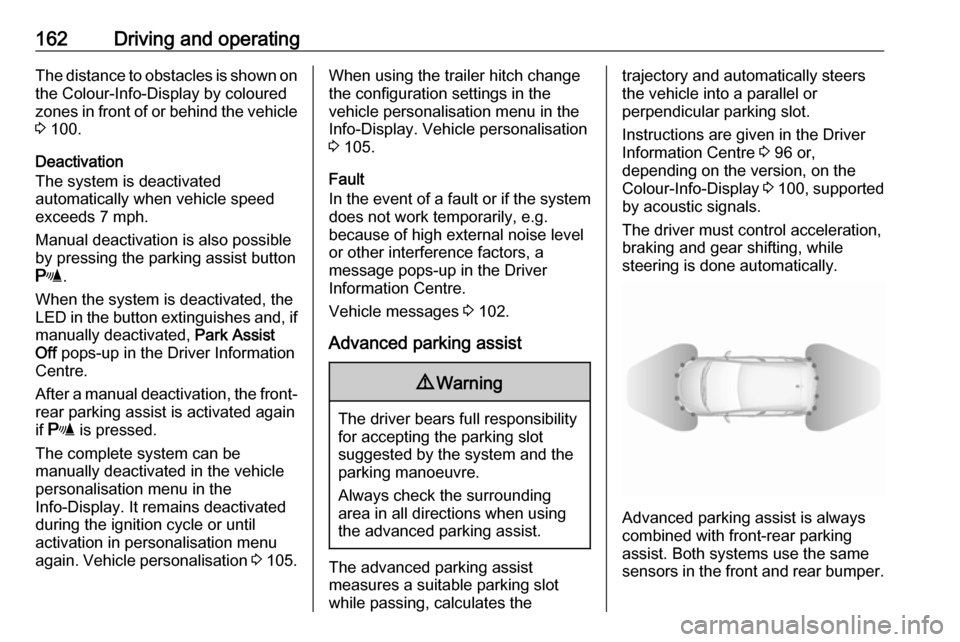
The advanced parking assist
measures a suitable parking slot
while passing, calculates the
trajectory and automatically steers
the vehicle into a parallel or
perpendicular parking slot.
Instructions are given in the Driver
Information Centre 3 96 or,
depending on the version, on the
Colour-Info-Display 3 100 , supported
by acoustic signals.
The driver must control acceleration,
braking and gear shifting, while
steering is done automatically.
Advanced parking assist is always
combined with front-rear parking assist. Both systems use the same
sensors in the front and rear bumper.
Page 167 of 265

Driving and operating165When the system is deactivated, the
LED in the button extinguishes and, if
manually deactivated, Park Assist
Off pops-up in the Driver Information
Centre.
After a manual deactivation, the front- rear parking assist is activated again
if r is pressed.
The complete system can be
manually deactivated in the vehicle personalisation menu in the
Info-Display. It remains deactivated
during the ignition cycle or until
activation in personalisation menu
again. Vehicle personalisation 3 105.
When using the trailer hitch change
the configuration settings in the
vehicle personalisation menu in the
Info-Display. Vehicle personalisation
3 105.
Activation of advanced parking assist Advanced parking assist can only be
activated when driving forwards.
When searching for a parking slot, the
system is ready to operate with a long press of D.
The system recognises and
memorises ten metres for parallel
parking slots or six metres for
perpendicular parking slots in the parking assist mode.
The system can only be activated at
a speed up to 18 mph and the system searches for a parking slot at a speed
up to 18 mph.
The maximum allowed parallel
distance between the vehicle and a
row of parked cars is 1.8 metres for
parallel parking and 2.5 metres for
perpendicular parking.
FunctionalityParking slot searching mode
Indication in the Driver Information
Centre
Page 173 of 265

Driving and operating171The camera is mounted between thenumber plate lights and has a viewing
angle of 130°.
The area displayed by the camera is
limited. The distance of the image that
appears on the display differs from
the actual distance.
Warning symbols
Warning symbols are indicated as
triangles 9 on the picture, which show
obstacles detected by the rear
sensors of the advanced parking
assist.
Additionally 9 appears on the top line
of the Info-Display with the warning to
check the vehicle surrounding.
Display settings
Brightness and contrast can be set by
tapping the touch screen display
when rear view camera is active.
Deactivation
The camera is deactivated when a
certain forward speed is exceeded or
if reverse gear is not engaged for
approx. ten seconds.
Rear view camera can be manually
deactivated in the vehicle
personalisation menu in the
Info-Display. Vehicle personalisation
3 105.
Deactivation of guiding lines and
warning symbols
Activation or deactivation of the visual guiding lines and the warning
symbols can be changed by touch
buttons in the lower zone of the
display.
Fault
Fault messages are displayed with a
9 on the top line of the Info-Display.The rear view camera may not
operate properly when:
● The surrounding is dark.
● The sun or the beam of headlights is shining directly into
the camera lens.
● Ice, snow, mud, or anything else covers the camera lens. Clean
the lens, rinse it with water, and
wipe it with a soft cloth.
● The vehicle is towing a trailer. ● The vehicle had a rear end accident.
● There are extreme temperature changes.
Traffic sign assistant
Functionality The traffic sign assistant system
detects designated traffic signs via a
front camera and displays them in the
Driver Information Centre.
Page 174 of 265

172Driving and operating
Traffic signs, which will be detected,
are:
Limit and no passing signs ● speed limit
● no passing
● end of speed limit
● end of no passingRoad signs
Beginning and end of:
● city regions (country specific)
● motorways
● A-roads
● play streetsAdd-on signs ● additional hints to traffic signs
● restriction of trailer towing
● tractor constraints
● wet warning
● ice warning
● direction arrows
Speed limit signs and no passing
signs are displayed in the Driver
Information Centre until the next
speed limit sign or end of speed limit
is detected or up to a defined sign
timeout.
Indication of multiple signs on the
display is possible.
An exclamation mark in a frame
indicates that there is an additional
sign detected which cannot be clearly
identified by the system.
The system operates without loss of
performance up to a speed of
125 mph depending on the lighting
conditions. At night the system is
active up to a speed of 100 mph.
As soon as vehicle speed becomes
slower than 34 mph, the display will
be reset and the content of the traffic
sign page will be cleared, e.g. when
entering a city zone. The next
recognized speed indication will be
displayed.
Display indication Information about the currently valid
traffic signs is available on the
designated traffic sign assistant page in the Driver Information Centre.
Page 184 of 265

182Driving and operatingThe figures are provided only for the
purpose of comparison between different vehicle variants and mustnot be taken as a guarantee for the
actual fuel consumption of a
particular vehicle. Additional
equipment may result in slightly
higher results than the stated
consumption and CO 2 figures.
Furthermore, fuel consumption is dependent on personal driving style
as well as road and traffic conditions.Trailer hitch
General information
Only use towing equipment that has
been approved for your vehicle.
Entrust retrofitting of towing
equipment to a workshop. It may be
necessary to make changes that
affect the cooling system, heat
shields or other equipment.
The bulb outage detection function for trailer brake light cannot detect a
partial bulb outage, e.g. in case of four
times five watt bulbs, the function only detects lamp outage when only a
single five Watt lamp remains or none
remain.
Fitting of towing equipment could
cover the opening of the towing eye.
If this is the case use the coupling ball bar for towing. Always keep the
coupling ball bar in the vehicle when
not in use.Driving characteristics and
towing tips
Before attaching a trailer, lubricate
the coupling ball. However, do not do
so if a stabiliser, which acts on the coupling ball, is being used to reduce
snaking movements.
For trailers with low driving stability
and caravan trailers with a permitted
gross vehicle weight of more than
1000 kg a speed of 50 mph must not
be exceeded; the use of a stabiliser is
recommended.
If the trailer starts snaking, drive more slowly, do not attempt to correct the
steering and brake sharply if
necessary.
When driving downhill, drive in the
same gear as if driving uphill and
drive at a similar speed.
Adjust tyre pressure to the value
specified for full load 3 250.