change time VAUXHALL CORSA 2016 User Guide
[x] Cancel search | Manufacturer: VAUXHALL, Model Year: 2016, Model line: CORSA, Model: VAUXHALL CORSA 2016Pages: 267, PDF Size: 7.79 MB
Page 113 of 267

Instruments and controls111Privacy button
Press and hold j until an audio
message is heard to activate or
deactivate the transmission of the
vehicle location.
Press j to answer a call or to end a
call to an OnStar advisor.
Press j to access the Wi-Fi settings.
OnStar button
Press Z to establish a connection to
an OnStar advisor.
SOS button
Press [ to establish a priority
emergency connection to a specially
trained emergency advisor.
Status light
Green: The system is ready.
Green flashing: The system is on a
call.
Red: A problem arose.
Off: System is off.
Red / green flashing for a short period
of time: Transmission of the vehicle
location has been deactivated.OnStar services
OnStar emergency services
OnStar emergency provides a service
with specially trained emergency
advisors for contact, assistance and
information during an emergency.
In the case of an emergency situation including vehicle breakdown, a flat
tyre or empty fuel tank, press [ and
talk to the advisor. The advisor then contacts emergency or assistance
service providers and directs them to
your vehicle.
In the case of an accident with
activation of airbags or belt
tensioners, an automatic emergency
call is established. The advisor is
immediately connected to your
vehicle to see whether help is
needed.
OnStar Wi-Fi hotspot
The Wi-Fi hotspot of the vehicle
provides internet connectivity through
the 4G/LTE mobile network.
Notice
The Wi-Fi hotspot functionality is not
available for all markets.Up to seven devices may be
connected.
To connect a mobile device with the
OnStar Wi-Fi hotspot:
1. Press j and then select Wi-Fi
settings on the Info-Display. The
settings displayed include the Wi- Fi hotspot name (SSID),
password and connection type.
2. Start a Wi-Fi network search on your mobile device.
3. Select your vehicle hotspot (SSID) when listed.
4. When prompted, enter the password on your mobile device.
Notice
To change the SSID or password,
select Z and talk to an OnStar
advisor or logon to your account.
To switch off the Wi-Fi hotspot
functionality, press Z to call an
OnStar advisor.
Smartphone app
With the My Vauxhall smartphone
app, some vehicle functions can be
operated via a smartphone.
Page 115 of 267

Instruments and controls113Press Z to call an OnStar advisor and
describe the destination or point of
interest.
The OnStar advisor can look up any
address or point of interest and
directly download the destination to
the built-in navigation system.
OnStar settings
OnStar PIN
To have full access to all OnStar
services, a four-digit PIN is required.
The PIN has to be personalised when first talking to an OnStar advisor.
To change the PIN, press Z to call an
OnStar advisor.
Account data
An OnStar subscriber has an
account, where all the data is stored. To request a change of the account
information, press Z and talk to an
OnStar advisor or logon to your
account.
If the OnStar service is used on
another vehicle, press Z and request
that the account be transferred to the
new vehicle.Notice
In any case, if the vehicle is disposed
of, sold or otherwise transferred,
immediately inform OnStar about
the changes and terminate the
OnStar service on this vehicle.
Vehicle location
The vehicle location is transmitted to OnStar when service is requested ortriggered. A message on the Info-
Display informs about this
transmission.
To activate or deactivate the
transmission of the vehicle location,
press and hold j until an audio
message is heard.
The deactivation is indicated by the
status light flashing red and green for a short period of time and each time
the vehicle is started.
Notice
If the transmission of the vehicle
location is deactivated, some
services are no longer available.
Notice
The vehicle location always remains
accessible to OnStar in the case of
an emergency.Find the privacy policy in your
account.
Software updates
OnStar may remotely carry out
software updates without further
notice or consent. These updates are to enhance or maintain safety and
security or the operation of the
vehicle.
These updates may concern privacy
issues. Find the privacy policy in your
account.
Page 116 of 267
114LightingLightingExterior lighting.......................... 114
Light switch .............................. 114
Automatic light control .............115
High beam ............................... 116
Headlight flash ......................... 116
Headlight range adjustment ....116
Headlights when driving abroad .................................... 116
Daytime running lights .............117
Xenon lighting system .............117
Hazard warning flashers ..........118
Turn and lane-change signals . 119
Front fog lights ......................... 119
Rear fog light ........................... 119
Parking lights ........................... 120
Reversing lights .......................120
Misted light covers ...................120
Interior lighting ........................... 120
Instrument panel illumination control ..................................... 120
Interior lights ............................ 121
Reading lights .......................... 122
Lighting features ........................122
Entry lighting ............................ 122Exit lighting.............................. 123
Battery discharge protection ....123Exterior lighting
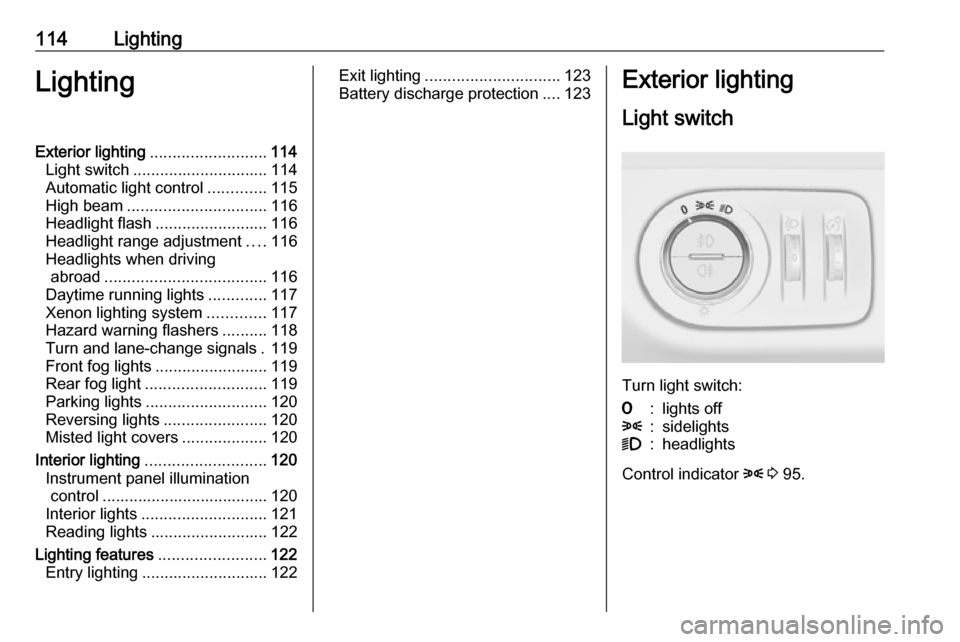
Light switch
Turn light switch:
7:lights off8:sidelights9:headlights
Control indicator 8 3 95.
Page 121 of 267

Lighting119Turn and lane-changesignalslever up:right turn signallever down:left turn signal
If the lever is moved past the
resistance point, the turn signal is
switched on constantly. When the
steering wheel moves back, the turn
signal is automatically deactivated.
For three flashes, e.g. when changing
lanes, press the lever until resistance
is felt and then release.
With a trailer connected, turn signal
flashes six times and tone frequency
changes when pressing the lever until resistance is felt and then releasing.
Move the lever to the resistance point
and hold for longer indication.
Switch the turn signal off manually by
moving the lever to its original
position.
Front fog lights
Operated by pressing >.
Light switch in position AUTO:
switching on front fog lights will switch the low beam on automatically.
Rear fog light
Operated by pressing r.
Light switch in position AUTO:
switching on rear fog light will switch
on headlights automatically.
Page 124 of 267
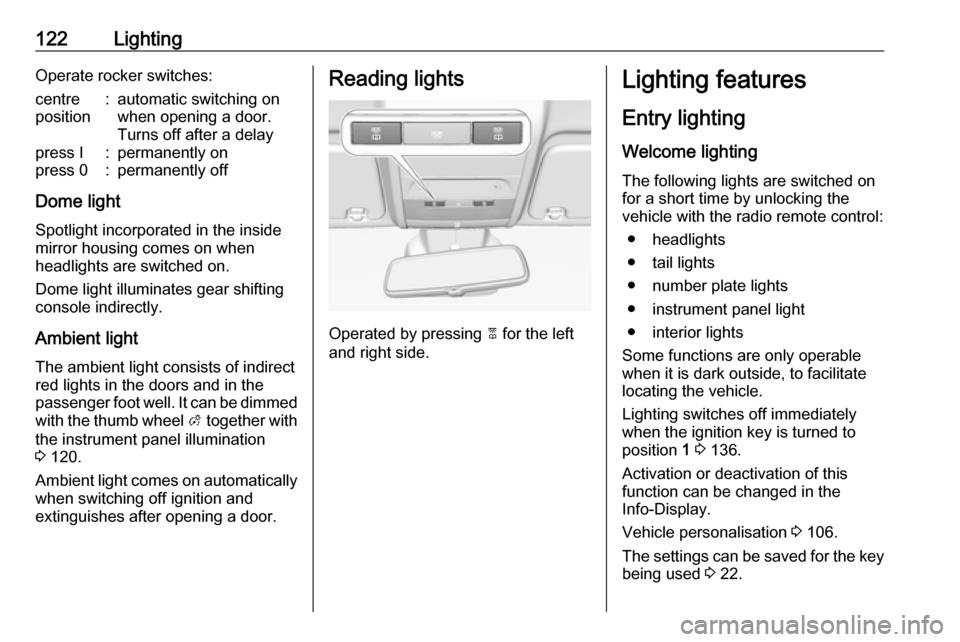
122LightingOperate rocker switches:centre
position:automatic switching on
when opening a door.
Turns off after a delaypress I:permanently onpress 0:permanently off
Dome light
Spotlight incorporated in the inside
mirror housing comes on when
headlights are switched on.
Dome light illuminates gear shifting
console indirectly.
Ambient light
The ambient light consists of indirect red lights in the doors and in the
passenger foot well. It can be dimmed with the thumb wheel A together with
the instrument panel illumination
3 120.
Ambient light comes on automatically when switching off ignition and
extinguishes after opening a door.
Reading lights
Operated by pressing 2 for the left
and right side.
Lighting features
Entry lighting
Welcome lighting
The following lights are switched on
for a short time by unlocking the
vehicle with the radio remote control:
● headlights
● tail lights
● number plate lights
● instrument panel light
● interior lights
Some functions are only operable
when it is dark outside, to facilitate locating the vehicle.
Lighting switches off immediately
when the ignition key is turned to
position 1 3 136.
Activation or deactivation of this
function can be changed in the
Info-Display.
Vehicle personalisation 3 106.
The settings can be saved for the key being used 3 22.
Page 125 of 267
Lighting123The following lights will additionally
switch on when the driver's door is opened:
● all switches
● Driver Information Centre
Exit lighting The following lights switch on if the
key is removed from the ignition
switch:
● interior lights
● instrument panel light (only when
it is dark)
They will switch off automatically after
a delay and will be activated again if
the driver's door is opened.
Path lighting Headlights, tail lights and number
plate lights illuminate the surrounding
area for an adjustable time after
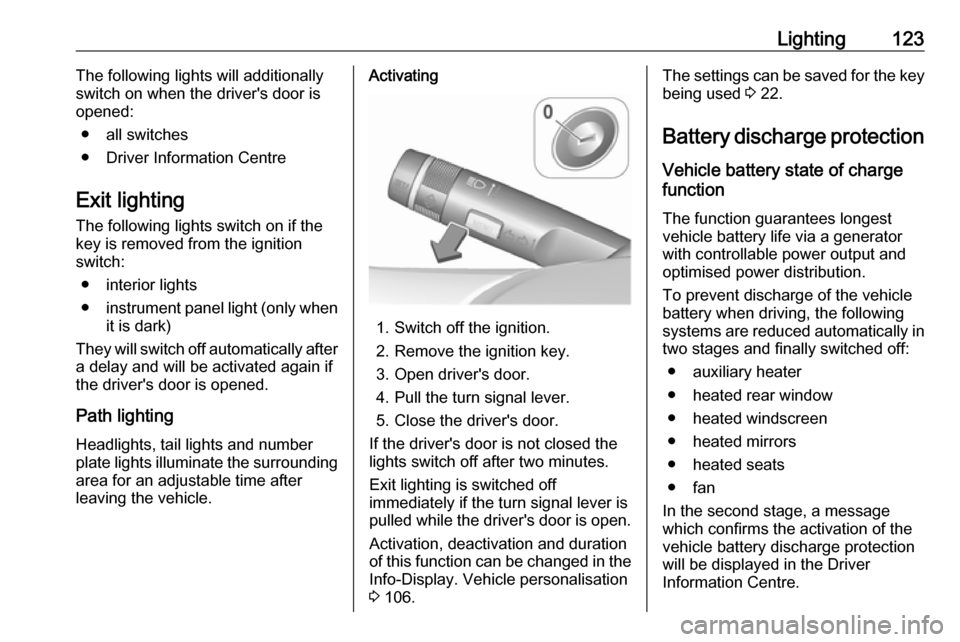
leaving the vehicle.Activating
1. Switch off the ignition.
2. Remove the ignition key.
3. Open driver's door.
4. Pull the turn signal lever.
5. Close the driver's door.
If the driver's door is not closed the
lights switch off after two minutes.
Exit lighting is switched off
immediately if the turn signal lever is
pulled while the driver's door is open.
Activation, deactivation and duration
of this function can be changed in the Info-Display. Vehicle personalisation
3 106.
The settings can be saved for the key
being used 3 22.
Battery discharge protection
Vehicle battery state of charge
function
The function guarantees longestvehicle battery life via a generator
with controllable power output and
optimised power distribution.
To prevent discharge of the vehicle
battery when driving, the following
systems are reduced automatically in two stages and finally switched off:
● auxiliary heater
● heated rear window
● heated windscreen
● heated mirrors
● heated seats
● fan
In the second stage, a message
which confirms the activation of the
vehicle battery discharge protection
will be displayed in the Driver
Information Centre.
Page 157 of 267

Driving and operating155Fault
If there is a fault in the system, the control indicator b illuminates
continuously and a message or a
warning code appears in the Driver
Information Centre. The system is not operational.
Have the cause of the fault remedied
by a workshop.
City mode City mode is a feature which enables
increased steering assistance during
lower speed conditions, e.g. city
traffic or parking. Steering assistance
is increased for greater convenience.Activation
Press B when engine is running. The
system works from standstill up to
22 mph, and also in reverse gear. Above this speed, the system
changes to normal mode. When
activated, City mode engages
automatically below 22 mph.
An illuminated LED in the City mode
button indicates that the system is
active and a message pops-up in the
Driver Information Centre.
City mode remains active during an
Autostop, but is only operational when the engine is running.
Stop-start system 3 138.
Deactivation
Press B; LED in the button
extinguishes and a message pops-up in the Driver Information Centre.
Each time the engine is started, City
mode is deactivated.
Fault
In the event of a fault in the system,
control indicator c illuminates and a
message is displayed in the Driver
Information Centre.
Vehicle messages 3 103.
System calibration
If control indicators c and b
illuminate simultaneously, a
calibration of the power steering
system is necessary. This can occur
e.g. when turning the steering wheel
for one rotation with ignition switched
Page 176 of 267

174Driving and operatingFault
Fault messages are displayed with a 9 on the top line of the Info-Display.
The rear view camera may not
operate properly when:
● The surrounding is dark.
● The sun or the beam of headlights is shining directly into
the camera lens.
● Ice, snow, mud, or anything else covers the camera lens. Clean
the lens, rinse it with water, and
wipe it with a soft cloth.
● The vehicle had a rear end accident.
● There are extreme temperature changes.
Traffic sign assistant Functionality
The traffic sign assistant system
detects designated traffic signs via a
front camera and displays them in the
Driver Information Centre.
Traffic signs, which will be detected,
are:
Limit and no passing signs ● speed limit
● no passing
● end of speed limit
● end of no passingRoad signs
Beginning and end of:
● motorways
● A-roads
● play streetsAdd-on signs ● additional hints to traffic signs
● restriction of trailer towing
● tractor constraints
● wet warning
● ice warning
● direction arrows
Speed limit signs and no passing
signs are displayed in the Driver
Information Centre until the next
speed limit sign or end of speed limit
is detected or up to a defined sign
timeout.
Indication of multiple signs on the
display is possible.
Page 186 of 267

184Driving and operatingGeneral information
The official fuel consumption and
specific CO 2 emission figures quoted
relate to the EU base model with
standard equipment.
Fuel consumption data and CO 2
emission data are determined
according to regulation R (EC)
No. 715/2007 (in the latest applicable
version), taking into consideration the
vehicle weight in running order, as specified by the regulation.
The figures are provided only for the
purpose of comparison between
different vehicle variants and must
not be taken as a guarantee for the
actual fuel consumption of a
particular vehicle. Additional
equipment may result in slightly
higher results than the stated
consumption and CO 2 figures.
Furthermore, fuel consumption is dependent on personal driving styleas well as road and traffic conditions.Trailer hitch
General information
Only use towing equipment that has
been approved for your vehicle.
Entrust retrofitting of towing
equipment to a workshop. It may be
necessary to make changes that
affect the cooling system, heat
shields or other equipment.
The bulb outage detection function for trailer brake light cannot detect a
partial bulb outage, e.g. in case of four
times five watt bulbs, the function only detects lamp outage when only a
single five Watt lamp remains or none remain.
Fitting of towing equipment could
cover the opening of the towing eye.
If this is the case use the coupling ball
bar for towing. Always keep the
coupling ball bar in the vehicle when
not in use.Driving characteristics and
towing tips
Before attaching a trailer, lubricate the coupling ball. However, do not do
so if a stabiliser, which acts on the coupling ball, is being used to reduce snaking movements.
For trailers with low driving stability
and caravan trailers with a permitted
gross vehicle weight of more than
1000 kg a speed of 50 mph must not
be exceeded; the use of a stabiliser is
recommended.
If the trailer starts snaking, drive more slowly, do not attempt to correct the
steering and brake sharply if
necessary.
When driving downhill, drive in the
same gear as if driving uphill and
drive at a similar speed.
Adjust tyre pressure to the value
specified for full load 3 252.
Page 192 of 267

190Vehicle careGeneral Information
Accessories and vehicle modifications
We recommend the use of genuine
parts and accessories and factory
approved parts specific for your
vehicle type. We cannot assess or guarantee reliability of other products
- even if they have a regulatory or
otherwise granted approval.
Do not make any modifications to the electrical system, e.g. changes of
electronic control units (chip tuning).Caution
When transporting the vehicle on
a train or on a recovery vehicle, the
mud flaps may be damaged.
Vehicle storage
Storage for a long period of time
If the vehicle is to be stored for several months:
● Wash and wax the vehicle.
● Have the wax in the engine compartment and underbody
checked.
● Clean and preserve the rubber seals.
● Fill up fuel tank completely.
● Change the engine oil.
● Drain the washer fluid reservoir.
● Check the coolant antifreeze and
corrosion protection.
● Adjust tyre pressure to the value specified for full load.
● Park the vehicle in a dry, well ventilated place. Engage first or
reverse gear or set selector lever
to P. Prevent the vehicle from
rolling.
● Do not apply the parking brake.● Open the bonnet, close all doors and lock the vehicle.
● Disconnect the clamp from the negative terminal of the vehicle
battery. Beware that all systems
are not functional, e.g. anti-theft
alarm system.
Putting back into operation
When the vehicle is to be put back into
operation:
● Connect the clamp to the negative terminal of the vehicle
battery. Activate the electronics
of the power windows.
● Check tyre pressure.
● Fill up the washer fluid reservoir.
● Check the engine oil level.
● Check the coolant level.
● Fit the number plate if necessary.
End-of-life vehicle recovery
Information on end-of-life vehicle
recovery centres and the recycling of
end-of-life vehicles is available on our website. Only entrust this work to an
authorised recycling centre.