radio VAUXHALL CORSA 2016 User Guide
[x] Cancel search | Manufacturer: VAUXHALL, Model Year: 2016, Model line: CORSA, Model: VAUXHALL CORSA 2016Pages: 267, PDF Size: 7.79 MB
Page 109 of 267
Instruments and controls107
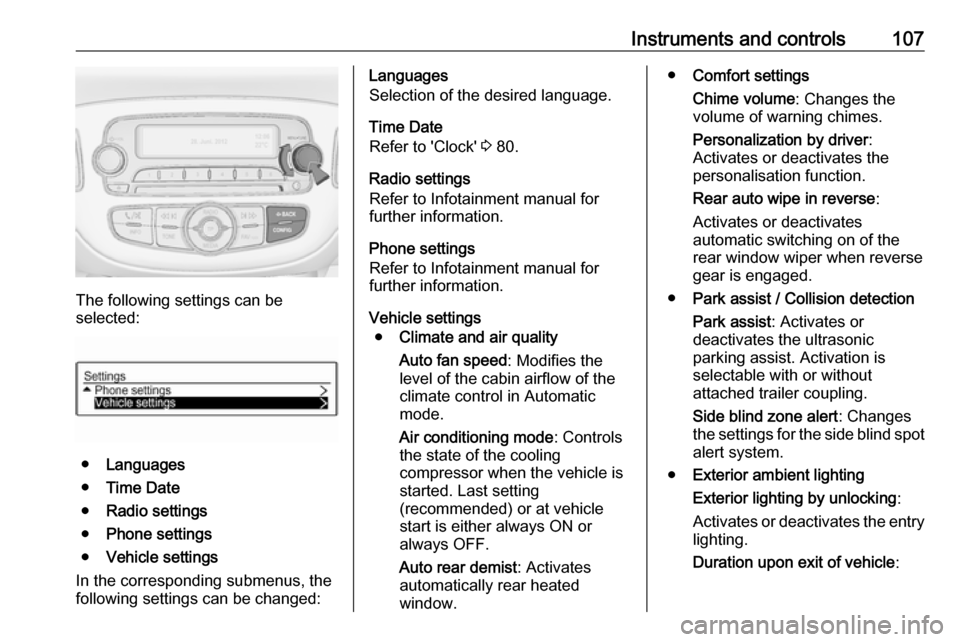
The following settings can be
selected:
● Languages
● Time Date
● Radio settings
● Phone settings
● Vehicle settings
In the corresponding submenus, the
following settings can be changed:
Languages
Selection of the desired language.
Time Date
Refer to 'Clock' 3 80.
Radio settings
Refer to Infotainment manual for
further information.
Phone settings
Refer to Infotainment manual for
further information.
Vehicle settings ● Climate and air quality
Auto fan speed : Modifies the
level of the cabin airflow of the
climate control in Automatic
mode.
Air conditioning mode : Controls
the state of the cooling
compressor when the vehicle is
started. Last setting
(recommended) or at vehicle
start is either always ON or
always OFF.
Auto rear demist : Activates
automatically rear heated
window.● Comfort settings
Chime volume : Changes the
volume of warning chimes.
Personalization by driver :
Activates or deactivates the
personalisation function.
Rear auto wipe in reverse :
Activates or deactivates
automatic switching on of the
rear window wiper when reverse gear is engaged.
● Park assist / Collision detection
Park assist : Activates or
deactivates the ultrasonic
parking assist. Activation is
selectable with or without
attached trailer coupling.
Side blind zone alert : Changes
the settings for the side blind spot alert system.
● Exterior ambient lighting
Exterior lighting by unlocking :
Activates or deactivates the entry
lighting.
Duration upon exit of vehicle :
Page 110 of 267

108Instruments and controlsActivates or deactivates and
changes the duration of exit
lighting.
● Power door locks
Auto door lock : Activates or
deactivates the automatic door
locking function after switching on ignition.
Stop door lock if door open :
Activates or deactivates the door
locking function while a door is open.
Delayed door lock : Activates or
deactivates the delayed door
locking function. This menu
option is displayed with Stop door
lock if door open deactivated.
Central locking system 3 22.
● Remote locking, unlocking,
starting
Remote unlock feedback :
Activates or deactivates the
hazard warning flasher feedback whilst unlocking.
Passive door unlock : Changes
the configuration to unlock only the driver's door or the whole
vehicle whilst unlocking.Auto relock doors : Activates or
deactivates the automatic relock
function after unlocking without
opening the vehicle.
● Restore factory settings :
Resets all settings to the default settings.
Personal settings
Colour-Info-Display
When audio is switched on, press ;
on the control panel.
Press Settings .
The following settings can be
selected:
● Time & date settings
● Radio settings
● Connection settings
● Vehicle settings
● Language
● Text scroll
● Touch beep volume
● Max startup volume
● System version
● DivX(R) VOD
In the corresponding submenus the
following settings can be changed:
Time & date settings
Refer to 'Clock' 3 80.
Page 111 of 267

Instruments and controls109Radio settings
Refer to Infotainment manual for
further information.
Connection settings
Refer to Infotainment manual for
further information.
Vehicle settings ● Climate & air quality
Auto fan speed : Modifies the
level of the cabin airflow of the
climate control in automatic
mode.
Air conditioning mode : Controls
the state of the cooling
compressor when the vehicle is
started. Last setting
(recommended) or at vehicle
start is either always ON or
always OFF.
Auto rear defog : Activates heated
rear window automatically.
● Comfort & convenience
Chime volume : Changes the
volume of warning chimes.Personalization by driver :
Activates or deactivates the
personalisation function.
Auto wipe in reverse gear :
Activates or deactivates
automatic switching on of the
rear window wiper when reverse gear is engaged.
● Collision / detection
Park assist : Activates or
deactivates the ultrasonic
parking assist. Activation is
selectable with or without
attached trailer coupling.
Side blind zone alert : Changes
the settings for the side blind spot alert system.
● Lighting
Exit lighting : Activates or
deactivates and changes the
duration of exit lighting.
Vehicle locator lights : Activates
or deactivates the welcome
lighting.
● Power door locks
Auto door lock : Activates or
deactivates the automatic doorlocking function after switching
on ignition.
Unlocked door anti lock out :
Activates or deactivates the door
locking function while a door is
open.
Delayed door lock : Activates or
deactivates the delayed door locking function. This menu
option is displayed with Unlocked
door anti lock out deactivated.
Central locking system 3 22.
● Lock, unlock settings
Remote unlock light feedback :
Activates or deactivates the
hazard warning flasher feedback whilst unlocking.
Remote door unlock : Changes
the configuration to unlock only
the driver's door or the whole
vehicle whilst unlocking.
Relock remotely unlocked doors :
Activates or deactivates the
automatic relock function after
Page 124 of 267
122LightingOperate rocker switches:centre
position:automatic switching on
when opening a door.
Turns off after a delaypress I:permanently onpress 0:permanently off
Dome light
Spotlight incorporated in the inside
mirror housing comes on when
headlights are switched on.
Dome light illuminates gear shifting
console indirectly.
Ambient light
The ambient light consists of indirect red lights in the doors and in the
passenger foot well. It can be dimmed with the thumb wheel A together with
the instrument panel illumination
3 120.
Ambient light comes on automatically when switching off ignition and
extinguishes after opening a door.
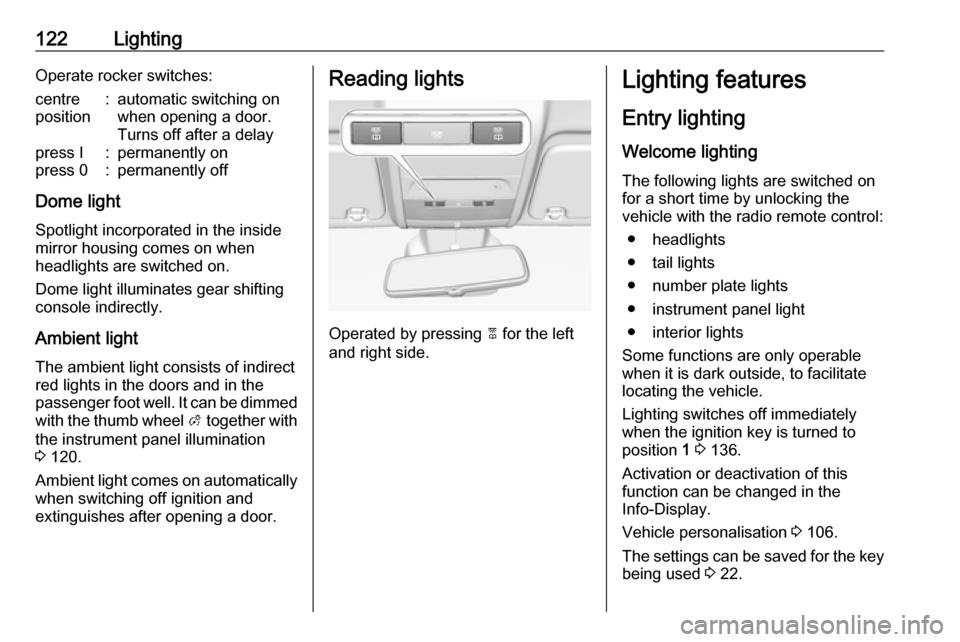
Reading lights
Operated by pressing 2 for the left
and right side.
Lighting features
Entry lighting
Welcome lighting
The following lights are switched on
for a short time by unlocking the
vehicle with the radio remote control:
● headlights
● tail lights
● number plate lights
● instrument panel light
● interior lights
Some functions are only operable
when it is dark outside, to facilitate locating the vehicle.
Lighting switches off immediately
when the ignition key is turned to
position 1 3 136.
Activation or deactivation of this
function can be changed in the
Info-Display.
Vehicle personalisation 3 106.
The settings can be saved for the key being used 3 22.
Page 256 of 267

254Customer informationCustomer
informationCustomer information ................254
Declaration of conformity .........254
Collision damage repair ...........256
Software acknowledgement ....256
Vehicle data recording and pri‐ vacy ........................................... 258
Event data recorders ...............258
Radio Frequency Identification (RFID) ..................................... 259Customer information
Declaration of conformity
Transmission systems
This vehicle has systems that
transmit and/or receive radio waves
subject to Directive 1999/5/EC.
These systems are in compliance
with the essential requirements and
other relevant provisions of Directive
1999/5/EC. Copies of the original
Declarations of Conformity can be
obtained on our website.
Page 261 of 267

Customer information259When using the vehicle, situations
may occur in which these technical
data related to other information
(accident report, damages on the
vehicle, witness statements etc.) may
be associated with a specific person - possibly, with the assistance of an
expert.
Additional functions contractually
agreed upon with the client (e.g.
vehicle location in emergency cases)
allow the transmission of particular vehicle data from the vehicle.
Radio Frequency Identification (RFID)
RFID technology is used in some
vehicles for functions such as tyre
pressure monitoring and ignition
system security. It is also used in
connection with conveniences such
as radio remote controls for door
locking/unlocking and starting, and in-
vehicle transmitters for garage door
openers. RFID technology in
Vauxhall vehicles does not use or
record personal information or link with any other Vauxhall system
containing personal information.
Page 265 of 267

263RRadio Frequency Identification (RFID) ..................................... 259
Radio remote control ...................21
Reading lights ............................ 122
Rear carrier system ......................59
Rear floor storage cover ..............70
Rear fog light ....................... 95, 119
Rear view camera ...................... 172
Rear window wiper/washer .......... 79
Recommended fluids and lubricants ........................ 237, 241
Reduced engine power ................94
Refuelling ................................... 180
Retained power off .....................137
Reversing lights .........................120
Ride control systems ..................153
Roof .............................................. 33
Roof load ...................................... 73
Roof rack ..................................... 72
S Safety belts ................................... 40
Seat adjustment ....................... 7, 37
Seat belt ........................................ 8
Seat belt reminder .......................90
Seat belts ..................................... 40
Seat folding .................................. 38
Seat heating ................................. 39
Seat position ................................ 36Selector lever ..................... 144, 148
Service ....................................... 134
Service display ............................ 86
Service information ....................236
Service vehicle soon .................... 91
Side airbag system ......................47
Side blind spot alert ....................171
Sidelights .................................... 114
Side turn signal lights ................204
Software acknowledgement .......256
Spare wheel ............................... 226
Speed limiter......................... 95, 158
Speedometer ............................... 83
Starting and operating ................136
Starting off ................................... 17
Starting the engine ............137, 148
Steering wheel adjustment ......9, 76
Steering wheel controls ...............76
Stop-start system........................ 138
Storage ......................................... 57
Storage compartments .................57
Sunroof ........................................ 33
Sun visors .................................... 32
Symbols ......................................... 4
T
Tachometer ................................. 84
Tail lights ................................... 202
Three-point seat belt .................... 41
Tools .......................................... 211Top-tether fastening eyes ............55
Tow bar....................................... 184
Towing ................................ 184, 230
Towing another vehicle .............231
Towing equipment .....................186
Towing the vehicle .....................230
Traction Control system ............. 153 Traction Control system off........... 93
Traffic sign assistant .............95, 174
Trailer coupling ........................... 184
Trailer stability assist .................188
Trailer towing ............................. 185
Transmission ............................... 16
Transmission display .........143, 148
Tread depth ............................... 217
Trip odometer .............................. 83
Turn and lane-change signals ...119
Turn signal ................................... 89
Tyre chains ................................ 218
Tyre designations ......................212
Tyre pressure ............................ 212
Tyre pressure monitoring system ............................... 94, 213
Tyre pressures ........................... 252
Tyre repair kit ............................. 219
U
Ultrasonic parking assist ...... 93, 161
Underseat storage .......................59