rain VAUXHALL CORSA 2016 Owner's Guide
[x] Cancel search | Manufacturer: VAUXHALL, Model Year: 2016, Model line: CORSA, Model: VAUXHALL CORSA 2016Pages: 267, PDF Size: 7.79 MB
Page 113 of 267

Instruments and controls111Privacy button
Press and hold j until an audio
message is heard to activate or
deactivate the transmission of the
vehicle location.
Press j to answer a call or to end a
call to an OnStar advisor.
Press j to access the Wi-Fi settings.
OnStar button
Press Z to establish a connection to
an OnStar advisor.
SOS button
Press [ to establish a priority
emergency connection to a specially
trained emergency advisor.
Status light
Green: The system is ready.
Green flashing: The system is on a
call.
Red: A problem arose.
Off: System is off.
Red / green flashing for a short period
of time: Transmission of the vehicle
location has been deactivated.OnStar services
OnStar emergency services
OnStar emergency provides a service
with specially trained emergency
advisors for contact, assistance and
information during an emergency.
In the case of an emergency situation including vehicle breakdown, a flat
tyre or empty fuel tank, press [ and
talk to the advisor. The advisor then contacts emergency or assistance
service providers and directs them to
your vehicle.
In the case of an accident with
activation of airbags or belt
tensioners, an automatic emergency
call is established. The advisor is
immediately connected to your
vehicle to see whether help is
needed.
OnStar Wi-Fi hotspot
The Wi-Fi hotspot of the vehicle
provides internet connectivity through
the 4G/LTE mobile network.
Notice
The Wi-Fi hotspot functionality is not
available for all markets.Up to seven devices may be
connected.
To connect a mobile device with the
OnStar Wi-Fi hotspot:
1. Press j and then select Wi-Fi
settings on the Info-Display. The
settings displayed include the Wi- Fi hotspot name (SSID),
password and connection type.
2. Start a Wi-Fi network search on your mobile device.
3. Select your vehicle hotspot (SSID) when listed.
4. When prompted, enter the password on your mobile device.
Notice
To change the SSID or password,
select Z and talk to an OnStar
advisor or logon to your account.
To switch off the Wi-Fi hotspot
functionality, press Z to call an
OnStar advisor.
Smartphone app
With the My Vauxhall smartphone
app, some vehicle functions can be
operated via a smartphone.
Page 117 of 267
Lighting115Light switch with automatic light
control
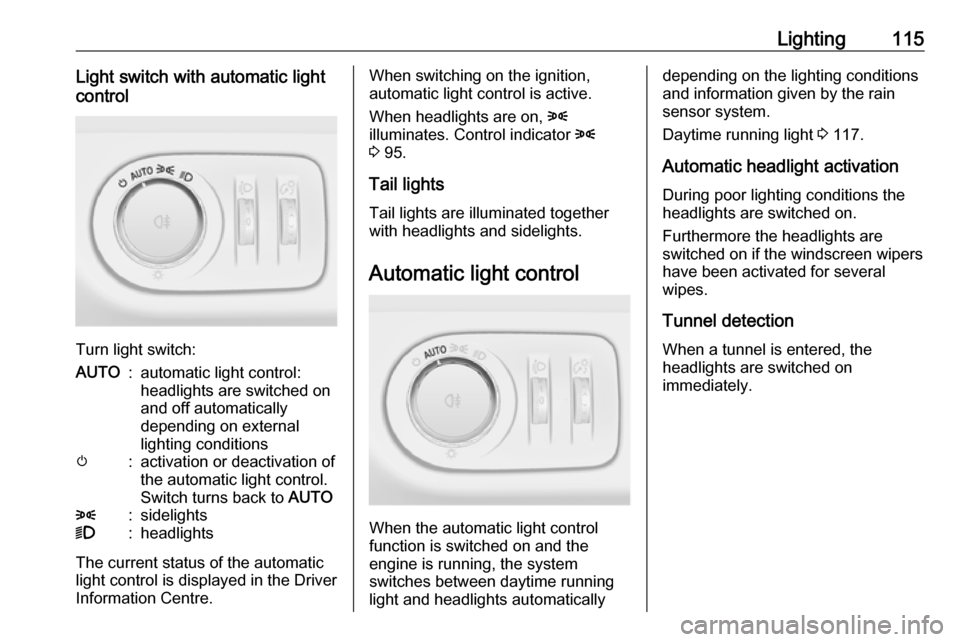
Turn light switch:
AUTO:automatic light control:
headlights are switched on
and off automatically
depending on external
lighting conditionsm:activation or deactivation of
the automatic light control.
Switch turns back to AUTO8:sidelights9:headlights
The current status of the automatic
light control is displayed in the Driver
Information Centre.
When switching on the ignition,
automatic light control is active.
When headlights are on, 8
illuminates. Control indicator 8
3 95.
Tail lights
Tail lights are illuminated together
with headlights and sidelights.
Automatic light control
When the automatic light control
function is switched on and the
engine is running, the system
switches between daytime running
light and headlights automatically
depending on the lighting conditions
and information given by the rain
sensor system.
Daytime running light 3 117.
Automatic headlight activation During poor lighting conditions the
headlights are switched on.
Furthermore the headlights are
switched on if the windscreen wipers
have been activated for several
wipes.
Tunnel detection When a tunnel is entered, the
headlights are switched on
immediately.
Page 119 of 267

Lighting117set to right-hand traffic mode.
Therefore, insert the key in the guide as shown in the illustration.
Alternatively, a Phillips head
screwdriver size three can be used for
setting.
To reset to left-hand traffic mode, turn
adjuster elements 1
/2 turn clockwise.
Daytime running lights Daytime running light increases
visibility of the vehicle during daylight.
They are switched on automatically
when ignition is on.
Versions with automatic light control
The system switches automatically
between daytime running light and
headlights, depending on the lighting
conditions and information given by
the rain sensor system. Automatic
light control 3 115.Xenon lighting system
Xenon lighting system includes: ● xenon headlights for low and high
beam
● high beam assist
● corner lighting
● reversing function
Xenon headlights Xenon headlights for low and high
beam ensure better visibility under all
conditions.
Operation is the same as for halogen headlights.
Light switch 3 114 , high beam 3 116,
headlight flash 3 116 , headlight range
adjustment 3 116, headlights when
driving abroad 3 116.
Automatic light control 3 115.
High beam assist This feature allows high beam xenon
lights to function as the main driving
light at night and when vehicle speed
exceeds 25 mph.It switches automatically to low beam when:
● The camera in the windscreen detects the lights of oncoming or
preceding vehicles.
● The vehicle speed drops below 12 mph.
● It is foggy or snowy.
● Driving in urban areas.
If there are no restrictions detected,
the system switches back to high
beam.
Activation
Page 122 of 267
120LightingParking lights
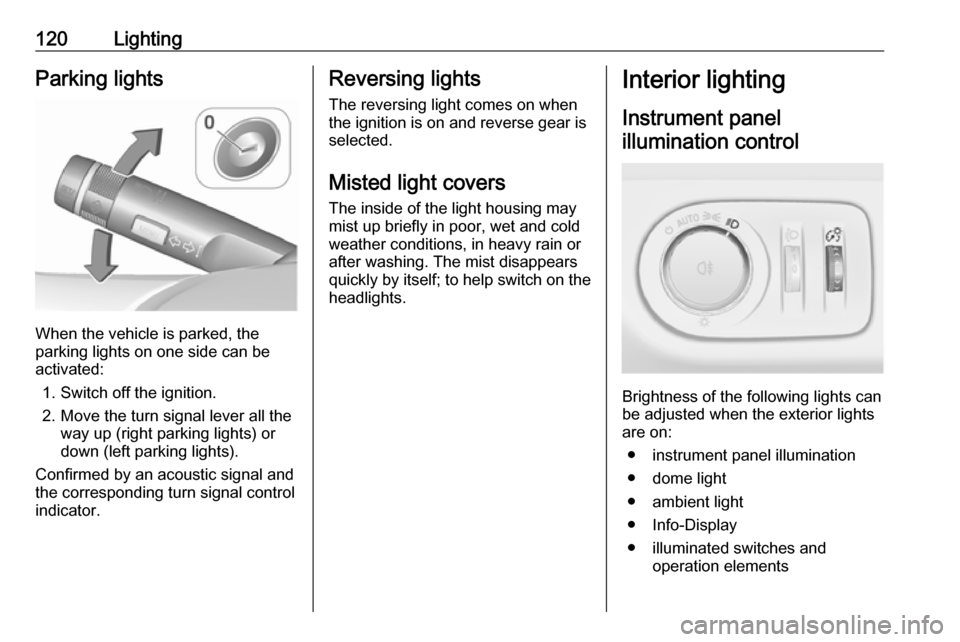
When the vehicle is parked, the
parking lights on one side can be
activated:
1. Switch off the ignition.
2. Move the turn signal lever all the way up (right parking lights) or
down (left parking lights).
Confirmed by an acoustic signal and
the corresponding turn signal control
indicator.
Reversing lights
The reversing light comes on when
the ignition is on and reverse gear is
selected.
Misted light covers
The inside of the light housing may
mist up briefly in poor, wet and cold weather conditions, in heavy rain or
after washing. The mist disappears
quickly by itself; to help switch on the
headlights.Interior lighting
Instrument panel illumination control
Brightness of the following lights can
be adjusted when the exterior lights
are on:
● instrument panel illumination
● dome light
● ambient light
● Info-Display
● illuminated switches and operation elements
Page 136 of 267

134Climate controlAir conditioning regularoperation
In order to ensure continuously
efficient performance, cooling must
be operated for a few minutes once a
month, irrespective of the weather
and time of year. Operation with
cooling is not possible when the
outside temperature is too low.
Service For optimal cooling performance, it is recommended to annually check the
climate control system, starting
three years after initial vehicle
registration, including:
● functionality and pressure test
● heating functionality
● leakage check
● check of drive belts
● cleaning of condenser and evaporator drainage
● performance check
Page 163 of 267

Driving and operating161The complete attention of the
driver is always required while
driving. The driver must always be
ready to take action and apply the
brakes.
System limitations
The system is designed to warn of vehicles only, but may react also to
other objects.
In the following cases, forward
collision alert may not detect a vehicle ahead or sensor performance is
limited:
● on winding roads
● when weather limits visibility, e.g.
fog, rain, or snow
● when the sensor is blocked by snow, ice, slush, mud, dirt, or
windscreen damage
Following distance
indication
The following distance indication
displays the distance to a preceding
moving vehicle. The front camera in
the windscreen is used to detect the
distance of a vehicle directly ahead in
the vehicle's path. It is active at
speeds above 25 mph.
When a preceding vehicle is detected
ahead, the distance is indicated in
seconds, displayed on a page in the
Driver Information Centre 3 96 . Press
MENU on the turn signal lever to
select Vehicle Information
Menu ? and turn the adjuster
wheel to choose following distance
indication page.
The minimum indicated distance is
0.5 seconds.
If there is no vehicle ahead or the vehicle ahead is out of range, two
dashes will be displayed: -.- sec.
Parking assist Rear parking assist9 Warning
It is the driver who bears full
responsibility for the parking
manoeuvre.
Always check the surrounding
area while reversing and using the rear parking assist system.
The rear parking assist makes
parking easier by measuring the
distance between the vehicle and
rear obstacles. It informs and warns
the driver by giving acoustic signals
and display indication.
Page 174 of 267
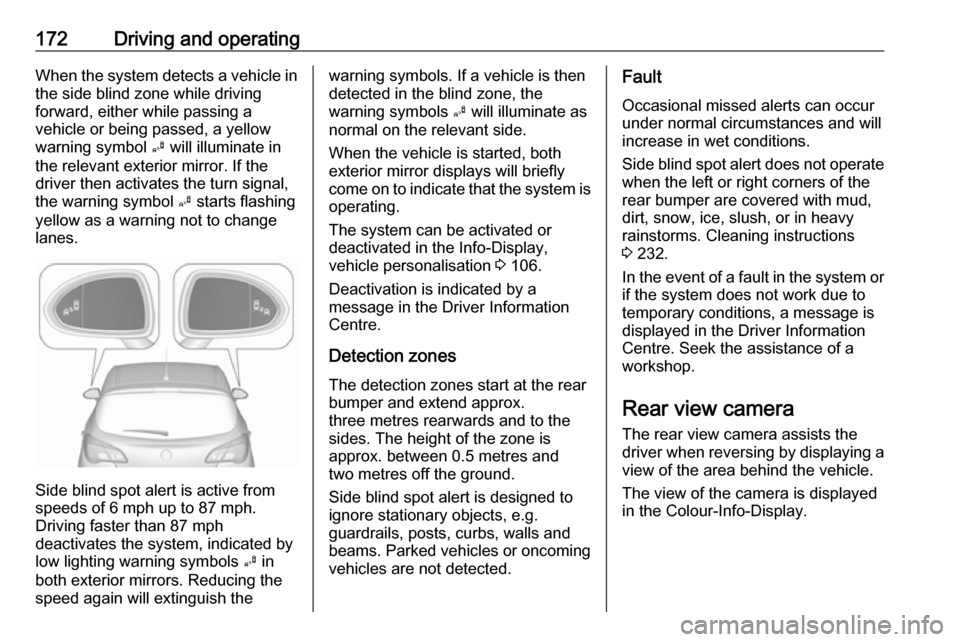
172Driving and operatingWhen the system detects a vehicle inthe side blind zone while driving
forward, either while passing a
vehicle or being passed, a yellow
warning symbol B will illuminate in
the relevant exterior mirror. If the
driver then activates the turn signal,
the warning symbol B starts flashing
yellow as a warning not to change
lanes.
Side blind spot alert is active from
speeds of 6 mph up to 87 mph.
Driving faster than 87 mph
deactivates the system, indicated by
low lighting warning symbols B in
both exterior mirrors. Reducing the speed again will extinguish the
warning symbols. If a vehicle is then
detected in the blind zone, the
warning symbols B will illuminate as
normal on the relevant side.
When the vehicle is started, both exterior mirror displays will briefly
come on to indicate that the system is operating.
The system can be activated or
deactivated in the Info-Display,
vehicle personalisation 3 106.
Deactivation is indicated by a
message in the Driver Information
Centre.
Detection zones The detection zones start at the rear
bumper and extend approx.
three metres rearwards and to the
sides. The height of the zone is
approx. between 0.5 metres and
two metres off the ground.
Side blind spot alert is designed to
ignore stationary objects, e.g.
guardrails, posts, curbs, walls and
beams. Parked vehicles or oncoming
vehicles are not detected.Fault
Occasional missed alerts can occur
under normal circumstances and will
increase in wet conditions.
Side blind spot alert does not operate when the left or right corners of the
rear bumper are covered with mud,
dirt, snow, ice, slush, or in heavy
rainstorms. Cleaning instructions
3 232.
In the event of a fault in the system or if the system does not work due to
temporary conditions, a message is
displayed in the Driver Information
Centre. Seek the assistance of a
workshop.
Rear view camera The rear view camera assists the
driver when reversing by displaying a view of the area behind the vehicle.
The view of the camera is displayed
in the Colour-Info-Display.
Page 176 of 267

174Driving and operatingFault
Fault messages are displayed with a 9 on the top line of the Info-Display.
The rear view camera may not
operate properly when:
● The surrounding is dark.
● The sun or the beam of headlights is shining directly into
the camera lens.
● Ice, snow, mud, or anything else covers the camera lens. Clean
the lens, rinse it with water, and
wipe it with a soft cloth.
● The vehicle had a rear end accident.
● There are extreme temperature changes.
Traffic sign assistant Functionality
The traffic sign assistant system
detects designated traffic signs via a
front camera and displays them in the
Driver Information Centre.
Traffic signs, which will be detected,
are:
Limit and no passing signs ● speed limit
● no passing
● end of speed limit
● end of no passingRoad signs
Beginning and end of:
● motorways
● A-roads
● play streetsAdd-on signs ● additional hints to traffic signs
● restriction of trailer towing
● tractor constraints
● wet warning
● ice warning
● direction arrows
Speed limit signs and no passing
signs are displayed in the Driver
Information Centre until the next
speed limit sign or end of speed limit
is detected or up to a defined sign
timeout.
Indication of multiple signs on the
display is possible.
Page 178 of 267

176Driving and operating
The alert function can be activated or
deactivated in the setting menu of the
traffic sign assistant page by pressing SET/CLR on the turn signal lever.
Once setting page is displayed, select
Alerts ON to activate pop-up alert.
Deactivate by selecting Alerts OFF.
When switching on the ignition, alert
function is deactivated.
Pop-up alert is displayed for approx.
eight seconds in the Driver
Information Centre.
System reset
The content of the traffic sign memory
can be cleared in the setting menu of the traffic sign assistant page by
selecting Reset Scores and confirm
by pressing SET/CLR on the turn
signal lever. Upon successful reset, a chime will sound and the following
symbol is indicated until the next
traffic sign is detected.
In some cases, traffic sign assistant is
cleared up automatically by the
system.
Fault
The traffic sign assistant system may
not operate correctly when:
● The area of the windscreen, where the front camera is
located, is not clean.
● Traffic signs are completely or partially covered or difficult to
discern.
● There are adverse environmental
conditions, e.g. heavy rain, snow, direct sunlight or shadows. In this
event, No Traffic Sign Detection
due to Weather is indicated on
the display.
● Traffic signs are incorrectly mounted or damaged.
● Traffic signs do not comply with the Vienna Convention on traffic
signs (Wiener Übereinkommen
über Straßenverkehrszeichen).Caution
The system is intended to help the driver within a defined speed
range to discern certain traffic
Page 180 of 267
178Driving and operatingFault
The lane departure warning system may not operate properly when:
● The windscreen is not clean.
● There are adverse environmental
conditions e.g. heavy rain, snow,
direct sunlight or shadows.
The system can not operate when no
lane marking is detected.Fuel
Fuel for petrol engines
Only use unleaded fuel that complies
with European standard EN 228 or
E DIN 51626-1 or equivalent.
The engine is capable of running with fuel that contains up to 10% ethanol(e.g. named E10).
Use fuel with the recommended
octane rating 3 244.Caution
Do not use fuel or fuel additives
that contain metallic compounds
such as manganese-based
additives. This may cause engine
damage.
Caution
Use of fuel that does not comply to EN 228 or E DIN 51626-1 or
equivalent can lead to deposits or
engine damage.
Caution
Use of fuel with too low an octane
rating could lead to uncontrolled combustion and engine damage.
Fuel for diesel engines
Only use diesel fuel that complies
with EN 590.
In countries outside the European
Union use Euro-Diesel fuel with a
sulphur concentration below 50 ppm.
Caution
Use of fuel that does not comply to EN 590 or similar can lead to
engine powerloss, increased wear
or engine damage.
Do not use marine diesel oils, heating
oils, Aquazole and similar diesel-
water emulsions. Diesel fuels must
not be diluted with fuels for petrol
engines.