brakes VAUXHALL CORSA 2016 Owner's Manual
[x] Cancel search | Manufacturer: VAUXHALL, Model Year: 2016, Model line: CORSA, Model: VAUXHALL CORSA 2016Pages: 267, PDF Size: 7.79 MB
Page 19 of 267
In brief17Starting offCheck before starting off ● Tyre pressure and condition 3 212, 3 252.
● Engine oil level and fluid levels 3 192.
● All windows, mirrors, exterior lighting and number plates are
free from dirt, snow and ice and
are operational.
● Proper position of mirrors, seats, and seat belts 3 28, 3 36,
3 41.
● Brake function at low speed, particularly if the brakes are wet.Starting the engine
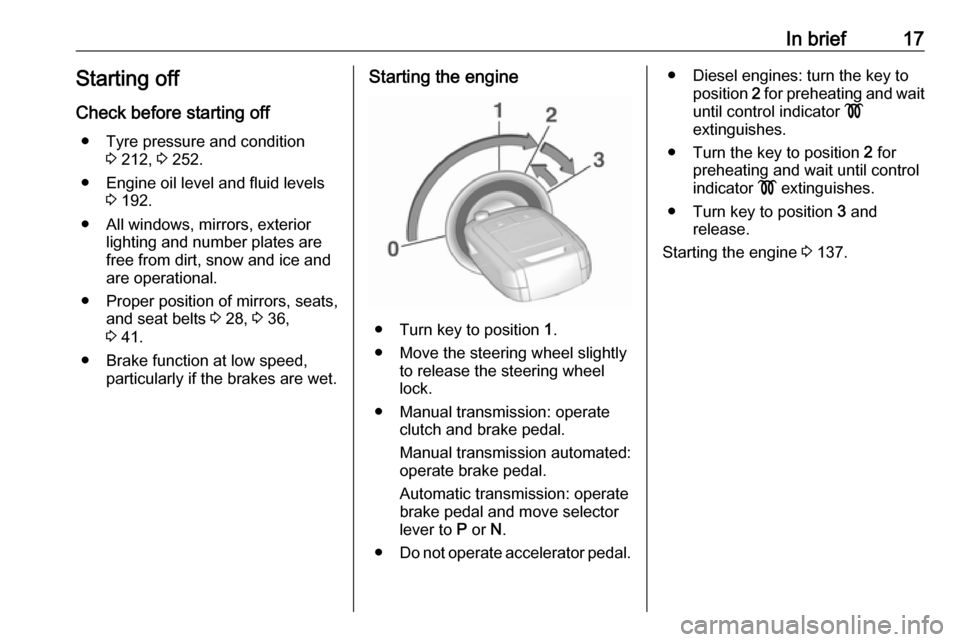
● Turn key to position 1.
● Move the steering wheel slightly to release the steering wheel
lock.
● Manual transmission: operate clutch and brake pedal.
Manual transmission automated:
operate brake pedal.
Automatic transmission: operate
brake pedal and move selector
lever to P or N.
● Do not operate accelerator pedal.
● Diesel engines: turn the key to
position 2 for preheating and wait
until control indicator !
extinguishes.
● Turn the key to position 2 for
preheating and wait until control
indicator ! extinguishes.
● Turn key to position 3 and
release.
Starting the engine 3 137.
Page 107 of 267

Instruments and controls105No.Vehicle message94Shift to park before exiting95Service airbag128Bonnet open134Park assist fault, clean bumper136Service parking assist145Check washer fluid level174Low vehicle battery258Park assist off
Vehicle messages on Uplevel-
Display
The vehicle messages are displayedas text. Follow the instructions given
in the messages.
The system displays messages
regarding the following topics:
● service messages
● fluid levels
● anti-theft alarm system
● brakes
● ride control systems
● cruise control, speed limiter
● forward collision alert
● parking assist systems
● lighting, bulb replacement
● wiper/washer system
● doors, windows
● side blind spot alert
● traffic sign assistant
● lane departure warning
● radio remote control
● seat belts
● airbag systems
● engine and transmission
● tyre pressure
● diesel particle filter
● vehicle battery status
Vehicle messages on
Colour-Info-Display
Some important messages appear
additionally in the
Colour-Info-Display. Some
messages only pop-up for a few
seconds.Warning chimes
When starting the engine or whilst driving
Only one warning chime will sound at a time.
The warning chime regarding
unfastened seat belts has priority
over any other warning chime.
● If seat belt is not fastened.
● If a door or the tailgate is not fully
closed when starting off.
● If a certain speed is exceeded with parking brake applied.
● If a programmed speed is exceeded.
● If a warning message appears in the Driver Information Centre orInfo-Display.
● If the parking assist detects an object.
● If unintended lane change occurs.
Page 114 of 267

112Instruments and controlsThe following functions are available:● Lock or unlock doors.
● Honk horn or flash lights.
● Check fuel level, engine oil life and tyre pressure (only with tyre
pressure monitoring system).
● Send navigation destination to the vehicle, if equipped with a
built-in navigation system.
● Locate vehicle on a map.
● Manage Wi-Fi settings.
To operate these functions, download the app from the respective app store.
Remote service
If desired, use any phone to call an
OnStar advisor, who can remotely
operate specific vehicle functions.
Find the respective OnStar phone
number on our country-specific
website.
The following functions are available: ● Lock or unlock doors.
● Provide information on the vehicle location.
● Honk horn or flash lights.Stolen vehicle assistance
If a vehicle is stolen, the OnStar
stolen vehicle assistance service can
provide support in locating and
recovering the vehicle.Theft alert
When the anti-theft alarm system is
triggered, a notification is sent to
OnStar. You are then informed about
this event by text message or email.
If required, report the theft to the
authorities and request OnStar stolen
vehicle assistance. Use any phone to call an OnStar advisor. Find the
respective OnStar phone number on
our country-specific website.Remote ignition block
By sending remote signals, OnStar
can block the ignition cycle
preventing the vehicle from restarting once it has been turned off.
On-demand diagnostics
At any time e.g. if the vehicle displays a service message, press Z to
contact an OnStar advisor and ask to
complete a real-time diagnostic check
to directly determine the issue.
Depending on the results, the advisor
will provide further support.
Monthly vehicle diagnostics
The vehicle automatically transmits
diagnostic data to OnStar which
sends a monthly email report to you
and your preferred workshop.
Notice
The workshop notification function
can be disabled in your account.
The report contains the status of key
operating systems of the vehicle like
engine, transmission, airbags,
antilock brakes, and other major
systems. It also provides information
on possible maintenance items and
tyre pressure (only with tyre pressure monitoring system).
To look at the information in greater
detail, select the link within the email and log into your account.
Destination download
A desired destination can be directly
downloaded to the navigation system.
Page 137 of 267

Driving and operating135Driving and
operatingDriving hints ............................... 136
Control of the vehicle ...............136
Starting and operating ...............136
New vehicle running-in ............136
Ignition switch positions ...........136
Retained power off ..................137
Starting the engine ..................137
Overrun cut-off ........................ 138
Stop-start system ....................138
Parking .................................... 141
Engine exhaust .......................... 142
Diesel particle filter ..................142
Catalytic converter ...................143
Automatic transmission ..............143
Transmission display ...............143
Selector lever .......................... 144
Manual mode ........................... 145
Electronic driving programmes 145
Fault ........................................ 146
Interruption of power supply ....146
Manual transmission ..................147Manual transmission automa‐
ted .............................................. 147
Transmission display ...............148
Starting the engine ..................148
Selector lever .......................... 148
Manual mode ........................... 150
Electronic driving programmes 150
Fault ........................................ 150
Brakes ........................................ 151
Antilock brake system .............151
Parking brake .......................... 152
Brake assist ............................. 152
Hill start assist ......................... 152
Ride control systems .................153
Traction Control system ..........153
Electronic Stability Control ......154
City mode ................................ 155
Driver assistance systems .........156
Cruise control .......................... 156
Speed limiter ........................... 158
Forward collision alert .............159
Following distance indication ...161
Parking assist .......................... 161
Side blind spot alert .................171
Rear view camera ...................172
Traffic sign assistant ................174
Lane departure warning ..........177
Fuel ............................................ 178
Fuel for petrol engines .............178Fuel for diesel engines ............178
Fuel for liquid gas operation ....179
Refuelling ................................ 180
Fuel consumption - CO 2-
Emissions .............................. 183
Trailer hitch ................................ 184
General information .................184
Driving characteristics and towing tips .............................. 184
Trailer towing ........................... 185
Towing equipment ...................186
Trailer stability assist ...............188
Page 153 of 267

Driving and operating151Brakes
The brake system comprises two
independent brake circuits.
If a brake circuit fails, the vehicle can
still be braked using the other brake
circuit. However, braking effect is
achieved only when the brake pedal
is depressed firmly. Considerably
more force is needed for this. The
braking distance is extended. Seek the assistance of a workshop before
continuing the journey.
When the engine is not running, the
support of the brake servo unit
disappears once the brake pedal has
been depressed once or twice.
Braking effect is not reduced, but
braking requires significantly greater
force. It is especially important to bear this in mind when being towed.
Control indicator R 3 92.
Antilock brake system
Antilock brake system (ABS)
prevents the wheels from locking.ABS starts to regulate brake pressure as soon as a wheel shows a tendency to lock. The vehicle remains
steerable, even during hard braking.
ABS control is made apparent
through a pulse in the brake pedal
and the noise of the regulation
process.
For optimum braking, keep the brake
pedal fully depressed throughout the
braking process, despite the fact that
the pedal is pulsating. Do not reduce
the pressure on the pedal.
After starting-off the system performs
a self-test which may be audible.
Control indicator u 3 92.
Adaptive brake light
During full braking, all three brake
lights flash for the duration of ABS
control.Fault9 Warning
If there is a fault in the ABS, the
wheels may be liable to lock due
to braking that is heavier than
normal. The advantages of ABS are no longer available. During
hard braking, the vehicle can no longer be steered and may
swerve.
Have the cause of the fault remedied
by a workshop.
Page 154 of 267

152Driving and operatingParking brake
Manual parking brake9 Warning
Always apply parking brake firmly
without operating the release
button, and apply as firmly as
possible on a downhill or uphill
slope.
To release the parking brake, pull
the lever up slightly, press the
release button and fully lower the
lever.
To reduce the operating forces of
the parking brake, depress the
brake pedal at the same time.
Control indicator R 3 92.
Brake assist
If the brake pedal is depressed
quickly and forcefully, maximum
brake force is automatically applied
(full braking).
Maintain steady pressure on the
brake pedal for as long as full braking is required. Maximum brake force is
automatically reduced when the
brake pedal is released.
Hill start assist
The system helps prevent unintended movement when driving away on
inclines.
When releasing the brake pedal after
stopping on an incline, the brakes
remain on for a further two seconds.
The brakes release automatically as
soon as the vehicle begins to
accelerate or the two seconds holding
time is over.
The hill start assist is not active during
an Autostop.
Page 162 of 267
160Driving and operating
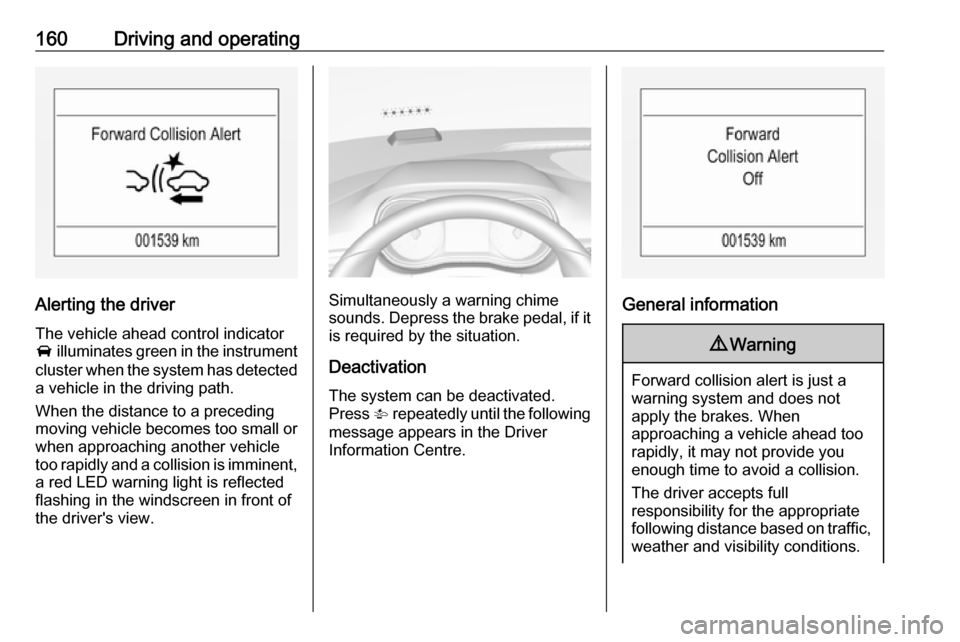
Alerting the driver
The vehicle ahead control indicator A illuminates green in the instrument
cluster when the system has detected
a vehicle in the driving path.
When the distance to a preceding
moving vehicle becomes too small or
when approaching another vehicle
too rapidly and a collision is imminent,
a red LED warning light is reflected
flashing in the windscreen in front of
the driver's view.Simultaneously a warning chime
sounds. Depress the brake pedal, if it is required by the situation.
Deactivation
The system can be deactivated.
Press V repeatedly until the following
message appears in the Driver
Information Centre.General information
9 Warning
Forward collision alert is just a
warning system and does not
apply the brakes. When
approaching a vehicle ahead too
rapidly, it may not provide you
enough time to avoid a collision.
The driver accepts full
responsibility for the appropriate
following distance based on traffic, weather and visibility conditions.
Page 163 of 267

Driving and operating161The complete attention of the
driver is always required while
driving. The driver must always be
ready to take action and apply the
brakes.
System limitations
The system is designed to warn of vehicles only, but may react also to
other objects.
In the following cases, forward
collision alert may not detect a vehicle ahead or sensor performance is
limited:
● on winding roads
● when weather limits visibility, e.g.
fog, rain, or snow
● when the sensor is blocked by snow, ice, slush, mud, dirt, or
windscreen damage
Following distance
indication
The following distance indication
displays the distance to a preceding
moving vehicle. The front camera in
the windscreen is used to detect the
distance of a vehicle directly ahead in
the vehicle's path. It is active at
speeds above 25 mph.
When a preceding vehicle is detected
ahead, the distance is indicated in
seconds, displayed on a page in the
Driver Information Centre 3 96 . Press
MENU on the turn signal lever to
select Vehicle Information
Menu ? and turn the adjuster
wheel to choose following distance
indication page.
The minimum indicated distance is
0.5 seconds.
If there is no vehicle ahead or the vehicle ahead is out of range, two
dashes will be displayed: -.- sec.
Parking assist Rear parking assist9 Warning
It is the driver who bears full
responsibility for the parking
manoeuvre.
Always check the surrounding
area while reversing and using the rear parking assist system.
The rear parking assist makes
parking easier by measuring the
distance between the vehicle and
rear obstacles. It informs and warns
the driver by giving acoustic signals
and display indication.
Page 191 of 267

Vehicle care189Vehicle careGeneral Information...................190
Accessories and vehicle modifications .......................... 190
Vehicle storage ........................190
End-of-life vehicle recovery .....190
Vehicle checks ........................... 191
Performing work ......................191
Bonnet ..................................... 191
Engine oil ................................. 192
Engine coolant ......................... 193
Washer fluid ............................ 195
Brakes ..................................... 195
Brake fluid ............................... 195
Vehicle battery ......................... 195
Diesel fuel system bleeding .....197
Wiper blade replacement ........197
Bulb replacement .......................198
Halogen headlights ..................198
Xenon headlights .....................201
Fog lights ................................. 202
Front turn signal lights .............202
Tail lights ................................. 202
Side turn signal lights ..............204
Centre high-mounted brake light ......................................... 205Number plate light...................205
Interior lights ............................ 205
Instrument panel illumination ...205
Electrical system ........................206
Fuses ....................................... 206
Engine compartment fuse box . 207
Instrument panel fuse box .......209
Vehicle tools .............................. 211
Tools ........................................ 211
Wheels and tyres .......................212
Winter tyres ............................. 212
Tyre designations ....................212
Tyre pressure .......................... 212
Tyre pressure monitoring system .................................... 213
Tread depth ............................. 217
Changing tyre and wheel size . 218
Wheel covers ........................... 218
Tyre chains .............................. 218
Tyre repair kit .......................... 219
Wheel changing .......................224
Spare wheel ............................ 226
Jump starting ............................. 228
Towing ....................................... 230
Towing the vehicle ...................230
Towing another vehicle ...........231Appearance care .......................232
Exterior care ............................ 232
Interior care ............................. 234
Page 197 of 267
Vehicle care195Washer fluid
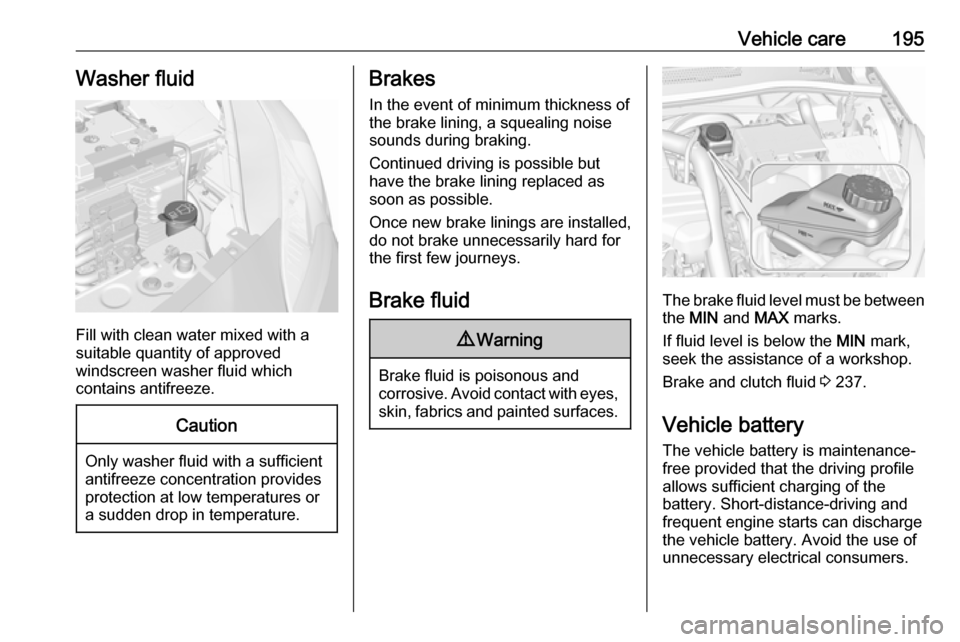
Fill with clean water mixed with a
suitable quantity of approved
windscreen washer fluid which
contains antifreeze.
Caution
Only washer fluid with a sufficient
antifreeze concentration provides
protection at low temperatures or
a sudden drop in temperature.
Brakes
In the event of minimum thickness of
the brake lining, a squealing noise
sounds during braking.
Continued driving is possible but
have the brake lining replaced as
soon as possible.
Once new brake linings are installed,
do not brake unnecessarily hard for
the first few journeys.
Brake fluid9 Warning
Brake fluid is poisonous and
corrosive. Avoid contact with eyes, skin, fabrics and painted surfaces.
The brake fluid level must be betweenthe MIN and MAX marks.
If fluid level is below the MIN mark,
seek the assistance of a workshop.
Brake and clutch fluid 3 237.
Vehicle battery
The vehicle battery is maintenance-
free provided that the driving profile
allows sufficient charging of the
battery. Short-distance-driving and
frequent engine starts can discharge
the vehicle battery. Avoid the use of
unnecessary electrical consumers.