instrument cluster VAUXHALL CORSA 2016 Owner's Manual
[x] Cancel search | Manufacturer: VAUXHALL, Model Year: 2016, Model line: CORSA, Model: VAUXHALL CORSA 2016Pages: 267, PDF Size: 7.79 MB
Page 77 of 267

Instruments and controls75Instruments and
controlsControls ....................................... 76
Steering wheel adjustment ........76
Steering wheel controls .............76
Heated steering wheel ...............76
Horn ........................................... 77
Windscreen wiper/washer .........77
Rear window wiper/washer .......79
Outside temperature ..................79
Clock ......................................... 80
Power outlets ............................. 82
Cigarette lighter ......................... 82
Ashtrays .................................... 83
Warning lights, gauges and indi‐ cators ........................................... 83
Instrument cluster ......................83
Speedometer ............................. 83
Odometer .................................. 83
Trip odometer ............................ 83
Tachometer ............................... 84
Fuel gauge ................................ 85
Fuel selector .............................. 85
Engine coolant temperature gauge ....................................... 86
Service display .......................... 86Control indicators ......................87
Turn signal ................................. 89
Seat belt reminder .....................90
Airbag and belt tensioners .........90
Airbag deactivation ....................91
Charging system .......................91
Malfunction indicator light ..........91
Service vehicle soon .................91
Brake and clutch system ...........92
Operate pedal ............................ 92
Antilock brake system (ABS) .....92
Gear shifting .............................. 92
Power steering .......................... 92
Lane departure warning ............92
Ultrasonic parking assist ...........93
Electronic Stability Control off ...93
Electronic Stability Control and Traction Control system ...........93
Traction Control system off .......93
Preheating ................................. 93
Diesel particle filter ....................93
Tyre pressure monitoring system ...................................... 94
Engine oil pressure ....................94
Low fuel ..................................... 94
Immobiliser ................................ 94
Reduced engine power .............94
Autostop .................................... 95
Exterior light .............................. 95
High beam ................................. 95High beam assist.......................95
Fog light ..................................... 95
Rear fog light ............................. 95
Cruise control ............................ 95
Vehicle detected ahead .............95
Speed limiter ............................. 95
Traffic sign assistant ..................95
Door open .................................. 95
Information displays .....................96
Driver Information Centre ..........96
Colour-Info-Display ..................101
Graphic-Info-Display ................102
Vehicle messages ......................103
Warning chimes .......................105
Battery voltage ........................ 106
Vehicle personalisation ..............106
OnStar® system ........................110
Page 85 of 267

Instruments and controls83AshtraysCaution
To be used only for ash and not forcombustible rubbish.
The portable ashtray can be placed in
the cupholders.
Warning lights, gauges
and indicators
Instrument cluster
The needles of the instruments briefly
rotate to the end position when the
ignition is switched on.
Speedometer
Indicates vehicle speed.
Odometer
The bottom line displays the recorded distance in miles.
Trip odometer The recorded distance is displayedsince the last reset.
Trip odometer counts up to
9999 miles and then restarts at 0.
Page 90 of 267
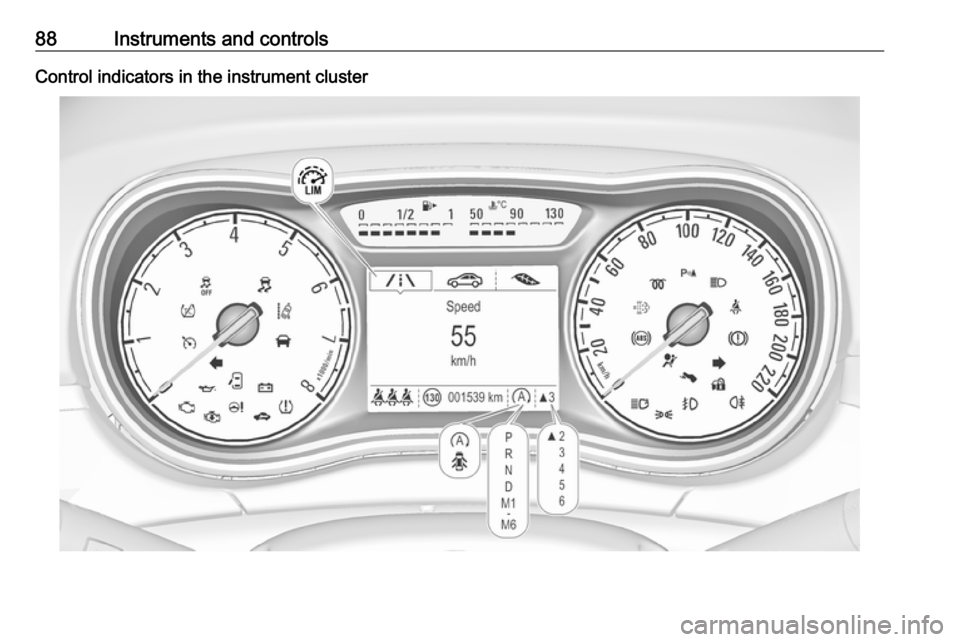
88Instruments and controlsControl indicators in the instrument cluster
Page 98 of 267
96Instruments and controlsInformation displaysDriver Information Centre The Driver Information Centre is
located in the instrument cluster.
Depending on the version and
equipment, the Driver Information
Centre is available as Baselevel
display, Midlevel display or Uplevel
display.
Following menus are selectable in the
Driver Information Centre using the
buttons on the turn signal lever:
● trip odometer 3 83
● vehicle information and settings, see below
● trip/fuel information, see below ● economic information, see below
● navigation information
Following indication appears if
required:
● warning messages 3 103
● gear shift indication 3 92
● drive mode indication 3 143,
3 148
● tyre pressure warning 3 213● seat belt reminder indication
3 90
● Autostop indication 3 138
● service information 3 91
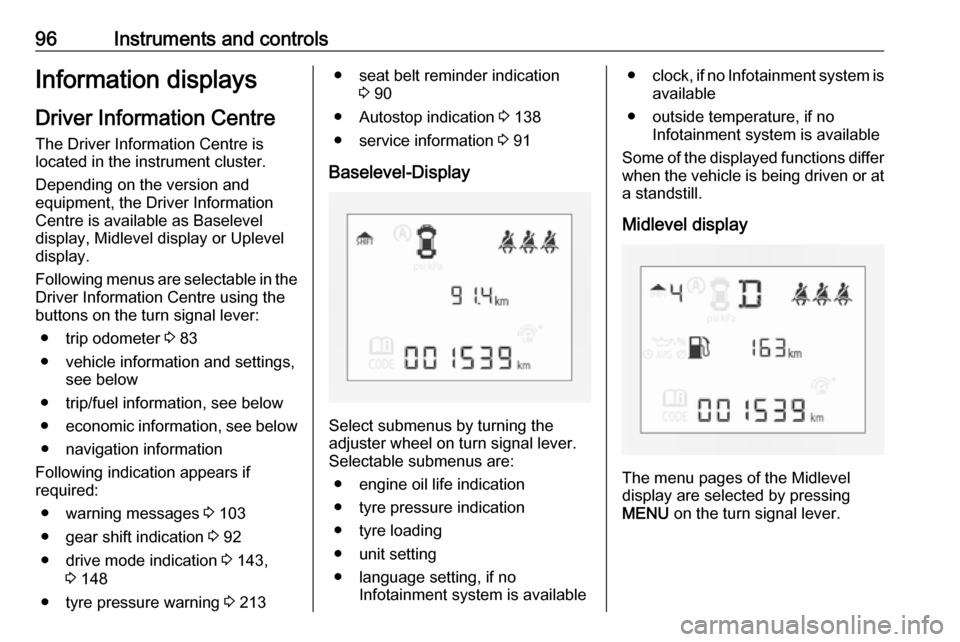
Baselevel-Display
Select submenus by turning the
adjuster wheel on turn signal lever. Selectable submenus are:
● engine oil life indication
● tyre pressure indication
● tyre loading
● unit setting
● language setting, if no Infotainment system is available
●clock, if no Infotainment system is
available
● outside temperature, if no Infotainment system is available
Some of the displayed functions differ
when the vehicle is being driven or at a standstill.
Midlevel display
The menu pages of the Midlevel
display are selected by pressing
MENU on the turn signal lever.
Page 159 of 267

Driving and operating157Press m; control indicator m in
instrument cluster illuminates white.
Activation
Accelerate to the desired speed and
turn thumb wheel to SET/-, the
current speed is stored and
maintained. Control indicator m in
instrument cluster illuminates green. Accelerator pedal can be released.
Vehicle speed can be increased by depressing the accelerator pedal.
When the accelerator pedal is
released, the previously stored speed
is resumed.
Cruise control remains activated
while gearshifting.
Increase speed
With cruise control active, hold thumb
wheel turned to RES/+ or briefly turn
to RES/+ repeatedly: speed
increases continuously or in small
increments.
Alternatively accelerate to the desired speed and store by turning to SET/-.
Reduce speed
With cruise control active, hold thumb
wheel turned to SET/- or briefly turn to
SET/- repeatedly: speed decreases
continuously or in small increments.
Deactivation
Press y; control indicator m in
instrument cluster illuminates white.
Cruise control is deactivated. Last
stored speed remains in memory for
later speed resume.
Automatic deactivation:
● Vehicle speed is below approx. 20 mph.
● Vehicle speed above approx. 125 mph.
● The brake pedal is depressed.
● The clutch pedal is depressed for
a few seconds.
● The selector lever is in N.
● Engine speed is in a very low range.
● The Traction Control system or Electronic Stability Control is
operating.
Resume stored speed
Turn thumb wheel to RES/+ at a
speed above 20 mph. The stored
speed will be obtained.
Switching off
Press m, control indicator m in
instrument cluster extinguishes. The
stored speed is deleted.
Page 162 of 267
160Driving and operating
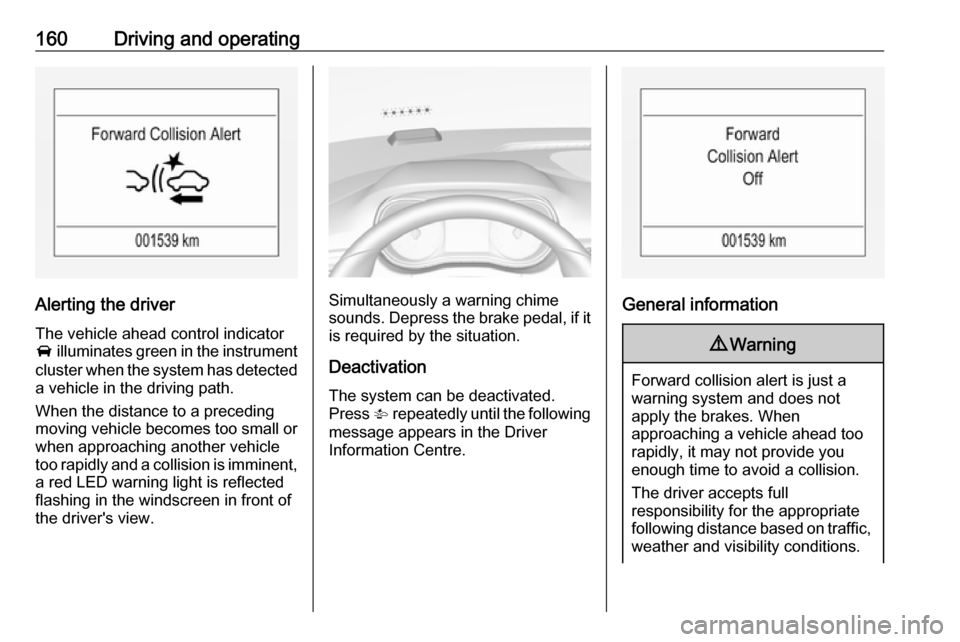
Alerting the driver
The vehicle ahead control indicator A illuminates green in the instrument
cluster when the system has detected
a vehicle in the driving path.
When the distance to a preceding
moving vehicle becomes too small or
when approaching another vehicle
too rapidly and a collision is imminent,
a red LED warning light is reflected
flashing in the windscreen in front of
the driver's view.Simultaneously a warning chime
sounds. Depress the brake pedal, if it is required by the situation.
Deactivation
The system can be deactivated.
Press V repeatedly until the following
message appears in the Driver
Information Centre.General information
9 Warning
Forward collision alert is just a
warning system and does not
apply the brakes. When
approaching a vehicle ahead too
rapidly, it may not provide you
enough time to avoid a collision.
The driver accepts full
responsibility for the appropriate
following distance based on traffic, weather and visibility conditions.
Page 165 of 267
Driving and operating163Control indicator r illuminates in
the instrument cluster 3 93 or a
message is indicated in the Driver
Information Centre.
Front-rear parking assist9 Warning
The driver bears full responsibility
for the parking manoeuvre.
Always check the surrounding
area when driving backwards or
forwards while using parking
assist system.
The front-rear parking assist
measures the distance between the vehicle and obstacles in front and
behind the vehicle. It informs and
warns the driver by giving acoustic
signals and display indication.
It uses two different acoustic warning
signals for the front and rear
monitoring areas, each with a
different tone frequency.
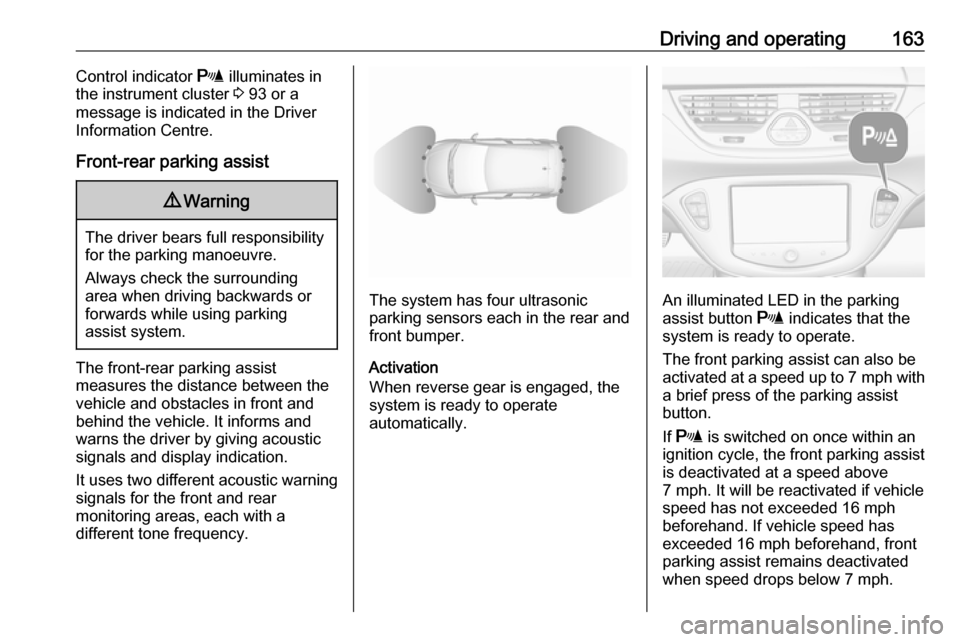
The system has four ultrasonic
parking sensors each in the rear and front bumper.
Activation
When reverse gear is engaged, the
system is ready to operate
automatically.An illuminated LED in the parking
assist button r indicates that the
system is ready to operate.
The front parking assist can also be
activated at a speed up to 7 mph with
a brief press of the parking assist
button.
If r is switched on once within an
ignition cycle, the front parking assist
is deactivated at a speed above
7 mph. It will be reactivated if vehicle
speed has not exceeded 16 mph
beforehand. If vehicle speed has
exceeded 16 mph beforehand, front
parking assist remains deactivated
when speed drops below 7 mph.
Page 179 of 267

Driving and operating177signs. Do not ignore traffic signs
which are not displayed by the
system.
The system does not discern any
other than the conventional traffic
signs that might give or end a
speed limit.
Do not let this special feature
tempt you into taking risks when
driving.
Always adapt speed to the road
conditions.
The driver assistance systems do not relieve the driver from full
responsibility for vehicle
operation.
Lane departure warning
The lane departure warning system
observes the lane markings between
which the vehicle is driving via a front camera. The system detects lane
changes and warns the driver in the
event of an unintended lane change
via visual and acoustic signals.
Criteria for the detection of an
unintended lane change are:
● No operation of turn signals.
● No brake pedal operation.
● No active accelerator operation or speeding-up.
● No active steering.
If the driver is performing these
actions, no warning will be issued.
Activation
The lane departure warning system is activated by pressing ). The
illuminated LED in the button
indicates that the system is switched
on. When control indicator ) in the
instrument cluster illuminates green, the system is ready to operate.
The system is only operable at
vehicle speeds above 35 mph and if lane markings are available.
When the system recognises an
unintended lane change, control
indicator ) changes to yellow and
flashes. Simultaneously a chime
sound is activated.
Deactivation
The system is deactivated by
pressing ), LED in the button
extinguishes.
At speeds below 35 mph the system
is inoperable.
Page 236 of 267

234Vehicle carePaintwork damageRectify minor paintwork damage with
a touch-up pen before rust forms.
Have more extensive damage or rust
areas repaired by a workshop.
Underbody Some areas of the vehicle underbody
have a PVC undercoating while other
critical areas have a durable
protective wax coating.
After the underbody is washed, check
the underbody and have it waxed if
necessary.
Bitumen/rubber materials could
damage the PVC coating. Have
underbody work carried out by a
workshop.
Before and after winter, wash the
underbody and have the protective
wax coating checked.Liquid gas system9 Danger
Liquid gas is heavier than air and
can collect in sink points.
Take care when performing work
at the underbody in a pit.
For painting work and when using a
drying booth at a temperature above
60 °C, the liquid gas tank must be
removed.
Do not make any modifications to the
liquid gas system.
Towing equipment
Do not clean the coupling ball bar with a steam-jet or high-pressure jet
cleaner.
Rear carrier system Clean the rear carrier system with a
steam-jet or high-pressure jet cleaner
at least once a year.
Operate the rear carrier system
periodically if not in regular use, in
particular during winter.
Interior care
Interior and upholstery Only clean the vehicle interior,
including the instrument panel fascia
and panelling, with a dry cloth or
interior cleaner.
Clean the leather upholstery with
clear water and a soft cloth. In case of
heavy soiling, use leather care.
The instrument cluster and the
displays should only be cleaned using
a soft damp cloth. If necessary use a
weak soap solution.
Clean fabric upholstery with a
vacuum cleaner and brush. Remove
stains with an upholstery cleaner.
Clothing fabrics may not be
colourfast. This could cause visible
discolourations, especially on light- coloured upholstery. Removable
stains and discolourations should be
cleaned as soon as possible.
Clean seat belts with lukewarm water or interior cleaner.
Page 264 of 267

262Headlights................................... 114Headlights when driving abroad 116
Head restraint adjustment .............8
Head restraints ............................ 35
Heated mirrors ............................. 29
Heated rear window ..................... 32
Heated steering wheel .................76
Heated windscreen .......................32
Heating ........................................ 39
Heating and ventilation system . 125
High beam ........................... 95, 116
High beam assist ..................95, 117
Hill start assist ........................... 152
Horn ....................................... 13, 77
I
Identification plate .....................240
Ignition switch positions .............136
Immobiliser ............................ 28, 94
Indicators ...................................... 83
Information displays...................... 96
Instrument cluster ........................83
Instrument panel fuse box .........209
Instrument panel illumination .....205
Instrument panel illumination control .................................... 120
Instrument panel overview ........... 10
Interior care ............................... 234
Interior lighting ............................ 120
Interior lights ...................... 121, 205Interior mirrors .............................. 29
Interruption of power supply ......146
Introduction .................................... 3
ISOFIX child restraint systems ....55
J
Jump starting ............................. 228
K Key, memorised settings ..............22
Keys ............................................. 20
Keys, locks ................................... 20
L
Lane departure warning .......92, 177
Lashing eyes ............................... 71
Light switch ................................ 114
Load compartment ................25, 67
Load compartment cover .............69
Loading information .....................73
Low fuel ....................................... 94
M Malfunction indicator light ............91
Manual anti-dazzle ......................29
Manual mode .....................145, 150
Manual transmission .................. 147
Manual transmission automated 147
Manual windows ..........................30
Memorised settings ......................22Mirror adjustment ........................... 8
Misted light covers .....................120
N
New vehicle running-in ..............136
Number plate light .....................205
O Object detection systems ...........161
Odometer ..................................... 83
Oil, engine .......................... 237, 241
OnStar® system .........................110
Operate pedal ............................... 92
Outside temperature ....................79
Overrun cut-off ........................... 138
P Parking ................................ 18, 141
Parking assist ............................ 161
Parking brake ............................ 152
Parking lights ............................. 120
Particulate filter ........................... 142
Performance .............................. 246
Performing work ........................191
Pollen filter ................................. 133
Power outlets ............................... 82
Power steering.............................. 92
Power windows ............................ 30
Preheating ................................... 93
Puncture ..................................... 224