Park VAUXHALL CORSA 2017 User Guide
[x] Cancel search | Manufacturer: VAUXHALL, Model Year: 2017, Model line: CORSA, Model: VAUXHALL CORSA 2017Pages: 267, PDF Size: 7.82 MB
Page 94 of 267

92Instruments and controlsBrake and clutch systemR illuminates red.
The brake and clutch fluid level is too
low, when manual parking brake is
not applied 3 194.9 Warning
Stop. Do not continue your
journey. Consult a workshop.
Illuminates when the manual parking
brake is applied and ignition is
switched on 3 149.
Operate pedal - illuminates or flashes yellow.
Illuminates
Clutch pedal must be depressed to
start the engine in Autostop mode.
Stop-start system 3 135.
Flashes
Clutch pedal must to be depressed for a main start of the engine 3 17,
3 134.
On some versions, the operate pedal
message is indicated in the Driver
Information Display 3 102.
Antilock brake system (ABS)
u illuminates yellow.
Illuminates for a few seconds after the ignition is switched on. The system is ready for operation when the control
indicator extinguishes.
If the control indicator does not go out
after a few seconds, or if it illuminates while driving, there is a fault in the
ABS. The brake system remains
operational but without ABS
regulation.
Antilock brake system 3 148.
Gear shifting
R with the number of a higher gear is
indicated, when upshifting is
recommended for fuel saving
reasons.Power steering
c illuminates yellow.
Illuminates with power steering
disabled
Failure in the power steering system.
Consult a workshop.
Illumination of c and b
simultaneously
Power steering system must be
calibrated, system calibration 3 152.
Lane departure warning ) illuminates green or flashes yellow.
Illuminates green
System is switched on and ready to
operate.
Flashes yellow System recognises an unintended
lane change.
Lane departure warning 3 175.
Page 95 of 267

Instruments and controls93Ultrasonic parking assist
r illuminates yellow.
Fault in system
or
Fault due to sensors that are dirty or
covered by ice or snow
or
Interference due to external sources of ultrasound. Once the source of
interference is removed, the system
will operate normally.
Have the cause of the fault in the
system remedied by a workshop.
Ultrasonic parking assist 3 159.
Electronic Stability Control
off
t illuminates yellow.
The system is deactivated.
Electronic Stability Controland Traction Control system
b flashes or illuminates yellow.Flashes
The system is actively engaged.
Engine output may be reduced and
the vehicle may be braked
automatically to a small degree.
Illuminates
A fault in the system is present. A
warning message or warning code
appears in the Driver Information
Centre. Continued driving is possible.
The system is not operational. Drivingstability, however, may deteriorate
depending on road surface
conditions.
Have the cause of the fault remedied
by a workshop.
Electronic Stability Control 3 151,
Traction Control system 3 150.
Traction Control system off
k illuminates yellow.
The system is deactivated.
Preheating
! illuminates yellow.Preheating of diesel engine is
activated. Only activates when
outside temperature is low.
Diesel particle filter % illuminates or flashes yellow.
The diesel particle filter requires
cleaning.
Continue driving until %
extinguishes. If possible, do not allow
engine speed to drop below
2000 rpm.
Illuminates
The diesel particle filter is full. Start
cleaning process as soon as
possible.
Flashes
The maximum filling level of the filter
is reached. Start cleaning process
immediately to avoid damage to the
engine.
Diesel particle filter 3 139, Stop-start
system 3 135.
Page 102 of 267
100Instruments and controlsshows the effect of topography or
driving behaviour on fuel
consumption.
Graph can be reset by pressing
SET/CLR .
Economy index
The current fuel consumption is
indicated on an economic scale. For
economical driving, adapt driving
style to keep the filled segments
within the Eco area. The more
segments are filled, the higher the
fuel consumption.
Simultaneously, the average
consumption value is indicated.
Top consumers
List of top comfort consumers
currently switched on is displayed in
descending order. Fuel saving
potential is indicated.
During sporadic driving conditions,
the engine will activate the heated
rear window automatically to increase
the engine load. In this event, the
heated rear window is indicated as
one of the top consumers, without
activation by the driver.Colour-Info-Display
Depending on the vehicle
configuration, the vehicle has a
Colour-Info-Display with touch screen
functionality.
The Colour-Info-Display with touch screen functionality indicates in
colour:
● time 3 79
● outside temperature 3 78
● date 3 79
● rear view camera indication 3 170
● parking assist and advanced parking assist instructions
3 159
● electronic climate control settings
3 125
● Infotainment system, see description in the Infotainment
manual
● system messages
● vehicle messages 3 102
● settings for vehicle personalisation 3 105The type of information and how it is
displayed depends on the settings
made.
Selecting menus and settings
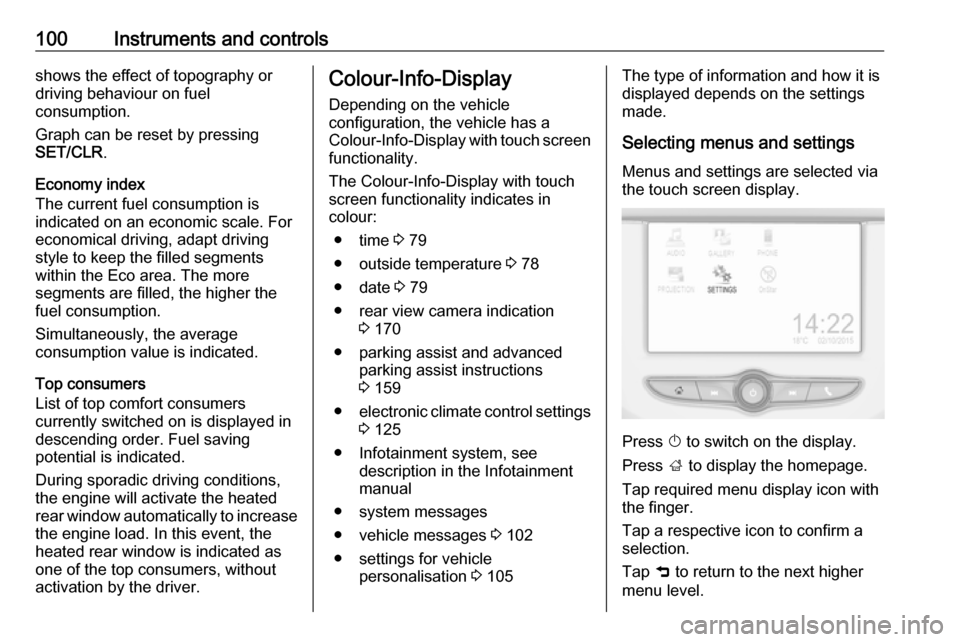
Menus and settings are selected via
the touch screen display.
Press X to switch on the display.
Press ; to display the homepage.
Tap required menu display icon with
the finger.
Tap a respective icon to confirm a
selection.
Tap 9 to return to the next higher
menu level.
Page 105 of 267

Instruments and controls103No.Vehicle message28Right rear turn signal failure29Check trailer brake light30Check trailer reversing light31Check left trailer turn signal32Check right trailer turn signal33Check trailer rear fog light34Check trailer rear light35Replace battery in radio remote
control48Clean side blind spot alert
system49Lane departure warning
unavailable53Tighten fuel filler cap54Water in diesel fuel filter55Diesel particle filter is full
3 13956Tyre pressure imbalance on
front axleNo.Vehicle message57Tyre pressure imbalance on rear axle58Tyres without TPMS sensors
detected59Open then close driver window60Open then close front
passenger window65Theft attempted66Service anti-theft alarm system67Service steering wheel lock68Service power steering75Service air conditioning76Service side blind spot alert
system79Top up engine oil81Service transmission82Change engine oil soon84Engine power reduced89Service vehicle soonNo.Vehicle message94Shift to park before exiting95Service airbag128Bonnet open134Parking assist fault, clean
bumper136Service parking assist145Check washer fluid level174Low vehicle battery151Press clutch to start258Parking assist off
Vehicle messages on Uplevel-
Display
The vehicle messages are displayedas text. Follow the instructions given
in the messages.
Page 106 of 267

104Instruments and controlsVehicle messages on
Colour-Info-Display
Some important messages appear
additionally in the
Colour-Info-Display. Some
messages only pop-up for a few
seconds.
Warning chimes
When starting the engine or whilst driving
Only one warning chime will sound at a time.
The warning chime regarding
unfastened seat belts has priority
over any other warning chime.
● If seat belt is not fastened.
● If a door or the tailgate is not fully
closed when starting off.
● If a certain speed is exceeded with parking brake applied.
● If a programmed speed is exceeded.
● If a warning message appears in the Driver Information Centre orInfo-Display.● If the parking assist detects an object.
● If unintended lane change occurs.
● If the reverse gear is engaged and the rear end carrier
extended.
● If the diesel particle filter has reached the maximum filling
level.
When the vehicle is parked and/or
the driver's door is opened
● With exterior lights on.
During an Autostop ● If the driver's door is opened.
Battery voltage Uplevel display
When the vehicle battery voltage is
running low, a warning message will
appear in the Driver Information
Centre.
Midlevel displayWhen the vehicle battery voltage is
running low, a warning code 174 will appear in the Driver Information
Centre.
1. Switch off immediately any electrical consumers which are
not required for a safe drive, e.g.
seat heating, heated windscreen
and heated rear window or other
main consumers.
2. Charge the vehicle battery by driving continuously for a while or
by using a charging device.
The warning message or warning
code will disappear after the engine has been started twice consecutively
without a voltage drop.
If the vehicle battery cannot be
recharged, have the cause of the fault
remedied by a workshop.
Page 107 of 267
Instruments and controls105Vehicle personalisation
The vehicle's behaviour can be
personalised by changing the settings in the Info-Display.
Some of the personal settings for
different drivers can be memorised
individually for each vehicle key.
Memorised settings 3 22.
Depending on vehicle equipment and
country-specific regulations, some of
the functions described below might
not be available.
Some functions are only displayed or
active when the engine is running.
Personal settings Graphic-Info-Display
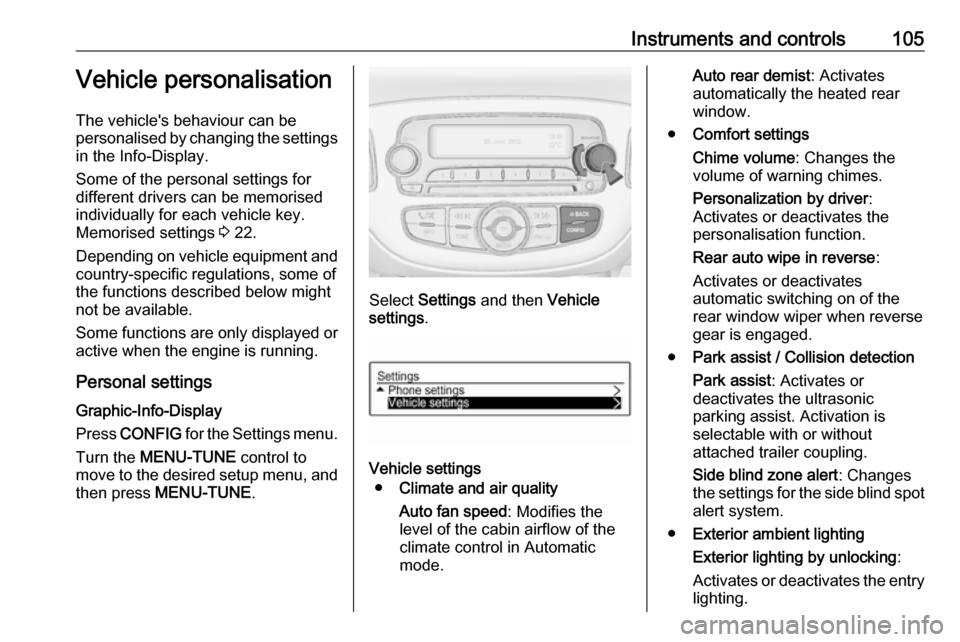
Press CONFIG for the Settings menu.
Turn the MENU-TUNE control to
move to the desired setup menu, and then press MENU-TUNE .
Select Settings and then Vehicle
settings .
Vehicle settings
● Climate and air quality
Auto fan speed : Modifies the
level of the cabin airflow of the
climate control in Automatic
mode.
Auto rear demist : Activates
automatically the heated rear
window.
● Comfort settings
Chime volume : Changes the
volume of warning chimes.
Personalization by driver :
Activates or deactivates the
personalisation function.
Rear auto wipe in reverse :
Activates or deactivates
automatic switching on of the
rear window wiper when reverse gear is engaged.
● Park assist / Collision detection
Park assist : Activates or
deactivates the ultrasonic
parking assist. Activation is
selectable with or without
attached trailer coupling.
Side blind zone alert : Changes
the settings for the side blind spot alert system.
● Exterior ambient lighting
Exterior lighting by unlocking :
Activates or deactivates the entry
lighting.
Page 109 of 267

Instruments and controls107Auto Rear Defog: Automatically
activates heated rear window.
● Collision / Detection Systems
Park Assist : Activates or
deactivates the ultrasonic
parking assist. Activation is
selectable with or without
attached trailer coupling.
Side Blind Zone Alert : Activates
or deactivates side blind zone alert.
● Comfort and Convenience
Chime Volume : Changes the
volume of warning chimes.
Personalization By Driver :
Activates or deactivates the
personalisation function.
Auto Wipe in Reverse Gear :
Activates or deactivates
automatic switching on of the
rear window wiper when reverse gear is engaged.
● Lighting
Vehicle Locator Lights : Activates
or deactivates the entry lighting.Exit Lighting : Activates or
deactivates and changes the duration of exit lighting.
● Power Door Locks
Unlocked Door Anti Lock Out :
Activates or deactivates the door locking function while a door isopen.
Auto Door Lock : Activates or
deactivates the automatic door
locking function after switching on ignition.
Auto Door Unlock : Changes the
configuration to unlock only the driver's door or the whole vehicle after switching off ignition.
Delayed Door Lock : Activates or
deactivates the delayed door
locking function. This feature
delays the actual locking of the
doors until all doors are closed.
● Remote Lock, Unlock, Start
Remote Unlock Light Feedback :
Activates or deactivates the
hazard warning flasher feedback whilst unlocking.
Remote Door Unlock : Changes
the configuration to unlock onlythe driver's door or the whole
vehicle whilst unlocking.
Relock Remotely Unlocked
Doors : Activates or deactivates
the automatic relock function
after unlocking without opening
the vehicle.
Page 114 of 267
112LightingLightingExterior lighting.......................... 112
Light switch .............................. 112
Automatic light control .............113
High beam ............................... 114
Headlight flash ......................... 114
Headlight range adjustment ....114
Headlights when driving abroad .................................... 114
Daytime running lights .............115
Xenon lighting system .............115
Hazard warning flashers ..........116
Turn and lane-change signals . 117
Front fog lights ......................... 117
Rear fog light ........................... 117
Parking lights ........................... 118
Reversing lights .......................118
Misted light covers ...................118
Interior lighting ........................... 118
Instrument panel illumination control ..................................... 118
Interior lights ............................ 119
Reading lights .......................... 120
Lighting features ........................120
Entry lighting ............................ 120Exit lighting.............................. 120
Battery discharge protection ....121Exterior lighting
Light switch
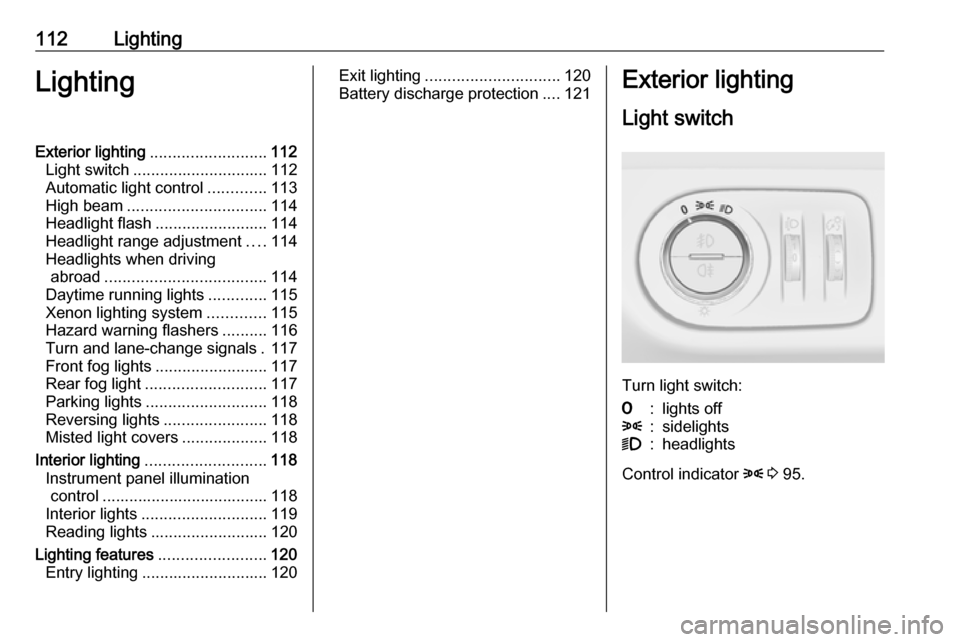
Turn light switch:
7:lights off8:sidelights9:headlights
Control indicator 8 3 95.
Page 118 of 267
116LightingThe high beam assist is activated by
pushing the indicator lever twice at a
speed above 25 mph.
The green control indicator f
illuminates continuously when the
assist is activated, the blue one 7
illuminates when high beam is on.
Control indicator f 3 95.
Deactivation
Push indicator lever once. It is also
deactivated when front fog lights are
switched on.
If a headlight flash is activated when
the high beam is on, the high beam
assist will be deactivated.
If a headlight flash is activated when
the high beam is off, the high beam
assist will remain activated.
The latest setting of the high beam
assist will remain after the ignition is
switched on again.Corner lighting
On tight bends or when turning off,
depending on the steering angle or
the indicator light signal, an additional left or right reflector is switched on
which illuminates the road in the
direction of travel. It is activated up to
a speed of 25 mph.
Reversing function To assist driver's orientation when
parking, both corner lights and
reversing light illuminate when
headlights are on and reverse gear is engaged. They remain illuminated for
a short time after disengaging reverse gear or until driving faster than
4 mph in a forward gear.
Hazard warning flashers
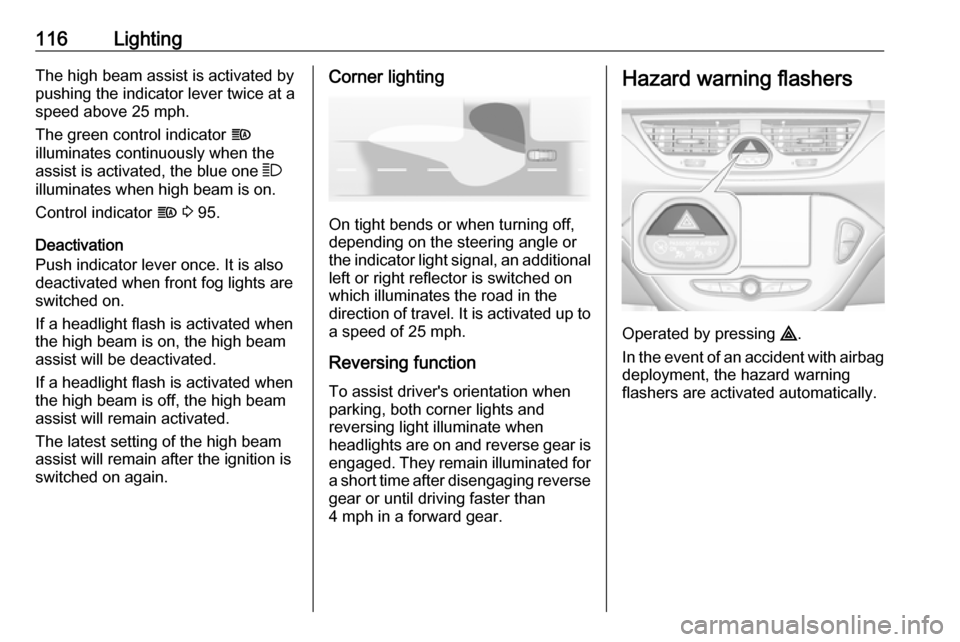
Operated by pressing ¨.
In the event of an accident with airbag
deployment, the hazard warning
flashers are activated automatically.
Page 120 of 267
118LightingParking lights
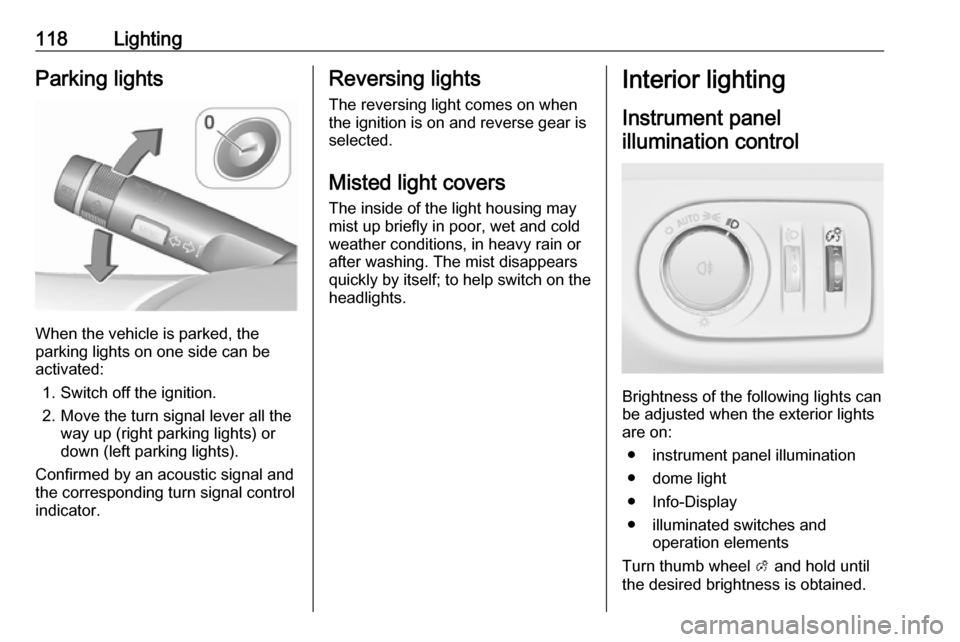
When the vehicle is parked, the
parking lights on one side can be
activated:
1. Switch off the ignition.
2. Move the turn signal lever all the way up (right parking lights) or
down (left parking lights).
Confirmed by an acoustic signal and
the corresponding turn signal control
indicator.
Reversing lights
The reversing light comes on when
the ignition is on and reverse gear is
selected.
Misted light covers
The inside of the light housing may
mist up briefly in poor, wet and cold weather conditions, in heavy rain or
after washing. The mist disappears
quickly by itself; to help switch on the
headlights.Interior lighting
Instrument panel illumination control
Brightness of the following lights can
be adjusted when the exterior lights
are on:
● instrument panel illumination
● dome light
● Info-Display
● illuminated switches and operation elements
Turn thumb wheel A and hold until
the desired brightness is obtained.