ESP VAUXHALL CORSA F 2018 User Guide
[x] Cancel search | Manufacturer: VAUXHALL, Model Year: 2018, Model line: CORSA F, Model: VAUXHALL CORSA F 2018Pages: 271, PDF Size: 7.86 MB
Page 82 of 271

80Instruments and controlsRDS clock synchronization
The RDS signal of most VHF
transmitters automatically sets the
time. RDS time synchronisation can take a few minutes. Some
transmitters do not send a correct
time signal. In such cases, it is
recommended to switch off the
automatic time synchronisation.
To switch between the options On
and Off, repeatedly press the
MENU-TUNE knob.
Colour-Info Display Press ; then select Settings screen.
Select Time and Date to display the
respective submenu.
Set Time Format
To select the desired time format,
touch the screen buttons 12 h or 24 h .
Set Date Format To select the desired date format,
select Set Date Format and choose
between the available options in the
submenu.
Auto Set
To choose whether time and date are to be set automatically or manually,
select Auto Set .
For time and date to be set
automatically, select On - RDS.
For time and date to be set manually,
select Off - Manual . If Auto Set is set
to Off - Manual , the submenu items
Set Time and Set Date become
available.
Set time and date
To adjust the time and date settings,
select Set Time or Set Date .
Touch + and - to adjust the settings.
Power outlets
A 12 Volt power outlet is located in the
centre console.
Do not exceed the maximum power
consumption of 120 watts.
Page 86 of 271

84Instruments and controlsUplevel display
Two trip odometer pages are
selectable for different trips.
Select menu ; by pressing Menu
on the turn signal lever. Turn adjuster wheel on turn signal lever and
select ;1 or ; 2. Each trip
odometer page can be reset
separately by pressing SET/CLR on
the turn signal lever for a few seconds
on the respective menu.
Tachometer
Displays the engine speed.
Drive in a low engine speed range for each gear as much as possible.
Caution
If the needle is in the red warning
zone, the maximum permitted
engine speed is exceeded. Engine at risk.
Fuel gauge
Displays the fuel level or gas content
in the tank depending on the
operation mode.
Number of LEDs displayed shows the level in the respective fuel tank. 8
LEDs means fuel tank is full.
During liquid gas operation, the level
in the gas tank is displayed.
Low fuel indication
One remaining LED illuminating white indicates that the fuel level is low.
Page 100 of 271

98Instruments and controlsSome of the displayed functions differ
when the vehicle is being driven or at
a standstill. Some functions are only
available when the vehicle is being
driven.
Selecting menus and functions The menus and functions can be
selected via the buttons on the turn
signal lever.
Press MENU to switch between the
main menus or to return from a
submenu to the next higher menu
level.
Turn the adjuster wheel to select a
submenu of the main menu or to set
a numeric value.
Press SET/CLR to select and confirm
a function.
Vehicle and service messages are
popped-up in the Driver Information
Centre if required. Confirm messages
by pressing SET/CLR. Vehicle
messages 3 103.
Trip/Fuel information menu ;
Possible pages are: ● digital vehicle speed
● trip odometer
● average fuel economy
● average vehicle speed
● instantaneous fuel economy
● fuel range
● fuel range LPG version
● timer
● outside temperature
Selection and indication is different
between Midlevel display and Uplevel display.Digital vehicle speed
Digital display of the instantaneous
speed.
Trip odometer
Trip odometer displays the current
distance since a certain reset.
Trip odometer counts up to
9999 miles and then restarts at 0.
Turn the adjuster wheel to select between trip odometer 1 and 2 forUplevel display.
To reset, press SET/CLR for a few
seconds while viewing this page.
The information of trip page 1 and 2
can be reset separately while the
respective display is active.
Average fuel economy
Display of average consumption. The
measurement can be reset at any
time and starts with a default value.
To reset, press SET/CLR for a few
seconds while viewing this page.
The information of trip page 1 and 2
can be reset separately while the
respective display is active.
Page 101 of 271
Instruments and controls99On vehicles with LPG engines:
Average consumption is indicated for
the currently selected mode, LPG or
petrol.
Average vehicle speed
Display of average speed. The
measurement can be reset at any
time.
To reset, press SET/CLR for a few
seconds while viewing this page.
The information of trip page 1 and 2
can be reset separately while the
respective display is active.
Instantaneous fuel economy
Display of the instantaneous
consumption.
On vehicles with LPG engines:
Instantaneous consumption is
indicated for the currently selected
mode, LPG or petrol.
Fuel range
Range is calculated from current fuel tank level and current consumption. The display shows average values.
After refuelling, the range is updated
automatically after a brief delay.When the fuel level in the tank is low,
a message appears on the display
and control indicator Y in the fuel
gauge illuminates.
When the tank must be refuelled
immediately, a warning message
appears and remains on the display.
Additionally, control indicator Y
flashes in the fuel gauge 3 95.
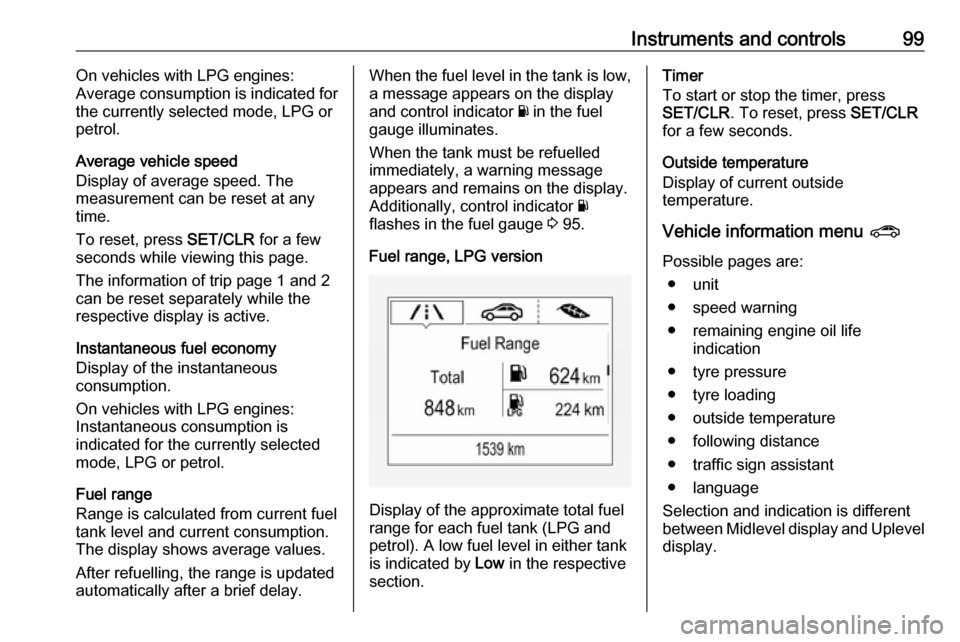
Fuel range, LPG version
Display of the approximate total fuel
range for each fuel tank (LPG and
petrol). A low fuel level in either tank
is indicated by Low in the respective
section.
Timer
To start or stop the timer, press
SET/CLR . To reset, press SET/CLR
for a few seconds.
Outside temperature
Display of current outside
temperature.
Vehicle information menu ?
Possible pages are: ● unit
● speed warning
● remaining engine oil life indication
● tyre pressure
● tyre loading
● outside temperature
● following distance
● traffic sign assistant
● language
Selection and indication is different
between Midlevel display and Uplevel
display.
Page 104 of 271

102Instruments and controlsTouch a respective icon to confirm a
selection.
Touch 9 to return to the next higher
menu level.
Press ; to return to the homepage.
For further information, see
Infotainment manual.
Vehicle personalisation 3 106.
Graphic-Info-Display
Depending on the vehicle
configuration, the vehicle has a
Graphic-Info-Display.The Graphic-Info-Display indicates:
● time 3 79
● outside temperature 3 78
● date 3 79
● electronic climate control settings
3 127
● Infotainment system, see description in the Infotainment
manual
● settings for vehicle personalisation 3 106
Selecting menus and settings Menus and settings are accessed viathe display.
Press CONFIG : Menu page Settings
is displayed.
Turn knob MENU-TUNE to select a
setting or value.
Press knob MENU-TUNE to confirm
a setting or value.
Press BACK to exit a menu or setting
without changing or delete the last
character in a character sequence.
Press the button for a few seconds to
delete the entire entry.
To exit the Settings menu, press
BACK in steps or press CONFIG after
confirming the changes.
Vehicle personalisation 3 106.
Memorised settings 3 22.
Page 109 of 271

Instruments and controls107Duration upon exit of vehicle:
Activates or deactivates and
changes the duration of exit
lighting.
● Power door locks
Auto door lock : Activates or
deactivates the automatic door
locking function after switching on ignition.
Stop door lock if door open :
Activates or deactivates the door locking function while a door isopen.
Delayed door lock : Activates or
deactivates the delayed door
locking function. This menu
option is displayed with Stop door
lock if door open deactivated.
Central locking system 3 22.
● Remote locking, unlocking,
starting
Remote unlock feedback :
Activates or deactivates the
hazard warning flasher feedback
whilst unlocking.
Passive door unlock : Changes
the configuration to unlock onlythe driver's door or the whole
vehicle whilst unlocking.
Auto relock doors : Activates or
deactivates the automatic relock
function after unlocking without
opening the vehicle.
● Restore factory settings :
Resets all settings to the default settings.
Personal settings Colour-Info-Display
Press ;, select Settings and then
Vehicle on the touch-screen.In the corresponding submenus the
following settings can be changed:
Vehicle ● Climate & Air Quality
Auto Fan Max Speed : Modifies
the level of the cabin airflow of the climate control in automatic
mode.
Auto Heated Seats :
Automatically activates the seat
heating.
Auto Defog : Supports
windscreen dehumidification by
automatically selecting the
necessary settings and
automatic air conditioning mode.
Auto Rear Defog : Automatically
activates heated rear window.
● Collision / Detection Systems
Forward Collision Alert : Activates
or deactivates forward collision
alert.
Auto Collision Preparation :
Activates or deactivates the
automatic brake functionality of
the vehicle in the event of
imminent collision danger. The
Page 113 of 271

Instruments and controls111To connect a mobile device with the
Wi-Fi hotspot:
1. Press j and then select Wi-Fi
settings on the Info-Display. The
settings displayed include the Wi- Fi hotspot name (SSID),
password and connection type.
2. Start a Wi-Fi network search on your mobile device.
3. Select your vehicle hotspot (SSID) when listed.
4. When prompted, enter the password on your mobile device.
Notice
To change the SSID or password, press Z and talk to an advisor or log
in to your account.
To switch off the Wi-Fi hotspot
functionality, press Z to call an
advisor.
Smartphone app
With the My Vauxhall smartphone
app, some vehicle functions can be
operated remotely.The following functions are available:
● Lock or unlock vehicle.
● Honk horn or flash lights.
● Check fuel level, engine oil life and tyre pressure (only with tyre
pressure monitoring system).
● Send navigation destination to the vehicle, if equipped with a
built-in navigation system.
● Locate vehicle on a map.
● Manage Wi-Fi settings.
To operate these functions, download the app from App Store ®
or
Google Play™ Store.
Remote control
If desired, use any phone to call an
advisor, who can remotely operate
specific vehicle functions. Find the respective OnStar phone number on
our country-specific website.
The following functions are available: ● Lock or unlock vehicle.
● Provide information on the vehicle location.
● Honk horn or flash lights.Stolen vehicle assistance
If the vehicle is stolen, report the theft to the authorities and request OnStar
stolen vehicle assistance. Use any
phone to call an advisor. Find the
respective OnStar phone number on
our country-specific website.
OnStar can provide support in
locating and recovering the vehicle.Theft alert
When the anti-theft alarm system is
triggered, a notification is sent to
OnStar. You are then informed about
this event by text message or email.Restart prevention
By sending remote signals, OnStar
can prevent the vehicle from
restarting once it has been turned off.
On-demand diagnostics
At any time e.g. if the vehicle displays a vehicle message, press Z to
contact an advisor and ask to
complete a real-time diagnostic check
to directly determine the issue.
Depending on the results, the advisor
will provide further support.
Page 122 of 271

120LightingParking lights
When the vehicle is parked, the
parking lights on one side can be
activated:
1. Switch off the ignition.
2. Move the turn signal lever all the way up (right parking lights) or
down (left parking lights).
Confirmed by an acoustic signal and
the corresponding turn signal control
indicator.
Reversing lights
The reversing light comes on when
the ignition is on and reverse gear is
selected.
Misted light covers
The inside of the light housing may
mist up briefly in poor, wet and cold weather conditions, in heavy rain or
after washing. The mist disappears
quickly by itself; to help switch on the
headlights.Interior lighting
Instrument panel illumination control
Brightness of the following lights can
be adjusted when the exterior lights
are on:
● instrument panel illumination
● dome light
● Info-Display
● illuminated switches and operation elements
Turn thumb wheel A and hold until
the desired brightness is obtained.
Page 135 of 271

Climate control133Air conditioning regular
operation
In order to ensure continuously
efficient performance, cooling must
be operated for a few minutes once a month, irrespective of the weather
and time of year. Operation with
cooling is not possible when the
outside temperature is too low.
Service For optimal cooling performance, it is
recommended to annually check the
climate control system, starting
three years after initial vehicle
registration, including:
● functionality and pressure test
● heating functionality
● leakage check
● check of drive belts
● cleaning of condenser and evaporator drainage
● performance check
Notice
Refrigerant R-134a contains
fluorinated greenhouse gases.
Page 139 of 271

Driving and operating137Starting the vehicle at lowtemperatures
Diesel engines
The start of the engine without
additional heaters is possible down to
-25 °С.
Petrol engines
The start of the engine without
additional heaters is possible down to -30 °C.
Required is an engine oil with the correct viscosity, the correct fuel,
performed services and a sufficiently
charged vehicle battery.
With temperatures below -30 °C, the
automatic transmission requires a
warming phase of approx. five
minutes. The selector lever must be
in position P.
Automatic starter control This function controls the engine
starting procedure. The driver does
not need to hold the key in position 3.
Once applied, the system will go on starting automatically until the engineis running. Because of the checking
procedure, the engine starts running
after a short delay.
Possible reasons for a non-starting
engine:
● clutch pedal not operated (manual transmission)
● brake pedal not operated or selector lever not in P or N
(automatic transmission)
● timeout occurred
Turbo engine warm-up
Upon start-up, engine available
torque may be limited for a short time, especially when the engine
temperature is cold. The limitation is
to allow the lubrication system to fully
protect the engine.
Overrun cut-off
The fuel supply is automatically cut off
during overrun, i.e. when the vehicle
is driven with a gear engaged but
accelerator is released.
Depending on driving conditions, the
overrun cut-off may be deactivated.Stop-start system
The stop-start system helps to save
fuel and to reduce the exhaust
emissions. When conditions allow, it
switches off the engine as soon as the
vehicle is at a low speed or at a
standstill, e.g. at a traffic light or in a
traffic jam.
On vehicles with manual
transmission, the engine is started
automatically as soon as the clutch is depressed.
On vehicles with manual transmission
automated, the engine is started
automatically as soon as the brake
pedal is released.
A vehicle battery sensor ensures that
an Autostop is only performed if the
vehicle battery is sufficiently charged
for a restart.
Activation
The stop-start system is available as
soon as the engine is started, the
vehicle starts-off and the conditions
as stated below in this section are
fulfilled.