ignition VAUXHALL CORSA F 2018 Owner's Guide
[x] Cancel search | Manufacturer: VAUXHALL, Model Year: 2018, Model line: CORSA F, Model: VAUXHALL CORSA F 2018Pages: 271, PDF Size: 7.86 MB
Page 95 of 271
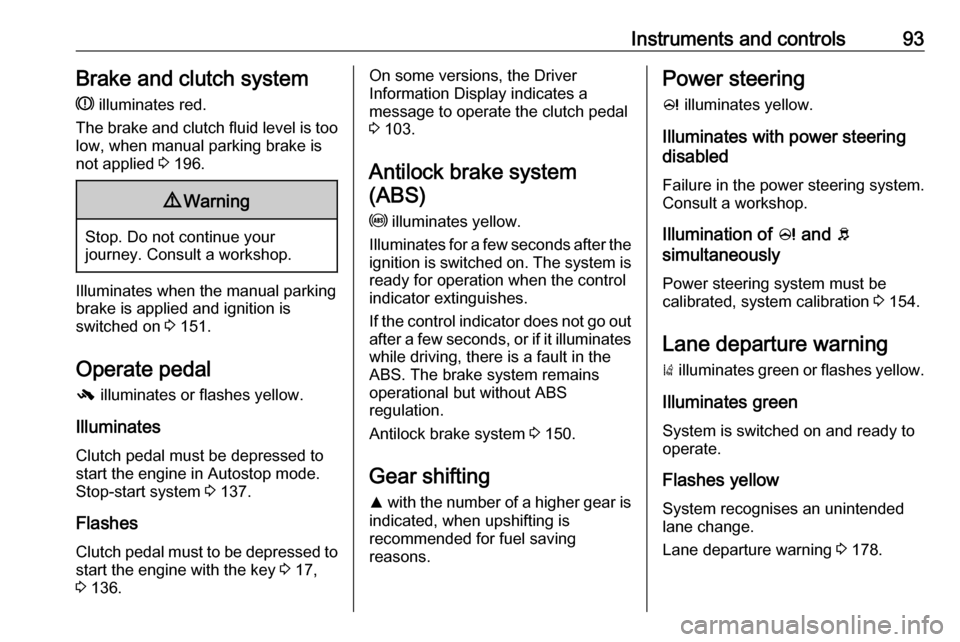
Instruments and controls93Brake and clutch systemR illuminates red.
The brake and clutch fluid level is too low, when manual parking brake is
not applied 3 196.9 Warning
Stop. Do not continue your
journey. Consult a workshop.
Illuminates when the manual parking
brake is applied and ignition is
switched on 3 151.
Operate pedal - illuminates or flashes yellow.
Illuminates
Clutch pedal must be depressed to
start the engine in Autostop mode.
Stop-start system 3 137.
Flashes
Clutch pedal must to be depressed to start the engine with the key 3 17,
3 136.
On some versions, the Driver
Information Display indicates a
message to operate the clutch pedal
3 103.
Antilock brake system
(ABS)
u illuminates yellow.
Illuminates for a few seconds after the ignition is switched on. The system is
ready for operation when the control
indicator extinguishes.
If the control indicator does not go out after a few seconds, or if it illuminates while driving, there is a fault in the
ABS. The brake system remains
operational but without ABS
regulation.
Antilock brake system 3 150.
Gear shifting R with the number of a higher gear is
indicated, when upshifting is
recommended for fuel saving
reasons.Power steering
c illuminates yellow.
Illuminates with power steering disabled
Failure in the power steering system.
Consult a workshop.
Illumination of c and b
simultaneously
Power steering system must be
calibrated, system calibration 3 154.
Lane departure warning
) illuminates green or flashes yellow.
Illuminates green
System is switched on and ready to
operate.
Flashes yellow
System recognises an unintended
lane change.
Lane departure warning 3 178.
Page 97 of 271
Instruments and controls95Tyre pressure monitoringsystem
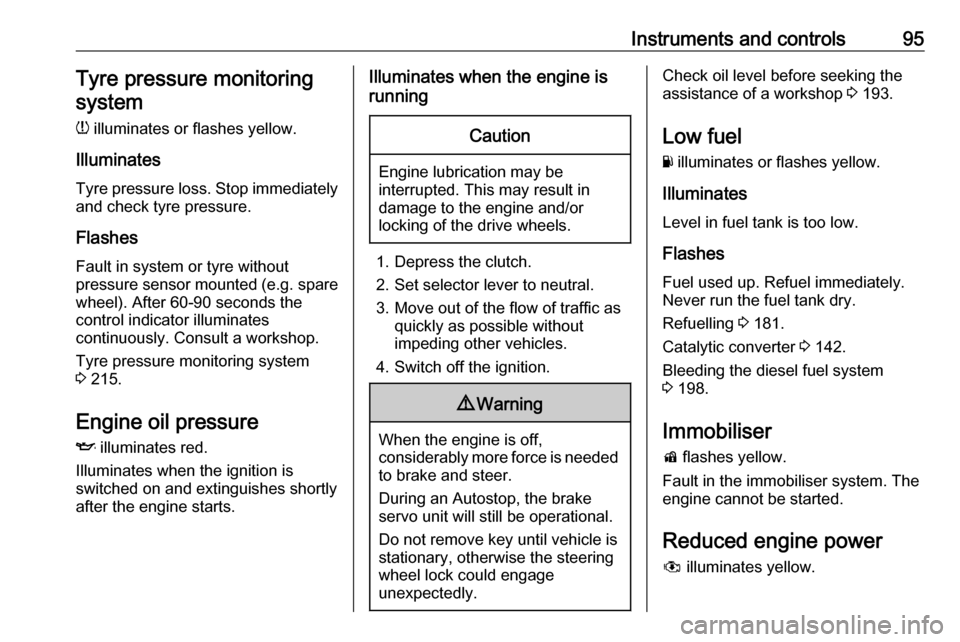
w illuminates or flashes yellow.
Illuminates
Tyre pressure loss. Stop immediately
and check tyre pressure.
Flashes
Fault in system or tyre without pressure sensor mounted ( e.g. spare
wheel). After 60-90 seconds the
control indicator illuminates
continuously. Consult a workshop.
Tyre pressure monitoring system
3 215.
Engine oil pressure
I illuminates red.
Illuminates when the ignition is
switched on and extinguishes shortly
after the engine starts.Illuminates when the engine is
runningCaution
Engine lubrication may be
interrupted. This may result in
damage to the engine and/or
locking of the drive wheels.
1. Depress the clutch.
2. Set selector lever to neutral.
3. Move out of the flow of traffic as quickly as possible without
impeding other vehicles.
4. Switch off the ignition.
9 Warning
When the engine is off,
considerably more force is needed
to brake and steer.
During an Autostop, the brake
servo unit will still be operational.
Do not remove key until vehicle is stationary, otherwise the steeringwheel lock could engage
unexpectedly.
Check oil level before seeking the
assistance of a workshop 3 193.
Low fuel
Y illuminates or flashes yellow.
Illuminates
Level in fuel tank is too low.
Flashes
Fuel used up. Refuel immediately.
Never run the fuel tank dry.
Refuelling 3 181.
Catalytic converter 3 142.
Bleeding the diesel fuel system
3 198.
Immobiliser d flashes yellow.
Fault in the immobiliser system. The
engine cannot be started.
Reduced engine power
# illuminates yellow.
Page 105 of 271
Instruments and controls103Vehicle messages
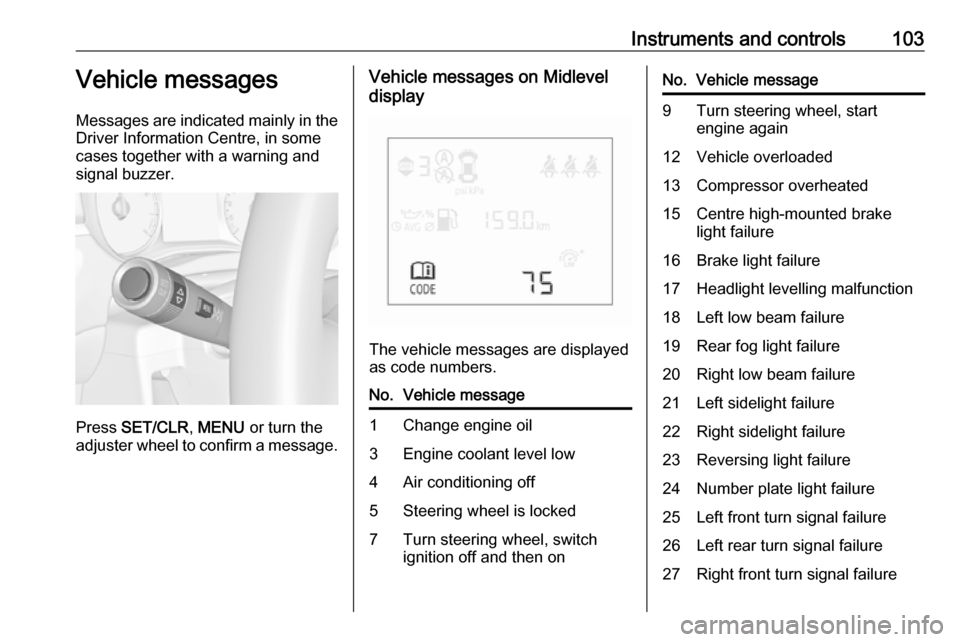
Messages are indicated mainly in the
Driver Information Centre, in some
cases together with a warning and
signal buzzer.
Press SET/CLR , MENU or turn the
adjuster wheel to confirm a message.
Vehicle messages on Midlevel
display
The vehicle messages are displayed
as code numbers.
No.Vehicle message1Change engine oil3Engine coolant level low4Air conditioning off5Steering wheel is locked7Turn steering wheel, switch
ignition off and then onNo.Vehicle message9Turn steering wheel, start
engine again12Vehicle overloaded13Compressor overheated15Centre high-mounted brake
light failure16Brake light failure17Headlight levelling malfunction18Left low beam failure19Rear fog light failure20Right low beam failure21Left sidelight failure22Right sidelight failure23Reversing light failure24Number plate light failure25Left front turn signal failure26Left rear turn signal failure27Right front turn signal failure
Page 109 of 271

Instruments and controls107Duration upon exit of vehicle:
Activates or deactivates and
changes the duration of exit
lighting.
● Power door locks
Auto door lock : Activates or
deactivates the automatic door
locking function after switching on ignition.
Stop door lock if door open :
Activates or deactivates the door locking function while a door isopen.
Delayed door lock : Activates or
deactivates the delayed door
locking function. This menu
option is displayed with Stop door
lock if door open deactivated.
Central locking system 3 22.
● Remote locking, unlocking,
starting
Remote unlock feedback :
Activates or deactivates the
hazard warning flasher feedback
whilst unlocking.
Passive door unlock : Changes
the configuration to unlock onlythe driver's door or the whole
vehicle whilst unlocking.
Auto relock doors : Activates or
deactivates the automatic relock
function after unlocking without
opening the vehicle.
● Restore factory settings :
Resets all settings to the default settings.
Personal settings Colour-Info-Display
Press ;, select Settings and then
Vehicle on the touch-screen.In the corresponding submenus the
following settings can be changed:
Vehicle ● Climate & Air Quality
Auto Fan Max Speed : Modifies
the level of the cabin airflow of the climate control in automatic
mode.
Auto Heated Seats :
Automatically activates the seat
heating.
Auto Defog : Supports
windscreen dehumidification by
automatically selecting the
necessary settings and
automatic air conditioning mode.
Auto Rear Defog : Automatically
activates heated rear window.
● Collision / Detection Systems
Forward Collision Alert : Activates
or deactivates forward collision
alert.
Auto Collision Preparation :
Activates or deactivates the
automatic brake functionality of
the vehicle in the event of
imminent collision danger. The
Page 110 of 271

108Instruments and controlsfollowing is selectable: the
system will take over brake
control, warn by chimes only or is
deactivated completely.
Forward Collision System :
Changes the settings of forward collision alert.
Park Assist : Activates or
deactivates the ultrasonic
parking assist. Activation is
selectable with or without
attached trailer coupling.
Go Notifier : Activates or
deactivates the reminder to drive
off when the adaptive cruise
control holds the vehicle at
standstill.
Side Blind Zone Alert : Activates
or deactivates side blind zone
alert.
● Comfort and Convenience
Auto Memory Recall : Changes
the settings to the recall of
memorised settings for power
seat adjustment.
Easy Exit Driver Seat : Activates
or deactivates easy exit function
of the power seat.Chime Volume : Changes the
volume of warning chimes.
Personalization By Driver :
Activates or deactivates the
personalisation function.
Rain Sense Wipers : Activates or
deactivates automatic wiping with rain sensor.
Auto Wipe in Reverse Gear :
Activates or deactivates
automatic switching on of the
rear window wiper when reverse gear is engaged.
● Lighting
Vehicle Locator Lights : Activates
or deactivates the entry lighting.
Exit Lighting : Activates or
deactivates and changes the
duration of exit lighting.
Left or Right Hand Traffic :
Changes between lighting for left or right-hand traffic.
Adaptive Forward Lighting :
Changes the settings of the
functions of the LED headlights.● Power Door Locks
Unlocked Door Anti Lock Out :
Activates or deactivates the door
locking function while a door is
open.
Auto Door Lock : Activates or
deactivates the automatic door
locking function after switching
on ignition.
Delayed Door Lock : Activates or
deactivates the delayed door
locking function. This feature
delays the actual locking of the
doors until all doors are closed.
● Remote Lock, Unlock, Start
Remote Unlock Light Feedback :
Activates or deactivates the
hazard warning flasher feedback whilst unlocking.
Remote Lock Feedback :
Changes what kind of feedback
is given when locking the vehicle.
Remote Door Unlock : Changes
the configuration to unlock only
the driver's door or the whole
vehicle whilst unlocking.
Relock Remotely Unlocked
Doors : Activates or deactivates
Page 111 of 271

Instruments and controls109the automatic relock function
after unlocking without opening
the vehicle.
Remote Window Operation :
Activates or deactivates the
operation of power windows with
remote control.
Passive Door Unlock : Changes
the configuration to unlock only
the driver's door or the whole
vehicle whilst unlocking.
Passive Door Lock : Activates or
deactivates the passive locking
function. This feature locks the
vehicle automatically after
several seconds if all doors have been closed and an electronic
key has been removed from the
vehicle.
Remote Left in Vehicle Alert :
Activates or deactivates the
warning chime when the
electronic key remains in the
vehicle.Telematics service
OnStar
OnStar is a personal connectivity and service assistant with integrated
Wi-Fi hotspot. The OnStar service is
available 24 hours a day, seven days
a week.
Notice
OnStar is not available for all
markets. For further information,
contact your workshop.
Notice
In order to be available and
operational, OnStar needs a valid
OnStar subscription, functioning
vehicle electrics, mobile service and
GPS satellite link.
To activate the OnStar services and
set up an account, press Z and speak
with an advisor.Depending on the equipment of the
vehicle, the following services are available:
● Emergency services and support
in the case of a vehicle
breakdown
● Wi-Fi hotspot
● Smartphone application
● Remote control, e.g. location of the vehicle, activation of horn and
lights, control of central locking system
● Stolen vehicle assistance
● Vehicle diagnostics
● Destination download
Notice
The OnStar module of the vehicle is deactivated after ten days without an
ignition cycle. Functions requiring a
data connection will be available
again after switching on the ignition.
Page 117 of 271

Lighting115Light switch with automatic light
control
Turn light switch:
AUTO:automatic light control:
headlights are switched on
and off automatically
depending on external
lighting conditionsm:activation or deactivation of
the automatic light control.
Switch turns back to AUTO8:sidelights9:headlightsA status message in the Driver
Information Centre indicates the
current status of the automatic light
control.
When switching on the ignition,
automatic light control is active.
When headlights are on, 8
illuminates. Control indicator 8
3 96.
Tail lights
Tail lights are illuminated together
with headlights and sidelights.
Automatic light controlWhen the automatic light control
function is switched on and the
engine is running, the system
switches between daytime running
light and headlights automatically
depending on the lighting conditions
and information given by the rain
sensor system.
Daytime running light 3 117.
Automatic headlight activation During poor lighting conditions the
headlights are switched on.
Furthermore the headlights are
switched on if the windscreen wipers
have been activated for several
wipes.
Tunnel detection When a tunnel is entered, the
headlights are switched on
immediately.
Page 119 of 271

Lighting117set to right-hand traffic mode.
Therefore, insert the key in the guide as shown in the illustration.
Alternatively, a Phillips head
screwdriver size three can be used for
setting.
To reset to left-hand traffic mode, turn
adjuster elements 1
/2 turn clockwise.
Daytime running lights Daytime running light increases
visibility of the vehicle during daylight.
They are switched on automatically
when ignition is on.
Versions with automatic light control
The system switches automatically
between daytime running light and
headlights, depending on the lighting
conditions and information given by
the rain sensor system. Automatic
light control 3 115.Xenon lighting system
Xenon lighting system includes: ● xenon headlights for low and high
beam
● high beam assist
● corner lighting
● reversing function
Xenon headlights Xenon headlights for low and high
beam ensure better visibility under all
conditions.
Operation is the same as for halogen headlights.
Light switch 3 114 , high beam 3 116,
headlight flash 3 116 , headlight range
adjustment 3 116, headlights when
driving abroad 3 116.
Automatic light control 3 115.
High beam assist This feature allows high beam xenon
lights to function as the main driving
light at night and when vehicle speed
exceeds 25 mph.It switches automatically to low beam when:
● The camera in the windscreen detects the lights of oncoming or
preceding vehicles.
● The vehicle speed drops below 12 mph.
● It is foggy or snowy.
● Driving in urban areas.
If there are no restrictions detected,
the system switches back to high
beam.
Activation
Page 120 of 271

118LightingThe high beam assist is activated by
pushing the indicator lever twice at a
speed above 25 mph.
The green control indicator f
illuminates continuously when the
assist is activated, the blue one 7
illuminates when high beam is on.
Control indicator f 3 96.
Deactivation
Push indicator lever once. It is also
deactivated when front fog lights are
switched on.
If a headlight flash is activated when
the high beam is on, the high beam
assist will be deactivated.
If a headlight flash is activated when
the high beam is off, the high beam
assist will remain activated.
The latest setting of the high beam
assist will remain after the ignition is
switched on again.Corner lighting
On tight bends or when turning off,
depending on the steering angle or
the indicator light signal, an additional left or right reflector is switched on
which illuminates the road in the
direction of travel. It is activated up to
a speed of 25 mph.
Reversing function To assist driver's orientation when
parking, both corner lights and
reversing light illuminate when
headlights are on and reverse gear is engaged. They remain illuminated for
a short time after disengaging reverse gear or until driving faster than
4 mph in a forward gear.
Hazard warning flashers
Operated by pressing ¨.
In the event of an accident with airbag
deployment, the hazard warning
flashers are activated automatically.
Page 122 of 271

120LightingParking lights
When the vehicle is parked, the
parking lights on one side can be
activated:
1. Switch off the ignition.
2. Move the turn signal lever all the way up (right parking lights) or
down (left parking lights).
Confirmed by an acoustic signal and
the corresponding turn signal control
indicator.
Reversing lights
The reversing light comes on when
the ignition is on and reverse gear is
selected.
Misted light covers
The inside of the light housing may
mist up briefly in poor, wet and cold weather conditions, in heavy rain or
after washing. The mist disappears
quickly by itself; to help switch on the
headlights.Interior lighting
Instrument panel illumination control
Brightness of the following lights can
be adjusted when the exterior lights
are on:
● instrument panel illumination
● dome light
● Info-Display
● illuminated switches and operation elements
Turn thumb wheel A and hold until
the desired brightness is obtained.