abs VAUXHALL CORSA F 2018 Owner's Manual
[x] Cancel search | Manufacturer: VAUXHALL, Model Year: 2018, Model line: CORSA F, Model: VAUXHALL CORSA F 2018Pages: 271, PDF Size: 7.86 MB
Page 76 of 271

74Instruments and controlsInstruments and
controlsControls ....................................... 75
Steering wheel adjustment ........75
Steering wheel controls .............75
Heated steering wheel ...............75
Horn ........................................... 76
Windscreen wiper/washer .........76
Rear window wiper/washer .......77
Outside temperature ..................78
Clock ......................................... 79
Power outlets ............................. 80
Inductive charging .....................81
Cigarette lighter ......................... 82
Ashtrays .................................... 82
Warning lights, gauges and indi‐ cators ........................................... 83
Instrument cluster ......................83
Speedometer ............................. 83
Odometer .................................. 83
Trip odometer ............................ 83
Tachometer ............................... 84
Fuel gauge ................................ 84
Fuel selector .............................. 85
Engine coolant temperature gauge ....................................... 86Service display.......................... 87
Control indicators ......................88
Turn signal ................................. 90
Seat belt reminder .....................91
Airbag and belt tensioners .........91
Airbag deactivation ....................92
Charging system .......................92
Malfunction indicator light ..........92
Service vehicle soon .................92
Brake and clutch system ...........93
Operate pedal ............................ 93
Antilock brake system (ABS) .....93
Gear shifting .............................. 93
Power steering .......................... 93
Lane departure warning ............93
Ultrasonic parking assist ...........94
Electronic Stability Control off ...94
Electronic Stability Control and Traction Control system ...........94
Traction Control system off .......94
Preheating ................................. 94
Diesel particle filter ....................94
Tyre pressure monitoring system ...................................... 95
Engine oil pressure ....................95
Low fuel ..................................... 95
Immobiliser ................................ 95
Reduced engine power .............95
Autostop .................................... 96
Exterior light .............................. 96High beam................................. 96
High beam assist .......................96
Fog light ..................................... 96
Rear fog light ............................. 96
Cruise control ............................ 96
Vehicle detected ahead .............96
Speed limiter ............................. 96
Traffic sign assistant ..................96
Door open .................................. 96
Information displays .....................97
Driver Information Centre ..........97
Colour-Info-Display ..................101
Graphic-Info-Display ................102
Vehicle messages ......................103
Warning chimes .......................105
Battery voltage ........................ 105
Vehicle personalisation ..............106
Telematics service .....................109
OnStar ..................................... 109
Page 92 of 271
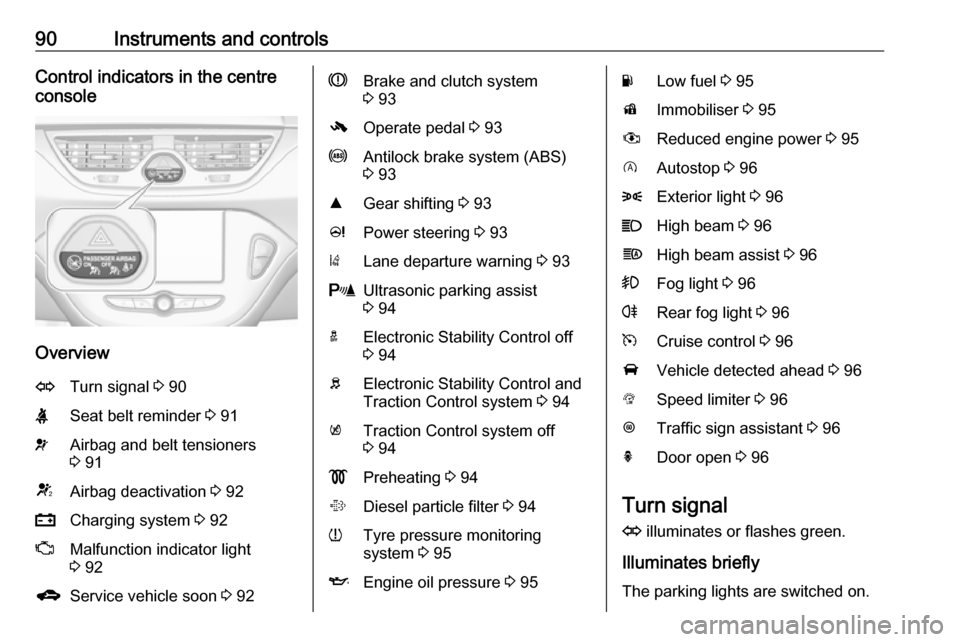
90Instruments and controlsControl indicators in the centre
console
Overview
OTurn signal 3 90XSeat belt reminder 3 91vAirbag and belt tensioners
3 91VAirbag deactivation 3 92pCharging system 3 92ZMalfunction indicator light
3 92gService vehicle soon 3 92RBrake and clutch system
3 93-Operate pedal 3 93uAntilock brake system (ABS)
3 93RGear shifting 3 93cPower steering 3 93)Lane departure warning 3 93rUltrasonic parking assist
3 94aElectronic Stability Control off
3 94bElectronic Stability Control and
Traction Control system 3 94kTraction Control system off
3 94!Preheating 3 94%Diesel particle filter 3 94wTyre pressure monitoring
system 3 95IEngine oil pressure 3 95YLow fuel 3 95dImmobiliser 3 95#Reduced engine power 3 95DAutostop 3 968Exterior light 3 96CHigh beam 3 96fHigh beam assist 3 96>Fog light 3 96rRear fog light 3 96mCruise control 3 96AVehicle detected ahead 3 96LSpeed limiter 3 96LTraffic sign assistant 3 96hDoor open 3 96
Turn signal
O illuminates or flashes green.
Illuminates briefly
The parking lights are switched on.
Page 95 of 271

Instruments and controls93Brake and clutch systemR illuminates red.
The brake and clutch fluid level is too low, when manual parking brake is
not applied 3 196.9 Warning
Stop. Do not continue your
journey. Consult a workshop.
Illuminates when the manual parking
brake is applied and ignition is
switched on 3 151.
Operate pedal - illuminates or flashes yellow.
Illuminates
Clutch pedal must be depressed to
start the engine in Autostop mode.
Stop-start system 3 137.
Flashes
Clutch pedal must to be depressed to start the engine with the key 3 17,
3 136.
On some versions, the Driver
Information Display indicates a
message to operate the clutch pedal
3 103.
Antilock brake system
(ABS)
u illuminates yellow.
Illuminates for a few seconds after the ignition is switched on. The system is
ready for operation when the control
indicator extinguishes.
If the control indicator does not go out after a few seconds, or if it illuminates while driving, there is a fault in the
ABS. The brake system remains
operational but without ABS
regulation.
Antilock brake system 3 150.
Gear shifting R with the number of a higher gear is
indicated, when upshifting is
recommended for fuel saving
reasons.Power steering
c illuminates yellow.
Illuminates with power steering disabled
Failure in the power steering system.
Consult a workshop.
Illumination of c and b
simultaneously
Power steering system must be
calibrated, system calibration 3 154.
Lane departure warning
) illuminates green or flashes yellow.
Illuminates green
System is switched on and ready to
operate.
Flashes yellow
System recognises an unintended
lane change.
Lane departure warning 3 178.
Page 99 of 271

Instruments and controls97Information displays
Driver Information Centre
The Driver Information Centre is
located in the instrument cluster.
Depending on the version and
equipment, the Driver Information
Centre is available as Midlevel
display or Uplevel display.
The following menus are selectable in
the Driver Information Centre using
the buttons on the turn signal lever:
● vehicle information and settings
● trip/fuel information
● economic information
The following indications appear if
required:
● warning messages 3 103
● gear shift indication 3 93
● drive mode indication 3 142,
3 147
● tyre pressure warning 3 215
● seat belt reminder indication 3 91● Autostop indication 3 137
● service information 3 92
Midlevel display
Main menus are: ● trip/fuel information, see description below
● vehicle information, see description below
Some of the displayed functions differ
when the vehicle is being driven or at a standstill. Some functions are only
available when the vehicle is being
driven.
Uplevel display
Main menus are:
● trip/fuel information menu, displayed by ;, see
description below
● vehicle information menu, displayed by ?, see
description below
● eco information menu, displayed by @ , see description below
Notice
Some systems override the main
menu tabs. The currently active tab
is indicated by a small arrow head.
Page 114 of 271

112Instruments and controlsDiagnostic report
The vehicle automatically transmits
diagnostic data to OnStar which
sends a monthly email report to you
and your preferred workshop.
Notice
The workshop notification function
can be disabled in your account.
The report contains the status of key
operating systems of the vehicle like
engine, transmission, airbags, ABS,
and other major systems. It also
provides information on possible
maintenance items and tyre pressure (only with tyre pressure monitoring
system).
To look at the information in greater
detail, select the link within the email and log in to your account.
Destination download
A desired destination can be directly
downloaded to the navigation system.
Press Z to call an advisor and
describe the destination or point of
interest.The advisor can look up any address
or point of interest and directly send
the destination to the built-in
navigation system.
OnStar settings
OnStar PIN
To have full access to all OnStar
services, a four-digit PIN is required. The PIN has to be personalised when first talking to an advisor.
To change the PIN, press Z to call an
advisor.
Account data
An OnStar subscriber has an account
where all the data is stored. To
request a change of the account
information, press Z and talk to an
advisor or log in to your account.
If the OnStar service is used on
another vehicle, press Z and request
that the account be transferred to the
new vehicle.Notice
In any case, if the vehicle is disposed of, sold or otherwise transferred,
immediately inform OnStar about
the changes and terminate the
OnStar service on this vehicle.
Vehicle location
The vehicle location is transmitted to OnStar when service is requested ortriggered. A message on the Info-
Display informs about this
transmission.
To activate or deactivate the
transmission of the vehicle location,
press and hold j until an audio
message is heard.
The deactivation is indicated by the
status light flashing red and green for a short period of time and each time
the vehicle is started.
Notice
If the transmission of the vehicle
location is deactivated, some
services are no longer available.
Page 152 of 271

150Driving and operatingIn the event of a fault, control indicatorg illuminates. Additionally, a
warning message is displayed in the
Driver Information Centre. Vehicle
messages 3 103.
Continued driving is restricted or not possible, depending on the fault.
Have the cause of the fault remedied
by a workshop.Brakes
The brake system comprises two
independent brake circuits.
If a brake circuit fails, the vehicle can
still be braked using the other brake
circuit. However, braking effect is
achieved only when the brake pedal
is depressed firmly. Considerably
more force is needed for this. The braking distance is extended. Seek
the assistance of a workshop before
continuing the journey.
When the engine is not running, the
support of the brake servo unit
disappears once the brake pedal has been depressed once or twice.
Braking effect is not reduced, but
braking requires significantly greater
force. It is especially important to bear this in mind when being towed.
Control indicator R 3 93.
Antilock brake system
Antilock brake system (ABS)
prevents the wheels from locking.ABS starts to regulate brake pressure as soon as a wheel shows a tendency to lock. The vehicle remains
steerable, even during hard braking.
ABS control is made apparent
through a pulse in the brake pedal
and the noise of the regulation
process.
For optimum braking, keep the brake
pedal fully depressed throughout the
braking process, despite the fact that
the pedal is pulsating. Do not reduce
the pressure on the pedal.
After starting-off the system performs
a self-test which may be audible.
Control indicator u 3 93.
Adaptive brake light
During full braking, all three brake
lights flash for the duration of ABS
control.
Page 153 of 271
Driving and operating151Fault9Warning
If there is a fault in the ABS, the
wheels may be liable to lock due
to braking that is heavier than
normal. The advantages of ABS are no longer available. During
hard braking, the vehicle can no longer be steered and may
swerve.
Have the cause of the fault remedied
by a workshop.
Parking brake
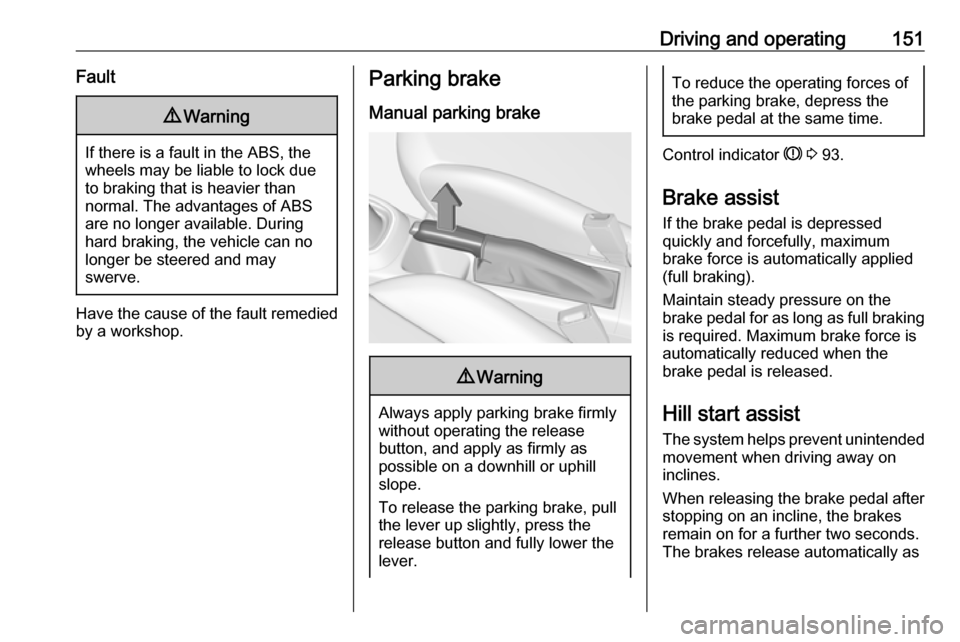
Manual parking brake9 Warning
Always apply parking brake firmly
without operating the release
button, and apply as firmly as
possible on a downhill or uphill
slope.
To release the parking brake, pull
the lever up slightly, press the
release button and fully lower the
lever.
To reduce the operating forces of
the parking brake, depress the
brake pedal at the same time.
Control indicator R 3 93.
Brake assist
If the brake pedal is depressed
quickly and forcefully, maximum
brake force is automatically applied
(full braking).
Maintain steady pressure on the
brake pedal for as long as full braking is required. Maximum brake force is
automatically reduced when the
brake pedal is released.
Hill start assist
The system helps prevent unintended movement when driving away on
inclines.
When releasing the brake pedal after
stopping on an incline, the brakes
remain on for a further two seconds.
The brakes release automatically as
Page 210 of 271

208Vehicle careEngine compartment fuse
box
The fuse box is in the front left of the
engine compartment.
Disengage the cover and fold it
upwards until it stops. Remove the
cover vertically upwards.
No.Circuit1Trailer interface module, rear
carrier system2-3Battery sensor4Chassis control module fuel
pump5ABS6Low beam and Daytime running
light left, Xenon high beam
shutter left and right7–8MTA Transmission control
module, LPG control module9Body control module voltage
detection10Headlamp levelling11Rear wiper12Heated rear window13Low beam and Daytime running
light right
Page 212 of 271

210Vehicle careNo.Circuit1ABS pump2Front wiper3Blower4Instrument panel5Cooling fan6Diesel fuel heater7Transmission8Cooling fan9Cooling fan10Cooling fan11Starter
After having changed defective fuses
close the fuse box cover and press
until it engages.
If the fuse box cover is not closed
correctly, malfunction may occur.
Instrument panel fuse box
The fuse box is located behind a
cover in the glovebox. Open the
glovebox, then open the cover and
fold it down.
Page 235 of 271

Vehicle care233
Screw in the towing eye as far as it will
go until it stops in a horizontal
position.
The lashing eye at the rear
underneath the vehicle must never be used as a towing eye.
Attach a tow rope – or even better a
tow bar – to the towing eye.
The towing eye must only be used for
towing and not for recovering a
vehicle.
Caution
Drive slowly. Do not drive jerkily.
Excessive tractive force can
damage the vehicle.
After towing, unscrew the towing eye.
Insert cap at the top and engage
downwards.
Appearance care
Exterior care Locks
The locks are lubricated at the factory using a high quality lock cylinder
grease. Use a de-icing agent only
when absolutely necessary, as this
has a degreasing effect and impairs
lock function. After using a de-icing
agent, have the locks regreased by a workshop.
Washing
The paintwork of your vehicle is
exposed to environmental influences. Wash and wax your vehicle regularly.
When using automatic vehicle
washes, select a programme that
includes waxing. Restrictions for
filmed or matt painted body parts or
decor tapes, see "Polishing and
waxing".
Bird droppings, dead insects, resin,
pollen and the like should be cleaned
off immediately, as they contain
aggressive constituents which can
cause paint damage.