reset VAUXHALL CROSSLAND X 2017.75 User Guide
[x] Cancel search | Manufacturer: VAUXHALL, Model Year: 2017.75, Model line: CROSSLAND X, Model: VAUXHALL CROSSLAND X 2017.75Pages: 245, PDF Size: 7.38 MB
Page 152 of 245

150Driving and operatingPress MEM on the steering wheel to
request saving of the suggested
speed.
Press MEM on the steering wheel
once more to confirm and save the
new speed setting.
This speed is the new value for the
speed limiter.
This function can be deactivated or activated in the personalisation
menu, 3 99.
Exceeding the speed limit
In the event of an emergency, it is possible to exceed the speed limit by
a "kickdown". In this case the preset
speed value flashes.
Release the accelerator pedal and
the speed limiter function is
reactivated once a speed lower than
the limit speed is obtained.
Deactivation Press Ñ: speed limiter is in pause
mode, Pause is indicated. The
vehicle is driven without speed limit.Speed limiter is deactivated, but not
switched off. Last stored speed
remains in memory for later speed
resume.
Resume limit speed Press Ñ. The stored speed limit will
be obtained.
Switching off
Press ß, the speed limiter mode is
deselected and the speed limit
indication extinguishes in the Driver
Information Centre.
Pressing m to activate cruise control
deactivates speed limiter.
The preset speed remains in the
memory when the ignition is switched
off.
Fault
In the event of a speed limiter fault,
the speed is cleared resulting in
flashing of the dashes.
The speed limiter may not operate correctly if traffic signs do not comply with the Vienna Convention on RoadSigns and Signals (Wiener
Übereinkommen über
Straßenverkehrszeichen).
Parking assist
General information
When attaching a trailer or bike
carrier to the trailer hitch, the parking
assist is deactivated.9 Warning
The driver bears full responsibility
for the parking manoeuvre.
Always check the surrounding
area when driving backwards or
forwards while using parking
assist system.
Rear parking assist
The rear parking assist makes
parking easier by measuring the
distance between the vehicle and
rear obstacles. It informs and warns
the driver by giving acoustic signals
and display indication.
Page 167 of 245

Driving and operating165The system can not operate when no
lane marking is detected.
System limitations The system performance may not
operate properly when:
● Vehicle speed is below 37 mph.
● Driving on winding or hilly roads.
● During nighttime driving.
● Weather limits visibility, such as fog, rain, or snow.
● The sensor in the windscreen is blocked by snow, ice, slush, mud,dirt, windscreen damage or
affected by foreign items, e.g.
stickers.
● The sun is shining directly into the camera lens.
● Close vehicles ahead.
● Banked roads.
● Road edges.
● Roads with poor lane markings.
● Sudden lighting changes.Driver alert
Driver alert monitores the driving time above a vehicle speed of 65 km/h.
It is recommended to take a break as soon as feeling tired or at least every
two hours.
The system includes a driving time
alert.
Driving time alert
The driver gets notified by a pop-up
reminder symbol ˇ in the Driver
Information Centre simultaneously with a sound alert if the driver has not taken a break after two hours of
driving at a speed above 65 km/h. The
alert is repeated hourly until the
vehicle is stopped, no matter how
vehicle speed evolves.
The counting of driving time alert is
reset when the ignition has been
switched off for a few minutes.
Deactivation or activation The system can be deactivated or
activated in the personalisation menu
3 99.Driver drowsiness detection alert is
reset when the ignition has been
switched off for a few minutes.
Page 199 of 245
Vehicle care197If a tyre loses pressure the control
indicator w illuminates and a warning
message is displayed in the Driver
Information Centre.
In this case reduce speed, avoid
sharp cornering and strong braking.
Stop at next safe opportunity and
check tyre pressure.
Control indicator w 3 90.
After adjusting tyre pressure initialise
system to extinguish the control
indicator and restart system.Caution
Deflation detection system warns
just about low tyre pressure
condition and does not replace
regular tyre maintenance by the
driver.
In case of a system malfunction a
message is displayed in the Driver
Information Centre. Set correct tyre
pressure and reinitialise system. If the
failure continues to be displayed,
contact a workshop. The system is
inoperable when ABS or ESC has a
malfunction or a temporary spare
wheel is used. Once the road tyre has
been refitted, check the tyre pressure with cold tyres and initialise the
system.
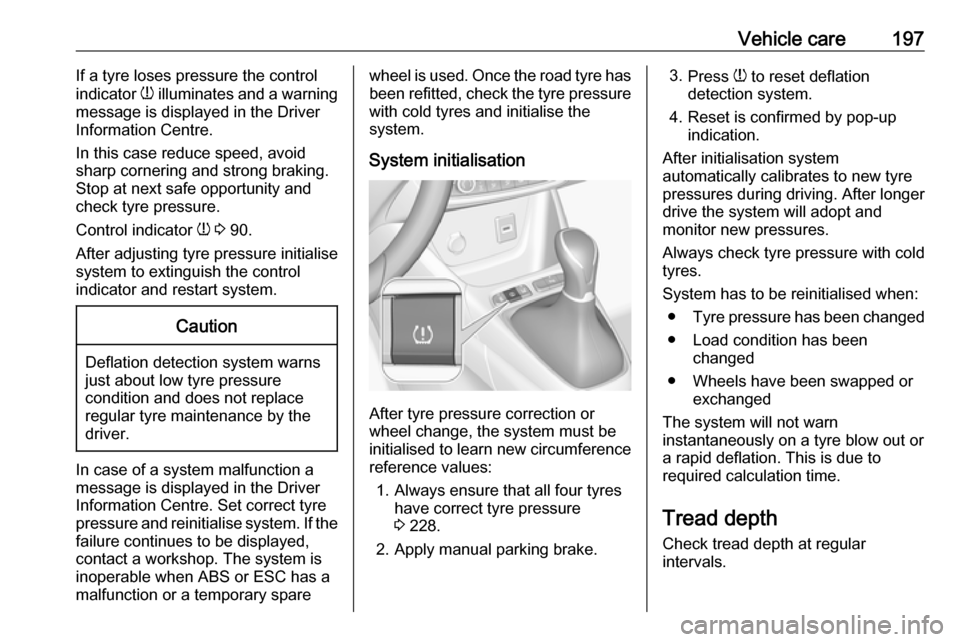
System initialisation
After tyre pressure correction or
wheel change, the system must be
initialised to learn new circumference reference values:
1. Always ensure that all four tyres have correct tyre pressure3 228.
2. Apply manual parking brake.
3. Press w to reset deflation
detection system.
4. Reset is confirmed by pop-up indication.
After initialisation system
automatically calibrates to new tyre
pressures during driving. After longer
drive the system will adopt and
monitor new pressures.
Always check tyre pressure with cold
tyres.
System has to be reinitialised when: ● Tyre pressure has been changed
● Load condition has been changed
● Wheels have been swapped or exchanged
The system will not warn instantaneously on a tyre blow out or
a rapid deflation. This is due to
required calculation time.
Tread depthCheck tread depth at regular
intervals.