Rear camera VAUXHALL CROSSLAND X 2018 Owner's Manual
[x] Cancel search | Manufacturer: VAUXHALL, Model Year: 2018, Model line: CROSSLAND X, Model: VAUXHALL CROSSLAND X 2018Pages: 255, PDF Size: 7.57 MB
Page 99 of 255

Instruments and controls97When the level in the fuel tank is low,
a message appears on the display
and the control indicator o in the fuel
gauge illuminates 3 94.
Instantaneous Fuel Consumption
Display of the instantaneous
consumption.
Trip 1 page:
Average speed
Display of average speed. The
measurement can be reset at any
time.
Average fuel consumption
Display of average consumption. The measurement can be reset at any
time and starts with a default value.
Distance travelled
Displays the current distance for trip
1 since the reset.
The values of trip 1 page can be reset
by pressing SET/CLR for a few
seconds.
Trip 2 page:
Average speedDisplay of average speed. The
measurement can be reset at any
time.
Average fuel consumption
Display of average consumption. The measurement can be reset at any
time and starts with a default value.
Distance travelled
Displays the current distance for trip
2 since a certain reset.
The values of trip 2 page can be reset
by pressing SET/CLR for a few
seconds.
Digital speed page
Digital display of the instantaneous
speed.
Stop and Start time counter
A time counter calculates the time
spent in STOP mode during a
journey. It resets to zero every time
the ignition is switched on.
Compass page
Displays the geographic direction of
driving.Blank page
No trip/fuel information is displayed.
Info display
The Info-Display is located in the
instrument panel near the instrument
cluster.
Depending on the vehicle
configuration the vehicle has a
● Graphic-Info-Display
or
● 7'' Colour-Info-Display with
touchscreen functionality
or
● 8'' Colour-Info-Display with
touchscreen functionality
The Info displays can indicate: ● time 3 78
● outside temperature 3 77
● date 3 78
● Infotainment system, see description in the Infotainment
manual
● indication of rear view camera 3 172
Page 105 of 255
Instruments and controls103Rear wiper in reverse gear:
Activation/Deactivation.
● Vehicle
Unlocking boot only : Activation/
Deactivation.
Plip action : Driver/all doors.
● Driving assistance
Fatigue Detection system :
Activation/Deactivation.
Speed recommendation :
Activation/Deactivation.
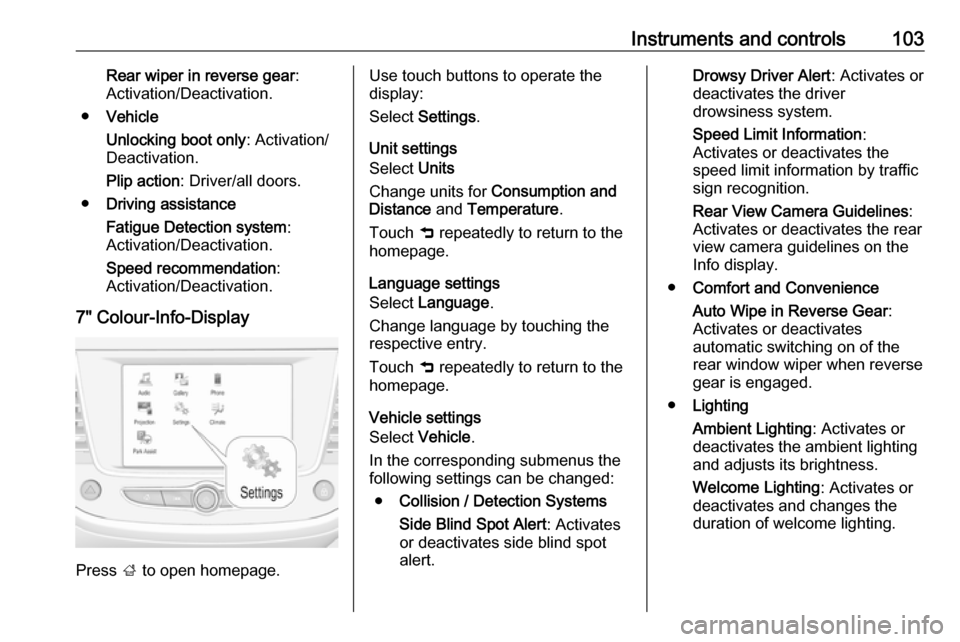
7" Colour-Info-Display
Press ; to open homepage.
Use touch buttons to operate the
display:
Select Settings .
Unit settings
Select Units
Change units for Consumption and
Distance and Temperature .
Touch 9 repeatedly to return to the
homepage.
Language settings
Select Language .
Change language by touching the respective entry.
Touch 9 repeatedly to return to the
homepage.
Vehicle settings
Select Vehicle .
In the corresponding submenus the
following settings can be changed:
● Collision / Detection Systems
Side Blind Spot Alert : Activates
or deactivates side blind spot
alert.Drowsy Driver Alert : Activates or
deactivates the driver
drowsiness system.
Speed Limit Information :
Activates or deactivates the
speed limit information by traffic
sign recognition.
Rear View Camera Guidelines :
Activates or deactivates the rear
view camera guidelines on the
Info display.
● Comfort and Convenience
Auto Wipe in Reverse Gear :
Activates or deactivates
automatic switching on of the
rear window wiper when reverse
gear is engaged.
● Lighting
Ambient Lighting : Activates or
deactivates the ambient lighting
and adjusts its brightness.
Welcome Lighting : Activates or
deactivates and changes the
duration of welcome lighting.
Page 133 of 255

Driving and operating131Driving and
operatingDriving hints ............................... 132
Control of the vehicle ...............132
Steering ................................... 132
Starting and operating ...............132
New vehicle running-in ............132
Ignition switch positions ...........132
Power button ........................... 133
Power saving mode .................134
Starting the engine ..................135
Overrun cut-off ........................ 136
Stop-start system ....................137
Parking .................................... 139
Engine exhaust .......................... 140
Diesel particle filter ..................140
Catalytic converter ...................140
AdBlue ..................................... 141
Automatic transmission ..............144
Transmission display ...............144
Selector lever .......................... 144
Manual mode ........................... 145
Electronic driving programmes 145
Fault ........................................ 146
Interruption of power supply ....146Manual transmission ..................147
Brakes ........................................ 148
Antilock brake system .............148
Parking brake .......................... 148
Brake assist ............................. 149
Hill start assist ......................... 149
Ride control systems .................149
Electronic Stability Control and Traction Control system .........149
Driver assistance systems .........151
Cruise control .......................... 151
Speed limiter ........................... 153
Forward collision alert .............155
Active emergency braking .......156
Front pedestrian protection .....158
Parking assist .......................... 160
Advanced parking assist .........163
Side blind spot alert .................168
Panoramic view system ...........169
Rear view camera ...................172
Lane departure warning ..........173
Driver alert ............................... 175
Fuel ............................................ 176
Fuel for petrol engines .............176
Fuel for diesel engines ............177
Fuel for liquid gas operation ....177
Refuelling ................................ 178Trailer hitch................................ 180
General information .................180
Driving characteristics and towing tips .............................. 180
Trailer towing ........................... 180
Towing equipment ...................181
Page 171 of 255

Driving and operating169The LED comes on after a delay when
passing another vehicle slowly.
Operation conditions
The following conditions must be
fullfilled for proper operation:
● All vehicles are moving in the same direction and in adjacent
lanes.
● The speed of your vehicle is between 7 and 87 mph.
● Passing a vehicle with a speed difference of less than 6 mph.
● Another vehicle is passing with a
speed difference of less than 15
mph.
● The traffic flow is normal.
● Driving on a straight or slightly curved road.
● The vehicle is not pulling a trailer.No alert will be given in the following
situations:
● In the presence of non-moving objects (parked vehicles,
barriers, street lamps, road
signs...).
● With vehicles moving in the opposite direction.
● Driving on a winding road or a sharp corner.
● When passing (or being passed by) a very long vehicle (lorry,
coach...) which is at the same
time detected at the rear in the
blind spot angle and present in
the driver's forward field of vision.
● In very heavy traffic: vehicles detected in front and behind are
confused with a lorry or a
stationary object.
● When passing too quickly.
Deactivation The system is deactivated in the
vehicle personalisation 3 102. B
extinguishes in the instrument cluster.
Additionally, an acoustic signal
soundsThe state of the system is stored
when switching off the ignition.
The system is automatically
deactivated when towing an
electrically connected trailer.
Fault
In the event of a fault, B flashes for a
few moments in the instrument panel, accompanied by F and a
display message. Contact a dealer or a qualified workshop to have the
system checked.
Panoramic view system This system allows views of the
vehicle's surroundings to be
displayed as a nearly 180° picture in
the Info display, like a bird's eye view.
The system uses: ● rear camera, installed in the tailgate
● ultrasonic parking sensors in the rear bumper
The screen in the Info display is
divided into two parts: on the right
there is a view from above the vehicle,
Page 173 of 255
Driving and operating171Auto mode
This mode is activated by default.
Using sensors in the rear bumper, the
automatic view changes from a rear
view to a view from above, as an
obstacle is approached during a
manoeuvre.
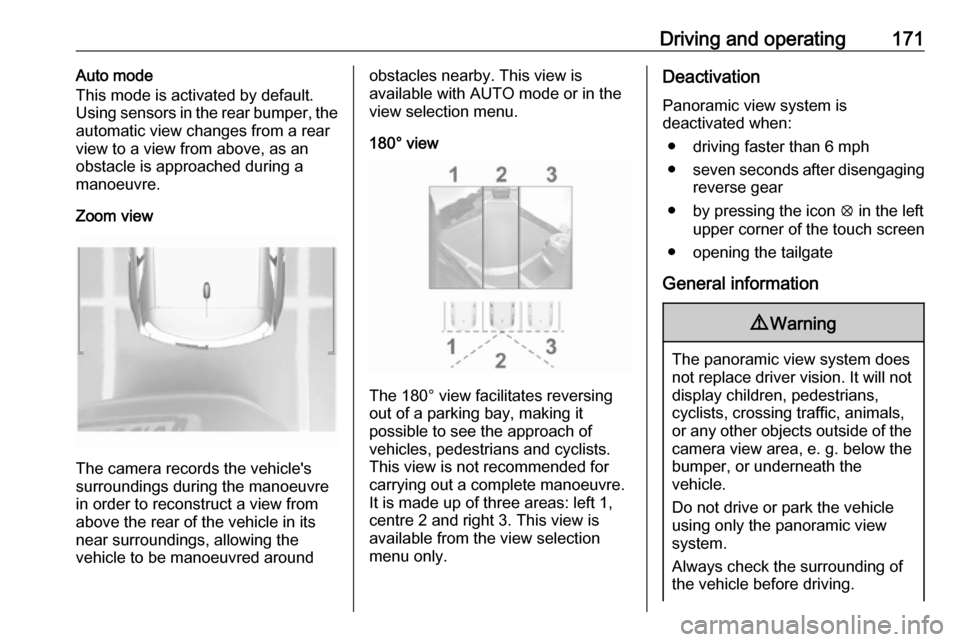
Zoom view
The camera records the vehicle's
surroundings during the manoeuvre in order to reconstruct a view fromabove the rear of the vehicle in its
near surroundings, allowing the
vehicle to be manoeuvred around
obstacles nearby. This view is
available with AUTO mode or in the
view selection menu.
180° view
The 180° view facilitates reversing
out of a parking bay, making it
possible to see the approach of
vehicles, pedestrians and cyclists.
This view is not recommended for
carrying out a complete manoeuvre.
It is made up of three areas: left 1,
centre 2 and right 3. This view is
available from the view selection menu only.
Deactivation
Panoramic view system is
deactivated when:
● driving faster than 6 mph
● seven seconds after disengaging
reverse gear
● by pressing the icon q in the left
upper corner of the touch screen
● opening the tailgate
General information9 Warning
The panoramic view system does
not replace driver vision. It will not display children, pedestrians,
cyclists, crossing traffic, animals,
or any other objects outside of the camera view area, e. g. below the
bumper, or underneath the
vehicle.
Do not drive or park the vehicle
using only the panoramic view
system.
Always check the surrounding of
the vehicle before driving.
Page 174 of 255
172Driving and operatingDisplayed images may be furtheror closer than they appear. The
area displayed is limited and
objects that are close to either
edge of the bumper or under the
bumper are not displayed on the
screen.
System limitations
Caution
For optimal operation of the
system, it is important to keep the
lense of the camera in the tailgate between the number plate lightsalways clean. Rinse the lense with water and wipe with a soft cloth.
Do not clean the lense with a
steam-jet or high-pressure jet
cleaner.
The panoramic view system may not
operate properly when:
● The surrounding is dark.
● The sun or the beam of headlights is shining directly into
the camera lenses.
● During nighttime driving.
● Weather limits visibility, such as fog, rain, or snow.
● The camera lenses are blocked by snow, ice, slush, mud, dirt.
● The vehicle is towing a trailer.
● The vehicle had an accident.
● There are extreme temperature changes.
Rear view camera The rear view camera assists the
driver when reversing by displaying a
view of the area behind the vehicle.
The view of the camera is displayed
in the Info-Display.9 Warning
The rear view camera does not
replace driver vision. Note that
objects that are outside the
camera's field of view and the
parking assist sensors, e.g. below
the bumper or underneath the
vehicle, are not displayed.
Do not reverse or park the vehicle
using only the rear view camera.
Always check the surrounding of
the vehicle before driving.
Switching on
Rear view camera is automatically
activated when reverse gear is
engaged.
Functionality
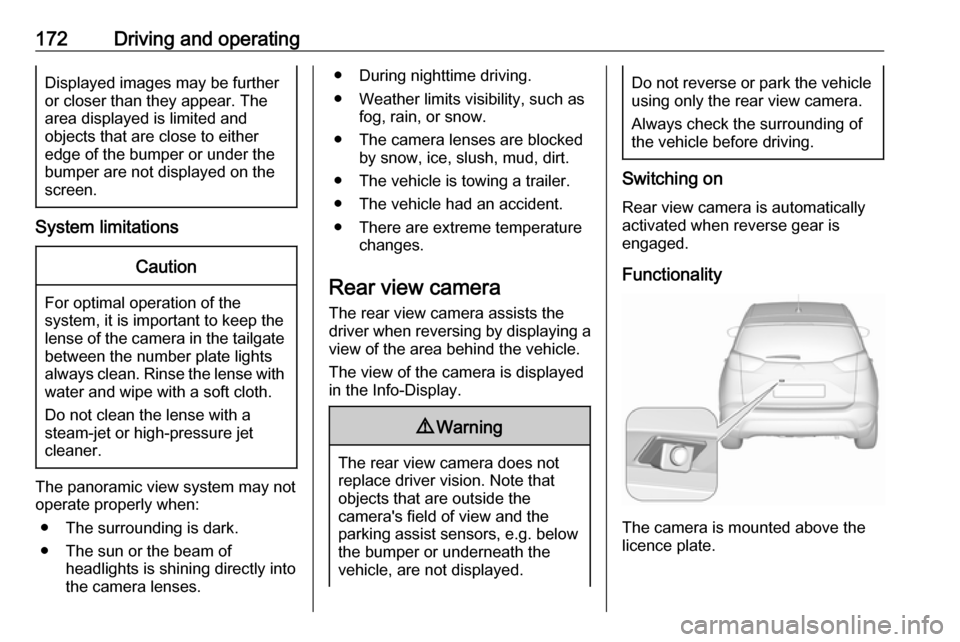
The camera is mounted above the
licence plate.
Page 175 of 255
Driving and operating173The area displayed by the camera is
limited. The distance of the image that
appears on the display differs from
the actual distance.
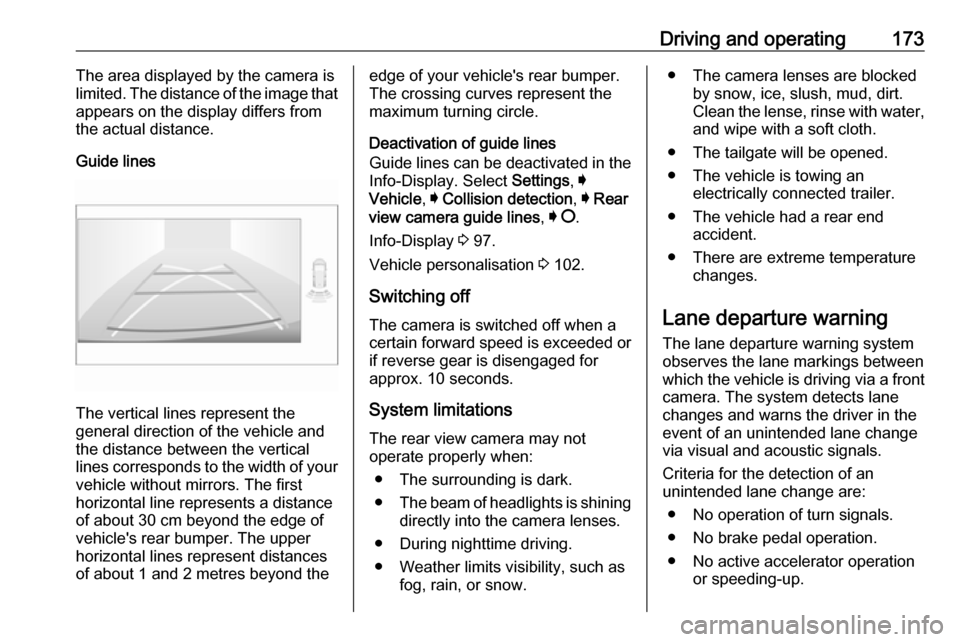
Guide lines
The vertical lines represent the
general direction of the vehicle and
the distance between the vertical
lines corresponds to the width of your vehicle without mirrors. The first
horizontal line represents a distance
of about 30 cm beyond the edge of
vehicle's rear bumper. The upper
horizontal lines represent distances
of about 1 and 2 metres beyond the
edge of your vehicle's rear bumper.
The crossing curves represent the
maximum turning circle.
Deactivation of guide lines
Guide lines can be deactivated in the Info-Display. Select Settings, I
Vehicle , I Collision detection , I Rear
view camera guide lines , I § .
Info-Display 3 97.
Vehicle personalisation 3 102.
Switching off
The camera is switched off when a
certain forward speed is exceeded or
if reverse gear is disengaged for
approx. 10 seconds.
System limitationsThe rear view camera may not
operate properly when:
● The surrounding is dark.
● The beam of headlights is shining
directly into the camera lenses.
● During nighttime driving.
● Weather limits visibility, such as fog, rain, or snow.● The camera lenses are blockedby snow, ice, slush, mud, dirt.Clean the lense, rinse with water,
and wipe with a soft cloth.
● The tailgate will be opened.
● The vehicle is towing an electrically connected trailer.
● The vehicle had a rear end accident.
● There are extreme temperature changes.
Lane departure warning
The lane departure warning system
observes the lane markings between
which the vehicle is driving via a front camera. The system detects lane
changes and warns the driver in the
event of an unintended lane change
via visual and acoustic signals.
Criteria for the detection of an
unintended lane change are:
● No operation of turn signals.
● No brake pedal operation.
● No active accelerator operation or speeding-up.
Page 204 of 255
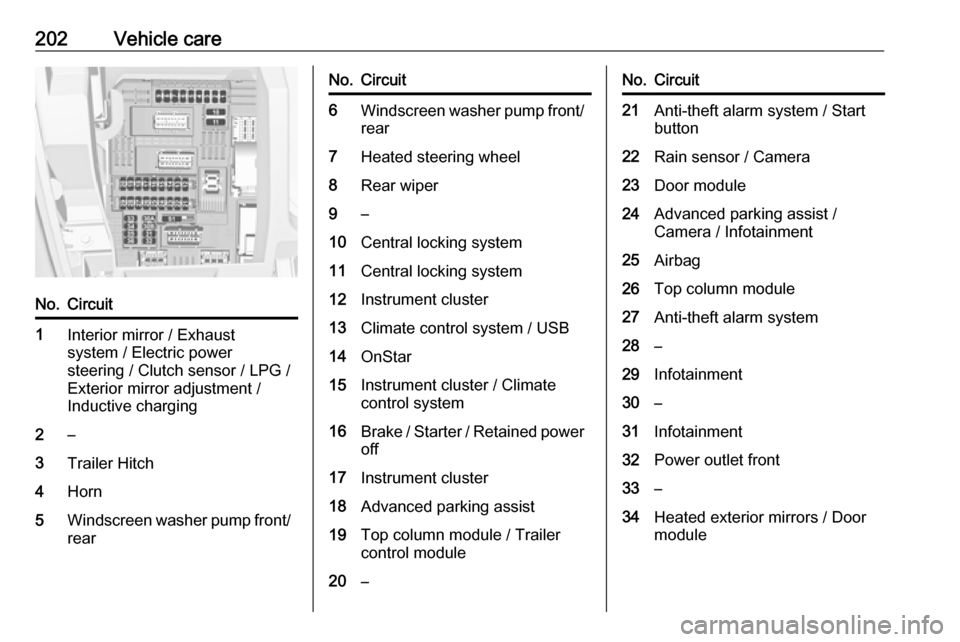
202Vehicle careNo.Circuit1Interior mirror / Exhaust
system / Electric power
steering / Clutch sensor / LPG /
Exterior mirror adjustment /
Inductive charging2–3Trailer Hitch4Horn5Windscreen washer pump front/
rearNo.Circuit6Windscreen washer pump front/
rear7Heated steering wheel8Rear wiper9–10Central locking system11Central locking system12Instrument cluster13Climate control system / USB14OnStar15Instrument cluster / Climate
control system16Brake / Starter / Retained power off17Instrument cluster18Advanced parking assist19Top column module / Trailer
control module20–No.Circuit21Anti-theft alarm system / Start
button22Rain sensor / Camera23Door module24Advanced parking assist /
Camera / Infotainment25Airbag26Top column module27Anti-theft alarm system28–29Infotainment30–31Infotainment32Power outlet front33–34Heated exterior mirrors / Door
module
Page 253 of 255

251Preheating ................................... 93
Puncture ..................................... 212
Q Quickheat ................................... 127
R Radio Frequency Identification (RFID) ..................................... 247
Radio remote control ...................22
Rain sensor .................................. 94
REACH ....................................... 243
Reading lights ............................ 116
Rear floor storage cover ..............68
Rear fog light ....................... 94, 115
Rear seats .................................... 47
Rear view camera ...................... 172
Rear window wiper/washer .......... 77
Recommended fluids and lubricants ........................ 225, 229
Refuelling ................................... 178
Registered trademarks ...............246
Reversing lights .........................115
Ride control systems ..................149
Roof .............................................. 40
Roof load ...................................... 71
Roof rack ..................................... 71
S
Safety belts ................................... 48
Seat adjustment ....................... 7, 44Seat belt ........................................ 8
Seat belt reminder .......................89
Seat belts ..................................... 48 Seat heating ................................. 46
Seat position ................................ 43
Selective catalytic reduction .......141
Selector lever ............................. 144
Service ............................... 130, 223
Service display ............................ 88
Service information ....................223
Service vehicle soon .................... 91
Side airbag system ......................54
Side blind spot alert ....................168
Sidelights .................................... 110
Side turn signal lights ................198
Software acknowledgement .......243
Software update ......................... 245
Spare wheel ............................... 214
Speed limiter......................... 95, 153
Speedometer ............................... 84
Starting and operating ................132
Starting off ................................... 17
Starting the engine ....................135
Steering ...................................... 132
Steering wheel adjustment ......9, 74
Steering wheel controls ...............74
Stop engine .................................. 91
Stop-start system........................ 137
Storage ......................................... 64
Storage compartments .................64Sunvisor lights ........................... 117
Sun visors .................................... 40
Symbols ......................................... 4
System check ............................... 91
T
Tachometer ................................. 85
Tail lights ................................... 194
Three-point seat belt .................... 49
Tools .......................................... 204
Tow bar....................................... 180 Towing ................................ 180, 217
Towing another vehicle .............218
Towing equipment .....................181
Towing the vehicle .....................217
Traffic sign assistant .....................95
Trailer coupling ........................... 180
Trailer towing ............................. 180
Transmission ............................... 16
Transmission display .................144
Tread depth ............................... 207
Trip odometer .............................. 85
Turn and lane-change signals ...114
Turn signal ................................... 89
Tyre chains ................................ 208
Tyre deflation detection system . 206
Tyre designations ......................205
Tyre pressure ............................ 205
Tyre pressures ........................... 238
Tyre repair kit ............................. 209