display VAUXHALL CROSSLAND X 2019.75 Workshop Manual
[x] Cancel search | Manufacturer: VAUXHALL, Model Year: 2019.75, Model line: CROSSLAND X, Model: VAUXHALL CROSSLAND X 2019.75Pages: 247, PDF Size: 7.77 MB
Page 160 of 247
158Driving and operatingFault
In the event of a fault, B flashes for a
few moments in the instrument
cluster, accompanied by C and a
display message. Seek the
assistance of a workshop.
Panoramic view system This system allows views of the
vehicle's surroundings to be
displayed as a nearly 180° picture in
the Info Display, like a bird's eye view.
The system uses: ● rear camera, installed in the tailgate
● ultrasonic parking sensors in the rear bumper
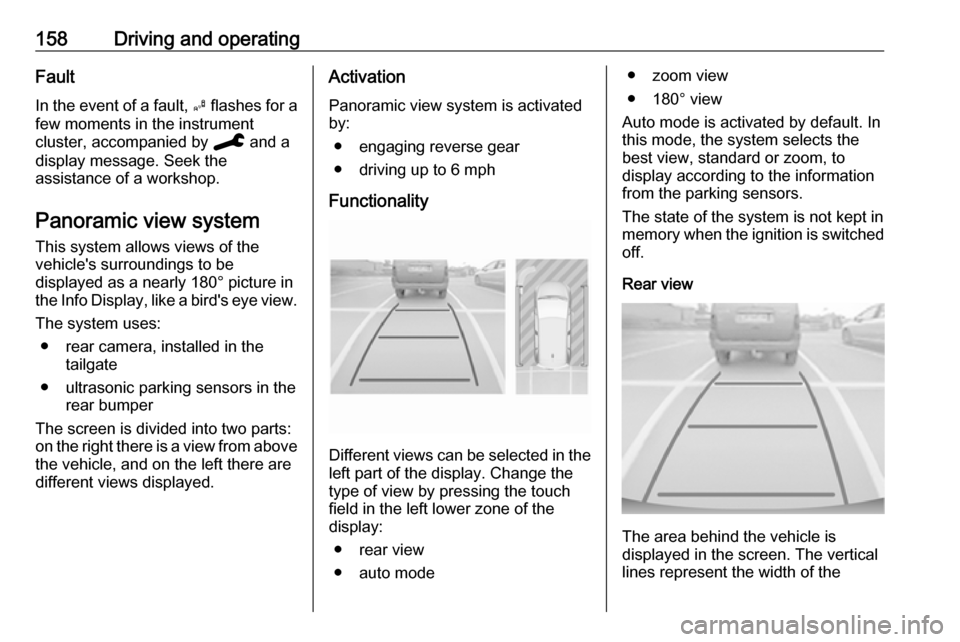
The screen is divided into two parts:
on the right there is a view from above
the vehicle, and on the left there are
different views displayed.Activation
Panoramic view system is activated
by:
● engaging reverse gear
● driving up to 6 mph
Functionality
Different views can be selected in the left part of the display. Change the
type of view by pressing the touch
field in the left lower zone of the
display:
● rear view
● auto mode
● zoom view
● 180° view
Auto mode is activated by default. In
this mode, the system selects the
best view, standard or zoom, to
display according to the information
from the parking sensors.
The state of the system is not kept in
memory when the ignition is switched
off.
Rear view
The area behind the vehicle is
displayed in the screen. The vertical
lines represent the width of the
Page 162 of 247
160Driving and operatingDeactivation
Panoramic view system is
deactivated when:
● driving faster than 6 mph
● 7 seconds after disengaging reverse gear
● by pressing the icon q in the left
upper corner of the touch screen
● opening the tailgate
General information9 Warning
The panoramic view system does
not replace driver vision. It will not display children, pedestrians,
cyclists, crossing traffic, animals,
or any other objects outside of the camera view area, e. g. below the
bumper, or underneath the
vehicle.
Do not drive or park the vehicle
using only the panoramic view
system.
Always check the surrounding of
the vehicle before driving.
Displayed images may be further
or closer than they appear. The
area displayed is limited and
objects that are close to either
edge of the bumper or under the
bumper are not displayed on the
screen.
System limitations
Caution
For optimal operation of the
system, it is important to keep the
lense of the camera in the tailgate between the number plate lightsalways clean. Rinse the lense with water and wipe with a soft cloth.
Do not clean the lense with a
steam-jet or high-pressure jet
cleaner.
The panoramic view system may not
operate properly when:
● The surrounding is dark.
● The sun or the beam of headlights is shining directly into
the camera lenses.
● During nighttime driving.
● Weather limits visibility, such as fog, rain, or snow.
● The camera lenses are blocked by snow, ice, slush, mud, dirt.
● A trailer or bike carrier is attached
to the trailer hitch.
● The vehicle had an accident.
● There are extreme temperature changes.
Rear view camera The rear view camera assists the
driver when reversing by displaying a
view of the area behind the vehicle.
The view of the camera is displayed
in the Info Display.9 Warning
The rear view camera does not
replace driver vision. Note that
objects that are outside the
camera's field of view and the
Page 163 of 247
Driving and operating161parking assist sensors, e.g. below
the bumper or underneath the
vehicle, are not displayed.
Do not reverse or park the vehicle using only the rear view camera.
Always check the surrounding of
the vehicle before driving.
Switching on
Rear view camera is automatically
activated when reverse gear is
engaged.
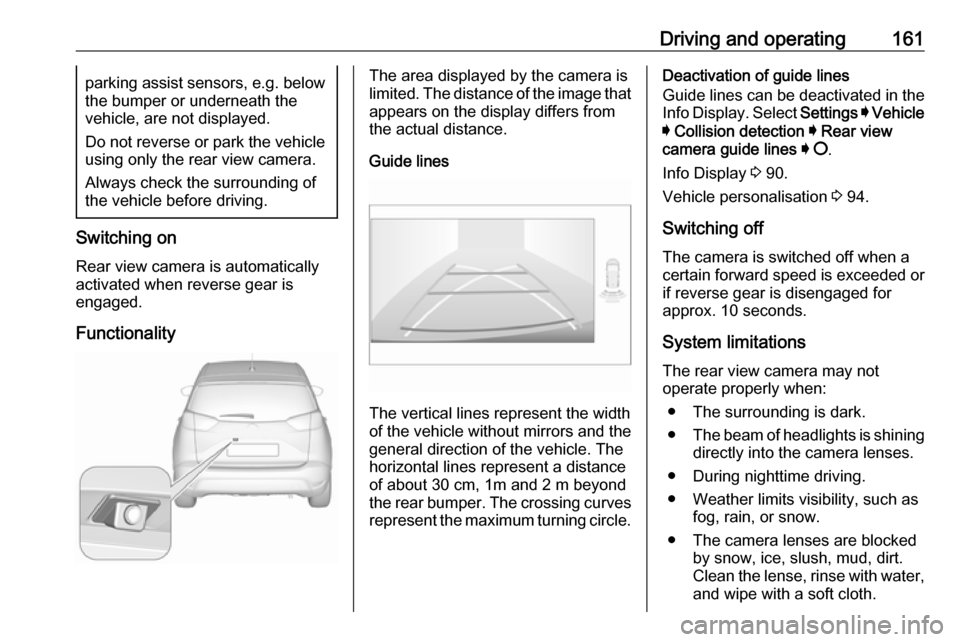
Functionality
The area displayed by the camera is
limited. The distance of the image that
appears on the display differs from
the actual distance.
Guide lines
The vertical lines represent the width
of the vehicle without mirrors and the
general direction of the vehicle. The
horizontal lines represent a distance of about 30 cm, 1m and 2 m beyond
the rear bumper. The crossing curves
represent the maximum turning circle.
Deactivation of guide lines
Guide lines can be deactivated in the Info Display. Select Settings I Vehicle
I Collision detection I Rear view
camera guide lines I § .
Info Display 3 90.
Vehicle personalisation 3 94.
Switching off
The camera is switched off when a
certain forward speed is exceeded or
if reverse gear is disengaged for
approx. 10 seconds.
System limitations
The rear view camera may not
operate properly when:
● The surrounding is dark.
● The beam of headlights is shining
directly into the camera lenses.
● During nighttime driving.
● Weather limits visibility, such as fog, rain, or snow.
● The camera lenses are blocked by snow, ice, slush, mud, dirt.
Clean the lense, rinse with water,
and wipe with a soft cloth.
Page 164 of 247
162Driving and operating● The tailgate will be opened.
● A trailer or bike carrier is attached
to the trailer hitch.
● The vehicle had a rear end accident.
● There are extreme temperature changes.
Lane departure warning The lane departure warning system
observes the lane markings between which the vehicle is driving via a front camera. The system detects lane
changes and warns the driver in the
event of an unintended lane change
via visual and acoustic signals.
Criteria for the detection of an
unintended lane change are:
● no operation of turn lights
● no brake pedal operation
● no active acceleration
If the driver is active, no warning will
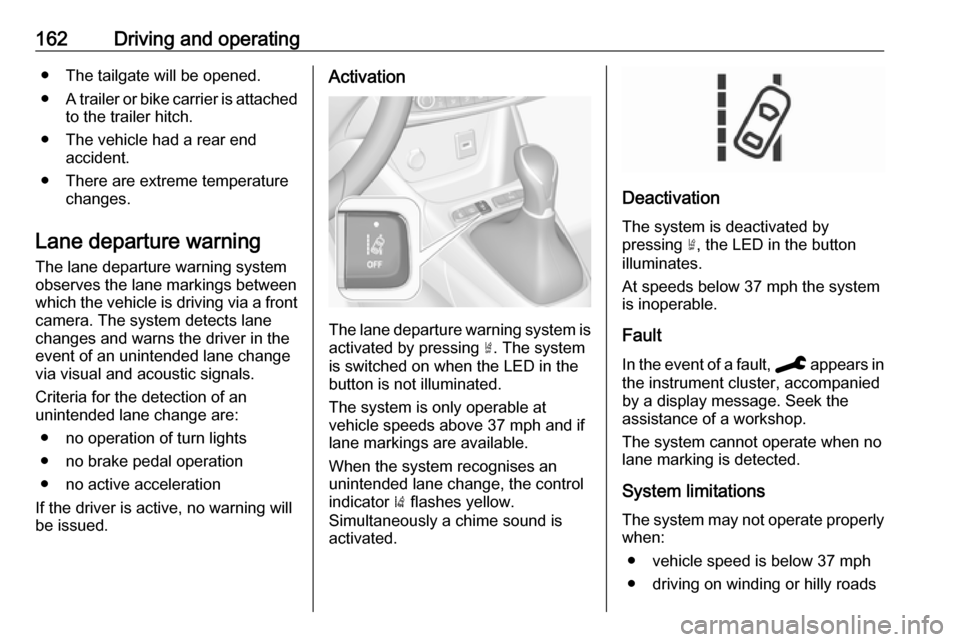
be issued.Activation
The lane departure warning system is activated by pressing ½. The system
is switched on when the LED in the
button is not illuminated.
The system is only operable at
vehicle speeds above 37 mph and if
lane markings are available.
When the system recognises an
unintended lane change, the control
indicator ) flashes yellow.
Simultaneously a chime sound is
activated.
Deactivation
The system is deactivated by
pressing ½, the LED in the button
illuminates.
At speeds below 37 mph the system
is inoperable.
Fault
In the event of a fault, C appears in
the instrument cluster, accompanied
by a display message. Seek the
assistance of a workshop.
The system cannot operate when no
lane marking is detected.
System limitations The system may not operate properly
when:
● vehicle speed is below 37 mph● driving on winding or hilly roads
Page 197 of 247
Vehicle care195The pressure increases by nearly
1.5 psi for a 10 °C temperature
increase. This must be considered
when warm tyres are checked.
Tyre deflation detectionsystem
The tyre deflation detection system
continually checks the rotation speed
of all four wheels and warns on low
tyre pressure condition once vehicle
is driving. This is achieved by
comparing tyre rolling circumference
with reference values and further
signals.
If a tyre loses pressure the control
indicator w illuminates and a warning
message is displayed in the Driver
Information Centre.
In this case reduce speed, avoid
sharp cornering and strong braking.
Stop at next safe opportunity and
check tyre pressure.
Control indicator w 3 85.
After adjusting tyre pressure initialise
system to extinguish the control
indicator and restart system.Caution
Deflation detection system warns
just about low tyre pressure
condition and does not replace
regular tyre maintenance by the
driver.
In case of a system malfunction a
message is displayed in the Driver
Information Centre. Set correct tyre
pressure and reinitialise system. If the
failure continues to be displayed,
contact a workshop. The system is
inoperable when ABS or ESC has a
malfunction or a temporary spare
wheel is used.
In case of a system malfunction a
message is displayed in the Driver
Information Centre. Set correct tyre
pressure and reinitialise system. If the
failure continues to be displayed,
contact a workshop. The system is
inoperable when ABS or ESC has a
malfunction.
Once the road tyre has been refitted,
check the tyre pressure with cold
tyres and initialise the system.
System initialisation
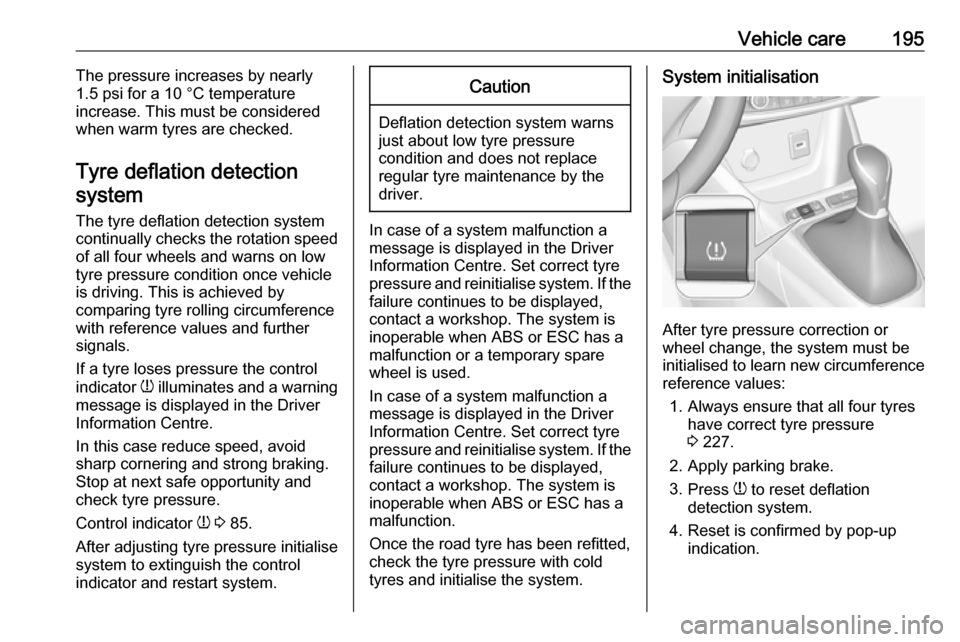
After tyre pressure correction or
wheel change, the system must be
initialised to learn new circumference reference values:
1. Always ensure that all four tyres have correct tyre pressure3 227.
2. Apply parking brake. 3. Press w to reset deflation
detection system.
4. Reset is confirmed by pop-up indication.
Page 212 of 247

210Vehicle careIce residues, pollution and continuouswiping on dry windows will damage or
even destroy the wiper blades.
Glass panel
Never clean with solvents or abrasive agents, fuels, aggressive media
(e.g. paint cleaner, acetone-
containing solutions etc.), acidic or
highly alkaline media or abrasive
pads.
Wheels and tyres Do not use high-pressure jet
cleaners.
Clean rims with a pH-neutral wheel
cleaner.
Rims are painted and can be treated
with the same agents as the body.
Paintwork damage Rectify minor paintwork damage witha touch-up pen before rust forms.
Have more extensive damage or rust areas repaired by a workshop.Underbody
Some areas of the vehicle underbody
have a PVC undercoating while other critical areas have a durable
protective wax coating.
After the underbody is washed, check
the underbody and have it waxed if
necessary.
Bitumen / rubber materials could damage the PVC coating. Have
underbody work carried out by a
workshop.
Before and after winter, wash the
underbody and have the protective
wax coating checked.
Towing equipment
Do not clean the coupling ball bar with a steam-jet or high-pressure jet
cleaner.Interior care
Interior and upholstery Only clean the vehicle interior,
including the instrument panel fascia
and panelling, with a dry cloth or
interior cleaner.
Clean the leather upholstery with
clear water and a soft cloth. In case of
heavy soiling, use leather care.
The instrument cluster and the
displays should only be cleaned using
a soft damp cloth. If necessary use a weak soap solution.
Clean fabric upholstery with a
vacuum cleaner and brush. Remove
stains with an upholstery cleaner.
Clothing fabrics may not be
colourfast. This could cause visible
discolourations, especially on light-
coloured upholstery. Removable
stains and discolourations should be
cleaned as soon as possible.
Clean seat belts with lukewarm water or interior cleaner.
Page 215 of 247

Service and maintenance213General information
Service information
In order to ensure economical and
safe vehicle operation and to
maintain the value of your vehicle, it
is of vital importance that all
maintenance work is carried out at the proper intervals as specified.
The detailed, up-to-date service
schedule for your vehicle is available
at the workshop.
Severe operating conditions exist if one or more of the following
circumstances occur frequently: Cold starting, stop and go operation, e.g.
for taxis and police vehicles, trailer
operation, mountain driving, driving
on poor and sandy road surfaces,
increased air pollution, presence of
airborne sand and high dust content,
driving at high altitude and large
variations of temperature.
Under these severe operating
conditions, certain service work may
be required more frequently than the
regular service interval indicated inthe service display. Contact a
workshop for customised service
schedules.
Service display 3 80.
Page 216 of 247

214Service and maintenanceConfirmations
Confirmation of service is recorded in the Service and warranty booklet.
The date and mileage is completed
with the stamp and signature of the
servicing workshop.Make sure that the Service and
warranty booklet is completed
correctly as continuous proof of
service is essential if any warranty or goodwill claims are to be met, and is
also a benefit when selling the
vehicle.Service intervalsEngine code
EB2ADT
EB2ADTS
EB2FAEP6FADTXDEB2DTS
Country group 116,000 miles / 1 year16,000 miles / 1 year19,000 miles / 1 yearCountry group 29,000 miles / 1 year16,000 miles / 1 year12,000 miles / 1 yearCountry group 39,000 miles / 1 year16,000 miles / 1 year12,000 miles / 1 year6,000 miles / 1 year 1)Country group 49,000 miles / 1 year12,000 miles / 1 yearCountry group 56,000 miles / 1 year1)
Unless otherwise indicated in the service display.
Page 217 of 247

Service and maintenance215
Engine code
DV5RC
DV5RD
DW10FCDV6D
Country group 119,000 miles / 1 year 1)19,000 miles / 1 year 1)Country group 219,000 miles / 1 year 1)19,000 miles / 1 year 1)Country group 39,000 miles / 1 year12,000 miles / 1 yearCountry group 49,000 miles / 1 year12,000 miles / 1 year9,000 miles / 1 yearCountry group 56,000 miles / 1 year6,000 miles / 1 year6,000 miles / 1 year1)
Unless otherwise indicated in the service display.Country Group 1:
Andorra, Austria, Belgium, Cyprus, Denmark, Finland, France, Germany, Greece, Iceland, Republic of Ireland, Italy, Liechtenstein, Luxembourg, Malta, Monaco, Netherlands, Norway, Portugal, San Marino, Spain, Sweden, Switzerland,
United Kingdom.Country Group 2:
Bosnia-Herzegovina, Bulgaria, Croatia, Czech Republic, Estonia, FYR of Macedonia, Hungary, Latvia, Lithuania, Poland, Romania, Slovakia, Slovenia.Country Group 3:
Albania, Montenegro, Serbia.Country Group 4:
Israel, South Africa, Turkey, Lesotho, Swaziland.Country Group 5:
All other countries which are not listed in the previous country groups.
Page 238 of 247

236Customer informationOperating data in the vehicleControl units process data for
operation of the vehicle.
This data includes, for example: ● vehicle status information (e.g. speed, movement delay, lateral
acceleration, wheel rotation rate, "seat belts fastened" display)
● ambient conditions (e.g. temperature, rain sensor,
distance sensor)
As a rule such data is transient and is
not stored for longer than an
operational cycle, and only processed on board the vehicle itself. Often
control units include data storage
(including the vehicle key). This is
used to allow information to be
documented temporarily or
permanently on vehicle condition,
component stress, maintenance
requirements and technical events
and errors.Depending on technical equipment
levels, the data stored is as follows:
● system component operating states (e.g. fill level, tyre
pressure, battery status)
● faults and defects in important system components (e.g. lights,
brakes)
● system reactions in special driving situations (e.g. triggering
of an airbag, actuation of the
stability control systems)
● information on events damaging the vehicle
● for electric vehicles the amount of
charge in the high-voltage
battery, estimated range
In special cases (e.g. if the vehicle
has detected a malfunction), it may be
necessary to save data that would
otherwise just be volatile.
When you use services (e.g. repairs,
maintenance), the operating data
saved can be read together with the
vehicle identification number and
used where necessary. Staff working
for the service network ( e.g. garages,
manufacturers) or third parties (e.g.breakdown services) can read the
data from the vehicle. The same
applies to warranty work and quality
assurance measures.
Data is generally read via the OBD
(On-Board Diagnostics) port
prescribed by law in the vehicle. The operating data read documents the
technical condition of the vehicle or
individual components and assists
with fault diagnosis, compliance with
warranty obligations and quality
improvement. This data, in particular
information on component stress,
technical events, operator errors and
other faults, is transmitted to the
manufacturer where appropriate,
together with the vehicle identification number. The manufacturer is also
subject to product liability. The
manufacturer potentially also uses
operating data from vehicles for
product recalls. This data can also be
used to check customer warranty and
guarantee claims.
Fault memories in the vehicle can be
reset by a service company when
carrying out servicing or repairs or at
your request.