USB VAUXHALL CROSSLAND X 2019.75 Owner's Manual
[x] Cancel search | Manufacturer: VAUXHALL, Model Year: 2019.75, Model line: CROSSLAND X, Model: VAUXHALL CROSSLAND X 2019.75Pages: 247, PDF Size: 7.77 MB
Page 13 of 247

In brief111Power windows .....................36
2 Exterior mirrors .....................33
3 Cruise control .....................139
Speed limiter ....................... 141
Heated steering wheel .........70
4 Turn lights ........................... 103
Headlight flash ....................101
High beam ........................... 100
High beam assist ...............100
Exit lighting ......................... 106
Parking lights ...................... 104
Buttons for Driver
Information Centre ................87
5 Side air vents ...................... 117
6 Instruments .......................... 77
Driver Information Centre ...... 87
7 Infotainment controls ...........70
8 Windscreen wiper and
washer, rear wiper and
washer ................................. 71
9 Head-up display ....................92
10 Centre air vents .................. 11711Hazard warning flashers ....102
12 Info Display .......................... 90
13 Centre air vent ....................118
14 Anti-theft alarm system
status LED ........................... 31
15 Central locking system ..........23
16 Glovebox .............................. 61
Fuse box ............................ 190
17 Controls for Info Display
operation ............................... 90
18 Climate control system ........ 108
19 USB port .............................. 74
20 Electronic Stability Control
and Traction Control ...........137
Lane departure warning .....162
Stop-start system ................125
Parking assist ..................... 149
Advanced parking assist ....152
Electric child locks ................ 28
21 Power outlet .......................... 74
22 Selector lever ...................... 132
23 Parking brake ......................136
24 Power button ....................... 122
25 Ignition switch .....................12226Steering wheel adjustment ..70
27 Horn ..................................... 71
28 Bonnet release lever ..........174
29 Storage ................................. 61
Fuse box ............................ 190
30 Head-up display ....................92
31 Light switch .......................... 99
Headlight range
adjustment ......................... 101
Front fog lights ...................103
Rear fog light ...................... 104
Instrument illumination .......105
Page 76 of 247
74Instruments and controlsClockDate and time are shown in the
Info Display 3 90.
Setting date and time, see
Infotainment manual.
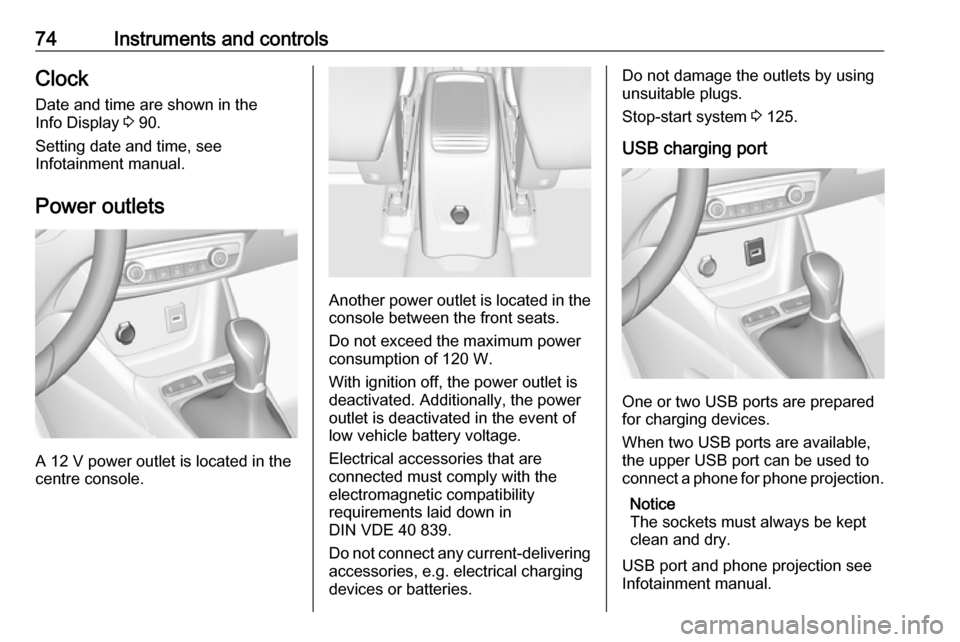
Power outlets
A 12 V power outlet is located in the
centre console.
Another power outlet is located in the
console between the front seats.
Do not exceed the maximum power
consumption of 120 W.
With ignition off, the power outlet is deactivated. Additionally, the poweroutlet is deactivated in the event of
low vehicle battery voltage.
Electrical accessories that are
connected must comply with the
electromagnetic compatibility
requirements laid down in
DIN VDE 40 839.
Do not connect any current-delivering
accessories, e.g. electrical charging
devices or batteries.
Do not damage the outlets by using
unsuitable plugs.
Stop-start system 3 125.
USB charging port
One or two USB ports are prepared
for charging devices.
When two USB ports are available,
the upper USB port can be used to
connect a phone for phone projection.
Notice
The sockets must always be kept
clean and dry.
USB port and phone projection see
Infotainment manual.
Page 193 of 247

Vehicle care191No.Circuit7Heated steering wheel8Rear wiper9–10Central locking system11Central locking system12Instrument cluster13Climate control system, USB14OnStar15Instrument cluster, climate
control system16Brake, starter, retained power
off17Instrument cluster18Advanced parking assist19Top column module, trailer
control module20–21Anti-theft alarm system, start
buttonNo.Circuit22Rain sensor, front camera23Door module24Advanced parking assist,
camera, Infotainment25Airbag26Top column module27Anti-theft alarm system28–29Infotainment30–31Infotainment32Power outlet front33–34Heated exterior mirrors, door
moduleNo.Circuit35Instrument cluster, light switch,
advanced parking assist, trans‐
mission control module36Courtesy lights, sun visor lights,
glovebox light
Fuse box on the right side of the
instrument panel
In right-hand drive vehicles, the fuse
box is behind a cover in the
instrument panel. Disengage cover at
the side and remove.
Page 239 of 247

Customer information237Comfort and infotainment
functions
Comfort settings and custom settings
can be stored in the vehicle and
changed or reset at any time.
Depending on the equipment level in
question, these include
● seat and steering wheel position settings
● chassis and air conditioning settings
● custom settings such as interior lighting
You can input your own data in the
infotainment functions for your
vehicle as part of the selected
features.
Depending on the equipment level in
question, these include
● multimedia data such as music, videos or photos for playback in
an integrated multimedia system
● address book data for use with an
integrated hands-free system or an integrated navigation system● input destinations
● data on the use of online services
This data for comfort and
infotainment functions can be stored
locally in the vehicle or be kept on a
device that you have connected to the
vehicle ( e.g. a smartphone, USB stick
or MP3 player). Data that you have input yourself can be deleted at any
time.
This data can only be transmitted out
of the vehicle at your request,
particularly when using online
services in accordance with the
settings selected by you.
Smartphone integration, e.g.
Android Auto or Apple CarPlay
If your vehicle is equipped
accordingly, you can connect your
smartphone or another mobile device
to the vehicle so that you can control
it via the controls integrated in the
vehicle. The smartphone image and
sound can be output via the
multimedia system in this case. At the same time, specific information is
transmitted to your smartphone.
Depending on the type of integration,this includes data such as position
data, day / night mode and other
general vehicle information. For more
information, please see the operating
instructions for the vehicle /
infotainment system.
Integration allows selected
smartphone apps to be used, such as navigation or music playback. No
further integration is possible
between smartphone and vehicle, in
particular active access to vehicle
data. The nature of further data
processing is determined by the
provider of the app used. Whether
you can define settings, and if so
which ones, is dependent on the app
in question and your smartphone's
operating system.
Page 246 of 247

244UUltrasonic parking assist............. 149
Upholstery .................................. 210
USB port ....................................... 74
Using this manual ..........................3
V Vauxhall Connect .........................97
Vehicle battery ........................... 177
Vehicle checks............................ 174
Vehicle data ................................ 221
Vehicle data recording and privacy ..................................... 235
Vehicle dimensions .................... 226
Vehicle identification number ....219
Vehicle jack ................................ 192
Vehicle messages .......................93
Vehicle personalisation ...............94
Vehicle security ............................ 30
Vehicle specific data ......................3
Vehicle storage ........................... 173
Vehicle tools ............................... 192
Vehicle unlocking ........................... 6
Ventilation ................................... 108
W
Warning chimes ........................... 94
Warning lights ............................... 77
Warning triangle .......................... 66
Washer and wiper systems .........13
Washer fluid ............................... 176Wheel Tightening torque ....................201
Wheel changing .........................200
Wheel covers ............................. 196
Wheels and tyres .......................193
Windows ....................................... 35
Windscreen................................... 35
Windscreen wiper and washer ....71
Winter tyres ............................... 193
Wiper blade replacement ..........179