brakes VAUXHALL CROSSLAND X 2019.75 Owner's Manual
[x] Cancel search | Manufacturer: VAUXHALL, Model Year: 2019.75, Model line: CROSSLAND X, Model: VAUXHALL CROSSLAND X 2019.75Pages: 247, PDF Size: 7.77 MB
Page 18 of 247
16In briefTransmission
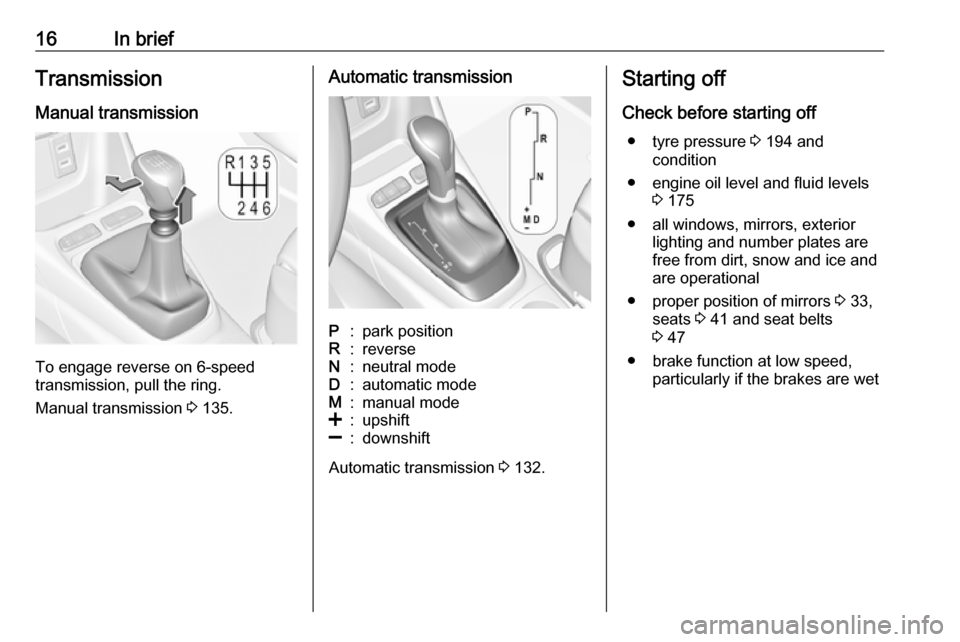
Manual transmission
To engage reverse on 6-speed
transmission, pull the ring.
Manual transmission 3 135.
Automatic transmissionP:park positionR:reverseN:neutral modeD:automatic modeM:manual mode<:upshift]:downshift
Automatic transmission 3 132.
Starting off
Check before starting off ● tyre pressure 3 194 and
condition
● engine oil level and fluid levels 3 175
● all windows, mirrors, exterior lighting and number plates are
free from dirt, snow and ice and
are operational
● proper position of mirrors 3 33,
seats 3 41 and seat belts
3 47
● brake function at low speed, particularly if the brakes are wet
Page 122 of 247

120Driving and operatingDriving and
operatingDriving hints ............................... 121
Control of the vehicle ...............121
Steering ................................... 121
Starting and operating ...............121
New vehicle running-in ............121
Ignition switch positions ...........122
Power button ........................... 122
Starting the engine ..................123
Overrun cut-off ........................ 125
Stop-start system ....................125
Parking .................................... 127
Engine exhaust .......................... 128
Exhaust filter ............................ 128
Catalytic converter ...................129
AdBlue ..................................... 129
Automatic transmission ..............132
Transmission display ...............132
Gear selection ......................... 132
Manual mode ........................... 133
Electronic driving programmes 133
Fault ........................................ 134
Interruption of power supply ....134
Manual transmission ..................135Brakes........................................ 136
Antilock brake system .............136
Parking brake .......................... 136
Brake assist ............................. 137
Hill start assist ......................... 137
Ride control systems .................137
Electronic Stability Control and Traction Control system .........137
Driver assistance systems .........139
Cruise control .......................... 139
Speed limiter ........................... 141
Forward collision alert .............144
Active emergency braking .......145
Front pedestrian protection .....148
Parking assist .......................... 149
Advanced parking assist .........152
Side blind spot alert .................156
Panoramic view system ...........158
Rear view camera ...................160
Lane departure warning ..........162
Driver alert ............................... 163
Fuel ............................................ 164
Fuel for petrol engines .............164
Fuel for diesel engines ............164
Refuelling ................................ 166
Trailer hitch ................................ 167
General information .................167
Driving characteristics and towing tips .............................. 168Trailer towing........................... 168
Towing equipment ...................169
Page 138 of 247
136Driving and operatingBrakes
The brake system comprises two
independent brake circuits.
If a brake circuit fails, the vehicle can
still be braked using the other brake
circuit. However, braking effect is
achieved only when the brake pedal
is depressed firmly. Considerably
more force is needed for this. The
braking distance is extended. Seek the assistance of a workshop before
continuing the journey.
When the engine is not running, the
support of the brake servo unit
disappears once the brake pedal has been depressed once or twice.
Braking effect is not reduced, but
braking requires significantly greater
force. It is especially important to bear this in mind when being towed.
Control indicator R 3 83.
Antilock brake system
Antilock brake system (ABS)
prevents the wheels from locking.ABS starts to regulate brake pressure as soon as a wheel shows a tendency to lock. The vehicle remains
steerable, even during hard braking.
ABS control is made apparent
through a pulse in the brake pedal
and the noise of the regulation
process.
For optimum braking, keep the brake
pedal fully depressed throughout the
braking process, despite the fact that the pedal is pulsating. Do not reduce
the pressure on the pedal.
When braking in an emergency, the
hazard warning flashers are switched
on automatically depending on the
force of deceleration. They are
switched off automatically the first
time you accelerate.
After starting off, the system performs
a self-test which may be audible.
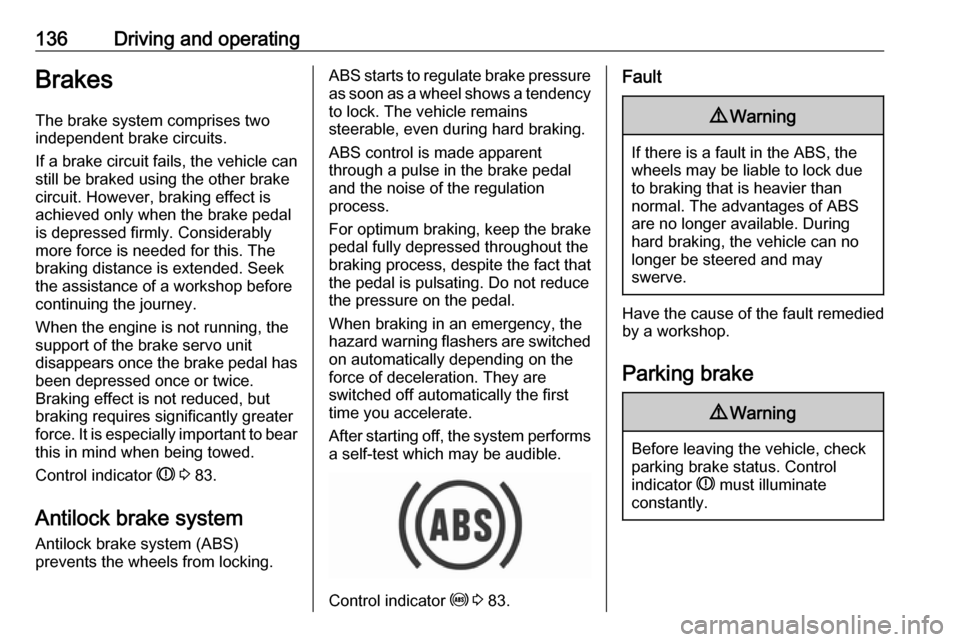
Control indicator u 3 83.
Fault9 Warning
If there is a fault in the ABS, the
wheels may be liable to lock due
to braking that is heavier than
normal. The advantages of ABS are no longer available. During
hard braking, the vehicle can no longer be steered and may
swerve.
Have the cause of the fault remedied
by a workshop.
Parking brake
9 Warning
Before leaving the vehicle, check
parking brake status. Control
indicator R must illuminate
constantly.
Page 139 of 247
Driving and operating1379Warning
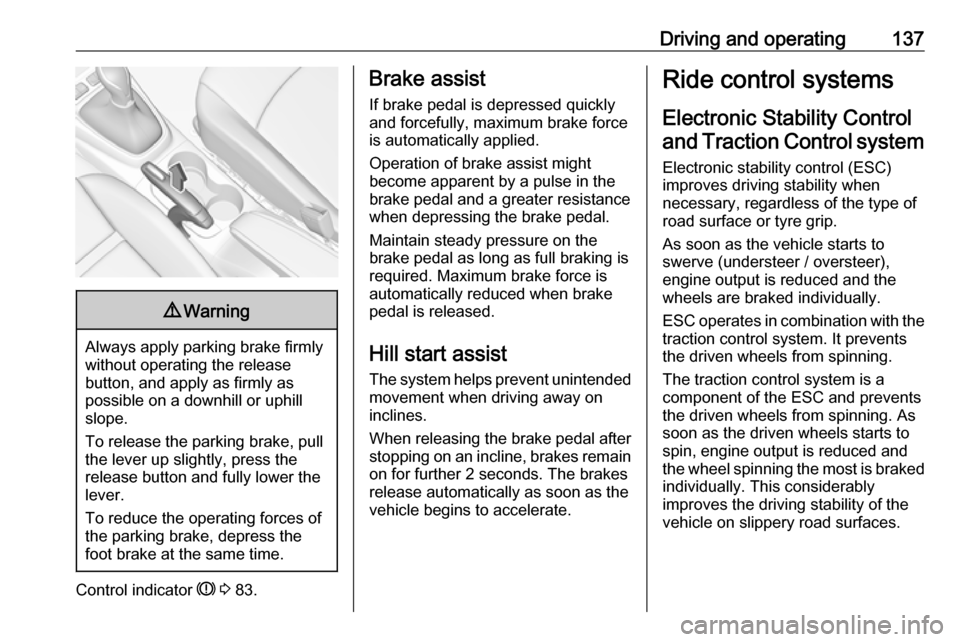
Always apply parking brake firmly
without operating the release
button, and apply as firmly as
possible on a downhill or uphill
slope.
To release the parking brake, pull
the lever up slightly, press the
release button and fully lower the
lever.
To reduce the operating forces of
the parking brake, depress the
foot brake at the same time.
Control indicator R 3 83.
Brake assist
If brake pedal is depressed quickly
and forcefully, maximum brake force
is automatically applied.
Operation of brake assist might
become apparent by a pulse in the
brake pedal and a greater resistance when depressing the brake pedal.
Maintain steady pressure on the
brake pedal as long as full braking is
required. Maximum brake force is
automatically reduced when brake
pedal is released.
Hill start assist The system helps prevent unintendedmovement when driving away on
inclines.
When releasing the brake pedal after
stopping on an incline, brakes remain on for further 2 seconds. The brakes
release automatically as soon as the
vehicle begins to accelerate.Ride control systems
Electronic Stability Control and Traction Control system
Electronic stability control (ESC)
improves driving stability when
necessary, regardless of the type of
road surface or tyre grip.
As soon as the vehicle starts to
swerve (understeer / oversteer),
engine output is reduced and the
wheels are braked individually.
ESC operates in combination with the traction control system. It prevents
the driven wheels from spinning.
The traction control system is a
component of the ESC and prevents
the driven wheels from spinning. As
soon as the driven wheels starts to
spin, engine output is reduced and
the wheel spinning the most is braked
individually. This considerably
improves the driving stability of the
vehicle on slippery road surfaces.
Page 146 of 247

144Driving and operatingFault
In the event of a speed limiter fault, the speed is cleared resulting in
flashing of the dashes.
The speed limit recognition may not
operate correctly if traffic signs do not
comply with the Vienna Convention
on Road Signs and Signals.
Forward collision alert The forward collision alert may help toavoid or reduce the harm caused by
front-end crashes.
The forward collision alert uses the
front camera in the windscreen to
detect a preceding vehicle directly
ahead, in your path.
If a vehicle directly ahead is
approached too quickly, a warning
chime and alert in the Driver
Information Centre is provided.9 Warning
Forward collision alert is just a
warning system and does not
apply the brakes. When
approaching a vehicle ahead too
rapidly, it may not provide you
enough time to avoid a collision.
The driver accepts full
responsibility for the appropriate
following distance based on traffic, weather and visibility conditions.
The complete attention of the
driver is always required while
driving. The driver must always be
ready to take action and apply the
brakes.
Activation
Forward collision alert detects
vehicles and operates automatically
at all speeds above 3 mph and
53 mph. The system detects
stationary vehicles if the speed does
not exceed 50 mph.
Alerting the driver
The driver is warned by following
alerts:
● Symbol , illuminates and a
warning message is displayed in the Driver Information Centre
when the distance to the vehicle
ahead gets to small.
● Symbol , illuminates, a warning
message is displayed in the
Driver Information Centre and a
warning chime sounds, when a
collision is imminent and
immediate driver's action is
required.9 Warning
Forward collision alert is just a
warning system and does not
apply the brakes. When
Page 147 of 247

Driving and operating145approaching a vehicle ahead too
rapidly, it may not provide you
enough time to avoid a collision.
The driver accepts full
responsibility for the appropriate
following distance based on traffic,
weather and visibility conditions.
The complete attention of the
driver is always required while
driving. The driver must always be ready to take action and apply the
brakes.Caution
The colour lighting of this control
indicator does not correspond to
local traffic laws on following
distance. The driver bears full
responsibility for maintaining safe
following distance according to
applicable traffic rules, weather
and road conditions etc. at all
times.
Selecting the alert sensitivity
The alert sensitivity has to be set to
close, normal or distant in the vehicle personalisation menu 3 94.
The chosen setting will remain until it
is changed. The alert timing will vary
based on vehicle speed. The faster
the vehicle speed, the farther away
the alert will occur. Consider traffic
and weather conditions when
selecting the alert timing.
Deactivation The system can only be deactivated
by deactivating the active emergency
braking in the vehicle personalisation
3 94.
System limitations Forward collision alert is designed to
warn on vehicles only, but may react
also to other objects.In the following cases, forward
collision alert may not detect a vehicle ahead or sensor performance is
limited:
● driving on winding or hilly roads
● driving in the dark
● weather limits visibility, such as fog, rain, or snow
● the sensor in the windscreen is blocked by snow, ice, slush, mud,dirt etc.
● the windscreen is damaged or affected by foreign objects, e.g.
stickers
Active emergency braking
Active emergency braking can help to reduce the damage and injury from
crashes with vehicles, pedestrians
and obstacles directly ahead, when a
collision can no longer be avoided
either by manual braking or by
steering. Before the active
emergency braking applies, the driver is warned by the forward collision
alert or the front pedestrian protection
alert.
Page 148 of 247

146Driving and operatingForward collision alert 3 144
Front pedestrian protection 3 148
The feature uses various inputs (e.g.
camera sensor, brake pressure,
vehicle speed) to calculate the
probability of a frontal collision.9 Warning
This system is not intended to
replace the driver responsibility for driving the vehicle and looking
ahead. Its function is limited to
supplemental use only to reduce
the vehicle speed before a
collision.
The system may not react to
animals. After a sudden lane
change, the system needs a
certain time to detect the next
preceding vehicle.
The driver must always be ready
to take action and apply the brakes and steer to avoid collisions.
Functionality
Active emergency braking is
equipped with a front camera and
operates in forward gear above
walking speed up to 53 mph. The
system detects stationary vehicles
only if the speed does not exceed
50 mph.
A precondition is that forward collision
alert with front camera system is not
deactivated in the vehicle
personalisation menu 3 94.
The system includes: ● emergency automatic braking● forward looking brake assist
● forward collision alert
● front pedestrian protection
Emergency automatic braking
After activation of brake preparation
system and just before the imminent
collision, this function automatically
applies limited braking to reduce the
impact speed of the collision or
prohibit a crash. If active emergency
braking is applied, m flashes in the
instrument cluster. Depending on thesituation, the vehicle may
automatically brake moderately or
hard. This front automatic braking can
only occur if a vehicle or a pedestrian ahead is detected.
Forward collision alert 3 144
Front pedestrian protection 3 148
Emergency automatic braking may
slow the vehicle to a complete stop to
try to avoid a potential crash.9 Warning
Emergency automatic braking is
an emergency crash preparation
feature and is not designed to
avoid crashes. Do not rely on the
system to brake the vehicle.
Emergency automatic braking will
not brake outside of its operating speed range and only responds to
detected vehicles and
pedestrians.
Forward looking brake assist
In addition to emergency automatic
braking, the forward looking brake
assist function makes the brake assist
Page 149 of 247

Driving and operating147more sensitive. Therefore, pressing
the brake pedal less strongly results
in immediate hard braking. This
function helps the driver brake
quicker and harder before the
imminent collision.9 Warning
Active emergency braking is not
designed to apply hard
autonomous braking or to
automatically avoid a collision. It is designed to reduce the vehicle
speed before a collision. It may not
react to animals. After a sudden
lane change, the system needs a
certain time to detect the next
preceding vehicle.
The complete attention of the
driver is always required while
driving. The driver must always be
ready to take action and apply the brakes and steer to avoid
collisions.
The system is designed to work with
all occupants wearing their seat belts.
Forward collision alert 3 144.
Front pedestrian protection 3 148.
System limitations In some cases, the active emergencybraking system may provide an
automatic braking in situations that
seem to be unnecessary, for instance
in parking garages, due to traffic signs in a curve or due to vehicles in
another lane. This is normal
operation, the vehicle does not need
service. Firmly apply the accelerator
pedal to override the automatic
braking if the situation and the
surroundings permit.
In the following cases, active
emergency braking performance is limited:
● driving on winding or hilly roads
● detecting all vehicles, especially vehicles with a trailer, tractors,
muddy vehicles, etc.
● detecting a vehicle when weather
limits visibility, such as in fog,
rain, or snow
● driving in the dark
● windscreen damaged or stickeredComplete attention is always required
while driving, and you should be
ready to take action and apply the
brakes and / or steer the vehicle to
avoid crashes.
We recommend to deactivate the
system in the vehicle personalisation
in the following cases:
● when towing a trailer or caravan
● when carrying long objects on roof bars or a roof rack
● when the vehicle is being towed with the engine running
● when a spare wheel is fitted that is smaller than the other wheels
● before using an automatic car wash with the engine running
● before placing the vehicle on a rolling road in a workshop
● if the windscreen has been damaged close to the camera
● if the front bumper has been damaged
● if the brake lamps are not working
Active emergency braking can be
deactivated in the personalisation
menu 3 94. If deactivated, m
Page 174 of 247

172Vehicle careVehicle careGeneral Information...................172
Accessories and vehicle modifications .......................... 172
Vehicle storage ........................173
End-of-life vehicle recovery .....173
Vehicle checks ........................... 174
Performing work ......................174
Bonnet ..................................... 174
Engine oil ................................. 175
Engine coolant ......................... 176
Washer fluid ............................ 176
Brakes ..................................... 177
Brake fluid ............................... 177
Vehicle battery ......................... 177
Diesel fuel system bleeding .....179
Wiper blade replacement ........179
Bulb replacement .......................180
Halogen headlights ..................180
LED headlights ........................ 183
Front fog lights ......................... 183
Tail lights ................................. 183
Side turn lights ......................... 187
Number plate light ...................188
Interior lights ............................ 188Electrical system........................188
Fuses ....................................... 188
Engine compartment fuse box . 189
Instrument panel fuse box .......190
Vehicle tools .............................. 192
Tools ........................................ 192
Wheels and tyres .......................193
Winter tyres ............................. 193
Tyre designations ....................193
Tyre pressure .......................... 194
Tyre deflation detection system .................................... 195
Tread depth ............................. 196
Changing tyre and wheel size . 196
Wheel covers ........................... 196
Tyre chains .............................. 197
Tyre repair kit .......................... 197
Wheel changing .......................200
Spare wheel ............................ 201
Jump starting ............................. 205
Towing ....................................... 206
Towing the vehicle ...................206
Towing another vehicle ...........207
Appearance care .......................208
Exterior care ............................ 208
Interior care ............................. 210
Floor mats ............................... 211General Information
Accessories and vehicle modifications
We recommend the use of genuine parts and accessories and factory
approved parts specific for this
vehicle type. We cannot assess or
guarantee reliability of other products - even if they have a regulatory or
otherwise granted approval.
Any modification, conversion or other
changes made to standard vehicle
specifications (including, without
limitation, software modifications,
modifications of the electronic control units) may invalidate the warranty
offered by Vauxhall.
Furthermore, such changes may
affect driver assistance systems, may
impact fuel consumption, CO 2
emissions and other emissions of the
vehicle and cause the vehicle to no
longer conform to the operating
permit, impacting the validity of your
vehicle registration.
Page 179 of 247
Vehicle care177Caution
Only washer fluid with a sufficient
antifreeze concentration provides
protection at low temperatures or
a sudden drop in temperature.
Washer fluid 3 217.
Brakes In the event of minimum thickness of
the brake lining, a squealing noise
sounds during braking.
Continued driving is possible but
have the brake lining replaced as
soon as possible.
Once new brake linings are installed,
do not brake unnecessarily hard for
the first few journeys.
Brake fluid
9 Warning
Brake fluid is poisonous and
corrosive. Avoid contact with eyes,
skin, fabrics and painted surfaces.
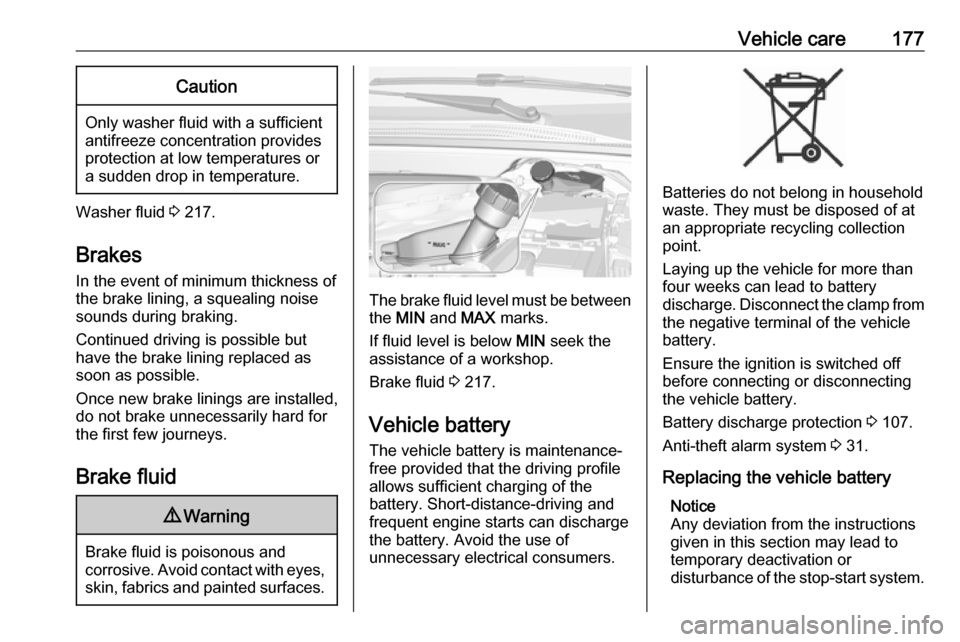
The brake fluid level must be betweenthe MIN and MAX marks.
If fluid level is below MIN seek the
assistance of a workshop.
Brake fluid 3 217.
Vehicle battery
The vehicle battery is maintenance-
free provided that the driving profile
allows sufficient charging of the
battery. Short-distance-driving and
frequent engine starts can discharge
the battery. Avoid the use of
unnecessary electrical consumers.
Batteries do not belong in household
waste. They must be disposed of at
an appropriate recycling collection
point.
Laying up the vehicle for more than
four weeks can lead to battery
discharge. Disconnect the clamp from the negative terminal of the vehicle
battery.
Ensure the ignition is switched off
before connecting or disconnecting
the vehicle battery.
Battery discharge protection 3 107.
Anti-theft alarm system 3 31.
Replacing the vehicle battery Notice
Any deviation from the instructions
given in this section may lead to temporary deactivation or
disturbance of the stop-start system.