service reset VAUXHALL CROSSLAND X 2019.75 Owner's Manual
[x] Cancel search | Manufacturer: VAUXHALL, Model Year: 2019.75, Model line: CROSSLAND X, Model: VAUXHALL CROSSLAND X 2019.75Pages: 247, PDF Size: 7.77 MB
Page 82 of 247
80Instruments and controlsService displayThe service system informs when to
change the engine oil and filter or a
vehicle service is required. Based on
driving conditions, the interval at
which an engine oil and filter change
is required can vary considerably.
Service information 3 213.
A required service due is displayed in the Driver Information Centre for7 seconds after switching on the
ignition.
If no service is required for the next
1800 miles or more no service
information appears in the display.
If service is required within the next
1800 miles, the remaining distance or
time duration is indicated for several
seconds. Simultaneously C lights
up permanently as reminder.
If service is required in less than
600 miles, C flashes and then
lights up permanently. Remaining
distance or time duration is indicated for several seconds.
Overdued service is indicated by a
message in the Driver Information
Centre which indicates the overdueddistance. C flashes and then lights
up permanently until service is
executed.
Reset of service interval
After each service, the service
indicator must be reset to ensure
proper functionality. It is
recommended to seek the assistance of a workshop.
Operate as following: ● switch off ignition
● press and hold button M or
CHECK
● switch on ignition, the distance indication begins a countdown
● when the display indicates =0,
release the button
The C disappears.
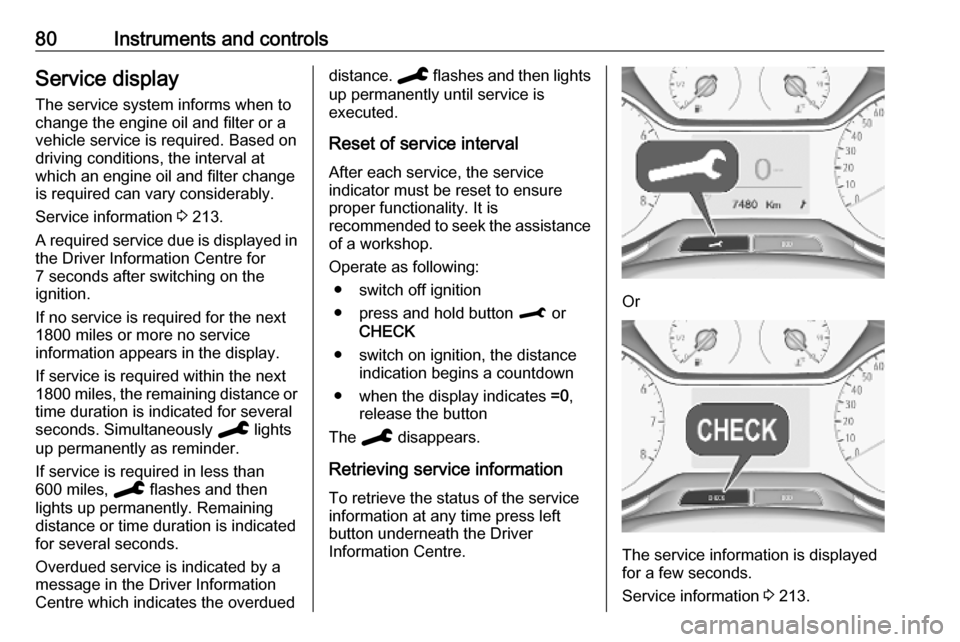
Retrieving service information To retrieve the status of the service
information at any time press left
button underneath the Driver
Information Centre.
Or
The service information is displayed
for a few seconds.
Service information 3 213.
Page 90 of 247
88Instruments and controlsSelecting menus and functions
Turn the adjuster wheel to select a
page in the trip / fuel information
menu.
Press SET/CLR to confirm or reset a
function.
Vehicle and service messages are
popped up in the Driver Information
Centre if required. Scroll messages
by turning the adjuster wheel.
Confirm messages by pressing
SET/CLR .
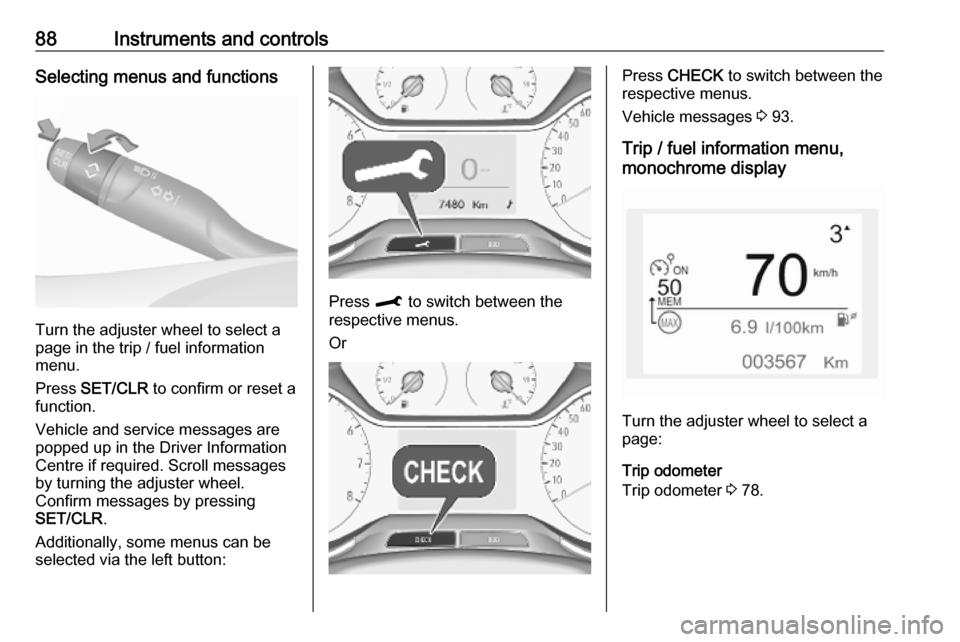
Additionally, some menus can be selected via the left button:
Press M to switch between the
respective menus.
Or
Press CHECK to switch between the
respective menus.
Vehicle messages 3 93.
Trip / fuel information menu,
monochrome display
Turn the adjuster wheel to select a
page:
Trip odometer
Trip odometer 3 78.
Page 238 of 247

236Customer informationOperating data in the vehicleControl units process data for
operation of the vehicle.
This data includes, for example: ● vehicle status information (e.g. speed, movement delay, lateral
acceleration, wheel rotation rate, "seat belts fastened" display)
● ambient conditions (e.g. temperature, rain sensor,
distance sensor)
As a rule such data is transient and is
not stored for longer than an
operational cycle, and only processed on board the vehicle itself. Often
control units include data storage
(including the vehicle key). This is
used to allow information to be
documented temporarily or
permanently on vehicle condition,
component stress, maintenance
requirements and technical events
and errors.Depending on technical equipment
levels, the data stored is as follows:
● system component operating states (e.g. fill level, tyre
pressure, battery status)
● faults and defects in important system components (e.g. lights,
brakes)
● system reactions in special driving situations (e.g. triggering
of an airbag, actuation of the
stability control systems)
● information on events damaging the vehicle
● for electric vehicles the amount of
charge in the high-voltage
battery, estimated range
In special cases (e.g. if the vehicle
has detected a malfunction), it may be
necessary to save data that would
otherwise just be volatile.
When you use services (e.g. repairs,
maintenance), the operating data
saved can be read together with the
vehicle identification number and
used where necessary. Staff working
for the service network ( e.g. garages,
manufacturers) or third parties (e.g.breakdown services) can read the
data from the vehicle. The same
applies to warranty work and quality
assurance measures.
Data is generally read via the OBD
(On-Board Diagnostics) port
prescribed by law in the vehicle. The operating data read documents the
technical condition of the vehicle or
individual components and assists
with fault diagnosis, compliance with
warranty obligations and quality
improvement. This data, in particular
information on component stress,
technical events, operator errors and
other faults, is transmitted to the
manufacturer where appropriate,
together with the vehicle identification number. The manufacturer is also
subject to product liability. The
manufacturer potentially also uses
operating data from vehicles for
product recalls. This data can also be
used to check customer warranty and
guarantee claims.
Fault memories in the vehicle can be
reset by a service company when
carrying out servicing or repairs or at
your request.
Page 239 of 247

Customer information237Comfort and infotainment
functions
Comfort settings and custom settings
can be stored in the vehicle and
changed or reset at any time.
Depending on the equipment level in
question, these include
● seat and steering wheel position settings
● chassis and air conditioning settings
● custom settings such as interior lighting
You can input your own data in the
infotainment functions for your
vehicle as part of the selected
features.
Depending on the equipment level in
question, these include
● multimedia data such as music, videos or photos for playback in
an integrated multimedia system
● address book data for use with an
integrated hands-free system or an integrated navigation system● input destinations
● data on the use of online services
This data for comfort and
infotainment functions can be stored
locally in the vehicle or be kept on a
device that you have connected to the
vehicle ( e.g. a smartphone, USB stick
or MP3 player). Data that you have input yourself can be deleted at any
time.
This data can only be transmitted out
of the vehicle at your request,
particularly when using online
services in accordance with the
settings selected by you.
Smartphone integration, e.g.
Android Auto or Apple CarPlay
If your vehicle is equipped
accordingly, you can connect your
smartphone or another mobile device
to the vehicle so that you can control
it via the controls integrated in the
vehicle. The smartphone image and
sound can be output via the
multimedia system in this case. At the same time, specific information is
transmitted to your smartphone.
Depending on the type of integration,this includes data such as position
data, day / night mode and other
general vehicle information. For more
information, please see the operating
instructions for the vehicle /
infotainment system.
Integration allows selected
smartphone apps to be used, such as navigation or music playback. No
further integration is possible
between smartphone and vehicle, in
particular active access to vehicle
data. The nature of further data
processing is determined by the
provider of the app used. Whether
you can define settings, and if so
which ones, is dependent on the app
in question and your smartphone's
operating system.