warning VAUXHALL GRANDLAND X 2018 Infotainment system
[x] Cancel search | Manufacturer: VAUXHALL, Model Year: 2018, Model line: GRANDLAND X, Model: VAUXHALL GRANDLAND X 2018Pages: 127, PDF Size: 2.33 MB
Page 98 of 127

98IntroductionIntroductionGeneral information.....................98
Theft-deterrent feature .................99
Control elements overview ........100
Usage ........................................ 103General information
The Infotainment system provides
you with state-of-the-art in-car
infotainment.
Using the FM, AM or DAB radio
functions, you can play a great
number of different radio stations. If desired, you can register stations on
radio preset buttons.
You can connect external data
storage devices to the Infotainment
system as further audio sources,
either via a cable or via Bluetooth ®
.
In addition, the Infotainment system is equipped with a Phone function that
allows comfortable and safe use of
your mobile phone in the vehicle.
The Infotainment system can be
operated using the control panel or
the controls on the steering wheel.
Notice
This manual describes all options
and features available for the
various Infotainment systems.
Certain descriptions, including those
for display and menu functions, may
not apply to your vehicle due tomodel variant, country
specifications, special equipment or
accessories.
Important information on
operation and traffic safety9 Warning
Drive safely at all times when
using the Infotainment system.
If in doubt, stop the vehicle before operating the Infotainment
system.
Radio reception
Radio reception may be disrupted by static, noise, distortion or loss of
reception due to:
● changes in distance from the transmitter
● multi-path reception due to reflection
● shadowing
Page 118 of 127
118PhonePhoneGeneral information...................118
Bluetooth connection .................119
Emergency call .......................... 120
Operation ................................... 121
Mobile phones and CB radio
equipment .................................. 123General information
The Phone function provides you with the possibility of having mobile phone conversations via a vehicle
microphone and the vehicle
loudspeakers as well as operating the
most important mobile phone
functions via the Infotainment system in the vehicle. To be able to use the
Phone function, the mobile phone
must be connected to the
Infotainment system via Bluetooth.
Not all functionalities of the Phone
function are supported by every
mobile phone. The possible
functionalities depend on the relevant
mobile phone and network provider.
You will find further information on
this in the operating instructions for
your mobile phone or you can enquire about them with your network
provider.Important information for
operation and traffic safety9 Warning
Mobile phones have effects on
your environment. For this reason safety regulations and directions
have been prepared. You should
be familiar with the related
directions before you use the
telephone function.
9 Warning
Use of the hands-free facility while
driving can be dangerous because
your concentration is reduced
when telephoning. Park your
vehicle before you use the hands- free facility. Follow the stipulations
of the country in which you find
yourself at present.
Do not forget to follow the special
regulations that apply in specific
areas and always switch off the
mobile phone if the use of mobile
phones is prohibited, if
Page 120 of 127
120PhoneNotice
The Bluetooth device currently
connected to the Infotainment
system is indicated by ¥.
To establish the connection, select
the desired device and press OK.
Disconnecting a device Press MENU , select Connections and
press OK.
Select Connections management
and press OK. A list of all Bluetooth
devices currently paired to the
Infotainment system is displayed.
Notice
The Bluetooth device currently
connected to the Infotainment
system is indicated by ¥.
Select the device currently connected to the Infotainment system.
Press OK to confirm your selection.
Select Disconnect telephone .
To disconnect the device, select Yes
and press OK.Removing a paired device
Press MENU , select Connections and
press OK.
Select Connections management . A
list of all Bluetooth devices currently
paired to the Infotainment system is
displayed.
Notice
The Bluetooth device currently
connected to the Infotainment
system is indicated by ¥.
Select the desired device and press
OK to confirm.
To remove the paired device, select
Delete connection and press OK.
Emergency call9 Warning
Connection setup cannot be
guaranteed in all situations. For
this reason, do not rely exclusively on a mobile phone when a vitally
important communication (e.g. a
medical emergency) is concerned.
On some networks, it may be
necessary for a valid SIM card to
be properly inserted in the mobile
phone.9 Warning
Bear in mind that you can make
and receive calls with the mobile
phone if it is in a service area with a sufficiently strong signal. Under
certain circumstances,
emergency calls cannot be made
in all mobile phone networks;
problems may occur when certain
network services and / or
telephone functions are active.
You can enquire about this with
the local network operators.
The emergency call number can
differ depending on the region and
country. Please enquire
beforehand about the correct
emergency call number for the
relevant region.
Page 121 of 127
Phone121Making an emergency callDial the emergency call number (e.g.
112 ).
The telephone connection to the
emergency call centre is set up.
Answer when the service personnel
questions you about the emergency.9 Warning
Do not end the call until you are
requested to do so by the
emergency call centre.
Operation
As soon as a Bluetooth connection
has been set up between your mobile
phone and the Infotainment system,
you can also operate many functions
of your mobile phone via the
Infotainment system.
Via the Infotainment system, you can, e.g. set up a connection to the
telephone numbers stored in your
mobile phone or change the
telephone numbers.
After the setup of a connection
between the mobile phone and the Infotainment system, mobile phone
data is transmitted to the Infotainment
system. This can take several
minutes depending on the phone
model. During this period, operation
of the mobile phone is possible via the
Infotainment system only to a limited
extent.
Notice
Not every mobile phone fully
supports the phone function.
Therefore, deviations from the range of functions described below are
possible.
Initiating a phone call
Entering a number manually
Press MENU , select Telephone and
then select Call.
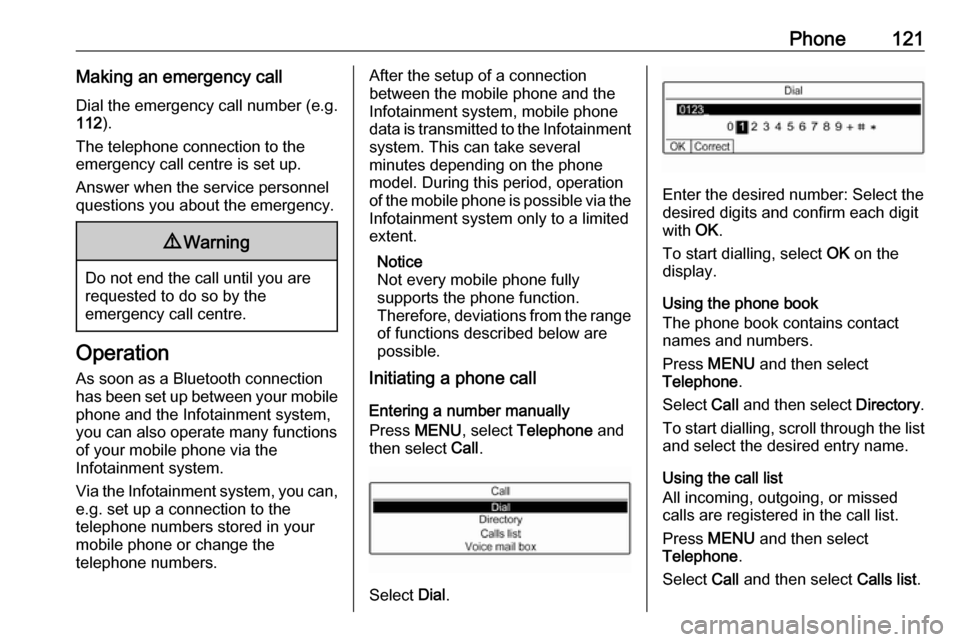
Select Dial.
Enter the desired number: Select the
desired digits and confirm each digit
with OK.
To start dialling, select OK on the
display.
Using the phone book
The phone book contains contact
names and numbers.
Press MENU and then select
Telephone .
Select Call and then select Directory.
To start dialling, scroll through the list and select the desired entry name.
Using the call list
All incoming, outgoing, or missed
calls are registered in the call list.
Press MENU and then select
Telephone .
Select Call and then select Calls list.
Page 123 of 127

Phone123To transfer the call to the telephone
(for example to leave the vehicle
while continuing the conversation),
activate Telephone mode . To transfer
the call to the Infotainment system,
deselect Telephone mode .
To put the call on hold, select On
hold during an ongoing call. If a call
has been put on hold, the menu item
On hold changes to Resume. To
return to a call put on hold, select
Resume .
To switch between two calls, select
Switch .
Mobile phones and CB radio
equipment
Installation instructions and
operating guidelines
The vehicle specific installation
instructions and the operating
guidelines of the mobile phone and
handsfree manufacturer must be
observed when installing and
operating a mobile telephone. Failureto do so could invalidate the vehicle type approval (EU directive 95/54/
EC).
Recommendations for fault-free
operation:
● Professionally installed exterior antenna to obtain the maximum
range possible,
● Maximum transmission power 10 watts,
● Installation of the phone in a suitable spot, consider relevant
Note in the Owner's Manual,
section Airbag system .
Seek advice on predetermined
installation points for the external
antenna or equipment holder and
ways of using devices with a
transmission power exceeding
10 watts.
Use of a handsfree attachment
without external antenna with mobile
telephone standards GSM
900/1800/1900 and UMTS is only
permitted if the maximum
transmission power of the mobile
telephone is 2 watts for GSM 900 or
1 watt for the other types.For reasons of safety, do not use the
phone while driving. Even use of a handsfree set can be a distraction
while driving.9 Warning
Operation of radio equipment and
mobile telephones which fail to
meet above mentioned mobile
telephone standards is only
permitted using an antenna
located outside of the vehicle.
Caution
Mobile telephones and radio
equipment may lead to
malfunctions in the vehicle
electronics when operated inside
the vehicle with no exterior
antenna, unless the above
mentioned regulations are
observed.