cruise control VAUXHALL GRANDLAND X 2018 Owner's Manual
[x] Cancel search | Manufacturer: VAUXHALL, Model Year: 2018, Model line: GRANDLAND X, Model: VAUXHALL GRANDLAND X 2018Pages: 263, PDF Size: 7.41 MB
Page 13 of 263

In brief111Power windows .....................40
2 Exterior mirrors .....................38
3 Side air vents ...................... 131
4 Turn and lane-change
signals, headlight flash,
low/high beam, high beam
assist ................................... 118
Exit lighting ......................... 122
Parking lights ...................... 119
Buttons for Driver
Information Centre ................99
5 Cruise control .....................158
Speed limiter ....................... 160
Heated steering wheel ..........79
6 Instruments .......................... 89
Driver Information Centre ...... 99
7 Buttons for Driver
Information Centre ................99
8 Windscreen wiper and
washer, rear wiper and
washer ................................. 80
9 Power button ....................... 135
10 Centre air vents .................. 13111 Hazard warning flashers ....118
12 Info-Display ........................ 101
13 Anti-theft alarm system
status LED ........................... 35
14 Central locking system ..........24
15 Glovebox .............................. 68
16 Controls for Info-Display
operation ............................. 101
17 Climate control system ........ 124
18 USB charging port ................ 84
19 Power outlet .......................... 84
20 Parking assist/Advanced
parking assist .....................174
Lane departure warning .....188
Eco button for stop-start
system ................................. 139
Electronic Stability Control and Traction Control ...........153
Sport mode ......................... 157
21 Manual transmission ..........149
Automatic transmission ......146
22 Electric parking brake .........151
23 Selective ride control ..........15524Ignition switch .....................134
25 Steering wheel adjustment ..79
26 Horn ..................................... 80
27 Storage ................................. 68
28 Bonnet release lever ..........204
29 Light switch ........................ 112
Headlight range
adjustment ......................... 114
Front/rear fog lights ............119
Instrument illumination .......120
Page 80 of 263

78Instruments and controlsInstruments and
controlsControls ....................................... 79
Steering wheel adjustment ........79
Steering wheel controls .............79
Heated steering wheel ...............79
Horn ........................................... 80
Windscreen wiper/washer .........80
Rear window wiper/washer .......82
Outside temperature ..................82
Clock ......................................... 83
Power outlets ............................. 84
Inductive charging .....................85
Cigarette lighter ......................... 86
Ashtrays .................................... 86
Warning lights, gauges and indi‐ cators ........................................... 87
Instrument cluster ......................87
Speedometer ............................. 89
Odometer .................................. 90
Trip odometer ............................ 90
Tachometer ............................... 90
Fuel gauge ................................ 91
Engine coolant temperature gauge ....................................... 91
Service display .......................... 91Control indicators ......................92
Turn signal ................................. 93
Seat belt reminder .....................93
Airbag and belt tensioners .........93
Airbag deactivation ....................94
Charging system .......................94
Malfunction indicator light ..........94
Stop engine ............................... 94
System check ............................ 95
Brake and clutch system ...........95
Electric parking brake ................95
Electric parking brake fault ........95
Antilock brake system (ABS) .....95
Gear shifting .............................. 96
Lane departure warning ............96
Lane keep assist .......................96
Electronic Stability Control and Traction Control system ...........96
Engine coolant temperature ......96
Preheating ................................. 97
Diesel particle filter ....................97
AdBlue ....................................... 97
Deflation detection system ........97
Engine oil pressure ....................97
Low fuel ..................................... 98
Autostop .................................... 98
Exterior light .............................. 98
High beam ................................. 98
High beam assist .......................98
LED headlights .......................... 98Fog light..................................... 98
Rear fog light ............................. 98
Rain sensor ............................... 98
Cruise control ............................ 99
Adaptive cruise control ..............99
Vehicle detected ahead .............99
Speed limiter ............................. 99
Door open .................................. 99
Information displays .....................99
Driver Information Centre ..........99
Info display .............................. 101
Vehicle messages ......................103
Warning chimes .......................103
Battery voltage ........................ 104
Vehicle personalisation ..............104
Telematics service .....................108
OnStar ..................................... 108
Page 91 of 263

Instruments and controls89OverviewOTurn signal 3 93XSeat belt reminder 3 93vAirbag and belt tensioners
3 93VAirbag deactivation 3 94pCharging system 3 94ZMalfunction indicator light
3 94HService vehicle soon 3 91STOPStop engine 3 94JSystem check 3 95RBrake and clutch system
3 95oElectric parking brake
3 95uAntilock brake system (ABS)
3 95RGear shifting 3 96)Lane departure warning
3 96LLane keep assist 3 96bElectronic Stability Control
and Traction Control system
3 96!Preheating 3 97%Diesel particle filter 3 97YAdBlue 3 97wDeflation detection system
3 97IEngine oil pressure 3 97Y oLow fuel 3 98W oEngine coolant temperature
high 3 96DAutostop 3 988Exterior light 3 989Low beam 3 112CHigh beam 3 98fHigh beam assist 3 98>Fog light 3 98øRear fog light 3 98
Active emergency braking
3 170,
Front pedestrian protection
3 173hDoor open 3 99
Speedometer
Page 101 of 263

Instruments and controls99Cruise control
m illuminates white or green.
Illuminates white
The system is on.
Illuminates green
Cruise control is active. Set speed is
indicated in the Driver Information
Centre.
Cruise control 3 158.
Adaptive cruise control
m illuminates white or green.
C illuminates in the Driver
Information Centre.
m illuminates white
The system is on.
m illuminates green
Adaptive cruise control is active.
When Adaptive cruise control is on or
active, C with the set speed is
indicated in the Driver Information
Centre.Adaptive cruise control 3 162.
Vehicle detected ahead
A illuminates green.
Illuminates green
A vehicle ahead is detected in the
same lane.
Adaptive cruise control 3 162,
Forward collision alert 3 169.
Speed limiter
ß illuminates in the Driver
Information Centre when Speed
limiter is active. Set speed is indicated alongside ß symbol.
Speed limiter 3 160.
Door open
h illuminates red.
A door or the tailgate is open.Information displays
Driver Information Centre The Driver Information Centre is
located in the instrument cluster.
Driver Information Centre indicates: ● overall and trip odometer
● digital speed indication
● trip/fuel information menu
● gear shift indication
● service information
● vehicle and warning messages
● driver assistance messages
● pop-up messages
Selecting menus and functions The menus and functions can be
selected via the buttons on the turn
signal lever.
Page 105 of 263
Instruments and controls103Speech recognition
Description see Infotainment manual.
Vehicle personalisation 3 104.Vehicle messages
Messages are indicated in the Driver
Information Centre, in some cases
together with a warning and signal
chime.
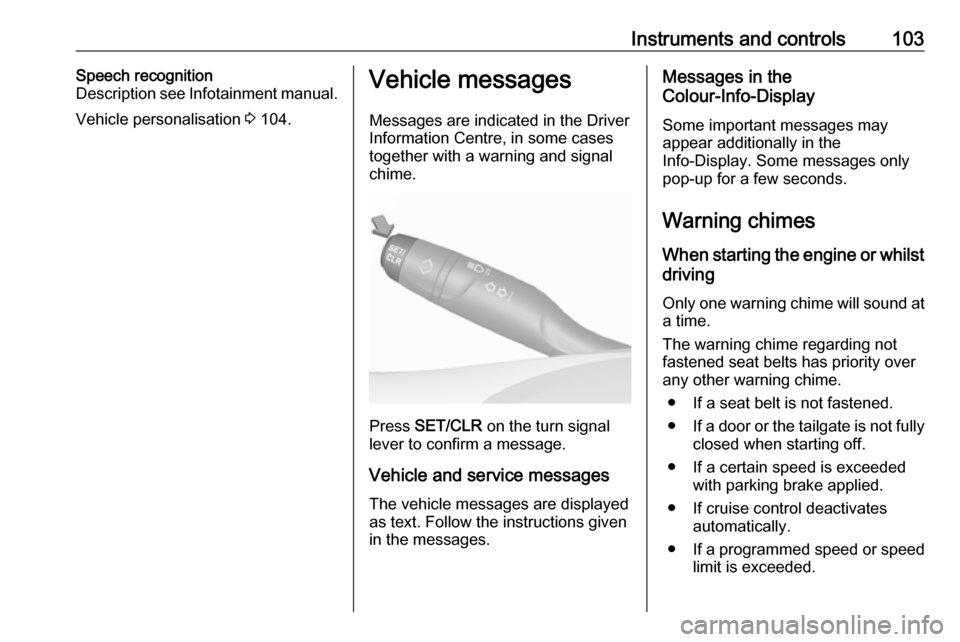
Press SET/CLR on the turn signal
lever to confirm a message.
Vehicle and service messages The vehicle messages are displayed
as text. Follow the instructions given
in the messages.
Messages in the
Colour-Info-Display
Some important messages may
appear additionally in the
Info-Display. Some messages only
pop-up for a few seconds.
Warning chimes When starting the engine or whilst
driving
Only one warning chime will sound at a time.
The warning chime regarding not
fastened seat belts has priority over
any other warning chime.
● If a seat belt is not fastened.
● If a door or the tailgate is not fully
closed when starting off.
● If a certain speed is exceeded with parking brake applied.
● If cruise control deactivates automatically.
● If a programmed speed or speed
limit is exceeded.
Page 135 of 263

Driving and operating133Driving and
operatingDriving hints ............................... 134
Control of the vehicle ...............134
Steering ................................... 134
Starting and operating ...............134
New vehicle running-in ............134
Ignition switch positions ...........134
Power button ........................... 135
Power saving mode .................136
Starting the engine ..................137
Overrun cut-off ........................ 138
Stop-start system ....................139
Parking .................................... 141
Engine exhaust .......................... 142
Diesel particle filter ..................142
Catalytic converter ...................143
AdBlue ..................................... 143
Automatic transmission ..............146
Transmission display ...............146
Selector lever .......................... 147
Manual mode ........................... 148
Electronic driving programmes 148
Fault ........................................ 148
Interruption of power supply ....149Manual transmission ..................149
Brakes ........................................ 150
Antilock brake system .............150
Parking brake .......................... 151
Brake assist ............................. 153
Hill start assist ......................... 153
Ride control systems .................153
Electronic Stability Control and Traction Control system .........153
Selective ride control ...............155
Sport mode .............................. 157
Driver assistance systems .........158
Cruise control .......................... 158
Speed limiter ........................... 160
Adaptive cruise control ............162
Forward collision alert .............169
Active emergency braking .......170
Front pedestrian protection .....173
Parking assist .......................... 174
Advanced parking assist .........177
Side blind spot alert .................182
Panoramic view system ...........184
Rear view camera ...................187
Lane departure warning ..........188
Lane keep assist .....................190
Driver alert ............................... 192
Fuel ............................................ 193
Fuel for petrol engines .............193
Fuel for diesel engines ............194Refuelling ................................ 195
Fuel consumption - CO 2-
Emissions .............................. 196
Trailer hitch ................................ 197
General information .................197
Driving characteristics and towing tips .............................. 197
Trailer towing ........................... 197
Towing equipment ...................198
Trailer stability assist ...............200
Page 160 of 263
158Driving and operatingDriver assistance
systems9 Warning
Driver assistance systems are
developed to support the driver
and not to replace the driver's
attention.
The driver accepts full
responsibility when driving the
vehicle.
When using driver assistance
systems, always take care
regarding the current traffic
situation.
Cruise control
The cruise control can store and
maintain speeds above 25 mph.
Additionally at least the third gear
must be engaged on manual
transmission, on automatic
transmission position D or the second
or a higher gear in position M must be
selected.
Deviations from the stored speeds may occur when driving uphill or
downhill.
The system maintains the vehicle
speed at the preset speed by the
driver, without any action on the
accelerator pedal.
The preset speed can be exceeded
temporarily by pressing the
accelerator pedal.
The status and preset speed is
displayed in the Driver Information Centre.
Do not use the cruise control if it is not advisable to maintain a constant
speed.
Activating in first gear is not possible.
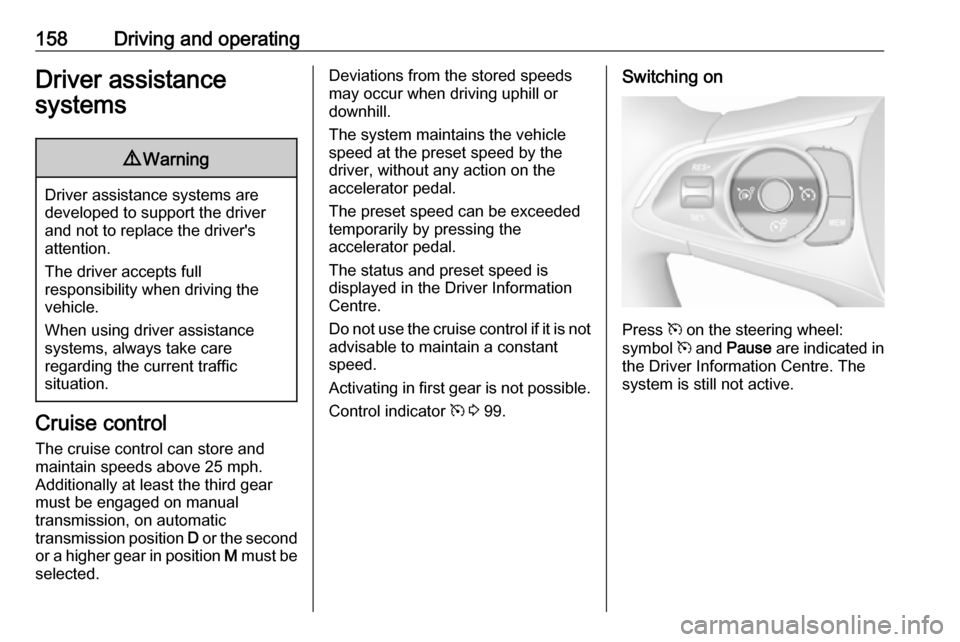
Control indicator m 3 99.Switching on
Press m on the steering wheel:
symbol m and Pause are indicated in
the Driver Information Centre. The
system is still not active.
Page 161 of 263
Driving and operating159
Activation
Setting speed by the driver
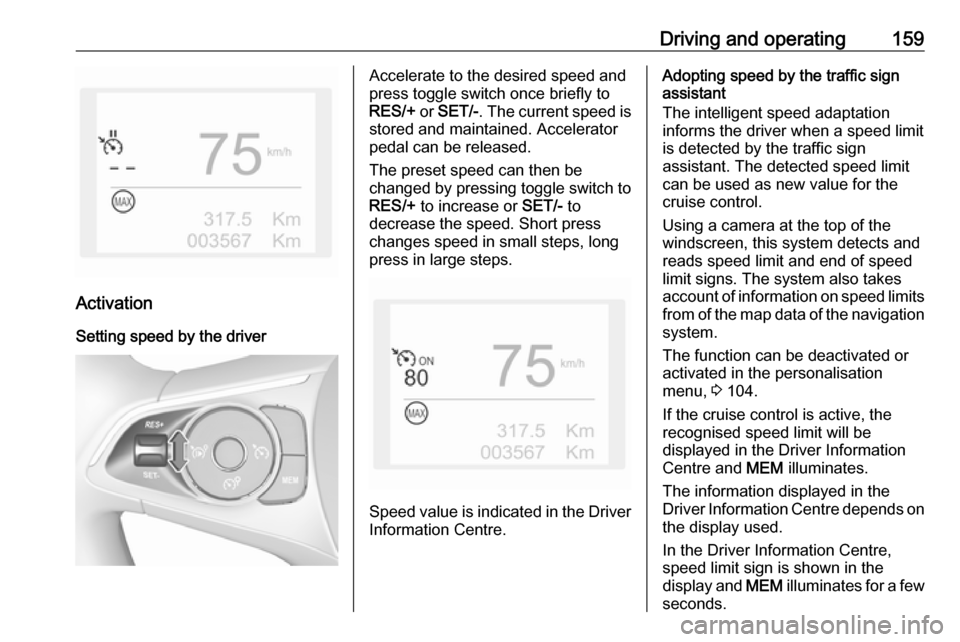
Accelerate to the desired speed and
press toggle switch once briefly to
RES/+ or SET/- . The current speed is
stored and maintained. Accelerator
pedal can be released.
The preset speed can then be
changed by pressing toggle switch to
RES/+ to increase or SET/- to
decrease the speed. Short press
changes speed in small steps, long
press in large steps.
Speed value is indicated in the Driver
Information Centre.
Adopting speed by the traffic sign
assistant
The intelligent speed adaptation
informs the driver when a speed limit
is detected by the traffic sign
assistant. The detected speed limit
can be used as new value for the
cruise control.
Using a camera at the top of the
windscreen, this system detects and
reads speed limit and end of speed
limit signs. The system also takes
account of information on speed limits from of the map data of the navigationsystem.
The function can be deactivated or
activated in the personalisation
menu, 3 104.
If the cruise control is active, the
recognised speed limit will be
displayed in the Driver Information Centre and MEM illuminates.
The information displayed in the
Driver Information Centre depends on
the display used.
In the Driver Information Centre,
speed limit sign is shown in the
display and MEM illuminates for a few
seconds.
Page 162 of 263

160Driving and operatingPress MEM on the steering wheel to
request saving of the suggested
speed.
Press MEM on the steering wheel
once more to confirm and save the
new speed setting.
This speed is the new value for the
cruise control.
Exceeding the set speed Vehicle speed can be increased by
depressing the accelerator pedal.
When the accelerator pedal is
released, the previously stored speed
is resumed.
Deactivation
Press Ñ: cruise control is in pause
mode, Pause is indicated. The
vehicle is driven without cruise
control.
Cruise control is deactivated, but not
switched off. Last stored speed
remains in memory for later speed
resume.Cruise control is deactivated
automatically:
● The brake pedal is depressed.
● The clutch pedal is depressed.
● Vehicle speed is below 25 mph.
● The Traction Control system or Electronic Stability Control is
operating.
● The selector lever is in N.
Resume stored speed Press toggle switch to RES/+ at a
speed above 25 mph. The stored
speed will be obtained.
Switching off
Press m: the cruise control mode is
deselected and the cruise control
indication extinguishes in the Driver
Information Centre.
Pressing ß to activate the speed
limiter deactivates cruise control.
Switching off the ignition cancels any
programmed speed value.Fault
In the event of a cruise control fault, the speed is cleared resulting in
flashing of the dashes.
The cruise control may not operate
correctly if traffic signs do not comply with the Vienna Convention on Road
Signs and Signals (Wiener
Übereinkommen über
Straßenverkehrszeichen).
Speed limiter
The speed limiter prevents the
vehicle exceeding a preset maximum
speed.
The maximum speed can be set at
speeds above 18 mph.
The driver can accelerate the vehicle
up to the preset speed. Deviations
from the limited speed may occur
when driving downhill.
The preset speed can be exceeded
temporarily by pressing the
accelerator pedal firmly.
The status and preset speed limit is
displayed in the Driver Information Centre.
Page 164 of 263

162Driving and operatingThe function can be deactivated or
activated in the personalisation
menu, 3 104.
If the speed limiter is active, the
recognised speed limit will be
displayed in the Driver Information
Centre and MEM illuminates.
The information displayed in the
Driver Information Centre depends on
the display used.
In the Driver Information Centre,
speed limit sign is shown in the
display and MEM illuminates for a few
seconds.
Press MEM on the steering wheel to
request saving of the suggested
speed.
Press MEM on the steering wheel
once more to confirm and save the
new speed setting.
This speed is the new value for the
speed limiter.
Exceeding the speed limit
In the event of an emergency, it is
possible to exceed the speed limit by
a "kickdown". In this case the preset
speed value flashes.Release the accelerator pedal and
the speed limiter function is
reactivated once a speed lower than
the limit speed is obtained.
Deactivation Press Ñ: speed limiter is in pause
mode, Pause is indicated. The
vehicle is driven without speed limit.
Speed limiter is deactivated, but not
switched off. Last stored speed
remains in memory for later speed
resume.
Resume limit speed Press Ñ. The stored speed limit will
be obtained.
Switching off
Press ß, the speed limiter mode is
deselected and the speed limit
indication extinguishes in the Driver
Information Centre.
Pressing m to activate cruise control
deactivates speed limiter.
The preset speed remains in the
memory when the ignition is switched
off.Fault
In the event of a speed limiter fault,
the speed is cleared resulting in
flashing of the dashes.
The speed limiter may not operate correctly if traffic signs do not comply with the Vienna Convention on Road
Signs and Signals (Wiener
Übereinkommen über
Straßenverkehrszeichen).
Adaptive cruise control
Adaptive cruise control is an
enhancement to conventional cruise
control with the additional feature of
maintaining a certain distance behind the vehicle ahead. It uses radar and
camera sensors to detect the vehicles
ahead. If no vehicle is detected in the driving path, the adaptive cruise
control will behave like a conventional
cruise control.
Adaptive cruise control automatically
decelerates the vehicle when
approaching a slower moving vehicle.
It then adjusts the vehicle speed to
follow the vehicle ahead at the
selected following distance. The