fog light VAUXHALL GRANDLAND X 2019.75 Owner's Manual
[x] Cancel search | Manufacturer: VAUXHALL, Model Year: 2019.75, Model line: GRANDLAND X, Model: VAUXHALL GRANDLAND X 2019.75Pages: 271, PDF Size: 7.73 MB
Page 13 of 271

In brief111Power windows .....................39
2 Exterior mirrors .....................36
3 Side air vents ...................... 126
4 Turn lights, headlight
flash, low/high beam, high
beam assist ......................... 113
Exit lighting ......................... 117
Parking lights ...................... 114
Buttons for Driver
Information Centre ................98
5 Cruise control .....................152
Speed limiter ....................... 155
Heated steering wheel ..........79
6 Instruments .......................... 88
Driver Information Centre ...... 98
7 Infotainment controls
8 Windscreen wiper and
washer, rear wiper and
washer ................................. 80
9 Power button ....................... 131
10 Air vents ............................. 126
11 Hazard warning flashers ....113
12 Info Display ........................ 10013Anti-theft alarm system
status LED ........................... 34
14 Central locking system ..........23
15 Glovebox .............................. 68
16 Controls for Info Display
operation ............................. 100
17 Climate control system ........ 119
18 USB charging port ................ 84
19 Power outlet .......................... 84
20 Parking assist/Advanced
parking assist .....................169
Lane departure warning .....183
Eco button for stop-start
system ................................. 134
Electronic Stability Control and Traction Control ...........149
Sport mode ......................... 151
21 Manual transmission ..........145
Automatic transmission ......142
22 Electric parking brake .........146
23 Selective ride control ..........150
24 Ignition switch .....................130
25 Steering wheel adjustment ..7926 Horn ..................................... 80
27 Storage ................................. 68
28 Bonnet release lever ..........199
29 Light switch ........................ 108
Headlight range
adjustment ......................... 109
Front/rear fog lights ............114
Instrument illumination .......115
Page 14 of 271
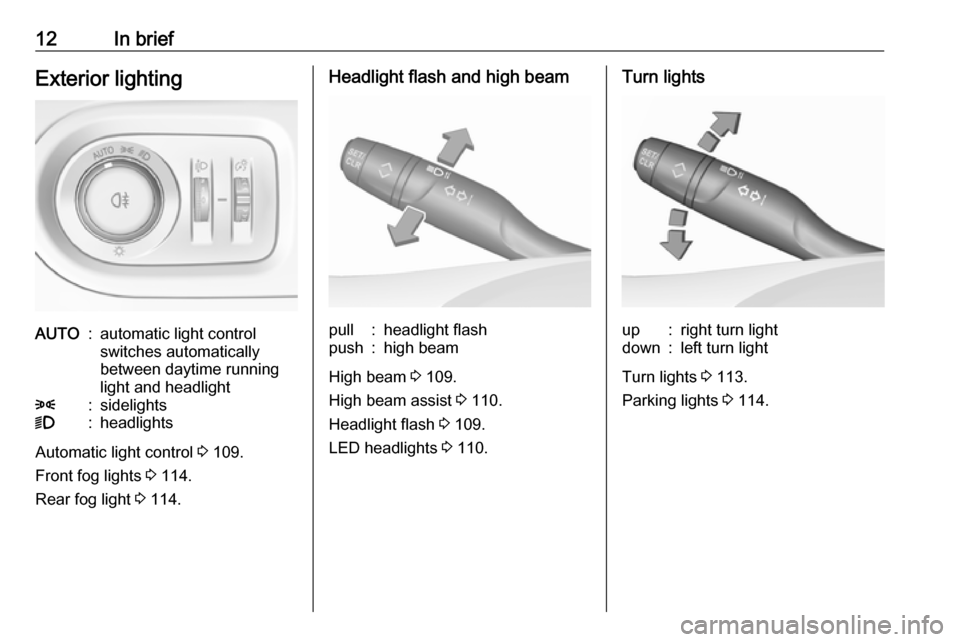
12In briefExterior lightingAUTO:automatic light control
switches automatically
between daytime running
light and headlight8:sidelights9:headlights
Automatic light control 3 109.
Front fog lights 3 114.
Rear fog light 3 114.
Headlight flash and high beampull:headlight flashpush:high beam
High beam 3 109.
High beam assist 3 110.
Headlight flash 3 109.
LED headlights 3 110.
Turn lightsup:right turn lightdown:left turn light
Turn lights 3 113.
Parking lights 3 114.
Page 80 of 271

78Instruments and controlsInstruments and
controlsControls ....................................... 79
Steering wheel adjustment ........79
Steering wheel controls .............79
Heated steering wheel ...............79
Horn ........................................... 80
Windscreen wiper and washer ..80
Rear window wiper and washer ...................................... 82
Outside temperature ..................82
Clock ......................................... 83
Power outlets ............................. 84
Inductive charging .....................86
Cigarette lighter ......................... 86
Ashtrays .................................... 87
Warning lights, gauges and indi‐ cators ........................................... 87
Instrument cluster ......................87
Speedometer ............................. 88
Odometer .................................. 88
Trip odometer ............................ 88
Tachometer ............................... 89
Fuel gauge ................................ 89
Engine coolant temperature gauge ....................................... 89Engine oil level monitor.............90
Service display .......................... 90
Control indicators ......................91
Turn lights .................................. 91
Seat belt reminder .....................91
Airbag and belt tensioners .........92
Airbag deactivation ....................92
Charging system .......................92
Malfunction indicator light ..........92
Service vehicle soon .................93
Stop engine ............................... 93
System check ............................ 93
Brake and clutch system ...........93
Electric parking brake ................93
Electric parking brake fault ........94
Antilock brake system (ABS) .....94
Gear shifting .............................. 94
Lane departure warning ............94
Lane keep assist .......................94
Electronic Stability Control and Traction Control system ...........95
Engine coolant temperature ......95
Preheating ................................. 95
Exhaust filter .............................. 95
AdBlue ....................................... 95
Deflation detection system ........96
Engine oil pressure ....................96
Low fuel ..................................... 96
Autostop .................................... 96
Exterior light .............................. 96Low beam.................................. 97
High beam ................................. 97
High beam assist .......................97
LED headlights .......................... 97
Front fog lights ........................... 97
Rear fog light ............................. 97
Rain sensor ............................... 97
Cruise control ............................ 97
Adaptive cruise control ..............97
Vehicle detected ahead .............97
Side blind spot alert ...................97
Active emergency braking .........98
Speed limiter ............................. 98
Door open .................................. 98
Displays ....................................... 98
Driver Information Centre ..........98
Info Display .............................. 100
Vehicle messages ......................102
Warning chimes .......................102
Vehicle personalisation ..............103
Telematics services ...................106
Vauxhall Connect ....................106
Page 90 of 271
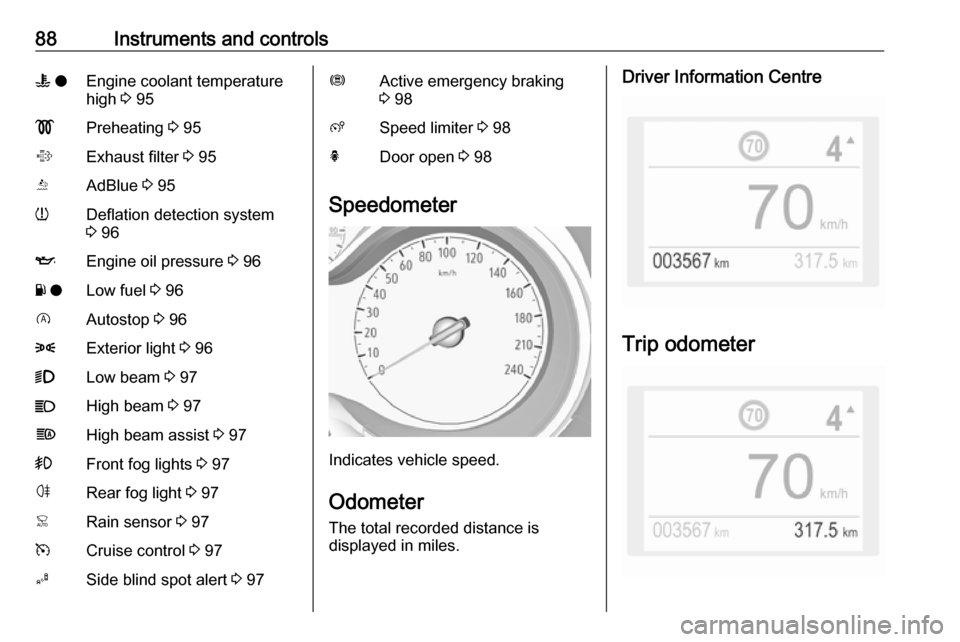
88Instruments and controlsW oEngine coolant temperature
high 3 95!Preheating 3 95%Exhaust filter 3 95YAdBlue 3 95wDeflation detection system
3 96IEngine oil pressure 3 96Y oLow fuel 3 96DAutostop 3 968Exterior light 3 969Low beam 3 97CHigh beam 3 97fHigh beam assist 3 97>Front fog lights 3 97øRear fog light 3 97
Speedometer
Indicates vehicle speed.
Odometer
The total recorded distance is
displayed in miles.
Driver Information Centre
Trip odometer
Page 99 of 271

Instruments and controls97Low beam
9 illuminates green.
Illuminated when low beam is on.
High beam C illuminates blue.
Illuminates when high beam is on,
during headlight flash 3 109.
High beam assist f illuminates green.
The high beam assist is activated
3 110.
LED headlights C illuminates and a warning
message is displayed in the Driver
Information Centre.
Seek the assistance of a workshop.
Front fog lights > illuminates green.
The front fog lights are on 3 114.Rear fog light
r illuminates yellow.
The rear fog light is on 3 114.
Rain sensor < illuminates green.
Illuminated when rain sensor position on wiper lever is selected.
Windscreen wiper and washer 3 80.
Cruise control m illuminates white or green.
Illuminates white The system is on.
Illuminates green
Cruise control is active. Set speed is
indicated in the Driver Information
Centre.
Cruise control 3 152.
Adaptive cruise control
m illuminates white or green.C illuminates in the Driver
Information Centre.
m illuminates white
The system is on.
m illuminates green
Adaptive cruise control is active.
When adaptive cruise control is on or active, C with the set speed is
indicated in the Driver Information
Centre.
Adaptive cruise control 3 157.
Vehicle detected ahead
A illuminates green.
Illuminates green
A vehicle ahead is detected in the
same lane.
Adaptive cruise control 3 157.
Forward collision alert 3 163.
Side blind spot alert B illuminates green.
The system is active 3 177.
Page 110 of 271
108LightingLightingExterior lighting.......................... 108
Light switch .............................. 108
Automatic light control .............109
High beam ............................... 109
Headlight flash ......................... 109
Headlight range adjustment ....109
Headlights when driving abroad .................................... 110
Daytime running lights .............110
LED headlights ........................ 110
Hazard warning flashers ..........113
Turn lights ................................ 113
Front fog lights ......................... 114
Rear fog light ........................... 114
Parking lights ........................... 114
Reversing lights .......................115
Misted light covers ...................115
Interior lighting ........................... 115
Instrument panel illumination control ..................................... 115
Interior lights ............................ 115
Reading lights .......................... 116
Sunvisor lights ......................... 116
Lighting features ........................116
Centre console lighting ............116Entry lighting ............................ 116
Exit lighting .............................. 117
Battery discharge protection ....117Exterior lighting
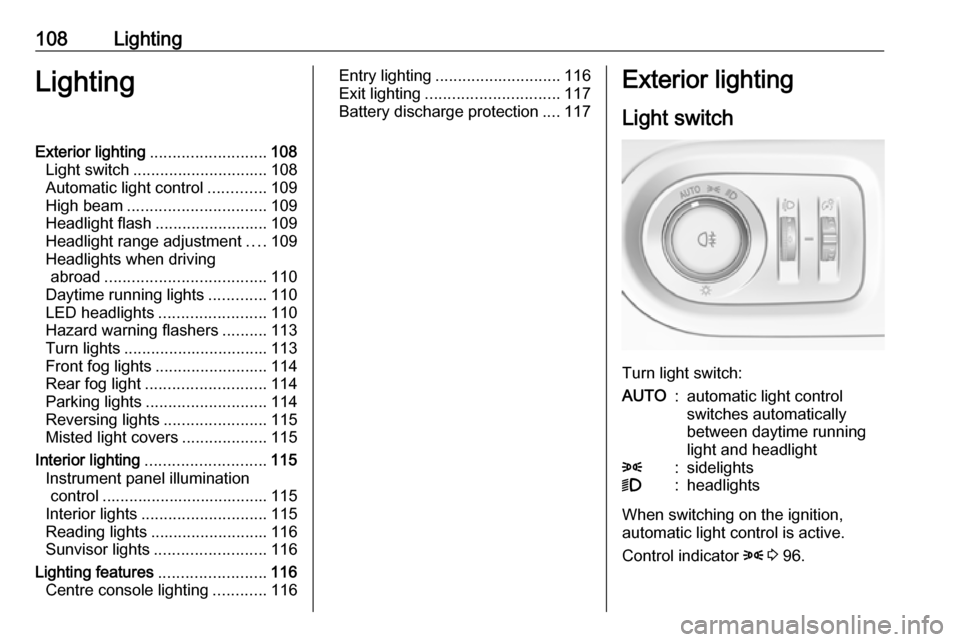
Light switch
Turn light switch:
AUTO:automatic light control
switches automatically
between daytime running
light and headlight8:sidelights9:headlights
When switching on the ignition,
automatic light control is active.
Control indicator 8 3 96.
Page 114 of 271
112LightingParticular LEDs, based on steeringangle and speed, are additionally
triggered to improve lighting in
curves. This function is activated at
speeds from 25 mph to 43 mph.
High beam assist This feature activates the high beam
at night when the vehicle speed is
faster than 15 mph.
The camera in the windscreen
detects the lights of oncoming or
preceding vehicles. Each LED on
right or left side can be triggered or faded out particularly according to the
traffic situation. This gives the best
light distribution without dazzling
other road users. Once activated,
high beam assist remains active and
switches high beam on and off
depending on surrounding
conditions. The latest setting of the
high beam assist will remain after the ignition is switched on again.
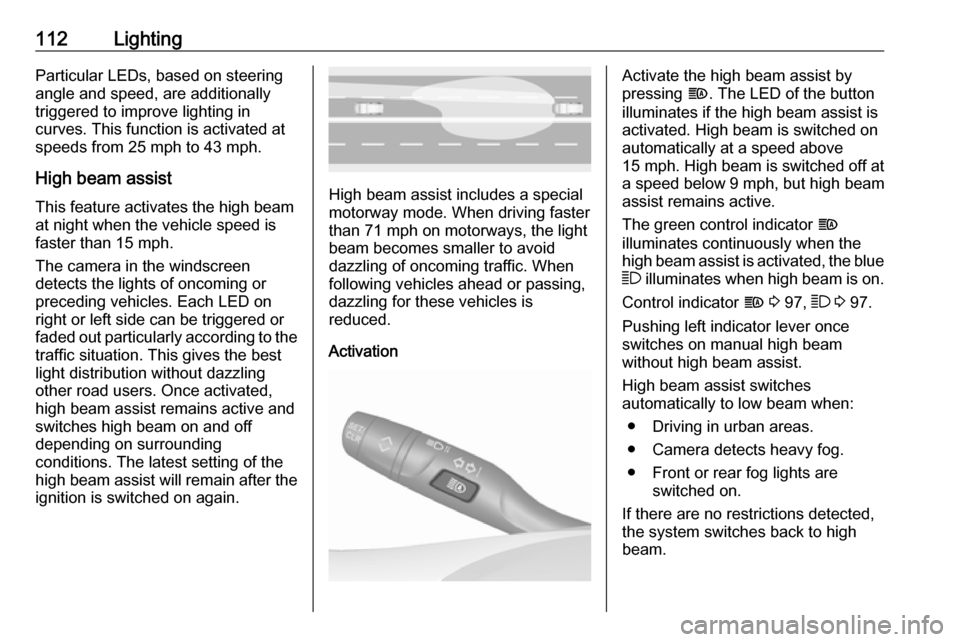
High beam assist includes a special
motorway mode. When driving faster
than 71 mph on motorways, the light beam becomes smaller to avoid
dazzling of oncoming traffic. When
following vehicles ahead or passing,
dazzling for these vehicles is
reduced.
Activation
Activate the high beam assist by
pressing f. The LED of the button
illuminates if the high beam assist is
activated. High beam is switched on automatically at a speed above
15 mph . High beam is switched off at
a speed below 9 mph, but high beam
assist remains active.
The green control indicator f
illuminates continuously when the
high beam assist is activated, the blue 7 illuminates when high beam is on.
Control indicator f 3 97, 7 3 97.
Pushing left indicator lever once
switches on manual high beam
without high beam assist.
High beam assist switches
automatically to low beam when:
● Driving in urban areas.
● Camera detects heavy fog.
● Front or rear fog lights are switched on.
If there are no restrictions detected, the system switches back to high
beam.
Page 116 of 271
114LightingActivate temporary flashing by
holding the indicator lever just before
the resistance point. Turn lights will
flash until indicator lever is being
released.
To activate three flashes, tap the
indicator lever briefly without passing
the resistance point.
If you forget to cancel the turn lights
for more than 20 seconds, the volume
of the audible signal will increase if
the speed is above 40 mph.
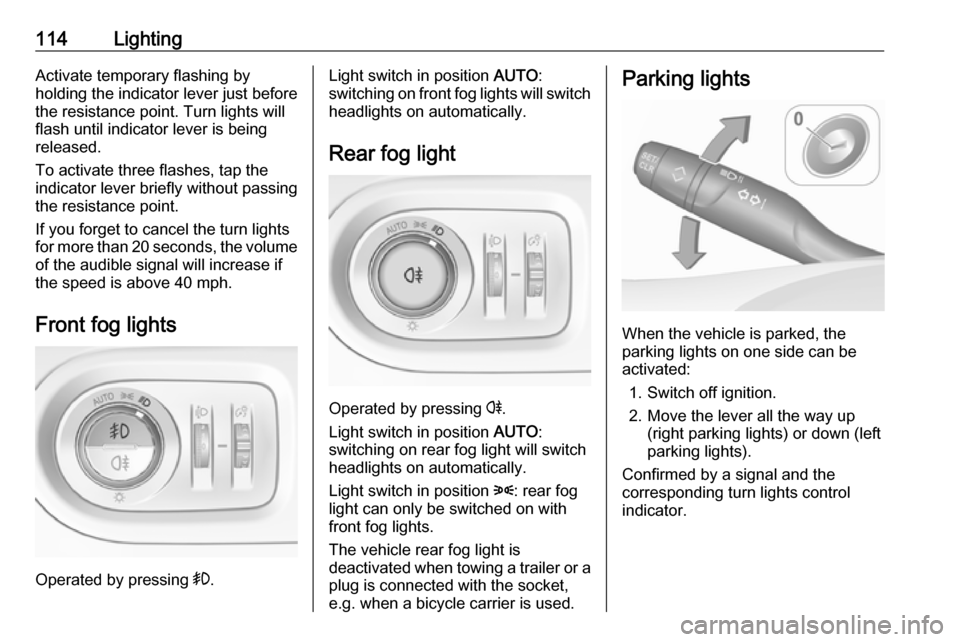
Front fog lights
Operated by pressing >.
Light switch in position AUTO:
switching on front fog lights will switch headlights on automatically.
Rear fog light
Operated by pressing r
.
Light switch in position AUTO:
switching on rear fog light will switch
headlights on automatically.
Light switch in position 8: rear fog
light can only be switched on with
front fog lights.
The vehicle rear fog light is
deactivated when towing a trailer or a
plug is connected with the socket,
e.g. when a bicycle carrier is used.
Parking lights
When the vehicle is parked, the
parking lights on one side can be
activated:
1. Switch off ignition.
2. Move the lever all the way up (right parking lights) or down (left
parking lights).
Confirmed by a signal and the
corresponding turn lights control
indicator.
Page 183 of 271
Driving and operating181DeactivationPanoramic view system is
deactivated when:
● driving faster than 12 mph
● 7 seconds after disengaging reverse gear
● by pressing the icon q in the left
upper corner of the touch screen
● opening the tailgate
General information9 Warning
The panoramic view system does
not replace driver vision. It will not display children, pedestrians,
cyclists, crossing traffic, animals,
or any other objects outside of the camera view area, e. g. below the
bumper, or underneath the
vehicle.
Do not drive or park the vehicle
using only the panoramic view
system.
Always check the surrounding of
the vehicle before driving.
Displayed images may be further
or closer than they appear. The
area displayed is limited and
objects that are close to either
edge of the bumper or under the
bumper are not displayed on the
screen.
System limitations
Caution
For optimal operation of the
system, it is important to keep the
lense of the camera in the tailgate between the number plate lightsand the lense in the front grill
below the emblem always clean.
Rinse the lenses with water and
wipe with a soft cloth.
Do not clean the lenses with a
steam-jet or high-pressure jet
cleaner.
The panoramic view system may not
operate properly when:
● The surrounding is dark.
● The sun or the beam of headlights is shining directly into
the camera lenses.
● Weather limits visibility, such as fog, rain, or snow.
● The camera lenses are blocked by snow, ice, slush, mud, dirt.
● The vehicle is towing a trailer. ● The vehicle had an accident.● There are extreme temperature changes.
Rear view camera The rear view camera assists the
driver when reversing by displaying a
view of the area behind the vehicle.
The view of the camera is displayed
in the Info Display.
Page 185 of 271
Driving and operating183System limitationsThe rear view camera may not
operate properly when:
● the surrounding is dark
● the beam of headlights is shining
directly into the camera lenses
● weather limits visibility, such as fog, rain, or snow
● the camera lenses are blocked by snow, ice, slush, mud, dirt.Clean the lense, rinse with water,
and wipe with a soft cloth
● the tailgate will be opened
● the vehicle is towing an electrically connected trailer,
bicycle carrier, etc.
● the vehicle had a rear end accident
● there are extreme temperature changes
Lane departure warning
The lane departure warning system
observes the lane markings between which the vehicle is driving via a front camera located at the top of thewindscreen. The system warns the
driver in the event of an unintendend
lane departure via visual and acoustic signals.
There is no lane departure warning
when the turn lights are operated and during 20 seconds after turn lights
have been switched off.9 Warning
This system is a driving aid that
cannot, in any circumstances,
replace the need for vigilance on
the part of the driver.
Activation
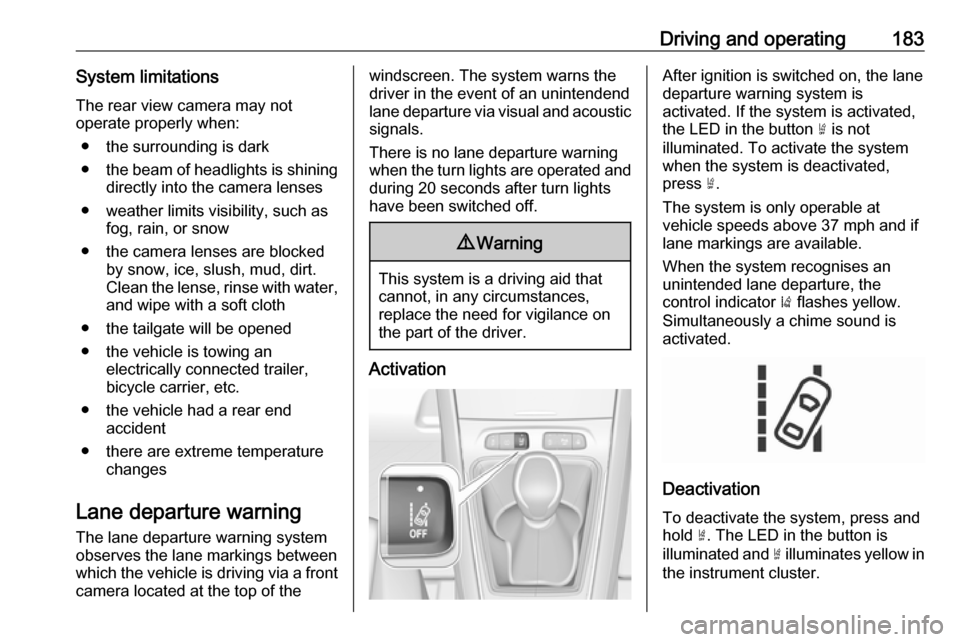
After ignition is switched on, the lane
departure warning system is
activated. If the system is activated,
the LED in the button ½ is not
illuminated. To activate the system
when the system is deactivated,
press ½.
The system is only operable at
vehicle speeds above 37 mph and if
lane markings are available.
When the system recognises an
unintended lane departure, the
control indicator ) flashes yellow.
Simultaneously a chime sound is
activated.
Deactivation
To deactivate the system, press andhold ½. The LED in the button is
illuminated and ½ illuminates yellow in
the instrument cluster.