camera VAUXHALL GRANDLAND X 2020 Owner's Manual
[x] Cancel search | Manufacturer: VAUXHALL, Model Year: 2020, Model line: GRANDLAND X, Model: VAUXHALL GRANDLAND X 2020Pages: 283, PDF Size: 21.87 MB
Page 40 of 283
38Keys, doors and windowsInterior mirrors
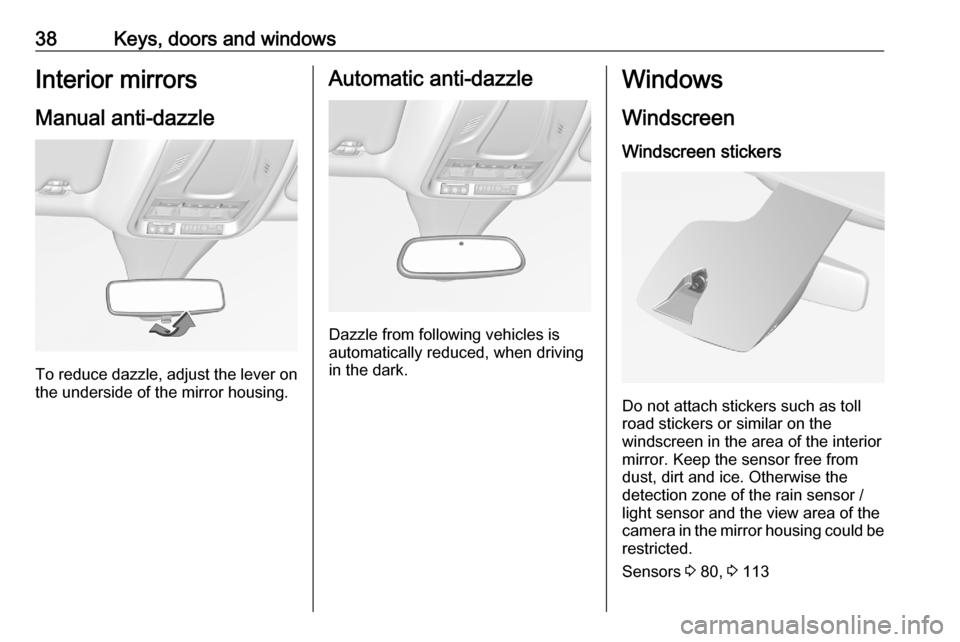
Manual anti-dazzle
To reduce dazzle, adjust the lever on the underside of the mirror housing.
Automatic anti-dazzle
Dazzle from following vehicles is
automatically reduced, when driving
in the dark.
Windows
Windscreen
Windscreen stickers
Do not attach stickers such as toll
road stickers or similar on the
windscreen in the area of the interior
mirror. Keep the sensor free from
dust, dirt and ice. Otherwise the
detection zone of the rain sensor /
light sensor and the view area of the
camera in the mirror housing could be
restricted.
Sensors 3 80, 3 113
Page 41 of 283
Keys, doors and windows39Windscreen replacementCaution
If the vehicle has a front-looking
camera sensor for the driver
assistance systems, it is very
important that any windscreen
replacement is performed
accurately according to Vauxhall
specifications. Otherwise, these systems may not work properly
and there is a risk of unexpected
behaviour and / or messages from these systems.
Power windows
9 Warning
Take care when operating the
power windows. Risk of injury,
particularly to children.
If there are children on the rear seats, switch on the child safety
system for the power windows.
Keep a close watch on the
windows when closing them.
Ensure that nothing becomes
trapped in them as they move.
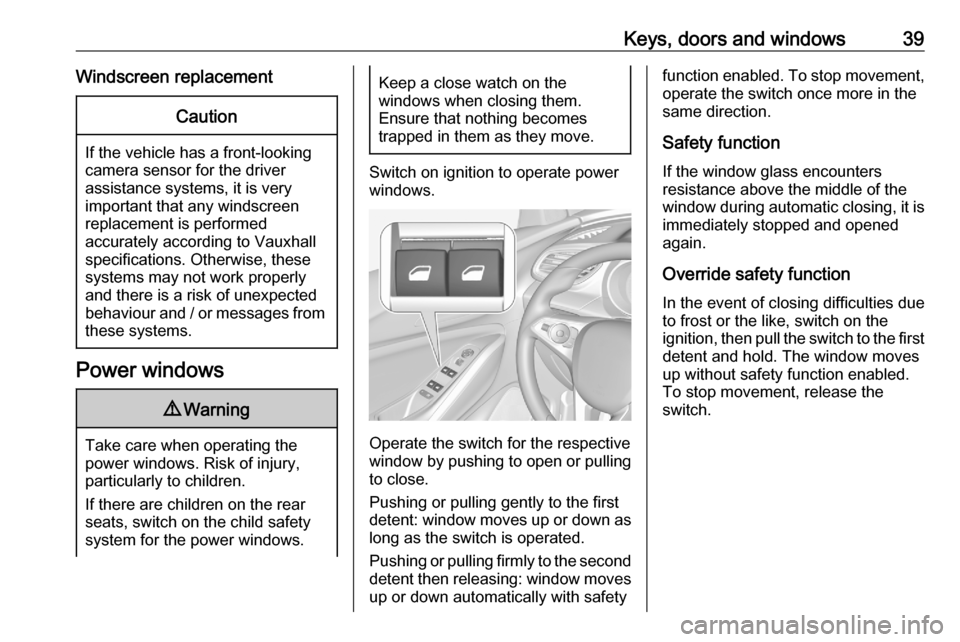
Switch on ignition to operate power
windows.
Operate the switch for the respective
window by pushing to open or pulling to close.
Pushing or pulling gently to the first
detent: window moves up or down as long as the switch is operated.
Pushing or pulling firmly to the second
detent then releasing: window moves
up or down automatically with safety
function enabled. To stop movement,
operate the switch once more in the
same direction.
Safety function
If the window glass encounters
resistance above the middle of the
window during automatic closing, it is
immediately stopped and opened
again.
Override safety function
In the event of closing difficulties due
to frost or the like, switch on the
ignition, then pull the switch to the first
detent and hold. The window moves
up without safety function enabled.
To stop movement, release the
switch.
Page 105 of 283
Instruments and controls103The Info Displays can indicate:● time 3 83
● outside temperature 3 83
● date 3 83
● Infotainment system, see description in the Infotainment
manual
● indication of rear view camera 3 188
● indication of panoramic view system 3 185
● indication of parking assist instructions 3 176
● navigation, see description in the
Infotainment manual
● vehicle and system messages 3 106
● settings for vehicle personalisation 3 107
● indication of the current powerflow within the hybrid
system
● indication of the average fuel and
power consumption● settings for programmable charging 3 197
● settings for eSave function
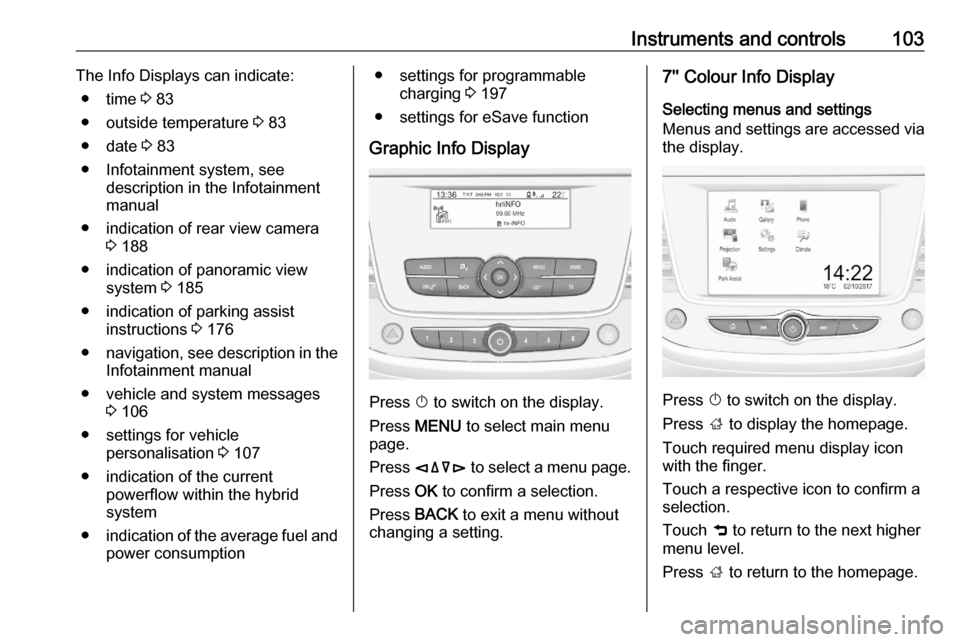
Graphic Info Display
Press X to switch on the display.
Press MENU to select main menu
page.
Press èäåé to select a menu page.
Press OK to confirm a selection.
Press BACK to exit a menu without
changing a setting.
7'' Colour Info Display
Selecting menus and settings
Menus and settings are accessed via
the display.
Press X to switch on the display.
Press ; to display the homepage.
Touch required menu display icon
with the finger.
Touch a respective icon to confirm a
selection.
Touch 9 to return to the next higher
menu level.
Press ; to return to the homepage.
Page 110 of 283
108Instruments and controlsRear wiper in reverse gear:
Activation / deactivation.
● Vehicle
Unlocking boot only : Activation /
deactivation.
Plip action : Driver / all doors.
● Driving assistance
Fatigue Detection system :
Activation / deactivation.
Speed recommendation :
Activation / deactivation.
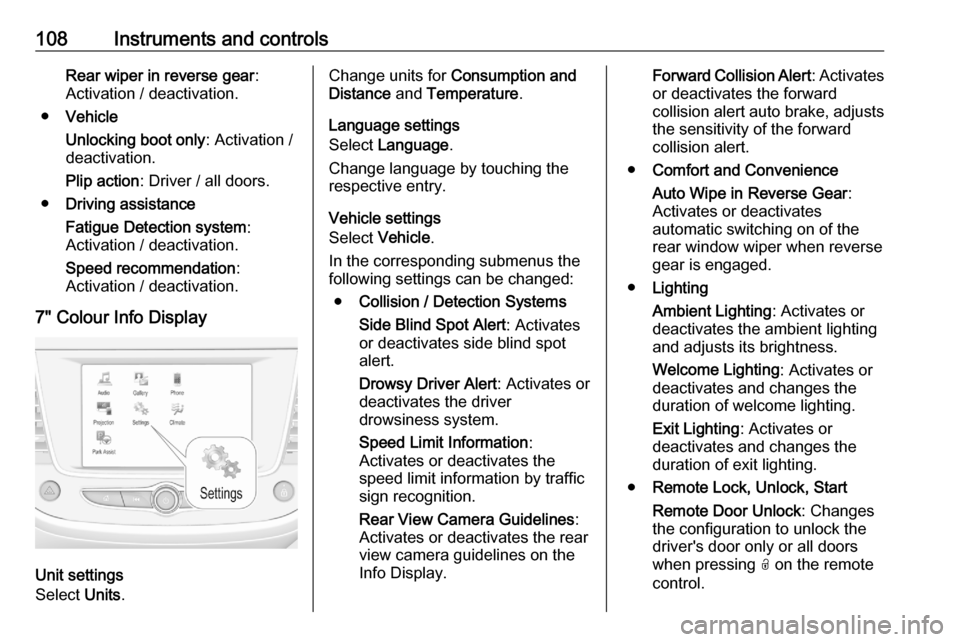
7" Colour Info Display
Unit settings
Select Units.
Change units for Consumption and
Distance and Temperature .
Language settings
Select Language .
Change language by touching the
respective entry.
Vehicle settings
Select Vehicle .
In the corresponding submenus the
following settings can be changed:
● Collision / Detection Systems
Side Blind Spot Alert : Activates
or deactivates side blind spot
alert.
Drowsy Driver Alert : Activates or
deactivates the driver
drowsiness system.
Speed Limit Information :
Activates or deactivates the
speed limit information by traffic
sign recognition.
Rear View Camera Guidelines :
Activates or deactivates the rear
view camera guidelines on the
Info Display.Forward Collision Alert : Activates
or deactivates the forward
collision alert auto brake, adjusts the sensitivity of the forward
collision alert.
● Comfort and Convenience
Auto Wipe in Reverse Gear :
Activates or deactivates
automatic switching on of the
rear window wiper when reverse gear is engaged.
● Lighting
Ambient Lighting : Activates or
deactivates the ambient lighting
and adjusts its brightness.
Welcome Lighting : Activates or
deactivates and changes the duration of welcome lighting.
Exit Lighting : Activates or
deactivates and changes the
duration of exit lighting.
● Remote Lock, Unlock, Start
Remote Door Unlock : Changes
the configuration to unlock the
driver's door only or all doors
when pressing O on the remote
control.
Page 118 of 283
116Lightingto recognise objects and markings on
the right road side and obstacles on
the lane despite the weather
condition. By lowering the reflection
on wet roads the oncoming traffic is less dazzled. Adverse weather light is activated up to a speed to 43 mph.
Curve light
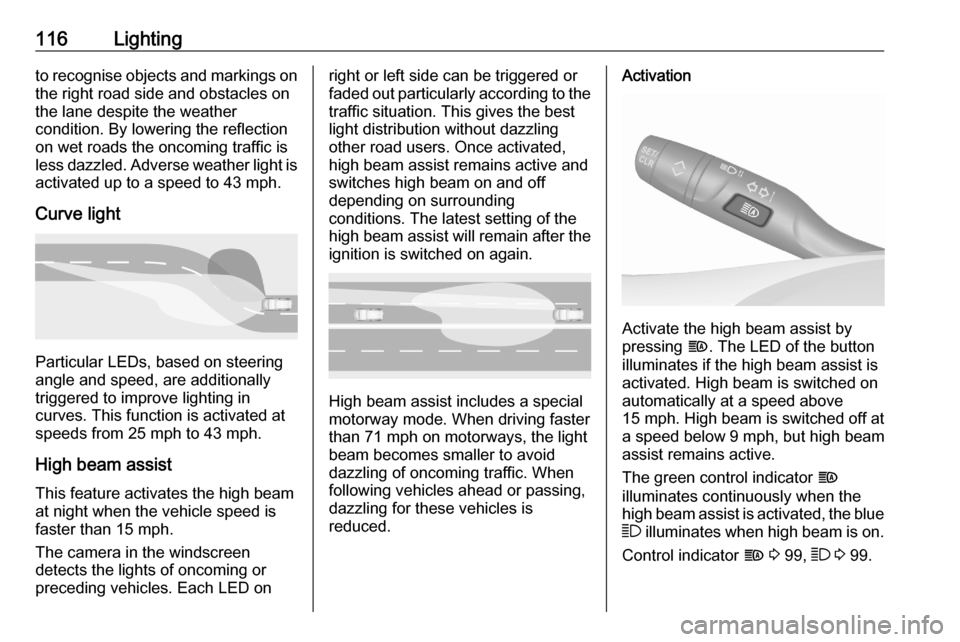
Particular LEDs, based on steering
angle and speed, are additionally
triggered to improve lighting in
curves. This function is activated at
speeds from 25 mph to 43 mph.
High beam assistThis feature activates the high beam
at night when the vehicle speed is
faster than 15 mph.
The camera in the windscreen
detects the lights of oncoming or
preceding vehicles. Each LED on
right or left side can be triggered or
faded out particularly according to the traffic situation. This gives the best
light distribution without dazzling
other road users. Once activated,
high beam assist remains active and
switches high beam on and off
depending on surrounding
conditions. The latest setting of the
high beam assist will remain after the
ignition is switched on again.
High beam assist includes a special
motorway mode. When driving faster
than 71 mph on motorways, the light
beam becomes smaller to avoid
dazzling of oncoming traffic. When
following vehicles ahead or passing,
dazzling for these vehicles is
reduced.
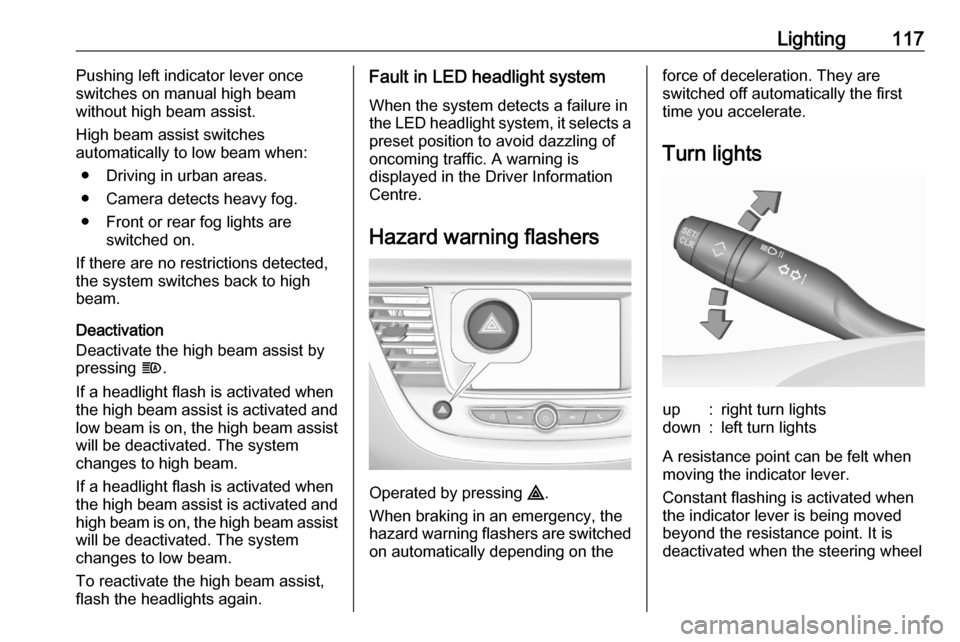
Activation
Activate the high beam assist by
pressing f. The LED of the button
illuminates if the high beam assist is
activated. High beam is switched on automatically at a speed above
15 mph . High beam is switched off at
a speed below 9 mph, but high beam
assist remains active.
The green control indicator f
illuminates continuously when the
high beam assist is activated, the blue 7 illuminates when high beam is on.
Control indicator f 3 99, 7 3 99.
Page 119 of 283
Lighting117Pushing left indicator lever once
switches on manual high beam
without high beam assist.
High beam assist switches
automatically to low beam when:
● Driving in urban areas.
● Camera detects heavy fog.
● Front or rear fog lights are switched on.
If there are no restrictions detected, the system switches back to high
beam.
Deactivation
Deactivate the high beam assist by
pressing f.
If a headlight flash is activated when the high beam assist is activated and
low beam is on, the high beam assist will be deactivated. The system
changes to high beam.
If a headlight flash is activated when the high beam assist is activated and
high beam is on, the high beam assist will be deactivated. The system
changes to low beam.
To reactivate the high beam assist,
flash the headlights again.Fault in LED headlight system
When the system detects a failure in
the LED headlight system, it selects a preset position to avoid dazzling of
oncoming traffic. A warning is
displayed in the Driver Information
Centre.
Hazard warning flashers
Operated by pressing ¨.
When braking in an emergency, the
hazard warning flashers are switched
on automatically depending on the
force of deceleration. They are
switched off automatically the first
time you accelerate.
Turn lightsup:right turn lightsdown:left turn lights
A resistance point can be felt when
moving the indicator lever.
Constant flashing is activated when
the indicator lever is being moved
beyond the resistance point. It is
deactivated when the steering wheel
Page 135 of 283

Driving and operating133Driving and
operatingDriving hints ............................... 134
Control of the vehicle ...............134
Steering ................................... 134
Starting and operating ...............134
New vehicle running-in ............134
Ignition switch positions ...........134
Power button ........................... 135
Starting the engine ..................136
Overrun cut-off ........................ 138
Stop-start system ....................138
Parking .................................... 140
Engine exhaust .......................... 141
Exhaust filter ............................ 141
Catalytic converter ...................142
AdBlue ..................................... 142
Automatic transmission electri‐
fied ............................................. 146
Automatic transmission ..............147
Transmission display ...............147
Gear selection ......................... 147
Manual mode ........................... 148
Electronic driving programmes 149Fault ........................................ 149
Interruption of power supply ....149
Manual transmission ..................150
Drive systems ............................ 151
Drive modes ............................ 151
All-wheel drive ......................... 151
Brakes ........................................ 152
Antilock brake system .............152
Parking brake .......................... 153
Brake assist ............................. 155
Hill start assist ......................... 155
Regenerative braking ..............155
Ride control systems .................156
Electronic Stability Control and Traction Control system .........156
Selective ride control ...............157
Sport mode .............................. 158
Driver assistance systems .........159
Cruise control .......................... 159
Speed limiter ........................... 162
Adaptive cruise control ............164
Forward collision alert .............170
Active emergency braking .......172
Front pedestrian protection .....175
Parking assist .......................... 176
Advanced parking assist .........179
Side blind spot alert .................184
Panoramic view system ...........185
Rear view camera ...................188Lane departure warning ..........190
Lane keep assist .....................191
Driver alert ............................... 193
Charging .................................... 194
Programmable charging ..........197
Charging status .......................198
Charge cord ............................. 198
Fuel ............................................ 201
Fuel for petrol engines .............201
Fuel for diesel engines ............202
Refuelling ................................ 203
Trailer hitch ................................ 205
General information .................205
Driving characteristics and towing tips .............................. 205
Trailer towing ........................... 205
Towing equipment ...................206
Trailer stability assist ...............208
Page 163 of 283

Driving and operating161Adopting speed by the speed limitrecognition
The intelligent speed adaptation
informs the driver when a speed limit
is detected by the speed limit
recognition. The detected speed limit
can be used as new value for the
cruise control.
Using the camera at the top of the
windscreen, this system detects and
reads speed limit and end of speed
limit signs.
If the cruise control is active, the
recognised speed limit will be
displayed in the Driver Information
Centre and MEM illuminates.
Press MEM on the steering wheel to
request saving of the suggested
speed.
Press MEM on the steering wheel
once more to confirm and save the
new speed setting.
This speed is the new value for the
cruise control.
The function can be deactivated or activated in the personalisation menu
3 107.Exceeding the set speed
Vehicle speed can be increased by
depressing the accelerator pedal. When the accelerator pedal is
released, the previously stored speed is resumed.
Deactivation of the functionality Press Ñ, cruise control is in pause
mode and a message is displayed.
The vehicle is driven without cruise
control.
Cruise control is deactivated, but not
switched off. Last stored speed
remains in memory for later speed
resume.
Cruise control is deactivated
automatically:
● The brake pedal is depressed.
● Vehicle speed is below 25 mph.
● The Traction Control system or Electronic Stability Control is
operating.
● The selector lever is in N
(automatic transmission), first or
second gear (manual
transmission).Resume stored speed
Move thumb wheel to RES/+ at a
speed above 25 mph. The stored
speed will be obtained.
Switching off the system
Press m, the cruise control mode is
deselected and the cruise control
indication extinguishes in the Driver
Information Centre.
Pressing ß to activate the speed
limiter deactivates cruise control.
Switching off the ignition cancels any
programmed speed value.
Fault
In the event of a cruise control fault, the speed is cleared resulting in
flashing of the dashes.
The speed limit recognition may not
operate correctly if traffic signs do not comply with the Vienna Convention
on Road Signs and Signals.
Page 165 of 283

Driving and operating163Accelerate to the desired speed and
move thumb wheel once briefly to
SET/- . The current speed is stored as
maximum speed.
The preset maximum speed can be
set by pressing thumb wheel to
RES/+ to increase or SET/- to
decrease the desired maximum
speed. Move thumb wheel repeatedly
to change speed in small steps, move and hold to change speed in large
steps.
Speed value is indicated in the Driver
Information Centre.
Press Ñ to activate speed limiter.
Adopting speed by the speed limit recognition
The intelligent speed adaptation
informs the driver when a speed limit
is detected by the speed limit
recognition. The detected speed limit
can be used as new value for the
speed limiter.
Using the camera at the top of the
windscreen, this system detects and
reads speed limit and end of speed
limit signs.
If the speed limiter is active, the
recognised speed limit will be
displayed in the Driver Information Centre and MEM illuminates.
Press MEM on the steering wheel to
request saving of the suggested
speed limit.
Press MEM on the steering wheel
once more to confirm and save the
new speed setting.
This speed is the new value for the
speed limiter.
The function can be activated or deactivated in the personalisation
menu 3 107.
Exceeding the speed limit
In the event of an emergency, it is possible to exceed the speed limit by
depressing the accelerator pedal
fully. In this case the preset speed
value flashes.
Release the accelerator pedal and
the speed limiter function is
reactivated once a speed lower than
the limit speed is obtained.
Page 166 of 283

164Driving and operatingDeactivation of the functionality
Press Ñ, speed limiter is in pause
mode and a message is displayed.
The vehicle is driven without speed
limiter.
Speed limiter is deactivated, but not
switched off. Last stored speed
remains in memory for later speed
resume.
Resume limit speed
Press Ñ, the stored speed limit will be
obtained.
Switching off the system
Press ß, the speed limiter mode is
deselected and the speed limit indication extinguishes in the Driver
Information Centre.
Pressing m to activate cruise control
deactivates speed limiter.
The preset speed remains in the
memory when the ignition is switched
off.Fault
In the event of a speed limiter fault,
the speed is cleared resulting in
flashing of the dashes.
The speed limit recognition may not
operate correctly if traffic signs do not
comply with the Vienna Convention
on Road Signs and Signals.
Adaptive cruise control The adaptive cruise control is an
enhancement to the conventional
cruise control with the additional
feature of maintaining a certain
following distance to the vehicle
ahead. It uses radar and camera
sensors to detect the vehicles ahead.
If no vehicle is detected in the driving path, the adaptive cruise control will
behave like a conventional cruise
control.
The adaptive cruise control
automatically decelerates the vehicle
when approaching a slower moving vehicle. It then adjusts the vehicle
speed to follow the vehicle ahead at
the selected following distance. The
vehicle speed increases or decreasesto follow the vehicle ahead, but will
not exceed the set speed. It may
apply limited braking with activated
brake lights.
If the vehicle ahead accelerates or changes lane, the adaptive cruise
control progressively accelerates the
vehicle to return to the stored set
speed. If the driver operates a the turn lights to overtake a slower vehicle, the
adaptive cruise control allows the
vehicle to temporarily approach the
vehicle ahead to help passing it.
However, the set speed will never be
exceeded.
The adaptive cruise control can store set speeds over 19 mph for manual
transmission. If the vehicle ahead is
moving too slowly and the selected
following distance cannot be
maintained anymore, a warning
chime is given and a message is
displayed in the Driver Information
Centre. The message prompts the
driver to take back control of the
vehicle. On vehicles with automatic
transmission, the system can brake
the vehicle until a full stop.