audio VAUXHALL INSIGNIA 2014.5 Infotainment system
[x] Cancel search | Manufacturer: VAUXHALL, Model Year: 2014.5, Model line: INSIGNIA, Model: VAUXHALL INSIGNIA 2014.5Pages: 143, PDF Size: 2.57 MB
Page 41 of 143
Basic operation41Tone settingsIn the tone settings menu, the tone
characteristics can be set. If adjusted
in one main menu, they are globally
set within all source modes. The
menu may be accessed from each
individual audio main menu.
Notice
A customised set of tone settings
may be stored as a favourite. Find a detailed description 3 28.
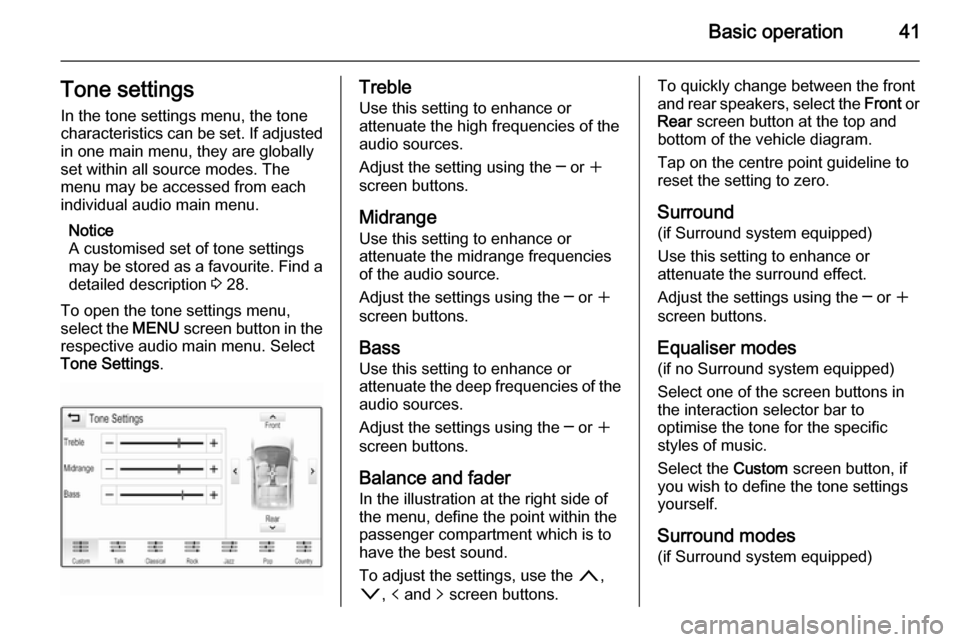
To open the tone settings menu, select the MENU screen button in the
respective audio main menu. Select
Tone Settings .Treble
Use this setting to enhance or
attenuate the high frequencies of the
audio sources.
Adjust the setting using the ─ or w
screen buttons.
Midrange Use this setting to enhance or
attenuate the midrange frequencies
of the audio source.
Adjust the settings using the ─ or w
screen buttons.
Bass
Use this setting to enhance or
attenuate the deep frequencies of the
audio sources.
Adjust the settings using the ─ or w
screen buttons.
Balance and fader
In the illustration at the right side of
the menu, define the point within the passenger compartment which is to
have the best sound.
To adjust the settings, use the n,
o , p and q screen buttons.To quickly change between the front
and rear speakers, select the Front or
Rear screen button at the top and
bottom of the vehicle diagram.
Tap on the centre point guideline to
reset the setting to zero.
Surround
(if Surround system equipped)
Use this setting to enhance or
attenuate the surround effect.
Adjust the settings using the ─ or w
screen buttons.
Equaliser modes(if no Surround system equipped)
Select one of the screen buttons in
the interaction selector bar to
optimise the tone for the specific
styles of music.
Select the Custom screen button, if
you wish to define the tone settings yourself.
Surround modes
(if Surround system equipped)
Page 42 of 143

42Basic operation
Select one of the screen buttons in
the interaction selector bar of the
screen to optimise the tone for the
different seating positions.
Select the Normal screen button, if
you wish to provide the best sound for all seating positions.
Volume settings Maximum startup volume
Press the ; button and then select
the SETTINGS icon on the Home
screen.
Scroll through the list and select
Radio and then Maximum Start-Up
Volume .
Tap on the ─ or w screen buttons to
set the desired volume.
Automatic volume adjustment
The volume may be adjusted
automatically relative to the speed of the vehicle. Depending on the vehicle equipment, one of the following
options is available.Auto Volume
Press the ; button and then select
the SETTINGS icon.
Scroll through the list and select Radio and then Auto Volume .
To adjust the degree of volume
adaptation, set Auto Volume to one of
the available options.
Off : no enhancement of volume with
increasing vehicle speed.
High : maximum enhancement of
volume with increasing vehicle
speed.
Bose AudioPilot
This feature automatically adjusts the
volume based on all noises registered within the vehicle. This way, it
assures that also lower volume
passages remain audible.
Press the ; button and then select
the SETTINGS icon.
Scroll through the list and select
Radio and then Bose AudioPilot .
Tap on the Bose AudioPilot menu
item to turn the function on or off.Audible Touch Feedback
If Audible Touch Feedback is
activated, each tap on a screen
button or menu item is indicated by a
beeping sound.
Press the ; button and then select
the SETTINGS icon.
Scroll through the list and select
Radio and then Audible Touch
Feedback .
Select On or Off.
Audio Cue Volume
When the system is turned on or off,
music sounds are played.
Press the ; button and then select
the SETTINGS icon.
Scroll through the list and select
Radio and then Audio Cue Volume .
Select On or Off.
To adjust the startup and shutdown
sounds, select the ─ or w screen
buttons.
Page 47 of 143
Radio47RadioUsage.......................................... 47
Station search .............................. 47
Waveband menus ........................48
Radio data system (RDS) ............49
Digital audio broadcasting ...........50Usage
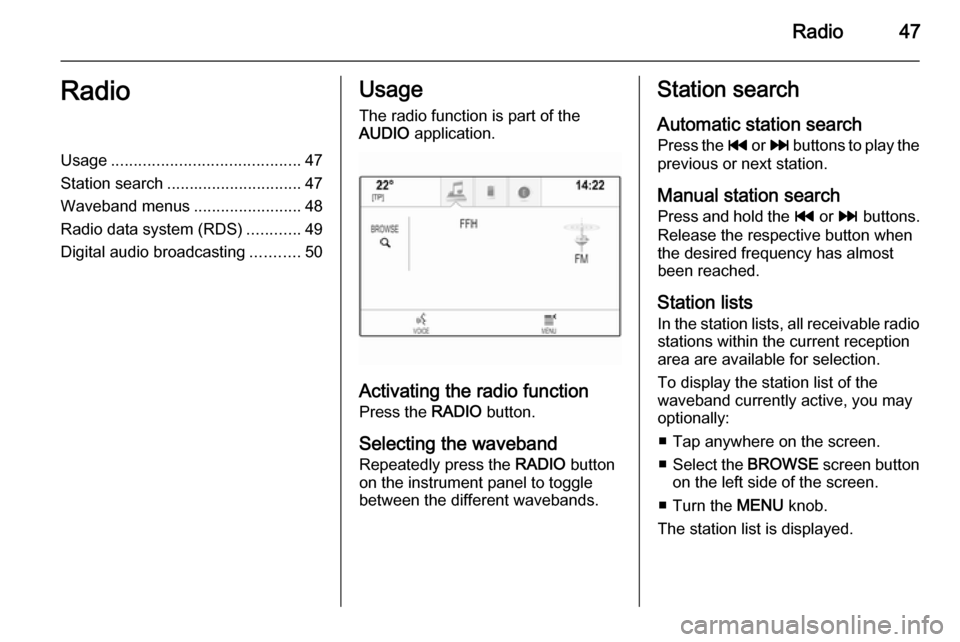
The radio function is part of the
AUDIO application.
Activating the radio function
Press the RADIO button.
Selecting the waveband
Repeatedly press the RADIO button
on the instrument panel to toggle between the different wavebands.
Station search
Automatic station search
Press the t or v buttons to play the
previous or next station.
Manual station search Press and hold the t or v buttons.
Release the respective button when
the desired frequency has almost
been reached.
Station lists
In the station lists, all receivable radio stations within the current reception
area are available for selection.
To display the station list of the
waveband currently active, you may
optionally:
■ Tap anywhere on the screen.
■ Select the BROWSE screen button
on the left side of the screen.
■ Turn the MENU knob.
The station list is displayed.
Page 49 of 143
Radio49
Tone SettingsFind a detailed description 3 41.
Auto volume / Bose Audio-Pilot Find a detailed description 3 42.
Update Station List If the stations stored in a waveband-
specific station list can no longer be received, select Update Station List .
Notice
If a waveband-specific station list is
updated, the corresponding
category list (if available) is also
updated.
Updating Station List is displayed on
the screen until the search has been
completed.
Traffic Programme (TP)(Not available for AM waveband)
To constantly receive traffic news, set
Traffic Programme (TP) - On .
Find a detailed description 3 49.Radio data system (RDS)
RDS is a service of FM stations that
considerably improves the finding of the desired station and its fault-free
reception.
Advantages of RDS ■ On the display, the programme name of the station appears
instead of its frequency.
■ During a station search, the Infotainment system tunes in to
RDS stations only.
■ The Infotainment system always tunes into the best receivable
broadcasting frequency of the set
station by means of AF (alternative frequency).
■ Depending on the station received,
the Infotainment system displays
radio text that can contain e.g.
information on the current
programme.
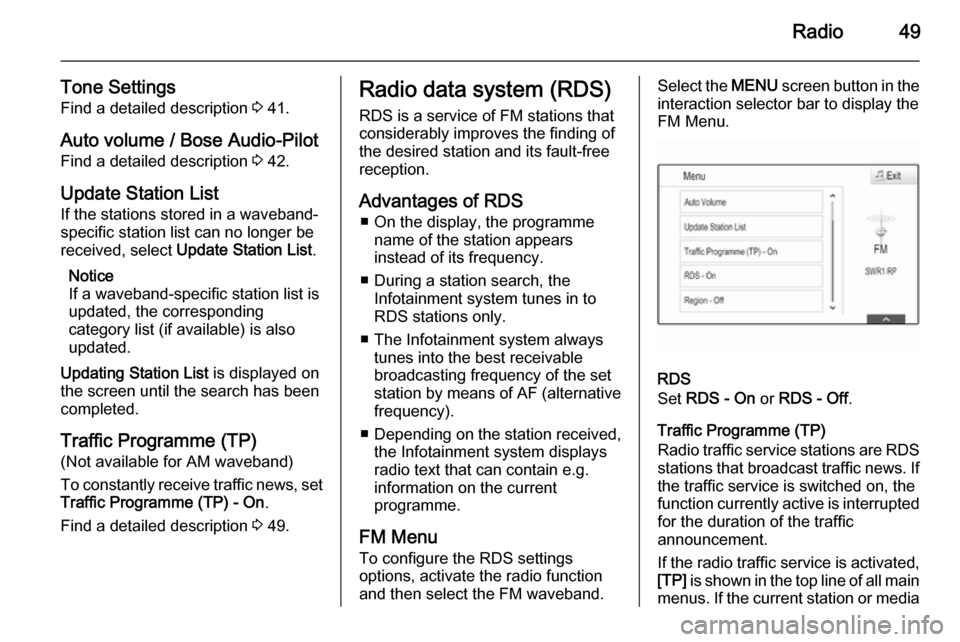
FM Menu
To configure the RDS settings
options, activate the radio function
and then select the FM waveband.Select the MENU screen button in the
interaction selector bar to display the
FM Menu.
RDS
Set RDS - On or RDS - Off .
Traffic Programme (TP)
Radio traffic service stations are RDS
stations that broadcast traffic news. If the traffic service is switched on, the
function currently active is interrupted for the duration of the traffic
announcement.
If the radio traffic service is activated,
[TP] is shown in the top line of all main
menus. If the current station or media
Page 50 of 143
![VAUXHALL INSIGNIA 2014.5 Infotainment system 50Radio
played is not a radio traffic service
station, [ ] is displayed and a search
is started automatically for the next
radio traffic service station available.
As soon as a radio traffic service](/img/38/19475/w960_19475-49.png "VAUXHALL INSIGNIA 2014.5 Infotainment system 50Radio
played is not a radio traffic service
station, [ ] is displayed and a search
is started automatically for the next
radio traffic service station available.
As soon as a radio traffic service")
50Radio
played is not a radio traffic service
station, [ ] is displayed and a search
is started automatically for the next
radio traffic service station available.
As soon as a radio traffic service
station is found, [TP] is highlighted. If
no radio traffic service station is
found, [ ] remains on the screen.
If a traffic announcement is
broadcasted on the respective radio
traffic service station, a message is
displayed.
To interrupt the announcement and
return to the function previously
activated, dismiss the alert.
Region
Sometimes RDS stations broadcast
regionally different programmes on
different frequencies.
Set Region - On or Region - Off .
If regionalisation is switched on,
alternative frequencies with the same
regional programmes are selected if
necessary. If regionalisation is
switched off, alternative frequencies
of the stations are selected without
regard to regional programmes.Digital audio broadcasting
Digital audio broadcasting (DAB) is
an innovative and universal
broadcasting system.
Advantages of DAB ■ DAB stations are indicated by the programme name instead of the
broadcasting frequency.
■ With DAB, several radio programmes (services) can be
broadcasted on a single frequency (ensemble).
■ Besides high-quality digital audio services, DAB is also able to
transmit programme-associated
data and a multitude of other data
services including travel and traffic
information.
■ As long as a given DAB receiver can pick up the signal sent out by abroadcasting station (even if thesignal is very weak), sound
reproduction is ensured.
■ There is no fading (weakening of the sound that is typical of AM orFM reception). The DAB signal is
reproduced at a constant volume.
If the DAB signal is too weak to be
picked up by the receiver, reception
is interrupted completely. This can
be avoided by activating DAB to
DAB Linking and/or DAB to FM
Linking in the DAB option menu
(see below).
■ Interference caused by stations that are on nearby frequencies (a
phenomenon that is typical of AM
and FM reception) does not occur
with DAB.
■ If the DAB signal is reflected by natural obstacles or buildings, the
reception quality of DAB is
improved, whereas AM or FM
reception is considerably impaired in such cases.
■ When DAB reception is enabled, the FM tuner of the Infotainment
system remains active in the
background and continually
searches for the best receivable FM stations. If TP 3 49 is activated,
traffic announcements of the FM
station which is currently best
Page 52 of 143
52CD PlayerCD PlayerGeneral information.....................52
Usage .......................................... 53General information
The Infotainment system's CD player
can replay audio CDs and MP3/WMA CDs.Caution
Under no circumstances place
DVDs, single-CDs with a diameter
of 8 cm or shaped CDs in the audio
player.
You must not put any stickers on
CDs. These discs can get jammed
in the CD drive and ruin the drive.
An expensive replacement of the
device will then be necessary.
Important information about
audio CDs and MP3/WMA CDs ■ The following CD formats can be used:
CD, CD-R and CD-RW.
■ The following file formats can be used:
ISO9660 Level 1, Level 2, (Romeo,
Joliet).
MP3 and WMA files written in any
format other than listed above may
not play correctly, and their file names and folder names may not
be displayed correctly.
■ Audio CDs with copy protection, which are not in compliance with
the audio CD standard, may not
play correctly or not at all.
■ Self-recorded CD-Rs and CD-RWs
are more vulnerable to mishandling than prerecorded CDs. Correct
handling, especially in the case of
self-recorded CD-Rs and CD-RWs,
must be ensured.
■ Self-recorded CD-Rs and CD-RWs
may not play correctly or not at all.
■ On mixed mode CDs (combinations
of audio and data, e.g. MP3), only
the audio tracks will be detected and played.
■ Avoid leaving fingerprints when you
change CDs.
■ Put CDs back in their sleeves immediately after removing them
from the audio player in order to
protect them from damage and dirt.
Page 53 of 143
CD Player53
■ Dirt and liquids on CDs can smearthe lens of the audio player inside
the device and cause faults.
■ Protect CDs from heat and direct sunlight.
■ The following restrictions apply for the data stored on an MP3/WMACD:
Maximum file/song number: 800.
Maximum folders in depth
hierarchy: 8.
WMA files with Digital Rights
Management (DRM) from online music shops cannot be played.
WMA files can only be played
safely if they were created with Windows Media Player version 9 or later.
Applicable playlist
extensions: .m3u, .pls.
Playlist entries must be in the form
of relative paths.Notice
This chapter only deals with playing
MP3 files since the operation for
MP3 and WMA files is identical.
When a CD with WMA files is loaded
MP3 related menus are displayed.
Usage
Starting CD playback Push an audio or MP3 CD with the
labelled side facing upwards into the
CD slot until it is pulled in.
Repeatedly press the MEDIA button
to activate the CD function.Removing a CD
Press the R button. The CD is
pushed out of the CD slot.
If the CD is not removed after
ejection, it will be drawn back in after
a few seconds.
Function buttons
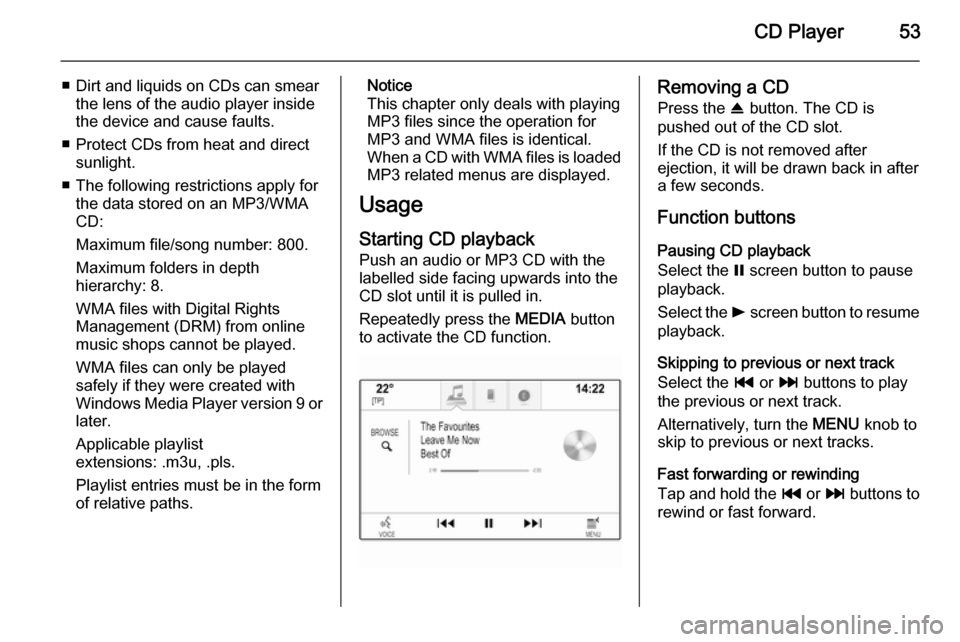
Pausing CD playback
Select the = screen button to pause
playback.
Select the l screen button to resume
playback.
Skipping to previous or next track
Select the t or v buttons to play
the previous or next track.
Alternatively, turn the MENU knob to
skip to previous or next tracks.
Fast forwarding or rewinding
Tap and hold the t or v buttons to
rewind or fast forward.
Page 54 of 143

54CD Player
Track list
To display the track list, you may
optionally:
■ Tap anywhere on the screen
■ Select the BROWSE screen button
on the left side of the screen
■ Turn the MENU knob.
The track list is displayed.
Notice
The track currently playing is
highlighted.
Scroll through the list and select the
desired list item.
Notice
Find a detailed description of
browsing MP3 CDs 3 57.
CD Menu To display the CD Menu, select the
MENU screen button in the
interaction selector bar.
Tone Settings
Find a detailed description 3 41.Shuffle
If Shuffle is set to On, all tracks on the
active CD are played in random order.
Set Shuffle to On or Off.
Auto Volume / Bose AudioPilot
Find a detailed description 3 42.
Page 55 of 143
External devices55External devicesGeneral information.....................55
Playing audio ............................... 57
Playing movies ............................. 59
Using apps ................................... 60General information
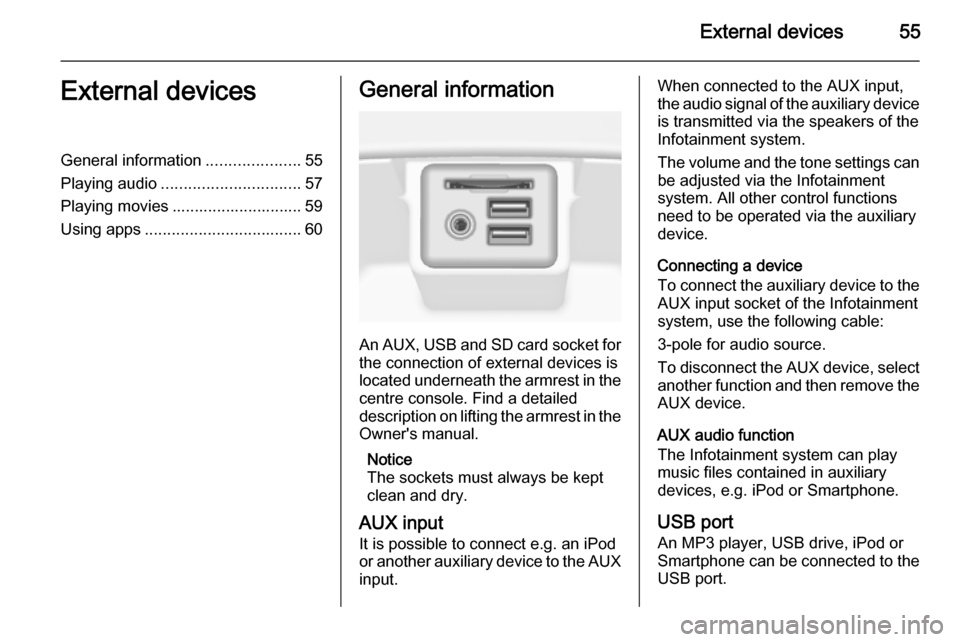
An AUX, USB and SD card socket for
the connection of external devices is
located underneath the armrest in the centre console. Find a detailed
description on lifting the armrest in the
Owner's manual.
Notice
The sockets must always be kept
clean and dry.
AUX input It is possible to connect e.g. an iPod
or another auxiliary device to the AUX
input.
When connected to the AUX input,
the audio signal of the auxiliary device is transmitted via the speakers of the
Infotainment system.
The volume and the tone settings can
be adjusted via the Infotainment
system. All other control functions
need to be operated via the auxiliary
device.
Connecting a device
To connect the auxiliary device to the AUX input socket of the Infotainment
system, use the following cable:
3-pole for audio source.
To disconnect the AUX device, select
another function and then remove the
AUX device.
AUX audio function
The Infotainment system can play
music files contained in auxiliary
devices, e.g. iPod or Smartphone.
USB port An MP3 player, USB drive, iPod or
Smartphone can be connected to the USB port.
Page 56 of 143
56External devices
When connected to the USB port, the
devices mentioned above can be
operated via the controls and menus
of the Infotainment system.
Notice
Not all MP3 players, USB drives,
iPod models or Smartphones are
supported by the Infotainment
system.
Connecting/disconnecting a device
Connect the USB device or iPod to
the USB port. For the iPod, use the
appropriate connection cable.
Notice
If a non-readable USB device or iPod is connected, a corresponding
error message will appear and the
Infotainment system will
automatically switch to the previous
function.
To disconnect the USB device or
iPod, select another function and then remove the USB storage device.Caution
Avoid disconnecting the device
during playback. This may
damage the device or the
Infotainment system.
USB audio function
The Infotainment system can play music files contained in USB storage
devices or iPod/iPhone products.
USB movie function
The Infotainment system can play
movies contained in USB storage
devices.
SD card
An SD card may be inserted in the SD
card slot.
When inserted, the SD card can be
operated via the controls and menus
of the Infotainment system.
Notice
Not all SD card types are supported
by the Infotainment system.
Inserting/removing an SD cardCaution
Never attempt to use an SD card
that has been cracked, deformed
or repaired using adhesive tape.
Doing so may damage the
equipment.
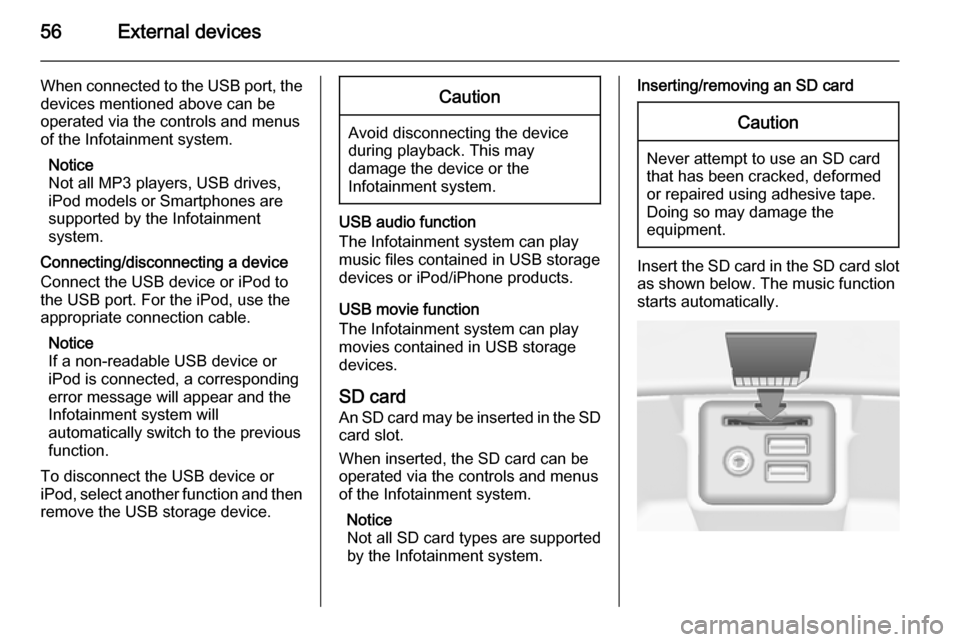
Insert the SD card in the SD card slot
as shown below. The music function
starts automatically.