brake VAUXHALL INSIGNIA 2014.5 User Guide
[x] Cancel search | Manufacturer: VAUXHALL, Model Year: 2014.5, Model line: INSIGNIA, Model: VAUXHALL INSIGNIA 2014.5Pages: 321, PDF Size: 8.98 MB
Page 117 of 321

Instruments and controls115
Shift indication: On Baselevel display
the current gear is indicated inside an
arrow. The figure above recommends upshifting for fuel saving reasons.
Blank page
shows a blank page without any
information.
Performance Menu Performance menu is only viewable
on Uplevel display.
The following list contains all possible Performance Menu pages. Somemay not be available for your
particular vehicle.
Press Q or P to select a page:
■ Friction bubble
■ Acceleration and braking
■ Oil temperature
■ Oil pressure
■ Battery voltage
■ Transmission fluid temperatureFriction bubble
A four quadrant visual display,
indicative of the four corners of the
car, with a “bubble” showing where
the most inertia is being exerted on
the vehicle.
Acceleration and braking
Displays the percentage amount of
brake or accelerator pressure applied
by the driver as a bar graph around
the outer perimeter of the DIC area.
The left side is for acceleration and
the right side is for braking.
Oil temperature
Displays the oil temperature in
degrees Celsius.
Oil pressure
Displays the oil pressure in kPa.
Battery voltage
Displays the vehicle battery voltage.
Transmission fluid temperature
Displays the transmission fluid
temperature in degrees Celsius.Audio Menu
Audio menu enables browsing for
music, selecting from favourites or
changing the audio source.
See Infotainment system manual.
Phone Menu
Phone menu enables managing and performing of phone calls, scrolling
through contacts or operating
handsfree phoning.
See Infotainment system manual.
Navigation Menu Navigation menu enables route
guidance.
See Infotainment system manual.
Settings Menu
The following list contains all possible Settings Menu pages. Some may not
be available for your particular
vehicle. Depending on the display
some functions are symbolised.
Page 121 of 321
Instruments and controls119
Valet mode
Some functions of the Driver
Information Centre and the Colour-
Info-Display can be limited for some
drivers.
Activation or deactivation of valet
mode can be set in the menu
Settings in the vehicle personalisation
menu.
Vehicle personalisation 3 121.
For more information see
Infotainment system manual.
Smartphone controller The smartphone controller allows a
smartphone to access vehicle data
via WLAN or Bluetooth connection.
This data can then be displayed and analysed on the smartphone.Vehicle messages
Messages are indicated in the Driver
Information Centre (DIC), in some
cases together with a warning and
signal buzzer.
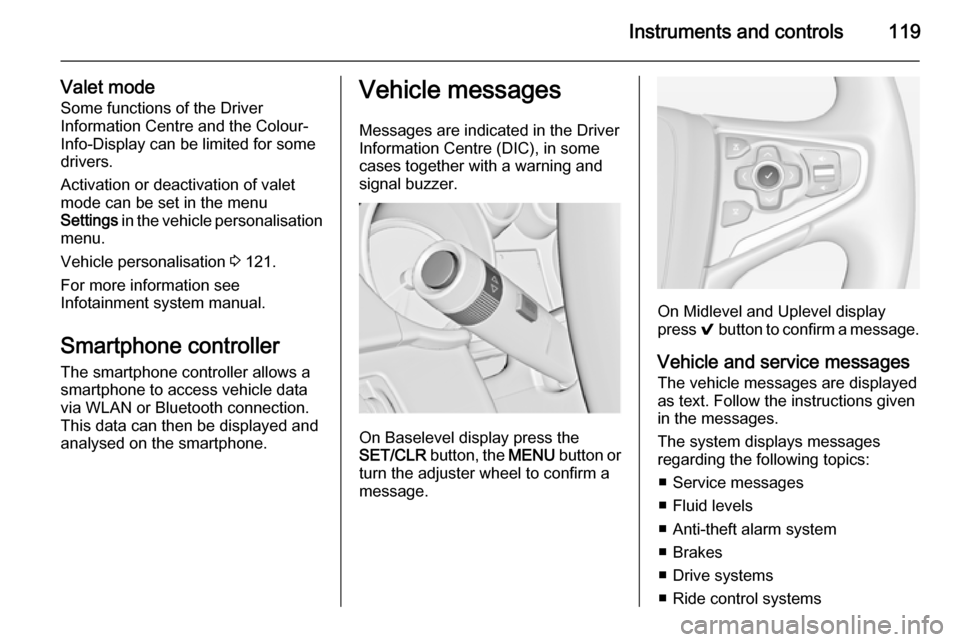
On Baselevel display press the
SET/CLR button, the MENU button or
turn the adjuster wheel to confirm a
message.
On Midlevel and Uplevel display
press 9 button to confirm a message.
Vehicle and service messages
The vehicle messages are displayed as text. Follow the instructions given
in the messages.
The system displays messages
regarding the following topics:
■ Service messages
■ Fluid levels
■ Anti-theft alarm system
■ Brakes
■ Drive systems
■ Ride control systems
Page 122 of 321

120Instruments and controls
■ Driver assistance systems
■ Cruise control
■ Speed limiter
■ Adaptive cruise control
■ Forward collision alert
■ Collision imminent braking system
■ Parking assist systems
■ Lighting, bulb replacement
■ Adaptive forward lighting
■ Wiper/washer system
■ Doors, windows
■ Side blind spot alert
■ Traffic sign assistant
■ Lane departure warning
■ Load compartment, boot lid
■ Radio remote control
■ Electronic key system
■ Keyless starting
■ Seat belts
■ Airbag systems
■ Engine and transmission
■ Tyre pressure■ Diesel particle filter
■ Vehicle battery status
Messages in the
Colour-Info-Display
Some important messages may
appear additionally in the
Colour-Info-Display. Press the
multifunction knob to confirm a
message. Some messages only pop
up for a few seconds.
Warning chimes
When starting the engine or
whilst driving
Only one warning chime will sound at a time.
The warning chime regarding not
fastened seat belts has priority over
any other warning chime.
■ If seat belt is not fastened.
■ If a door or the tailgate is not fully closed when starting off.
■ If a certain speed is exceeded with parking brake applied.■ If adaptive cruise controldeactivates automatically.
■ If approaching a vehicle ahead too closely.
■ If a programmed speed or speed limit is exceeded.
■ If a warning message appears in the Driver Information Centre.
■ If the electronic key is not in the passenger compartment.
■ If the parking assist detects an object.
■ If an unintended lane change occurs.
■ If the diesel particle filter has reached the maximum filling level.
When the vehicle is parked and/ or the driver's door is opened ■ When the key is in the ignition switch.
■ With exterior lights on.
■ If the trailer hitch is not engaged.
Page 124 of 321

122Instruments and controls
■Voice
■ Display
■ Rear Camera
■ Return to Factory Settings
■ Software Information
■ TouchPad
In the corresponding submenus the
following settings can be changed:
Time and Date
See Clock 3 90.
Sport Mode
The driver can select the functions
which will be activated in Sport mode
3 170.
■ Sport Mode Backlighting : Changes
the instrument illumination colour.
■ Engine Sport Performance :
Accelerator pedal and gear change
characteristics become more
responsive.
■ Sport Steering : Steering support is
reduced.■ Sport Suspension : Damping
becomes harder.
■ All Wheel Drive : Engine torque is
distributed to a greater extent to the rear axle.
Language (Language)
Selection of the desired language.
See Infotainment system manual.
Valet Mode
See Infotainment system manual.
Radio
See Infotainment system manual.
Vehicle ■ Climate and Air Quality
Auto Fan Max Speed : Modifies the
level of the cabin airflow of the
climate control in automatic mode.
Air Conditioning Mode : Controls the
state of the cooling compressor
when the vehicle is started. Last setting (recommended) or at
vehicle start is either always ON or
always OFF.
Auto Demist : Supports windscreen
dehumidification by automaticallyselecting the necessary settings
and automatic air conditioning
mode.
Auto Rear Demist : Activates
automatically the heated rear
window.
■ Collision / Detection Systems
Park Assist : Activates or
deactivates the ultrasonic parking assist.
Auto Collision Preparation :
Activates or deactivates the
automatic brake functionality of the
vehicle in the event of imminent
collision danger. The following is
selectable: the system will take
over brake control, warn by chimes
only or is deactivated completely.
Go Notifier : Activates or
deactivates the reminder function
of the adaptive cruise control.
Side Blind Zone Alert : Activates or
deactivates side blind zone alert.
Rear Cross Traffic Alert : Activates
or deactivates rear cross traffic
alert.
Page 153 of 321

Driving and operating151Driving and operatingDriving hints............................... 151
Starting and operating ...............152
Engine exhaust .......................... 159
Automatic transmission .............. 160
Manual transmission ..................164
Drive systems ............................ 165
Brakes ........................................ 165
Ride control systems .................168
Driver assistance systems .........173
Fuel ............................................ 204
Trailer hitch ................................ 211Driving hints
Control of the vehicleNever coast with engine not
running (except during Autostop)
Many systems will not function in this
situation (e.g. brake servo unit, power steering). Driving in this manner is a
danger to yourself and others. All
systems function during an Autostop,
but there will be a controlled reduction
in power steering assist and vehicle
speed is reduced.
Stop-start system 3 156.
Pedals
To ensure the pedal travel is
uninhibited, there must be no mats in the area of the pedals.Steering
If power steering assist is lost
because the engine stops or due to a
system malfunction, the vehicle can
be steered but may require increased
effort.
Control indicator c 3 106.Caution
Vehicles equipped with hydraulic
power steering:
If the steering wheel is turned until it reaches the end of its travel, and
is held in that position for more
than 15 seconds, damage may occur to the power steering
system and there may be loss of
power steering assist.
Page 154 of 321
152Driving and operatingStarting and operating
New vehicle running-in Do not brake unnecessarily hard for
the first few journeys.
During the first drive, smoke may
occur because of wax and oil
evaporating off the exhaust system.
Park the vehicle in the open for a
while after the first drive and avoid
inhaling the fumes.
During the running-in period fuel and engine oil consumption may be
higher and the cleaning process of the diesel particle filter may take
place more often.
Diesel particle filter 3 159.
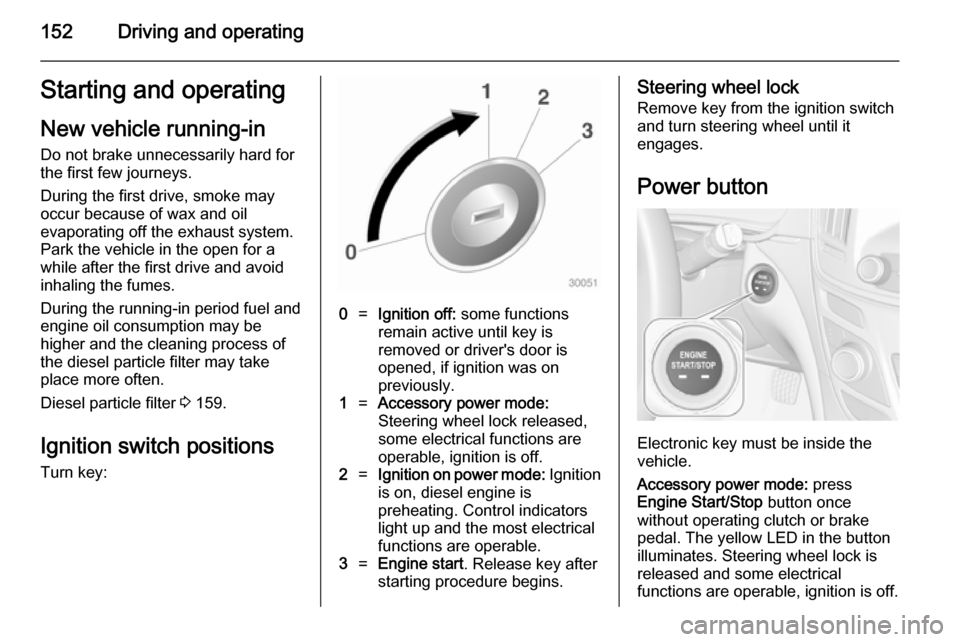
Ignition switch positions
Turn key:0=Ignition off: some functions
remain active until key is
removed or driver's door is
opened, if ignition was on
previously.1=Accessory power mode:
Steering wheel lock released,
some electrical functions are
operable, ignition is off.2=Ignition on power mode: Ignition
is on, diesel engine is
preheating. Control indicators
light up and the most electrical
functions are operable.3=Engine start . Release key after
starting procedure begins.Steering wheel lock
Remove key from the ignition switch
and turn steering wheel until it
engages.
Power button
Electronic key must be inside the
vehicle.
Accessory power mode: press
Engine Start/Stop button once
without operating clutch or brake pedal. The yellow LED in the button
illuminates. Steering wheel lock is
released and some electrical
functions are operable, ignition is off.
Page 155 of 321
Driving and operating153
Ignition on power mode: press and
hold Engine Start/Stop button for
6 seconds without operating clutch or brake pedal. The green LED in the
button illuminates, diesel engine is
preheating. Control indicators light up
and the most electrical functions are
operable.
Engine start: operate clutch pedal
(manual transmission) or brake pedal (automatic transmission) and press
Engine Start/Stop button once more.
Release button after starting
procedure begins.
Ignition off: press Engine Start/Stop
button briefly in each mode or when
engine is running. Some functions
remain active until driver's door is
opened, if ignition was on before.
Steering wheel lock
The steering wheel lock activates
automatically when:
■ the vehicle is stationary and
■ the ignition has been switched off and
■ the driver's door is opened.To release steering wheel lock, open
and close driver's door and switch on accessory mode or start the engine
directly.9 Warning
If the vehicle battery is discharged,
the vehicle must not be towed,
tow-started or jump-started as the
steering wheel lock cannot be
disengaged.
Emergency operation on
vehicles with electronic key
system
If either the electronic key fails or the
battery of the electronic key is weak,
the Driver Information Centre may
display No Remote Detected or
Replace Battery in Remote Key when
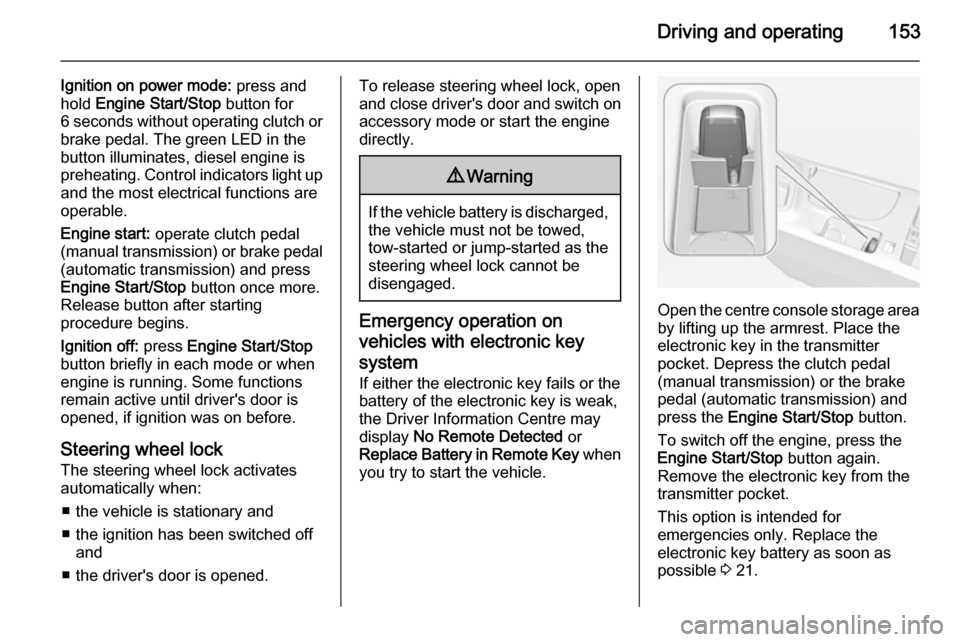
you try to start the vehicle.Open the centre console storage area by lifting up the armrest. Place the
electronic key in the transmitter
pocket. Depress the clutch pedal
(manual transmission) or the brake
pedal (automatic transmission) and
press the Engine Start/Stop button.
To switch off the engine, press the Engine Start/Stop button again.
Remove the electronic key from the
transmitter pocket.
This option is intended for
emergencies only. Replace the
electronic key battery as soon as
possible 3 21.
Page 156 of 321

154Driving and operating
For unlocking or locking the doors see
fault in radio remote control unit or
electronic key system 3 22.
Retained power off
The following electronic systems can
work until the driver's door is opened
or for 10 minutes after the ignition is
switched off:
■ Power windows
■ Sunroof
■ Power outlets
Power to the Infotainment system will continue to operate for 30 minutes
when ignition is off, regardless of
whether any door will be opened.Starting the engine
Vehicles with ignition switch
Manual transmission: operate clutch
and brake pedal.
Automatic transmission: operate
brake pedal and move selector lever
to P or N.
Do not operate accelerator pedal.
Diesel engine: turn the key to position 2 for preheating until control
indicator ! extinguishes.
Turn key briefly to position 3 and
release: an automatic procedure operates the starter with a short delay
until the engine is running, see
Automatic Starter Control.
Before restarting or to switch off the
engine, turn key back to position 0.
During an Autostop, the engine can
be started by depressing the clutch
pedal 3 156.
Vehicles with power button
Manual transmission: operate clutch
and brake pedal.
Page 157 of 321

Driving and operating155
Automatic transmission: operate
brake pedal and move selector lever
to P or N.
Do not operate accelerator pedal.
Press and release Engine Start/Stop
button: an automatic procedure
operates the starter with a short delay
until the engine is running, see
Automatic Starter Control.
Before restarting or to switch off the
engine, press Engine Start/Stop
button once more.
During an Autostop, the engine can
be started by depressing the clutch
pedal 3 156.Starting the vehicle at low
temperatures
Starting the engine without additional
heaters is possible down to -25 °С for diesel engines and -30 °C for petrol
engines. Required is an engine oil
with the correct viscosity, the correct
fuel, performed services and a
sufficiently charged vehicle battery.
With temperatures below -30 °C the
automatic transmission requires a
warming phase of approx. 5 minutes.
The selector lever must be in position
P .
Automatic Starter Control
This function controls the engine
starting procedure. The driver does
not have to hold the key in position 3
or to hold Engine Start/Stop button
pressed. Once applied, the system
will go on starting automatically until
the engine is running. Because of the checking procedure, the engine startsrunning after a short delay.Possible reasons for a non-startingengine:
■ Clutch pedal not operated (manual transmission)
■ Brake pedal not operated or selector lever not in P or N
(automatic transmission)
■ Timeout occurred
Turbo engine warm-up Upon start-up, engine available
torque may be limited for a short time, especially when the engine
temperature is cold. The limitation is
to allow the lubrication system to fully
protect the engine.
Overrun cut-off The fuel supply is automatically cut-
off during overrun, i.e. when the
vehicle is driven with a gear engaged but accelerator pedal is released.
Page 158 of 321
156Driving and operatingStop-start systemThe stop-start system helps to save
fuel and to reduce the exhaust
emissions. When conditions allow, it
switches off the engine as soon as the
vehicle is at a low speed or at a
standstill, e.g. at a traffic light or in a
traffic jam. It starts the engine
automatically as soon as the clutch is depressed. A battery sensor ensures
that an Autostop is only performed if
the vehicle battery is sufficiently
charged for a restart.
Activation
The stop-start system is available as
soon as the engine is started, the
vehicle starts-off and the conditions
as stated below in this section are
fulfilled.Deactivation
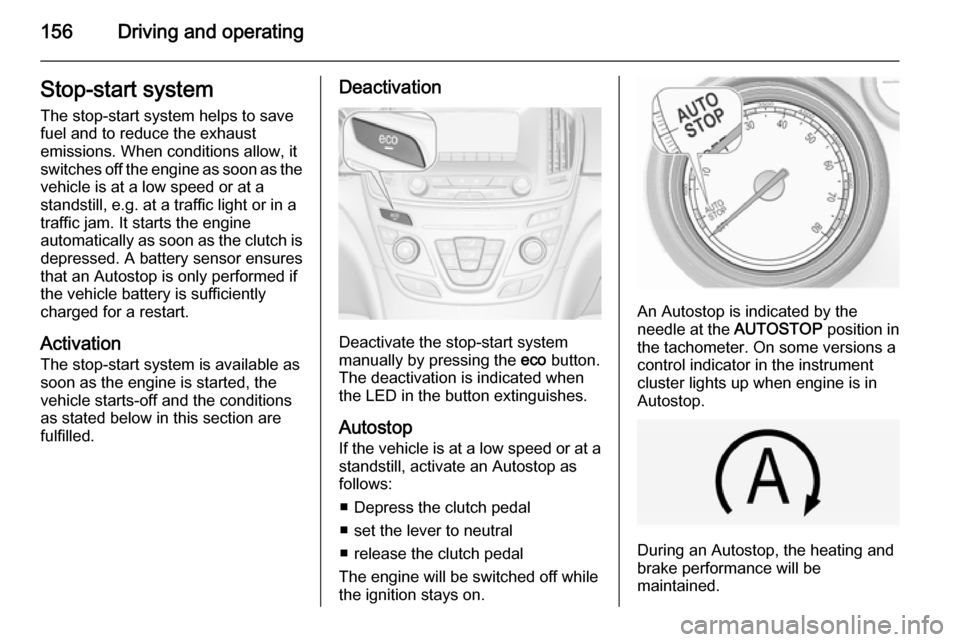
Deactivate the stop-start system
manually by pressing the eco button.
The deactivation is indicated when
the LED in the button extinguishes.
Autostop
If the vehicle is at a low speed or at a
standstill, activate an Autostop as
follows:
■ Depress the clutch pedal
■ set the lever to neutral
■ release the clutch pedal
The engine will be switched off while
the ignition stays on.
An Autostop is indicated by the
needle at the AUTOSTOP position in
the tachometer. On some versions a
control indicator in the instrument
cluster lights up when engine is in Autostop.
During an Autostop, the heating and
brake performance will be
maintained.