seats VAUXHALL INSIGNIA 2014.5 Owner's Guide
[x] Cancel search | Manufacturer: VAUXHALL, Model Year: 2014.5, Model line: INSIGNIA, Model: VAUXHALL INSIGNIA 2014.5Pages: 321, PDF Size: 8.98 MB
Page 73 of 321
Storage71Armrest storage
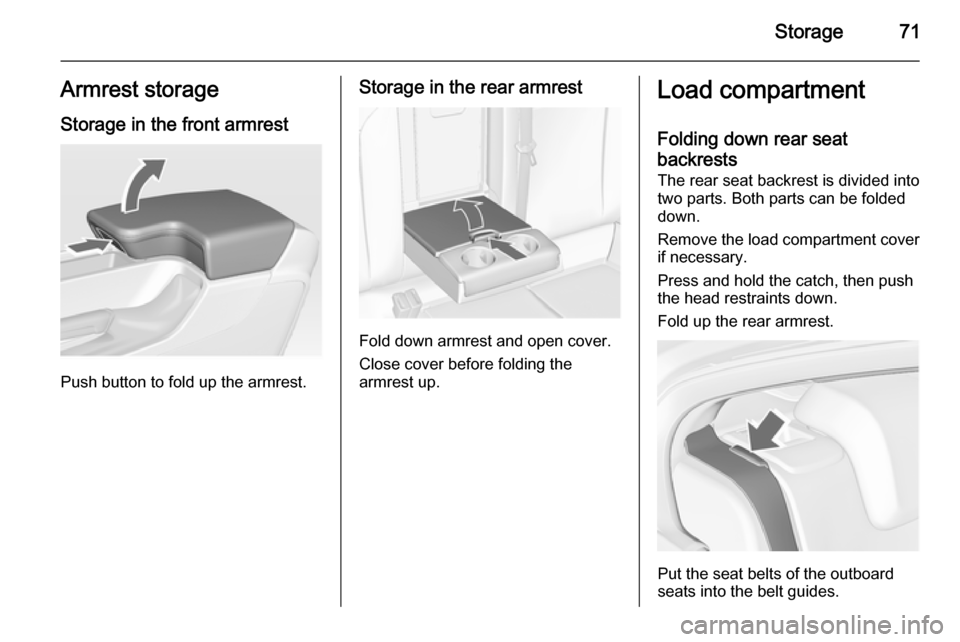
Storage in the front armrest
Push button to fold up the armrest.
Storage in the rear armrest
Fold down armrest and open cover.
Close cover before folding the
armrest up.
Load compartment
Folding down rear seat backrests The rear seat backrest is divided into
two parts. Both parts can be folded
down.
Remove the load compartment cover if necessary.
Press and hold the catch, then push
the head restraints down.
Fold up the rear armrest.
Put the seat belts of the outboard
seats into the belt guides.
Page 74 of 321
72Storage
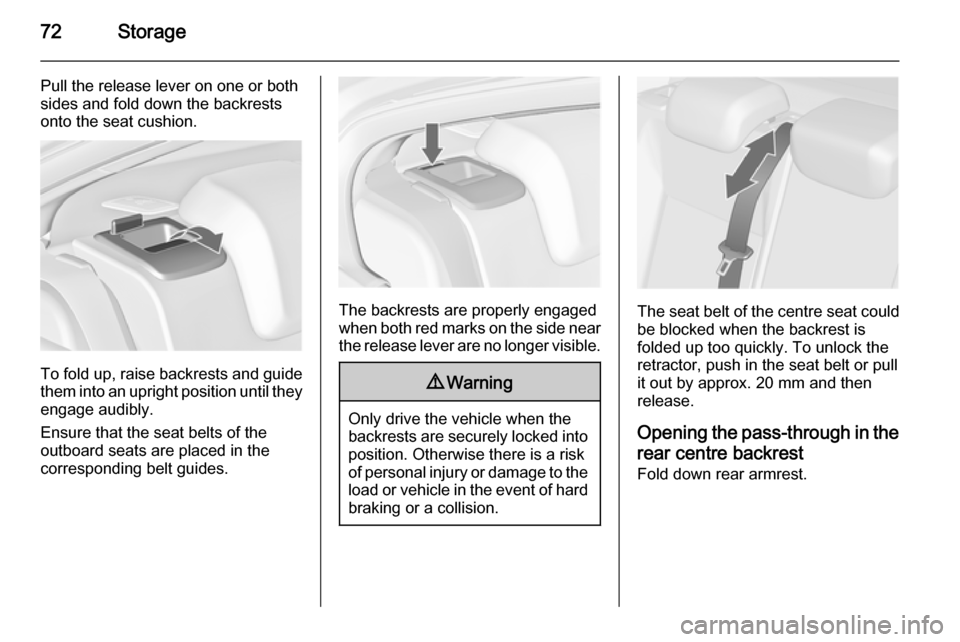
Pull the release lever on one or both
sides and fold down the backrests
onto the seat cushion.
To fold up, raise backrests and guide them into an upright position until they
engage audibly.
Ensure that the seat belts of the
outboard seats are placed in the corresponding belt guides.
The backrests are properly engaged
when both red marks on the side near the release lever are no longer visible.
9 Warning
Only drive the vehicle when the
backrests are securely locked into position. Otherwise there is a risk
of personal injury or damage to the
load or vehicle in the event of hard braking or a collision.
The seat belt of the centre seat could
be blocked when the backrest is
folded up too quickly. To unlock the
retractor, push in the seat belt or pull
it out by approx. 20 mm and then
release.
Opening the pass-through in the
rear centre backrest Fold down rear armrest.
Page 80 of 321
78Storage
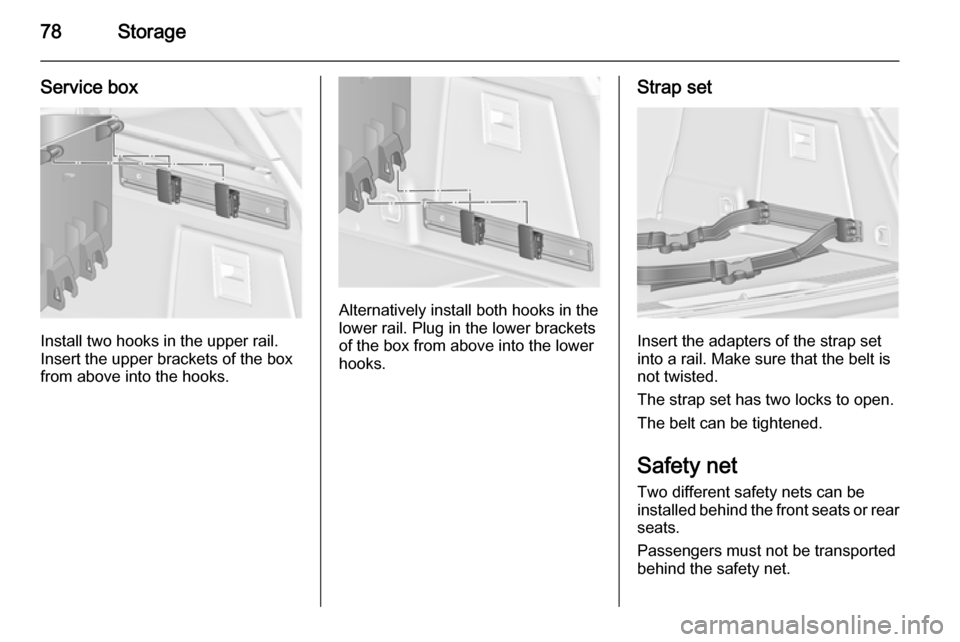
Service box
Install two hooks in the upper rail.
Insert the upper brackets of the box
from above into the hooks.
Alternatively install both hooks in the
lower rail. Plug in the lower brackets
of the box from above into the lower
hooks.
Strap set
Insert the adapters of the strap set
into a rail. Make sure that the belt is
not twisted.
The strap set has two locks to open. The belt can be tightened.
Safety net
Two different safety nets can be
installed behind the front seats or rear seats.
Passengers must not be transported
behind the safety net.
Page 81 of 321
Storage79
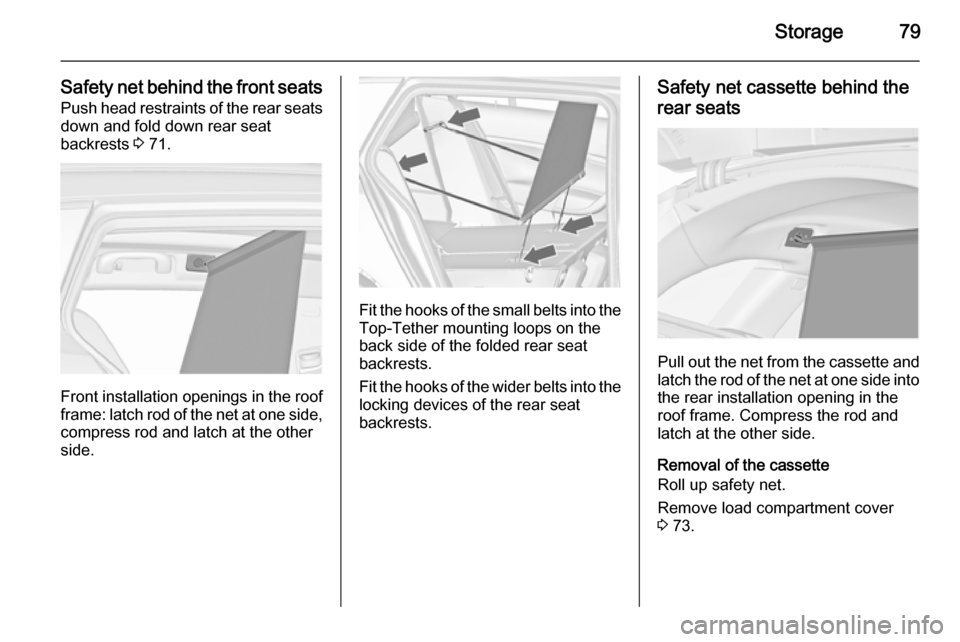
Safety net behind the front seatsPush head restraints of the rear seatsdown and fold down rear seat
backrests 3 71.
Front installation openings in the roof
frame: latch rod of the net at one side,
compress rod and latch at the other
side.
Fit the hooks of the small belts into the Top-Tether mounting loops on the
back side of the folded rear seat
backrests.
Fit the hooks of the wider belts into the locking devices of the rear seat
backrests.
Safety net cassette behind the
rear seats
Pull out the net from the cassette and latch the rod of the net at one side into
the rear installation opening in the
roof frame. Compress the rod and
latch at the other side.
Removal of the cassette
Roll up safety net.
Remove load compartment cover
3 73.
Page 82 of 321
80Storage
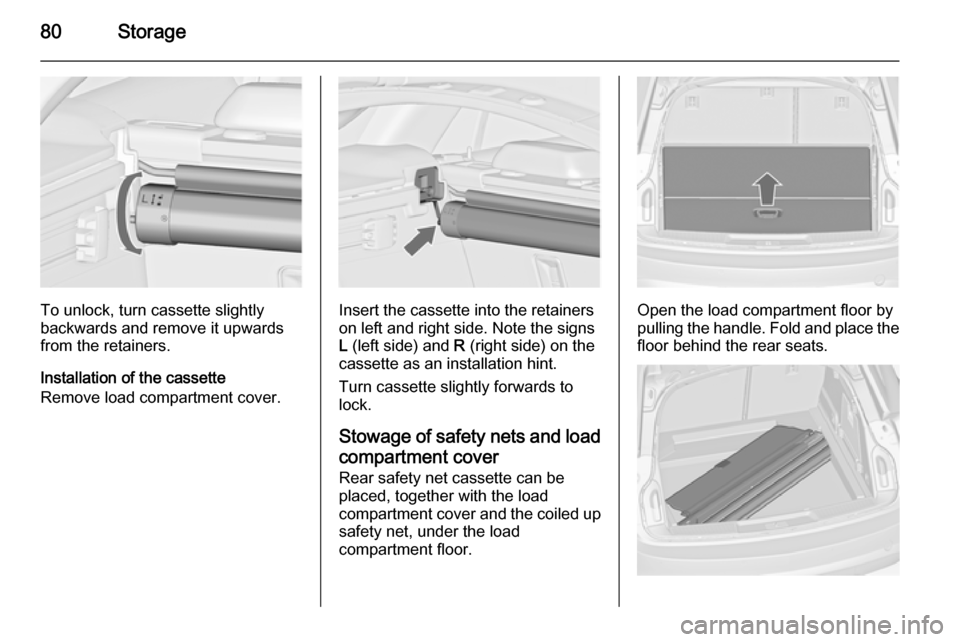
To unlock, turn cassette slightly
backwards and remove it upwards from the retainers.
Installation of the cassette
Remove load compartment cover.Insert the cassette into the retainers
on left and right side. Note the signs
L (left side) and R (right side) on the
cassette as an installation hint.
Turn cassette slightly forwards to
lock.
Stowage of safety nets and load
compartment cover Rear safety net cassette can be
placed, together with the load
compartment cover and the coiled up safety net, under the load
compartment floor.Open the load compartment floor by
pulling the handle. Fold and place the
floor behind the rear seats.
Page 85 of 321
Storage83Loading information
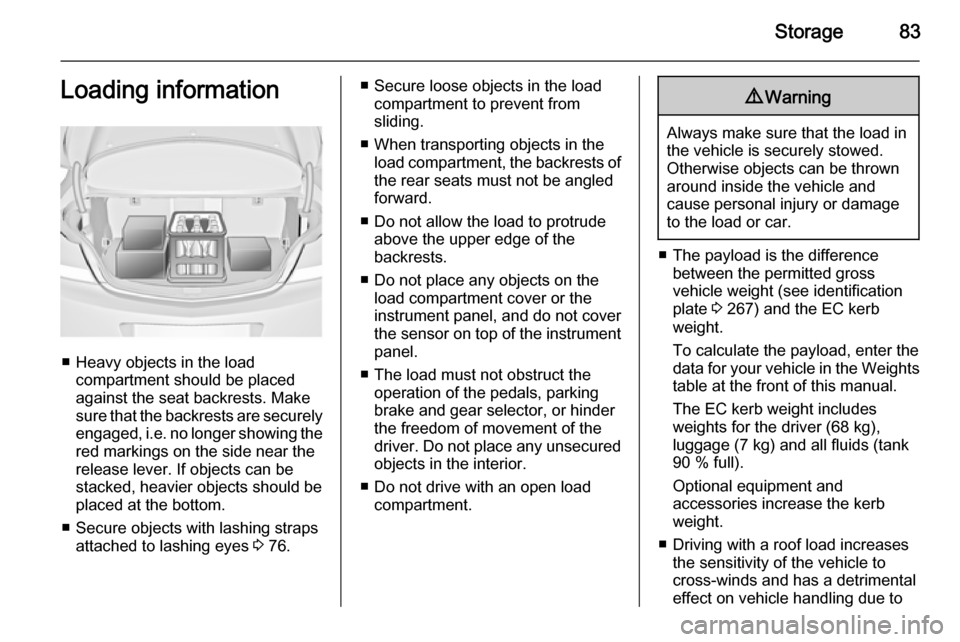
■ Heavy objects in the loadcompartment should be placedagainst the seat backrests. Make
sure that the backrests are securely engaged, i.e. no longer showing the
red markings on the side near the release lever. If objects can be
stacked, heavier objects should be
placed at the bottom.
■ Secure objects with lashing straps attached to lashing eyes 3 76.
■ Secure loose objects in the load
compartment to prevent from
sliding.
■ When transporting objects in the load compartment, the backrests of
the rear seats must not be angled
forward.
■ Do not allow the load to protrude above the upper edge of the
backrests.
■ Do not place any objects on the load compartment cover or theinstrument panel, and do not cover
the sensor on top of the instrument panel.
■ The load must not obstruct the operation of the pedals, parking
brake and gear selector, or hinder
the freedom of movement of the
driver. Do not place any unsecured objects in the interior.
■ Do not drive with an open load compartment.9 Warning
Always make sure that the load in
the vehicle is securely stowed.
Otherwise objects can be thrown
around inside the vehicle and
cause personal injury or damage
to the load or car.
■ The payload is the difference between the permitted gross
vehicle weight (see identification
plate 3 267) and the EC kerb
weight.
To calculate the payload, enter the
data for your vehicle in the Weights
table at the front of this manual.
The EC kerb weight includes
weights for the driver (68 kg),
luggage (7 kg) and all fluids (tank
90 % full).
Optional equipment and
accessories increase the kerb
weight.
■ Driving with a roof load increases the sensitivity of the vehicle to
cross-winds and has a detrimental
effect on vehicle handling due to
Page 105 of 321

Instruments and controls103Control indicatorsThe control indicators described are
not present in all vehicles. The
description applies to all instrument
versions. Depending on the
equipment, the position of the control
indicators may vary. When the
ignition is switched on, most control
indicators will illuminate briefly as a functionality test.
The control indicator colours mean:red=danger, important
reminderyellow=warning, information, faultgreen=confirmation of activationblue=confirmation of activationwhite=confirmation of activation
See all control indicators on different
instrument clusters 3 94.
Turn signal
O illuminates or flashes green.
Illuminates briefly The parking lights are switched on.
Flashes
A turn signal or the hazard warning
flashers are activated.
Rapid flashing: failure of a turn signal
light or associated fuse, failure of turn
signal light on trailer.
Bulb replacement 3 225, Fuses
3 235.
Turn signals 3 131.
Seat belt reminder Seat belt reminder on front
seats X for driver's seat illuminates or
flashes red in the instrument cluster.
k for front passenger seat illuminates
or flashes red in the centre console,
when seat is occupied.
Illuminates
After the ignition has been switched on until the seat belt has been
fastened.Flashes
After having started the engine for a maximum of 100 seconds until the
seat belt has been fastened.
Seat belt status on rear seats,
base level instrument cluster
X flashes or illuminates in the Driver
Information Centre.
Illuminates
After having started the engine when
the seat belt has been fastened.
Flashes
After starting off when the seat belt is
unfastened.
Fastening the seat belt 3 54.
Seat belt status on rear seats,
midlevel and uplevel instrument cluster
X illuminates red or green or grey in
the instrument cluster, after having
started the engine.
Illuminates red
Seat occupied and the seat belt is
unfastened.
Page 119 of 321
Instruments and controls117Colour-Info-Display
The Colour-Info-Display is located in the instrument panel near the
instrument cluster.
Depending on the vehicle
configuration the vehicle has a
■ 4.2'' colour display
or
■ 8'' colour display with Touch-
Screen and Touch-Pad
functionality
The Info displays indicate: ■ time 3 90
■ outside temperature 3 89
■ date 3 90
■ Infotainment system, see description in the Infotainment
system manual
■ navigation, see description in the Infotainment system manual
■ system messages
■ vehicle messages 3 119
■ settings for vehicle personalisation 3 1214.2'' Colour display
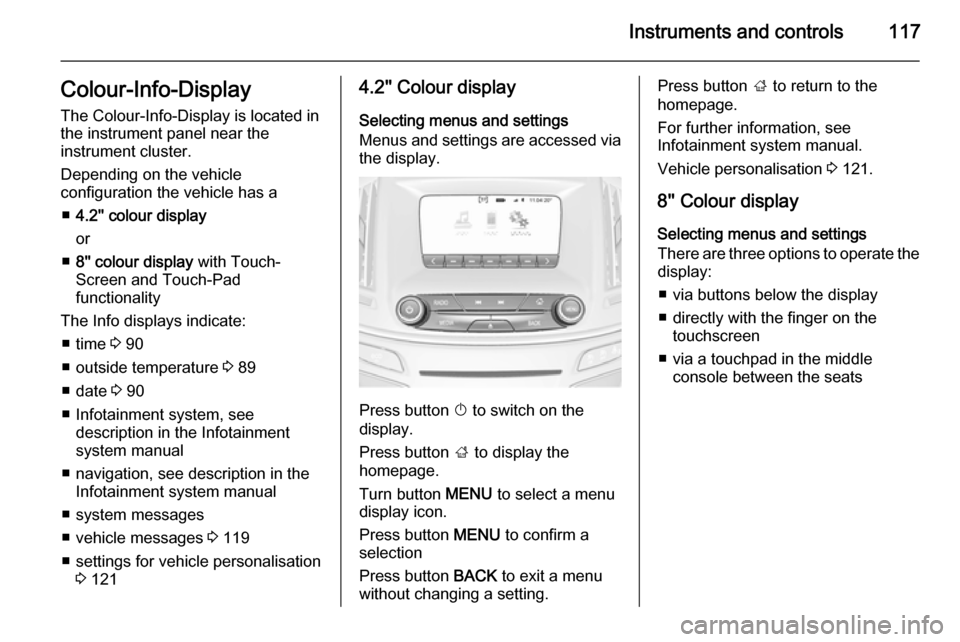
Selecting menus and settings
Menus and settings are accessed via the display.
Press button X to switch on the
display.
Press button ; to display the
homepage.
Turn button MENU to select a menu
display icon.
Press button MENU to confirm a
selection
Press button BACK to exit a menu
without changing a setting.
Press button ; to return to the
homepage.
For further information, see
Infotainment system manual.
Vehicle personalisation 3 121.
8'' Colour display Selecting menus and settings
There are three options to operate the
display:
■ via buttons below the display
■ directly with the finger on the touchscreen
■ via a touchpad in the middle console between the seats
Page 123 of 321
Instruments and controls121
During an Autostop■ If the driver's door is opened.
Battery voltage When the vehicle battery voltage isrunning low, a warning message will
appear in the Driver Information
Centre.
1. Switch off any electrical consumers which are not requiredfor a safe ride, e.g. seat heating,
heated rear window or other main consumers.
2. Charge the vehicle battery by driving continuously for a while or
by using a charging device.
The warning message will disappear
after the engine has been started
twice without a voltage drop.
If the vehicle battery cannot be
recharged, have the cause of the fault
remedied by a workshop.Vehicle personalisation
The vehicle's behaviour can be
personalised by changing the settings
in the Colour-Info-Display.
Some of the personal settings for
different drivers can be memorised individually for each vehicle key.
Memorised settings 3 22.
Depending on vehicle equipment and
country-specific regulations some of
the functions described below might
not be available.
Some functions are only displayed or
active when the engine is running.
Personal settings Following the changing of personal
settings is described via the buttons
below the display. This is valid for
4.2'' as well as 8'' Colour-Info-Display.
Additionally the 8'' display is operable
as a touchscreen and with the touchpad between the front seats. See description Colour-Info-Display
3 117 and the Infotainment system
manual.
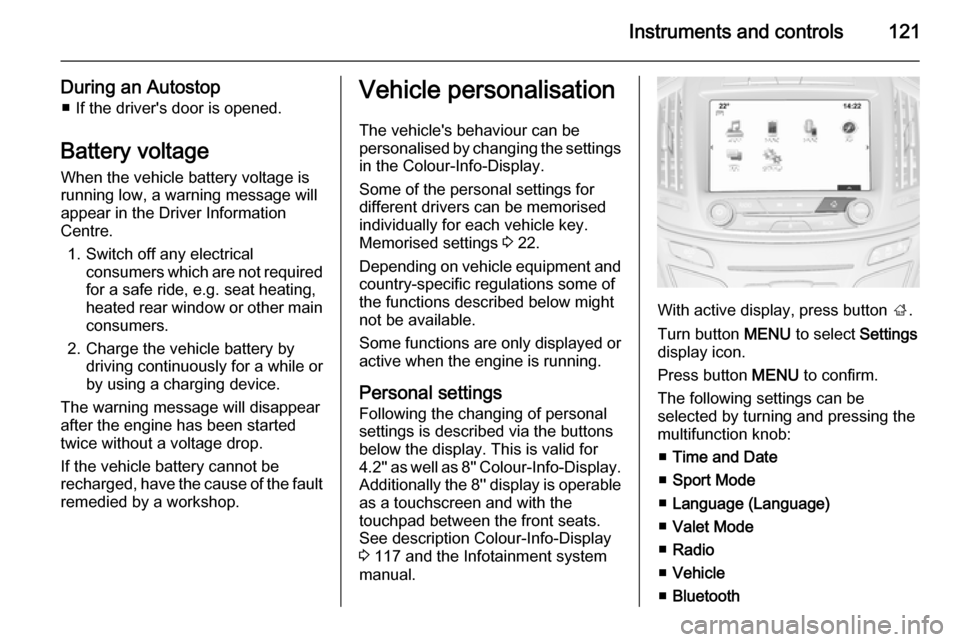
With active display, press button ;.
Turn button MENU to select Settings
display icon.
Press button MENU to confirm.
The following settings can be
selected by turning and pressing the multifunction knob:
■ Time and Date
■ Sport Mode
■ Language (Language)
■ Valet Mode
■ Radio
■ Vehicle
■ Bluetooth
Page 129 of 321
Lighting127
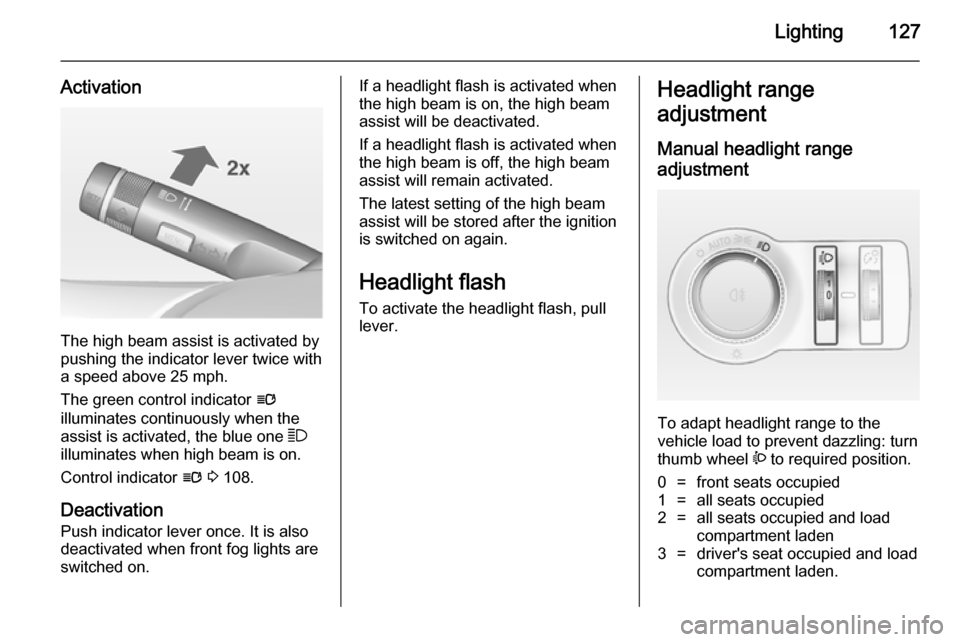
Activation
The high beam assist is activated by
pushing the indicator lever twice with
a speed above 25 mph.
The green control indicator l
illuminates continuously when the
assist is activated, the blue one 7
illuminates when high beam is on.
Control indicator l 3 108.
Deactivation
Push indicator lever once. It is also deactivated when front fog lights are
switched on.
If a headlight flash is activated when
the high beam is on, the high beam
assist will be deactivated.
If a headlight flash is activated when
the high beam is off, the high beam
assist will remain activated.
The latest setting of the high beam
assist will be stored after the ignition
is switched on again.
Headlight flash To activate the headlight flash, pull
lever.Headlight range
adjustment
Manual headlight range
adjustment
To adapt headlight range to the
vehicle load to prevent dazzling: turn
thumb wheel ? to required position.
0=front seats occupied1=all seats occupied2=all seats occupied and load
compartment laden3=driver's seat occupied and load
compartment laden.