infotainment VAUXHALL INSIGNIA 2014.5 Owner's Manual
[x] Cancel search | Manufacturer: VAUXHALL, Model Year: 2014.5, Model line: INSIGNIA, Model: VAUXHALL INSIGNIA 2014.5Pages: 321, PDF Size: 8.98 MB
Page 24 of 321

22Keys, doors and windows
FaultIf the central locking cannot be
operated or the engine cannot be
started, the cause may be one of the
following:
■ Fault in electronic key
■ Electronic key out of reception range
■ Battery voltage too low,
■ Overload of the central locking system by operating at frequent
intervals, the power supply is
interrupted for a short time
■ Interference from higher-power radio waves from other sources.
To rectify the cause of the fault,
change the position of the electronic
key.
Manual unlocking 3 22.
Memorised settings Whenever the ignition is switched off,
the following settings are
automatically memorised by the
remote control unit or the electronic
key:■ Automatic climate control
■ Lighting
■ Infotainment system
■ Central locking system
■ Sport mode settings
■ Comfort settings
The saved settings are automatically
used the next time the ignition is
switched on with the memorised key
with remote control unit 3 152 or
electronic key 3 21.
A precondition is that Personalisation
by Driver is activated in the personal
settings of the Info-Display. This must
be set for each remote control unit or
electronic key which is used.
Also memorised are the adjustments
of the driver's seat and exterior
mirrors, independent of the memory
positions 3 49.
Power seat automatically moves into
the saved position when unlocking
and opening the driver's door with the
memorised remote control or
electronic key and Auto Memory
Recall in the Info-Display is activated.Vehicle personalisation 3 121.
Central locking system
Unlocks and locks doors, load
compartment and fuel filler flap.
A pull on an interior door handle
unlocks the respective door. Pulling
the handle once more opens the door.
Notice
In the event of an accident in which
airbags or belt pretensioners are
deployed, the vehicle is
automatically unlocked.
Notice
A short time after unlocking with the
remote control the doors are locked
automatically if no door has been
opened.
Page 54 of 321

52Seats, restraints
Safety function
If the driver's seat encounters
resistance during movement, the
recall may stop. After removing the
obstruction, press and hold the
appropriate power seat position
button for the memory item for
two seconds. Try recalling the
memory position again. If the recall
does not operate, consult a
workshop.
Overload
If the seat setting is electrically
overloaded, the power supply is
automatically cut-off for a short time.
Notice
After an accident in which airbags
have been deployed, the memorised settings for each position button willbe deactivated.Armrest
Push button and fold armrest
upwards. Under the armrest there is
a storage compartment.
Auxiliary devices, see Infotainment
system manual.
Heating
Adjust heating to the desired setting
by pressing button ß for the
respective seat one or more times.
The control indicator in the button
indicates the setting.
Prolonged use of the highest setting
for people with sensitive skin is not
recommended.
Seat heating is operational when engine is running and during an
Autostop.
Stop-start system 3 156.
Page 87 of 321
Instruments and controls85Instruments and
controlsControls ....................................... 85
Warning lights, gauges and indi‐ cators ........................................... 94
Information displays ...................110
Vehicle messages ...................... 119
Vehicle personalisation ..............121Controls
Steering wheel adjustment
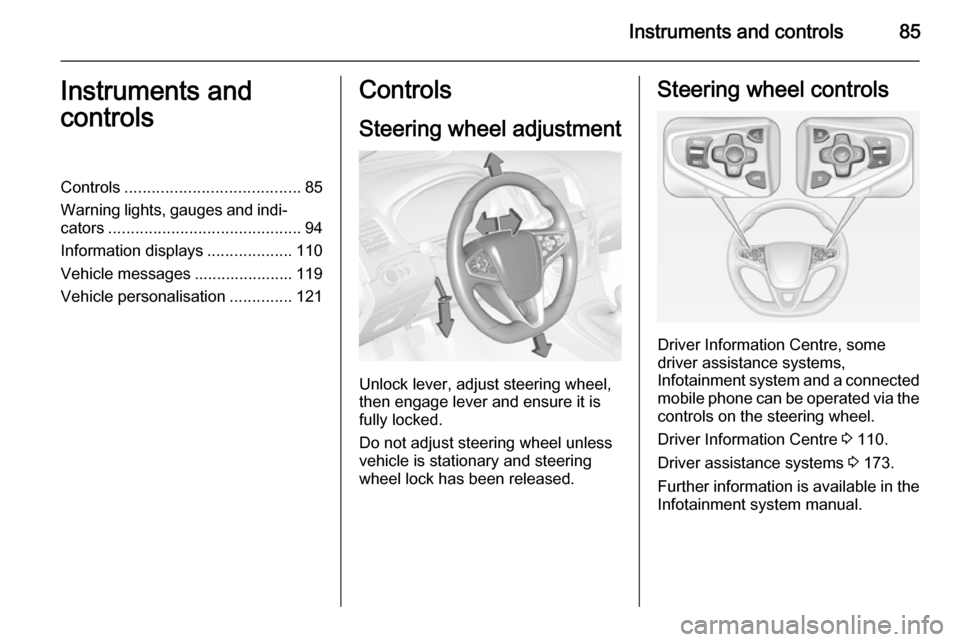
Unlock lever, adjust steering wheel,
then engage lever and ensure it is fully locked.
Do not adjust steering wheel unless
vehicle is stationary and steering
wheel lock has been released.
Steering wheel controls
Driver Information Centre, some
driver assistance systems,
Infotainment system and a connected
mobile phone can be operated via the controls on the steering wheel.
Driver Information Centre 3 110.
Driver assistance systems 3 173.
Further information is available in the
Infotainment system manual.
Page 92 of 321
90Instruments and controls
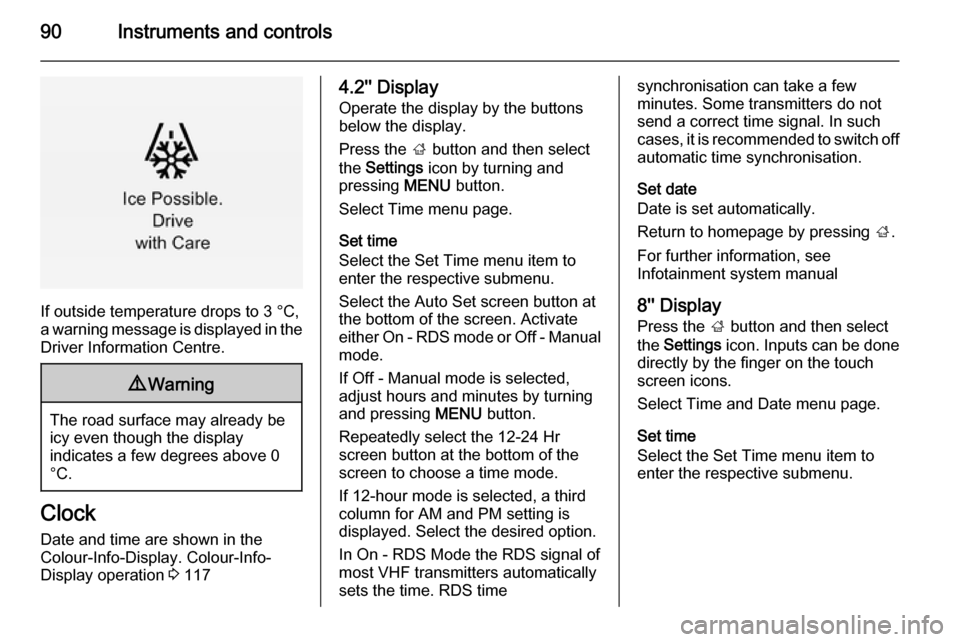
If outside temperature drops to 3 °C,
a warning message is displayed in the Driver Information Centre.
9 Warning
The road surface may already be
icy even though the display
indicates a few degrees above 0
°C.
Clock
Date and time are shown in the
Colour-Info-Display. Colour-Info-
Display operation 3 117
4.2'' Display
Operate the display by the buttons
below the display.
Press the ; button and then select
the Settings icon by turning and
pressing MENU button.
Select Time menu page.
Set time
Select the Set Time menu item to
enter the respective submenu.
Select the Auto Set screen button at
the bottom of the screen. Activate
either On - RDS mode or Off - Manual mode.
If Off - Manual mode is selected,
adjust hours and minutes by turning
and pressing MENU button.
Repeatedly select the 12-24 Hr
screen button at the bottom of the
screen to choose a time mode.
If 12-hour mode is selected, a third
column for AM and PM setting is
displayed. Select the desired option.
In On - RDS Mode the RDS signal of
most VHF transmitters automatically
sets the time. RDS timesynchronisation can take a few
minutes. Some transmitters do not
send a correct time signal. In such
cases, it is recommended to switch off
automatic time synchronisation.
Set date
Date is set automatically.
Return to homepage by pressing ;.
For further information, see
Infotainment system manual
8'' Display
Press the ; button and then select
the Settings icon. Inputs can be done
directly by the finger on the touch screen icons.
Select Time and Date menu page.
Set time
Select the Set Time menu item to
enter the respective submenu.
Page 93 of 321
Instruments and controls91
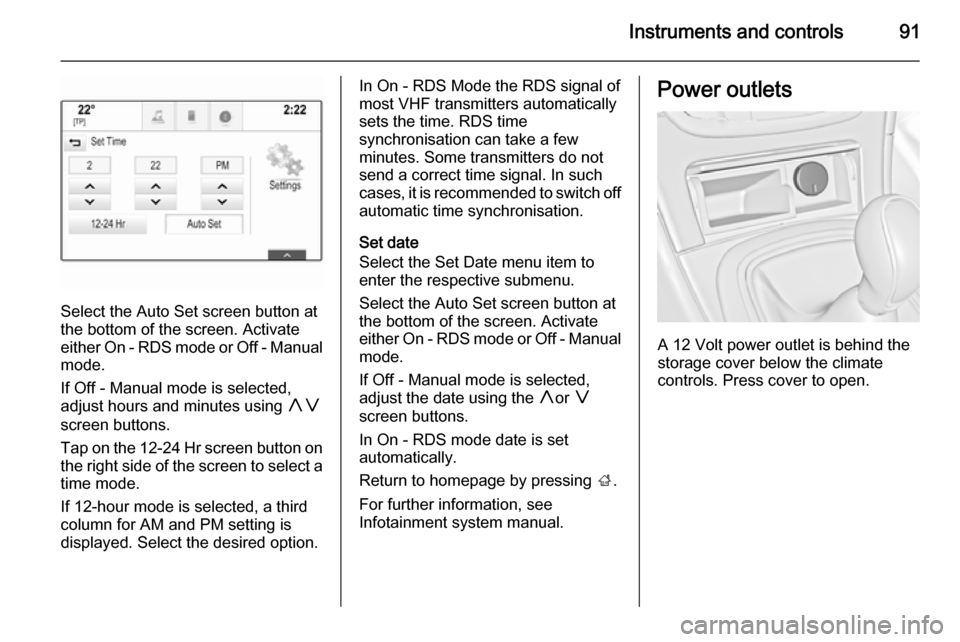
Select the Auto Set screen button at
the bottom of the screen. Activate
either On - RDS mode or Off - Manual
mode.
If Off - Manual mode is selected,
adjust hours and minutes using hg
screen buttons.
Tap on the 12-24 Hr screen button on the right side of the screen to select a
time mode.
If 12-hour mode is selected, a third column for AM and PM setting is
displayed. Select the desired option.
In On - RDS Mode the RDS signal of
most VHF transmitters automatically
sets the time. RDS time
synchronisation can take a few
minutes. Some transmitters do not
send a correct time signal. In such
cases, it is recommended to switch off automatic time synchronisation.
Set date
Select the Set Date menu item to
enter the respective submenu.
Select the Auto Set screen button at
the bottom of the screen. Activate
either On - RDS mode or Off - Manual
mode.
If Off - Manual mode is selected,
adjust the date using the hor g
screen buttons.
In On - RDS mode date is set
automatically.
Return to homepage by pressing ;.
For further information, see
Infotainment system manual.Power outlets
A 12 Volt power outlet is behind the
storage cover below the climate
controls. Press cover to open.
Page 112 of 321
110Instruments and controls
Illuminates green
Speed limiter is active. Set speed is
indicated near L symbol.
Speed limiter 3 174.
Traffic sign assistant
L displays detected traffic signs as
control indicator.
Traffic sign assistant 3 200.
Door open h illuminates red.
A door or the tailgate is open.Information displays
Driver Information Centre The Driver Information Centre (DIC)
is located in the instrument cluster.
Depending on the version and the
instrument cluster, the Driver
Information Centre is available as
Baselevel display, Midlevel display or Uplevel display.
DIC indicates depending on the
equipment:
■ overall and trip odometer
■ vehicle information
■ trip/fuel information
■ economic information
■ performance information
■ vehicle and warning messages
■ audio and infotainment information
■ phone information
■ navigation information
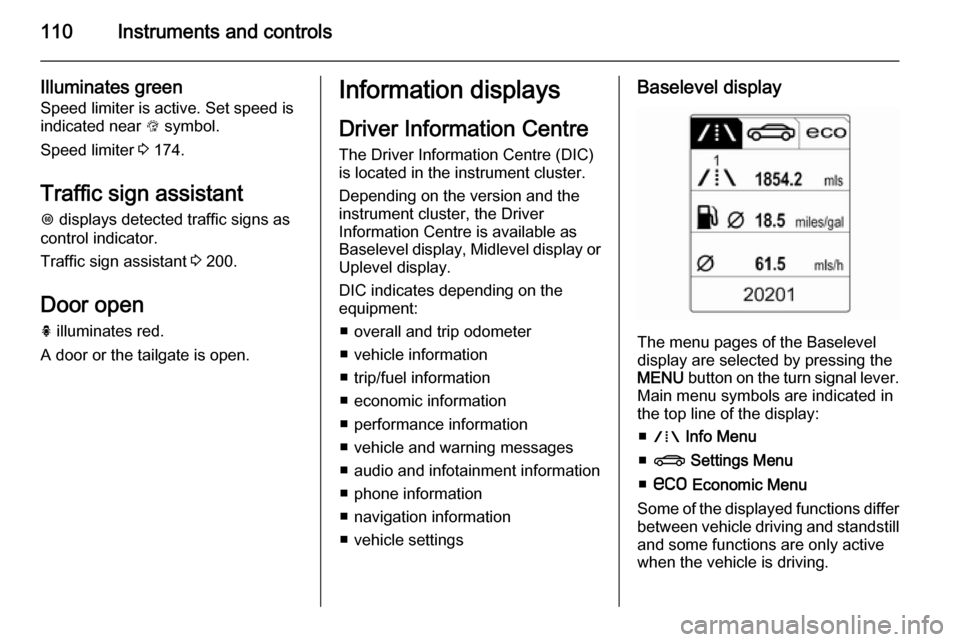
■ vehicle settingsBaselevel display
The menu pages of the Baselevel
display are selected by pressing the
MENU button on the turn signal lever.
Main menu symbols are indicated in
the top line of the display:
■ W Info Menu
■ X Settings Menu
■ s Economic Menu
Some of the displayed functions differ between vehicle driving and standstilland some functions are only active
when the vehicle is driving.
Page 117 of 321

Instruments and controls115
Shift indication: On Baselevel display
the current gear is indicated inside an
arrow. The figure above recommends upshifting for fuel saving reasons.
Blank page
shows a blank page without any
information.
Performance Menu Performance menu is only viewable
on Uplevel display.
The following list contains all possible Performance Menu pages. Somemay not be available for your
particular vehicle.
Press Q or P to select a page:
■ Friction bubble
■ Acceleration and braking
■ Oil temperature
■ Oil pressure
■ Battery voltage
■ Transmission fluid temperatureFriction bubble
A four quadrant visual display,
indicative of the four corners of the
car, with a “bubble” showing where
the most inertia is being exerted on
the vehicle.
Acceleration and braking
Displays the percentage amount of
brake or accelerator pressure applied
by the driver as a bar graph around
the outer perimeter of the DIC area.
The left side is for acceleration and
the right side is for braking.
Oil temperature
Displays the oil temperature in
degrees Celsius.
Oil pressure
Displays the oil pressure in kPa.
Battery voltage
Displays the vehicle battery voltage.
Transmission fluid temperature
Displays the transmission fluid
temperature in degrees Celsius.Audio Menu
Audio menu enables browsing for
music, selecting from favourites or
changing the audio source.
See Infotainment system manual.
Phone Menu
Phone menu enables managing and performing of phone calls, scrolling
through contacts or operating
handsfree phoning.
See Infotainment system manual.
Navigation Menu Navigation menu enables route
guidance.
See Infotainment system manual.
Settings Menu
The following list contains all possible Settings Menu pages. Some may not
be available for your particular
vehicle. Depending on the display
some functions are symbolised.
Page 118 of 321

116Instruments and controls
Turn the adjuster wheel or press Q
or P to select a page and follow the
instructions given in the submenus:
■ Units
■ Display themes
■ Info pages
■ Speed warning
■ Tyre loading
■ Software information
Units
Press > while units is displayed.
Select imperial or metric units by
pressing 9.
Display themes
Press > while display themes is
displayed. Select Sport or Touring
mode by pressing 9. Sport mode
includes more vehicle information,
Tour mode includes more media information.
This setting is only available with
Uplevel display.Info pages
Press > while Info pages is displayed.
A list of all items in the Info Menu is
displayed. Select the functions to be
displayed in the Info page by pressing
9 . Selected pages have a 9 in a
checkbox. Non viewable functions
have a blank checkbox. See Info
Menu above.
Speed warning
The speed warning display allows you to set a speed that you do not
want to exceed.
To set the speed warning, press >
while the page is displayed. Press
Q or P to adjust the value. Press
9 to set the speed. Once the speed
is set, this feature can be turned off by
pressing 9 while viewing this page. If
the selected speed limit is exceeded,
a pop-up warning is displayed with a
chime.
Tyre loading
The tyre loading display selects tyre
pressure category according to the
actually inflated tyre pressure. Press
> while the page is displayed 3 243.Select:
■ Light for comfort pressure up to
3 people
■ Eco for Eco pressure up to
3 people
■ Max for full loading
by pressing 9.
Software information
Displays the open source software
information.
Valet mode
Some functions of the Driver
Information Centre and the Colour-
Info-Display can be limited for some
drivers.
Activation or deactivation of valet
mode can be set in the menu
Settings in the vehicle personalisation
menu.
Colour-Info-Display 3 117.
Vehicle personalisation 3 121.
For more information see
Infotainment system manual.
Page 119 of 321
Instruments and controls117Colour-Info-Display
The Colour-Info-Display is located in the instrument panel near the
instrument cluster.
Depending on the vehicle
configuration the vehicle has a
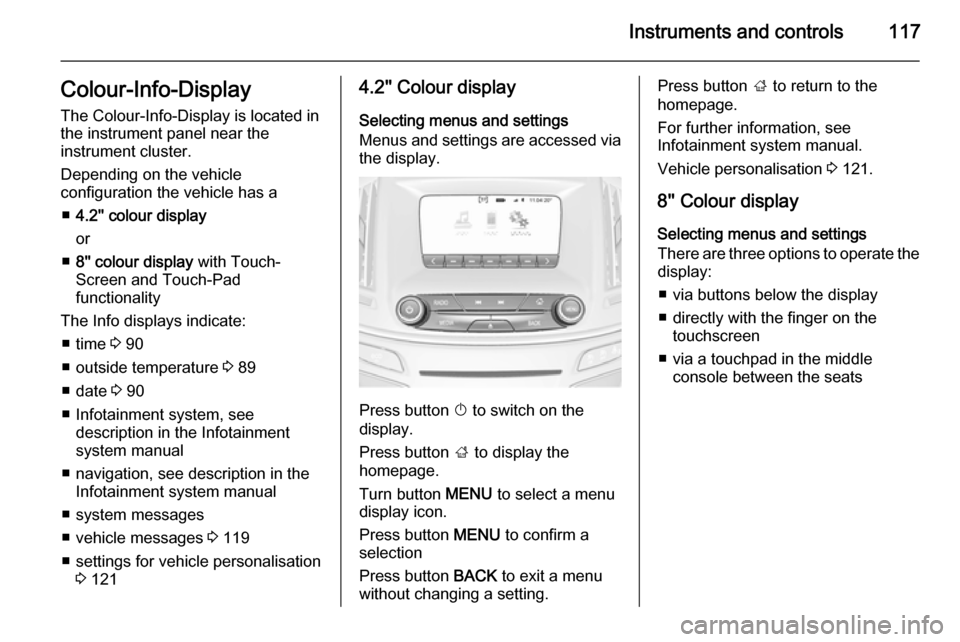
■ 4.2'' colour display
or
■ 8'' colour display with Touch-
Screen and Touch-Pad
functionality
The Info displays indicate: ■ time 3 90
■ outside temperature 3 89
■ date 3 90
■ Infotainment system, see description in the Infotainment
system manual
■ navigation, see description in the Infotainment system manual
■ system messages
■ vehicle messages 3 119
■ settings for vehicle personalisation 3 1214.2'' Colour display
Selecting menus and settings
Menus and settings are accessed via the display.
Press button X to switch on the
display.
Press button ; to display the
homepage.
Turn button MENU to select a menu
display icon.
Press button MENU to confirm a
selection
Press button BACK to exit a menu
without changing a setting.
Press button ; to return to the
homepage.
For further information, see
Infotainment system manual.
Vehicle personalisation 3 121.
8'' Colour display Selecting menus and settings
There are three options to operate the
display:
■ via buttons below the display
■ directly with the finger on the touchscreen
■ via a touchpad in the middle console between the seats
Page 120 of 321
118Instruments and controls
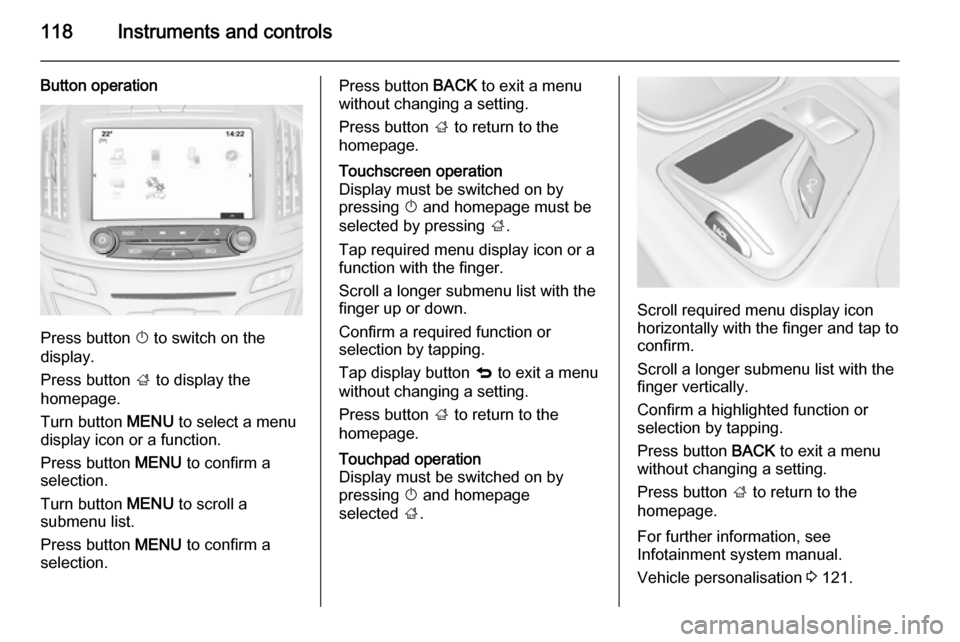
Button operation
Press button X to switch on the
display.
Press button ; to display the
homepage.
Turn button MENU to select a menu
display icon or a function.
Press button MENU to confirm a
selection.
Turn button MENU to scroll a
submenu list.
Press button MENU to confirm a
selection.
Press button BACK to exit a menu
without changing a setting.
Press button ; to return to the
homepage.Touchscreen operation
Display must be switched on by
pressing X and homepage must be
selected by pressing ;.
Tap required menu display icon or a function with the finger.
Scroll a longer submenu list with the
finger up or down.
Confirm a required function or
selection by tapping.
Tap display button q to exit a menu
without changing a setting.
Press button ; to return to the
homepage.Touchpad operation
Display must be switched on by
pressing X and homepage
selected ;.
Scroll required menu display icon
horizontally with the finger and tap to
confirm.
Scroll a longer submenu list with the
finger vertically.
Confirm a highlighted function or
selection by tapping.
Press button BACK to exit a menu
without changing a setting.
Press button ; to return to the
homepage.
For further information, see
Infotainment system manual.
Vehicle personalisation 3 121.