AUX VAUXHALL INSIGNIA 2014 Infotainment system
[x] Cancel search | Manufacturer: VAUXHALL, Model Year: 2014, Model line: INSIGNIA, Model: VAUXHALL INSIGNIA 2014Pages: 143, PDF Size: 2.53 MB
Page 126 of 143

126External devicesExternal devicesGeneral information...................126
Playing audio ............................. 128General information
An AUX, USB and SD card socket for
the connection of external devices is
located underneath the armrest in the centre console. Find a detailed
description on lifting the armrest in the
Owner's manual.
Notice
The sockets must always be kept
clean and dry.
AUX input It is possible to connect e.g. an iPod,
a Smartphone or another auxiliary
device to the AUX input.
When connected to the AUX input, the audio signal of the auxiliary device
is transmitted via the speakers of the
Infotainment system.
The volume and the tone settings can be adjusted via the Infotainment
system. All other control functions
need to be operated via the auxiliary
device.
Connecting/disconnecting a device
To connect the auxiliary device to the
AUX input socket of the Infotainment
system, use the following cable:
3-pole for audio source.
To disconnect the AUX device, select
another function and then remove the AUX device.
AUX audio function
The Infotainment system can play
music files contained in auxiliary
devices, e.g. iPod or Smartphone.
USB port
An MP3 player, USB drive, iPod or
Smartphone can be connected to the USB port.
Page 129 of 143
External devices129
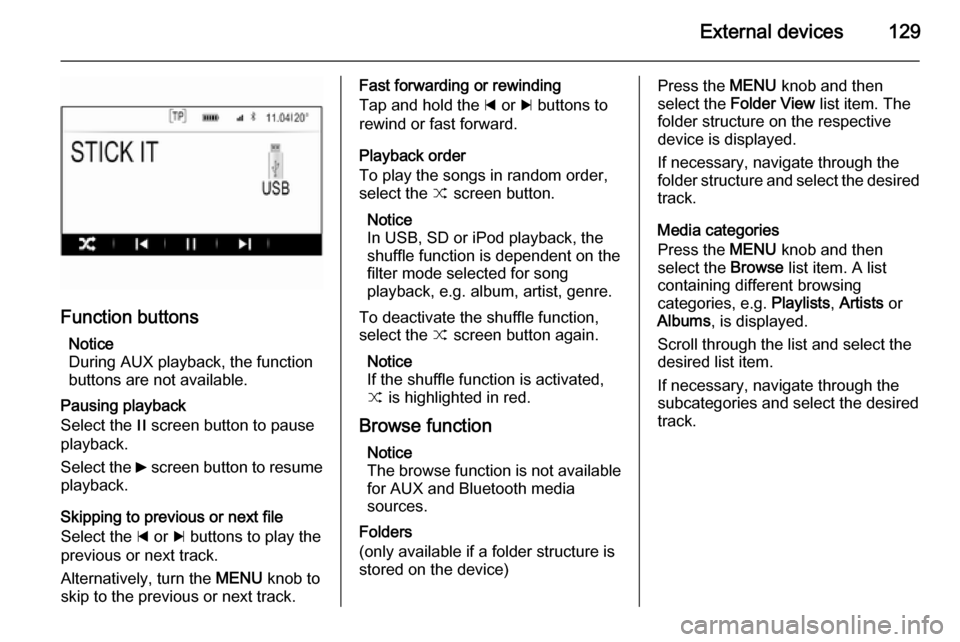
Function buttonsNotice
During AUX playback, the function buttons are not available.
Pausing playback
Select the / screen button to pause
playback.
Select the 6 screen button to resume
playback.
Skipping to previous or next file
Select the d or c buttons to play the
previous or next track.
Alternatively, turn the MENU knob to
skip to the previous or next track.
Fast forwarding or rewinding
Tap and hold the d or c buttons to
rewind or fast forward.
Playback order
To play the songs in random order,
select the 9 screen button.
Notice
In USB, SD or iPod playback, the
shuffle function is dependent on the
filter mode selected for song
playback, e.g. album, artist, genre.
To deactivate the shuffle function,
select the 9 screen button again.
Notice
If the shuffle function is activated,
9 is highlighted in red.
Browse function Notice
The browse function is not available
for AUX and Bluetooth media
sources.
Folders
(only available if a folder structure is
stored on the device)Press the MENU knob and then
select the Folder View list item. The
folder structure on the respective
device is displayed.
If necessary, navigate through the
folder structure and select the desired track.
Media categories
Press the MENU knob and then
select the Browse list item. A list
containing different browsing
categories, e.g. Playlists, Artists or
Albums , is displayed.
Scroll through the list and select the
desired list item.
If necessary, navigate through the subcategories and select the desiredtrack.
Page 140 of 143

140IndexAActivating AUX............................ 128
Activating Bluetooth music .........128
Activating CD player ...................124
Activating radio ........................... 117
Activating SD card ......................128
Activating the Infotainment system ..................................... 109
Activating the phone portal .........134
Activating USB............................ 128
Audio files ................................... 126
Auto Set ...................................... 114
Auto volume control ....................113
AUX ............................................ 126
B BACK button ............................... 111
Balance....................................... 112
Basic operation ........................... 111
Five-way-controller ..................111
Instrument panel .....................111
Bass............................................ 112
Bluetooth connection ..................131
Bluetooth music .......................... 126
C Category list................................ 117
CD player.................................... 123
Clock display .............................. 114Control elements
Infotainment system ................106
Steering wheel ........................ 106
Control elements overview .........106
D DAB ............................................ 121
DAB linking ................................. 121
Digital audio broadcasting ..........121
E Emergency call ........................... 133
EQ .............................................. 112
Equaliser..................................... 112
F
Fader .......................................... 112
Favourite lists ............................. 118
Retrieving stations................... 118
Storing stations .......................118
File formats Audio files................................ 126
Five-way-controller .....................111
Forgotten PIN ............................. 114
Frequency list ............................. 117
G General information ....123, 126, 130
AUX ......................................... 126
Bluetooth music....................... 126
Page 141 of 143

141
CD........................................... 123
Infotainment system ................104
Phone ...................................... 130
Radio ....................................... 117
SD ........................................... 126
USB ......................................... 126
H
Home button ............................... 111
I
Infotainment control panel ..........106
Intellitext ..................................... 121
L
Language ................................... 114
L-Band ........................................ 121
M
Maximum startup volume ...........113
MENU knob ................................ 111
Menu operation .......................... 111
Midrange..................................... 112 Mobile phones and CB radio equipment .............................. 137
Mute............................................ 109
O Operation .................................... 134
AUX ......................................... 128
Blueotooth music ....................128CD........................................... 124
Infotainment system ................109
Menu ....................................... 111
Phone ...................................... 134
Radio ....................................... 117
SD card ................................... 128
USB ......................................... 128
P Pairing ........................................ 131
Phone Bluetooth ................................. 130
Bluetooth connection ..............131
Emergency calls ......................133
General information ................130
Handsfree mode .....................134
Phone book ............................. 134
Recent calls............................. 134
Ringtone .................................. 134
Phone book ................................ 134
Phone call Initiating ................................... 134
Rejecting ................................. 134
Taking ..................................... 134
Playing audio .............................. 128
R Radio Category list ............................ 117
DAB ......................................... 121DAB announcements..............121
DAB menu ............................... 121
Digital Audio Broadcasting ......121
Favourite lists .......................... 118
FM menu ................................. 120
Frequency list .......................... 117
Intellitext .................................. 121
L-Band..................................... 121
Radio Data System .................120
RDS......................................... 120 Region ..................................... 120
Regionalisation ....................... 120
Retrieving stations................... 118
Station list................................ 117
Station search ......................... 117
Storing stations .......................118
TP............................................ 120
Traffic Programme ..................120
Waveband ............................... 117
Radio data system (RDS) ..........120
Region ........................................ 120
Regionalisation ........................... 120
Retrieving stations ......................118
Return to factory settings............ 114
Ringtone ..................................... 134
S SD card....................................... 126
Station list ................................... 117
Station search............................. 117
Page 142 of 143

142
Storing stations........................... 118
Switching the Infotainment system on ................................ 109
System settings .......................... 114
Display .................................... 114
Language ................................ 114
Return to factory settings ........114
Time and Date......................... 114
Valet mode .............................. 114
T
Theft-deterrent feature ..............105
Time............................................ 114
Tone settings .............................. 112
TP ............................................... 120
Traffic Programme ......................120
Treble ......................................... 112
U
Usage ......................... 109, 117, 124
AUX ......................................... 128
Bluetooth music....................... 128
CD ........................................... 124
Infotainment system ................109
Menu ....................................... 111
Phone ...................................... 134
SD card ................................... 128
USB ......................................... 128
USB ............................................ 126V
Valet mode Locking .................................... 114
Unlocking ................................ 114
Volume Auto volume control ................113
Maximum startup volume ........113
Mute function........................... 109
Setting the volume ..................109
Speed compensated volume ..113
Volume limitation at high
temperatures ........................... 109
Volume settings .......................... 113
W Waveband selection ...................117