infotainment VAUXHALL INSIGNIA 2014 Infotainment system
[x] Cancel search | Manufacturer: VAUXHALL, Model Year: 2014, Model line: INSIGNIA, Model: VAUXHALL INSIGNIA 2014Pages: 143, PDF Size: 2.53 MB
Page 105 of 143

Introduction105marked on the map. In such areasthe Infotainment system may
issue a warning that must be
accepted. Here you must pay
particular attention to one-way
streets, roads and entrances that
you are not allowed to drive into.
Radio reception
Radio reception may be disrupted by
static, noise, distortion or loss of
reception due to:
■ changes in distance from the transmitter,
■ multi-path reception due to reflection,
■ shadowing.
Theft-deterrent feature
The Infotainment system is equipped
with an electronic security system for
the purpose of theft deterrence.
The Infotainment system therefore
functions only in your vehicle and is
worthless to a thief.
Page 109 of 143

Introduction109
Driver Information Centre
In the Driver Information Centre,
Infotainment related information and
menus are shown.
The menus on the Driver Information
Centre are operated via the five-way
controller on the right-hand side of the steering wheel.
Usage
Control elements The Infotainment system is operated
via function buttons, a MENU knob
and menus that are shown on the
display.
Inputs are made optionally via: ■ the control panel on the Infotainment system 3 106
■ audio controls on the steering wheel 3 106.
Switching the Infotainment
system on or off
Press the X knob briefly. After
switching on, the last selected
Infotainment source becomes active.
Press and hold the X knob again to
turn the system off.
Automatic switch-off
If the Infotainment system is switched on using the X button while the
ignition is switched off, it switches off
again automatically after 1 hour.Setting the volume
Turn the m knob. The current setting
is shown on the display.
When the Infotainment system is
switched on, the last selected volume is set, provided that the volume is
lower than the maximum start-up
volume 3 113.
Speed compensated volume
When Auto volume is activated
3 113, the volume is adapted
automatically to make up for the road
and wind noises as you drive.
Mute function
Press the m knob to mute the audio
sources.
To cancel the mute function: turn the
m knob.
Modes of operation
Radio
Press the RADIO button to open the
radio main menu or to toggle between
the different wavebands.
Page 110 of 143

110Introduction
Find a detailed description of the
radio functions 3 117.
CD player
Press the MEDIA button repeatedly to
activate the CD player.
Find a detailed description of the CD
player functions 3 123.
External devices
Press the MEDIA button repeatedly to
activate the playback mode for a
connected external device (e.g. USB
device, iPod or smartphone).
Find a detailed descriptions on
connecting and operating external
devices 3 126.
Phone
Press the ; button to display the
Home screen.
Select the PHONE screen button to
establish a Bluetooth connection
between the Infotainment system and
a mobile phone.
If a connection can be established,
the main menu of the phone mode is
displayed.Find a detailed description of mobile
phone operation via the Infotainment
system 3 134.
If no connection can be established,
a corresponding message is
displayed. Find a detailed description of preparing and establishing a
Bluetooth connection between the Infotainment system and a mobile
phone 3 131.
Page 114 of 143

114Basic operation
To access the setting from an audio
main menu, press the MENU knob,
scroll through the list and select Auto
Volume .
To adjust the degree of volume
adaptation, set Auto Volume to one of
the available options.
Off : no enhancement of volume with
increasing vehicle speed.
High : maximum enhancement of
volume with increasing vehicle
speed.
System settings
Various settings and adaptions for the Infotainment system can be
performed via the SETTINGS
application.
Time
Press the ; button and then select
the SETTINGS icon.
Select the Time menu item.
Set Time
Select the Set Time menu item to
enter the respective submenu.
Select the AUTO SET screen button
at the bottom of the screen. Activate
either On - RDS or Off - Manual .
If Off - Manual is selected, adjust
hours and minutes.
Repeatedly select the 12-24 HR
screen button at the bottom of the
screen to choose a time mode.
If the 12-hour mode is selected, a
third column for AM and PM selection
is displayed. Select the desired
option.
Clock Display
Select the Clock Display menu item to
enter the respective submenu.
To turn off the digital clock display in
the menus, select the Off menu item.
Language Press the ; button and then select
the SETTINGS icon.
Select the Language menu item.
Scroll through the list and select the
desired language.
Valet mode
If valet mode is activated, all vehicle displays are locked and no changes
may be performed within the system.
Notice
Vehicle-related messages remain enabled.
Page 115 of 143
Basic operation115
Locking the system
Press the ; button and then select
the SETTINGS icon.
Scroll through the list and select the
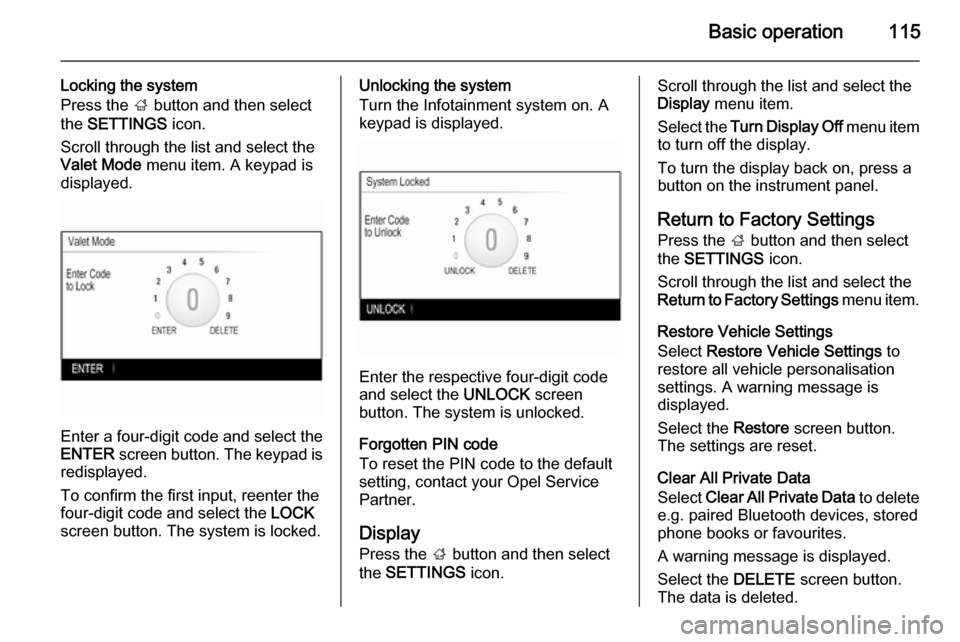
Valet Mode menu item. A keypad is
displayed.
Enter a four-digit code and select the
ENTER screen button. The keypad is
redisplayed.
To confirm the first input, reenter the
four-digit code and select the LOCK
screen button. The system is locked.
Unlocking the system
Turn the Infotainment system on. A
keypad is displayed.
Enter the respective four-digit code
and select the UNLOCK screen
button. The system is unlocked.
Forgotten PIN code
To reset the PIN code to the default
setting, contact your Opel Service Partner.
Display Press the ; button and then select
the SETTINGS icon.
Scroll through the list and select the
Display menu item.
Select the Turn Display Off menu item
to turn off the display.
To turn the display back on, press a
button on the instrument panel.
Return to Factory SettingsPress the ; button and then select
the SETTINGS icon.
Scroll through the list and select the
Return to Factory Settings menu item.
Restore Vehicle Settings
Select Restore Vehicle Settings to
restore all vehicle personalisation
settings. A warning message is
displayed.
Select the Restore screen button.
The settings are reset.
Clear All Private Data
Select Clear All Private Data to delete
e.g. paired Bluetooth devices, stored
phone books or favourites.
A warning message is displayed.
Select the DELETE screen button.
The data is deleted.
Page 116 of 143

116Basic operation
Restore Radio Settings
Select Restore Radio Settings to
reset Infotainment settings, e.g. tone
settings.
A warning message is displayed.
Select the Restore screen button.
The settings are reset.
Software Information
Press the ; button and select the
SETTINGS icon.
Scroll through the list and select the
Software Information menu item.
This menu contains specific
information on the software.
Page 118 of 143

118Radio
Station lists
FM or DAB waveband
Turn the MENU knob to display a list
of all stations currently receivable.
Scroll through the list and select the
desired station.
AM waveband
Press the MENU knob to open the
waveband menu and then select the
Station List list item.
Select All Strong Stations to display a
list of all stations currently receivable.
Scroll through the list and select the
desired station.
Category lists
Numerous RDS 3 120 and DAB
3 121 stations broadcast a PTY
code, which specifies the type of
programme transmitted (e.g. news).
Some stations also change the PTY
code depending on the content which
is currently transmitted.
The Infotainment system stores these
stations, sorted by programme type in
the corresponding category list.Notice
The Categories list item is only
available for the FM and the DAB
wavebands.
Press the MENU knob to display the
respective waveband menu and
select the Categories list item.
A list of programme type categories
currently available is displayed.
Select the desired category. A list of
stations is displayed transmitting a
programme of the selected type.
Select the desired station.
Updating the station lists
FM and DAB waveband
Press the MENU knob to open the
waveband menu and select the
Update Station List menu item.
The respective station list is updated
Notice
If a waveband specific station list is
updated the corresponding category list (if available) is also updated.AM waveband
Press the MENU knob to open the
waveband menu and select the
Station List menu item.
Select Update Station List .
The station list is updated
Favourite lists
Stations of all wavebands can be
stored manually in the favourite lists.
25 individual favourite locations are
available, displayed in five favourites
per favourites page.
Page 120 of 143
120Radio
The favourite is moved to the new
location.
Defining the number of favourites shown
Press the ; button and then select
the SETTINGS icon. Select the
Radio menu item and then Number of
Favorites Shown .
Select the desired option.
Notice
If the number of favourites stored
exceeds the number of favourites
activated in the settings menu, the
additionally stored favourites are not
deleted but just hidden from the
view. They may be reactivated by
increasing the number of viewable
favourites.
Radio data system (RDS)
RDS is a service of FM stations that considerably improves the finding ofthe desired station and its fault-free
reception.Advantages of RDS
■ On the display, the programme name of the station appears
instead of its frequency.
■ During a station search the Infotainment system tunes in to
RDS stations only.
■ The Infotainment system always tunes into the best receivable
broadcasting frequency of the set
station by means of AF (alternative
frequency).
■ Depending on the station that is received, the Infotainment system
displays radio text that can contain
e.g. information on the current
programme.
FM menu
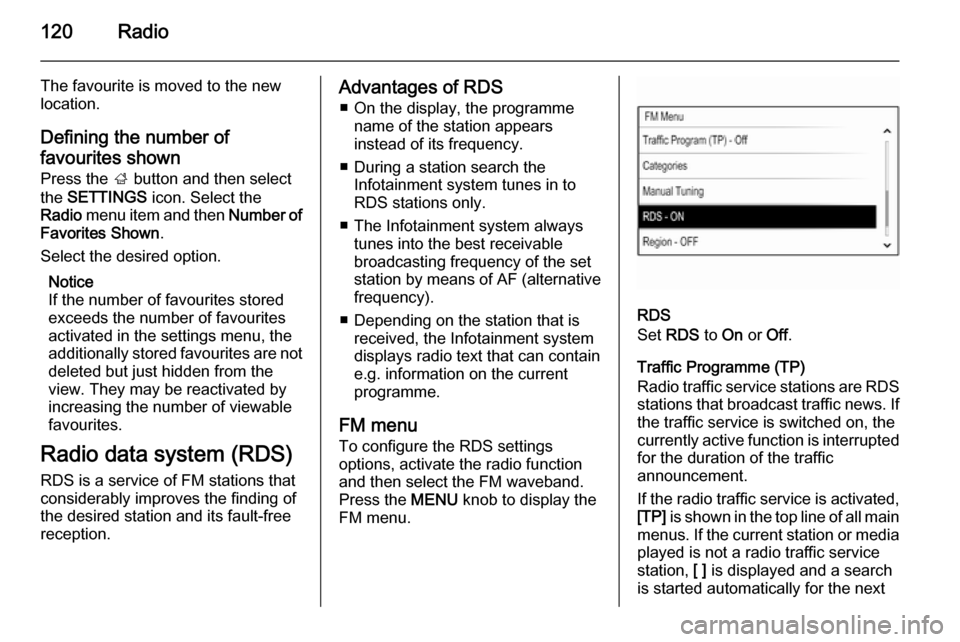
To configure the RDS settings
options, activate the radio function
and then select the FM waveband.
Press the MENU knob to display the
FM menu.
RDS
Set RDS to On or Off.
Traffic Programme (TP)
Radio traffic service stations are RDS stations that broadcast traffic news. Ifthe traffic service is switched on, the
currently active function is interrupted
for the duration of the traffic
announcement.
If the radio traffic service is activated,
[TP] is shown in the top line of all main
menus. If the current station or media played is not a radio traffic service
station, [ ] is displayed and a search
is started automatically for the next
Page 121 of 143
![VAUXHALL INSIGNIA 2014 Infotainment system Radio121
radio traffic service station. As soon
as a radio traffic service station is
found, [TP] is highlighted. If no radio
traffic service station is found, [ ]
remains on the screen.
If a traffi](/img/38/19473/w960_19473-120.png "VAUXHALL INSIGNIA 2014 Infotainment system Radio121
radio traffic service station. As soon
as a radio traffic service station is
found, [TP] is highlighted. If no radio
traffic service station is found, [ ]
remains on the screen.
If a traffi")
Radio121
radio traffic service station. As soon
as a radio traffic service station is
found, [TP] is highlighted. If no radio
traffic service station is found, [ ]
remains on the screen.
If a traffic announcement is
broadcasted on the respective radio
traffic service station, a message is
displayed.
To interrupt the announcement and
return to the function previously
activated, dismiss the alert.
Region
Sometimes RDS stations broadcast
regionally different programmes on
different frequencies.
Set Region to On or Off.
If regionalisation is switched on,
alternative frequencies with the same regional programmes are selected
where necessary.
If regionalisation is switched off,
alternative frequencies of the stations
are selected without regard to
regional programmes.Digital audio broadcasting
Digital audio broadcasting (DAB) is
an innovative and universal
broadcasting system.
Advantages of DAB ■ DAB stations are indicated by the programme name instead of the
broadcasting frequency.
■ With DAB, several radio programmes (services) can bebroadcasted on a single frequency(ensemble).
■ Besides high-quality digital audio services, DAB is also able to
transmit programme-associated
data and a multitude of other data
services including travel and traffic
information.
■ As long as a given DAB receiver can pick up the signal sent out by a
broadcasting station (even if the signal is very weak), sound
reproduction is ensured.
■ There is no fading (weakening of the sound that is typical of AM orFM reception). The DAB signal is
reproduced at a constant volume.
If the DAB signal is too weak to be
picked up by the receiver, reception is interrupted completely. This canbe avoided by activating DAB to
DAB Linking and/or DAB to FM
Linking in the DAB option menu
(see below).
■ Interference caused by stations that are on nearby frequencies (aphenomenon that is typical of AM
and FM reception) does not occur with DAB.
■ If the DAB signal is reflected by natural obstacles or buildings, the
reception quality of DAB is
improved, whereas AM or FM
reception is considerably impaired in such cases.
■ When DAB reception is enabled, the FM tuner of the Infotainment
system remains active in the
background and continually
searches for the best receivable FM stations. If TP 3 120 is activated,
traffic announcements of the FM station which is currently best
Page 122 of 143
122Radio
receivable are issued. Deactivate
TP, if DAB reception should not be
interrupted by FM traffic
announcements.
DAB menu
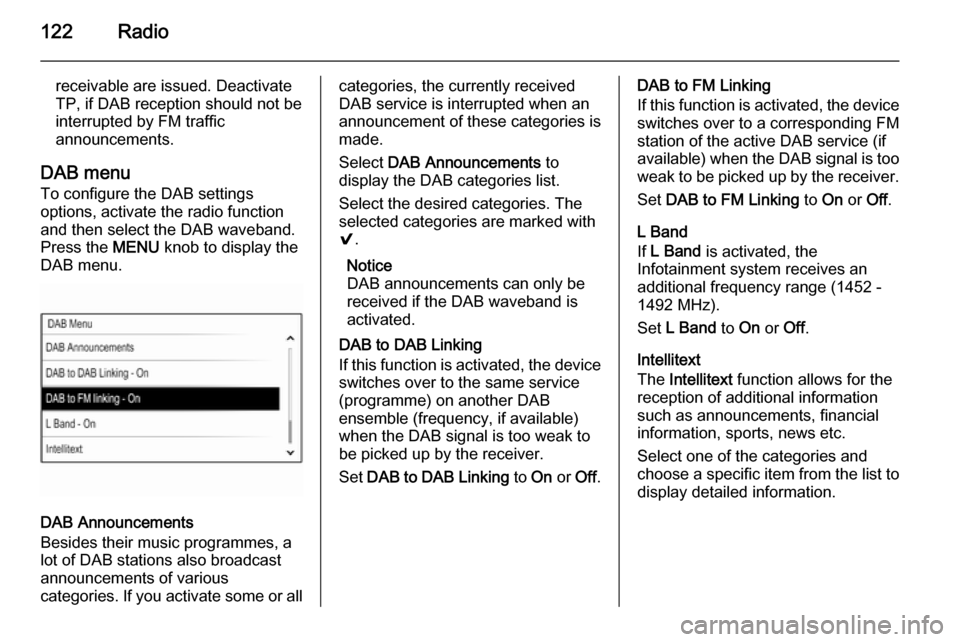
To configure the DAB settings
options, activate the radio function
and then select the DAB waveband.
Press the MENU knob to display the
DAB menu.
DAB Announcements
Besides their music programmes, a
lot of DAB stations also broadcast announcements of various
categories. If you activate some or all
categories, the currently received
DAB service is interrupted when an
announcement of these categories is
made.
Select DAB Announcements to
display the DAB categories list.
Select the desired categories. The
selected categories are marked with
9 .
Notice
DAB announcements can only be
received if the DAB waveband is
activated.
DAB to DAB Linking
If this function is activated, the device
switches over to the same service
(programme) on another DAB
ensemble (frequency, if available)
when the DAB signal is too weak to
be picked up by the receiver.
Set DAB to DAB Linking to On or Off.DAB to FM Linking
If this function is activated, the device switches over to a corresponding FM
station of the active DAB service (if
available) when the DAB signal is too
weak to be picked up by the receiver.
Set DAB to FM Linking to On or Off.
L Band
If L Band is activated, the
Infotainment system receives an
additional frequency range (1452 - 1492 MHz).
Set L Band to On or Off.
Intellitext
The Intellitext function allows for the
reception of additional information
such as announcements, financial
information, sports, news etc.
Select one of the categories and
choose a specific item from the list to display detailed information.